Reading Wiz CIRT's LLMjacking Report: The Flow of How a Google Cloud Billing Account Gets Hijacked and You End Up Paying for Someone Else's Gemini API Usage, and What to Check

This page has been translated by machine translation. View original
Hi there! I'm Yuji Nishimura from the Operations team!
An attack where stolen cloud credentials are used to run LLMs and make victims pay the usage fees is called "LLMjacking." The most commonly heard form involves calling models within the victim's account using stolen credentials. A report published on October 20, 2026 by the Wiz Incident Response Team (Wiz CIRT), "From Phishing to LLMjacking: Threat Actors Targeting Cloud Billing Accounts for LLM Usage," covers a slightly different form. Attackers hijacked the victim's billing account (Cloud Billing account) and made massive calls to the Gemini API. According to the report, within 24–48 hours of initial intrusion, unexpected charges of tens of thousands to hundreds of thousands of dollars were incurred.
When your organization uses Google Cloud (referred to as GCP in the report), there are likely people on your team who hold administrator privileges over the billing account. Reading from that perspective, you'd want to know how this attack progresses from a single click on a search ad, why the victim's logs contain no prompts, and what to check in your own environment. This article organizes the attack flow and the reasons it succeeds from the Wiz report. Based on that, along with detection clues from the report and budget and permission specifications verified in Google Cloud's official documentation, I'll summarize the points to check. I won't cover how to use Wiz products, similar attacks on AWS or Azure, or identifying the attackers.
Before Reading This Report
- Wiz, the publisher, is a cloud security company, and the sections of the report covering detection include guidance on their own product queries and detection rules. This article only covers clues that don't depend on their product.
- The report is a summary of multiple breaches that Wiz CIRT responded to. The number of breaches, the industry and size of affected organizations, the damage amount per breach (only a range is shown), and who the attackers are are not described.
- The scope is Google Cloud only. The report's introduction mentions that multiple breaches with similar patterns were investigated, and the report focuses on a campaign targeting Google Cloud specifically.
- What the attackers were doing with the Gemini API is not known even in the report (the reason is explained in the next section).
Usage Fees for Gemini API in Someone Else's Project Land on Your Billing Account
In Google Cloud, project usage fees are billed to the billing account linked to that project. Since one billing account can be linked to multiple projects, this relationship forms the premise of the attack.
According to the report, the goal of this breach is not destruction but financial exploitation—forcing victims to pay for massive LLM inference costs.
| Item | Description in the Report |
|---|---|
| Target | Google Cloud billing accounts and credentials of highly privileged Google Cloud users |
| Entry point | Phishing via Google Search ads for terms like "google cloud" and "gcp," redirecting through Google Sites to a fake Google login screen |
| Service used | Gemini API (large volumes of automated calls) |
| Time to impact | 24–48 hours from initial intrusion |
| Scale of damage | Unexpected charges of tens of thousands to hundreds of thousands of dollars; sharp increase from normal usage amounts |
| What victims couldn't see | API keys issued in the attacker's project, prompts, and model outputs |
Source: Introduction and "Initial Access" / "Impact: AI Resource Abuse" sections of the Wiz report
For this reason, if an attacker links their own project to the victim's billing account, the API usage fees for that project are paid by the victim. Meanwhile, since API keys and request logs reside on the attacker's project side, Gemini API calls, prompts, and outputs do not appear in the victim's audit logs (from the "Impact: AI Resource Abuse" section of the report). Operations performed within the victim's organization—such as deleting organization policies or modifying IAM on the billing account—can be traced in the victim's logs. The checks covered in the latter half of this article focus primarily on these operations that remain on the victim's side.
From Clicking a Search Ad to Hijacking the Billing Account
The report describes the attack in order: initial access, persistence and privilege escalation, defense evasion, and impact. The flow in table form is as follows. In this article, to prevent IP addresses from being treated as links, I write 212.73.134[.]136 (the actual value has [.] replaced with .).
| Stage | What the attacker did |
|---|---|
| 1. Phishing | Directed users from Google Search ads for "google cloud" / "gcp" through a Google Sites redirect to a fake Google login screen, where they entered their ID, password, and MFA code |
| 2. Initial login | The phishing kit immediately logged into Google Cloud using the stolen credentials (from 212.73.134[.]136). A few minutes later, re-authentication occurred from a different IP, and all subsequent operations were performed from that IP |
| 3. Enabling API and issuing keys | Enabled the Gemini API on an existing, rarely used project, and created a service account and Gemini API key. Attached highly privileged roles such as roles/ml.admin and roles/mcp.toolUser to the created service account (the purpose of each role is not described in the report) |
| 4. Deleting organization policies | Deleted organization-level policies such as iam.allowedPolicyMemberDomains, enabling IAM roles to be granted to accounts outside the company domain |
| 5. Inviting external accounts | Added an attacker-controlled Gmail account to the billing account, and assigned roles/billing.admin (billing account) and roles/recommender.billingAccountCudAdmin (project) to either the compromised user or an external account |
| 6. Linking external project | Linked the attacker's Google Cloud project to the victim's billing account and made massive Gemini API calls |
| 7. Defense evasion and lockout | Operated from IP addresses in the country where the victim organization's headquarters is located, and downgraded existing billing account administrators to read-only billing viewer (the report's expression, likely corresponding to Billing Account Viewer) |
Source: "Initial Access," "Persistence and Privilege Escalation," "Defence Evasion," and "Impact: AI Resource Abuse" sections of the Wiz report
The flow is illustrated in the diagram below. This is a conceptual diagram I created based on the report—it is not an official diagram from Wiz or Google Cloud.
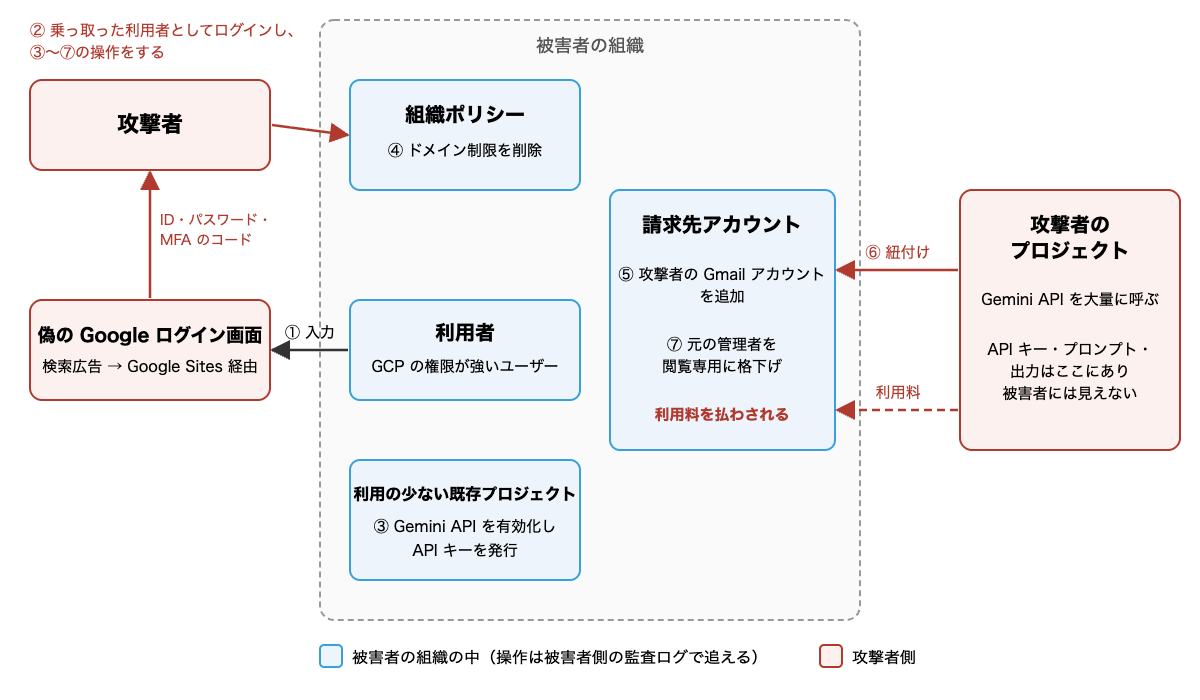
The blue box represents what is inside the victim's organization, and operations in stages 3–5 and 7 performed there can be traced in the victim's audit logs. The red box is on the attacker's side, and only the usage fees from the attacker's project linked in stage 6 reach the victim's billing account.
The Second Login Screen and the Warning Email Google Sent (Stages 1–2)
The phishing screen redirected users to the real Google login screen after stealing their credentials. Users ended up logging in a second time. The report notes that users probably assumed the initial login failure was just a minor glitch. In the meantime, the phishing kit had already completed the first login using the stolen credentials. According to the report, after this activity was reported, Google Ads removed the relevant ad campaigns.
Google judged this login as suspicious and sent users a warning email, but the breach was not prevented. Based on this, the report recommends not relying solely on user vigilance. Specifically, it suggests ingesting Google Workspace user log events to monitor suspicious login judgments and abnormal re-authentication.
Using Existing Unused Projects Rather Than Creating New Infrastructure (Stage 3)
Instead of building new infrastructure from scratch, the attacker enabled the Gemini API on an existing, rarely used project and issued API keys. The report doesn't explain why, but my reading is that a project the owner doesn't check on a daily basis is less likely to have changes noticed compared to a project in regular use. This is why I've included the enabling of APIs and creation of keys in rarely used projects in the verification items in the latter half.
Deleting Organization Policies Before Inviting External Gmail Accounts (Stages 4–5)
iam.allowedPolicyMemberDomains is an organization policy that restricts IAM role assignments to accounts from allowed domains. According to the Google Cloud documentation, for organizations created after May 3, 2024, this policy is enabled by default with only the company's own domain allowed. The attacker removed this restriction before adding a Gmail account to the billing account. Since the report doesn't state when the victim organization was created, it's unknown whether this policy was enabled by default.
Regarding the granted roles/billing.admin, the report explains it as a role that allows complete control over the billing account, including managing permissions, linking external projects, and changing payment settings. The Cloud Billing access control documentation also states that Billing Account Administrator is the owner role for a billing account, with the ability to link and unlink projects and manage other users' roles.
Operating from the Headquarters Country's IP and Downgrading the Original Administrator to Read-Only (Stage 7)
After the initial login, in every breach, the attacker operated from IP addresses in the country where the victim organization's headquarters is located, regardless of the compromised user's actual location. The report identifies this as a technique to avoid location-based alerts. My interpretation is that for an organization headquartered in Japan, operations would appear to come from a Japanese IP, making it undetectable by detection that only looks at the originating country.
Furthermore, the attacker downgraded existing billing account administrators to read-only billing viewer. According to the report, this downgrade prevented legitimate administrators from revoking permissions through the console or unlinking unauthorized projects.
What to Check in Your Own Google Cloud Environment
The report recommends investigating across Google Workspace, Google Cloud admin activity, and Cloud Billing audit logs. The detection clues are summarized as follows:
| What to check | Clues listed in the report |
|---|---|
| Indicators of compromise | Whether Google Workspace and Google Cloud audit logs contain access matching the report's indicators (1 IP address, 17 phishing domains) |
| Users from external domains | Whether Google Cloud IAM includes users from external domains, especially personal email domains like @gmail.com |
| Organization policy and billing permissions | Whether there are changes to organization policies (especially iam.allowedPolicyMemberDomains) and IAM policy changes related to billing account administrators |
| Changes in rarely used projects | Whether there are unexpected Gemini API enablements, service account creations, or service account API key creations in rarely used projects |
| Sudden cost spikes | Whether there are abnormal increases in API usage costs. Use capped budgets if needed (as described below, these don't apply to the attacker's project) |
Source: "Detection and Threat Hunting Indicators" section of the Wiz report
The list of 17 phishing domains is available in the "Indicators of Compromise" section of the report.
The following is what I verified in the Google Cloud documentation.
Audit the People Who Hold Billing Account Roles
According to the documentation on changing a project's billing, to link a project to a billing account, you need the billing.resourceAssociations.create permission on the destination billing account. This permission is included in the Billing Account User and Billing Account Administrator roles. Regarding Billing Account User, the access control documentation states that because its permissions are very limited, it can be granted broadly. However, combined with Project Creator, it allows creating new projects linked to that billing account. Combined with Project Billing Manager, it also allows linking and unlinking projects.
If the attacker created the project themselves, they already have project-side permissions from the start, so obtaining Billing Account User on the victim's billing account alone would likely be sufficient to complete the linking. In the audit, check both Administrator and User roles to confirm no external accounts are mixed in. According to the access control documentation, billing accounts inherit IAM permissions from the parent organization. In addition to the IAM on the billing account itself, also check for billing roles granted at the organization level.
Additionally, checking the list of projects linked to the billing account for any projects not belonging to your organization would let you notice traces of stage 6 of the attack. The list can be viewed by opening the Cloud Billing "Account management" page in the Google Cloud console, as described in the documentation on changing project billing. The access control documentation states that billing accounts can also pay for projects belonging to other organizations, so projects outside your organization can also appear in the list.
Regarding whether this list can still be viewed after being downgraded, the two documents differ. In the access control documentation, Billing Account Viewer also holds billing.resourceAssociations.list to view the list. On the other hand, the billing change documentation also lists the project-side resourcemanager.projects.get as a required permission for displaying the association. I haven't tested which is required in my own environment this time.
Capped Budgets Don't Apply to the Attacker's Project
Cloud Billing budgets come in two types: notification-only budgets and spend cap budgets.
| Type | Scope | What happens when exceeded |
|---|---|---|
| Notification-only budget | Entire billing account. Can be filtered by organization/folder/project, service, or label (billing account-level budgets only) | Sends alert emails or Pub/Sub notifications. Usage is not stopped |
| Spend cap budget | Only one target service for one project | Stops new usage of the target service in that project for the remainder of that budget period |
Source: Google Cloud "Create, edit, or delete budgets and budget alerts" and "Manage spend cap budgets"
The target services for spend cap budgets include the Gemini API (generativelanguage.googleapis.com). However, spend cap budgets are set for a single project and cannot be set for folders, organizations, or multiple projects. Spend cap budgets set by the victim do not apply to the attacker's project that was linked from outside. This type of budget only protects against cases like stage 3 of the attack, where the Gemini API is used on an existing in-house project. Note that according to the spend cap documentation, requests in progress when the cap is reached are processed to completion and billed.
To detect usage on the attacker's project, you can set a notification-only budget covering the entire billing account, with a budget amount close to your normal usage and an early threshold. According to the budget documentation, budgets scoped to an organization or folder only apply to projects within them, so external attacker projects won't be captured. The scope must be set to the entire billing account.
However, budgets are probably best thought of as a safety net for after-the-fact detection. The same documentation recommends setting the budget amount lower than available funds because there is a delay in usage reporting. The spend cap documentation also notes that actual costs typically appear in billing reports within one day, and can exceed 24 hours. Since the report shows damage occurring within 24–48 hours, there's a good chance the damage has progressed considerably by the time a notification-only budget alert arrives. To detect issues early, this needs to be combined with monitoring for organization policy and IAM changes described below.
Budget Alert Recipients and Changes to the Budget Itself
According to the budget documentation, budget alert emails are sent by default to Billing Account Administrators and Billing Account Users of the billing account. Connecting a Cloud Monitoring email notification channel to the budget also allows alerts to be sent to any address.
It's a good idea to also send budget alerts to recipients that don't depend on billing account roles. Additionally, establishing in advance a communication channel to the organization's administrators (those who can modify the organization's IAM policy and restore billing account administrator privileges) would allow you to request unlinking even after a downgrade.
Also, in the access control documentation's list of permissions, Billing Account Administrator holds permissions to create, modify, and delete budgets and set caps (billing.budgets.*). If the attacker obtains this role, they can modify the budget itself. Since I haven't verified how to detect budget changes this time, it seems best not to rely solely on budget alerts.
Organization Policy Change Notifications Don't Work If Project Logs Are the Premise
The iam.allowedPolicyMemberDomains deleted in stage 4 of the report is described as a "legacy managed constraint" in the domain restriction documentation. The same documentation presents three methods for restricting domains, with the newer managed constraint iam.managed.allowedPolicyMembers listed first. The other two are using a custom organization policy and the traditional iam.allowedPolicyMemberDomains. Regardless of which method you use, you need to have notifications set up to alert you when a change occurs.
According to the organization policy audit logging documentation, google.cloud.orgpolicy.v2.OrgPolicy.CreatePolicy, UpdatePolicy, and DeletePolicy are recorded in admin activity audit logs. Since there could also be changes that relax the policy by creating a new one, creation as well as deletions and updates should be targeted. The same page notes that audit logs for changes made via the v1 API (Resource Manager) are on a separate page, so filtering only by v2 method names may miss changes made via v1 (I haven't verified the v1 method names this time).
Cloud Logging has log-based alert policies that notify you when specific logs appear. However, according to the Cloud Logging monitoring documentation, log-based alert policies cannot be used with logs from folders, billing accounts, or organizations. This means organization-level policy changes or billing account IAM changes cannot be captured with this method. The same page also mentions SQL-based alert policies (a preview feature) that query linked BigQuery datasets, and these don't appear to have the restriction of only applying to logs from projects. A configuration that aggregates organization logs into a project's log bucket and notifies via SQL-based alerts seems like a candidate, but I haven't tested it this time.
Summary
According to the Wiz CIRT report, the technique of hijacking billing accounts to force victims to pay for attacker project usage is on the rise. When an attacker's project is linked from outside, prompts and outputs leave no trace in the victim's logs, and project-level spend cap budgets don't apply. What can be traced on the victim's side are operations performed within the organization and changes to the billing account.
The key points for noticing an attack via the same route in your own Google Cloud environment are as follows:
- Are you monitoring suspicious login judgments and re-authentication in Google Workspace, and cross-referencing with the report's indicators of compromise?
- Are there any external accounts mixed in among the entities holding billing account roles (Billing Account Administrator and Billing Account User)?
- Are there any projects linked to the billing account that don't belong to your organization?
- Is there a mechanism to notify you of organization policy changes and IAM changes to billing account administrators? (Log-based alerts premised on project logs cannot capture these)
- Are you monitoring Gemini API enablements and API key creation in rarely used projects?
- Do you have an alert with a threshold close to your normal usage set as a billing account-wide budget? (Project-level spend cap budgets don't apply to the attacker's project)
- Are the budget alert recipients and the communication channel to organization administrators independent of billing account roles?
I hope this is helpful to someone.
Reference Links:
- From Phishing to LLMjacking: Threat Actors Targeting Cloud Billing Accounts for LLM Usage | Wiz Blog
- Create, edit, or delete budgets and budget alerts | Cloud Billing | Google Cloud
- Manage spend cap budgets | Cloud Billing | Google Cloud
- Cloud Billing access control and permissions | Google Cloud
- Enable, disable, or change billing for a project | Cloud Billing | Google Cloud
- Restrict identities with domain-restricted sharing | Organization Policy | Google Cloud
- Organization Policy audit logging | Google Cloud
- Configure log-based alerting policies | Cloud Logging | Google Cloud
- Monitor your logs | Cloud Logging | Google Cloud
- Gemini API | Google AI for Developers
- User log events | Google Workspace Admin Help

