I Tried Out Google's Decision Model "Gemini Decision 1"

This page has been translated by machine translation. View original
Hello, this is Keima.
Google has released a new decision model, "Gemini Decision 1".
Until now, decision models that return only per-question probabilities without generating text have been rolled out, such as TypeSafe's Jev, OpenAI's Decisions API, and Microsoft's Decision-1.
Jev initially supported only text but can now accept images as well, and decision models are becoming increasingly multimodal.
Gemini Decision 1 is also multimodal, so I'm looking forward to seeing what kinds of judgments it can make.
In this article, I passed text, images, PDFs, audio, and video to Gemini Decision 1 and tested whether it could answer questions correctly (tested on November 13, 2026).
I focus on the request and response formats, the token counts for each input, and response times.
1. What is Gemini Decision 1?
Gemini Decision 1 is a decision model offered through the Decisions API of the Gemini API.
According to the official documentation, it evaluates questions about text, images, video, audio, and PDFs in a single pass and returns probability values without consuming output tokens.
Gemini Decision 1 is a specialized multimodal model built for the Decisions API. It evaluates typed questions over text, images, video, audio, and PDFs in a single prefill pass and returns calibrated outcome probabilities with zero output tokens.
Source: Gemini Decision 1 | Google AI Studio
Three question types are available.
-
noul: a yes/no question. Returns the probability of yes (0.01 to 0.99) -
choice: a question that selects one of 2 to 255 options. Returns the selected value and the probability of each option -
score: a question that scores on an ordered scale of 2 to 255 levels. Returns the probability of each level and a probability-weighted score
In a single request, you can ask up to 1,000 questions at once over a shared input of up to 262,144 tokens.
2. Differences from Jev, Decisions API, and Microsoft-Decision-1
I compared the request formats and pricing of similar decision models.
| Item | Gemini Decision 1 | Jev | Decisions API | Microsoft-Decision-1 |
|---|---|---|---|---|
| Provider | Google (Gemini API) | TypeSafe | OpenAI | Microsoft (Microsoft Foundry) |
| Input | Text, images, audio, video, PDF | Text, JSON (images in preview version) | Text, JSON, and images | Text, JSON |
| Field for the material to judge | input |
state |
input |
state |
| How questions are passed | Dictionary in questions |
Dictionary in questions |
Array in questions |
Dictionary in questions |
| Yes/no type | noul |
noul |
predicate |
noul |
| Authentication | x-goog-api-key header |
Bearer | Bearer | api-key header |
| Price (per 1M input tokens) | $0.10 | $0.042 | $0.10 | $0.042 |
Pricing applies only to input tokens; output is 0 tokens, so it is not billed.
A free tier is also available, but data sent on the free tier is subject to terms allowing Google to use it for product improvement.
Therefore, the tests in this article were run on the paid tier.
Source: Pricing | Google AI Studio
3. Request and response format
Here is an example request that sends two questions, a yes/no and a multiple-choice, for a single Japanese inquiry.
curl -X POST "https://generativelanguage.googleapis.com/v1beta/decisions" \
  -H "x-goog-api-key: $GEMINI_API_KEY" \
  -H "Content-Type: application/json" \
  -d '{
    "model": "gemini-decision-1",
    "input": "注文した青いマグカップが、水曜日に割れた状態で届きました。",
    "questions": {
      "is_damaged": {"type": "noul", "instructions": "商品は破損した状態で届いたか?"},
      "queue": {
        "type": "choice",
        "instructions": "この問い合わせはどの窓口が担当すべきか?",
        "criteria": {
          "billing": "支払い・請求・返金",
          "replacements": "破損・欠品・誤配送",
          "general": "商品の質問・アカウント変更"
        }
      }
    }
  }'
Here is the actual response.
{
  "answers": {
    "is_damaged": {"type": "noul", "noul": 0.9840137462708173, "confidence": 0.9840137462708173},
    "queue": {
      "type": "choice",
      "choice": "replacements",
      "confidence": 0.9954992504366662,
      "probabilities": {
        "general": 0.0008395011506577694,
        "billing": 0.0036612484126759973,
        "replacements": 0.9954992504366662
      }
    }
  },
  "usage": {
    "total_input_tokens": 181,
    "input_tokens_by_modality": [{"modality": "text", "tokens": 181}],
    "total_output_tokens": 0
  }
}
This response shows the following three points.
-
noul: the probability that the content is about an item arriving damaged -
choiceandprobabilities: the most probable department and the probability breakdown for each department -
usage: the token count per input modality (output is 0)
In other words, Gemini Decision 1 judged this inquiry to be a damage report with a probability of about 0.98 and correctly routed it to the "damage / missing items / misdelivery" department.
When passing images, PDFs, audio, or video, make input an array and specify an object for each modality.
Pass the file data as a base64-encoded string in data and specify mime_type.
{
  "model": "gemini-decision-1",
  "input": [
    {"type": "image", "data": "<BASE64>", "mime_type": "image/jpeg", "resolution": "low"}
  ],
  "questions": {
    "damaged": {"type": "noul", "instructions": "箱につぶれや破れ、開いて中身がこぼれているなどの破損があるか?"}
  }
}
The type values you can specify are five: text, image, audio, video, and document (PDF).
resolution specifies how finely the model reads images or video frames.
The finer the reading, the more input tokens are used, and the higher the cost.
It can be specified only for images and video, and you can choose from low, medium, high, and ultra_high (images only).
4. Testing each input
I prepared questions for each input modality and verified the results against the correct answers.
For yes/no judgments, I scored a probability of 0.5 or higher as "yes".
4.1 Text
I sent the same three questions for three inquiries I wrote myself.
| Inquiry | Arrived broken? | Responsible department | Urgency (0–3) | Response time |
|---|---|---|---|---|
| I ordered a blue mug, and it arrived broken on Wednesday. Please send a replacement. | 0.986 | Replacement (0.999) | 2.08 | About 0.57 s (572ms) |
| Last month's usage fee has been charged twice. Please check it urgently. | 0.01 | Billing (0.997) | 2.77 | About 0.49 s (494ms) |
| I want to change the email address registered to my account, so please tell me the procedure. | 0.01 | General (0.999) | 1.25 | About 0.71 s (708ms) |
The responsible department and yes/no judgments were correct for all three.
For urgency as well, it gave the highest score to the double charge and the lowest to the email address change.
The input token count was about 255 tokens in every case.
4.2 Images
I sent seven questions at once for four delivery photos from Pexels.
I tested the same questions twice each, changing the resolution between low and high.
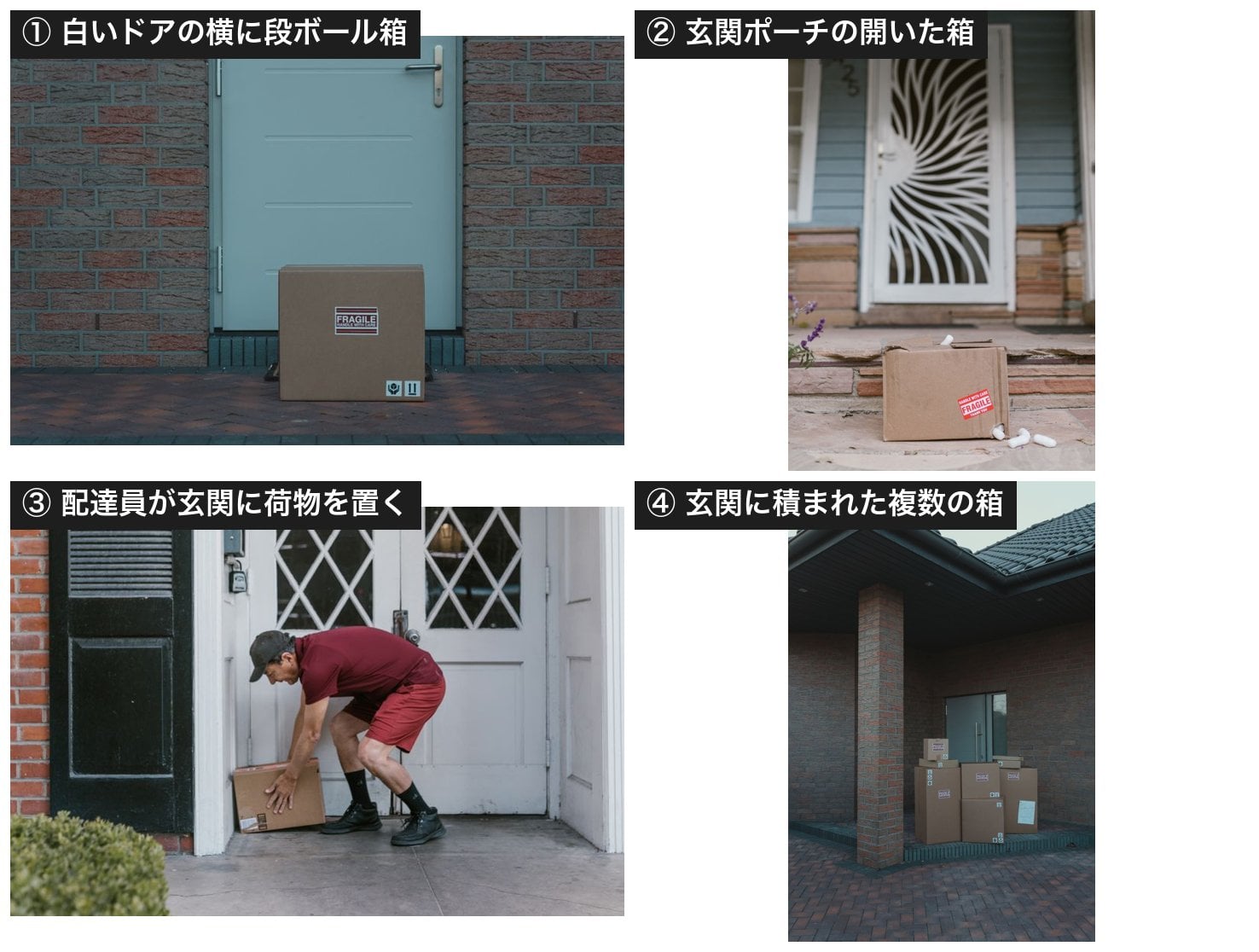
The four delivery photos used (Pexels. Numbered in the order of the table below)
| Photo | Box present | Damaged | In front of door | Person present | 2 or more | Delivery quality (0–3) | Next action |
|---|---|---|---|---|---|---|---|
| Cardboard box beside a white door | 0.941 | 0.099 | 0.922 | 0.069 | 0.099 | 1.34 | No issue (0.626) |
| Open box on a front porch | 0.939 | 0.913 | 0.895 | 0.038 | 0.095 | 0.49 | Send for damage check (0.605) |
| Delivery person leaving a package at the door | 0.936 | 0.192 | 0.762 | 0.935 | 0.113 | 1.55 | No issue (0.752) |
| Multiple boxes stacked at the door | 0.962 | 0.125 | 0.854 | 0.066 | 0.932 | 1.57 | No issue (0.614) |
Results at low resolution
The yes/no judgments and the next-action choices were all correct for all four photos.
It accurately judged only the second photo, where the box is open and cushioning material has spilled out, as damaged, and chose "Send for damage check".
On the other hand, the delivery quality score was a somewhat modest 1.3 to 1.6 even for photos with no particular problems.
The differences in behavior by resolution are as follows.
| Resolution | Image tokens | Response time (range over 4 photos) | Answers |
|---|---|---|---|
low |
260 | About 0.71–0.92 s | All correct |
high |
1,080–1,107 | About 1.05–1.52 s | All correct |
Even when lowering the resolution to low, answer accuracy did not drop, the image token count fell to about a quarter, and response time also became shorter.
4.3 PDF
I passed the PDF "Publication of Information on Negotiated Contracts" published by the Statistics Bureau of the Ministry of Internal Affairs and Communications as input as is.
It is a one-page tabular document summarizing contract titles, counterparties, amounts, winning bid rates, and so on.
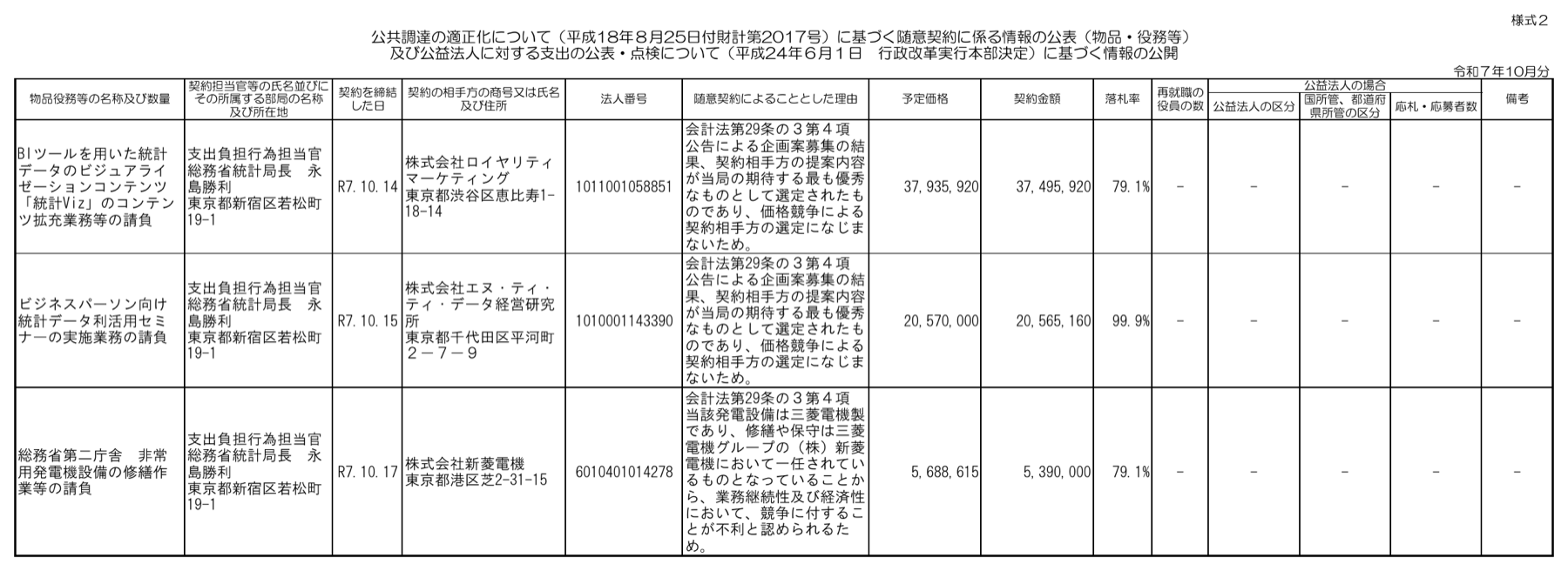
Statistics Bureau, Ministry of Internal Affairs and Communications (October, Reiwa 7). Source: Statistics Bureau of Japan website (margins trimmed on this blog)
| Question | Answer | Correct answer | |
|---|---|---|---|
| Statistics Bureau, MIC (October, Reiwa 7) | Is the contract amount with Shinryo Denki Co., Ltd. 5,390,000 yen? | 0.938 | Yes |
| Same as above | Is the basis for the negotiated contracts in all three cases Article 29-3, Paragraph 4 of the Accounting Act? | 0.946 | Yes |
Both questions were answered correctly, and the response time stayed at about 1.09 seconds.
Each PDF page is counted as an image and consumed 532 tokens per page.
4.4 Audio
For English audio, I used NASA's published Artemis II pre-launch check audio (Go/No-Go poll, about 171 seconds).
For Japanese audio, I used two recordings (about 19 seconds and about 17 seconds) of a fictional scenario that I read aloud and recorded myself.
NASA Artemis II Go/No-Go poll (English, about 171 seconds)
This is a communication, published in NASA's audio library, in which the responsible director checks "Go or No-Go" with each person in charge in turn before launch.
| Question | Answer | Correct answer |
|---|---|---|
| Is the director checking with each person in charge in turn whether to proceed with the launch? | 0.804 | Yes |
| Which language is being spoken? | English (0.986) | English |
Actual request and response for the NASA communication (excerpt)
Request
{
  "model": "gemini-decision-1",
  "input": [
    {"type": "audio", "data": "<BASE64>", "mime_type": "audio/mpeg"}
  ],
  "questions": {
    "poll": {"type": "noul", "instructions": "打ち上げをしてよいかを、責任者が各担当に順に確認しているか?"},
    "lang": {"type": "choice", "instructions": "話されている言語はどれか?", "criteria": {"en": "英語", "ja": "日本語", "es": "スペイン語"}}
  }
}
Response
{
  "answers": {
    "poll": {"type": "noul", "noul": 0.8038835784645741, "confidence": 0.8038835784645741},
    "lang": {
      "type": "choice",
      "choice": "en",
      "confidence": 0.9858712444987193,
      "probabilities": {
        "es": 0.0018284270695773715,
        "ja": 0.012300328431703275,
        "en": 0.9858712444987193
      }
    }
  },
  "usage": {
    "total_input_tokens": 5620,
    "input_tokens_by_modality": [{"modality": "text", "tokens": 497}, {"modality": "audio", "tokens": 5123}],
    "total_output_tokens": 0
  }
}
Inquiry (Japanese, about 19 seconds)
Script that was read aloud
お世話になっております。
株式会社みなと商事の佐藤です。
先週の金曜日に注文した事務用の椅子10脚のうち、2脚が脚の折れた状態で届きました。
来週の月曜日までに、交換品を送っていただけますか。
急ぎではありませんので、ご返信をお待ちしております。
| Question | Answer | Correct answer |
|---|---|---|
| Does it say the product arrived broken? | 0.925 | Yes |
| Which department should handle it? | Replacement (0.997) | Replacement |
| Does it include a request with a deadline? | 0.752 | Yes (replacement items by next Monday) |
Actual request and response for the inquiry (excerpt)
Request (in reality, the same seven questions were sent together for both recordings. Only the three questions in the table are shown here)
{
  "model": "gemini-decision-1",
  "input": [
    {"type": "audio", "data": "<BASE64>", "mime_type": "audio/x-wav"}
  ],
  "questions": {
    "damaged": {"type": "noul", "instructions": "商品が壊れて届いたという内容か?"},
    "queue": {"type": "choice", "instructions": "どの窓口が担当すべき内容か?", "criteria": {"billing": "請求(支払い・請求・返金)", "replacements": "交換(破損・欠品・誤配送)", "general": "一般(社内の連絡・商品の質問など)"}},
    "deadline": {"type": "noul", "instructions": "締め切りのある頼みごとが含まれているか?"}
  }
}
Response
{
  "answers": {
    "damaged": {"type": "noul", "noul": 0.9250404528791057, "confidence": 0.9250404528791057},
    "queue": {
      "type": "choice",
      "choice": "replacements",
      "confidence": 0.9966262520300841,
      "probabilities": {
        "general": 0.0021148546362017516,
        "billing": 0.0012588933337142408,
        "replacements": 0.9966262520300841
      }
    },
    "deadline": {"type": "noul", "noul": 0.7521579306702354, "confidence": 0.7521579306702354}
  },
  "usage": {
    "total_input_tokens": 1056,
    "input_tokens_by_modality": [{"modality": "text", "tokens": 478}, {"modality": "audio", "tokens": 578}],
    "total_output_tokens": 0
  }
}
Meeting announcement (Japanese, about 17 seconds)
Script that was read aloud
来週の定例会議は、水曜日の午後3時から、木曜日の午前10時に変更になりました。
場所は変わらず、5階の会議室です。
資料は前の日までに共有フォルダに置いてください。
欠席する人は、田中さんまで連絡をお願いします。
| Question | Answer | Correct answer |
|---|---|---|
| Is it an announcement that the date and time changed? | 0.879 | Yes |
| Does it say the location also changed? | 0.024 | No |
| Does it include a request with a deadline? | 0.17 | Yes (place the materials by the previous day) |
Actual request and response for the meeting announcement (excerpt)
Request (only the three questions in the table are shown)
{
  "model": "gemini-decision-1",
  "input": [
    {"type": "audio", "data": "<BASE64>", "mime_type": "audio/x-wav"}
  ],
  "questions": {
    "schedule_change": {"type": "noul", "instructions": "日時が変わったという連絡か?"},
    "place_change": {"type": "noul", "instructions": "場所も変わったという内容か?"},
    "deadline": {"type": "noul", "instructions": "締め切りのある頼みごとが含まれているか?"}
  }
}
Response
{
  "answers": {
    "schedule_change": {"type": "noul", "noul": 0.8786937301730974, "confidence": 0.8786937301730974},
    "place_change": {"type": "noul", "noul": 0.02382484762107802, "confidence": 0.9761751523789219},
    "deadline": {"type": "noul", "noul": 0.16961928429576015, "confidence": 0.8303807157042399}
  },
  "usage": {
    "total_input_tokens": 992,
    "input_tokens_by_modality": [{"modality": "text", "tokens": 474}, {"modality": "audio", "tokens": 518}],
    "total_output_tokens": 0
  }
}
Only the deadline-bound request in the meeting announcement, "please place the materials in the shared folder by the previous day", was missed, with a judgment of 0.17.
All other questions were answered correctly.
The token consumption was 578 tokens for about 19 seconds of audio and 5,123 tokens for about 171 seconds of audio.
4.5 Video
I sent four questions each for five Pexels delivery videos (about 11 to 29 seconds, resolution 640×360).
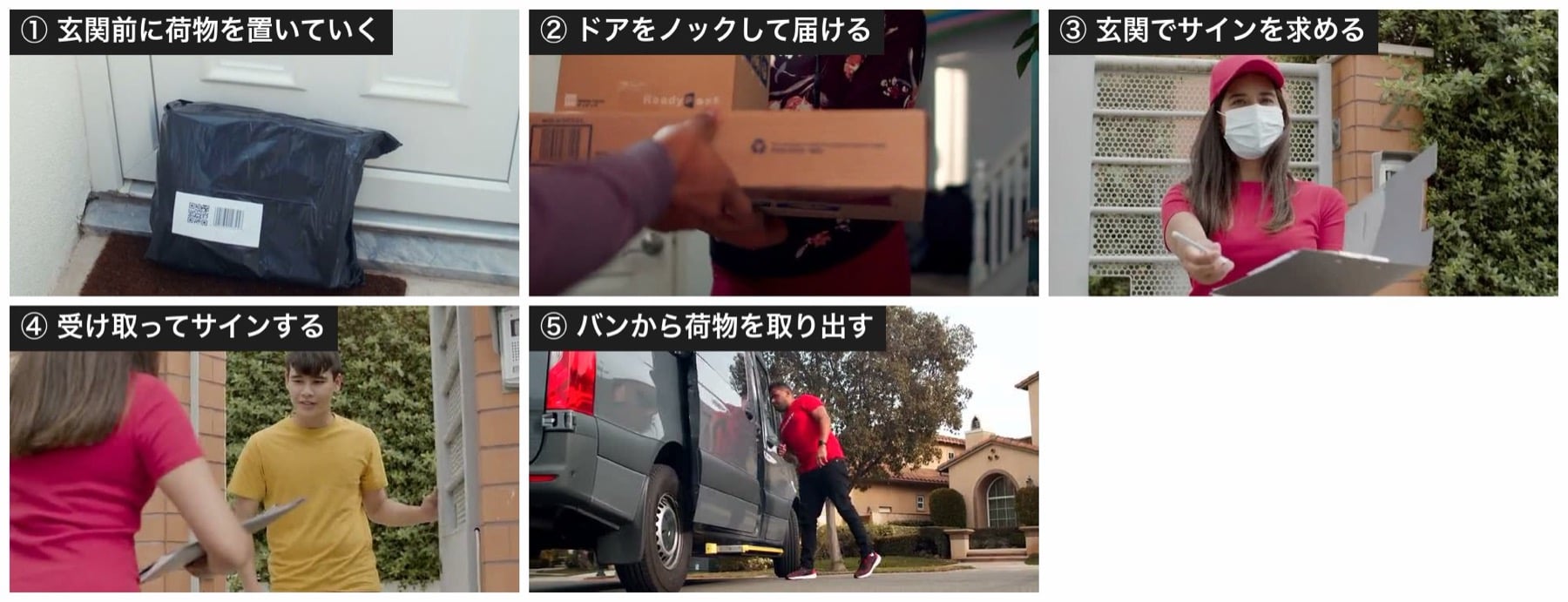
A mid-point frame from each of the five delivery videos used (Pexels. Numbered in the order of the table below)
| Video | Hand-delivered | Signature | Left at door | Scene (3 choices) | Response time |
|---|---|---|---|---|---|
| A delivery man leaves a package at the front door (11 s) | 0.142 | 0.221 | 0.827 | Left at the front door (0.975) | About 1.86 s |
| Knocking on the door to deliver a package (13 s) | 0.544 | 0.204 | 0.235 | Handed over at the door (0.884) | About 2.15 s |
| A delivery person asks for a signature at the door (13 s) | 0.249 | 0.839 | 0.222 | Handed over at the door (0.902) | About 1.47 s |
| Receiving a package and signing (29 s) | 0.723 | 0.85 | 0.208 | Handed over at the door (0.957) | About 2.24 s |
| Taking a package out of a van (17 s) | 0.203 | 0.197 | 0.202 | Taking a package out of a vehicle (0.986) | About 1.87 s |
It chose the correct answer for all 20 questions (5 videos × 4 questions).
However, the two videos judged as hand-delivered only reached 0.544 and 0.723, which are somewhat modest confidence values.
Video consumes tokens for both visuals and audio; for the 29-second video, the visuals were 1,914 tokens and the audio was 1,004 tokens.
4.6 Number of questions per request
At the time of release, Google posted a demo on X in which 16 questions were judged at once for a single delivery photo.
So I sent 16, 60, and 200 questions at once for the same single photo and compared the response time and input token count.
| Number of questions | Input tokens (of which image) | Response time |
|---|---|---|
| 16 questions | 1,094 (260) | About 0.57 s (565ms) |
| 60 questions | 3,168 (260) | About 0.90 s (903ms) |
| 200 questions | 9,860 (260) | About 0.90 s (895ms) |
Even when asking 200 questions at once, the response came back within one second.
As the number of questions increased, input tokens grew by the amount of question text, and the response time rose from about 0.57 seconds for 16 questions to about 0.90 seconds for 60 questions, but it did not rise further at 200 questions.
Also, the judgment values for the first seven questions matched exactly those obtained when asking the seven questions alone, even with 16 or 60 questions, and the results stayed almost the same when increased to 200 questions.
As stated in the official documentation, each question is evaluated independently of the others, so adding or removing questions does not affect the other answers.
The API evaluates each question independently against the shared input. Questions can't see each other, and adding or removing one doesn't change the other answers.
Source: Decisions API | Google AI Studio
5. Summary
I passed five types of input, namely text, images, PDFs, audio, and video, to Gemini Decision 1 and had it make judgments with questions written in the same way as for Jev.
| Input | Result | Approximate input tokens |
|---|---|---|
| Text | 3 items × 3 questions, department and yes/no all correct | About 255 |
| Image | 4 photos × 7 questions, all correct (same at low) |
260 per photo (low) |
| 1 item × 2 questions, all correct | 532 per page | |
| Audio | 7 of 8 questions correct (missed one request with a deadline) | 578 for about 19 s |
| Video | 5 videos × 4 questions, all correct | About 2,900 for 29 s |
The same noul, choice, and score questions as in Jev worked as is, and just by changing the material to judge from state to input, inputs other than documents could be judged with the same procedure.
I also used Japanese material for audio and PDFs, and it answered just as it did for English, so it seems accuracy should be fine not only in English but also in Japanese.
Because the judgments did not change even when images were set to low, and responses came back within one second even when asking 200 questions at once, I felt it is well suited to usage where many check items are lined up for a single photo.
The price is $0.10 per 1M input tokens, which is on the higher side compared with Jev ($0.042).
However, OpenAI's Decisions API, which can also handle images, is likewise $0.10, so for a multimodal decision model the price is comparable.
Gemini Decision 1 can be called from the Gemini API (REST or the Google Gen AI SDK) using an API key issued in Google AI Studio.
If you want to try it without writing code, you can check how it works while changing questions and inputs in the Google AI Studio sample app "Decisions Playground".
Availability on the Google Cloud (Vertex AI) side is listed as "coming soon" as of November 14, 2026.