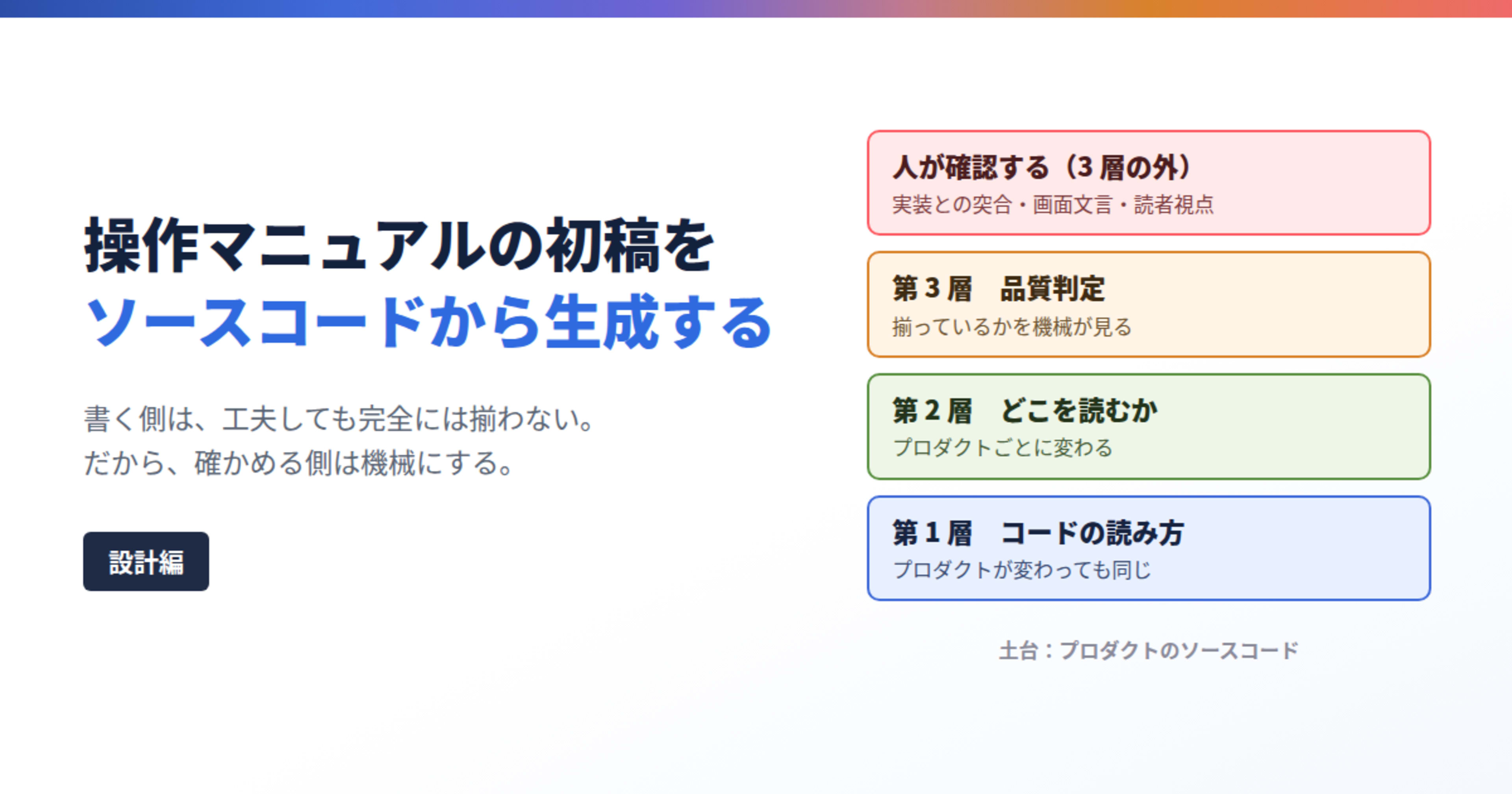
Generate the first draft of an operation manual from source code (Design Edition)

This page has been translated by machine translation. View original
Introduction
Hello. I'm Kunikichi.
This is my first post in a while. I'm still working on creating operation manuals for product users. It's not a coding job.
Lately I've been experimenting with having Claude generate manuals, managing tasks through it, and various other things. This post is about one of those experiments: building a system (shown below) that analyzes source code and generates a first draft of a manual.

I wrote this article for people who write manuals professionally, and for those in a position to design systems within teams that have writers. You don't need to know how to write code. Even experienced writers tend to get stuck at the stage of figuring out which code to look at. That's exactly the part I wanted to eliminate.
Notes
- The system I'm introducing is not publicly available. The public version of the OSS it's built on (tsumiki) does not include functionality for generating user-facing operation manuals. Installing the public version after reading this article will not automatically generate manuals for you. What I want to convey is what decisions were made along the way.
- The subject matter is a fictional library management app, and the code and settings shown are written-up examples for explanatory purposes.
- Basic Git and command-line operations are required. I'll explain why at the end.
Why I Decided to Build This
Background
Manuals need to accurately document what items appear on a screen, what the options contain, how many characters can be entered, and what errors appear. However, there isn't always a specification document covering all of this. And even when one exists, it isn't necessarily kept up to date.
Ultimately, the implementation is the most accurate source of truth. So I had to verify things by reading source code or actually operating the screens.
That said, I'm not the one who implemented the product. On top of that, the tech stack changes depending on which product I'm assigned to. Every time I wrote a manual, I had to start from scratch, feeling my way through to figure out where to look. Naturally, this took time. And since I was working by trial and error, oversights happened. After finishing a draft or during review, I would sometimes notice missing descriptions of options or errors.
Riding the Wave of Internal AI Adoption
Around that time, the company started promoting AI adoption, and I began using Claude. At first, it was small things — having it check my writing, or asking it to come up with document summaries. As I experimented, I started using it to review source code as well.
Eventually, I thought: "That's it — let me have AI analyze the entire codebase." And that's where it all started.
First, I Let AI Write It
What I tried was having it read code and write a first draft of an operation manual. At the time, I was also passing it a writing template.
What came out wasn't bad. But as I worked on the second and third manuals, problems started to emerge. Even though I was making the same requests, the writing style changed every time.
- The opening of each page's introduction changed
- The way sections were divided changed
- Item descriptions were one sentence on one page, and three sentences on another
Reading each one in isolation, they were all "not wrong." But placed side by side, the writing wasn't consistent.
This has a slow, cumulative effect on readers. An operation manual isn't something you read a single page of and put down. It's something you read across many pages while switching between screens. When the writing style changes from page to page, readers have to constantly adjust how they're reading. This accumulation becomes a burden and ultimately results in "a manual that's hard to read."
I had been providing a template, so why wasn't it consistent? I later realized it was because the template I'd provided only specified "what sections to include." For example, the following things hadn't been decided:
- What format to use for titles
- How many steps to write for operating procedures
- How to standardize the sentence endings for page summaries
- What symbols to use to enclose screen buttons and menus
- When multiple terms refer to the same thing, which one to use
The parts that weren't decided were left for AI to judge on the spot. And it doesn't necessarily make the same judgment every time. The inconsistency wasn't the AI's fault — it was because I hadn't made those decisions.
I Wrote Out My Decisions in Files
So I went through and wrote out everything I hadn't decided, one by one. I added instructions to the template for "write this section like this," and consolidated terminology and symbol rules into a separate file. I first created this for the product I was working on at the time. It was less of a system and more of a set of template and rule files. When invoked, the AI reads them before writing the manual.
When I tried it, things did become more consistent. At the same time, I realized how much there was to write out. This is because each type of operation requires its own template. Search screens, registration screens, and status-change screens each have different writing patterns.
At this point, I put into writing for the first time what I had normally been thinking about while writing. What information to show, and in what order. What to include in error descriptions so readers can recover. Things I thought I was doing "just because it felt right" turned out to have reasons when I wrote them down. It took time, but this was the most impactful work of all.
I Built on an OSS That Already Had Analysis Functionality
I had the set of files, but the code-reading part was still being delegated to AI on the spot each time. Having to properly frame that request every time was also burdensome.
When I looked into it, I found an OSS with functionality to read code and produce documentation. That was tsumiki. It's a framework for supporting AI-driven development, distributed as a Claude Code plugin. It has features such as analyzing a project's tech stack and structure, generating screen specifications from source code, and reverse-generating design documents and test specifications from existing code.
In other words, the path of "feed in code and get documentation out" already existed on the framework side. So I decided to build my templates and rules on top of it. Rather than designing from scratch, I added manual-generation procedures on top of that same path.
This foundation is used by other teams as well. So I also decided not to change the base behavior of the underlying system. What I added was the procedure for generating manuals, and optional settings that only take effect when enabled. As noted above, the public version can only generate developer-facing documents — manual generation for end users only exists in my local development and testing repository. I'm holding off on including it until the quality is solid.
When I Built on Top, I Split Things Into Three Layers
While doing the integration work, I noticed that the files I'd written out were specific to that one product. They couldn't be used as-is for other products. So I reviewed the contents and split them into three parts:
- Things that stay the same regardless of product … how to read code, writing defaults
- Things that change per product … which code to look at, writing style for that product
- Things that can be left to machines … checking whether terminology and sentence endings are consistent
This became three layers. Human review is not one of the layers — it comes after passing through all three.
| Layer | What it handles | Where it lives | Does it change per product? |
|---|---|---|---|
| Layer 1 | How to read code and writing defaults | System-side repository | No (generic) |
| Layer 2 | Which code to look at (targets) and writing style for that product | Product repository | Yes |
| Layer 3 | Quality judgment (terminology, sentence endings, symbols, prohibited expressions, heading format) | Inspection tool repository | Toggle rules on/off, add product-specific rules |
| (Outside layers) | Cross-referencing with implementation, verifying screen text, final judgment from reader's perspective | - | Humans review regardless of product |
The two right-hand columns are the key points. The bulk of what needs to be written anew per product is concentrated in Layer 2, and the generated manuals are also stored in the product repository. Layer 1 is never touched even as more products are added.
In a bit more detail, it looks like this. Start from the source code in the upper left and read downward.
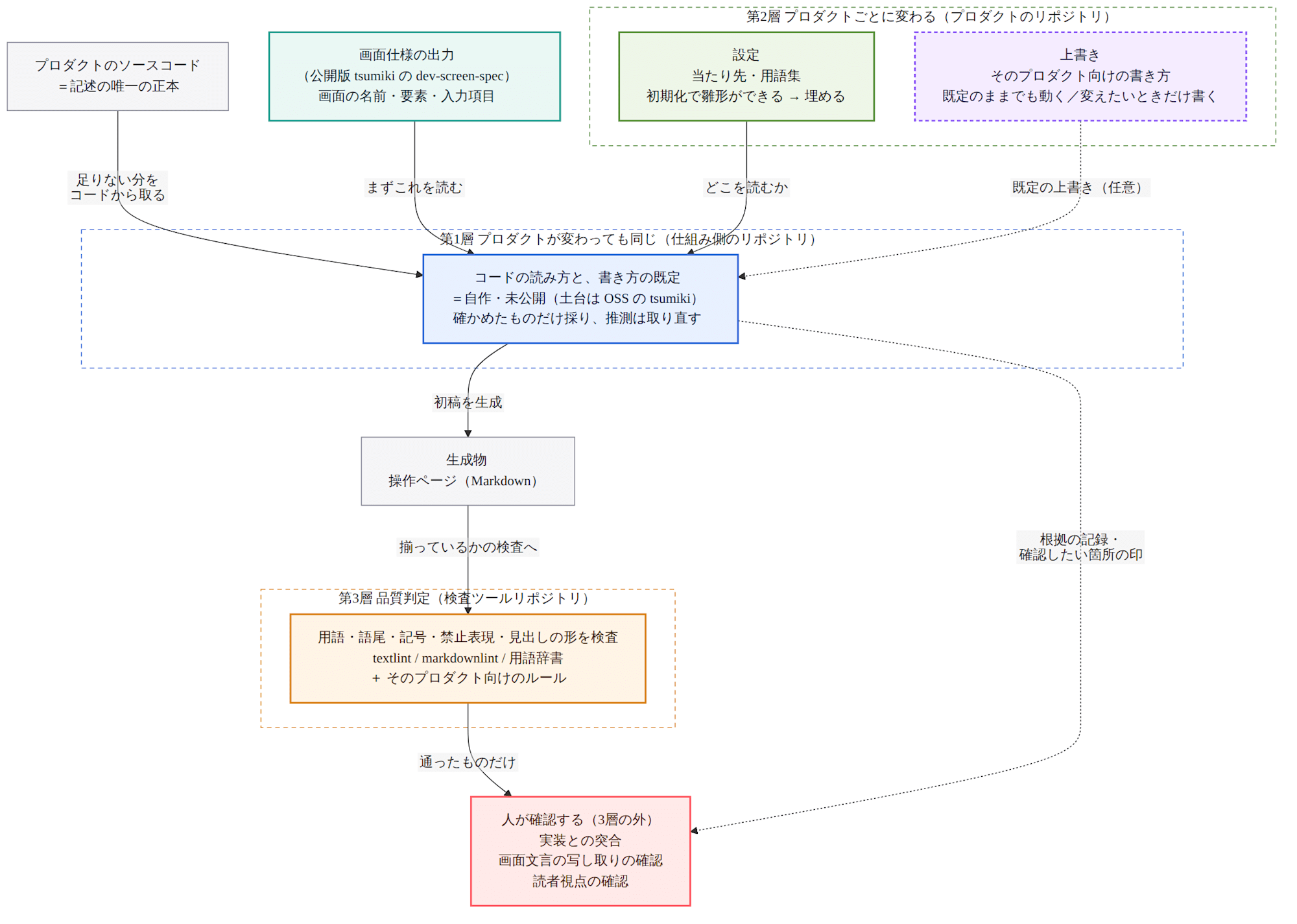
Note that the writing defaults used in Layer 2 are held by Layer 1, so in the diagram they are shown inside Layer 1.
Layer 1: How to Read Code
While doing the splitting work, I noticed something. Even as the tech stack changed, "what I was looking for" hadn't changed. Identifying the filter conditions on a list screen. Picking up whether input fields are required or optional, and their character limits. Extracting the errors that can actually occur. Even though the language, framework, and directory structure were different, what I was doing was the same every time. What changed was only where that information was written.
In other words, the work I'd been doing from scratch every time could be split into "how to read" and "where to look." And "how to read" can be reused. This is why I separated Layer 1 from Layer 2.
What I Wrote in "How to Read"
"How to read" is the procedure for investigating something until it reaches a level of certainty that can be written in a manual.
It doesn't mean reading all the code from the start. Since tsumiki has a screen specification generation feature (dev-screen-spec), I run that first. The output includes screen names, the elements displayed, and input fields. You can do this much with just the public version.
But that's not enough to write a manual. The actual character limit for input fields, the exact error messages users will see, who can perform an operation — none of these appear in the output, so I need to retrieve them from the code.
And one more thing. The output of dev-screen-spec distinguishes, for each item, between "confirmed from code" and "filled in by inference." In the layer I added, inferred items are not carried into the manual — they are re-retrieved from code. Since the output of one AI is being passed to another AI, unless we carry along how certain each item is, inferences can end up becoming the text of the manual.
The procedure for retrieving information from code is as follows. For character limits on input fields, in summary:
- Confirm which file actually renders that screen
- From there, identify input fields and trace to both client-side and server-side validation
- If the limit is written as a constant name, look up the actual value in the constants file
- If client-side and server-side values differ, use the one the user will actually encounter
- For anything that couldn't be confirmed, don't leave it blank — distinguish between "checked, doesn't exist" and "checked, but couldn't determine"
Step 1 wasn't included at first. Sometimes files with similar names remain, or old files that are no longer in use are left behind. Reading those could result in writing about items that don't exist, or missing items that do. Tracing from the screen's URL to first determine exactly which file is actually being displayed — until I added that extra step, there were unexplained discrepancies.
Step 3 was also quietly important. Writing "Please enter within BOOK_TITLE_MAX characters" in a manual doesn't mean anything to readers. Unless the procedure specifies going to look up the constant's actual value and converting it to "within 100 characters," the work stalls right there.
Step 4 doesn't mean always defaulting to one side. If the client side catches it first, users see that value. If it passes through client-side and gets caught server-side, users see that value instead. It's determined by which value the user actually sees.
And the thing I enforced most strongly was Step 5: don't fill in with guesses. "Checked, doesn't exist" and "checked, but couldn't determine" mean different things, so they don't get the same blank treatment. Things that can't be determined are returned to a human without being decided then and there. If this is left ambiguous, the output can't be trusted even if it passes inspection.
For each type of information to look for, I wrote out the procedure in this form. The destination is Claude Code skills. A skill is a file where you write "please work through these steps," and when invoked, Claude Code follows them.
The guiding principle is one: put how to read code on the generic side. What changes per product should be only where to look and how to write.
Layer 2: Where to Read
If Layer 1 is "how to read," Layer 2 is "where to read." Almost everything that needs to be written fresh per product is concentrated here.
When I first built this, I had divided this layer into two parts: a configuration for writing targets and a glossary, and a separate place for templates and proofreading rules. Both were assumed to be prepared manually.
This failed. When I moved on to the next product, I could quickly write the targets, but I got stuck at the templates. Even though I had written the previous product's templates myself, I couldn't tell which parts were product-specific and which were generic. I ended up writing from a blank slate again. I thought I had separated things out, but the heaviest task was still left over every time.
So I pulled the parts that could be made generic up into Layer 1 as defaults, creating a three-tiered structure.
| Tier | Contents | Who prepares it |
|---|---|---|
| 1. Defaults | Chapter structure, how to write each section, proofreading rules, operation types, permission roles | Layer 1 has these from the start |
| 2. Configuration | Targets, glossary | Run initialization once, a template is created, then fill it in through a dialogue |
| 3. Overrides | Chapter structure, how to write each section, proofreading rules | Works even with defaults. Only write your own when you want to change something |
The goal is to start from a state where things work without writing anything.
1. Defaults (Works Without Deciding on Writing Style)
The first tier takes what I originally wrote out for a specific product and reworks it into generic form, carrying it in Layer 1. If nothing is specified in the configuration, this is used as-is. Operation types and permission roles also have defaults, and based on answers given during initialization, the appropriate ones for that product are filled in.
This might be hard to visualize, so here's an example of an operation page using a fictional library management app. This is written for explanatory purposes only and does not match the actual defaults.
# Search for a Book

This section explains how to filter and display books using search conditions.

## Before You Start

- This operation can be performed by Librarians, Library Staff, and Visitors.

## How to Operate

1. Click [Book Management] > [Book Search] in the side menu.
2. Enter your search conditions.
3. Click the [Search] button.

## Search Conditions

| Field | Description |
|---|---|
| Title | Searches by partial match. Enter up to 100 characters. |
| Author | Searches by partial match. Enter up to 50 characters. |
| Loan Status | Select from: All / Available / On Loan. Default is "All." |

## If an Error Occurs

| Error Message | How to Resolve |
|---|---|
| Please enter a title within 100 characters | Revise your input to 100 characters or fewer. |
The things I said "hadn't been decided" earlier are now decided here. Summary sentence endings, step count for procedures, columns in item tables, button formatting. So even the first draft comes out in a reasonably consistent form.
Starting from a blank slate versus iterating on something that already works are completely different experiences in terms of ease of getting started. The former is what I experienced at the beginning.
2. Configuration (Templates Generated by Initialization)
When I said "you don't need to decide anything" in the previous tier, that only applied to writing style. The configuration file in this tier is required — without it, generation won't start.
That said, you don't need to figure out the format yourself. Run the initialization skill once, and you'll be asked questions in a conversational format. Simply answer them, and a configuration file and glossary template are created in the product repository. The configuration is roughly this detailed:
# Example written for explanation purposes. Does not match the actual configuration file format.
# Values are for a fictional library management app.
sources:
  - label: Screen side          # Where screen items, options, and input constraints are determined
    dir: src/pages/books/
  - label: Server side          # Where validation and error messages are determined
    dir: api/handlers/books/
The glossary can also be grown after the template is created by using a dedicated skill to collect terms from existing documents and code.
3. Overrides (Customize to Your Own Style)
The third tier is where you replace templates and proofreading rules. Chapter structure goes directly in the configuration file; how to write each section and proofreading rules go in separate files with the location specified. The rule for how they apply is the same — if specified, that is used; otherwise, the defaults apply.
The location is the product's repository, so changes can be tracked just like code. The templates output plain Markdown that doesn't depend on any specific output tool.
This tier plays the same role as what I originally wrote by hand. The only difference is that you can start with the defaults as a foundation.
Can You Actually Write the Targets Yourself?
After reading this far, you might be thinking: "The problem was not knowing which code to look at, so if you can write the targets yourself, what was the struggle about?"
That's a fair question. I thought the same thing at first. When I actually tried it, I found that the level of granularity needed was just "code related to the screen side is around here," "server side is around here" — directory-level coarseness was sufficient. Finding specifics within that is AI's job. When you pass a feature keyword, it searches the specified directories and goes looking for matching components, validation definitions, and error definitions. The "feel my way through" step I used to do moved there. It also searches areas not explicitly written using the generic procedure, so you don't need to write things in detail from the start.
And here was the biggest win: if the first draft revealed something "was hard to find," I'd add it to the configuration. From then on, that's where it would look.
Previously, the results of my trial-and-error searches only stayed in my own head, and I'd search from scratch again for the next manual. Even for the second manual for the same product, I'd start by trying to recall how I'd searched before. Now, those search results accumulate as configuration.
"Not knowing where things are written" isn't something resolved all at once — it's resolved through growth. The configuration file is where that growth is stored.
Note that when there are no clues at all, you can also have the machine do preliminary investigation first. That would be dev-context for analyzing tech stacks and structure, and dev-screen-spec for generating screen specification documents. Both are included in the public version of tsumiki, so you can try them today.
Layer 3: Quality Judgment
Even with templates and proofreading rules provided, inconsistencies remain. Terminology variation, sentence endings, button formatting, prohibited expressions, heading format. These are things you notice when reading, but the judgment varies depending on who reads it. And above all, deciding "should I flag this?" at every review was heavy work.
So I separated this layer from generation and had machines perform the inspection. Each judgment comes out as "pass / fail." Since there's no subjectivity involved, the flagged issues don't vary when the person responsible changes.
The contents are textlint and markdownlint combined with a terminology dictionary, plus product-specific structural rules on top. The base for the terminology dictionary is the glossary grown in Layer 2. However, I couldn't use the glossary directly for inspection. The glossary has explanations and readings for readers alongside mappings of "this phrasing is incorrect, the correct form is this" for inspection purposes all in the same file. Only the latter is needed for inspection, and running everything through would catch terms not even used in that product. So I designated the glossary as the canonical source and placed only selected entries on the inspection side.
When run, the output looks like this. This is an example written to explain the format.
manual-samples/book-search.md
  12:8   Inconsistent notation: "検索ボタン" → "[検索] ボタン"
  34:1   Sentence ending does not match style guide
  58:22  Prohibited expression: "〜することができます"
Detected items are divided into those that halt judgment and those that are only flagged as warnings. Which category each belongs to is determined per rule. Whether to fix a warning is up to the writer, but what gets detected is always the same. That's because what I don't want to vary is the detection itself.
Layer 2 also has rules for sentence endings and symbols, but those are instructions given to the writing side. Layer 3 is for verifying that things are consistent. There was a moment where the difference in roles became very clear. When the AI-side writing check returned "no issues," the machine inspection still caught violations. Neither one alone was sufficient.
So I settled on this:
No matter how much you refine the instructions on the writing side, it won't be perfectly consistent. So make the checking side a machine.
Machine inspection produces the same judgment no matter how many times you run it on the same content. Rather than asking nicely to "please make it consistent" and hoping, it stops if things aren't consistent. Since establishing this, the work of reading through outputs and comparing them every time generation runs has disappeared.
What Humans Review (Outside the 3 Layers)
Clarifying what I had not automated was just as important as clarifying what I had. I left three things to humans.
| Step | Why humans review it |
|---|---|
| Cross-referencing with implementation | Errors of the type "the conclusion is right but the basis is wrong" can occur |
| Verifying screen text transcription | Requires comparing character by character against the actual screen |
| Reader-perspective review | Writing style could be codified into rules, but "can this reader follow along and complete the operation in this order" requires actually reading through it |
A note on cross-referencing with implementation. Even if a generated description is correct in its conclusion, the code it referenced might be wrong. For example, an old unused process might remain in the code, and the AI might read that and base its judgment on it. The procedure in Layer 1, Step 1 reduces this, but some still gets through. And this type of error can't be noticed just by reading the resulting text.
If Humans Still Do the Cross-Referencing, Isn't It the Same as Before?
This is also a fair question. To put the conclusion plainly: the task itself remained, but the scope changed.
| What is reviewed | Before | Now |
|---|---|---|
| How to trace the basis | Go searching through the code again myself | A record remains of "which code each piece was derived from," in one-to-one correspondence with the text |
| What to check | The entire manual. No clues about which parts might be suspect | Sections flagged by machines, and sections that changed since last time |
| Second time onward | Read through everything again | Only look at the diff from the commit when the last generation occurred |
All three rows in this table are things the system handles.
Preserve the basis. The results of code analysis during generation are preserved in one-to-one correspondence with the manual text. During review, text and basis are viewed side by side, so there's no need to search again for "where did this statement come from."
Don't let uncertain things be stated with certainty. This is where the "don't fill in with guesses" rule from Layer 1 takes effect. For example, when the boundary for date-based search depends on timezone handling, and reading the code doesn't let you determine it conclusively. For such cases, the text doesn't make absolute claims — instead, a flag is output as "a section that should be verified on the actual screen." The flag appears on the basis record side, not in the manual text. There's a world of difference between suspecting everything and examining a few flagged locations.
Only look at diffs from last time. The generated manual records the commit it referenced. For the next update, only the diff from that commit needs to be reviewed. If the implementation hasn't changed, it ends with "no changes."
In other words, I didn't reduce the steps humans perform — I had machines narrow down the scope of what humans need to look at. I haven't pursued fully automating this. The accuracy of a manual is ultimately determined by whether it matches the implementation. I didn't want to build a system that skips that check.
Where Things Stand Now
I'm still partway there. Let me be honest about where things are at the moment.
What became possible
- No longer need to feel my way from scratch every time to figure out "which code to look at"
- Can start first-draft generation with a single line invocation (it's not a continuous flow from there to the finished product — there are moments along the way where judgment calls are needed)
- Quality judgment is decided by "pass / fail," and flagged issues don't vary when the responsible person changes
- Writing decisions are now readable as files and can be handed off to others
- Starting on a new product is no longer from a blank slate, but rather "get the defaults running, fill in through dialogue, override as needed"
What I haven't yet reached
- Cross-referencing with implementation, verifying screen text, and reader-perspective review are still done by humans
- Override templates are not part of the initialization process — you still end up with a blank file. What I want to do is "make small edits to the defaults," but that foundation doesn't appear in front of me
- The scope of Layer 1 application remains narrow. It's been set up to be shared across multiple products, but there's no track record of running it simultaneously yet
And the Most Unsolved Issue Is "Omissions"
"This option isn't listed." "This error isn't mentioned." These kinds of gaps can't be caught anywhere in this system.
If Layer 1 misses something, the fact that that option or error exists in the first place never reaches downstream. Layer 3 inspects the text that was written, so things that weren't written are out of scope. In other words, the problem I described at the start of this article as "oversights happen" remains.
Making things consistent and avoiding omissions turned out to be separate challenges. The consistency side can be handed to machines once you've made decisions and written them down. The omissions side requires knowing what to look for in the first place. This is still something humans verify by looking at the implementation and the screens.
What was removed was the need to personally search for "which code to read." Instructions to the AI can be written in natural language, so no programming knowledge is required. On the other hand, Git and the command line remain because the manuals are placed in the product repository and tracked in the same place as code. This is a question of where to store manuals, which I don't think should be solved on the generation system side.
Summary
The thing that had the most impact was making decisions about things that hadn't been decided. The reason the writing style was inconsistent wasn't the AI — it was because I hadn't decided how to write the content within each section. I wrote those out one by one in files, and built on top of tsumiki, which already had code analysis functionality. When building on top, I divided things into three layers — how to read code (generic), where to read (specific), quality judgment (machine) — and placed human review outside those layers.
Clues for what to decide turned out to be surprisingly within myself. The feeling of "I'm not good at this step" or "I've done this enough that I don't hesitate here" was itself a marker for "what to hand over to machines."
And the things that couldn't be solved became clear as well. Omissions remain outside the system. That's where I think the next round of work will be.
There are two things you can start doing without any system in place. One is writing out the writing decisions you're making unconsciously when you write. The other is using dev-context and dev-screen-spec, which are included in the public version of tsumiki, to have machines do preliminary investigation of the structure and screen specifications of your product. Neither requires writing code.
See you next time.
