
GitHub CLI tokens that previously had no expiration can now be configured to expire and automatically renew within a few hours

This page has been translated by machine translation. View original
Hi there! I'm Yuji Nishimura from the Operations team!
When you log in to GitHub CLI (gh) with gh auth login, it used to save an OAuth token with no expiration date. While convenient, a leaked token could be used until manually revoked.
GitHub CLI 2.103.0, released on October 21, 2026 (US time), introduced a new authentication method as a Public Preview. It's a mechanism where gh automatically refreshes access tokens that expire within a few hours. This article explains how to enable it, and covers the impact on scripts using gh auth token, tokens passed via environment variables, HTTPS git operations, and gh auth refresh.
What I personally verified was limited to: checking the help display, reading/writing settings, and the display at login start, using the official GitHub CLI 2.103.1 binary on macOS (arm64). Since I didn't proceed through the device flow authorization, I have not tested the behavior after logging in with an expiring token or the auto-refresh. The post-login behavior is based on the release notes, GitHub Docs, PRs, and the v2.103.1 source code.
Tokens that expire in a few hours and are auto-refreshed by gh
When you choose expiring tokens, gh saves a short-lived access token and a refresh token that gets replaced with each exchange. When an access token is needed, if it has expired or is about to expire, gh uses the refresh token to obtain a new access token. Users don't need to log in again.
GitHub Docs highlights as a benefit that even if a token leaks, it becomes unusable within a few hours.
The main specifications are as follows:
| Item | Details |
|---|---|
| Required version | GitHub CLI 2.103.0 or later (latest as of October 24, 2026 is 2.103.2) |
| Availability | Public Preview (GitHub Changelog) |
| Supported hosts | github.com, GHE.com (GitHub Enterprise Cloud with data residency options). GitHub Enterprise Server 3.23 or later |
| For unsupported hosts | A regular non-expiring token is issued |
| Default behavior | Disabled (opt-in). Existing logins and manually passed tokens are unaffected |
Regarding token validity periods, the GitHub CLI documentation only says "a few hours." The expiring access tokens specification for OAuth Apps states that access tokens expire after 8 hours and refresh tokens expire after 6 months of inactivity. Whether the same periods apply to gh tokens is not stated in the CLI documentation and was not verified this time.
The GitHub Changelog (October 21, 2026) also mentions plans to make expiring tokens the default for new logins in a future release (timeline TBD).
The token flow between gh, git, and scripts
The following diagram is a conceptual diagram I created myself, not an official architecture diagram. gh obtains an access token and refresh token from GitHub and stores them in the credential store. gh commands, git (when gh is set as the credential helper), and scripts calling gh auth token all receive tokens through gh. When a token is near expiration, gh exchanges it for a new one before passing it along.
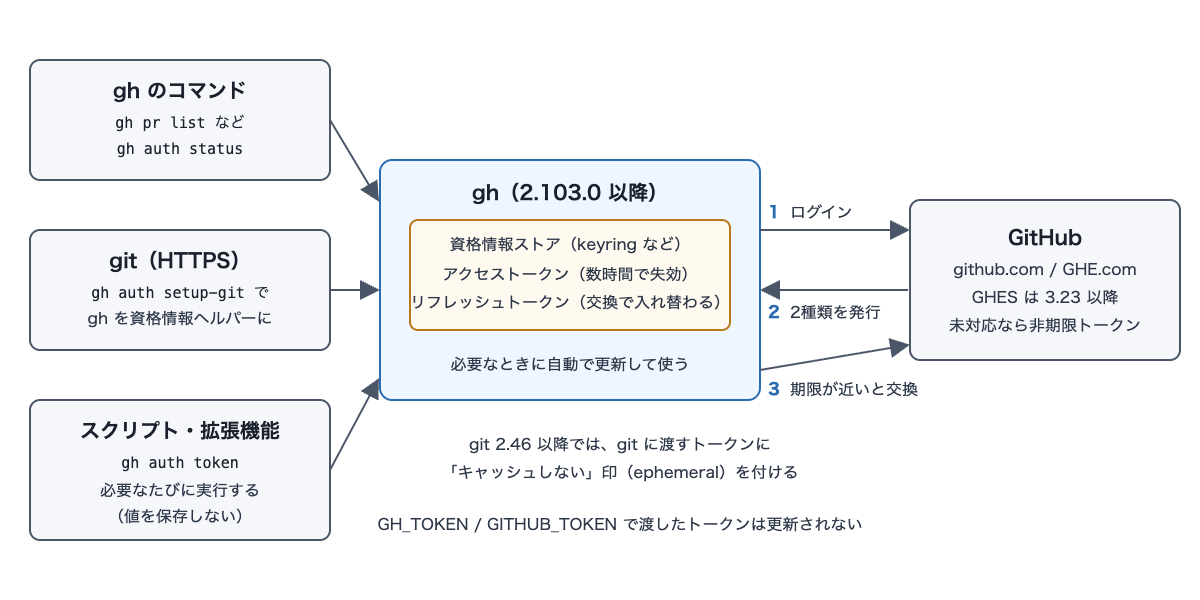
If you store the token value somewhere outside of gh, you exit this refresh flow. Most of the caveats described later stem from this point.
Enabling with --expiring and expiring_credentials
Since GitHub CLI 2.103.0 or later is required, check your version first. If you use scripts or extensions, reading "Things to check before switching" below will help you identify scripts that would break after expiration before you make the switch.
gh --version
To use expiring tokens for a single login only, add --expiring:
gh auth login --expiring
To use it for every subsequent login, enable the expiring_credentials setting:
gh config set expiring_credentials enabled
I verified the behavior of expiring_credentials by pointing GH_CONFIG_DIR to a separate empty directory and using the official GitHub CLI 2.103.1 binary. The default value is disabled, and values other than enabled / disabled are not accepted. The command to enable it produces no output on success.
$ gh config get expiring_credentials
disabled

$ gh config set expiring_credentials yes
failed to set "expiring_credentials" to "yes": valid values are 'enabled', 'disabled'

$ gh config set expiring_credentials enabled
$ gh config get expiring_credentials
enabled
If you have the setting enabled but want a specific login to use a non-expiring token, add --expiring=false. According to gh auth login --help, an explicitly specified flag takes precedence over the setting.
--expiring is a request for an expiring token and does not guarantee issuance. The help also notes that supported hosts may issue expiring tokens even without the flag.
I also verified the display at login start by running in non-TTY mode (not connected to a terminal). The one-time code display and the authorization page (https://github.com/login/device) were the same regardless of whether --expiring was specified.
$ gh auth login --web --expiring -h github.com -p https
! One-time code (XXXX-XXXX) copied to clipboard
Open this URL to continue in your web browser: https://github.com/login/device
Also, in 2.103.1, when logging in interactively to github.com or similar hosts without --expiring and without the setting enabled, a one-line hint about expiring tokens is now displayed (PR #14798). According to the PR, it only appears when stderr is connected to a terminal, so it was not shown in the non-TTY execution above.
Checking expiration and refresh status
gh auth status lets you check whether a token is subject to auto-refresh and when the access token expires. Looking at status.go in v2.103.1, for expiring tokens, the implementation outputs lines like the following:
  - Expiring token that gh refreshes automatically
  - Token expires: <date/time> (<time remaining>)
  - Refresh token expires: <date/time> (<time remaining>)
Both gh auth status and gh auth token automatically refresh expired or near-expiring tokens before returning results. If you want to see the current state without triggering a refresh, add --no-refresh to either command.
According to the same source, if the refresh token itself is rejected, the stored expiring credentials are deleted, and gh auth status will prompt you to log in again with gh auth login -h <host>.
Things to check before switching
Scripts that save the value from gh auth token
The most impactful case is scripts or extensions that store the output of gh auth token in a variable or file for reuse. Since the saved value expires within a few hours, the release notes recommend re-running gh auth token each time a token is needed. The GitHub Changelog also advises against opting in yet if you have workflows that assume tokens remain valid for a long time.
# With expiring tokens, retrieve a fresh token immediately before each use
curl -H "Authorization: Bearer $(gh auth token)" https://api.github.com/user
Tokens passed via environment variables are not refreshed
According to the release notes, tokens passed via GH_TOKEN or GITHUB_TOKEN, such as in GitHub Actions, are not refreshed by gh.
Use gh as the credential helper for HTTPS git
When using git over HTTPS, setting gh as git's credential helper allows gh to refresh and pass expiring tokens automatically.
gh auth setup-git
According to GitHub Docs, when you log in with an expiring token, gh will ask whether to configure itself as the helper if it isn't already.
I checked the handling when another credential helper is already in use in git_credential.go in v2.103.1. Since that helper cannot refresh expiring tokens and would continue passing expired tokens, gh requires you to set itself as the helper. For logins where expiring tokens were requested via --expiring or the setting, three options are presented: "Set gh as the helper (recommended)," "Continue without configuring," or "Cancel login." Choosing gh sets it as the credential helper for that host, even if another helper was already present.
If an expiring token was issued without you requesting it, you'll be asked whether to set gh as the helper instead. If you decline, gh will not save the token to the existing helper. It will delete any stored credentials for that host from the helper and display a warning advising you to run gh auth setup-git --hostname <host>.
gh auth login --help also recommends git 2.46 or later. If git is 2.46 or later, gh marks the tokens it passes to git as not to be cached (ephemeral). This prevents caching helpers like git-credential-cache from holding onto expired tokens. In helper.go in v2.103.1, when git is older, the implementation passes the token but outputs a warning to stderr recommending a git update.
When changing scopes with gh auth refresh
The handling when adding scopes with gh auth refresh --scopes is described differently in the documentation and the CLI help.
- GitHub Docs: When using expiring tokens, add
--expiringor enable the setting; omitting it may replace the token with a non-expiring one gh auth refresh --help(2.103.0 / 2.103.1): Without the flag, the current token type (expiring or non-expiring) is preserved
refresh.go in v2.103.1 also matches the help text, with the implementation preserving the current token type if no flag is specified. Either way, explicitly adding --expiring as the documentation advises ensures an expiring token is maintained under either description.
gh auth refresh --scopes read:project --expiring
Deciding whether to enable it
| Use case | Recommendation |
|---|---|
Using gh interactively on a local machine |
A candidate for enabling. If gh auth setup-git is done and git is 2.46 or later, no additional steps are needed for everyday use according to the official documentation |
Scripts or extensions that save the value from gh auth token |
First update them to run gh auth token each time before enabling |
| Automation that passes tokens via environment variables, such as GitHub Actions | Not subject to auto-refresh. Keep using the existing approach without changing the setting |
| GitHub Enterprise Server 3.22 or earlier | Expiring tokens are not issued; opting in will result in a non-expiring token |
Since this is in the Public Preview stage, start by trying gh auth login --expiring on a few machines. After confirming that your scripts and extensions continue to work after token expiration, enable expiring_credentials.
Summary
With GitHub CLI 2.103.0 or later, you can switch to an authentication mode where gh automatically refreshes access tokens that expire within a few hours. The switch is made with gh auth login --expiring or gh config set expiring_credentials enabled. This shortens the window during which a leaked token can be used.
Three things to check before switching: whether scripts run gh auth token each time they need a token, whether gh is set as the credential helper for HTTPS git, and whether git is 2.46 or later. Following the guidance in the release notes and GitHub Docs, having these in place should prevent scripts and git push from hitting authentication errors due to expired tokens (post-expiration behavior was not tested this time). When changing scopes, it's safest to also add --expiring to gh auth refresh.
While in Public Preview, it's recommended to try gh auth login --expiring on a few machines, confirm that scripts and extensions continue to work after expiration, and then enable expiring_credentials.
I hope this is helpful to someone.
Reference links:
- GitHub CLI 2.103.0 Release Notes
- GitHub CLI 2.103.1 Release Notes
- GitHub Changelog: GitHub CLI: Opt in to expiring, auto-refreshing OAuth tokens
- GitHub Docs: Authenticating with GitHub CLI
- GitHub Docs: Authorizing OAuth apps - Expiring access tokens
- cli/cli PR #14452: short-lived login, refresh, and git credential path
- cli/cli PR #14798: hint at --expiring when no preference is set