
Trying out GitHub Actions workflow lockfiles: pin dependencies to commits with actions.lock, and stop before execution if anything drifts

This page has been translated by machine translation. View original
Hello! I'm Yuji Nishimura from the Operations Department!
In the GitHub documentation and in each action's README, the actions used in GitHub Actions are written as references by tag, like actions/checkout@v5. However, because tags can be moved later, there remains room for code different from what you reviewed to run in CI. As a countermeasure, there is the practice of "pinning to a full commit SHA", but it makes workflows harder to read. Furthermore, it cannot pin other actions that an action calls internally (transitive dependencies).
In the GitHub Changelog of October 14, 2026, workflow dependency lockfiles, which pin workflow dependencies with a lockfile, entered public preview. Following the same idea as npm and pnpm lockfiles, the commit of each action is recorded in .github/workflows/actions.lock, and at runtime the commits exactly as recorded are used.
In this article, I'll verify the following three points in a repository created on a Free plan account.
- What gh actions-lock generates, and how the workflow gets rewritten
- What happens in CI when you add an action without updating the lockfile
- What commit gets executed when the tag being referenced is moved
I have not tried the Require lockfile policy setup operation and its actual blocking behavior, automatic lockfile updates by Dependabot, or locking of reusable workflows this time. I'll only touch on the official documentation's explanation in the operations section.
What's changed
- Release date: October 14, 2026 (public preview)
- Target: In the Changelog body as of October 16, 2026, the targets are GitHub Enterprise Cloud, GitHub Enterprise Cloud with data residency, Team, and Free. An Editor's note of the same date says the target plans have been updated, so please read this on the premise that you should recheck the wording of the body before publishing. GitHub Enterprise Server is explicitly stated as unsupported in the gh-actions-lock README
- Lockfile location:
.github/workflows/actions.lock. It is generated and updated by the GitHub CLI extension gh-actions-lock, and is not meant to be edited by hand - What's recorded: the commits of directly referenced actions, transitive dependencies, and reusable workflows (details in the next section)
- Onboarding is per workflow: Putting a workflow under lockfile management is called onboarding. A workflow that has been onboarded needs a lockfile entry for every dependency it uses. Actions executes the recorded commits
- Related features: Dependabot also updates the corresponding lockfile entries in its action version update PRs. The Require lockfile policy, which makes the lockfile mandatory, is also in public preview
What does actions.lock record, and how does it differ from SHA pinning?
According to the official documentation, the lockfile has two sections: workflows and dependencies. workflows is the list of dependencies used by each onboarded workflow, and dependencies is the resolution result for each reference. The following items are recorded for each dependency.
| Item | Content |
|---|---|
ref |
The tag or branch the workflow references |
commit |
The commit SHA that the reference resolved to |
owner_id |
The numeric ID of the owner of the referenced repository |
repo_id |
The numeric ID of the referenced repository. GitHub Actions checks it together with owner_id at runtime |
For a dependency that has transitive dependencies, the list of dependencies it calls is also attached as uses:.
There are two differences from SHA pinning. One is that transitive dependencies are also pinned. Actions that a composite action uses: internally are also included in dependencies, and the parent-child relationships are recorded. The other is that repository identifiers are retained. The official documentation says that if the repository behind a name becomes different from the one you pinned (for example, the original repository was moved to another name and a different repository with the same name was created, or it was hijacked), execution stops even if the names match. The official documentation also says that SHA pinning within workflows becomes unnecessary in repositories that use a lockfile.
Trying it out
Environment
- macOS 26.6.1
- GitHub CLI 2.101.0
- gh-actions-lock v0.2.0 (released October 12, 2026 UTC. The lockfile schema is
v0.0.3) - Verification repository: ynishimura/blog-verify-actions-lock, newly created in a Free plan account
The extension can be installed with the following commands.
gh extension install github/gh-actions-lock
gh actions-lock --version
1. The workflow before adoption
As a starting point for comparison, I prepared a workflow that uses three tag-referenced actions and one local composite action. aquasecurity/trivy-action is a composite action that calls other actions internally, so I use it to check transitive dependencies.
name: ci
on:
  push:
    branches: [main]
  workflow_dispatch:
jobs:
  build:
    runs-on: ubuntu-latest
    steps:
      - uses: actions/checkout@v5
      - uses: actions/setup-node@v5
        with:
          node-version: 24
      - run: node --version
      - uses: ./.github/actions/hello
      - uses: aquasecurity/trivy-action@v0.36.0
        with:
          scan-type: fs
          scan-ref: .
          exit-code: 0
When I pushed in this state, the run succeeded, and the "Set up job" log showed the results of resolving the tags. I've omitted the two lines for actions/cache and actions/checkout that setup-trivy calls in turn.
Download action repository 'actions/checkout@v5' (SHA:fbc6f3992d24b796d5a048ff273f7fcc4a7b6c09)
Download action repository 'actions/setup-node@v5' (SHA:a0853c24544627f65ddf259abe73b1d18a591444)
Download action repository 'aquasecurity/trivy-action@v0.36.0' (SHA:ed142fd0673e97e23eac54620cfb913e5ce36c25)
Download action repository 'aquasecurity/setup-trivy@3fb12ec12f41e471780db15c232d5dd185dcb514' (SHA:3fb12ec12f41e471780db15c232d5dd185dcb514)
Download action repository 'actions/cache@27d5ce7f107fe9357f9df03efb73ab90386fccae' (SHA:27d5ce7f107fe9357f9df03efb73ab90386fccae)
Inside trivy-action, setup-trivy and actions/cache are fetched. These are transitive dependencies not written in the workflow, and including those of setup-trivy there are four.
2. Generate the lockfile
Running it at the repository root with no arguments scans all workflows under .github/workflows/.
gh actions-lock
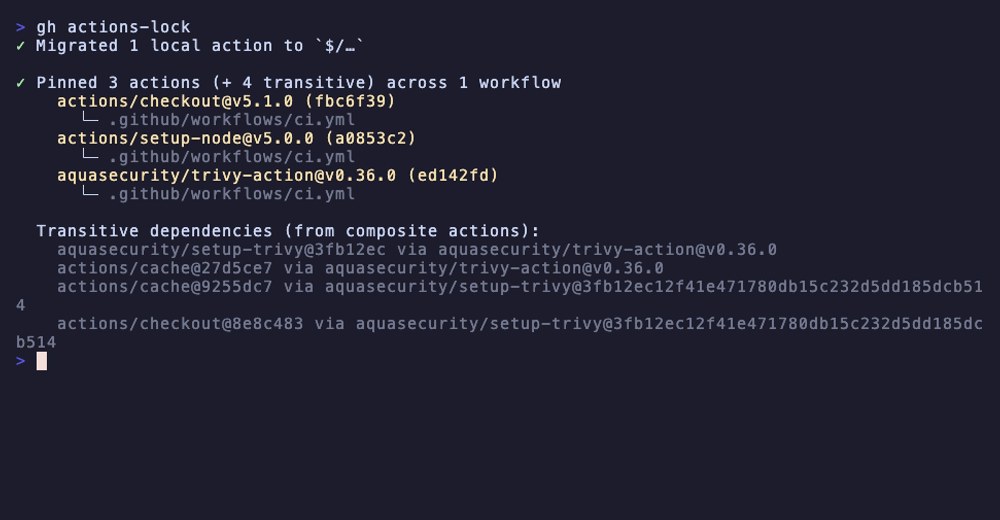
In addition to the three direct dependencies, four transitive dependencies (setup-trivy and actions/cache from trivy-action, and actions/cache and actions/checkout from setup-trivy) were pinned. The changes are not limited to adding the lockfile; they also go into the workflow itself. After generation, check the diff on the workflow side as well before committing.
-      - uses: actions/checkout@v5
-      - uses: actions/setup-node@v5
+      - uses: actions/checkout@v5.1.0
+      - uses: actions/setup-node@v5.0.0
         with:
           node-version: 24
       - run: node --version
-      - uses: ./.github/actions/hello
+      - uses: $/.github/actions/hello
       - uses: aquasecurity/trivy-action@v0.36.0
There are two kinds of rewriting.
- Narrowing partial versions: A reference with only a major version, like
@v5, is rewritten to the full tag (@v5.1.0) pointing at the resolved commit. Because full version tags almost never move after publication, the aim is to extend the period during which the pinned SHA stays valid, according to the description ingh actions-lock --help. References that are already full tags from the start, like@v0.36.0, are left as they are. It can be disabled with--no-narrow - Converting local actions to
$/:./.github/actions/hellobecomes$/.github/actions/hello.$/is a reference to "the commit being executed, in the same repository as this workflow", and since it always resolves to the running SHA, no lockfile entry is needed
The generated actions.lock is as follows. I've omitted three entries: actions/setup-node@v5.0.0, and actions/cache and actions/checkout under setup-trivy.
# This file is machine-generated by `gh actions-lock`.
# Do not edit by hand; run `gh actions-lock` to update.
# Docs: https://gh.io/actions-lockfile
version: 'v0.0.3'
workflows:
    '.github/workflows/ci.yml':
        - 'actions/checkout@v5.1.0'
        - 'actions/setup-node@v5.0.0'
        - 'aquasecurity/trivy-action@v0.36.0'
dependencies:
    'actions/cache@27d5ce7f107fe9357f9df03efb73ab90386fccae':
        ref: 'v5.0.5'
        commit: 'sha1-27d5ce7f107fe9357f9df03efb73ab90386fccae'
        owner_id: 44036562
        repo_id: 215566462
    'actions/checkout@v5.1.0':
        ref: 'v5.1.0'
        commit: 'sha1-fbc6f3992d24b796d5a048ff273f7fcc4a7b6c09'
        owner_id: 44036562
        repo_id: 197814629
    'aquasecurity/setup-trivy@3fb12ec12f41e471780db15c232d5dd185dcb514':
        ref: 'v0.2.6'
        commit: 'sha1-3fb12ec12f41e471780db15c232d5dd185dcb514'
        owner_id: 12783832
        repo_id: 869952525
        uses:
            - 'actions/cache@9255dc7a253b0ccc959486e2bca901246202afeb'
            - 'actions/checkout@8e8c483db84b4bee98b60c0593521ed34d9990e8'
    'aquasecurity/trivy-action@v0.36.0':
        ref: 'v0.36.0'
        commit: 'sha1-ed142fd0673e97e23eac54620cfb913e5ce36c25'
        owner_id: 12783832
        repo_id: 268833180
        uses:
            - 'actions/cache@27d5ce7f107fe9357f9df03efb73ab90386fccae'
            - 'aquasecurity/setup-trivy@3fb12ec12f41e471780db15c232d5dd185dcb514'
In the trivy-action entry, setup-trivy and actions/cache are listed as uses:, and the setup-trivy entry continues with its own dependencies. Even when transitive dependencies are referenced by SHA, the original tag name such as v5.0.5 remains in ref, so you can trace which version is in use from the lockfile alone.
When I committed and pushed this change, the run succeeded. In the fetch log of "Set up job", apart from the tag names changing like actions/checkout@v5.1.0, the SHAs were the same as before adoption. The local action was fetched as ynishimura/blog-verify-actions-lock@<running commit>, just as the $/ explanation says.
3. Add an action without updating the lockfile
In the onboarded workflow, I added a step for actions/cache@v4 without updating the lockfile and pushed.
      - run: node --version
      - uses: actions/cache@v4
        with:
          path: ~/.npm
          key: npm-${{ runner.os }}
The result was a startup_failure in which no job started at all. The Annotations on the run page show "Invalid lockfile: .github/workflows/actions.lock#L1 The lockfile could not be validated. Regenerate it by running gh actions-lock."
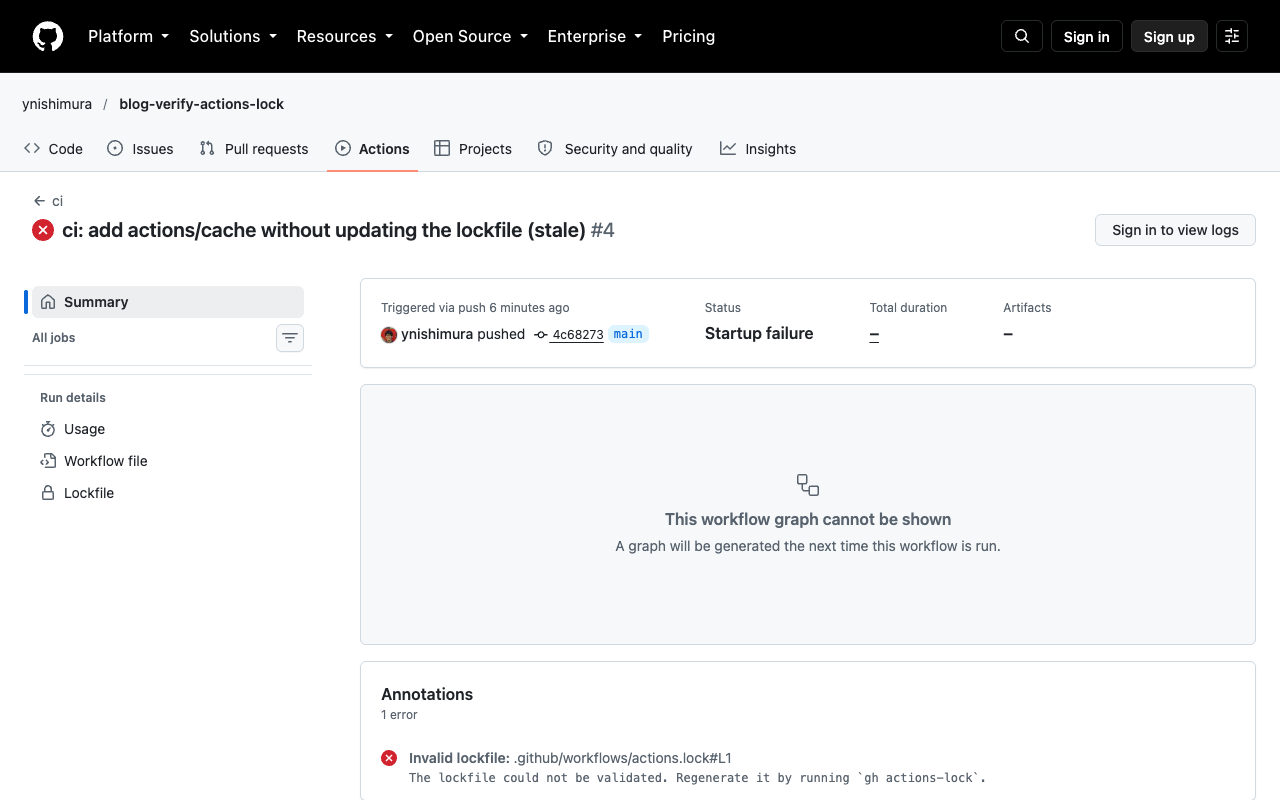
A workflow containing an action that was forgotten to be pinned stops before any job starts.
The same state can also be detected locally. --verify is a mode that inspects without rewriting anything.
gh actions-lock --verify
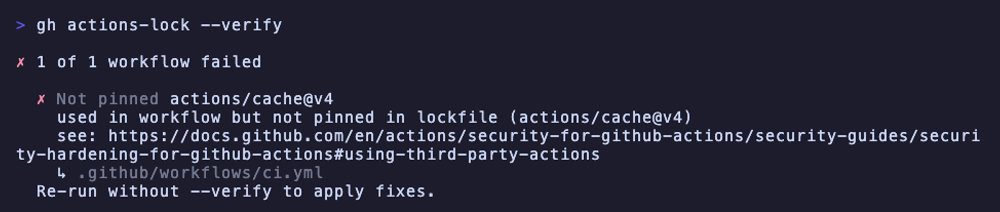
The exit code is 1, and after "Not pinned actions/cache@v4" it states that the action is used in the workflow but not pinned in the lockfile. --verify-local, which does not use the network, also gave exit code 1. It only checks whether each reference has an entry, so you need to use --verify to confirm that the contents of the entries are correct.
The fix is just to re-run it by specifying the workflow.
gh actions-lock .github/workflows/ci.yml
gh actions-lock --verify
actions/cache@v4 was rewritten to @v4.3.0, one entry was added to the lockfile, and --verify reported "All 1 workflow valid". After pushing, the run succeeded, and the fetch log showed actions/cache@v4.3.0 (SHA:0057852b...).
4. When the tag being referenced moves
The real purpose of the lockfile is "to execute the pinned commit even if the tag moves". Since I can't move tags in someone else's repository, I added a step that remotely references the verification repository's own composite action in the form owner/repo/path@v1, and moved the tag v1 myself.
- uses: ynishimura/blog-verify-actions-lock/.github/actions/hello@v1
The steps were as follows.
- Create the tag
v1, add the aboveuses:to the workflow, and lock it withgh actions-lock. The lockfile'scommitis607ea0a - Push another commit, and move
v1to that commit (24c8add) withgit push -f - Without updating the lockfile, run the workflow with
workflow_dispatch
The run log was as follows.
Download action repository 'ynishimura/blog-verify-actions-lock@v1' (SHA:607ea0a6f16c076321a582ebb583afa0d3eac3ee)
The remote v1 points to 24c8add, but what was executed was 607ea0a, as recorded in the lockfile. Merely moving the tag does not change what is executed.
At this point, both gh actions-lock --verify and gh actions-lock with no arguments locally reported "All 1 workflow valid", and the files did not change. As stated in the v0.2.0 release notes, already-pinned pins are "sticky" and are not re-resolved in a normal gh actions-lock run. According to the README, for references to branches or partial versions, --verify checks whether the pinned commit remains in the history of that reference. Here, 607ea0a is an ancestor of 24c8add, so it can be read that it was judged normal.
When you want to follow a new commit, use --relock.
gh actions-lock --relock
A diff appeared in which the lockfile's commit changed from 607ea0a to 24c8add. The documentation says that --relock --accept-moved is needed when the pinned commit has become unreachable due to a force push or similar, but I did not try that situation this time.
Key points for incorporating this into operations
From what I measured and from the official documentation, the shape of operations seems likely to be as follows.
- Validate the lockfile in PRs: The README positions
--verifyfor use as a check in CI. Put a job that runsgh actions-lock --verifyin PRs, and make it fail if the lockfile is outdated - Review lockfile diffs: A change in
commitmeans different code will run, so review it the same way as a dependency version update. A change inowner_idorrepo_idmeans the repository was replaced, so investigate before merging - Timing of updates: Re-run
gh actions-lockwhen you add or remove auses:. Use--relockwhen you want to follow a tag move. According to the official documentation, Dependabot also updates the corresponding lockfile entries in version update PRs for onboarded workflows. However, it does not onboard new workflows, and for workflows without entries it reports that onboarding is needed - Making the lockfile mandatory: According to the official documentation, "Require lockfile" under Settings > Actions > Policies can block the execution of workflows that have a
uses:not pinned in the lockfile. Enforcement status has "Active", which actually blocks, and "Evaluate", which does not block and only records the results in Policy insights. Evaluate is available only on GitHub Enterprise Cloud. I did not try this settings screen or the actual blocking behavior this time
Points to note when adopting
- It's in public preview, and the extension is pre-1.0: The README says the lockfile format, flags, and behavior may change without notice. In fact, in v0.2.0 the schema went up to
v0.0.3and--rescanwas removed.--verifyalso became stricter, so entries not used by any workflow and workflows without entries are also treated as failures - Compatibility with allowlists: According to the official documentation, after onboarding, the allowlist (Allow select actions) is matched against the pinned commit SHA, so allow entries written with tags like
actions/checkout@v5no longer match. You are said to need to change them to wildcards or full commit SHAs. I did not try this this time - Handling of local actions:
./references are automatically converted to$/. If you don't want conversion, add--no-migrate-local-actions. The README says workflows that use actions at local paths are excluded from onboarding (a short-term limitation), but according to the official documentation, what gets skipped is the case where./…cannot be resolved to an existing action file. The resolvable./.github/actions/hellowas converted to$/and then onboarded in v0.2.0 this time - Writes are all-or-nothing: According to the README and the v0.2.0 release notes, if even one reference cannot be resolved, nothing is written, including for other workflows. When the referenced tag or commit does not exist, you first need to fix the workflow side
Summary
GitHub Actions' workflow lockfile turned out to be a mechanism that generates .github/workflows/actions.lock with gh actions-lock and records the commits and repository IDs of direct and transitive dependencies. If an onboarded workflow uses an action that is not in the lockfile, it stops with a startup_failure before any job starts, and the same state can be detected locally with --verify. Even if the tag being referenced moves, what is executed remains the pinned commit, and you update with --relock only when you want to follow it.
If you are managing SHA pinning by hand, it is worth replacing it with the lockfile, because transitive dependencies can be pinned too and the workflow can still be read with tag names. When adopting, it is realistic to start by checking the effects on uses: rewriting and the allowlist, and adding a --verify job to PRs.
Reference links:
- GitHub Actions workflow lockfiles in public preview - GitHub Changelog
- Workflow dependency lockfiles - GitHub Docs
- Locking action dependencies in a repository's workflows - GitHub Docs
- Enforcing lockfiles for action dependencies - GitHub Docs
- Governing execution of GitHub Actions workflows - GitHub Docs
- github/gh-actions-lock
- gh-actions-lock v0.2.0 release notes