
Migrating GitHub branch protection to rulesets in bulk: Verifying the behavior of Import branch protection rules

This page has been translated by machine translation. View original
Hi there! I'm Yuji Nishimura from the Operations team!
The feature to convert GitHub branch protection rules to repository rulesets was expanded to support bulk conversion on 2026-10-20. The 2026-08-11 changelog had introduced Convert to ruleset, which converted one rule at a time. This time, Import branch protection rules is now available, allowing you to import all branch protection rules in a repository at once.
For repositories with many rules, bulk import is faster than converting one by one. On the other hand, since multiple rulesets are created with a single button press, it's worth understanding in advance how the rulesets will be divided and what happens to the original rules. In this article, I run the bulk import on a public repository for testing purposes and verify the contents of the generated rulesets, plan-based limitations, how the original rules are handled, and the conversion results for conversation resolution.
What Changed This Time
- Target / Date: All repositories where rulesets are available (announced 2026-10-20)
- Key changes:
- Branch protection rules in a repository can be bulk-converted to rulesets via Import branch protection rules in Settings → Rulesets
- The confirmation dialog (Review import) lets you preview the rulesets to be created, rules already covered by existing rulesets, and cases where one rule is split into multiple rulesets
- You can choose the enforcement status (Active / Evaluate / Disabled) and which rulesets to create
- After creation, you can choose to keep or delete the original branch protection rules
- Official link: Bulk migrate branch protections to rulesets for a repository
As of 2026-10-21, the GitHub Docs conversion page still only describes the one-at-a-time Convert to ruleset approach, and the bulk import procedure is only documented in the changelog.
Why Migrate to Rulesets
The GitHub Docs and changelog list the following advantages of rulesets:
- Pattern-based application to multiple branches: A single ruleset can be applied to multiple branches using pattern matching
- Layered rules: Multiple rulesets can be applied to the same branch simultaneously, allowing policies to be composed in layers
- Organization / Enterprise-level management: The same ruleset can be applied across multiple repositories
- Granular bypass permissions: You can specify who can bypass rules per user, team, or app
- Visibility for read access: People with read access can view active rulesets, allowing developers to see the rules that apply to them and auditors to check protection status without admin permissions
Trying the Bulk Import
Test Environment
- A Free plan account on github.com
- A public repository for testing (deleted after testing)
- Conducted on 2026-10-21
Since rulesets are not available for private repositories on the Free plan, I tested with a public repository.
Before the conversion, I set up the following three branch protection rules and an existing ruleset targeting develop.
| Pattern | Branch protection settings |
|---|---|
main |
Require 1 approval, require status check test (also require branches to be up to date before merging), require conversation resolution |
release/* |
Require linear history |
develop |
Require linear history. Already covered by the existing ruleset develop-linear-history, which includes linear history, no force pushes, and no deletions |
In all cases, "Do not allow bypassing the above settings" (enforce for administrators) is left disabled. To verify how conversation resolution is handled, I also added a rule for hotfix/* later and imported it (described below).
Checking the Generated Results in Review Import
When I opened Settings → Rulesets in a repository with branch protection rules, a banner prompting conversion and the Import branch protection rules button were displayed.
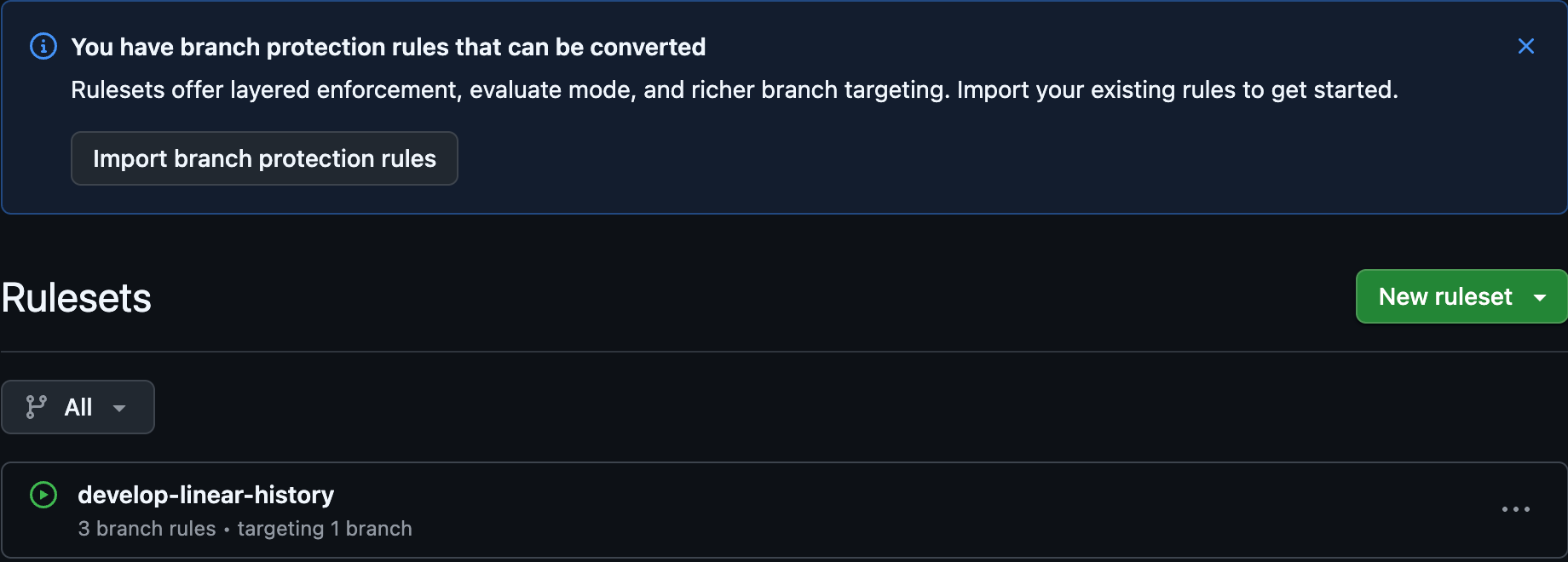
Clicking the button opens the Review import dialog.
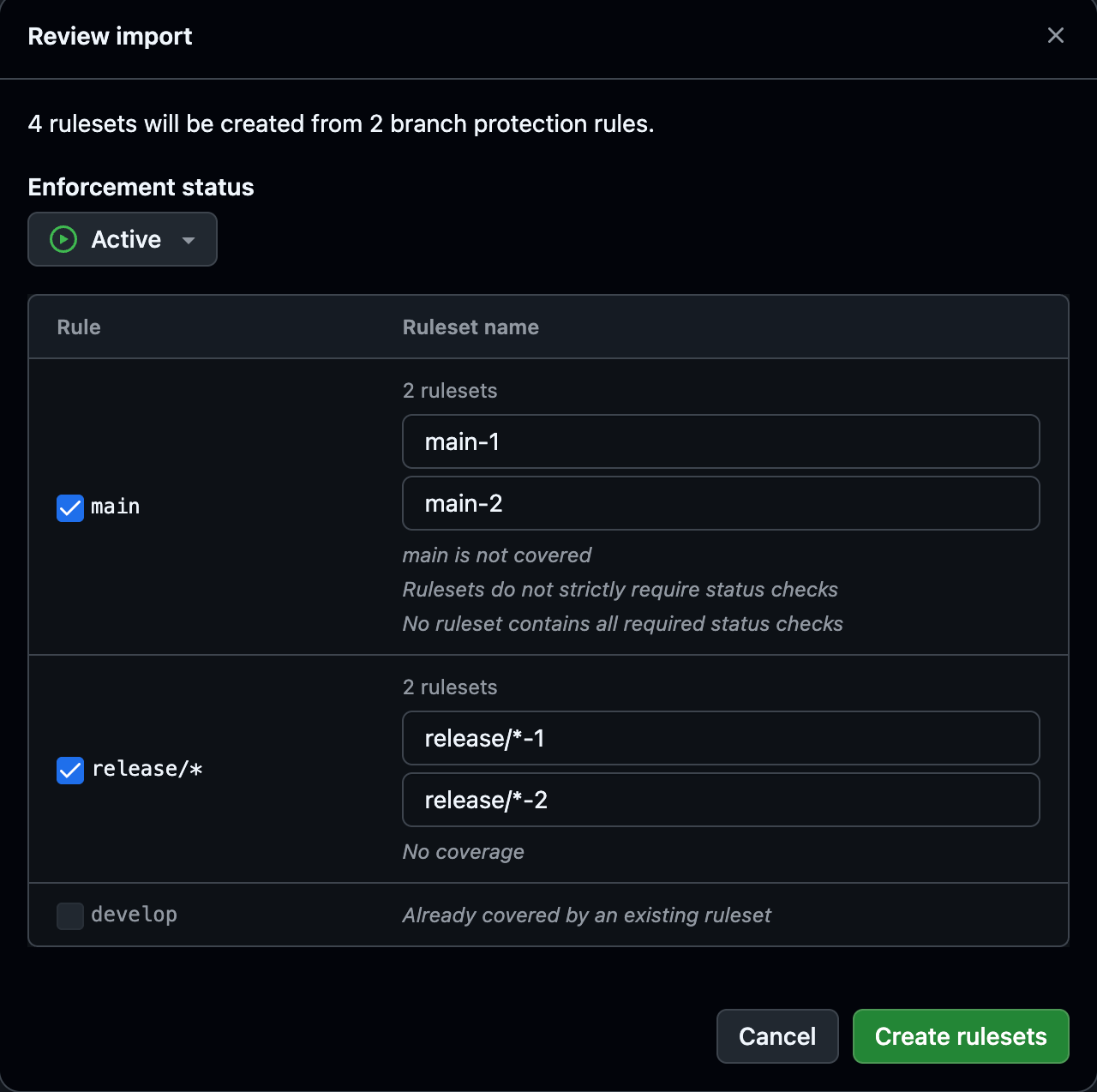
The following can be read from the dialog:
- The heading reads
4 rulesets will be created from 2 branch protection rules., meaning 4 rulesets will be created from the 2 rules formainandrelease/* mainandrelease/*are each split into 2 rulesets suffixed with-1and-2. Ruleset names can be changed in the input fieldsdevelophas its checkbox disabled and showsAlready covered by an existing ruleset. Rules already covered by an existing ruleset are excluded from the import- Notes appear for
mainsayingmain is not covered/Rulesets do not strictly require status checks/No ruleset contains all required status checks, and forrelease/*sayingNo coverage. Coverage status by existing rulesets and settings that don't fully match branch protection behavior are shown before creation
Why One Rule Is Split Into Two Rulesets
When I checked the contents of the created rulesets using gh api repos/<owner>/<repo>/rulesets/<id>, they were divided as follows:
| Ruleset | Bypass | Included rules |
|---|---|---|
main-1 |
None | Restrict deletions, restrict force pushes |
main-2 |
Repository admin | Required status checks (strict), pull request (1 approval, require conversation resolution) |
release/*-1 |
None | Restrict deletions, restrict force pushes |
release/*-2 |
Repository admin | Require linear history |
They are split based on whether a bypass is present. About protected branches explains that branch protection restrictions do not apply to people with admin permissions by default. In this case, the rules for approvals and status checks were set not to apply to administrators.
On the other hand, restrictions on deletions and force pushes were placed in the ruleset with no bypass. From this result, it appears that the conversion treats deletion and force push restrictions as rules that apply to administrators as well, and separates them into a different ruleset from the parts that administrators can bypass. Since bypass is configured at the ruleset level in rulesets, rules with different bypass handling cannot be combined into one.
The changelog notes that one branch protection rule may result in multiple rulesets being created to preserve the original behavior. The split in this case is an instance of that. Since ruleset names can be changed during import, using names that convey their purpose—such as main-protect-all and main-admin-bypass—will make the list easier to understand later.
Evaluate Appears in the UI But Cannot Be Created on the Free Plan
The Enforcement status dropdown showed all three options—Active, Evaluate, and Disabled—even on the Free plan. The default is Active. Note that Evaluate is a mode that does not enforce rules but only records violations in Rule Insights.
When I selected Evaluate and clicked Create rulesets, the following error appeared and no ruleset was created:
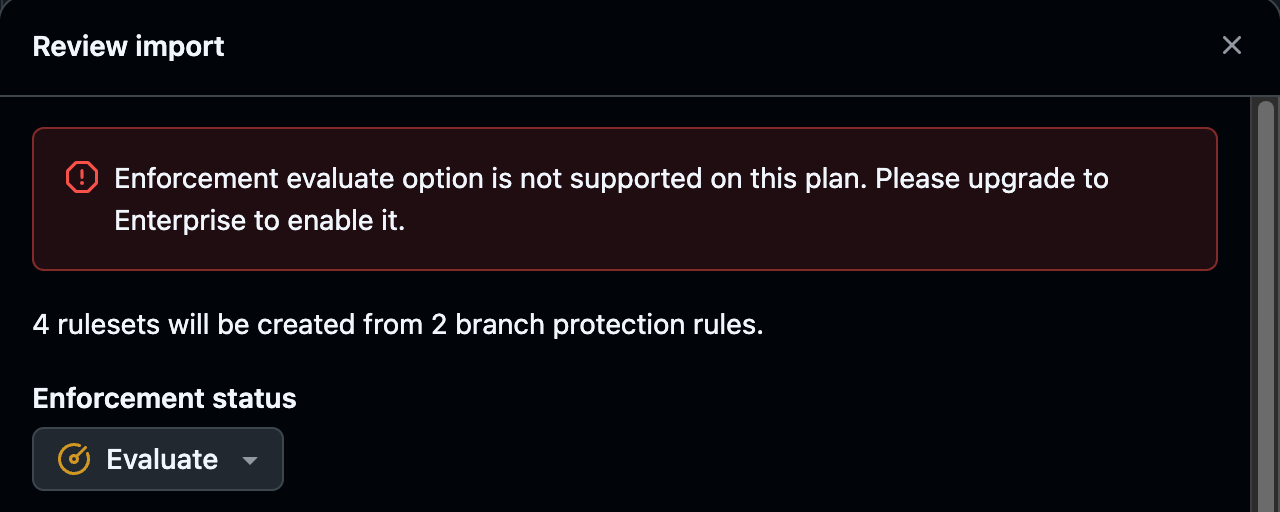
Enforcement evaluate option is not supported on this plan. Please upgrade to Enterprise to enable it.
Attempting to create a ruleset with enforcement: "evaluate" via the REST API also returned a 422 error with the same message. GitHub Docs also only shows the Evaluate description on pages intended for GitHub Enterprise Cloud / Server. I only tested on the Free plan, but based on the error message and Docs, Evaluate appears to be an Enterprise-only feature. If Evaluate is unavailable, you would create the ruleset as Active, keep the original rules, and run both in parallel.
Whether to Keep or Delete the Original Branch Protection Rules
When I switched back to Active and clicked Create rulesets, a dialog appeared asking whether to delete the original rules.
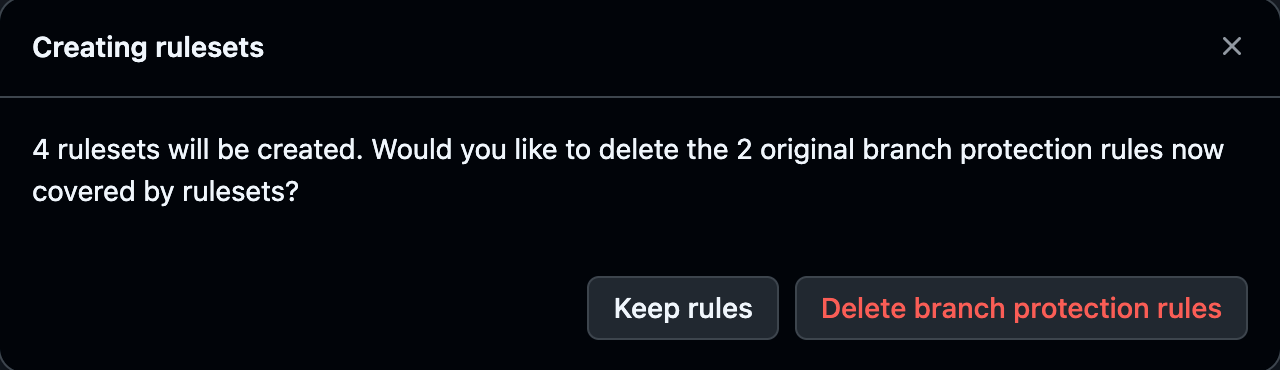
Selecting Keep rules added four rulesets in Active status.
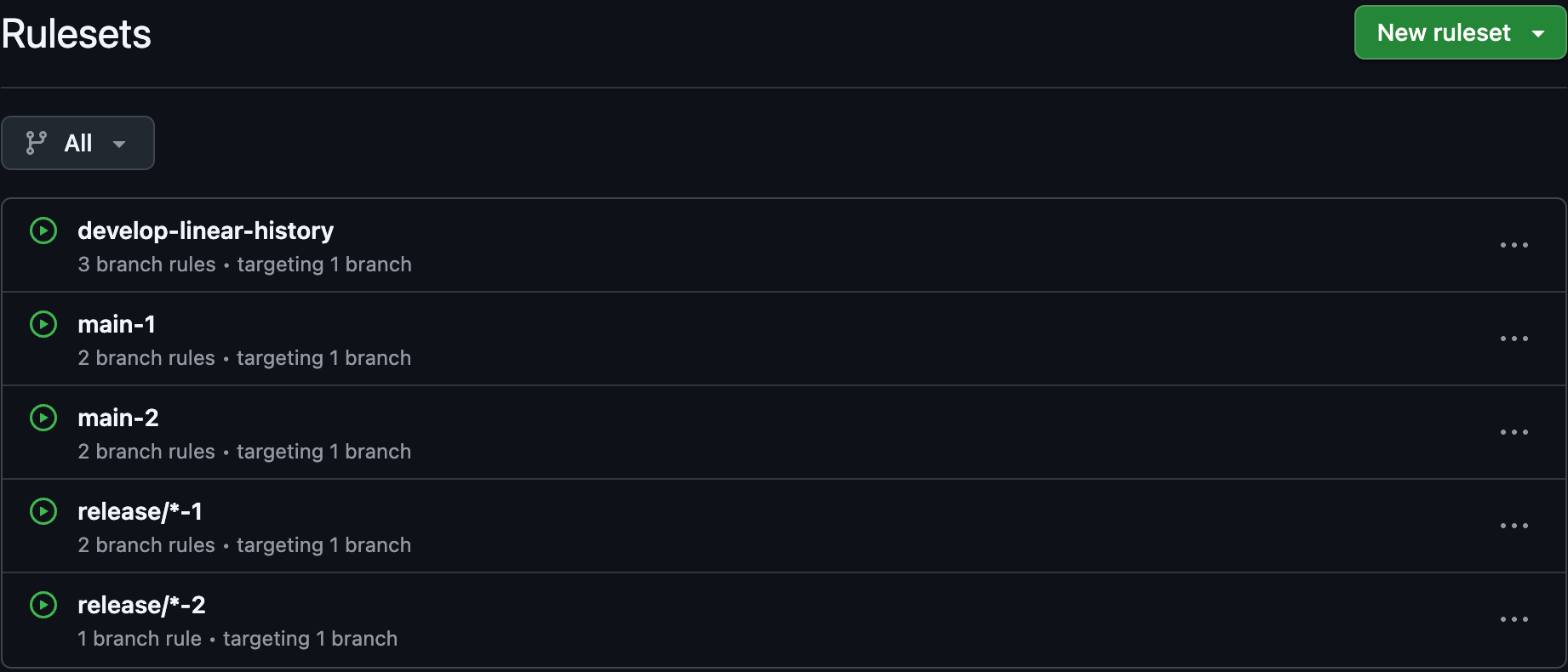
When I navigated to the Branches screen, all the original branch protection rules remained, and each showed the message This rule is fully covered by rulesets and can be safely deleted. along with a Delete button.
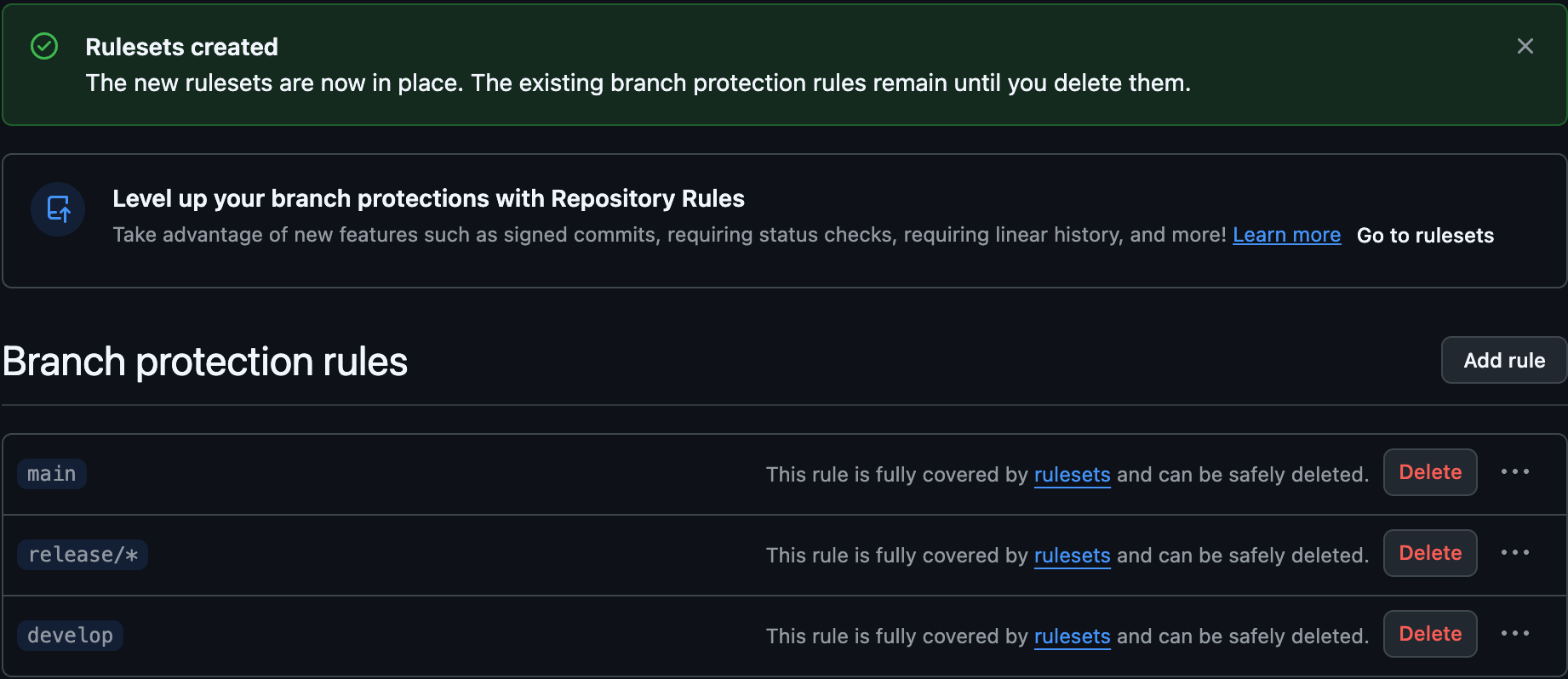
According to GitHub Docs, if the original rules are kept, both the branch protection and the Active ruleset are applied simultaneously, and changes must satisfy both. Keeping them ensures there is no gap in protection immediately after creating the rulesets. You can verify coverage on the Branches screen and then delete the original rules using Delete.
When importing the hotfix/* rule described below, I chose to delete. When there is only one target, the button appears in singular form as Delete branch protection rule, and the original rule disappears from the branch protection rule list at the same time the ruleset is created.
Conversation Resolution Is Converted as Part of the Pull Request Rule
GitHub Docs states that the conversion covers all branch protection types except Require conversation resolution before merging. The reason for the exclusion is that in rulesets, conversation resolution is part of the pull request rule and only applies when the pull request rule is enabled, so there is no one-to-one correspondence.
However, when I actually tried the bulk import, conversation resolution was also converted.
- For
main, which used it together with required approvals, it was carried over to the pull request rule inmain-2asrequired_review_thread_resolution: true - After the first import, I added
hotfix/*with only conversation resolution required and imported it. It was split into two rulesets:hotfix/*-1(no bypass, restrict deletions and force pushes) andhotfix/*-2(Repository admin bypass).hotfix/*-2contained a pull request rule with 0 required approvals (required_approving_review_count: 0,required_review_thread_resolution: true)
When importing hotfix/*, the following note appeared in Review import. The three rules converted earlier now show as Already covered by an existing ruleset at this point.
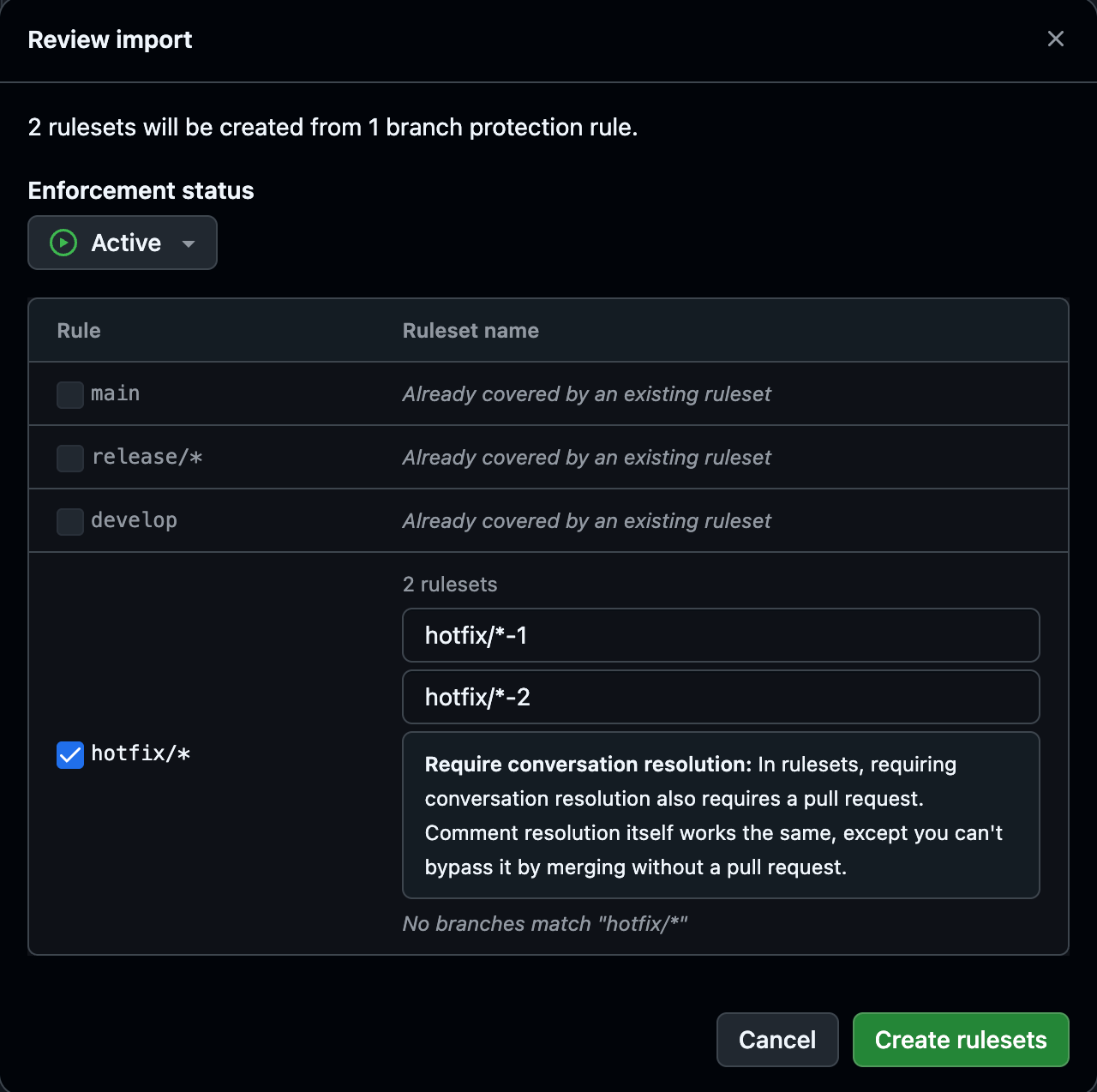
According to the note, requiring conversation resolution in a ruleset also requires a pull request, meaning it can no longer be bypassed by merging without going through a pull request. I didn't test actual pushes this time, but for branches that only required conversation resolution, it seems that after conversion, changes can only be merged via a pull request—except for administrators who are listed as bypass. When migrating branches that allowed direct pushes, this difference should be confirmed in advance.
Converting One Rule at a Time (Convert to ruleset)
The one-at-a-time conversion method added on 2026-08-11 is still available. Since I only tested the bulk import this time, this section is based on what GitHub Docs describes.
- Open the repository's Settings → Branches
- Find the target rule in the Branch protection rules list and click Convert to ruleset
- Set the ruleset name and review the changes in the New behavior section
- Optionally select Delete branch protection rule once migration is done, then click Create ruleset (or Create 2 rulesets if multiple will be created)
The Docs for non-Enterprise plans state that rulesets created this way are always Active. The Docs procedure does not include a step to review all rules already covered by existing rulesets at once. You can use this method to migrate specific rules first, and use bulk import to migrate an entire repository.
Summary
GitHub branch protection rules can now be bulk-converted to rulesets via Import branch protection rules in Settings → Rulesets as of 2026-10-20. The Review import screen lets you confirm the rulesets to be created and the rules already covered by existing rulesets, and you can decide whether to keep or delete the original rules—all in one flow.
When I tested on a public repository on the Free plan, one rule was split into two rulesets based on whether the administrator bypass was present. Although Evaluate appears in the dropdown, it cannot be created on the Free plan, and the error prompts an upgrade to Enterprise. Conversation resolution is documented as outside the scope of conversion, but in practice it is carried over as part of the pull request rule, making pull requests mandatory.
When migrating, it's safer to keep the original rules temporarily, verify coverage on the Branches screen, and then delete them to avoid any gap in protection. If you want to migrate only specific rules, the conventional Convert to ruleset is also available.
I hope this is helpful to someone.
Reference links:
- Bulk migrate branch protections to rulesets for a repository - GitHub Changelog
- Automatically migrate branch protection rules to repository rulesets - GitHub Changelog
- Converting branch protections to rulesets - GitHub Docs
- About rulesets - GitHub Docs
- About protected branches - GitHub Docs
- Create a repository ruleset - GitHub REST API
