
I tried GitHub Copilot for Xcode now that it supports Agent mode

This page has been translated by machine translation. View original
In May 2025, "Agent Mode" was added to GitHub Copilot for Xcode. This feature, which moved to public preview simultaneously with JetBrains/Eclipse versions, allows AI to edit multiple files and even automatically execute terminal operations.
In this article, I'll investigate how far we can utilize the Xcode extension without setting up an MCP server. The described behavior is based on version 0.35.0. I hope this will be useful for those who want to try it out easily.
Differences Between Ask Mode and Agent Mode
Here's a simple summary of the differences between Ask Mode and Agent Mode:
| Feature | Ask Mode | Agent Mode |
|---|---|---|
| Completion Unit | Line/function level within files, or file level | Entire project |
| Workflow | Interactive code generation with insertion at desired locations | 1. Input requirements 2. AI automatically executes Plan → Edit |
| Git Operations | Not possible | Can execute shell commands (e.g., git checkout -b) |
| Requirements | Copilot extension only | Copilot extension 0.35.0+ (MCP server is optional) |
Starting an MCP server enables GitHub API and external tool integration, but it's not necessary if you just want to try out the functionality locally. If you want to use it in combination with GitHub Copilot, GitHub MCP Server would be a good choice.
Testing Environment
- macOS 15.5 (24F74)
- Xcode 16.4
- GitHub Copilot for Xcode 0.35.0 (latest release at time of writing)
- GitHub Copilot Pro
Testing It Out
I wanted to add a notification screen to a personal app. Let's try adding a notification screen using Agent Mode as a test.
1. Update GitHub Copilot for Xcode to version 0.35.0 or higher
For installation/update methods, refer to "Installing GitHub Copilot for Xcode". I'll omit the details here.
2. Switch to Agent Mode in the Chat panel and send a prompt
- Select Editor → GitHub Copilot → Open Chat to open the Chat panel
- Switch the mode toggle at the bottom of the input field to Agent
- Paste the following specification and send it for execution
### Overview
Add a screen "InformationScreen" using SwiftUI.

### Requirements
* Work on the `feature/add-information-screen` branch
* Add InformationScreen
* Add InformationViewModel
* Screen title is "What's New" (localized)
* InformationScreen has list structure
* Notification items are managed by InformationViewModel
* If Information contains a url, display DisclosureIndicator and show the page in an in-app browser when tapping the item
* The information retrieval process will be implemented in another task, so it can remain unimplemented
* Implement unit tests for InformationViewModel
* Unit tests should be for iOS 17+, don't use XCTest, use Testing framework

### Acceptance Criteria
* Successful build (iOS 16+)
This specification has been repeatedly modified to achieve the intended results, so it's not well organized, but I'm sharing exactly what I used for testing.
3. AI Execution Results
The Agent automatically executed the following:
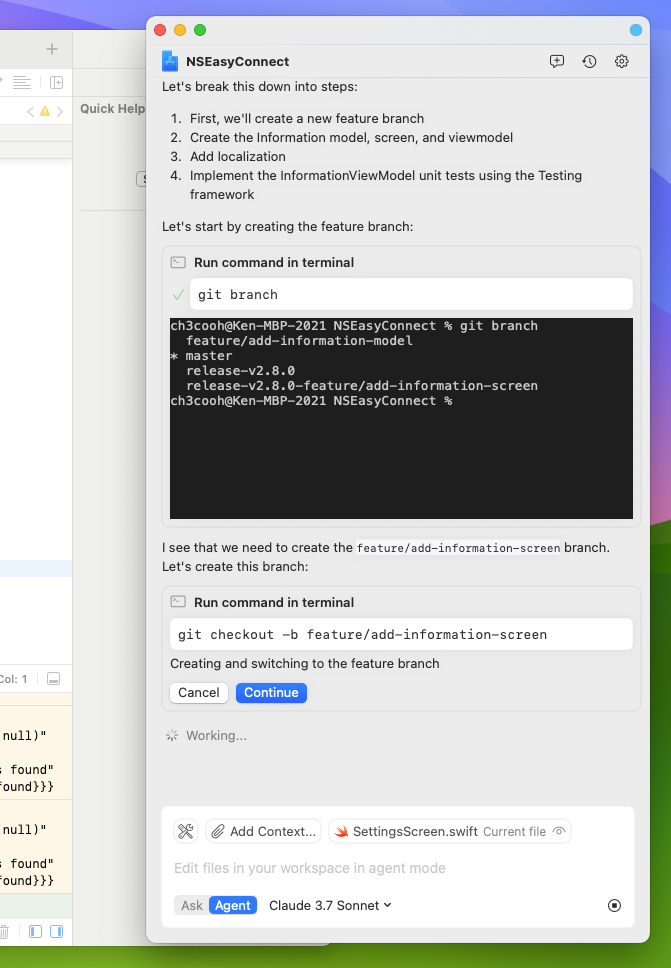
git checkout -b feature/add-information-screen- Generated 4 files including
InformationItem.swift - Added unit tests
The image below shows a dialog asking for permission to execute the git command while creating the working branch, requiring you to select "Continue".
4. Build Results and Manual Error Fixes
Unfortunately, the automatically generated code couldn't be built right away. I made the following error corrections:
| Error | Cause | Solution |
|---|---|---|
Cannot find 'SFSafariViewController' in scope |
Missing import SafariServices |
Added to the beginning of the file |
Call to main actor-isolated initializer in nonisolated context |
UI operations need to be on MainActor | Added @MainActor to the ViewModel |
After these corrections, the build was successful, and the notification screen worked.
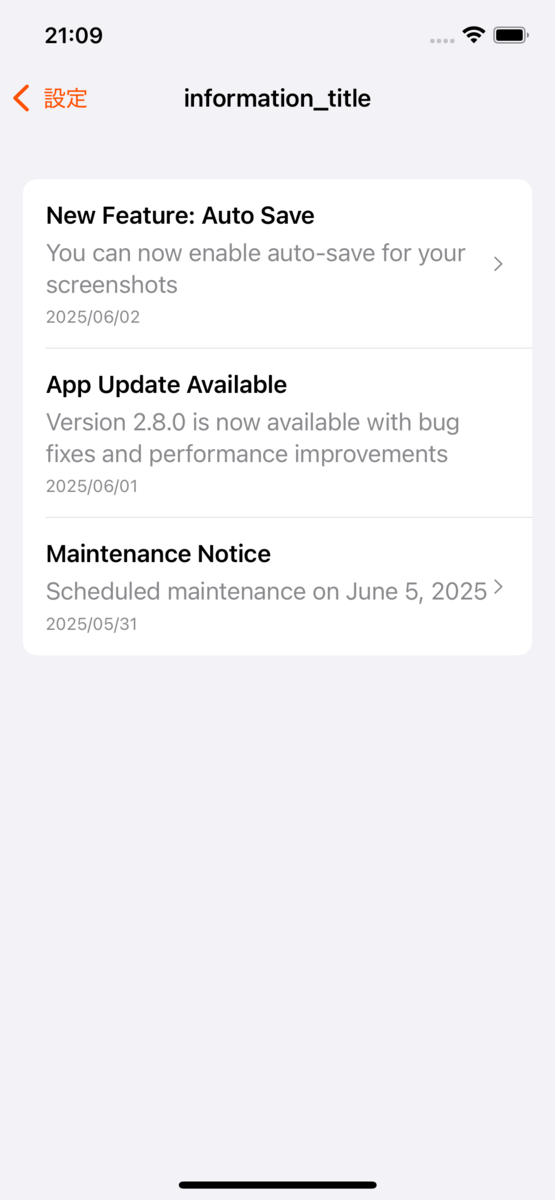
The generated code is useful as a framework, but fine-tuning details still remains the developer's responsibility.
5. Models Available in Agent Mode
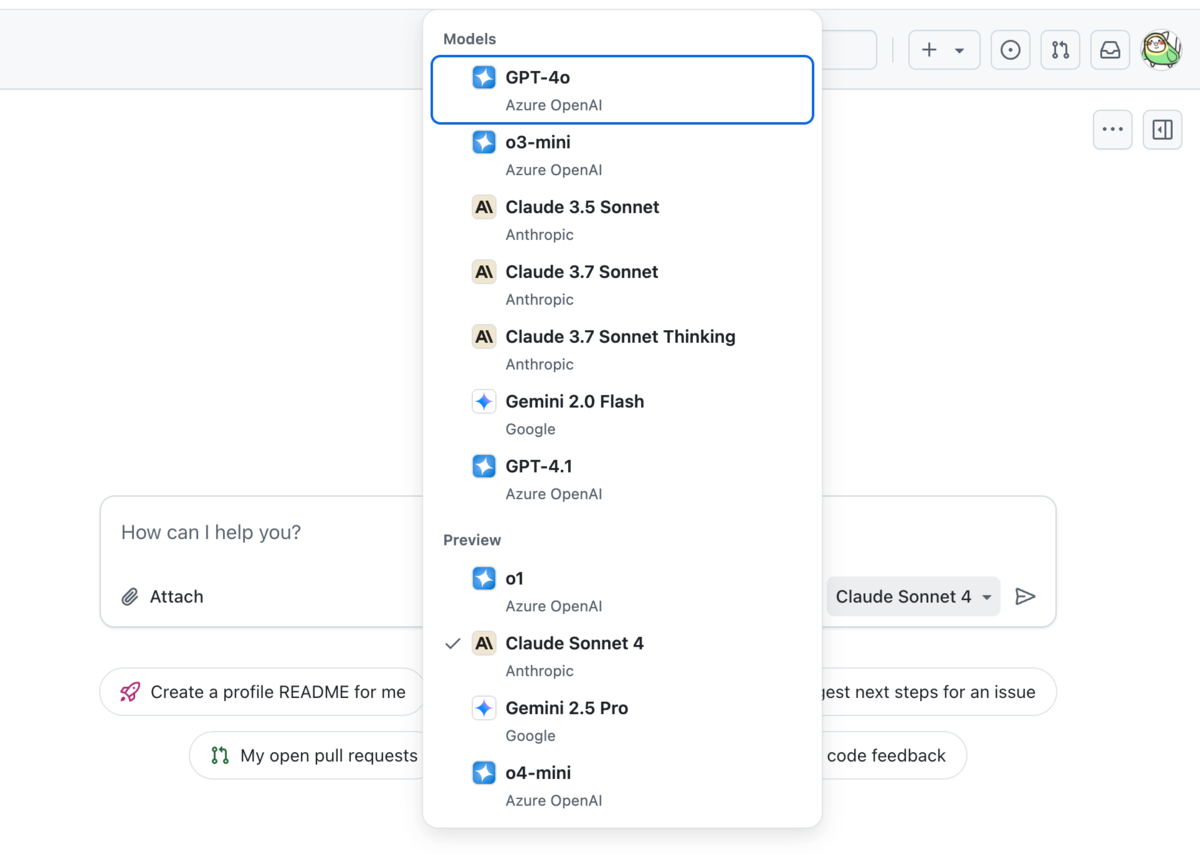
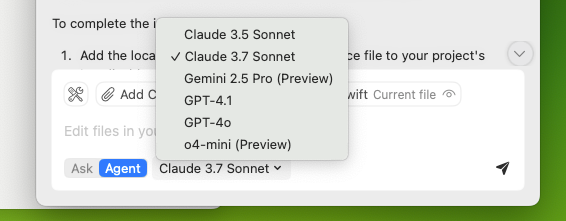
While the web version of GitHub Copilot and Ask mode allow selection of high-performance models, Agent mode currently seems to have fewer model options. Perhaps due to this difference, the quality of the generated code showed more variation than in Ask mode. I hope future updates to GitHub Copilot for Xcode will increase the model selection options.
Web version of GitHub Copilot
Ask Mode in GitHub Copilot for Xcode
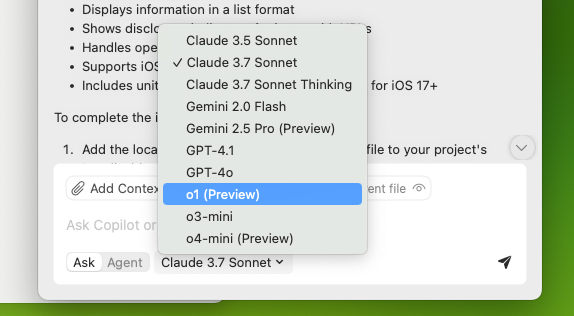
Agent Mode in GitHub Copilot for Xcode
Impressions
- From branch creation to multiple file generation is semi-automatic, offering high productivity
- As described in the official blog, I expected it to repeat the feedback loop of fix→build→test execution and automatically fix build errors, but it didn't work well in my environment
- If the prompt (specification) is too abstract, AI doesn't behave as intended. It's better to write prompts in great detail and specificity
- Rather than generating everything at once, it's better to divide tasks into smaller pieces like "just add the model," "just add the screen," or "just add tests"
- Personally, I felt Agent mode is ideal for initial implementation of "tasks I'm not excited about." A realistic approach would be to use the generated code as a base and then rewrite it appropriately. While I see posts on social media claiming "I made an app or game completely automatically!", the current GitHub Copilot for Xcode hasn't reached that level yet. Whether this issue can be resolved by combining it with an MCP server remains to be seen
Summary
Agent mode, added in GitHub Copilot for Xcode 0.35.0, is likely the first step from chat completion to autonomous work. It can automate branch operations, multiple file editing, and simple test addition, making it practical enough for creating feature "drafts." However, completing builds and tests and resolving errors still require human intervention.
The next step would be to test accuracy with GitHub MCP Server or other MCP servers in workflows that include repository operations and external API integration. When considering implementing Agent mode, it's good to start with small tasks like "adding a single screen" or "generating model classes" and gradually expand the scope of application.