
What We Learned from the OVHcloud CLI Release Replacement Incident: Tamper Protection for GitHub Releases - Immutable Releases and gh release verify-asset

This page has been translated by machine translation. View original
Hey there! I'm Yuji Nishimura from the Operations team!
On October 19, 2026, the binaries for previously published versions v0.11.0–v0.15.0 in the OVHcloud CLI GitHub Releases were replaced with versions embedding a module that steals secrets. The source code, tags, and CI remained unchanged. In some releases, even checksums.txt was replaced, meaning that verifying whether the hash matched the published one would not have revealed the tampering. This article, based on the OVHcloud advisory and Issue #300 that triggered the discovery, summarizes the settings and verification methods that both distributors and consumers of binaries via GitHub Releases should review.
Conclusions First: What to Check and How to Respond
| What to Check | Action |
|---|---|
| Did you download or update and run v0.11.0–v0.15.0 of OVHcloud CLI between 12:47–14:21 UTC on October 19? | Treat secrets on that machine as compromised, revoke and reissue them, delete the binary, and reinstall v0.16.0 or later |
| Is immutable releases enabled for repositories you distribute? | Enable it in the repository or organization settings. Releases published before enabling it are not protected, so update the version you point users to with a release published after enabling it |
| Are the hashes of binaries fetched in CI or install scripts pinned somewhere separate from the release? | Pin the hash you obtained initially by writing it into your own repository's CI definition or similar. If the distribution source uses immutable releases, verify using GitHub CLI's gh release verify-asset |
What Happened
According to the advisory and Issue #300, the sequence of events was as follows. Times have been converted to UTC (the advisory uses UTC+2).
| Date/Time (UTC) | Event | Source |
|---|---|---|
| 2025-10-20 | The developer's personal MacBook receives the extension "color-picker-universal 2.8.91" | Advisory (identified as a VS Code extension by StepSecurity) |
| 2026-03 | Multiple personal repositories on the same account are compromised | Advisory |
| 2026-10-19 12:47 | The Darwin binary for v0.15.0 is replaced | Advisory |
| 2026-10-19 12:57 | All binaries for v0.15.0 are replaced | Advisory |
| 2026-10-19 13:30 | Replacement of binaries for v0.11.0–v0.15.0 is complete | Advisory |
| 2026-10-19 13:50 | A user reports it in a GitHub Issue | Advisory |
| 2026-10-19 14:21 | The replaced binaries are removed | Advisory |
| 2026-10-19 17:16 | v0.16.0 with a signed tag is published as an immutable release | Signed tag from advisory, immutable from Issue #300 |
| 2026-10-20 | Advisory GHSA-862f-55f5-vmvw is published | Advisory |
The time at which the replacements were completed varies by source. The advisory states that the replacement of v0.11.0–v0.15.0 was completed by 13:30 UTC. Issue #300 records the replacement of v0.13.0–v0.15.0 as occurring around 12:47–13:12 UTC, and StepSecurity's analysis states that including v0.11.0–v0.12.0, the replacements were complete by 13:12 UTC.
- Scale: According to the advisory, the malicious binaries were publicly available for approximately one and a half hours (the advisory says "1h33"), and there were approximately 250 downloads.
- Cause: The advisory states at the outset that the main issue was that "release immutability" was not configured on the repository. In the "Root cause" section, it explains how a compromised developer's GitHub account was used to replace release binaries. It states that what was used for the replacements was not the developer's personal MacBook, but stolen keys (the original text says "stolen keys"). No compromise of company machines was confirmed.
- What remained unchanged: According to the advisory, the source code and build chain were not affected. The reporter of Issue #300 confirmed that the v0.15.0 tag still pointed to the original commit. The Go module proxy (the distribution source used by
go installand similar) was also serving that commit. - Affected distribution paths: StepSecurity's analysis states that Homebrew,
go install, building from source, and Docker images were not affected. - Unaffected versions: v0.10.0 and earlier, and v0.16.0 and later. Users who had already downloaded v0.11.0–v0.15.0 before the replacement window were also unaffected (advisory).
How Was It Detected?
The reporter of Issue #300 had pinned the SHA-256 of ovhcloud-cli_Linux_arm64.tar.gz in their CI. When CI failed due to a hash mismatch after the replacement, they noticed that an asset from a release published weeks earlier had been tampered with (as described in Issue #300).
The reporter then ran go version -m on the replaced binary and, from the embedded build information, demonstrated the following:
- The version was
v0.15.1-0.20261013083505-5ead8ef9b43d+dirty, pointing to a commit from October 13, after the release vcs.modified=true(built with uncommitted changes)- The ldflag (linker flag) in
.goreleaser.yamlthat embeds the version string at build time was absent
From this, the reporter concluded it was not built through the release pipeline, but built locally.
The Attack Flow
Based on the content of the advisory and Issue #300, I created a diagram of the sequence of events. The diagram is a conceptual illustration I created myself and is not an official architecture diagram.
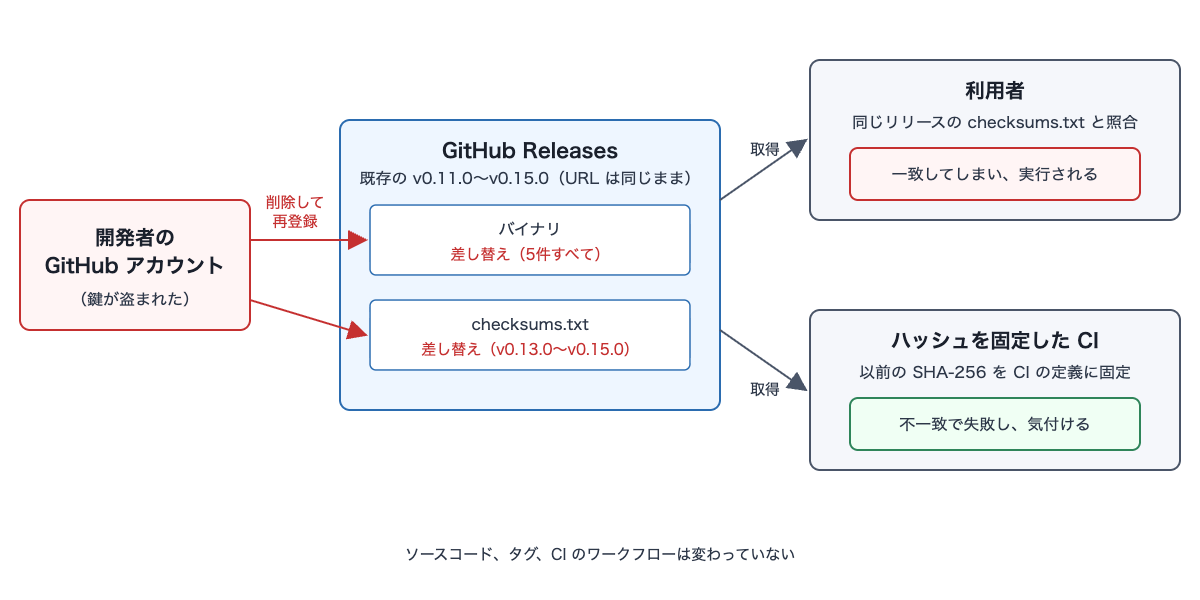
Because users receive the replaced binary and the matching checksums.txt from the same URL, the verification passes. Only CI that had pinned hashes in a separate location caught the mismatch.
- Preconditions: The attacker has credentials for an account that can modify repository releases. The target releases are not configured as immutable releases.
- Intrusion and exploitation: Without creating new releases or tags, only the assets of existing releases are replaced. For v0.13.0–v0.15.0, the
checksums.txtin the same release was also replaced, updating the published hash to match the replaced files (Issue #300, StepSecurity). - Impact: On machines that downloaded and executed the binary from the same URL, secret collection runs in addition to the normal CLI functionality. According to the advisory, the targets include:
- Editor and AI assistant databases and configurations (VS Code, Cursor, Continue, Sourcegraph Cody, OpenCode, Hermes, Claude, etc.)
- AWS / Google Cloud / Azure / DigitalOcean credentials
- Docker / Kubernetes configurations, SSH keys, npm, Terraform,
.netrc, git global configuration
Why This Works
Published assets can be changed if you have write access
Assets in GitHub Releases can be deleted and re-uploaded after publication as long as immutable releases is not enabled. The REST API documentation states regarding editing assets: "Users with push access to the repository can edit a release asset." What can be changed by editing is the name, label, and similar metadata; to change the file content, you delete the old file and re-upload it under the same name. Because the release URL does not change, users appear to be retrieving the same file from the same location as always.
The checksums.txt in the same release can be replaced with the same permissions
If checksums.txt is stored as an asset in the same release, anyone with permission to replace the binary can also replace checksums.txt. Verifying against a hash fetched from the same location confirms the file was not corrupted in transit, but does not confirm it has not been replaced by the publisher. The reason it was caught this time was that the reporter had pinned the previously obtained hash in a separate location (their own CI) rather than the release.
It does not appear in source, tag, or CI history
The replacement only requires deleting and re-uploading assets, so it leaves no trace in commit history or Actions execution history. Monitoring the repository history would not reveal it.
Immutable releases only protect releases published after it is enabled
Enabling immutable releases prevents assets of published releases from being modified or deleted, and prevents tags from being moved. However, the settings documentation states: "Be aware that immutability will only apply to future releases." Releases published before enabling it remain in a state where they can be replaced even after enabling.
Checking Whether Your Environment Is Affected
If you use OVHcloud CLI
- Check whether you downloaded or updated and ran v0.11.0–v0.15.0 between 12:47–14:21 UTC on October 19.
- Without running the extracted
ovhcloudbinary (orovhcloud.exeon Windows), compute its MD5 (macOS:md5 ovhcloud, Linux:md5sum ovhcloud) and compare it against the values in the advisory appendix (table below). The values are the MD5 of the binary itself, not of the downloaded tar.gz or zip.
| Target | MD5 (as listed in advisory) |
|---|---|
| Darwin arm64 | 6f2f086239f3d88eb2750e871901927d |
| Darwin x86_64 | 347e65eb7f2d78d1c6872690272a6cc3 |
| Linux arm64 | 01f57206d37c28cf711677f612052913 |
| Linux x86_64 | 301bff0b51980b9e76c93633e7cfd3bd |
Windows x86_64 (ovhcloud.exe) |
6a3cf153338c416169cda2fe704c8848 |
- Check whether any folders starting with
envchecker-remain in a temporary directory. According to the advisory, this folder is not deleted after execution and serves as an indicator of impact. - The advisory lists
hxxps://45.32.148[.]174/uploadas the destination URL (in the IOC list as45.32.148[.]174:443) and notes that the attacker could change this URL at any time.
The advisory recommends the following actions if affected: treat the secrets on that machine as compromised and revoke or invalidate them, delete the binary, and reinstall v0.16.0 or later.
If you distribute binaries via GitHub Releases
- Check whether "Enable release immutability" is enabled under Settings > "Releases" in the repository. If managed under an organization, also check the organization's Settings > "Repository" > "General" > "Releases". If the policy is set to "All repositories" or "Selected repositories," it is enabled for the target repository (see the settings documentation).
- Whether the version you point users to is immutable can be confirmed with
gh release verify. The following command assumes you are authenticated viagh auth login.
gh release verify v1.2.3 --repo OWNER/REPO
-
In the Releases web page, immutable releases are labeled "Immutable" (see the verification documentation).
-
Whether an existing release's assets have changed since publication can be assessed from the
created_at,updated_at,uploader, anddigestfields returned by the REST API for assets. Each field is listed in the response items of the REST API documentation. The command below displays these values alongside the tag name and release publication date (published_at) for each asset.
gh api "repos/OWNER/REPO/releases?per_page=100" --paginate \
  --jq '.[] | .published_at as $p | .tag_name as $t | .assets[] | [$t, $p, .name, .created_at, .updated_at, .uploader.login, .digest] | @tsv'
The following interpretation is my own summary based on the documentation fields.
- Since replacing file contents requires deletion and re-upload, a replaced asset will have a newer
created_at. An asset created a significant time after the release was published may have been added or replaced post-publication. However, in tools that publish releases and then upload assets one by one, differences of a few seconds to a few minutes are normal. uploadercan help identify accounts that do not normally create releases. In this incident as well, theuploaderof the replaced assets differed from the account that uploaded the original assets (Issue #300). However, if the account that normally uploads releases has itself been taken over,uploaderalone will not reveal the issue.digestcannot show changes from a single retrieval alone. You can only detect replacements by comparing it against a previously recorded hash (such as a value pinned in CI). For older assets, the value may benull(appearing as blank in the output).
If CI or install scripts fetch binaries from GitHub Releases
- Check whether you are verifying hashes, and if so, where the hash for verification comes from. If you are only fetching the hash from the
checksums.txtin the same release each time, it will match the replaced file as described above. - If the distribution source uses immutable releases, you can verify a local file with
gh release verify-asset. This command verifies that the file's digest matches what is covered by the release attestation, and that the attestation is for the specified release (see the GitHub CLI manual). A release attestation is a signed record that includes the tag, commit SHA, and assets (see the immutable releases documentation).
gh release verify-asset v1.2.3 ./my-tool_Linux_x86_64.tar.gz --repo OWNER/REPO
According to the verification documentation, the "Source code" zip and tarball in a release are generated at download time and therefore cannot be verified with this command.
How to Protect Against This
As a distributor
- Enable immutable releases (the settings location to check is described above).
- The same documentation recommends creating a release as a draft, attaching all assets, and then publishing it. This is because assets are locked at the point of publication.
- When an immutable release is published, a release attestation is automatically created, allowing users to verify with
gh release verify-asset. - Switch the version you point users to a release published after enabling immutable releases. OVHcloud enabled immutable releases across the entire organization (advisory) and published v0.16.0 as an immutable release, making it the latest version (Issue #300).
As a consumer
- Pin the hash you obtained initially in a location separate from the release, such as CI or package manager definitions.
- If the distribution source uses immutable releases, incorporate
gh release verify-assetas described above into your retrieval procedure. - Some distribution paths were unaffected in this incident. As noted above, installation via Homebrew was unaffected; according to StepSecurity, Homebrew's cask had the SHA-256 pinned. If there is an installation path other than manual download, using that is another option.
Developer accounts and machines
The advisory describes a compromised extension on the developer's personal machine as the starting point of the incident. It does not directly state that the keys used for the replacements were stolen from that machine. Nevertheless, the following two points are worth reviewing:
- Which machines retain keys or tokens for accounts with write access to the repository
- Which extensions are installed on those machines
Indicators for detection
- If a CI job with pinned hashes starts failing on a dependency you have not changed, first suspect that the release assets from the distribution source have been replaced.
- Existing releases can be inspected using the REST API verification method described above.
- For Go binaries, run
go version -mto check build information and look for discrepancies with the release tag or build configuration (the three indicators from this incident are described above). - The organization audit log includes events for enabling and disabling the immutable releases setting (
repo.immutable_releases_settings_enabled/repo.immutable_releases_settings_disabled), as well as events for changing the organization policy (org.update_immutable_releases_settings_policy). These can be used to monitor whether the setting has been disabled. However, the event list did not appear to include events for adding, deleting, or replacing assets.
Summary
- In the OVHcloud CLI incident, binaries for five published releases were replaced using a compromised developer account, and in at least three releases,
checksums.txtwas also replaced. The source, tags, and CI remained unchanged, and the incident was discovered because of hash pinning in CI. - Verifying against a hash placed in the same release will not detect a replacement. Distributors should enable immutable releases, and consumers should either pin hashes in a location separate from the release (such as their own repository's CI definition), or verify against the release attestation using
gh release verify-asset. - Immutable releases only protect releases published after the feature is enabled. Once enabled, you must also update the version you point users to with a release published after enabling it.
I hope this is useful to someone.
Reference Links:
- ovhcloud-cli security incident - October 19th, 2026 (GHSA-862f-55f5-vmvw)
- Release assets of v0.13.0–v0.15.0 replaced (ovh/ovhcloud-cli Issue #300)
- OVHcloud CLI Compromised via GitHub Release Swap: Detonating the Real GlassWorm Loader and What We Found (StepSecurity)
- Immutable releases (GitHub Docs)
- Preventing changes to your releases (GitHub Docs)
- Verifying the integrity of a release (GitHub Docs)
- gh release verify-asset (GitHub CLI manual)
- REST API endpoints for release assets (GitHub Docs)
- Audit log events for your organization (GitHub Docs)
- gh release verify (GitHub CLI manual)
- go version (cmd/go)