
Private repository git fetch origin returns 403 — the pitfalls of URL-embedded PATs and countermeasures

This page has been translated by machine translation. View original
Introduction
When setting up CI/CD scripts or release automation in GitHub Organization private repositories, you may encounter an error like this:
remote: Write access to repository not granted.
fatal: unable to access 'https://github.com/YOUR-ORG/your-repo.git/': The requested URL returned error: 403
git push succeeds, but the git fetch origin immediately after returns a 403. This seemingly contradictory behavior is caused by the combination of a push method that embeds a PAT (Personal Access Token) in the URL and an origin remote that has no authentication credentials.
This article explains why this problem occurs and introduces the $AUTHED_ORIGIN pattern for safely performing git operations on private repositories.
Prerequisites
- GitHub Organization private repository
- PAT managed with 1Password (not stored in git config)
- Token retrieved via a custom wrapper function for the Organization (
gh-org) using theghCLI (described later) - macOS / zsh
What Is Happening
Typical push script
When pushing to an Organization repository, git push origin main fails with an authentication error, so a method of embedding the PAT in the URL is used instead.
source ~/.zshrc
GH_TOKEN=$(gh-org auth token)
AUTHED_ORIGIN=$(git remote get-url origin | sed "s|https://|https://YOUR_USERNAME:${GH_TOKEN}@|")
git push "$AUTHED_ORIGIN" main
Replace YOUR_USERNAME with your GitHub username. This approach itself works fine. However, URL-based push has a side effect: local tracking refs are not updated. After pushing, running git status will show "Your branch is ahead of 'origin/main' by N commits" even though the push succeeded.
Getting a 403 when trying to update refs with fetch
To resolve this side effect, git fetch was being run immediately after the push.
git push "$AUTHED_ORIGIN" main && git fetch origin # ← 403 here
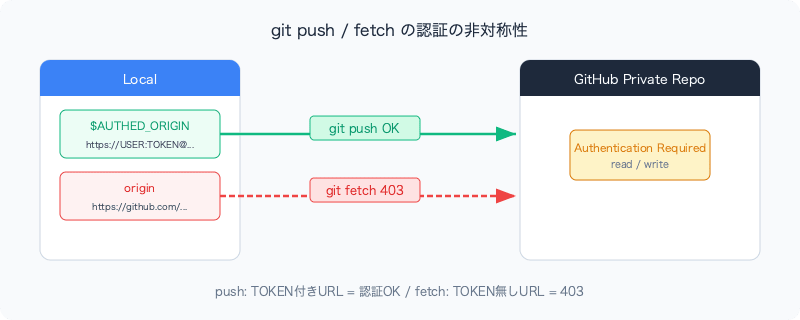
git push succeeds because it uses $AUTHED_ORIGIN (the URL with the token). However, git fetch origin uses the remote URL registered in git config as-is.
# origin remote URL (no token)
https://github.com/YOUR-ORG/your-repo.git
For public repositories, fetch works without authentication, but private repositories require authentication even for read access. As a result, a 403 is returned.
Diagram of the problem
Solution: Use $AUTHED_ORIGIN for all git operations
The fix is simple. Replace all occurrences of origin with $AUTHED_ORIGIN.
source ~/.zshrc
GH_TOKEN=$(gh-org auth token)
AUTHED_ORIGIN=$(git remote get-url origin | sed "s|https://|https://YOUR_USERNAME:${GH_TOKEN}@|")

# Use the same authenticated URL for both push and fetch
git push "$AUTHED_ORIGIN" main && git fetch "$AUTHED_ORIGIN"
The same applies to pull / fetch --prune
The same rule applies when running pull or prune in release scripts.
# NG: origin has no token → 403
git pull origin main && git fetch --prune origin

# OK: consistently use the authenticated URL
git pull "$AUTHED_ORIGIN" main && git fetch --prune "$AUTHED_ORIGIN"
Why not set the token in origin
You might wonder, "Why not just set the token-embedded URL with git remote set-url origin?" However, this approach is avoided for the following reasons:
| Method | Pros | Cons |
|---|---|---|
Embed token with git remote set-url |
Can use origin as-is for subsequent operations |
Token remains in .git/config as plaintext |
Environment variable $AUTHED_ORIGIN |
Token is not left in any file | Must explicitly specify $AUTHED_ORIGIN for all operations |
| git credential helper | Can use origin as-is, token managed in keychain |
Complex to switch between Organization PAT and personal PAT |
The $AUTHED_ORIGIN approach—retrieving the Organization PAT managed in 1Password each time and using it as a one-time credential—is the most secure from a security standpoint. The tradeoff is the effort required to replace origin with $AUTHED_ORIGIN throughout your scripts.
The && chain trap
There is another easy-to-miss issue. If git fetch origin fails with a 403, subsequent commands in the && chain will not be executed.
# fetch fails with 403 → tags push never runs
git push "$AUTHED_ORIGIN" main && git fetch origin && git push "$AUTHED_ORIGIN" --tags
When this problem was actually encountered, the result was a situation where "the push succeeded but the tags were not pushed." The error message reported the 403 from git fetch origin, but it was easy to miss that the tags had not been pushed.
As a countermeasure, either separate the tag push from the fetch, or fix the fetch to use $AUTHED_ORIGIN.
# Fix the fetch (recommended)
git push "$AUTHED_ORIGIN" main && git fetch "$AUTHED_ORIGIN"
git push "$AUTHED_ORIGIN" --tags

# Or, allow fetch failures
git push "$AUTHED_ORIGIN" main
git fetch "$AUTHED_ORIGIN" || true
git push "$AUTHED_ORIGIN" --tags
Token retrieval pattern for the gh CLI wrapper
For reference, here is the pattern for the gh-org wrapper that retrieves the Organization PAT from 1Password.
# Wrapper to run gh with an Organization PAT managed by 1Password
gh-org() {
  GH_TOKEN=$(op read "op://Private/GitHub Org PAT/token") gh "$@"
}
# Retrieve the token
GH_TOKEN=$(gh-org auth token)

# Build the authenticated URL
AUTHED_ORIGIN=$(git remote get-url origin | sed "s|https://|https://YOUR_USERNAME:${GH_TOKEN}@|")
gh-org auth token runs gh auth token with the GH_TOKEN environment variable set, so the PAT retrieved from 1Password is returned directly.
Summary
| Situation | Cause | Solution |
|---|---|---|
git fetch origin returns 403 |
Unauthenticated fetch on a private repository | Use $AUTHED_ORIGIN |
git status shows "ahead" after push |
URL-based push does not update tracking refs | Run git fetch "$AUTHED_ORIGIN" after push |
Subsequent commands in && chain not executed |
Chain interrupted by fetch failure midway | Fix the fetch or separate it |
The key point is the straightforward fact that "private repositories require authentication even for read access." The asymmetric setup—using an authenticated URL only for git push while using the plain origin for git fetch—was the root cause of this problem.
If you adopt the method of embedding the PAT in the URL, make sure to consistently use $AUTHED_ORIGIN for all push / fetch / pull operations.