
I tried masking sensitive strings in text using AWS Glue and Snowflake AI_REDACT

This page has been translated by machine translation. View original
This is Suzuki from the Data Business Division.
Unstructured data such as conversation history may contain personal information such as names, phone numbers, email addresses, and physical addresses.
There are situations where you want to mask this information before sending it to an LLM or sharing it internally, but compared to English, there are fewer options available for Japanese.
This time, using the same validation data, I tested masking with AWS Glue Job's Detect PII transform and Snowflake Cortex AI's AI_REDACT function.
Introduction
Unstructured text may contain risky strings including personal information. Snowflake's Dynamic Data Masking and AWS Lake Formation's column/row/cell-level controls are mainly suited for access control/masking at the column, row, or cell level. On the other hand, with unstructured text such as conversation history, there are cases where you want to hide only specific portions—such as names, phone numbers, and addresses—rather than the entire sentence, while using the remaining context for analysis.
When masking in combination with S3 on Snowflake on AWS, the following two features are candidates for performing this processing.
- Rule/pattern-based detection
- Detects phone numbers, email addresses, physical addresses, etc. based on regular expressions and pre-defined PII entities on the service side
- Example: AWS Glue Detect PII transform
- Detects phone numbers, email addresses, physical addresses, etc. based on regular expressions and pre-defined PII entities on the service side
- LLM/AI-based detection
- Detects personal and sensitive information in unstructured text while taking context into account
- Example: Snowflake Cortex AI_REDACT
- Detects personal and sensitive information in unstructured text while taking context into account
AWS Glue's Detect PII transform can detect PII at the row or column level from Glue Studio visual jobs or scripts, and you can choose actions such as editing or hashing.
Snowflake's AI_REDACT is one of the Cortex AI functions. In redact mode, it replaces detected information with placeholders, and in detect mode, it identifies detection positions. Selective editing by specifying detection categories is also available.
Preparing Validation Data
Sample CSV
For this validation, I prepared a CSV with a text column containing text resembling inquiries and operator notes. It includes personal information (fictitious, AI-generated) mixed into free-form Japanese text, such as names, phone numbers, email addresses, dates of birth, addresses, and IP addresses.
record_id,text
1,"問い合わせ内容:こんにちは、私の名前は山田太郎です。電話番号は090-0123-4567、メールアドレスはtaro.yamada@example.comです。クラスメソッドに所属しています。生年月日は1988年4月15日、住所は東京都架空区Example町1-2-3 Exampleマンション101号室です。最終アクセス元IPは203.0.113.45でした。"
2,"通販の再配達日変更。氏名:佐藤花子 / 生年月日:1985/03/17 / 携帯:070-0123-4567 / 固定電話:03-3000-1234 / 配送先:神奈川県Example市中央区本町2-4-6 / 登録メール:hanako.sato@example.co.jp / 受付端末IP:198.51.100.22。不在票が投函されたため、明日以降の再配達希望。オペレーター対応メモをそのまま社内チャットに貼りたい。"
3,"旅行予約の宿泊者名義確認。氏名:鈴木一郎、生年月日:1979/11/30、連絡先 090-0123-4568、メール ichiro.suzuki@example.jp、宿泊先 大阪府Example市北区Example町3-3-3 Exampleホテル、折返し先 03-3000-1234。予約確認メールの内容を海外LLMで要約してよいか、ゲストから確認あり。IVR通過時の端末IP 192.0.2.10。"
Summary of Included Personal Information
The main personal information included in the validation data is as follows.
| Category | Example |
|---|---|
| Name (Japanese) | Yamada Taro, Sato Hanako, Suzuki Ichiro |
| Mobile phone number | 090-0123-4567, 070-0123-4567 |
| Landline phone number | 03-3000-1234 |
| Email address | taro.yamada@example.com |
| Date of birth | April 15, 1988, 1985/03/17 |
| Address (Japan) | 1-2-3 Example-cho, Kako-ku, Tokyo … |
| IP address | 203.0.113.45 |
| Company name | Classmethod |
Company names are not personal information, but assuming there are cases where you don't want them to remain in conversation history, we treat them as masking targets here.
1. Masking with AWS Glue Detect PII
I validated the flow of reading a CSV from S3 and masking PII in the text column using the Detect PII transform in a Glue Job.
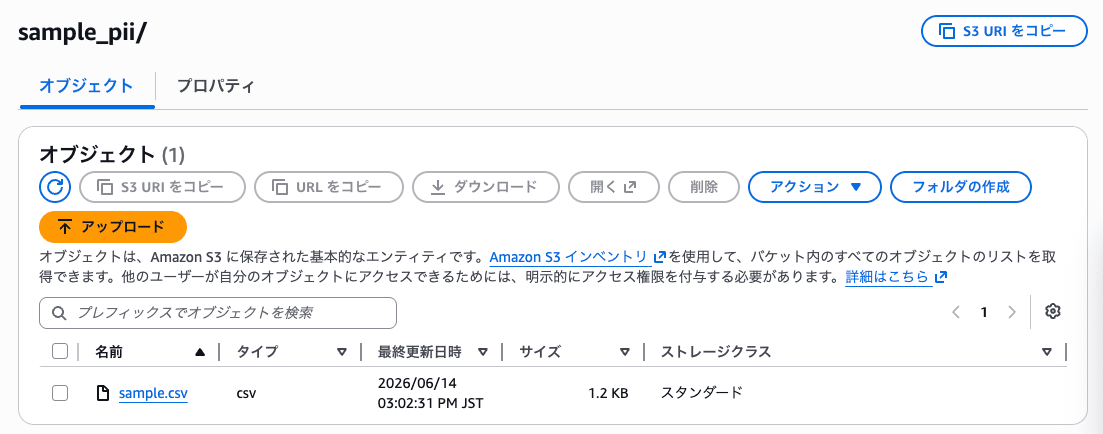
1. Data Placement
I uploaded the validation CSV to an S3 bucket.
2. Processing with Built-in Patterns
Creating a Job
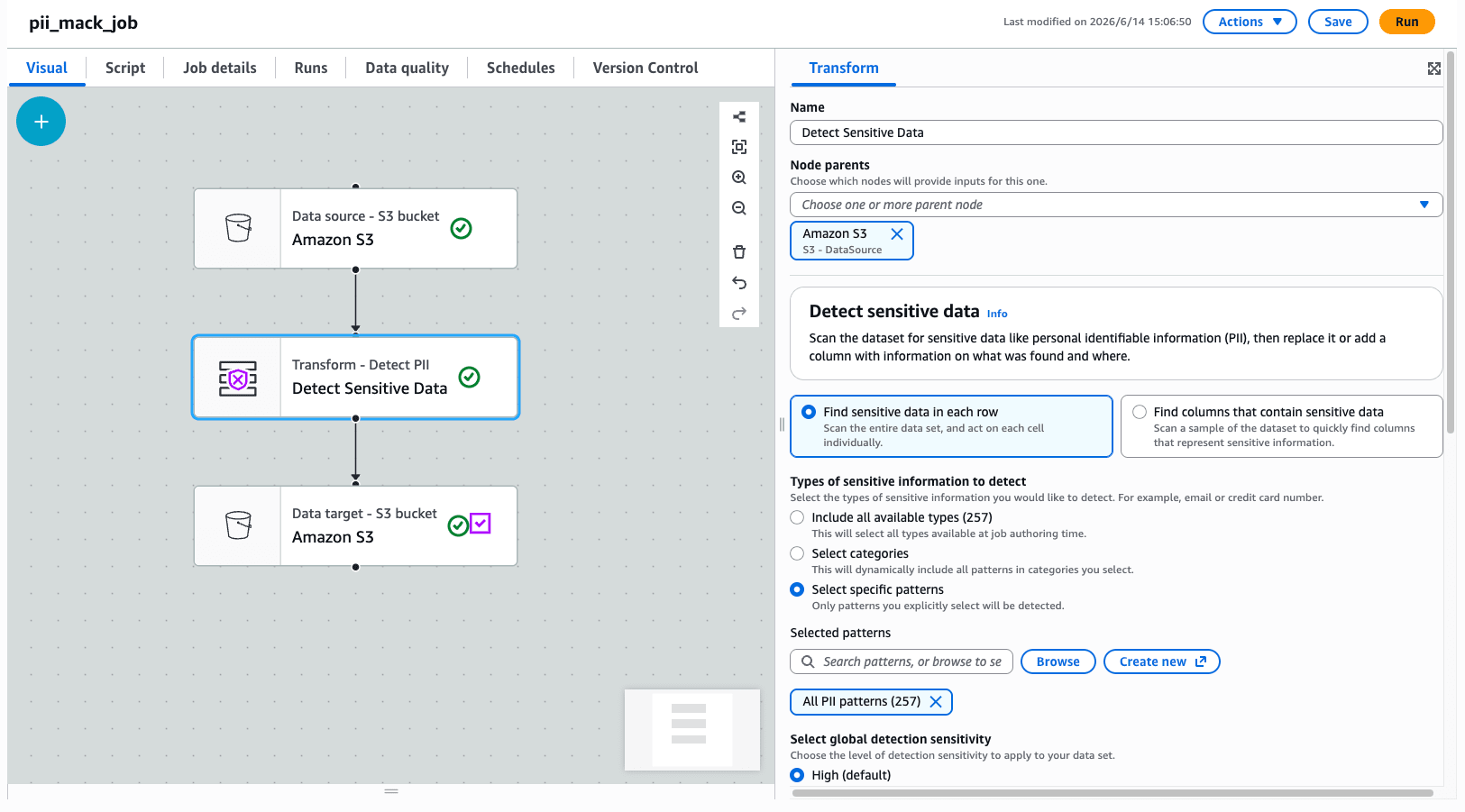
I created a job from Glue Studio with a configuration of source (CSV on S3) → Detect PII transform → target (S3, etc.).
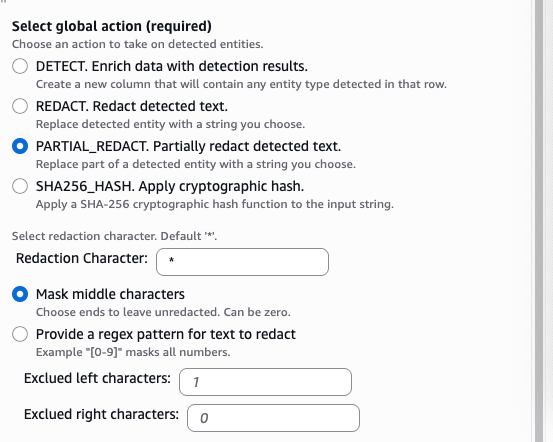
This time, I selected Find sensitive data in each row and detected with all patterns. I set the global detection sensitivity to High since we're dealing with PII, and configured PARTIAL_REDACT. Partially redact detected text. under Select global action to replace portions of detected text.
Job Execution and Results
I ran the job and checked the output data.
While phone numbers were masked, I found that quite a few things like names were missed.
As expected, the company name in the first record was not masked either.
{
    "record_id": "1",
    "text": "問い合わせ内容:こんにちは、私の名前は山田太郎です。電話番号は*************、メールアドレスはtaro.yamada@*******.comです。クラスメソッドに所属しています。生年月日は1988年4月15日、住所は東京都架空区Example町1-2-3 Exampleマンション101号室です。最終アクセス元IPは203.0.113.45でした。",
    "DetectedEntities": {
        "text": [
            {
                "entityType": "UK_PHONE_NUMBER",
                "actionUsed": "PARTIAL_REDACT",
                "start": 31,
                "end": 44
            },
            {
                "entityType": "LUXEMBOURG_PASSPORT_NUMBER",
                "actionUsed": "PARTIAL_REDACT",
                "start": 65,
                "end": 72
            }
        ]
    }
}
{
    "record_id": "2",
    "text": "通販の再配達日変更。氏名:佐藤花子 / 生年月日:1985/03/17 / 携帯:************* / 固定電話:************ / 配送先:神奈川県Example市中央区本町2-4-6 / 登録メール:************************* / 受付端末IP:*************。不在票が投函されたため、明日以降の再配達希望。オペレーター対応メモをそのまま社内チャットに貼りたい。",
    "DetectedEntities": {
        "text": [
            {
                "entityType": "LUXEMBOURG_PASSPORT_NUMBER",
                "actionUsed": "PARTIAL_REDACT",
                "start": 124,
                "end": 131
            },
            {
                "entityType": "IP_ADDRESS",
                "actionUsed": "PARTIAL_REDACT",
                "start": 147,
                "end": 160
            },
            {
                "entityType": "UK_PHONE_NUMBER",
                "actionUsed": "PARTIAL_REDACT",
                "start": 62,
                "end": 74
            },
            {
                "entityType": "UK_PHONE_NUMBER",
                "actionUsed": "PARTIAL_REDACT",
                "start": 41,
                "end": 54
            },
            {
                "entityType": "EMAIL",
                "actionUsed": "PARTIAL_REDACT",
                "start": 112,
                "end": 137
            }
        ]
    }
}
{
    "record_id": "3",
    "text": "旅行予約の宿泊者名義確認。氏名:鈴木一郎、生年月日:1979/11/30、連絡先 *************、メール ************************、宿泊先 大阪府Example市北区Example町3-3-3 Exampleホテル、折返し先 ************。予約確認メールの内容を海外LLMで要約してよいか、ゲストから確認あり。IVR通過時の端末IP **********。",
    "DetectedEntities": {
        "text": [
            {
                "entityType": "IP_ADDRESS",
                "actionUsed": "PARTIAL_REDACT",
                "start": 191,
                "end": 201
            },
            {
                "entityType": "LUXEMBOURG_PASSPORT_NUMBER",
                "actionUsed": "PARTIAL_REDACT",
                "start": 73,
                "end": 80
            },
            {
                "entityType": "UK_PHONE_NUMBER",
                "actionUsed": "PARTIAL_REDACT",
                "start": 41,
                "end": 54
            },
            {
                "entityType": "UK_PHONE_NUMBER",
                "actionUsed": "PARTIAL_REDACT",
                "start": 131,
                "end": 143
            },
            {
                "entityType": "EMAIL",
                "actionUsed": "PARTIAL_REDACT",
                "start": 59,
                "end": 83
            }
        ]
    }
}
It's not completely ineffective, so my impression is that it works in some cases but misses quite a few things.
3. Processing with Custom Detection Patterns
Creating Detection Patterns
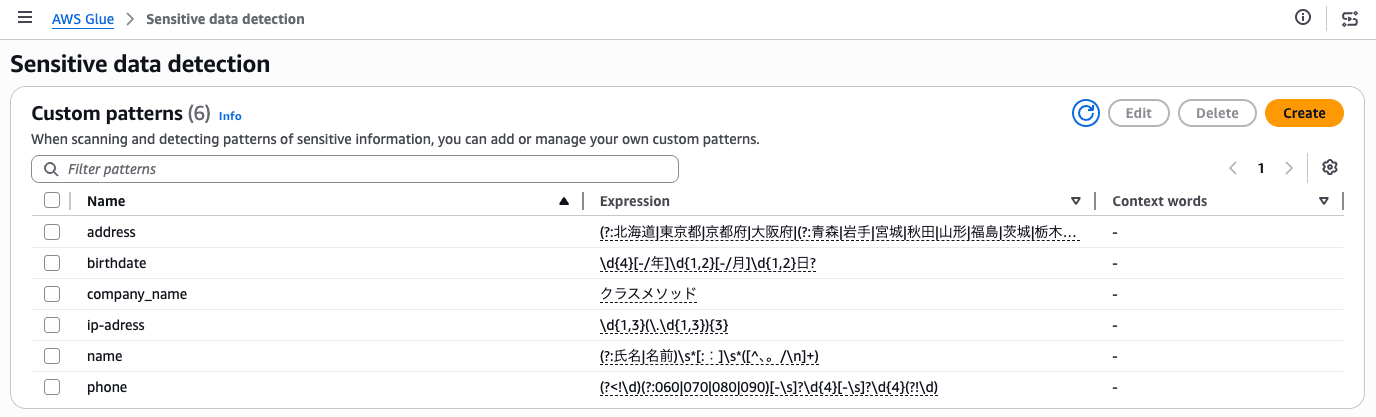
You can specify custom detection patterns using regular expressions for use in PII detection.
I was able to create them from Create detection pattern in the Glue console.
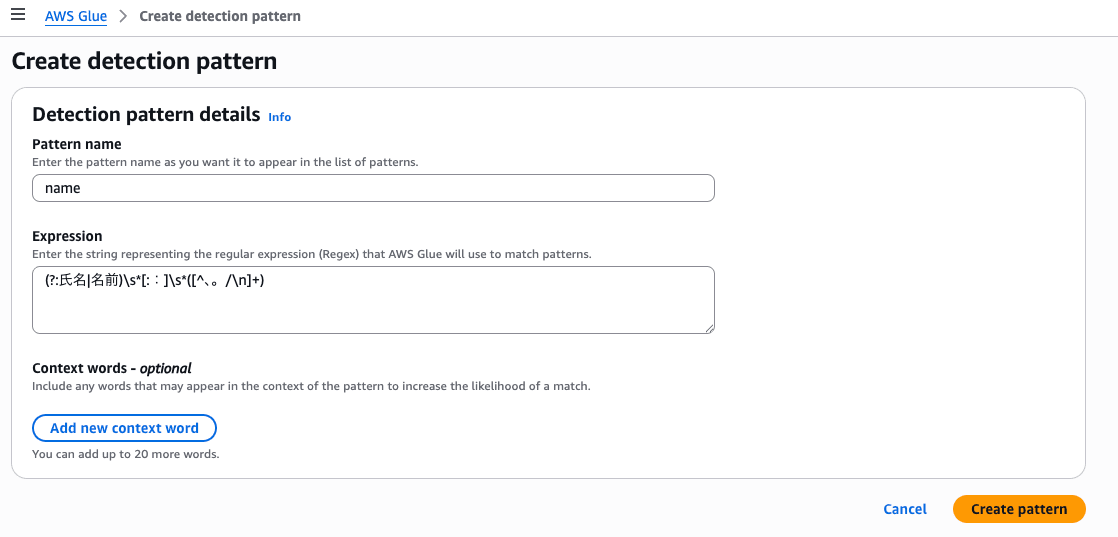
I created patterns as follows.
Modifying the Job
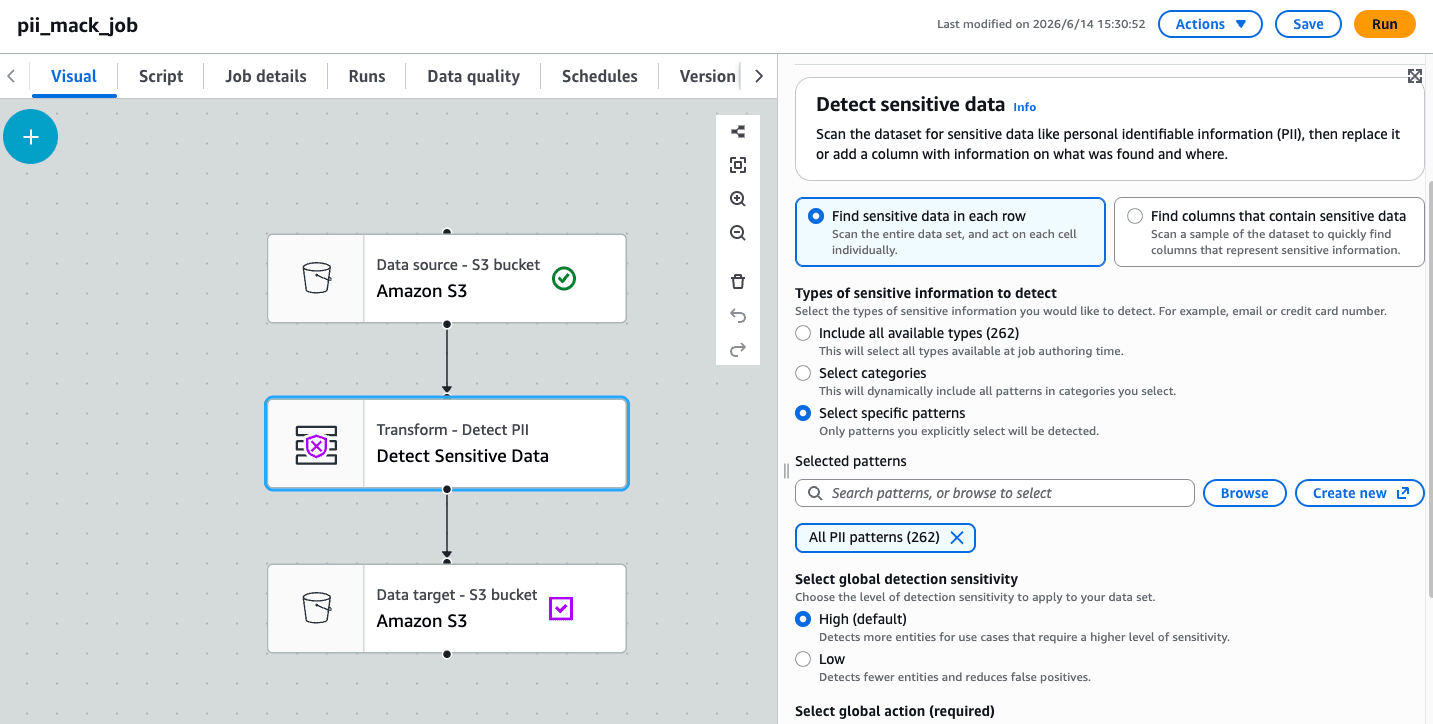
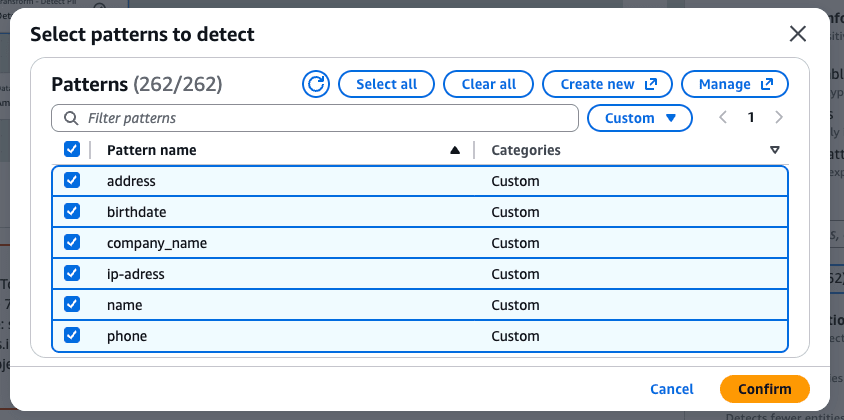
In the previous job, I configured and saved all detection patterns including the custom ones I created.
Job Execution and Results
I ran the job and checked the results.
As shown below, significantly more content was masked. Names are still partially missed because patterns are inherently difficult to capture for them.
How far to go depends on the use case, but as the number of input patterns increases, more unintended leaks and excessive masking are likely to occur.
{
    "record_id": "1",
    "text": "問い合わせ内容:こんにちは、私の名前は山田太郎です。電話番号は*************、メールアドレスはtaro.yamada@*******.comです。*******に所属しています。生年月日は**********、住所は***************************************。最終アクセス元IPは************でした。",
    "DetectedEntities": {
        "text": [
            {
                "entityType": "ip-adress",
                "actionUsed": "PARTIAL_REDACT",
                "start": 164,
                "end": 176
            },
            {
                "entityType": "phone",
                "actionUsed": "PARTIAL_REDACT",
                "start": 31,
                "end": 44
            },
            {
                "entityType": "address",
                "actionUsed": "PARTIAL_REDACT",
                "start": 114,
                "end": 153
            },
            {
                "entityType": "company_name",
                "actionUsed": "PARTIAL_REDACT",
                "start": 79,
                "end": 86
            },
            {
                "entityType": "birthdate",
                "actionUsed": "PARTIAL_REDACT",
                "start": 100,
                "end": 110
            },
            {
                "entityType": "UK_PHONE_NUMBER",
                "actionUsed": "PARTIAL_REDACT",
                "start": 31,
                "end": 44
            },
            {
                "entityType": "LUXEMBOURG_PASSPORT_NUMBER",
                "actionUsed": "PARTIAL_REDACT",
                "start": 65,
                "end": 72
            }
        ]
    }
}
{
    "record_id": "2",
    "text": "通販の再配達日変更。********/ 生年月日:********** / 携帯:************* / 固定電話:************ / 配送先:****************************************************************P:*************。不在票が投函されたため、明日以降の再配達希望。オペレーター対応メモをそのまま社内チャットに貼りたい。",
    "DetectedEntities": {
        "text": [
            {
                "entityType": "ip-adress",
                "actionUsed": "PARTIAL_REDACT",
                "start": 147,
                "end": 160
            },
            {
                "entityType": "phone",
                "actionUsed": "PARTIAL_REDACT",
                "start": 41,
                "end": 54
            },
            {
                "entityType": "birthdate",
                "actionUsed": "PARTIAL_REDACT",
                "start": 25,
                "end": 35
            },
            {
                "entityType": "name",
                "actionUsed": "PARTIAL_REDACT",
                "start": 10,
                "end": 18
            },
            {
                "entityType": "address",
                "actionUsed": "PARTIAL_REDACT",
                "start": 81,
                "end": 145
            },
            {
                "entityType": "LUXEMBOURG_PASSPORT_NUMBER",
                "actionUsed": "PARTIAL_REDACT",
                "start": 124,
                "end": 131
            },
            {
                "entityType": "IP_ADDRESS",
                "actionUsed": "PARTIAL_REDACT",
                "start": 147,
                "end": 160
            },
            {
                "entityType": "UK_PHONE_NUMBER",
                "actionUsed": "PARTIAL_REDACT",
                "start": 62,
                "end": 74
            },
            {
                "entityType": "UK_PHONE_NUMBER",
                "actionUsed": "PARTIAL_REDACT",
                "start": 41,
                "end": 54
            },
            {
                "entityType": "EMAIL",
                "actionUsed": "PARTIAL_REDACT",
                "start": 112,
                "end": 137
            }
        ]
    }
}
{
    "record_id": "3",
    "text": "旅行予約の宿泊者名義確認。*******、生年月日:**********、連絡先 *************、メール ************************、宿泊先 *************************************、折返し先 ************。予約確認メールの内容を海外LLMで要約してよいか、ゲストから確認あり。IVR通過時の端末IP **********。",
    "DetectedEntities": {
        "text": [
            {
                "entityType": "address",
                "actionUsed": "PARTIAL_REDACT",
                "start": 88,
                "end": 125
            },
            {
                "entityType": "phone",
                "actionUsed": "PARTIAL_REDACT",
                "start": 41,
                "end": 54
            },
            {
                "entityType": "birthdate",
                "actionUsed": "PARTIAL_REDACT",
                "start": 26,
                "end": 36
            },
            {
                "entityType": "name",
                "actionUsed": "PARTIAL_REDACT",
                "start": 13,
                "end": 20
            },
            {
                "entityType": "ip-adress",
                "actionUsed": "PARTIAL_REDACT",
                "start": 191,
                "end": 201
            },
            {
                "entityType": "IP_ADDRESS",
                "actionUsed": "PARTIAL_REDACT",
                "start": 191,
                "end": 201
            },
            {
                "entityType": "LUXEMBOURG_PASSPORT_NUMBER",
                "actionUsed": "PARTIAL_REDACT",
                "start": 73,
                "end": 80
            },
            {
                "entityType": "UK_PHONE_NUMBER",
                "actionUsed": "PARTIAL_REDACT",
                "start": 41,
                "end": 54
            },
            {
                "entityType": "UK_PHONE_NUMBER",
                "actionUsed": "PARTIAL_REDACT",
                "start": 131,
                "end": 143
            },
            {
                "entityType": "EMAIL",
                "actionUsed": "PARTIAL_REDACT",
                "start": 59,
                "end": 83
            }
        ]
    }
}
Masking with Snowflake AI_REDACT
After loading into Snowflake, I also tested masking the same validation data loaded into a table using the Cortex AI function AI_REDACT.
Since AI_REDACT is an LLM-based best-effort detection, detection misses and false positives are possible here as well. Also, it performs best on grammatically correct English text, and results may differ for Japanese text or text with typos or irregular punctuation.
1. Loading Data
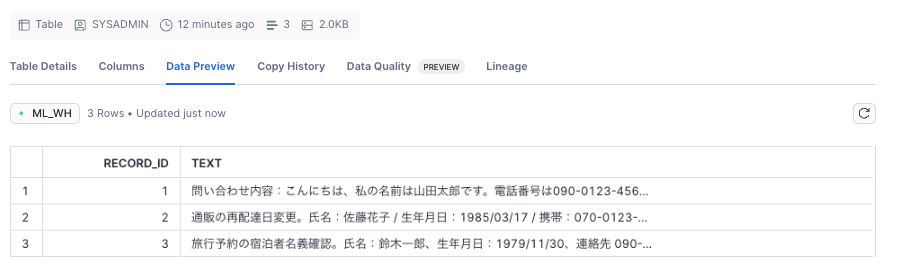
I uploaded the file previously processed with AWS Glue from Snowsight and created a table.
2. Masking with AI_REDACT
First, I masked the text column in the default redact mode.
SELECT
    AI_REDACT(text) AS redacted_text
FROM PII_INCLUDE_DATA;

The masking was done perfectly. There may be some misses in the case of call transcripts, but it seems to work fine for text of this length.
If it's data that can be sent to an AI/LLM, this should be sufficient.
However, Classmethod was not masked, so strings with low sensitivity that you still want to hide would be better handled by manually removing them after masking.
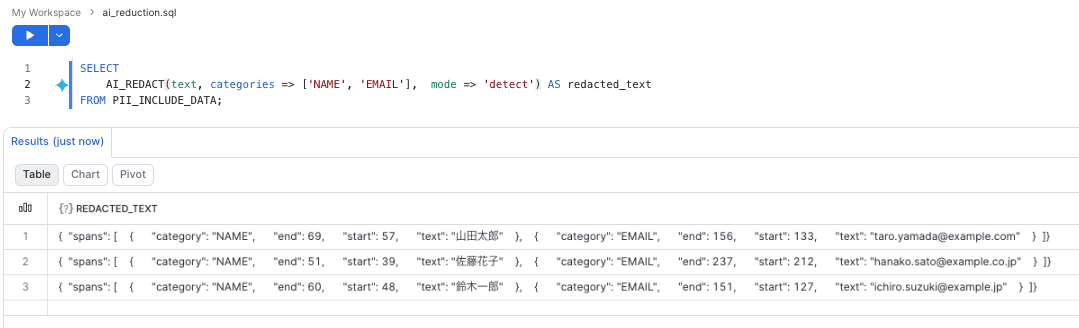
When narrowing down categories, the categories argument could be specified.

Finally, when you only want to check detection positions, the detect mode was available.
Closing Remarks
Using validation data resembling inquiry text, I organized the steps for masking personal information with AWS Glue's Detect PII transform and Snowflake's AI_REDACT.
Glue's strength lies in its ease of integration into ETL pipelines and the ability to explicitly control patterns. AI_REDACT is easy to try from SQL and shows promise for handling context-dependent expressions, but limitations regarding Japanese text and supported categories need to be verified as noted in the official documentation.
I hope this serves as a useful reference for those considering similar use cases.
