
I tried directly manipulating Iceberg tables in S3 Tables from Go and visualizing the internals with OpenTelemetry

This page has been translated by machine translation. View original
Hello, I'm sora from the Game Solutions Division.
This time, I tried directly manipulating Iceberg tables on S3 Tables from a Go program and visualizing its internals using OpenTelemetry traces.
About iceberg-go and S3 Tables
iceberg-go is a Go implementation of Iceberg that you embed into your application as a library.
No dedicated server is needed.
It traverses metadata within the application process and directly accesses Parquet files on S3.
S3 Tables is a bucket type dedicated to Iceberg that provides an Iceberg REST endpoint.
- Endpoint:
https://s3tables.<region>.amazonaws.com/iceberg - Authentication: SigV4 signing (service name is
s3tables) - warehouse: Table bucket ARN
In other words, the application connects to this REST endpoint via SigV4 and treats it as an Iceberg catalog.
Verification Setup
The entire setup was built with Terraform.
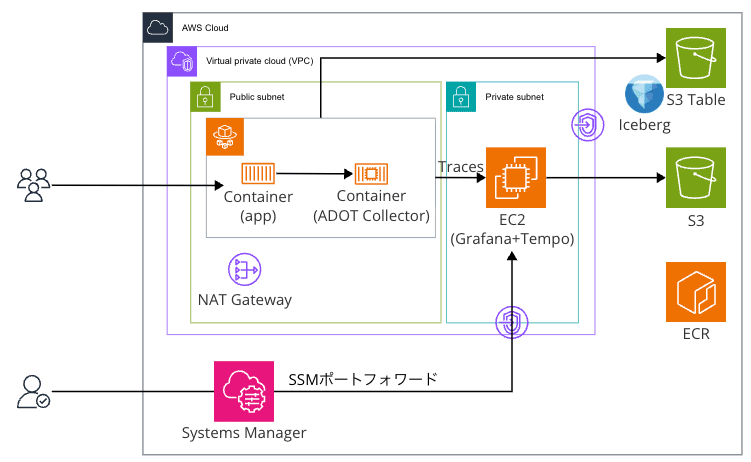
- The application runs as a persistent HTTP server on ECS Fargate (public subnet).
- Traces are sent to Tempo on a separate EC2 instance via the ADOT Collector sidecar in the same task.
- Tempo uses S3 as the trace storage destination.
- Grafana is placed in a private subnet and accessed via SSM port forwarding.
The S3 Tables storing Iceberg data and the S3 bucket storing traces are separate.
Application Implementation (span instrumentation)
The application uses iceberg-go v0.6.0 and connects to S3 Tables via REST + SigV4.
cat, err := rest.NewCatalog(ctx, "s3tables", uri,
    rest.WithSigV4RegionSvc(region, "s3tables"),
    rest.WithWarehouseLocation(warehouse),
)
To handle S3, add the following blank import to register the FileIO:
// Without this, all operations fail with "io scheme not registered for path s3://..."
import _ "github.com/apache/iceberg-go/io/gocloud"
Spans are created manually for each operation.
For example, append looks like this:
ctx, span := tracer.Start(ctx, "AppendTable", trace.WithAttributes(attribute.Int("rows", rows)))
defer span.End()

tbl, err := s.ensureTable(ctx)          // CreateTable if it doesn't exist
newTbl, err := tbl.AppendTable(ctx, arr, 1024, nil)
The endpoints were narrowed down to three:
| Method | Path | Operation | span |
|---|---|---|---|
| POST | /append?rows=3 |
Append (also creates table on first call) | AppendTable |
| GET | /scan?id=1004 |
Read (filter by id) | Scan |
| POST | /delete?id=1004 |
Row deletion | DeleteRows |
Manipulating Iceberg Tables from Go
After deploying, let's hit the application.
curl -X POST "http://$IP:8080/append?rows=3"   # append 3 rows
curl "http://$IP:8080/scan"                    # all rows
curl "http://$IP:8080/scan?id=1004"            # filtered
curl -X POST "http://$IP:8080/delete?id=1004"  # delete
curl "http://$IP:8080/scan?id=1004"            # after deletion
Here are the results:
$ curl -X POST 'http://APP:8080/append?rows=3'
appended 3 rows. metadata=s3://...--table-s3/metadata/00010-....metadata.json

$ curl 'http://APP:8080/scan'
scanned 22 rows

$ curl 'http://APP:8080/scan?id=1004'
scanned 1 rows

$ curl -X POST 'http://APP:8080/delete?id=1004'
deleted id=1004. metadata=s3://...--table-s3/metadata/00011-....metadata.json

$ curl 'http://APP:8080/scan?id=1004'
scanned 0 rows
The scan after deletion returned 0 rows, confirming that create, append, read, and delete all worked correctly.
It's also worth noting that metadata.json is being numbered sequentially as 00010→00011 with each operation (immutable commits).
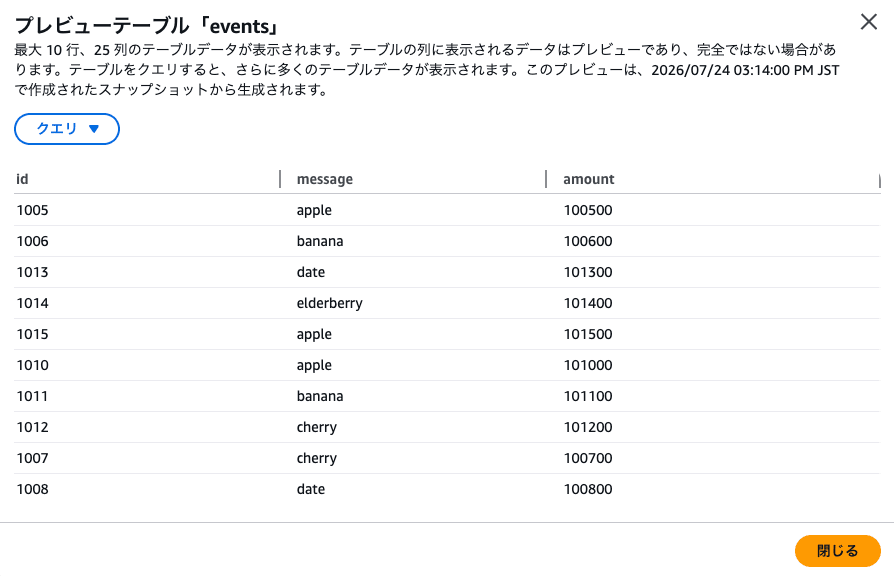
You can also preview the table contents from the S3 Tables console.
Peeking at Iceberg Metadata
The actual files of S3 Tables are in an AWS-managed hidden bucket and cannot be listed with aws s3 ls (LIST).
However, metadata.json can be retrieved individually via GET, so it can be obtained from the catalog pointer.
LOC=$(aws s3tables get-table --table-bucket-arn $ARN --namespace demo --name events --query metadataLocation --output text)
aws s3 cp "$LOC" - | jq '.snapshots[] | {seq: ."sequence-number", op: .summary.operation, added: .summary."added-records", deleted: .summary."deleted-records"}'
The snapshot history retained the append/delete operations made by Go exactly as-is.
seq=1  op=append  added=3  deleted=-
seq=2  op=delete  added=2  deleted=3
seq=3  op=append  added=3  deleted=-
...
metadataLocation is the pointer referenced by the catalog, and versionToken is the compare-and-swap token.
The atomic commit of "if current is N, replace with N+1" takes effect here.
Visualizing Traces
Open Grafana via SSM port forwarding and view traces in Tempo.
Opening the append trace shows gocloud.dev/blob.NewWriter (writes to S3) lined up under AppendTable.
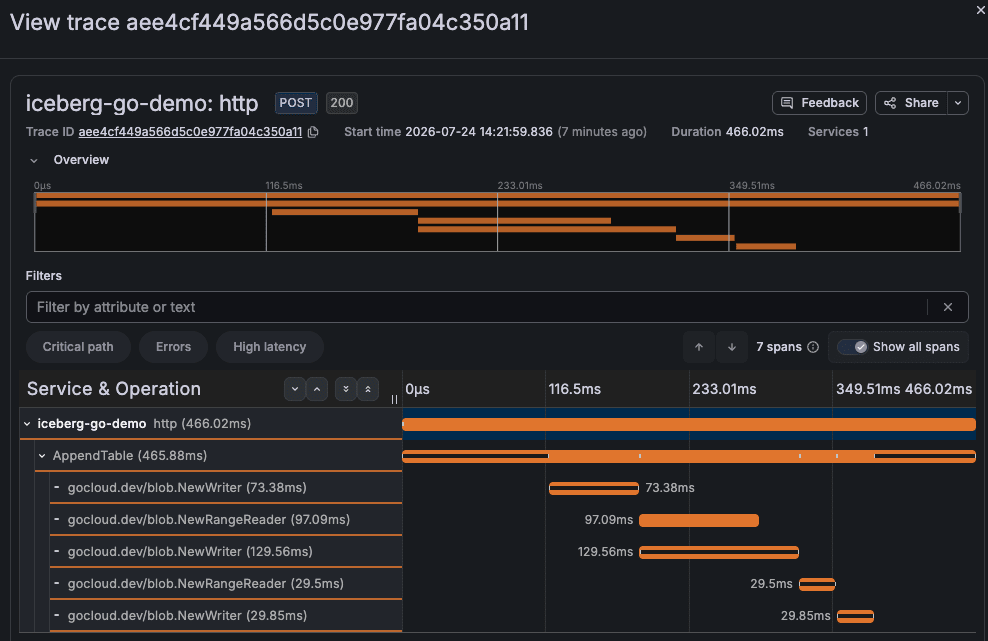
The spans for gocloud.dev/blob.NewWriter and NewRangeReader shown here were not instrumented by us.
iceberg-go uses a library called gocloud.dev/blob for S3 access, and this library itself supports OpenTelemetry.
Thanks to this, writes and reads to S3 objects automatically become spans, and access to metadata.json, manifests, and data files appear directly in the traces.
Delete Uses Copy-on-Write to "Read and Rewrite"
Looking at the delete trace, while append was dominated by NewWriter (writes), delete is filled with NewRangeReader (reads).
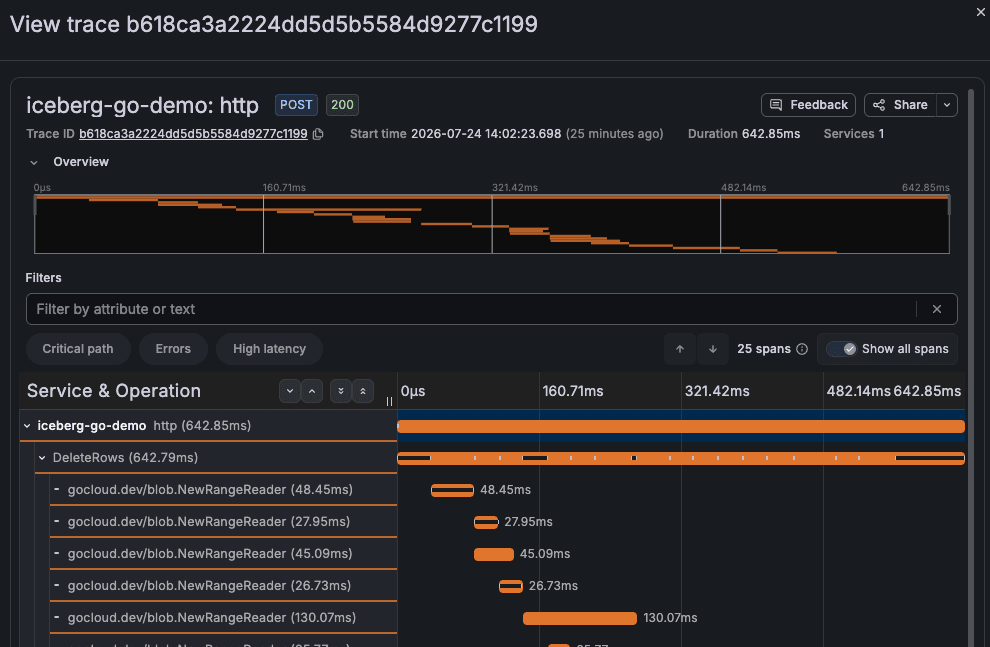
This is the reality of Iceberg's Copy-on-Write.
To delete one row, it reads the file containing that row and rewrites it as a new file with the remaining rows.
In the metadata shown earlier, delete showed added=2 / deleted=3, which numerically shows that "a file with 3 rows was read and rewritten with 2 rows."
In actual measurements, append took 466ms while delete took 642ms, with delete being heavier.
The traces make it clear that this is one of the reasons behind "things got slower after introducing Iceberg."
Non-Partition Columns Can Still Skip Files
After calling append several times to create multiple data files with non-overlapping id ranges, compare scans with and without a filter.
curl "http://$IP:8080/scan"          # no filter
curl "http://$IP:8080/scan?id=1004"  # with filter
Counting the number of spans in the traces via the Tempo API, along with the number of NewRangeReader (S3 reads) among them, yields the following:
| scan | S3 reads (NewRangeReader) | total spans in trace | duration |
|---|---|---|---|
/scan (all) |
52 | 54 | 874ms |
/scan?id=1004 (filtered) |
16 | 18 | 461ms |
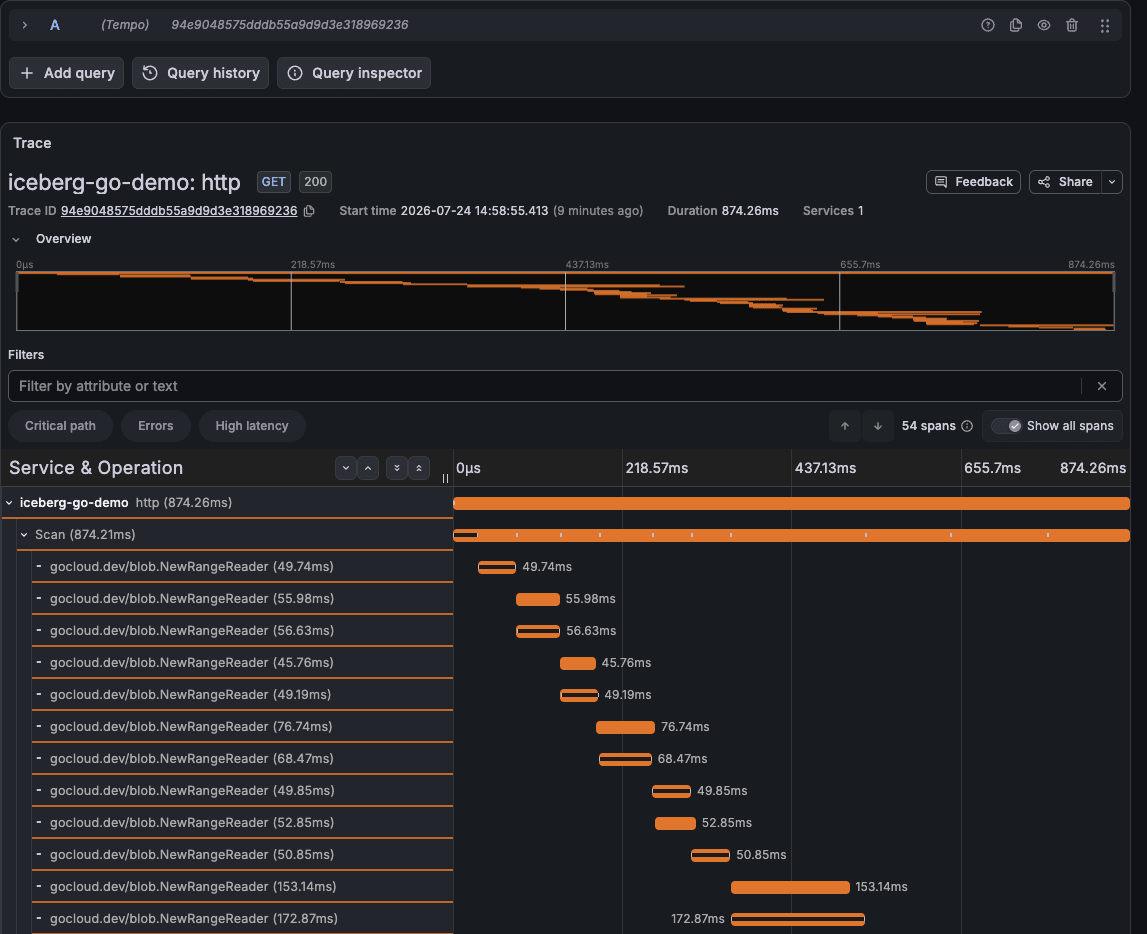
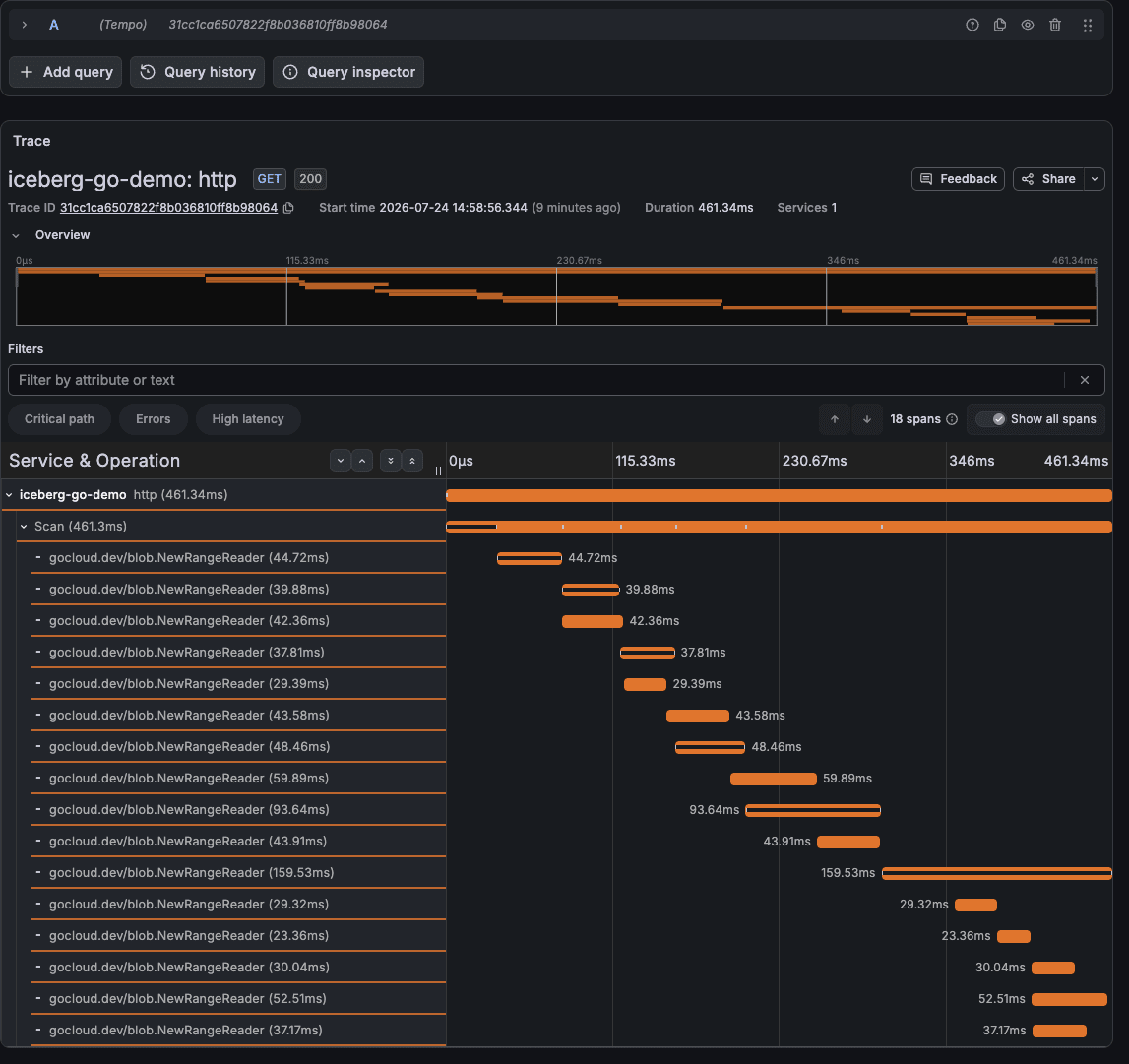
The full scan has so many NewRangeReader spans that they don't fit on screen (the image shows only a portion).
In contrast, the filtered scan clearly shows a reduction in NewRangeReader spans.
The filter reduced S3 reads (NewRangeReader) from 52 to 16.
What's important here is that id is not a partition column.
Even with Hive-style tables, you can filter on non-partition columns using the min/max per row group stored in the Parquet footer.
However, that determination requires opening the file, so listing the directory and accessing all files cannot be avoided.
Iceberg stores the per-column min/max of each data file in the manifest, so candidates can be excluded before opening any files.
Side Note: Contents of the Trace Storage Bucket
This time, Tempo's storage destination was set to S3.
Looking inside the Tempo bucket, you'll find files like these:
single-tenant/<UUID>/data.parquet         # trace body (span group). Tempo's own Parquet format
single-tenant/<UUID>/bloom-0              # Bloom filter
single-tenant/<UUID>/index                # in-block index
single-tenant/<UUID>/meta.json            # block metadata
single-tenant/index.json.gz               # tenant index
Tempo stores traces as proprietary Parquet blocks with Bloom filters and indexes for efficient lookup.
What iceberg-go v0.6.0 Can and Cannot Do
| Operation | Supported | Notes |
|---|---|---|
| Append | ○ | Table.AppendTable |
| Overwrite | ○ | Table.OverwriteTable |
| Row deletion (Copy-on-Write) | ○ | Table.Delete (specified by predicate) |
| upsert / MERGE | × | Not supported. Express via delete + append |
| Catalog | ○ | REST / Glue, etc. |
| SigV4 signing | ○ | WithSigV4RegionSvc(region, "s3tables") |
Closing
I tried manipulating Iceberg tables on S3 Tables from Go and visualizing its internals (Copy-on-Write and file skipping) using OpenTelemetry traces.
I hope this article is helpful to someone.
Reference Links
