I tried text-based development with Godot, a game engine well-suited for collaborative development with LLMs

This page has been translated by machine translation. View original
Introduction
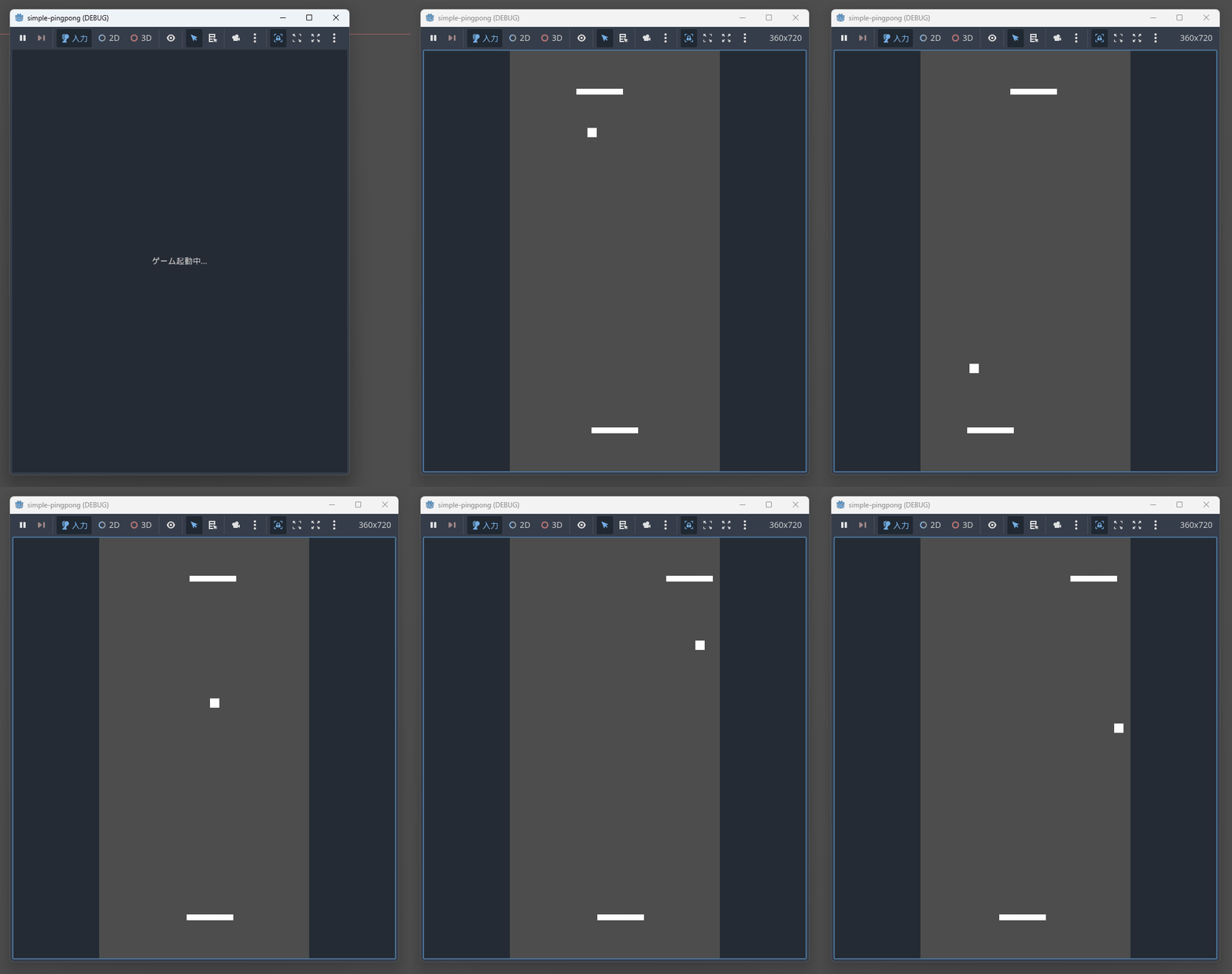
In this article, we will implement a simple ping-pong game using Godot 4.x, which is gaining attention as a game engine suitable for collaborative development with LLMs. This is a 2D game where the player controls the paddle at the bottom and plays against the CPU.
What is Godot
Godot is an open-source cross-platform game engine. It is one of the major game development tools alongside Unity and Unreal Engine, and it employs GDScript, its own Python-like scripting language. It is characterized by its lightweight engine size and fast startup.
Why Godot is suitable for collaborative development with LLMs
Godot's scene files (.tscn) are written in a human-readable format, making them easy for LLMs to understand and generate.
Example
[node name="Player" type="CharacterBody2D" parent="."]
position = Vector2(180, 650)
script = ExtResource("2_1hdqx")
Additionally, GDScript has a Python-like syntax, which is a language pattern many LLMs excel at. Development using only a text editor is possible, as in this case, allowing you to build an interactive development environment with LLMs.
Target audience
- Developers interested in game development using LLMs
- Those who want to learn the basics of Godot
References
Implementation
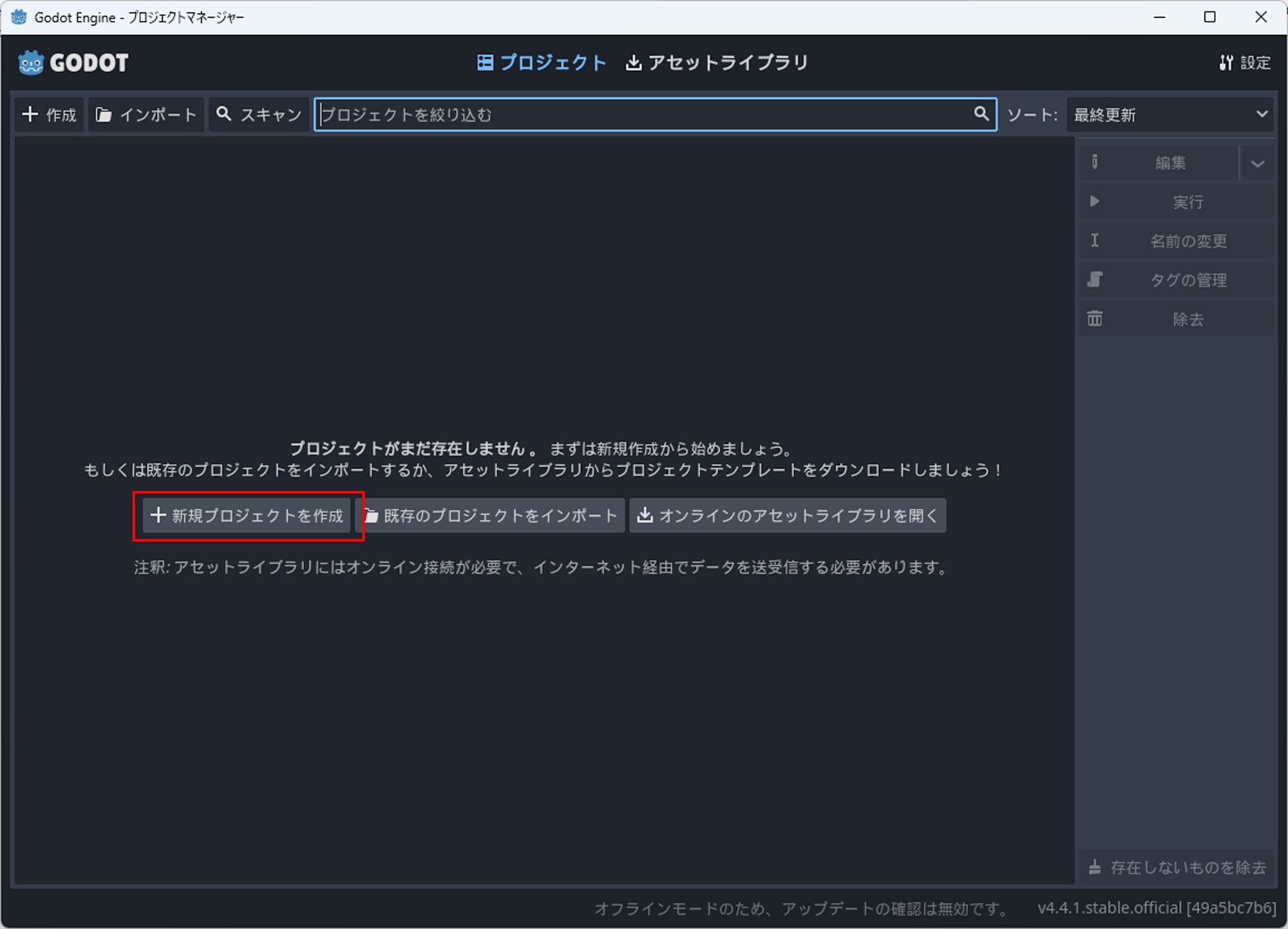
First, I downloaded and launched Godot from the official site and created a new project.
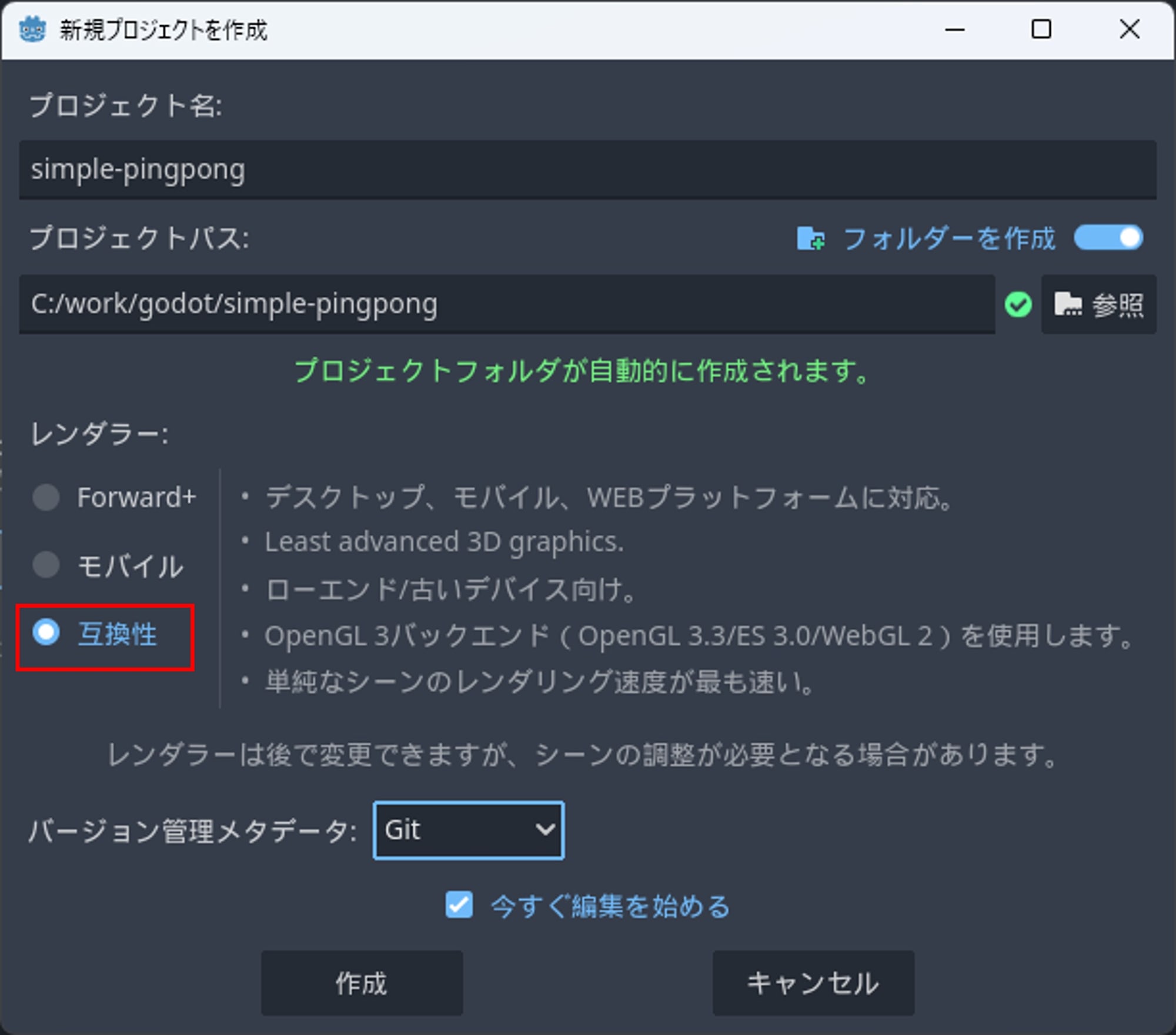
For this project, I chose Compatibility as the renderer, which is said to be "the fastest for rendering simple scenes."
After creating the project, a folder is created. I communicated the operational image of the game I wanted to create to the LLM and created the following files in the folder. For this development, I used Claude Sonnet 4 as the LLM.
Main.tscn
[gd_scene load_steps=9 format=3 uid="uid://bvxqy8qkqwqxr"]

[ext_resource type="Script" path="res://Main.gd" id="1_0hdqx"]
[ext_resource type="Script" path="res://Player.gd" id="2_1hdqx"]
[ext_resource type="Script" path="res://CPU.gd" id="3_2hdqx"]
[ext_resource type="Script" path="res://Ball.gd" id="4_3hdqx"]

[sub_resource type="RectangleShape2D" id="RectangleShape2D_1"]
size = Vector2(80, 10)

[sub_resource type="RectangleShape2D" id="RectangleShape2D_2"]
size = Vector2(80, 10)

[sub_resource type="RectangleShape2D" id="RectangleShape2D_3"]
size = Vector2(16, 16)

[sub_resource type="RectangleShape2D" id="RectangleShape2D_4"]
size = Vector2(20, 720)

[sub_resource type="RectangleShape2D" id="RectangleShape2D_5"]
size = Vector2(360, 20)

[node name="Main" type="Node2D"]
script = ExtResource("1_0hdqx")

[node name="Player" type="CharacterBody2D" parent="."]
position = Vector2(180, 650)
script = ExtResource("2_1hdqx")

[node name="CollisionShape2D" type="CollisionShape2D" parent="Player"]
shape = SubResource("RectangleShape2D_1")

[node name="ColorRect" type="ColorRect" parent="Player"]
offset_left = -40.0
offset_top = -5.0
offset_right = 40.0
offset_bottom = 5.0
color = Color(1, 1, 1, 1)

[node name="CPU" type="CharacterBody2D" parent="."]
position = Vector2(180, 70)
script = ExtResource("3_2hdqx")

[node name="CollisionShape2D" type="CollisionShape2D" parent="CPU"]
shape = SubResource("RectangleShape2D_2")

[node name="ColorRect" type="ColorRect" parent="CPU"]
offset_left = -40.0
offset_top = -5.0
offset_right = 40.0
offset_bottom = 5.0
color = Color(1, 1, 1, 1)

[node name="Ball" type="CharacterBody2D" parent="."]
position = Vector2(180, 360)
script = ExtResource("4_3hdqx")

[node name="CollisionShape2D" type="CollisionShape2D" parent="Ball"]
shape = SubResource("RectangleShape2D_3")

[node name="ColorRect" type="ColorRect" parent="Ball"]
offset_left = -8.0
offset_top = -8.0
offset_right = 8.0
offset_bottom = 8.0
color = Color(1, 1, 1, 1)

[node name="Walls" type="StaticBody2D" parent="."]

[node name="LeftWall" type="CollisionShape2D" parent="Walls"]
position = Vector2(-10, 360)
shape = SubResource("RectangleShape2D_4")

[node name="RightWall" type="CollisionShape2D" parent="Walls"]
position = Vector2(370, 360)
shape = SubResource("RectangleShape2D_4")

[node name="TopWall" type="CollisionShape2D" parent="Walls"]
position = Vector2(180, -10)
shape = SubResource("RectangleShape2D_5")

[node name="BottomWall" type="CollisionShape2D" parent="Walls"]
position = Vector2(180, 730)
shape = SubResource("RectangleShape2D_5")
Main.gd
extends Node2D

# Game settings
const SCREEN_WIDTH = 360
const SCREEN_HEIGHT = 720

# Score
var player_score = 0
var cpu_score = 0

# Game object references
@onready var player = $Player
@onready var cpu = $CPU
@onready var ball = $Ball

func _ready():
	# Set screen size
	get_window().size = Vector2i(SCREEN_WIDTH, SCREEN_HEIGHT)
	get_window().position = Vector2i(100, 100)  # Adjust window position

	# Connect ball's score update signal
	ball.goal_scored.connect(_on_goal_scored)

	print("Pingpong game started!")
	print("Use A/D or Left/Right arrows to move your paddle")

func _on_goal_scored(scorer):
	if scorer == "player":
		player_score += 1
		print("Player scores! Score: Player ", player_score, " - CPU ", cpu_score)
	elif scorer == "cpu":
		cpu_score += 1
		print("CPU scores! Score: Player ", player_score, " - CPU ", cpu_score)

	# Game end check (first to 5 points)
	if player_score >= 5:
		print("Player wins!")
		_reset_game()
	elif cpu_score >= 5:
		print("CPU wins!")
		_reset_game()

func _reset_game():
	# Reset score
	player_score = 0
	cpu_score = 0

	# Reset ball position
	ball.reset_position()

	print("Game reset! New game started.")

func _input(event):
	# Exit game with ESC key
	if event.is_action_pressed("ui_cancel"):
		get_tree().quit()
Player.gd
extends CharacterBody2D

# Paddle settings
const SPEED = 300.0
const PADDLE_WIDTH = 80.0
const SCREEN_WIDTH = 360

# Collision shape settings
@onready var collision_shape = $CollisionShape2D

func _ready():
	# Set paddle collision shape
	var shape = RectangleShape2D.new()
	shape.size = Vector2(PADDLE_WIDTH, 10)
	collision_shape.shape = shape

func _physics_process(delta):
	# Get input
	var input_direction = 0

	# Process keyboard input
	if Input.is_action_pressed("ui_left") or Input.is_action_pressed("move_left"):
		input_direction = -1
	elif Input.is_action_pressed("ui_right") or Input.is_action_pressed("move_right"):
		input_direction = 1

	# Set velocity
	velocity.x = input_direction * SPEED
	velocity.y = 0  # Restrict movement on Y axis

	# Execute movement
	move_and_slide()

	# Restrict at screen boundaries
	_clamp_to_screen()

func _clamp_to_screen():
	# Restrict paddle from going off-screen
	var half_width = PADDLE_WIDTH / 2
	position.x = clamp(position.x, half_width, SCREEN_WIDTH - half_width)

# Input map settings (apart from actions automatically created in project settings)
func _input(event):
	# Movement with A/D keys (additional input options)
	pass
CPU.gd
extends CharacterBody2D

# CPU paddle settings
const SPEED = 200.0  # Set a bit slower than player
const PADDLE_WIDTH = 80.0
const SCREEN_WIDTH = 360
const REACTION_ZONE = 360.0  # React when ball is above this Y coordinate

# AI settings
const PREDICTION_FACTOR = 0.8  # Response level to ball's predicted movement
const DEAD_ZONE = 10.0  # Don't move paddle within this range

# Game object references
@onready var collision_shape = $CollisionShape2D
var ball_node: CharacterBody2D

func _ready():
	# Set paddle collision shape
	var shape = RectangleShape2D.new()
	shape.size = Vector2(PADDLE_WIDTH, 10)
	collision_shape.shape = shape

	# Get reference to ball node
	ball_node = get_parent().get_node("Ball")

func _physics_process(delta):
	if not ball_node:
		return

	# Get ball position and velocity
	var ball_position = ball_node.global_position
	var ball_velocity = ball_node.velocity

	# Only react when ball is moving toward CPU
	if ball_position.y < REACTION_ZONE and ball_velocity.y < 0:
		_move_towards_ball(ball_position, ball_velocity, delta)
	else:
		# Return to center when ball is far
		_move_to_center(delta)

	# Execute movement
	move_and_slide()

	# Restrict at screen boundaries
	_clamp_to_screen()

func _move_towards_ball(ball_pos: Vector2, ball_vel: Vector2, delta: float):
	# Calculate predicted ball position
	var time_to_reach = abs((position.y - ball_pos.y) / ball_vel.y) if ball_vel.y != 0 else 0
	var predicted_x = ball_pos.x + ball_vel.x * time_to_reach * PREDICTION_FACTOR

	# Calculate difference between paddle center and predicted ball position
	var target_x = predicted_x
	var distance = target_x - position.x

	# Don't move within dead zone
	if abs(distance) < DEAD_ZONE:
		velocity.x = 0
		return

	# Move toward target
	var direction = sign(distance)
	velocity.x = direction * SPEED
	velocity.y = 0

func _move_to_center(delta: float):
	# Move toward center of screen
	var center_x = SCREEN_WIDTH / 2
	var distance = center_x - position.x

	if abs(distance) < DEAD_ZONE:
		velocity.x = 0
		return

	var direction = sign(distance)
	velocity.x = direction * SPEED * 0.5  # Return to center a bit slower
	velocity.y = 0

func _clamp_to_screen():
	# Restrict paddle from going off-screen
	var half_width = PADDLE_WIDTH / 2
	position.x = clamp(position.x, half_width, SCREEN_WIDTH - half_width)
Ball.gd
extends CharacterBody2D

# Ball settings
const INITIAL_SPEED = 250.0
const MAX_SPEED = 400.0
const SPEED_INCREMENT = 20.0  # Speed increases with each paddle hit
const BALL_SIZE = 16.0

# Screen settings
const SCREEN_WIDTH = 360
const SCREEN_HEIGHT = 720

# Game state
var current_speed = INITIAL_SPEED
var is_serving = true

# Signal
signal goal_scored(scorer)

# Game object references
@onready var collision_shape = $CollisionShape2D

func _ready():
	# Set ball collision shape
	var shape = RectangleShape2D.new()
	shape.size = Vector2(BALL_SIZE, BALL_SIZE)
	collision_shape.shape = shape

	# Initial serve
	_serve()

func _physics_process(delta):
	if is_serving:
		return

	# Execute movement
	var collision = move_and_slide()

	# Handle collision
	if get_slide_collision_count() > 0:
		_handle_collision()

	# Check for goals
	_check_goals()

func _serve():
	# Initial setup for serve
	is_serving = true
	current_speed = INITIAL_SPEED
	position = Vector2(SCREEN_WIDTH / 2, SCREEN_HEIGHT / 2)

	# Serve in random direction (either up or down)
	var angle = randf_range(-PI/4, PI/4)  # Range from -45 to 45 degrees
	if randf() > 0.5:
		angle += PI  # 50% chance of going downward

	velocity = Vector2(cos(angle), sin(angle)) * current_speed
	is_serving = false

	print("Ball served with velocity: ", velocity)

func _handle_collision():
	var collision = get_slide_collision(0)
	var collider = collision.get_collider()

	if collider:
		var collision_normal = collision.get_normal()

		# Collision with paddle
		if collider.name == "Player" or collider.name == "CPU":
			_handle_paddle_collision(collider, collision_normal)

		# Collision with wall
		elif collider.name == "Walls":
			_handle_wall_collision(collision_normal)

func _handle_paddle_collision(paddle, normal: Vector2):
	# Calculate relative position from paddle center to ball
	var paddle_center = paddle.global_position.x
	var ball_center = global_position.x
	var relative_intersect = (ball_center - paddle_center) / 40.0  # Normalize by paddle half-width

	# Calculate reflection angle (adjust angle based on relative position)
	var bounce_angle = relative_intersect * PI/3  # Maximum 60 degrees angle

	# Increase speed
	current_speed = min(current_speed + SPEED_INCREMENT, MAX_SPEED)

	# Set new velocity vector
	if paddle.name == "Player":
		# Player paddle (bottom to top)
		velocity = Vector2(sin(bounce_angle), -cos(bounce_angle)) * current_speed
	else:
		# CPU paddle (top to bottom)
		velocity = Vector2(sin(bounce_angle), cos(bounce_angle)) * current_speed

	print("Paddle hit! New speed: ", current_speed)

func _handle_wall_collision(normal: Vector2):
	# Reflection off wall (left and right walls only)
	if abs(normal.x) > 0.5:  # Left or right wall
		velocity.x = -velocity.x
		print("Wall bounce!")

func _check_goals():
	# Upper goal (player scores)
	if position.y < -20:
		goal_scored.emit("player")
		_serve()

	# Lower goal (CPU scores)
	elif position.y > SCREEN_HEIGHT + 20:
		goal_scored.emit("cpu")
		_serve()

func reset_position():
	# Reset position when game is reset
	_serve()

# Display velocity for debugging
func _input(event):
	if event.is_action_pressed("ui_accept"):  # Space key
		print("Ball position: ", position, " Velocity: ", velocity, " Speed: ", current_speed)
I also modified project.godot as follows:
project.godot
; Engine configuration file.
; It's best edited using the editor UI and not directly,
; since the parameters that go here are not all obvious.
;
; Format:
;   [section] ; section goes between []
;   param=value ; assign values to parameters

config_version=5

[application]

config/name="simple-pong"
run/main_scene="res://Main.tscn"

[display]

window/size/viewport_width=360
window/size/viewport_height=720
window/size/resizable=false

[input]

move_left={
"deadzone": 0.5,
"events": [Object(InputEventKey,"resource_local_to_scene":false,"resource_name":"","device":-1,"window_id":0,"alt_pressed":false,"shift_pressed":false,"ctrl_pressed":false,"meta_pressed":false,"pressed":false,"keycode":0,"physical_keycode":65,"key_label":0,"unicode":97,"echo":false,"script":null)
]
}
move_right={
"deadzone": 0.5,
"events": [Object(InputEventKey,"resource_local_to_scene":false,"resource_name":"","device":-1,"window_id":0,"alt_pressed":false,"shift_pressed":false,"ctrl_pressed":false,"meta_pressed":false,"pressed":false,"keycode":0,"physical_keycode":68,"key_label":0,"unicode":100,"echo":false,"script":null)
]
}

[rendering]

renderer/rendering_method="gl_compatibility"
renderer/rendering_method.mobile="gl_compatibility"
Testing and Fixing
After completing the implementation, I started the game in the Godot editor by pressing the F5 key.
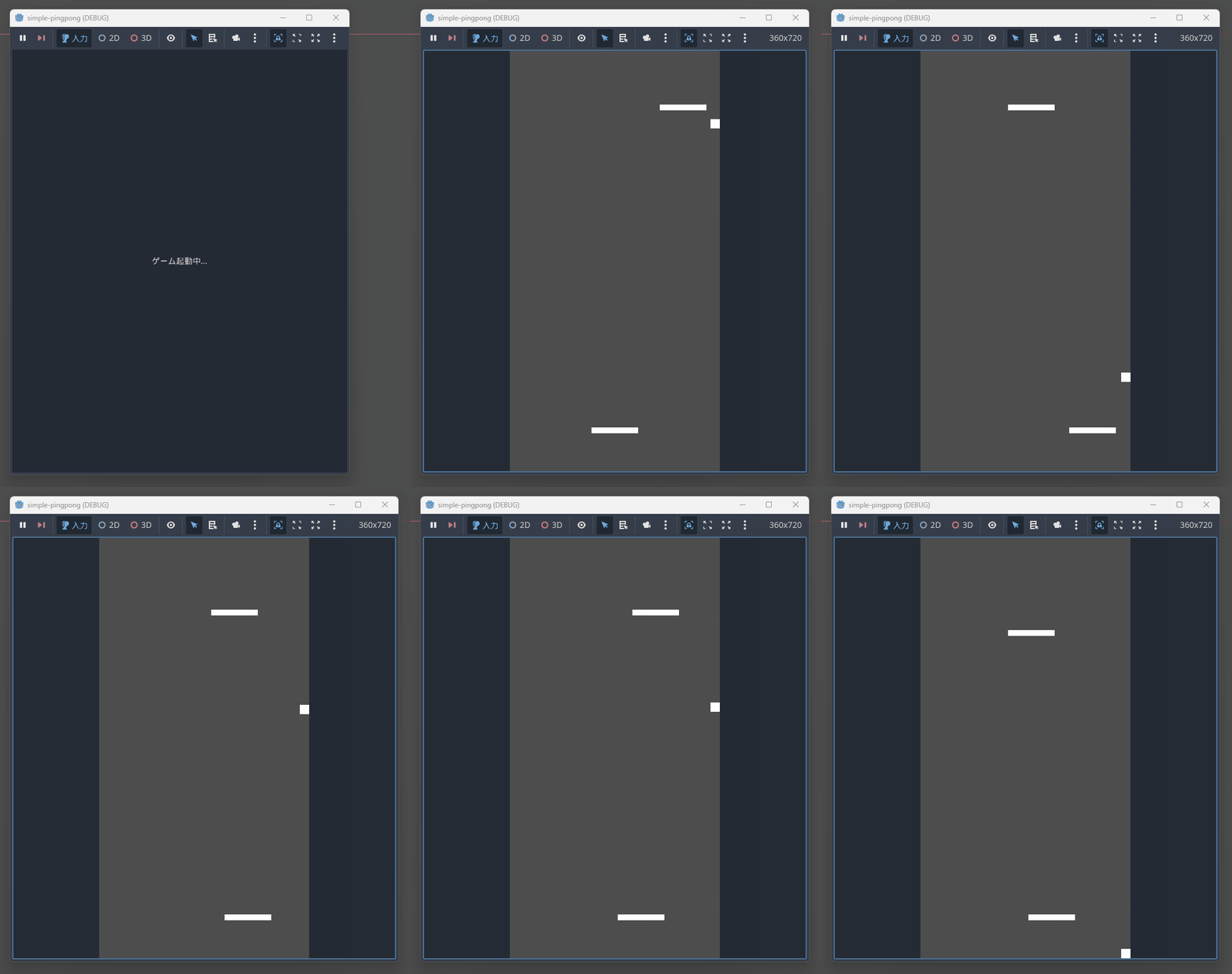
There were the following issues with the operation:
- CPU advances every time it hits the ball
- Ball gets stuck against the wall and doesn't move away
- Game doesn't end even when you lose
- Ball speed is too slow
After iterative dialogue with the LLM and several code revisions, I resolved the above issues.
Corrected Code
Main.tscn
[gd_scene load_steps=10 format=3 uid="uid://cilbg8jwrfbyr"]

[ext_resource type="Script" uid="uid://efgbiogmat67" path="res://Main.gd" id="1_0hdqx"]
[ext_resource type="Script" uid="uid://d348gu2f10sit" path="res://Player.gd" id="2_1hdqx"]
[ext_resource type="Script" uid="uid://c6m0g0dnrbvff" path="res://CPU.gd" id="3_2hdqx"]
[ext_resource type="Script" uid="uid://tbmexcoveiia" path="res://Ball.gd" id="4_3hdqx"]

[sub_resource type="RectangleShape2D" id="RectangleShape2D_1"]
size = Vector2(80, 10)

[sub_resource type="RectangleShape2D" id="RectangleShape2D_2"]
size = Vector2(80, 10)

[sub_resource type="RectangleShape2D" id="RectangleShape2D_3"]
size = Vector2(16, 16)

[sub_resource type="RectangleShape2D" id="RectangleShape2D_4"]
size = Vector2(20, 720)

[sub_resource type="RectangleShape2D" id="RectangleShape2D_5"]
size = Vector2(360, 20)

[node name="Main" type="Node2D"]
script = ExtResource("1_0hdqx")

[node name="Player" type="CharacterBody2D" parent="."]
position = Vector2(180, 650)
script = ExtResource("2_1hdqx")

[node name="CollisionShape2D" type="CollisionShape2D" parent="Player"]
shape = SubResource("RectangleShape2D_1")

[node name="ColorRect" type="ColorRect" parent="Player"]
offset_left = -40.0
offset_top = -5.0
offset_right = 40.0
offset_bottom = 5.0

[node name="CPU" type="CharacterBody2D" parent="."]
position = Vector2(180, 70)
script = ExtResource("3_2hdqx")

[node name="CollisionShape2D" type="CollisionShape2D" parent="CPU"]
shape = SubResource("RectangleShape2D_2")

[node name="ColorRect" type="ColorRect" parent="CPU"]
offset_left = -40.0
offset_top = -5.0
offset_right = 40.0
offset_bottom = 5.0

[node name="Ball" type="CharacterBody2D" parent="."]
position = Vector2(180, 360)
script = ExtResource("4_3hdqx")

[node name="CollisionShape2D" type="CollisionShape2D" parent="Ball"]
shape = SubResource("RectangleShape2D_3")

[node name="ColorRect" type="ColorRect" parent="Ball"]
offset_left = -8.0
offset_top = -8.0
offset_right = 8.0
offset_bottom = 8.0

[node name="Walls" type="StaticBody2D" parent="."]

[node name="LeftWall" type="CollisionShape2D" parent="Walls"]
position = Vector2(-10, 360)
shape = SubResource("RectangleShape2D_4")

[node name="RightWall" type="CollisionShape2D" parent="Walls"]
position = Vector2(370, 360)
shape = SubResource("RectangleShape2D_4")

[node name="TopWall" type="CollisionShape2D" parent="Walls"]
position = Vector2(180, -10)
shape = SubResource("RectangleShape2D_5")

[node name="BottomWall" type="CollisionShape2D" parent="Walls"]
position = Vector2(180, 730)
shape = SubResource("RectangleShape2D_5")
Main.gd
extends Node2D

# Game settings
const SCREEN_WIDTH = 360
const SCREEN_HEIGHT = 720
const WINNING_SCORE = 5

# Score
var player_score = 0
var cpu_score = 0
var game_over = false

# Game object references
@onready var player = $Player
@onready var cpu = $CPU
@onready var ball = $Ball

func _ready():
	# Set screen size
	get_window().size = Vector2i(SCREEN_WIDTH, SCREEN_HEIGHT)
	get_window().position = Vector2i(100, 100)

	# Connect the score update signal to the ball
	ball.goal_scored.connect(_on_goal_scored)

	print("Pingpong game started!")
	print("Use Arrow Keys to move your paddle")
	print("First to ", WINNING_SCORE, " points wins!")

func _on_goal_scored(scorer):
	print("Goal scored by: ", scorer)

	if game_over:
		print("Game is already over, ignoring goal")
		return

	if scorer == "player":
		player_score += 1
		print("Player scores! Score: Player ", player_score, " - CPU ", cpu_score)
	elif scorer == "cpu":
		cpu_score += 1
		print("CPU scores! Score: Player ", player_score, " - CPU ", cpu_score)

	# Check if game ended
	if player_score >= WINNING_SCORE:
		print("=== PLAYER WINS! ===")
		_end_game()
	elif cpu_score >= WINNING_SCORE:
		print("=== CPU WINS! ===")
		_end_game()

func _end_game():
	game_over = true
	# Stop the ball
	ball.velocity = Vector2.ZERO
	ball.is_serving = true

	print("Game Over! Press SPACE to restart or ESC to quit")

func _reset_game():
	print("Resetting game...")

	# Reset game state
	game_over = false
	player_score = 0
	cpu_score = 0

	# Reset object positions
	player.position = Vector2(180, 650)
	cpu.position = Vector2(180, 70)
	ball.reset_position()

	print("Game reset! New game started.")

func _input(event):
	# ESC key to quit game
	if event.is_action_pressed("ui_cancel"):
		print("Quitting game...")
		get_tree().quit()

	# Space key to restart
	if event.is_action_pressed("ui_accept"):
		if game_over:
			_reset_game()
		else:
			print("Current score: Player ", player_score, " - CPU ", cpu_score)

	# R key to restart (for debugging)
	if Input.is_key_pressed(KEY_R):
		_reset_game()

# Display debug info
func _process(delta):
	if Input.is_action_just_pressed("ui_select"):  # Tab key
		print("Ball position: ", ball.position)
		print("Ball velocity: ", ball.velocity)
		print("Game over: ", game_over)
		print("Is serving: ", ball.is_serving)
Player.gd
extends CharacterBody2D

# Paddle settings
const SPEED = 300.0
const PADDLE_WIDTH = 80.0
const SCREEN_WIDTH = 360

# Game object references
@onready var collision_shape = $CollisionShape2D

func _ready():
	# Set paddle collision shape
	var shape = RectangleShape2D.new()
	shape.size = Vector2(PADDLE_WIDTH, 10)
	collision_shape.shape = shape

func _physics_process(delta):
	# Get input
	var input_direction = 0

	# Process keyboard input
	if Input.is_action_pressed("ui_left"):
		input_direction = -1
	elif Input.is_action_pressed("ui_right"):
		input_direction = 1

	# Update position directly
	if input_direction != 0:
		position.x += input_direction * SPEED * delta

	# Restrict at screen boundaries
	_clamp_to_screen()

	# Fix Y coordinate
	position.y = 650

func _clamp_to_screen():
	# Prevent paddle from going offscreen
	var half_width = PADDLE_WIDTH / 2
	position.x = clamp(position.x, half_width, SCREEN_WIDTH - half_width)
CPU.gd
extends CharacterBody2D

# CPU paddle settings
const SPEED = 220.0
const PADDLE_WIDTH = 80.0
const SCREEN_WIDTH = 360
const REACTION_ZONE = 400.0  # Respond to ball above this Y coordinate

# AI settings
const PREDICTION_FACTOR = 0.7  # Ball prediction accuracy
const DEAD_ZONE = 15.0  # Don't move within this range
const CENTER_RETURN_SPEED = 0.4  # Speed coefficient for returning to center

# Game object references
@onready var collision_shape = $CollisionShape2D
var ball_node: Node2D
var target_x = 0.0

func _ready():
	# Set paddle collision shape
	var shape = RectangleShape2D.new()
	shape.size = Vector2(PADDLE_WIDTH, 10)
	collision_shape.shape = shape

	# Get ball node reference
	ball_node = get_parent().get_node("Ball")
	target_x = SCREEN_WIDTH / 2  # Initial target is center

func _physics_process(delta):
	if not ball_node:
		return

	# Wait in center if ball is serving
	if ball_node.is_serving:
		_move_to_center(delta)
	else:
		# Get ball state
		var ball_position = ball_node.position
		var ball_direction = ball_node.ball_direction
		var ball_speed = ball_node.current_speed

		# Only respond actively when ball is moving towards CPU side
		if ball_position.y < REACTION_ZONE and ball_direction.y < 0:
			_track_ball(ball_position, ball_direction, ball_speed, delta)
		else:
			# Return to center when ball is far away
			_move_to_center(delta)

	# Execute actual movement
	_execute_movement(delta)

	# Restrict at screen boundaries
	_clamp_to_screen()

	# Fix Y coordinate (prevent advancing)
	position.y = 70

func _track_ball(ball_pos: Vector2, ball_dir: Vector2, ball_speed: float, delta: float):
	# Calculate predicted ball position
	var time_to_cpu = 0.0
	if ball_dir.y != 0:
		time_to_cpu = abs((position.y - ball_pos.y) / (ball_dir.y * ball_speed))

	# Calculate prediction position
	var predicted_x = ball_pos.x + ball_dir.x * ball_speed * time_to_cpu * PREDICTION_FACTOR

	# Restrict within screen boundaries
	predicted_x = clamp(predicted_x, PADDLE_WIDTH/2, SCREEN_WIDTH - PADDLE_WIDTH/2)

	target_x = predicted_x

	# Debug info
	if randf() < 0.01:  # 1% chance to output (prevent spam)
		print("CPU tracking - Ball pos: ", ball_pos, " Predicted: ", predicted_x, " Target: ", target_x)

func _move_to_center(delta: float):
	# Set center of screen as target
	target_x = SCREEN_WIDTH / 2

func _execute_movement(delta: float):
	# Calculate difference between current position and target
	var distance = target_x - position.x

	# Don't move if within dead zone
	if abs(distance) < DEAD_ZONE:
		return

	# Determine movement direction and speed
	var direction = sign(distance)
	var move_speed = SPEED

	# Slower when returning to center
	if target_x == SCREEN_WIDTH / 2:
		move_speed *= CENTER_RETURN_SPEED

	# Update position directly (not using physics engine)
	position.x += direction * move_speed * delta

func _clamp_to_screen():
	# Prevent paddle from going offscreen
	var half_width = PADDLE_WIDTH / 2
	position.x = clamp(position.x, half_width, SCREEN_WIDTH - half_width)

# For debugging
func _input(event):
	if event.is_action_pressed("ui_select"):  # Tab key
		if ball_node:
			print("CPU Debug:")
			print("  Position: ", position.x)
			print("  Target: ", target_x)
			print("  Ball pos: ", ball_node.position)
			print("  Ball dir: ", ball_node.ball_direction)
			print("  Ball serving: ", ball_node.is_serving)
Ball.gd
extends CharacterBody2D

# Ball settings
const INITIAL_SPEED = 350.0
const MAX_SPEED = 500.0
const SPEED_INCREMENT = 25.0
const BALL_SIZE = 16.0

# Screen settings
const SCREEN_WIDTH = 360
const SCREEN_HEIGHT = 720

# Game state
var current_speed = INITIAL_SPEED
var ball_direction = Vector2.ZERO
var is_serving = false

# Signal
signal goal_scored(scorer)

# Game object references
@onready var collision_shape = $CollisionShape2D

func _ready():
	# Set ball collision shape
	var shape = RectangleShape2D.new()
	shape.size = Vector2(BALL_SIZE, BALL_SIZE)
	collision_shape.shape = shape

	# Initial serve
	_serve()

func _physics_process(delta):
	if is_serving:
		return

	# Manually move ball
	position += ball_direction * current_speed * delta

	# Check boundaries
	_check_boundaries()

	# Check paddle collisions
	_check_paddle_collisions()

func _serve():
	is_serving = true
	current_speed = INITIAL_SPEED
	position = Vector2(SCREEN_WIDTH / 2, SCREEN_HEIGHT / 2)

	# Serve after 1 second
	await get_tree().create_timer(1.0).timeout

	# Serve in random direction
	var angle = randf_range(-PI/6, PI/6)  # -30 to 30 degrees
	if randf() > 0.5:
		angle += PI  # 50% chance for downward direction

	ball_direction = Vector2(cos(angle), sin(angle))
	is_serving = false

	print("Ball served! Direction: ", ball_direction)

func _check_boundaries():
	# Reflect off left/right walls
	if position.x <= BALL_SIZE / 2:
		position.x = BALL_SIZE / 2
		ball_direction.x = abs(ball_direction.x)  # Rightward
		print("Left wall bounce")
	elif position.x >= SCREEN_WIDTH - BALL_SIZE / 2:
		position.x = SCREEN_WIDTH - BALL_SIZE / 2
		ball_direction.x = -abs(ball_direction.x)  # Leftward
		print("Right wall bounce")

	# Goal detection
	if position.y <= -BALL_SIZE:
		print("Player scores! Ball Y: ", position.y)
		goal_scored.emit("player")
		_serve()
	elif position.y >= SCREEN_HEIGHT + BALL_SIZE:
		print("CPU scores! Ball Y: ", position.y)
		goal_scored.emit("cpu")
		_serve()

func _check_paddle_collisions():
	# Player paddle collision
	var player = get_parent().get_node("Player")
	if _is_colliding_with_paddle(player):
		_handle_paddle_hit(player)

	# CPU paddle collision
	var cpu = get_parent().get_node("CPU")
	if _is_colliding_with_paddle(cpu):
		_handle_paddle_hit(cpu)

func _is_colliding_with_paddle(paddle) -> bool:
	var paddle_pos = paddle.position
	var paddle_size = Vector2(80, 10)  # Paddle size

	# Simple rectangular collision detection
	return (position.x + BALL_SIZE/2 > paddle_pos.x - paddle_size.x/2 and
			position.x - BALL_SIZE/2 < paddle_pos.x + paddle_size.x/2 and
			position.y + BALL_SIZE/2 > paddle_pos.y - paddle_size.y/2 and
			position.y - BALL_SIZE/2 < paddle_pos.y + paddle_size.y/2)

func _handle_paddle_hit(paddle):
	# Calculate relative position from paddle center
	var relative_x = (position.x - paddle.position.x) / 40.0  # Normalized
	relative_x = clamp(relative_x, -1.0, 1.0)

	# Calculate reflection angle
	var bounce_angle = relative_x * PI/4  # Max 45 degrees

	# Increase speed
	current_speed = min(current_speed + SPEED_INCREMENT, MAX_SPEED)

	# Set new direction
	if paddle.name == "Player":
		# Player paddle - reflect upward
		ball_direction = Vector2(sin(bounce_angle), -cos(bounce_angle))
		position.y = paddle.position.y - 10  # Move away from paddle
	else:
		# CPU paddle - reflect downward
		ball_direction = Vector2(sin(bounce_angle), cos(bounce_angle))
		position.y = paddle.position.y + 10  # Move away from paddle

	print("Paddle hit! Speed: ", current_speed, " Direction: ", ball_direction)

func reset_position():
	_serve()
Summary
Through the development of this ping-pong game, I've experienced how Godot's text-based development approach is exceptionally well-suited for collaboration with LLMs. Being able to complete everything from scene files to scripts entirely in a text editor allows direct utilization of LLM-generated code, potentially improving development efficiency. The same approach can be applied to expand UI elements and effects, making it possible to develop more sophisticated games using similar methods.