I tried text-based development with Godot, a game engine well-suited for collaborative development with LLMs

This article was published more than one year ago. Please be aware that the information may be outdated.
This page has been translated by machine translation. View original
Introduction
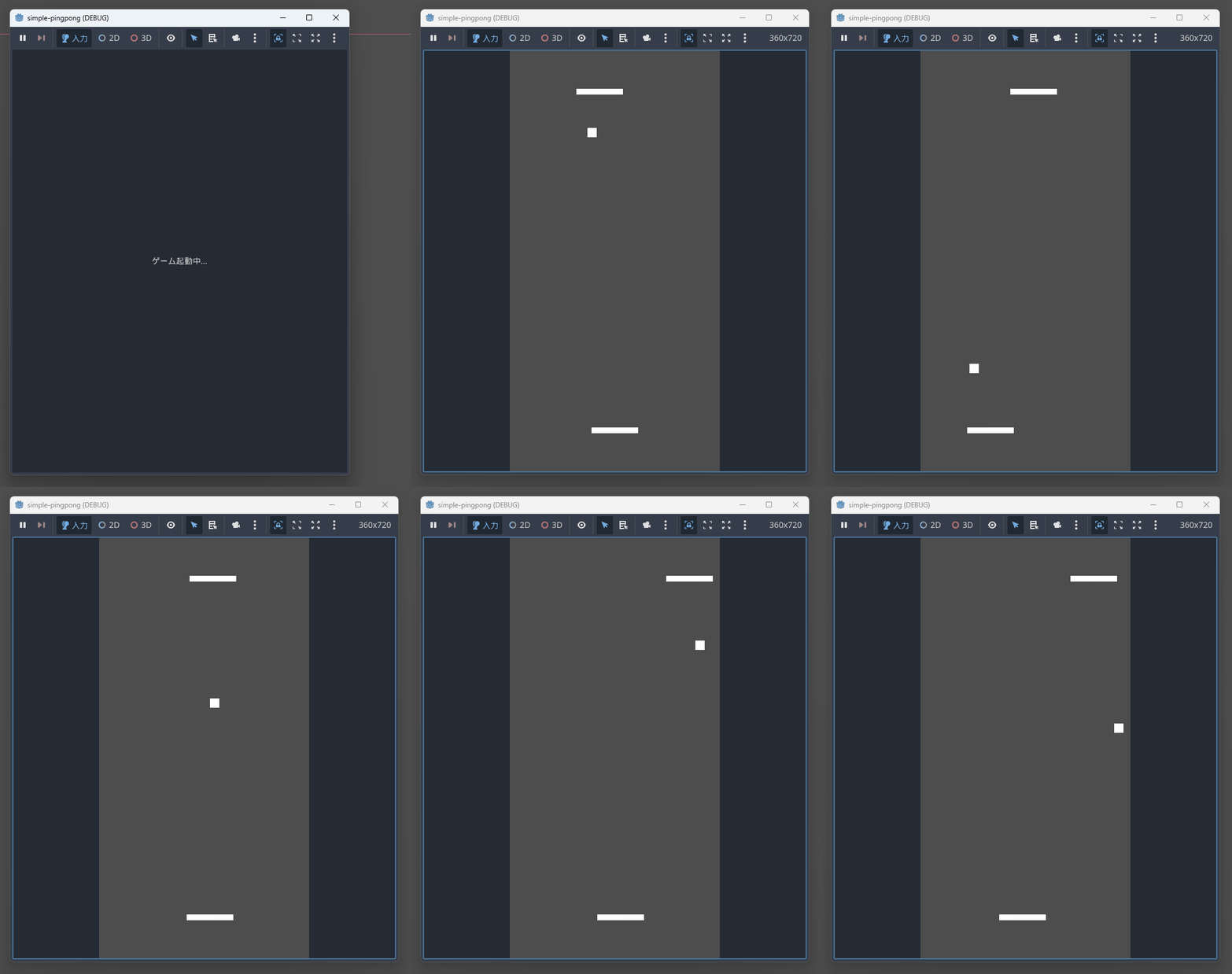
In this article, we will implement a simple ping-pong game using Godot 4.x, which is gaining attention as a game engine suitable for collaborative development with LLMs. This is a 2D game where the player controls the paddle at the bottom and plays against the CPU.
What is Godot
Godot is an open-source cross-platform game engine. It is one of the major game development tools alongside Unity and Unreal Engine, and it employs GDScript, its own Python-like scripting language. It is characterized by its lightweight engine size and fast startup.
Why Godot is suitable for collaborative development with LLMs
Godot's scene files (.tscn) are written in a human-readable format, making them easy for LLMs to understand and generate.
Example
[node name="Player" type="CharacterBody2D" parent="."]
position = Vector2(180, 650)
script = ExtResource("2_1hdqx")
Additionally, GDScript has a Python-like syntax, which is a language pattern many LLMs excel at. Development using only a text editor is possible, as in this case, allowing you to build an interactive development environment with LLMs.
Target audience
- Developers interested in game development using LLMs
- Those who want to learn the basics of Godot
References
Implementation
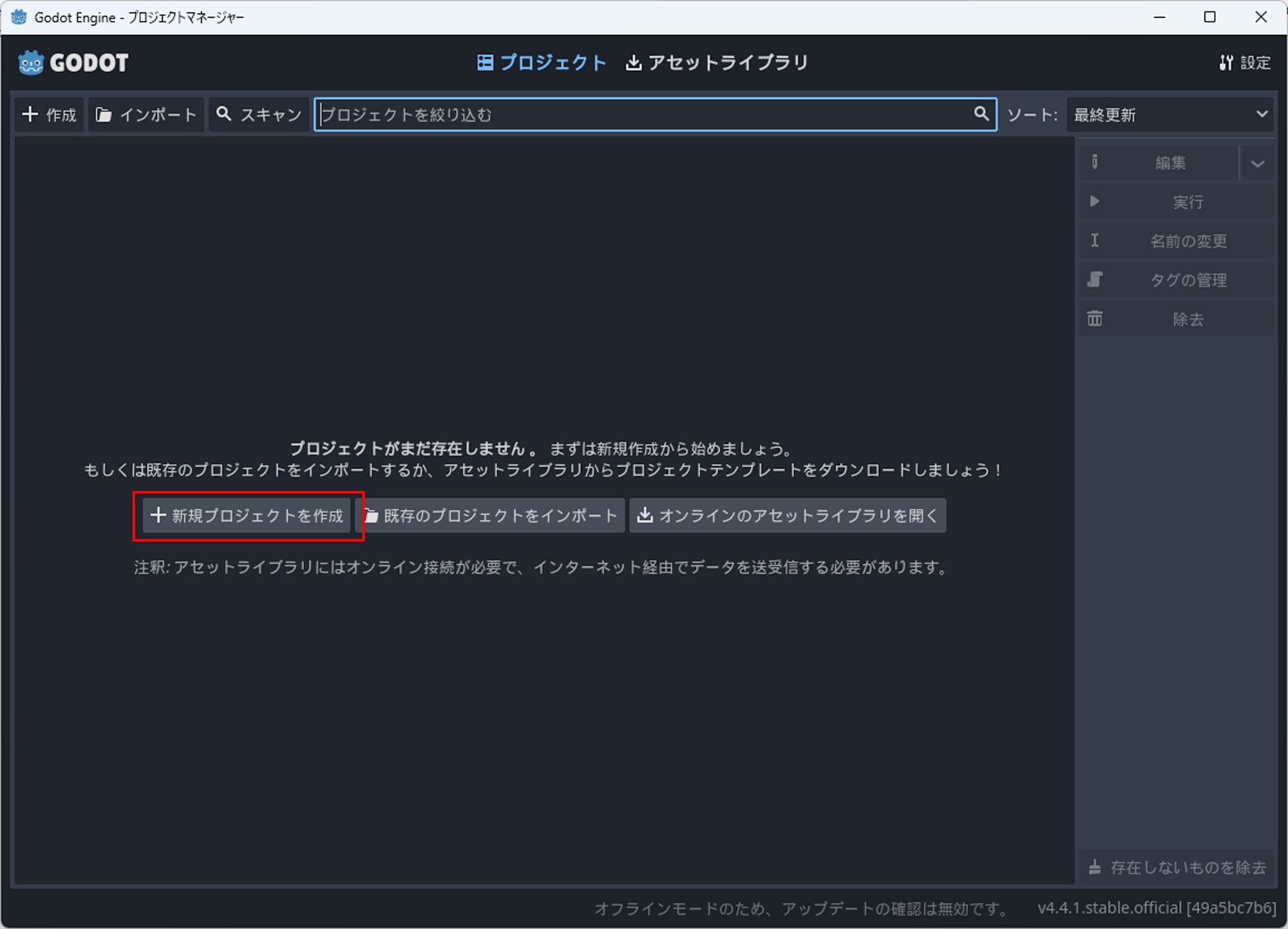
First, I downloaded and launched Godot from the official site and created a new project.
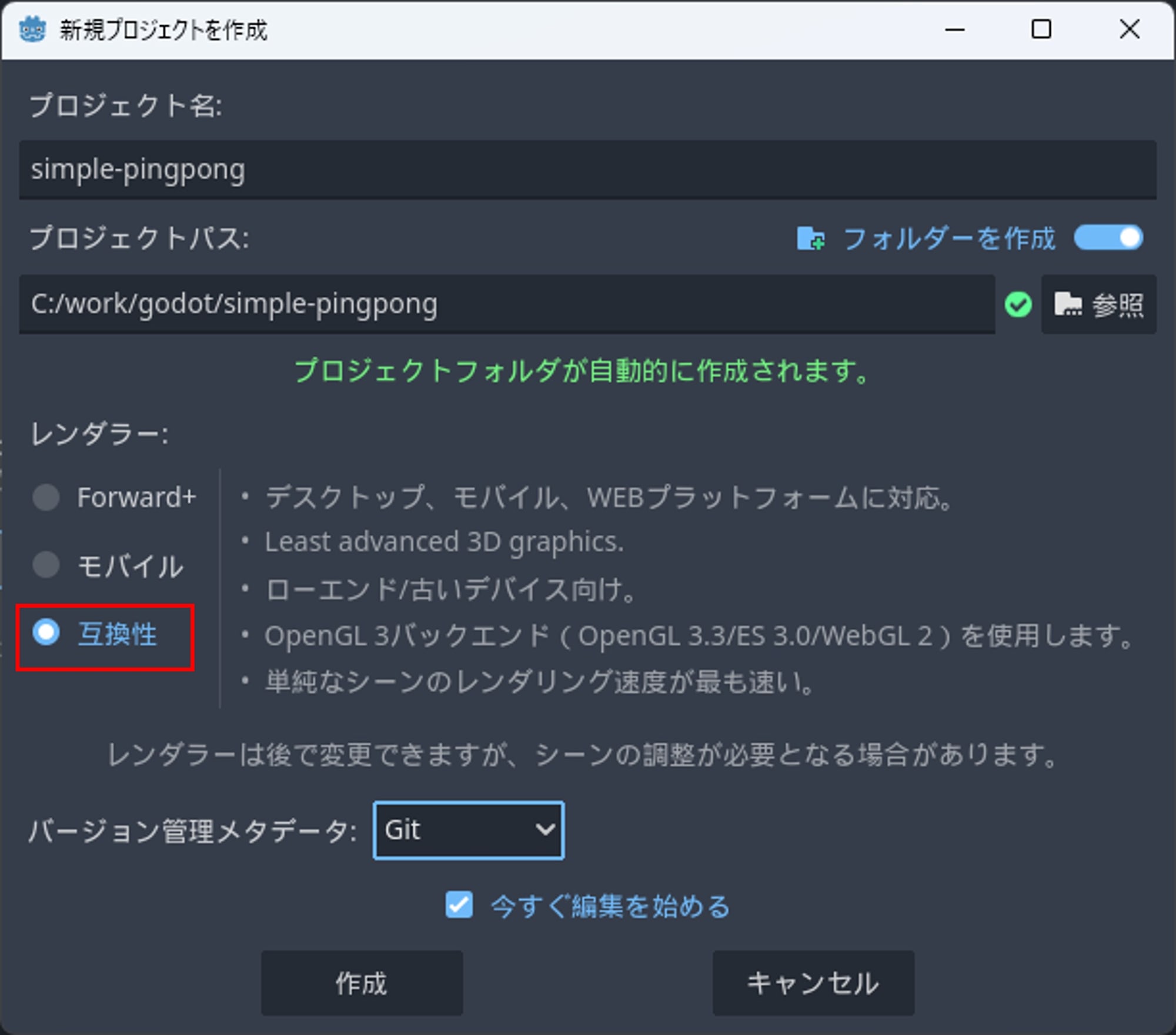
For this project, I chose Compatibility as the renderer, which is said to be "the fastest for rendering simple scenes."
After creating the project, a folder is created. I communicated the operational image of the game I wanted to create to the LLM and created the following files in the folder. For this development, I used Claude Sonnet 4 as the LLM.
Main.tscn
[gd_scene load_steps=9 format=3 uid="uid://bvxqy8qkqwqxr"]

[ext_resource type="Script" path="res://Main.gd" id="1_0hdqx"]
[ext_resource type="Script" path="res://Player.gd" id="2_1hdqx"]
[ext_resource type="Script" path="res://CPU.gd" id="3_2hdqx"]
[ext_resource type="Script" path="res://Ball.gd" id="4_3hdqx"]

[sub_resource type="RectangleShape2D" id="RectangleShape2D_1"]
size = Vector2(80, 10)

[sub_resource type="RectangleShape2D" id="RectangleShape2D_2"]
size = Vector2(80, 10)

[sub_resource type="RectangleShape2D" id="RectangleShape2D_3"]
size = Vector2(16, 16)

[sub_resource type="RectangleShape2D" id="RectangleShape2D_4"]
size = Vector2(20, 720)

[sub_resource type="RectangleShape2D" id="RectangleShape2D_5"]
size = Vector2(360, 20)

[node name="Main" type="Node2D"]
script = ExtResource("1_0hdqx")

[node name="Player" type="CharacterBody2D" parent="."]
position = Vector2(180, 650)
script = ExtResource("2_1hdqx")

[node name="CollisionShape2D" type="CollisionShape2D" parent="Player"]
shape = SubResource("RectangleShape2D_1")

[node name="ColorRect" type="ColorRect" parent="Player"]
offset_left = -40.0
offset_top = -5.0
offset_right = 40.0
offset_bottom = 5.0
color = Color(1, 1, 1, 1)

[node name="CPU" type="CharacterBody2D" parent="."]
position = Vector2(180, 70)
script = ExtResource("3_2hdqx")

[node name="CollisionShape2D" type="CollisionShape2D" parent="CPU"]
shape = SubResource("RectangleShape2D_2")

[node name="ColorRect" type="ColorRect" parent="CPU"]
offset_left = -40.0
offset_top = -5.0
offset_right = 40.0
offset_bottom = 5.0
color = Color(1, 1, 1, 1)

[node name="Ball" type="CharacterBody2D" parent="."]
position = Vector2(180, 360)
script = ExtResource("4_3hdqx")

[node name="CollisionShape2D" type="CollisionShape2D" parent="Ball"]
shape = SubResource("RectangleShape2D_3")

[node name="ColorRect" type="ColorRect" parent="Ball"]
offset_left = -8.0
offset_top = -8.0
offset_right = 8.0
offset_bottom = 8.0
color = Color(1, 1, 1, 1)

[node name="Walls" type="StaticBody2D" parent="."]

[node name="LeftWall" type="CollisionShape2D" parent="Walls"]
position = Vector2(-10, 360)
shape = SubResource("RectangleShape2D_4")

[node name="RightWall" type="CollisionShape2D" parent="Walls"]
position = Vector2(370, 360)
shape = SubResource("RectangleShape2D_4")

[node name="TopWall" type="CollisionShape2D" parent="Walls"]
position = Vector2(180, -10)
shape = SubResource("RectangleShape2D_5")

[node name="BottomWall" type="CollisionShape2D" parent="Walls"]
position = Vector2(180, 730)
shape = SubResource("RectangleShape2D_5")
Main.gd
extends Node2D

# Game settings
const SCREEN_WIDTH = 360
const SCREEN_HEIGHT = 720

# Score
var player_score = 0
var cpu_score = 0

# Game object references
@onready var player = $Player
@onready var cpu = $CPU
@onready var ball = $Ball

func _ready():
	# Set screen size
	get_window().size = Vector2i(SCREEN_WIDTH, SCREEN_HEIGHT)
	get_window().position = Vector2i(100, 100)  # Adjust window position

	# Connect ball's score update signal
	ball.goal_scored.connect(_on_goal_scored)

	print("Pingpong game started!")
	print("Use A/D or Left/Right arrows to move your paddle")

func _on_goal_scored(scorer):
	if scorer == "player":
		player_score += 1
		print("Player scores! Score: Player ", player_score, " - CPU ", cpu_score)
	elif scorer == "cpu":
		cpu_score += 1
		print("CPU scores! Score: Player ", player_score, " - CPU ", cpu_score)

	# Game end check (first to 5 points)
	if player_score >= 5:
		print("Player wins!")
		_reset_game()
	elif cpu_score >= 5:
		print("CPU wins!")
		_reset_game()

func _reset_game():
	# Reset score
	player_score = 0
	cpu_score = 0

	# Reset ball position
	ball.reset_position()

	print("Game reset! New game started.")

func _input(event):
	# Exit game with ESC key
	if event.is_action_pressed("ui_cancel"):
		get_tree().quit()
Player.gd
extends CharacterBody2D

# Paddle settings
const SPEED = 300.0
const PADDLE_WIDTH = 80.0
const SCREEN_WIDTH = 360

# Collision shape settings
@onready var collision_shape = $CollisionShape2D

func _ready():
	# Set paddle collision shape
	var shape = RectangleShape2D.new()
	shape.size = Vector2(PADDLE_WIDTH, 10)
	collision_shape.shape = shape

func _physics_process(delta):
	# Get input
	var input_direction = 0

	# Process keyboard input
	if Input.is_action_pressed("ui_left") or Input.is_action_pressed("move_left"):
		input_direction = -1
	elif Input.is_action_pressed("ui_right") or Input.is_action_pressed("move_right"):
		input_direction = 1

	# Set velocity
	velocity.x = input_direction * SPEED
	velocity.y = 0  # Restrict movement on Y axis

	# Execute movement
	move_and_slide()

	# Restrict at screen boundaries
	_clamp_to_screen()

func _clamp_to_screen():
	# Restrict paddle from going off-screen
	var half_width = PADDLE_WIDTH / 2
	position.x = clamp(position.x, half_width, SCREEN_WIDTH - half_width)

# Input map settings (apart from actions automatically created in project settings)
func _input(event):
	# Movement with A/D keys (additional input options)
	pass
CPU.gd
extends CharacterBody2D

# CPU paddle settings
const SPEED = 200.0  # Set a bit slower than player
const PADDLE_WIDTH = 80.0
const SCREEN_WIDTH = 360
const REACTION_ZONE = 360.0  # React when ball is above this Y coordinate

# AI settings
const PREDICTION_FACTOR = 0.8  # Response level to ball's predicted movement
const DEAD_ZONE = 10.0  # Don't move paddle within this range

# Game object references
@onready var collision_shape = $CollisionShape2D
var ball_node: CharacterBody2D

func _ready():
	# Set paddle collision shape
	var shape = RectangleShape2D.new()
	shape.size = Vector2(PADDLE_WIDTH, 10)
	collision_shape.shape = shape

	# Get reference to ball node
	ball_node = get_parent().get_node("Ball")

func _physics_process(delta):
	if not ball_node:
		return

	# Get ball position and velocity
	var ball_position = ball_node.global_position
	var ball_velocity = ball_node.velocity

	# Only react when ball is moving toward CPU
	if ball_position.y < REACTION_ZONE and ball_velocity.y < 0:
		_move_towards_ball(ball_position, ball_velocity, delta)
	else:
		# Return to center when ball is far
		_move_to_center(delta)

	# Execute movement
	move_and_slide()

	# Restrict at screen boundaries
	_clamp_to_screen()

func _move_towards_ball(ball_pos: Vector2, ball_vel: Vector2, delta: float):
	# Calculate predicted ball position
	var time_to_reach = abs((position.y - ball_pos.y) / ball_vel.y) if ball_vel.y != 0 else 0
	var predicted_x = ball_pos.x + ball_vel.x * time_to_reach * PREDICTION_FACTOR

	# Calculate difference between paddle center and predicted ball position
	var target_x = predicted_x
	var distance = target_x - position.x

	# Don't move within dead zone
	if abs(distance) < DEAD_ZONE:
		velocity.x = 0
		return

	# Move toward target
	var direction = sign(distance)
	velocity.x = direction * SPEED
	velocity.y = 0

func _move_to_center(delta: float):
	# Move toward center of screen
	var center_x = SCREEN_WIDTH / 2
	var distance = center_x - position.x

	if abs(distance) < DEAD_ZONE:
		velocity.x = 0
		return

	var direction = sign(distance)
	velocity.x = direction * SPEED * 0.5  # Return to center a bit slower
	velocity.y = 0

func _clamp_to_screen():
	# Restrict paddle from going off-screen
	var half_width = PADDLE_WIDTH / 2
	position.x = clamp(position.x, half_width, SCREEN_WIDTH - half_width)
Ball.gd
extends CharacterBody2D

# Ball settings
const INITIAL_SPEED = 250.0
const MAX_SPEED = 400.0
const SPEED_INCREMENT = 20.0  # Speed increases with each paddle hit
const BALL_SIZE = 16.0

# Screen settings
const SCREEN_WIDTH = 360
const SCREEN_HEIGHT = 720

# Game state
var current_speed = INITIAL_SPEED
var is_serving = true

# Signal
signal goal_scored(scorer)

# Game object references
@onready var collision_shape = $CollisionShape2D

func _ready():
	# Set ball collision shape
	var shape = RectangleShape2D.new()
	shape.size = Vector2(BALL_SIZE, BALL_SIZE)
	collision_shape.shape = shape

	# Initial serve
	_serve()

func _physics_process(delta):
	if is_serving:
		return

	# Execute movement
	var collision = move_and_slide()

	# Handle collision
	if get_slide_collision_count() > 0:
		_handle_collision()

	# Check for goals
	_check_goals()

func _serve():
	# Initial setup for serve
	is_serving = true
	current_speed = INITIAL_SPEED
	position = Vector2(SCREEN_WIDTH / 2, SCREEN_HEIGHT / 2)

	# Serve in random direction (either up or down)
	var angle = randf_range(-PI/4, PI/4)  # Range from -45 to 45 degrees
	if randf() > 0.5:
		angle += PI  # 50% chance of going downward

	velocity = Vector2(cos(angle), sin(angle)) * current_speed
	is_serving = false

	print("Ball served with velocity: ", velocity)

func _handle_collision():
	var collision = get_slide_collision(0)
	var collider = collision.get_collider()

	if collider:
		var collision_normal = collision.get_normal()

		# Collision with paddle
		if collider.name == "Player" or collider.name == "CPU":
			_handle_paddle_collision(collider, collision_normal)

		# Collision with wall
		elif collider.name == "Walls":
			_handle_wall_collision(collision_normal)

func _handle_paddle_collision(paddle, normal: Vector2):
	# Calculate relative position from paddle center to ball
	var paddle_center = paddle.global_position.x
	var ball_center = global_position.x
	var relative_intersect = (ball_center - paddle_center) / 40.0  # Normalize by paddle half-width

	# Calculate reflection angle (adjust angle based on relative position)
	var bounce_angle = relative_intersect * PI/3  # Maximum 60 degrees angle

	# Increase speed
	current_speed = min(current_speed + SPEED_INCREMENT, MAX_SPEED)

	# Set new velocity vector
	if paddle.name == "Player":
		# Player paddle (bottom to top)
		velocity = Vector2(sin(bounce_angle), -cos(bounce_angle)) * current_speed
	else:
		# CPU paddle (top to bottom)
		velocity = Vector2(sin(bounce_angle), cos(bounce_angle)) * current_speed

	print("Paddle hit! New speed: ", current_speed)

func _handle_wall_collision(normal: Vector2):
	# Reflection off wall (left and right walls only)
	if abs(normal.x) > 0.5:  # Left or right wall
		velocity.x = -velocity.x
		print("Wall bounce!")

func _check_goals():
	# Upper goal (player scores)
	if position.y < -20:
		goal_scored.emit("player")
		_serve()

	# Lower goal (CPU scores)
	elif position.y > SCREEN_HEIGHT + 20:
		goal_scored.emit("cpu")
		_serve()

func reset_position():
	# Reset position when game is reset
	_serve()

# Display velocity for debugging
func _input(event):
	if event.is_action_pressed("ui_accept"):  # Space key
		print("Ball position: ", position, " Velocity: ", velocity, " Speed: ", current_speed)
I also modified project.godot as follows:
project.godot
; Engine configuration file.
; It's best edited using the editor UI and not directly,
; since the parameters that go here are not all obvious.
;
; Format:
;   [section] ; section goes between []
;   param=value ; assign values to parameters

config_version=5

[application]

config/name="simple-pong"
run/main_scene="res://Main.tscn"

[display]

window/size/viewport_width=360
window/size/viewport_height=720
window/size/resizable=false

[input]

move_left={
"deadzone": 0.5,
"events": [Object(InputEventKey,"resource_local_to_scene":false,"resource_name":"","device":-1,"window_id":0,"alt_pressed":false,"shift_pressed":false,"ctrl_pressed":false,"meta_pressed":false,"pressed":false,"keycode":0,"physical_keycode":65,"key_label":0,"unicode":97,"echo":false,"script":null)
]
}
move_right={
"deadzone": 0.5,
"events": [Object(InputEventKey,"resource_local_to_scene":false,"resource_name":"","device":-1,"window_id":0,"alt_pressed":false,"shift_pressed":false,"ctrl_pressed":false,"meta_pressed":false,"pressed":false,"keycode":0,"physical_keycode":68,"key_label":0,"unicode":100,"echo":false,"script":null)
]
}

[rendering]

renderer/rendering_method="gl_compatibility"
renderer/rendering_method.mobile="gl_compatibility"
Testing and Fixing
After completing the implementation, I started the game in the Godot editor by pressing the F5 key.
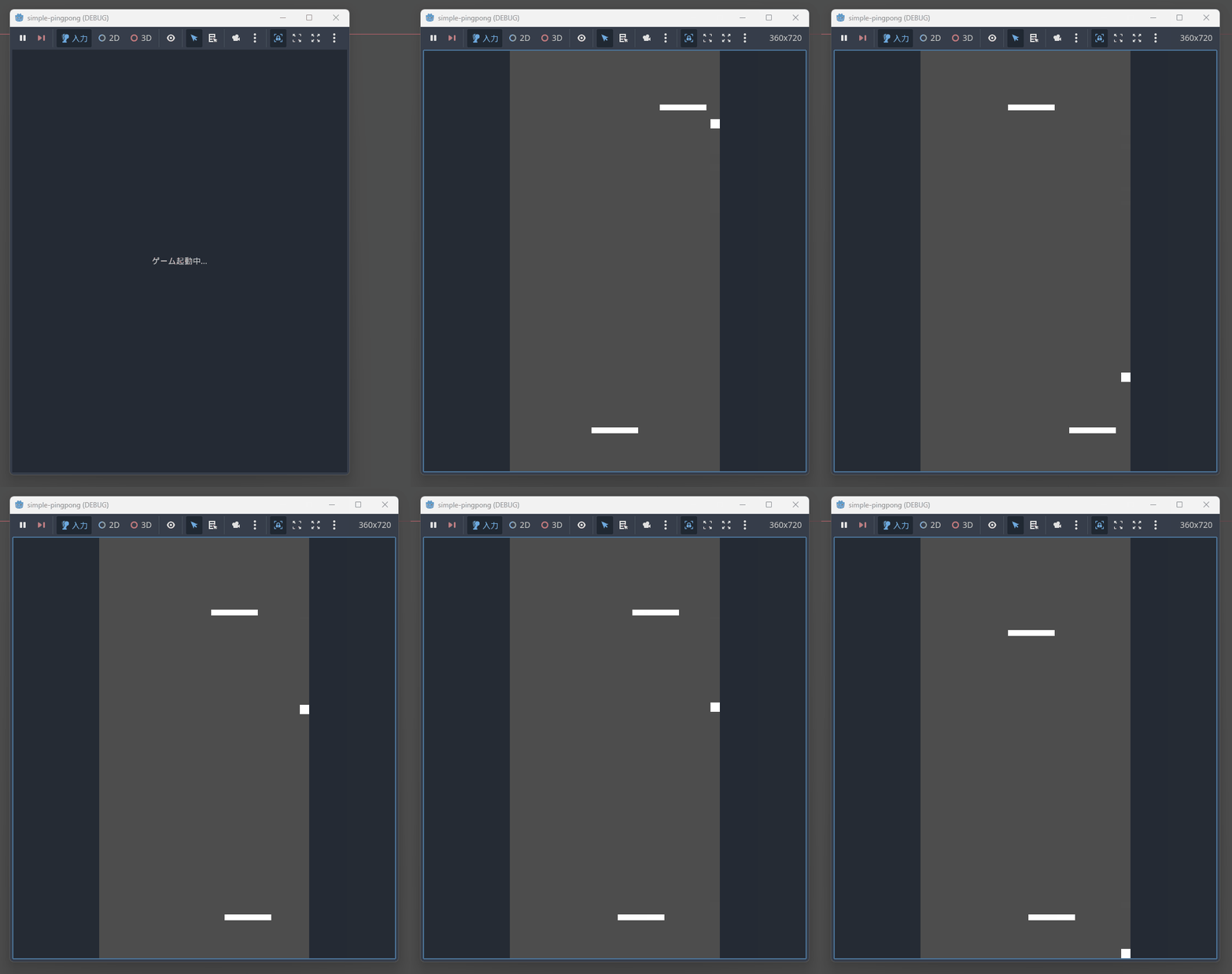
There were the following issues with the operation:
- CPU advances every time it hits the ball
- Ball gets stuck against the wall and doesn't move away
- Game doesn't end even when you lose
- Ball speed is too slow
After iterative dialogue with the LLM and several code revisions, I resolved the above issues.
Corrected Code
Main.tscn
[gd_scene load_steps=10 format=3 uid="uid://cilbg8jwrfbyr"]

[ext_resource type="Script" uid="uid://efgbiogmat67" path="res://Main.gd" id="1_0hdqx"]
[ext_resource type="Script" uid="uid://d348gu2f10sit" path="res://Player.gd" id="2_1hdqx"]
[ext_resource type="Script" uid="uid://c6m0g0dnrbvff" path="res://CPU.gd" id="3_2hdqx"]
[ext_resource type="Script" uid="uid://tbmexcoveiia" path="res://Ball.gd" id="4_3hdqx"]

[sub_resource type="RectangleShape2D" id="RectangleShape2D_1"]
size = Vector2(80, 10)

[sub_resource type="RectangleShape2D" id="RectangleShape2D_2"]
size = Vector2(80, 10)

[sub_resource type="RectangleShape2D" id="RectangleShape2D_3"]
size = Vector2(16, 16)

[sub_resource type="RectangleShape2D" id="RectangleShape2D_4"]
size = Vector2(20, 720)

[sub_resource type="RectangleShape2D" id="RectangleShape2D_5"]
size = Vector2(360, 20)

[node name="Main" type="Node2D"]
script = ExtResource("1_0hdqx")

[node name="Player" type="CharacterBody2D" parent="."]
position = Vector2(180, 650)
script = ExtResource("2_1hdqx")

[node name="CollisionShape2D" type="CollisionShape2D" parent="Player"]
shape = SubResource("RectangleShape2D_1")

[node name="ColorRect" type="ColorRect" parent="Player"]
offset_left = -40.0
offset_top = -5.0
offset_right = 40.0
offset_bottom = 5.0

[node name="CPU" type="CharacterBody2D" parent="."]
position = Vector2(180, 70)
script = ExtResource("3_2hdqx")

[node name="CollisionShape2D" type="CollisionShape2D" parent="CPU"]
shape = SubResource("RectangleShape2D_2")

[node name="ColorRect" type="ColorRect" parent="CPU"]
offset_left = -40.0
offset_top = -5.0
offset_right = 40.0
offset_bottom = 5.0

[node name="Ball" type="CharacterBody2D" parent="."]
position = Vector2(180, 360)
script = ExtResource("4_3hdqx")

[node name="CollisionShape2D" type="CollisionShape2D" parent="Ball"]
shape = SubResource("RectangleShape2D_3")

[node name="ColorRect" type="ColorRect" parent="Ball"]
offset_left = -8.0
offset_top = -8.0
offset_right = 8.0
offset_bottom = 8.0

[node name="Walls" type="StaticBody2D" parent="."]

[node name="LeftWall" type="CollisionShape2D" parent="Walls"]
position = Vector2(-10, 360)
shape = SubResource("RectangleShape2D_4")

[node name="RightWall" type="CollisionShape2D" parent="Walls"]
position = Vector2(370, 360)
shape = SubResource("RectangleShape2D_4")

[node name="TopWall" type="CollisionShape2D" parent="Walls"]
position = Vector2(180, -10)
shape = SubResource("RectangleShape2D_5")

[node name="BottomWall" type="CollisionShape2D" parent="Walls"]
position = Vector2(180, 730)
shape = SubResource("RectangleShape2D_5")
Main.gd
extends Node2D

# Game settings
const SCREEN_WIDTH = 360
const SCREEN_HEIGHT = 720
const WINNING_SCORE = 5

# Score
var player_score = 0
var cpu_score = 0
var game_over = false

# Game object references
@onready var player = $Player
@onready var cpu = $CPU
@onready var ball = $Ball

func _ready():
	# Set screen size
	get_window().size = Vector2i(SCREEN_WIDTH, SCREEN_HEIGHT)
	get_window().position = Vector2i(100, 100)

	# Connect the score update signal to the ball
	ball.goal_scored.connect(_on_goal_scored)

	print("Pingpong game started!")
	print("Use Arrow Keys to move your paddle")
	print("First to ", WINNING_SCORE, " points wins!")

func _on_goal_scored(scorer):
	print("Goal scored by: ", scorer)

	if game_over:
		print("Game is already over, ignoring goal")
		return

	if scorer == "player":
		player_score += 1
		print("Player scores! Score: Player ", player_score, " - CPU ", cpu_score)
	elif scorer == "cpu":
		cpu_score += 1
		print("CPU scores! Score: Player ", player_score, " - CPU ", cpu_score)

	# Check if game ended
	if player_score >= WINNING_SCORE:
		print("=== PLAYER WINS! ===")
		_end_game()
	elif cpu_score >= WINNING_SCORE:
		print("=== CPU WINS! ===")
		_end_game()

func _end_game():
	game_over = true
	# Stop the ball
	ball.velocity = Vector2.ZERO
	ball.is_serving = true

	print("Game Over! Press SPACE to restart or ESC to quit")

func _reset_game():
	print("Resetting game...")

	# Reset game state
	game_over = false
	player_score = 0
	cpu_score = 0

	# Reset object positions
	player.position = Vector2(180, 650)
	cpu.position = Vector2(180, 70)
	ball.reset_position()

	print("Game reset! New game started.")

func _input(event):
	# ESC key to quit game
	if event.is_action_pressed("ui_cancel"):
		print("Quitting game...")
		get_tree().quit()

	# Space key to restart
	if event.is_action_pressed("ui_accept"):
		if game_over:
			_reset_game()
		else:
			print("Current score: Player ", player_score, " - CPU ", cpu_score)

	# R key to restart (for debugging)
	if Input.is_key_pressed(KEY_R):
		_reset_game()

# Display debug info
func _process(delta):
	if Input.is_action_just_pressed("ui_select"):  # Tab key
		print("Ball position: ", ball.position)
		print("Ball velocity: ", ball.velocity)
		print("Game over: ", game_over)
		print("Is serving: ", ball.is_serving)
Player.gd
extends CharacterBody2D

# Paddle settings
const SPEED = 300.0
const PADDLE_WIDTH = 80.0
const SCREEN_WIDTH = 360

# Game object references
@onready var collision_shape = $CollisionShape2D

func _ready():
	# Set paddle collision shape
	var shape = RectangleShape2D.new()
	shape.size = Vector2(PADDLE_WIDTH, 10)
	collision_shape.shape = shape

func _physics_process(delta):
	# Get input
	var input_direction = 0

	# Process keyboard input
	if Input.is_action_pressed("ui_left"):
		input_direction = -1
	elif Input.is_action_pressed("ui_right"):
		input_direction = 1

	# Update position directly
	if input_direction != 0:
		position.x += input_direction * SPEED * delta

	# Restrict at screen boundaries
	_clamp_to_screen()

	# Fix Y coordinate
	position.y = 650

func _clamp_to_screen():
	# Prevent paddle from going offscreen
	var half_width = PADDLE_WIDTH / 2
	position.x = clamp(position.x, half_width, SCREEN_WIDTH - half_width)
CPU.gd
extends CharacterBody2D

# CPU paddle settings
const SPEED = 220.0
const PADDLE_WIDTH = 80.0
const SCREEN_WIDTH = 360
const REACTION_ZONE = 400.0  # Respond to ball above this Y coordinate

# AI settings
const PREDICTION_FACTOR = 0.7  # Ball prediction accuracy
const DEAD_ZONE = 15.0  # Don't move within this range
const CENTER_RETURN_SPEED = 0.4  # Speed coefficient for returning to center

# Game object references
@onready var collision_shape = $CollisionShape2D
var ball_node: Node2D
var target_x = 0.0

func _ready():
	# Set paddle collision shape
	var shape = RectangleShape2D.new()
	shape.size = Vector2(PADDLE_WIDTH, 10)
	collision_shape.shape = shape

	# Get ball node reference
	ball_node = get_parent().get_node("Ball")
	target_x = SCREEN_WIDTH / 2  # Initial target is center

func _physics_process(delta):
	if not ball_node:
		return

	# Wait in center if ball is serving
	if ball_node.is_serving:
		_move_to_center(delta)
	else:
		# Get ball state
		var ball_position = ball_node.position
		var ball_direction = ball_node.ball_direction
		var ball_speed = ball_node.current_speed

		# Only respond actively when ball is moving towards CPU side
		if ball_position.y < REACTION_ZONE and ball_direction.y < 0:
			_track_ball(ball_position, ball_direction, ball_speed, delta)
		else:
			# Return to center when ball is far away
			_move_to_center(delta)

	# Execute actual movement
	_execute_movement(delta)

	# Restrict at screen boundaries
	_clamp_to_screen()

	# Fix Y coordinate (prevent advancing)
	position.y = 70

func _track_ball(ball_pos: Vector2, ball_dir: Vector2, ball_speed: float, delta: float):
	# Calculate predicted ball position
	var time_to_cpu = 0.0
	if ball_dir.y != 0:
		time_to_cpu = abs((position.y - ball_pos.y) / (ball_dir.y * ball_speed))

	# Calculate prediction position
	var predicted_x = ball_pos.x + ball_dir.x * ball_speed * time_to_cpu * PREDICTION_FACTOR

	# Restrict within screen boundaries
	predicted_x = clamp(predicted_x, PADDLE_WIDTH/2, SCREEN_WIDTH - PADDLE_WIDTH/2)

	target_x = predicted_x

	# Debug info
	if randf() < 0.01:  # 1% chance to output (prevent spam)
		print("CPU tracking - Ball pos: ", ball_pos, " Predicted: ", predicted_x, " Target: ", target_x)

func _move_to_center(delta: float):
	# Set center of screen as target
	target_x = SCREEN_WIDTH / 2

func _execute_movement(delta: float):
	# Calculate difference between current position and target
	var distance = target_x - position.x

	# Don't move if within dead zone
	if abs(distance) < DEAD_ZONE:
		return

	# Determine movement direction and speed
	var direction = sign(distance)
	var move_speed = SPEED

	# Slower when returning to center
	if target_x == SCREEN_WIDTH / 2:
		move_speed *= CENTER_RETURN_SPEED

	# Update position directly (not using physics engine)
	position.x += direction * move_speed * delta

func _clamp_to_screen():
	# Prevent paddle from going offscreen
	var half_width = PADDLE_WIDTH / 2
	position.x = clamp(position.x, half_width, SCREEN_WIDTH - half_width)

# For debugging
func _input(event):
	if event.is_action_pressed("ui_select"):  # Tab key
		if ball_node:
			print("CPU Debug:")
			print("  Position: ", position.x)
			print("  Target: ", target_x)
			print("  Ball pos: ", ball_node.position)
			print("  Ball dir: ", ball_node.ball_direction)
			print("  Ball serving: ", ball_node.is_serving)
Ball.gd
extends CharacterBody2D

# Ball settings
const INITIAL_SPEED = 350.0
const MAX_SPEED = 500.0
const SPEED_INCREMENT = 25.0
const BALL_SIZE = 16.0

# Screen settings
const SCREEN_WIDTH = 360
const SCREEN_HEIGHT = 720

# Game state
var current_speed = INITIAL_SPEED
var ball_direction = Vector2.ZERO
var is_serving = false

# Signal
signal goal_scored(scorer)

# Game object references
@onready var collision_shape = $CollisionShape2D

func _ready():
	# Set ball collision shape
	var shape = RectangleShape2D.new()
	shape.size = Vector2(BALL_SIZE, BALL_SIZE)
	collision_shape.shape = shape

	# Initial serve
	_serve()

func _physics_process(delta):
	if is_serving:
		return

	# Manually move ball
	position += ball_direction * current_speed * delta

	# Check boundaries
	_check_boundaries()

	# Check paddle collisions
	_check_paddle_collisions()

func _serve():
	is_serving = true
	current_speed = INITIAL_SPEED
	position = Vector2(SCREEN_WIDTH / 2, SCREEN_HEIGHT / 2)

	# Serve after 1 second
	await get_tree().create_timer(1.0).timeout

	# Serve in random direction
	var angle = randf_range(-PI/6, PI/6)  # -30 to 30 degrees
	if randf() > 0.5:
		angle += PI  # 50% chance for downward direction

	ball_direction = Vector2(cos(angle), sin(angle))
	is_serving = false

	print("Ball served! Direction: ", ball_direction)

func _check_boundaries():
	# Reflect off left/right walls
	if position.x <= BALL_SIZE / 2:
		position.x = BALL_SIZE / 2
		ball_direction.x = abs(ball_direction.x)  # Rightward
		print("Left wall bounce")
	elif position.x >= SCREEN_WIDTH - BALL_SIZE / 2:
		position.x = SCREEN_WIDTH - BALL_SIZE / 2
		ball_direction.x = -abs(ball_direction.x)  # Leftward
		print("Right wall bounce")

	# Goal detection
	if position.y <= -BALL_SIZE:
		print("Player scores! Ball Y: ", position.y)
		goal_scored.emit("player")
		_serve()
	elif position.y >= SCREEN_HEIGHT + BALL_SIZE:
		print("CPU scores! Ball Y: ", position.y)
		goal_scored.emit("cpu")
		_serve()

func _check_paddle_collisions():
	# Player paddle collision
	var player = get_parent().get_node("Player")
	if _is_colliding_with_paddle(player):
		_handle_paddle_hit(player)

	# CPU paddle collision
	var cpu = get_parent().get_node("CPU")
	if _is_colliding_with_paddle(cpu):
		_handle_paddle_hit(cpu)

func _is_colliding_with_paddle(paddle) -> bool:
	var paddle_pos = paddle.position
	var paddle_size = Vector2(80, 10)  # Paddle size

	# Simple rectangular collision detection
	return (position.x + BALL_SIZE/2 > paddle_pos.x - paddle_size.x/2 and
			position.x - BALL_SIZE/2 < paddle_pos.x + paddle_size.x/2 and
			position.y + BALL_SIZE/2 > paddle_pos.y - paddle_size.y/2 and
			position.y - BALL_SIZE/2 < paddle_pos.y + paddle_size.y/2)

func _handle_paddle_hit(paddle):
	# Calculate relative position from paddle center
	var relative_x = (position.x - paddle.position.x) / 40.0  # Normalized
	relative_x = clamp(relative_x, -1.0, 1.0)

	# Calculate reflection angle
	var bounce_angle = relative_x * PI/4  # Max 45 degrees

	# Increase speed
	current_speed = min(current_speed + SPEED_INCREMENT, MAX_SPEED)

	# Set new direction
	if paddle.name == "Player":
		# Player paddle - reflect upward
		ball_direction = Vector2(sin(bounce_angle), -cos(bounce_angle))
		position.y = paddle.position.y - 10  # Move away from paddle
	else:
		# CPU paddle - reflect downward
		ball_direction = Vector2(sin(bounce_angle), cos(bounce_angle))
		position.y = paddle.position.y + 10  # Move away from paddle

	print("Paddle hit! Speed: ", current_speed, " Direction: ", ball_direction)

func reset_position():
	_serve()
Summary
Through the development of this ping-pong game, I've experienced how Godot's text-based development approach is exceptionally well-suited for collaboration with LLMs. Being able to complete everything from scene files to scripts entirely in a text editor allows direct utilization of LLM-generated code, potentially improving development efficiency. The same approach can be applied to expand UI elements and effects, making it possible to develop more sophisticated games using similar methods.
