# The Story of Building an Auto-Sync System for Google Drive KB Articles to Vertex AI RAG Corpus — From Abandoning Event-Driven to Arriving at Smart Polling

# The Story of Building an Auto-Sync System for Google Drive KB Articles to Vertex AI RAG Corpus — From Abandoning Event-Driven to Arriving at Smart Polling

# Google Drive KB Articles Auto-Sync to Vertex AI RAG Corpus ## Sharing the Trial and Error Journey from Overcoming Workspace Events API OAuth Constraints to Smart Polling Using GCS Metadata --- ## Background and Goals We built a mechanism to automatically synchronize knowledge base articles managed in Google Drive to a Vertex AI RAG Corpus. The goal was simple: **when a KB article is updated, have it reflected in the RAG Corpus automatically without any manual steps.** However, the path to get there was filled with unexpected obstacles. --- ## First Attempt: Webhook Using Workspace Events API The first approach we considered was using the **Workspace Events API** to receive Drive file change notifications in real time. ```python # Conceptual code for what we initially envisioned from google.workspace import events_v1 client = events_v1.WorkspaceEventsClient() subscription = client.create_subscription( subscription={ "target_resource": "//drive.googleapis.com/drives/DRIVE_ID", "event_types": ["google.workspace.drive.file.v1.updated"], "notification_endpoint": { "pubsub_topic": "projects/PROJECT_ID/topics/drive-changes" } } ) ``` ### The Wall We Hit: OAuth Constraints When actually trying to implement this, we ran into a critical constraint. **The Workspace Events API requires user-based OAuth authentication (3-legged OAuth).** Specifically: - Service account authentication alone is **not supported** - The subscription is tied to the **authenticated user's permissions** - The subscription becomes invalid when the **user's token expires** ``` Error: The caller does not have permission Required: oauth scope https://www.googleapis.com/auth/drive Service accounts cannot act on behalf of users without domain-wide delegation ``` Domain-Wide Delegation (DWD) was also an option, but it required **Google Workspace Admin privileges** and was not feasible in our organization's environment. --- ## Second Attempt: Drive API Push Notifications (Channels) Next, we tried **Drive API's push notification feature (Channels)**. ```python from googleapiclient.discovery import build from google.oauth2 import service_account credentials = service_account.Credentials.from_service_account_file( 'service_account.json', scopes=['https://www.googleapis.com/auth/drive.readonly'] ) service = build('drive', 'v3', credentials=credentials) # Register webhook channel channel = service.files().watch( fileId='FILE_ID', body={ 'id': 'unique-channel-id', 'type': 'web_hook', 'address': 'https://your-endpoint.com/webhook', 'expiration': expiration_time_ms } ).execute() ``` ### Problem with This Approach Too - Channel **expiration (maximum 1 week)** → re-registration management becomes complex - Notification contents only include **"something changed"**, file details must be fetched separately - Endpoint must have an **HTTPS public URL** - Reliability is low due to **retry logic** being required on the receiving side Managing the complexity of operations, we started to feel this wasn't a good fit. --- ## Final Solution: Smart Polling Using GCS Metadata After all this trial and error, we settled on a **polling approach leveraging GCS metadata**. The key insight was: > "Instead of chasing real-time, make the polling itself smarter" ### Overall Architecture ``` Google Drive ↓ (periodic polling) Cloud Scheduler + Cloud Run Jobs ↓ (change detection) GCS (metadata store) ↓ (only on changes) Vertex AI RAG Corpus ``` ### Core Implementation #### 1. Managing Last Sync State with GCS Metadata ```python import json from datetime import datetime, timezone from google.cloud import storage class SyncStateManager: def __init__(self, bucket_name: str, state_blob_name: str = "sync_state.json"): self.client = storage.Client() self.bucket = self.client.bucket(bucket_name) self.state_blob_name = state_blob_name def get_last_sync_state(self) -> dict: """Retrieve the last sync state""" blob = self.bucket.blob(self.state_blob_name) if not blob.exists(): return { "last_sync_time": "2024-01-01T00:00:00Z", "synced_files": {} } data = json.loads(blob.download_as_text()) return data def save_sync_state(self, state: dict): """Save sync state""" blob = self.bucket.blob(self.state_blob_name) blob.upload_from_string( json.dumps(state, indent=2, ensure_ascii=False), content_type='application/json' ) # Use GCS object metadata to also record the last update time blob.metadata = { "last_updated": datetime.now(timezone.utc).isoformat(), "total_files": str(len(state.get("synced_files", {}))) } blob.patch() ``` #### 2. Efficient Change Detection from Drive ```python from googleapiclient.discovery import build from google.oauth2 import service_account from typing import Optional import logging logger = logging.getLogger(__name__) class DriveChangeDetector: def __init__(self, credentials_path: str, folder_id: str): credentials = service_account.Credentials.from_service_account_file( credentials_path, scopes=['https://www.googleapis.com/auth/drive.readonly'] ) self.service = build('drive', 'v3', credentials=credentials) self.folder_id = folder_id def get_modified_files(self, since: str) -> list[dict]: """ Get only files modified after the specified time since: ISO 8601 format string """ query = ( f"'{self.folder_id}' in parents " f"and modifiedTime > '{since}' " f"and mimeType != 'application/vnd.google-apps.folder' " f"and trashed = false" ) files = [] page_token = None while True: response = self.service.files().list( q=query, fields="nextPageToken, files(id, name, modifiedTime, md5Checksum, size)", pageToken=page_token, orderBy="modifiedTime desc" ).execute() files.extend(response.get('files', [])) page_token = response.get('nextPageToken') if not page_token: break return files def detect_changes(self, synced_files: dict, drive_files: list[dict]) -> dict: """ Detect differences between Drive files and sync state Returns: dict containing new/updated/deleted file lists """ current_file_ids = {f['id'] for f in drive_files} synced_file_ids = set(synced_files.keys()) new_files = [] updated_files = [] deleted_file_ids = synced_file_ids - current_file_ids for file in drive_files: file_id = file['id'] if file_id not in synced_files: new_files.append(file) else: # Detect changes using MD5 checksum stored = synced_files[file_id] if stored.get('md5Checksum') != file.get('md5Checksum'): updated_files.append(file) elif stored.get('modifiedTime') != file.get('modifiedTime'): # Flag for re-check even when checksum is absent (Docs native format) updated_files.append(file) return { "new": new_files, "updated": updated_files, "deleted": list(deleted_file_ids) } ``` #### 3. RAG Corpus Synchronization ```python import vertexai from vertexai.preview import rag from google.cloud import storage import tempfile import os class RAGCorpusSyncer: def __init__(self, project_id: str, location: str, corpus_name: str): vertexai.init(project=project_id, location=location) self.corpus_name = corpus_name self.storage_client = storage.Client() def upload_to_rag(self, file_content: bytes, file_name: str, metadata: dict) -> str: """Upload file to RAG Corpus""" # Save temporarily to GCS temp_bucket = "your-temp-bucket" temp_blob_name = f"temp/{file_name}" bucket = self.storage_client.bucket(temp_bucket) blob = bucket.blob(temp_blob_name) # Also set GCS metadata blob.metadata = { "drive_file_id": metadata.get("id", ""), "drive_modified_time": metadata.get("modifiedTime", ""), "sync_time": datetime.now(timezone.utc).isoformat() } blob.upload_from_string(file_content, content_type='text/plain') gcs_uri = f"gs://{temp_bucket}/{temp_blob_name}" # Import to RAG Corpus response = rag.import_files( corpus_name=self.corpus_name, paths=[gcs_uri], chunk_size=512, chunk_overlap=100, ) logger.info(f"Imported to RAG: {file_name}, response: {response}") return gcs_uri def remove_from_rag(self, rag_file_id: str): """Delete file from RAG Corpus""" rag.delete_file(name=rag_file_id) logger.info(f"Deleted from RAG: {rag_file_id}") def list_rag_files(self) -> dict: """Get mapping of Drive file IDs to RAG file IDs""" files = rag.list_files(corpus_name=self.corpus_name) # Extract Drive file ID from display_name mapping = {} for f in files: # Naming convention: "drive_{drive_file_id}_{filename}" if f.display_name.startswith("drive_"): parts = f.display_name.split("_", 2) if len(parts) >= 2: drive_id = parts[1] mapping[drive_id] = f.name return mapping ``` #### 4. Main Orchestrator ```python class DriveToRAGSyncer: def __init__(self, config: dict): self.state_manager = SyncStateManager( bucket_name=config["state_bucket"] ) self.change_detector = DriveChangeDetector( credentials_path=config["credentials_path"], folder_id=config["drive_folder_id"] ) self.rag_syncer = RAGCorpusSyncer( project_id=config["project_id"], location=config["location"], corpus_name=config["corpus_name"] ) self.drive_service = build( 'drive', 'v3', credentials=service_account.Credentials.from_service_account_file( config["credentials_path"], scopes=['https://www.googleapis.com/auth/drive.readonly'] ) ) def sync(self): """Execute main sync process""" logger.info("Starting Drive → RAG sync") # 1. Load sync state state = self.state_manager.get_last_sync_state() last_sync_time = state["last_sync_time"] synced_files = state.get("synced_files", {}) logger.info(f"Last sync time: {last_sync_time}") # 2. Detect changes current_files = self.change_detector.get_modified_files(since=last_sync_time) # Also get all files for deletion detection all_drive_files = self._get_all_files() changes = self.change_detector.detect_changes(synced_files, all_drive_files) logger.info( f"Changes detected - " f"New: {len(changes['new'])}, " f"Updated: {len(changes['updated'])}, " f"Deleted: {len(changes['deleted'])}" ) if not any([changes['new'], changes['updated'], changes['deleted']]): logger.info("No changes detected. Skipping sync.") return # 3. Get mapping of RAG file IDs rag_file_mapping = self.rag_syncer.list_rag_files() # 4. Process new files for file in changes['new']: self._process_file(file, synced_files) # 5. Process updated files for file in changes['updated']: # Delete old version first if file['id'] in rag_file_mapping: self.rag_syncer.remove_from_rag(rag_file_mapping[file['id']]) self._process_file(file, synced_files) # 6. Process deleted files for file_id in changes['deleted']: if file_id in rag_file_mapping: self.rag_syncer.remove_from_rag(rag_file_mapping[file_id]) synced_files.pop(file_id, None) logger.info(f"Deleted from sync state: {file_id}") # 7. Save new sync state new_state = { "last_sync_time": datetime.now(timezone.utc).isoformat(), "synced_files": synced_files } self.state_manager.save_sync_state(new_state) logger.info("Sync completed successfully") def _process_file(self, file: dict, synced_files: dict): """Download and upload a single file""" file_id = file['id'] file_name = file['name'] try: # Download from Drive content = self._download_file(file_id, file.get('mimeType', '')) if content is None: logger.warning(f"Could not download: {file_name}") return # Upload to RAG display_name = f"drive_{file_id}_{file_name}" self.rag_syncer.upload_to_rag(content, display_name, file) # Update sync state synced_files[file_id] = { "name": file_name, "modifiedTime": file.get('modifiedTime'), "md5Checksum": file.get('md5Checksum'), "syncedAt": datetime.now(timezone.utc).isoformat() } logger.info(f"Sync completed: {file_name}") except Exception as e: logger.error(f"Failed to sync {file_name}: {e}") raise def _download_file(self, file_id: str, mime_type: str) -> Optional[bytes]: """Download Drive file (with special handling for Google Docs format)""" if mime_type == 'application/vnd.google-apps.document': # Export Google Docs as plain text response = self.drive_service.files().export( fileId=file_id, mimeType='text/plain' ).execute() return response if isinstance(response, bytes) else response.encode('utf-8') elif mime_type == 'application/vnd.google-apps.spreadsheet': # Export Sheets as CSV response = self.drive_service.files().export( fileId=file_id, mimeType='text/csv' ).execute() return response if isinstance(response, bytes) else response.encode('utf-8') else: # Download binary files (PDF, etc.) directly response = self.drive_service.files().get_media( fileId=file_id ).execute() return response def _get_all_files(self) -> list[dict]: """Get all files in folder""" return self.change_detector.get_modified_files(since="2000-01-01T00:00:00Z") ``` --- ## Deployment Configuration ### Cloud Run Jobs Configuration ```yaml # cloudbuild.yaml steps: - name: 'gcr.io/cloud-builders/docker' args: ['build', '-t', 'gcr.io/$PROJECT_ID/drive-rag-syncer', '.'] - name: 'gcr.io/cloud-builders/docker' args: ['push', 'gcr.io/$PROJECT_ID/drive-rag-syncer'] - name: 'gcr.io/google.com/cloudsdktool/cloud-sdk' entrypoint: gcloud args: - run - jobs - deploy - drive-rag-syncer - --image=gcr.io/$PROJECT_ID/drive-rag-syncer - --region=asia-northeast1 - --service-account=drive-rag-sa@$PROJECT_ID.iam.gserviceaccount.com - --set-env-vars=PROJECT_ID=$PROJECT_ID - --memory=1Gi - --task-timeout=600 ``` ### Cloud Scheduler Configuration ```bash # Execute every 15 minutes gcloud scheduler jobs create http drive-rag-sync-job \ --location=asia-northeast1 \ --schedule="*/15 * * * *" \ --uri="https://asia-northeast1-run.googleapis.com/apis/run.googleapis.com/v1/namespaces/${PROJECT_ID}/jobs/drive-rag-syncer:run" \ --oauth-service-account-email=scheduler-sa@${PROJECT_ID}.iam.gserviceaccount.com \ --message-body='{}' ``` ### IAM Configuration ```bash # Service account for sync job gcloud iam service-accounts create drive-rag-sa \ --display-name="Drive RAG Syncer" # Grant necessary permissions gcloud projects add-iam-policy-binding ${PROJECT_ID} \ --member="serviceAccount:drive-rag-sa@${PROJECT_ID}.iam.gserviceaccount.com" \ --role="roles/storage.objectAdmin" gcloud projects add-iam-policy-binding ${PROJECT_ID} \ --member="serviceAccount:drive-rag-sa@${PROJECT_ID}.iam.gserviceaccount.com" \ --role="roles/aiplatform.user" # Grant Drive access (through domain-wide delegation or sharing settings) # Share the target folder with the service account's email address ``` --- ## Learnings and Insights ### Why GCS Metadata is Useful Using GCS object metadata as a sync state store provided the following advantages: | Item | Value | |------|-------| | Persistence | State remains even if the container restarts | | Auditability | Can check when the last sync occurred from GCS metadata | | Simplicity | No database needed | | Cost | Essentially free | ### Comparison with Polling vs. Push | Item | Push (Webhook) | Smart Polling | |------|----------------|---------------| | Real-time | ◎ | △ (depends on interval) | | Implementation complexity | High | Low | | Operational complexity | High (expiry management, etc.) | Low | | Authentication constraints | Strict | Flexible | | Cost | Low | Low to Medium | ### Key Points for Tuning Polling Intervals ```python # Adaptive polling interval based on update frequency def calculate_next_interval(changes_count: int, current_interval: int) -> int: if changes_count > 10: # Shorten interval when many changes return max(5, current_interval // 2) elif changes_count == 0: # Lengthen interval when no changes return min(60, current_interval * 2) else: return current_interval # Keep current interval ``` --- ## Remaining Challenges 1. **Large-scale file support**: Need to consider chunked processing when files number in the thousands 2. **Error recovery**: Retry logic when partial failures occur mid-sync 3. **Conflict detection**: Handling simultaneous edits by multiple people --- ## Summary Starting from the lofty goal of "real-time sync using Workspace Events API," we ended up with a more realistic and robust solution. Sometimes the "boring" approach of polling is the right answer. By leveraging GCS metadata, we achieved a **stateful polling mechanism with operational simplicity**, and were able to build a system that stably handles auto-sync of Drive KB articles to the RAG Corpus.
2026.07.15

This page has been translated by machine translation. View original

Introduction

We operate a system where RAG (Retrieval-Augmented Generation) is integrated into an internal Google Chat bot, generating responses based on KB (Knowledge Base) articles. The setup involves importing documents into Vertex AI RAG Engine, with the bot searching the corpus to answer user questions.

Initially, KB articles were managed as Markdown files in a Git repository and uploaded to the RAG corpus via GCS using CLI scripts. However, adding or editing articles required git operations and CLI execution, which posed a high barrier for non-technical staff.

"Edit an article in Google Drive, and have it automatically reflected in the RAG corpus" — this is a record of the research and implementation done to achieve that goal. The initial design was event-driven, but we hit a wall with OAuth constraints, and ultimately settled on smart polling as a practical solution.

Overall Architecture

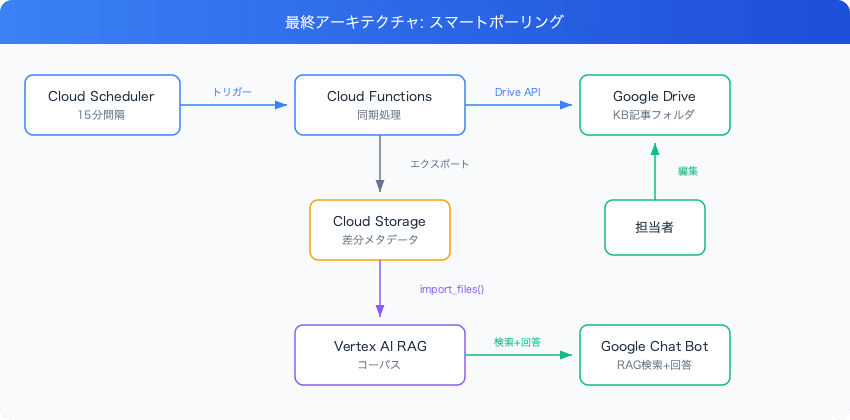
The final configuration we adopted is as follows.
google-drive-vertex-ai-rag-auto-sync-smart-polling

The key point is that we adopted Google Docs as the format for KB articles. Rather than placing Markdown files in a Drive folder, using Google Docs allows staff to edit articles in a WYSIWYG editor. Even without knowing Markdown syntax, they can intuitively work with formatting such as headings, lists, and bold text.

Vertex AI RAG Engine natively supports Google Workspace files including Google Docs, and they can be imported simply by passing a Drive folder URL to rag.import_files(). However, passing a folder URL to import_files() reprocesses all files every time, which is inefficient for polling at 15-minute intervals. Therefore, we implemented smart polling that uses GCS as an intermediate layer to detect changes and deletions.

Initial Design: Event-Driven with Workspace Events API

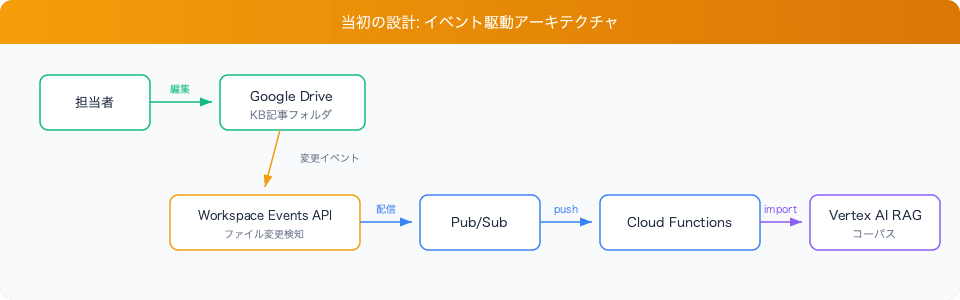
The first architecture we designed was for real-time synchronization.
google-drive-vertex-ai-rag-auto-sync-event-driven

Using the Google Workspace Events API, Drive file creation, update, and deletion events can be delivered to Pub/Sub. The supported event types are as follows.

  • google.workspace.drive.file.v3.created — File created
  • google.workspace.drive.file.v3.updated — File updated
  • google.workspace.drive.file.v3.trashed — File deleted (moved to trash)

With this design, the RAG corpus would be updated the moment an edit occurs, allowing the bot to always respond with the latest information.

Creating a Subscription

A Workspace Events API subscription is created as follows.

scripts/create_subscription.py
EVENT_TYPES = [
    "google.workspace.drive.file.v3.created",
    "google.workspace.drive.file.v3.updated",
    "google.workspace.drive.file.v3.trashed",
]

credentials, _ = google.auth.default(
    scopes=["https://www.googleapis.com/auth/drive"]
)
service = build("workspaceevents", "v1", credentials=credentials)

body = {
    "targetResource": f"//drive.googleapis.com/files/{folder_id}",
    "eventTypes": EVENT_TYPES,
    "notificationEndpoint": {
        "pubsubTopic": "projects/YOUR_PROJECT_ID/topics/drive-kb-events",
    },
    "payloadOptions": {
        "includeResource": True,
        "fieldMask": "mimeType,name,parents",
    },
}
result = service.subscriptions().create(body=body).execute()

Important note: The OAuth scope required for Drive events in the Workspace Events API is https://www.googleapis.com/auth/drive. A scope called apps.events.subscriptions does not exist. The official documentation also states to use existing scopes corresponding to the target resource (the drive scope for Drive).

Subscription Expiration

Workspace Events API subscriptions have a maximum TTL of 7 days and require periodic renewal. This can be handled by renewing every 6 days with Cloud Scheduler, or by handling the expirationReminder event that the subscription itself delivers.

The Wall of OAuth and Organizational Security

While advancing the event-driven design, we encountered several obstacles.

Wall 1: Subscriptions Cannot Be Created with a Service Account

Creating a Workspace Events API subscription requires user OAuth authentication. It cannot be created with a service account. Additionally, Domain-Wide Delegation (DWD) is not supported by the Workspace Events API.

This means a human must always go through the OAuth flow for the initial subscription creation.

Wall 2: gcloud CLI OAuth Client Gets Blocked

When attempting OAuth authentication using gcloud auth application-default login, an error appeared in the Google Workspace admin console saying "This app is blocked."

This is caused by App access controls configured by Google Workspace administrators (Admin Console → Security → API controls → App access control), which has two independent settings:

Setting Description
OAuth scope allowlist Whether to allow specific scopes (e.g., drive)
App trust level Classifies individual OAuth clients as "Trusted," "Limited," or "Blocked"

Even if the scope is allowed, authentication fails if the app itself is blocked. The gcloud CLI OAuth client ID is 764086051850-6qr4p6gpi6hn506pt8ejuq83di341hur.apps.googleusercontent.com, and an administrator needs to set this to "Trusted."

Wall 3: Organizational Policy Changes Required

In the end, using the Workspace Events API required all of the following conditions to be met:

  1. The drive scope must be allowed in the organization
  2. The gcloud CLI OAuth client must be set to trusted
  3. The administrator must approve the app in App access control

Depending on the organization's security policies, a process to request and approve these changes may be required.

Decision: Switching to Polling

Weighing the coordination cost of having organizational security settings changed for the event-driven approach against the sufficient update frequency achievable with polling, we adopted smart polling.

Aspect Event-Driven Smart Polling
Reflection speed Seconds to tens of seconds Up to 15 minutes
Org setting changes Required (OAuth permission, app trust) Not required
Infrastructure Pub/Sub + Workspace Events subscription Cloud Scheduler only
Maintainability Subscription renewal (7-day TTL) Not required
Reliability Risk of subscription expiration Scheduler runs stably

Given the frequency of KB article updates, 15-minute interval sync poses no practical issues. The Pub/Sub topic and event handler code have been kept in place so that event-driven can be added in the future once OAuth settings are in order.

Implementation of Smart Differential Sync via GCS

Even though we say "polling," reprocessing all files every time is inefficient. We implemented smart polling that only syncs files that have changed.

Change Detection: Saving modifiedTime in GCS Metadata

When uploading files exported from Drive to GCS, we record Drive's modifiedTime in the GCS blob metadata.

sync/rag_sync.py
def _export_doc_to_gcs(file_id: str, file_name: str, modified_time: str) -> str:
    drive = _get_drive_service()
    content = drive.files().export(
        fileId=file_id,
        mimeType="text/plain",
    ).execute()

    client = _get_gcs_client()
    bucket = client.bucket(GCS_BUCKET)
    blob = bucket.blob(_blob_name(file_name))
    blob.metadata = {"drive_modified_time": modified_time, "drive_file_id": file_id}
    blob.upload_from_string(content, content_type="text/plain")

    return f"gs://{GCS_BUCKET}/{blob.name}"

Sync Logic: Detecting Both Changes and Deletions

full_sync() works as follows:

  1. Retrieve the list of Google Docs in the target folder using the Drive API
  2. Retrieve the metadata (drive_modified_time) of existing blobs on GCS
  3. Compare the two and re-export only files that have changed
  4. Detect files that exist in GCS but not in Drive (= deleted files) and remove them from both GCS and the RAG corpus
  5. Call rag.import_files() only when there are changes
sync/rag_sync.py
def full_sync() -> dict:
    drive_docs = _list_drive_docs()
    gcs_blobs = _get_gcs_blobs()

    # Get modifiedTime from GCS metadata
    gcs_modified = {}
    for blob in gcs_blobs.values():
        blob.reload()
        meta = blob.metadata or {}
        gcs_modified[blob.name] = meta.get("drive_modified_time", "")

    exported = 0
    unchanged = 0
    drive_blob_names = set()

    for doc in drive_docs:
        bn = _blob_name(doc["name"])
        drive_blob_names.add(bn)
        gcs_mtime = gcs_modified.get(bn, "")

        if gcs_mtime == doc["modifiedTime"]:
            unchanged += 1
            continue

        _export_doc_to_gcs(doc["id"], doc["name"], doc["modifiedTime"])
        exported += 1

    # Deletion detection: files in GCS but not in Drive
    deleted = 0
    for bn, blob in gcs_blobs.items():
        if bn not in drive_blob_names:
            file_name = bn.removeprefix(GCS_PREFIX).removesuffix(".txt")
            blob.delete()
            _delete_rag_file(file_name)
            deleted += 1

    # Import only when there are changes
    imported = 0
    if exported > 0:
        response = rag.import_files(
            corpus_name=_corpus_name(),
            paths=[f"gs://{GCS_BUCKET}/{GCS_PREFIX}"],
        )
        imported = response.imported_rag_files_count

    return {"exported": exported, "unchanged": unchanged, "deleted": deleted, "imported": imported}

rag.import_files() itself has a mechanism to detect and skip unchanged files internally, but the differential check on the GCS side allows us to skip unnecessary export processing, making the overall sync faster.

Why Use GCS as an Intermediate Layer

You can import Google Docs by passing a Drive folder URL directly to rag.import_files(), but this method reprocesses all files in the folder every time. Reimporting 170+ files every 15 minutes of polling is inefficient.

By using GCS as an intermediate layer, the application can perform differential detection and process only files that have changed:

  • Change detection: By saving Drive's modifiedTime in GCS blob metadata, we can accurately determine whether a file has changed. If there are no changes, both export and import are skipped
  • Deletion detection: By diffing the GCS blob list against the Drive file list, deleted files can be identified. Since rag.import_files() does not detect deletions, this mechanism is essential
  • Ease of debugging: Files on GCS can be checked directly, making it easier to troubleshoot sync state issues

Cloud Function Entry Point

The Cloud Function (2nd gen / Cloud Run-based) handles both periodic calls from Cloud Scheduler and Pub/Sub events (for future event-driven use).

sync/main.py
@functions_framework.http
def handle_sync(request):
    body = request.get_json(silent=True) or {}

    try:
        # Pub/Sub push message (for future event-driven use)
        if "message" in body:
            return _handle_pubsub_event(body["message"])

        action = body.get("action", "")
        if action == "full_sync":
            summary = full_sync()
            return (summary, 200)

        return ("Unknown request", 400)
    except Exception:
        log("ERROR", "sync_error", error=traceback.format_exc())
        # Return 200 to prevent infinite Pub/Sub retries
        return ("error logged", 200)

Deployment and Scheduler Configuration

# Deploy Cloud Function (sync)
gcloud functions deploy kb-drive-sync \
  --gen2 --runtime=python314 --region=asia-northeast1 \
  --source=sync/ --entry-point=handle_sync \
  --trigger-http --no-allow-unauthenticated \
  --memory=512Mi --cpu=0.5 \
  --set-env-vars="GCP_PROJECT_ID=YOUR_PROJECT_ID,GCP_LOCATION=asia-northeast1,RAG_CORPUS_ID=YOUR_CORPUS_ID,DRIVE_FOLDER_ID=YOUR_FOLDER_ID,GCS_BUCKET=YOUR_BUCKET"

# Periodic execution every 15 minutes with Cloud Scheduler
gcloud scheduler jobs create http kb-drive-sync-scheduler \
  --location=asia-northeast1 \
  --schedule="*/15 * * * *" \
  --uri="https://kb-drive-sync-HASH-an.a.run.app" \
  --http-method=POST \
  --headers="Content-Type=application/json" \
  --message-body='{"action":"full_sync"}' \
  --oidc-service-account-email="YOUR_SA@developer.gserviceaccount.com"

KB Article Migration

Hundreds of Markdown files needed to be migrated to Google Docs.

Challenge: Unable to Call Drive API from Local Environment

Due to the OAuth constraints mentioned above, it was not possible to upload files using the Drive API from a local environment. Therefore, we took an approach of performing the migration via Cloud Function.

  1. Upload Markdown files from local to a temporary prefix in GCS (kb_migrate/)
  2. Call the Cloud Function's migrate action
  3. Inside the Cloud Function, read files from GCS and create them as Google Docs using the Drive API
sync/rag_sync.py
def migrate_from_gcs() -> dict:
    client = _get_gcs_client()
    bucket = client.bucket(GCS_BUCKET)
    drive = _get_drive_service()

    blobs = list(bucket.list_blobs(prefix=GCS_MIGRATE_PREFIX))
    md_blobs = [b for b in blobs if b.name.endswith(".md")]

    # Skip duplicates (safety for re-runs)
    existing_docs = {doc["name"] for doc in _list_drive_docs()}

    for blob in md_blobs:
        file_name = blob.name.removeprefix(GCS_MIGRATE_PREFIX).removesuffix(".md")
        if file_name in existing_docs:
            continue

        content = blob.download_as_bytes()
        media = MediaInMemoryUpload(content, mimetype="text/markdown")
        metadata = {
            "name": file_name,
            "parents": [DRIVE_FOLDER_ID],
            "mimeType": "application/vnd.google-apps.document",
        }
        drive.files().create(
            body=metadata,
            media_body=media,
            fields="id",
            supportsAllDrives=True,
        ).execute()

When specifying application/vnd.google-apps.document as the mimeType in the Drive API's files().create(), the uploaded file is automatically converted to Google Docs. Markdown files sent as text/markdown have their headings, lists, code blocks, and other elements appropriately converted to Google Docs format.

Handling Timeouts

The default timeout for Cloud Functions (2nd gen) is 540 seconds (9 minutes). There is not enough time to upload hundreds of files in one run, and in the initial execution, approximately half the files timed out.

However, since the existing_docs check enables duplicate skipping, simply re-running processes the remaining files. By designing with idempotency in mind, timeouts do not become a fatal issue.

Summary

Lessons learned:

  • Workspace Events API requires OAuth: Cannot be used with service accounts or DWD. Coordination with organizational security policies is necessary
  • The OAuth scope trap: There is no dedicated scope for the Workspace Events API (like apps.events.subscriptions). Use existing scopes corresponding to the target resource (such as drive)
  • The role of the GCS intermediate layer: RAG Engine can import Google Docs directly, but reprocesses all files every time. Using GCS blob metadata for change detection and deletion detection significantly improves polling efficiency
  • Idempotency matters: Designing migration scripts to be re-runnable allows you to handle timeouts and temporary failures

Future prospects:

The event-driven code (Pub/Sub handler) has been kept in place, so in the future, once OAuth settings are in order, smart polling and event-driven can be used together. Maintaining polling as a baseline for reliability while adding real-time capability with event-driven — this "polling + event-driven" hybrid configuration is what we consider the most robust choice.

Share this article