![[Update] I Tried Out Custom Detection Rules in Amazon GuardDuty](https://images.ctfassets.net/ct0aopd36mqt/wp-thumbnail-f1f1e80330aaa8917410e012de277155/263838c1009bccfef2d8a98f11615f2d/amazon-guardduty?w=3840&fm=webp)
[Update] I Tried Out Custom Detection Rules in Amazon GuardDuty

This page has been translated by machine translation. View original
Introduction
In September 2026, Custom Detection Rules were added to Amazon GuardDuty.
These are a preset of rules that detect operations such as sharing an AMI externally or deleting VPC flow logs, which may be routine in some environments but signs of compromise in others.
An enabled rule runs in one of two modes: "live mode," which creates Findings, or "dry-run mode," which only outputs CloudWatch metrics. Dry-run mode is for measuring "how many matches this account gets" before enabling a rule in live mode[1].
In this article, I enable three rules targeting CloudTrail management events in dry-run mode, perform the actual operations, and check whether they show up in the metrics.
Rules available in the Tokyo Region
When I retrieved the list with ListCustomDetectionRules, the Tokyo Region had 88 rules: 33 targeting CloudTrail management events and 55 targeting Runtime Monitoring events.
us-east-1 has organization-leave-attempt and organization-policy-disabled, which the Tokyo Region does not. This is probably because rules targeting AWS Organizations and similar services are provided only in the Regions where those services operate[2].
The detection condition of each rule is written in SQL in Definition.Expression of GetCustomDetectionRule. The three rules I try this time are as follows.
| Rule ID | Severity | Key points of the detection condition |
|---|---|---|
vpc-flow-logs-deleted |
HIGH | DeleteFlowLogs succeeded |
ec2-user-data-modified |
HIGH | ModifyInstanceAttribute succeeded and requestParameters['userData'] is present |
ec2-security-group-public-ssh |
MEDIUM | AuthorizeSecurityGroupIngress succeeded, toPort is 22, and the source is /0 |
Full detection condition of ec2-security-group-public-ssh
eventSource = 'ec2.amazonaws.com'
AND eventName = 'AuthorizeSecurityGroupIngress'
AND errorCode IS NULL
AND userIdentity.type != 'AWSService'
AND NOT contains(sourceIPAddress, 'amazonaws.com')
AND (
  (
    requestParameters['toPort'] = '22'
    AND (
      requestParameters['cidrIp'] LIKE '%/0'
      OR requestParameters['cidrIpv6'] LIKE '%/0'
    )
  )
  OR (
    requestParameters['ipPermissions'] LIKE '%"toPort":22%'
    AND (
      requestParameters['ipPermissions'] LIKE '%"cidrIp":"%/0"%'
      OR requestParameters['ipPermissions'] LIKE '%"cidrIpv6":"%/0"%'
    )
  )
)
Setting up the test environment
I create the test resources with CloudFormation and use the AWS CLI for the operations. The Custom Detection Rules commands are available in AWS CLI v2.36.37 or later[3].
CloudFormation template (cdr-dryrun.yaml)
AWSTemplateFormatVersion: "2010-09-09"
Description: GuardDuty Custom Detection Rules dry run verification

Parameters:
  AmiId:
    Type: AWS::SSM::Parameter::Value<AWS::EC2::Image::Id>
    Default: /aws/service/ami-amazon-linux-latest/al2023-ami-kernel-default-arm64

Resources:
  Vpc:
    Type: AWS::EC2::VPC
    Properties:
      CidrBlock: 10.99.0.0/24
      Tags:
        - Key: Name
          Value: cdr-dryrun

  Subnet:
    Type: AWS::EC2::Subnet
    Properties:
      VpcId: !Ref Vpc
      CidrBlock: 10.99.0.0/26
      Tags:
        - Key: Name
          Value: cdr-dryrun

  # SSH ルールの追加を試すためのセキュリティグループ
  TestSecurityGroup:
    Type: AWS::EC2::SecurityGroup
    Properties:
      GroupName: cdr-dryrun-test
      GroupDescription: cdr-dryrun test
      VpcId: !Ref Vpc

  # ユーザーデータの変更を試すためのインスタンス
  Instance:
    Type: AWS::EC2::Instance
    Properties:
      ImageId: !Ref AmiId
      InstanceType: t4g.nano
      SubnetId: !Ref Subnet
      SecurityGroupIds:
        - !Ref TestSecurityGroup
      Tags:
        - Key: Name
          Value: cdr-dryrun

  FlowLogGroup:
    Type: AWS::Logs::LogGroup
    Properties:
      LogGroupName: /cdr-dryrun/flowlogs
      RetentionInDays: 1

  FlowLogRole:
    Type: AWS::IAM::Role
    Properties:
      RoleName: cdr-dryrun-flowlogs
      AssumeRolePolicyDocument:
        Version: "2012-10-17"
        Statement:
          - Effect: Allow
            Principal:
              Service: vpc-flow-logs.amazonaws.com
            Action: sts:AssumeRole
      Policies:
        - PolicyName: flowlogs
          PolicyDocument:
            Version: "2012-10-17"
            Statement:
              - Effect: Allow
                Action:
                  - logs:CreateLogStream
                  - logs:PutLogEvents
                  - logs:DescribeLogGroups
                  - logs:DescribeLogStreams
                Resource: "*"

Outputs:
  VpcId:
    Value: !Ref Vpc
  SecurityGroupId:
    Value: !Ref TestSecurityGroup
  InstanceId:
    Value: !Ref Instance
  FlowLogGroupName:
    Value: !Ref FlowLogGroup
  FlowLogRoleArn:
    Value: !GetAtt FlowLogRole.Arn
User data can only be changed on a stopped instance, so I stop the instance after creating the stack.
aws cloudformation create-stack --stack-name cdr-dryrun \
  --template-body file://cdr-dryrun.yaml --capabilities CAPABILITY_NAMED_IAM
aws cloudformation wait stack-create-complete --stack-name cdr-dryrun

out() {
  aws cloudformation describe-stacks --stack-name cdr-dryrun \
    --query "Stacks[0].Outputs[?OutputKey=='$1'].OutputValue" --output text
}
VPC_ID=$(out VpcId)
SG_ID=$(out SecurityGroupId)
INSTANCE_ID=$(out InstanceId)
FLOW_LOG_ROLE_ARN=$(out FlowLogRoleArn)

aws ec2 stop-instances --instance-ids $INSTANCE_ID
aws ec2 wait instance-stopped --instance-ids $INSTANCE_ID
Checking the behavior in dry-run mode
I create associations to apply the rules to the account.
for RULE in vpc-flow-logs-deleted ec2-user-data-modified ec2-security-group-public-ssh; do
  aws guardduty create-custom-detection-rule-association --rule-id $RULE --mode DRY_RUN
done
Extracting some fields from the response gives the following, and ExpiresAt contained a date and time exactly 14 days after creation. When the expiration passes, the rule automatically reverts to disabled.
{
    "RuleAssociation": {
        "RuleId": "vpc-flow-logs-deleted",
        "Mode": "DRY_RUN",
        "ExpiresAt": "2026-11-12T11:07:08+09:00"
    }
}
Next, I run operations that should trigger the three rules.
# フローログを作成してすぐに削除する
FLOW_LOG_ID=$(aws ec2 create-flow-logs --resource-type VPC --resource-ids $VPC_ID \
  --traffic-type ALL --log-destination-type cloud-watch-logs \
  --log-group-name /cdr-dryrun/flowlogs --deliver-logs-permission-arn $FLOW_LOG_ROLE_ARN \
  --query "FlowLogIds[0]" --output text)
aws ec2 delete-flow-logs --flow-log-ids $FLOW_LOG_ID

# 停止中のインスタンスのユーザーデータを変更する
printf '#!/bin/bash\necho hello\n' > userdata.sh
aws ec2 modify-instance-attribute --instance-id $INSTANCE_ID \
  --user-data Value=$(base64 < userdata.sh | tr -d '\n')

# 0.0.0.0/0 からの SSH を許可し、すぐに取り消す
aws ec2 authorize-security-group-ingress --group-id $SG_ID --protocol tcp --port 22 --cidr 0.0.0.0/0
aws ec2 revoke-security-group-ingress --group-id $SG_ID --protocol tcp --port 22 --cidr 0.0.0.0/0
Three minutes later, three new CustomRuleDryRunSignalsMatched metrics appeared in the AWS/GuardDuty namespace!
aws cloudwatch list-metrics --namespace AWS/GuardDuty \
  --metric-name CustomRuleDryRunSignalsMatched
There are four dimensions: AccountId, Tactic, Technique, and RuleName, and the unit is Count. Because each rule becomes a separate metric, you can create graphs and alarms per rule.
{
  "Namespace": "AWS/GuardDuty",
  "MetricName": "CustomRuleDryRunSignalsMatched",
  "Dimensions": [
    {"Name": "AccountId", "Value": "123456789012"},
    {"Name": "Tactic", "Value": "Defense Impairment"},
    {"Name": "Technique", "Value": "T1685.002 - Disable or Modify Tools: Disable or Modify Cloud Log"},
    {"Name": "RuleName", "Value": "VPCFlowLogsDeleted"}
  ]
}
Graphing the sum at 1-minute intervals gives the following. The peak at 01:01 is the lines of the three rules overlapping, and the peak at 01:14 is the user data change I re-ran as a control in a later section.
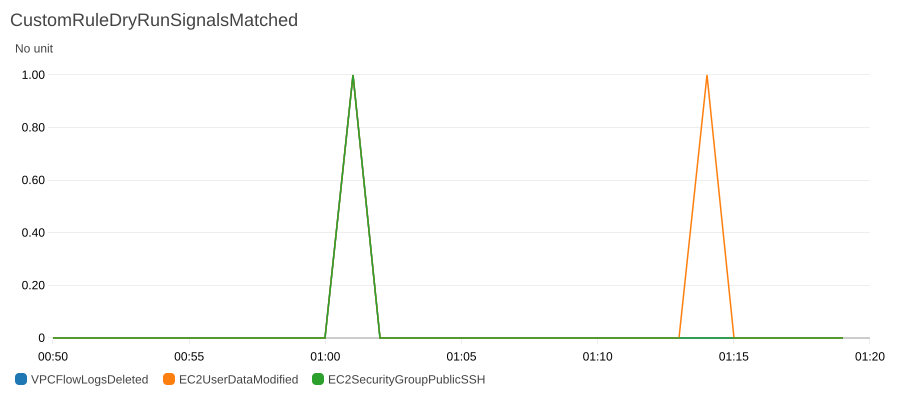
I ran the three operations across two different minutes, but all the data points landed in the same minute. The timestamp of a data point is probably not the time of the operation but the time when GuardDuty evaluated them in a batch.
Trying operations that fall outside the detection conditions
According to the documentation, depending on how an operation is performed, it may be possible to evade a rule, for example when the same change can be specified through a different API parameter[4].
I try two ways of making the changes the rules aim to detect while falling outside their detection conditions.
Changing user data with --attribute and --value
With modify-instance-attribute, besides passing user data with --user-data, you can also pass it with --attribute userData --value. I ran the following to try it.
aws ec2 modify-instance-attribute --instance-id $INSTANCE_ID \
  --attribute userData --value $(base64 < userdata.sh | tr -d '\n')
However, no matter how long I waited, no new data point appeared for EC2UserDataModified. When I changed it again with --user-data, a data point was added, so only the latter way of passing it matched.
Comparing the CloudTrail requestParameters, there was no userData key when I passed it with --attribute and --value.
| How it was passed | requestParameters |
|---|---|
--user-data |
{"instanceId": "i-0123456789abcdef0", "userData": "<sensitiveDataRemoved>"} |
--attribute userData --value |
{"instanceId": "i-0123456789abcdef0", "attribute": "userData", "value": "<sensitiveDataRemoved>"} |
The rule's condition is requestParameters['userData'] IS NOT NULL, so it seems the difference in the key name caused the mismatch.
Adding a rule that opens all ports
The condition of ec2-security-group-public-ssh is that toPort is 22, so I boldly opened ports 0 to 65535 to 0.0.0.0/0.
aws ec2 authorize-security-group-ingress --group-id $SG_ID --protocol tcp --port 0-65535 --cidr 0.0.0.0/0
aws ec2 revoke-security-group-ingress --group-id $SG_ID --protocol tcp --port 0-65535 --cidr 0.0.0.0/0
This configuration also makes SSH reachable from outside, but CloudTrail recorded "toPort": 65535 and the metric did not increase. What this rule detects is an operation that opens port 22 specifically, not a state in which SSH is reachable from outside.
If you want to evaluate the state itself, you would need to combine it with services that evaluate configurations, such as AWS Config or Security Hub CSPM controls.
Switching to live mode
Finally, I update the association for vpc-flow-logs-deleted to live mode.
ASSOCIATION_ID=$(aws guardduty list-custom-detection-rule-associations \
  --rule-id vpc-flow-logs-deleted --query "RuleAssociations[0].AssociationId" --output text)
aws guardduty update-custom-detection-rule-association \
  --rule-id vpc-flow-logs-deleted --association-id $ASSOCIATION_ID --mode LIVE
aws guardduty get-custom-detection-rule-association \
  --rule-id vpc-flow-logs-deleted --association-id $ASSOCIATION_ID
After the update, the association kept the same ID and CreatedAt, and ExpiresAt was gone. If you update a dry-run association, you can move to live as is without worrying about the 14-day expiration.
After switching, I repeated creating and deleting a flow log twice, and about 3 minutes later one Finding was created as follows.
| Item | Value |
|---|---|
| Type | DefenseImpairment:EC2/DisableOrModifyTools |
| Severity | 8.0 |
| FeatureName | CustomDetectionRule - CloudTrailManagementEvent |
| Count | 2 |
The two deletions were combined into one Finding, and Count is 2. As the documentation says, signals for the same tactic, service, and technique by the same principal appear to be aggregated into one Finding[5].
At the time of the announcement, there were only 26 Finding types for 35 rules, so Type alone may not identify which rule matched. Service.Detection.Sequence.Signals contained the rule name VPCFlowLogsDeleted, so it seems good to include this value in notifications.
Note that the deletion during live mode did not appear in CustomRuleDryRunSignalsMatched, and no Finding was created from the operations that matched during the dry run.
Conclusion
In dry-run mode of Custom Detection Rules, only the number of matches is output as a CloudWatch metric for each rule. If you want to know which operations matched, you need to investigate with CloudTrail.
As the user data rewrite test showed, rules that use specific CloudTrail keys or values as conditions could potentially be evaded if someone is determined to do so. Dry run seems usable not only to measure the volume of false positives but also to confirm that the operations you want detected are really detected.