![[Update] Amazon GuardDuty enablement can now be centrally managed with AWS Organizations declarative policies](https://images.ctfassets.net/ct0aopd36mqt/wp-thumbnail-f1f1e80330aaa8917410e012de277155/263838c1009bccfef2d8a98f11615f2d/amazon-guardduty?w=3840&fm=webp)
[Update] Amazon GuardDuty enablement can now be centrally managed with AWS Organizations declarative policies

This page has been translated by machine translation. View original
Introduction
In a recent update, it is now possible to centrally manage the enablement of Amazon GuardDuty using AWS Organizations declarative policies.
Previously, when using GuardDuty with Organizations integration, auto-enablement was configured per region in the delegated administrator account. Now, enablement across all regions and all accounts can be managed with a single policy.
I organized what is different from the conventional auto-enablement and actually configured it in a test organization, so I'll summarize the findings here.
Overview of the Update
GuardDuty now supports declarative policies in AWS Organizations (policy type GUARDDUTY_POLICY).
You create a policy in the delegated administrator account (or management account) and attach it to the organization's root, an OU, or an account. This works the same way as other policies.
In accounts where the policy is attached, the GuardDuty features and protection plans specified in the policy are enabled. Accounts that join the organization later, or accounts that are moved into an OU, also inherit the policy.
A policy consists of two settings: a "default configuration" and "per-region overrides."
defaultblock: Applied to all regions where GuardDuty is available- A block named after a region: Completely replaces
defaultfor that region only
If default is omitted, regions not explicitly named are not managed by the policy.
The features that can be managed (enabled/disabled) by the policy are as follows.
| Policy key | Feature |
|---|---|
foundational |
Basic threat detection (Foundational) |
s3_data_events |
S3 Protection |
eks_audit_logs |
EKS Protection |
ebs_malware_protection |
Malware Protection for EC2 |
rds_login_events |
RDS Protection |
lambda_network_logs |
Lambda Protection |
runtime_monitoring |
Runtime Monitoring (including agent management for EKS, ECS Fargate, and EC2) |
ai_protection |
AI Protection |
If you want to enable other features within the same block, you also need to enable foundational.
Supported regions include all commercial regions and AWS GovCloud (US) regions.
What Has Changed Compared to Before
Compared to the conventional auto-enablement, here is the breakdown.
| Item | Conventional auto-enablement | Organization policy |
|---|---|---|
| Scope of application | Uniform across the entire organization. Cannot be divided by OU or account | Can be attached per root, OU, or account |
| Regions | Configured for each region in use | default covers all regions, with overrides for specific regions as needed |
| New regions | Must be configured individually | Automatically included if default is used |
| New accounts | Follow the auto-enablement settings | Accounts that enter the attached scope inherit the policy |
| Per-account changes | Delegated administrator can change per account from the Accounts page. Member accounts cannot make changes | Protection plans managed by the policy cannot be changed by the delegated administrator from the console or API. Change them by updating the policy |
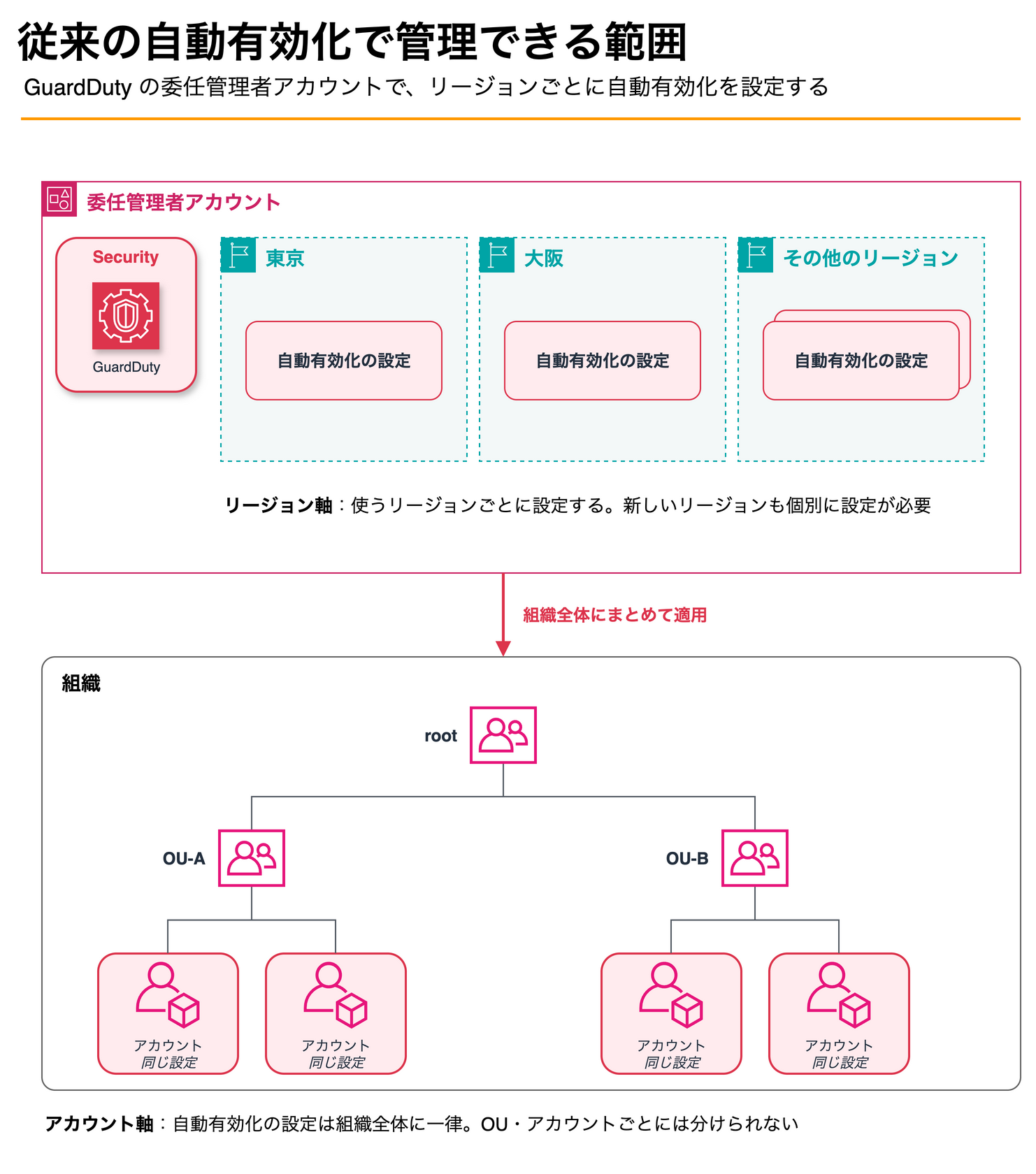
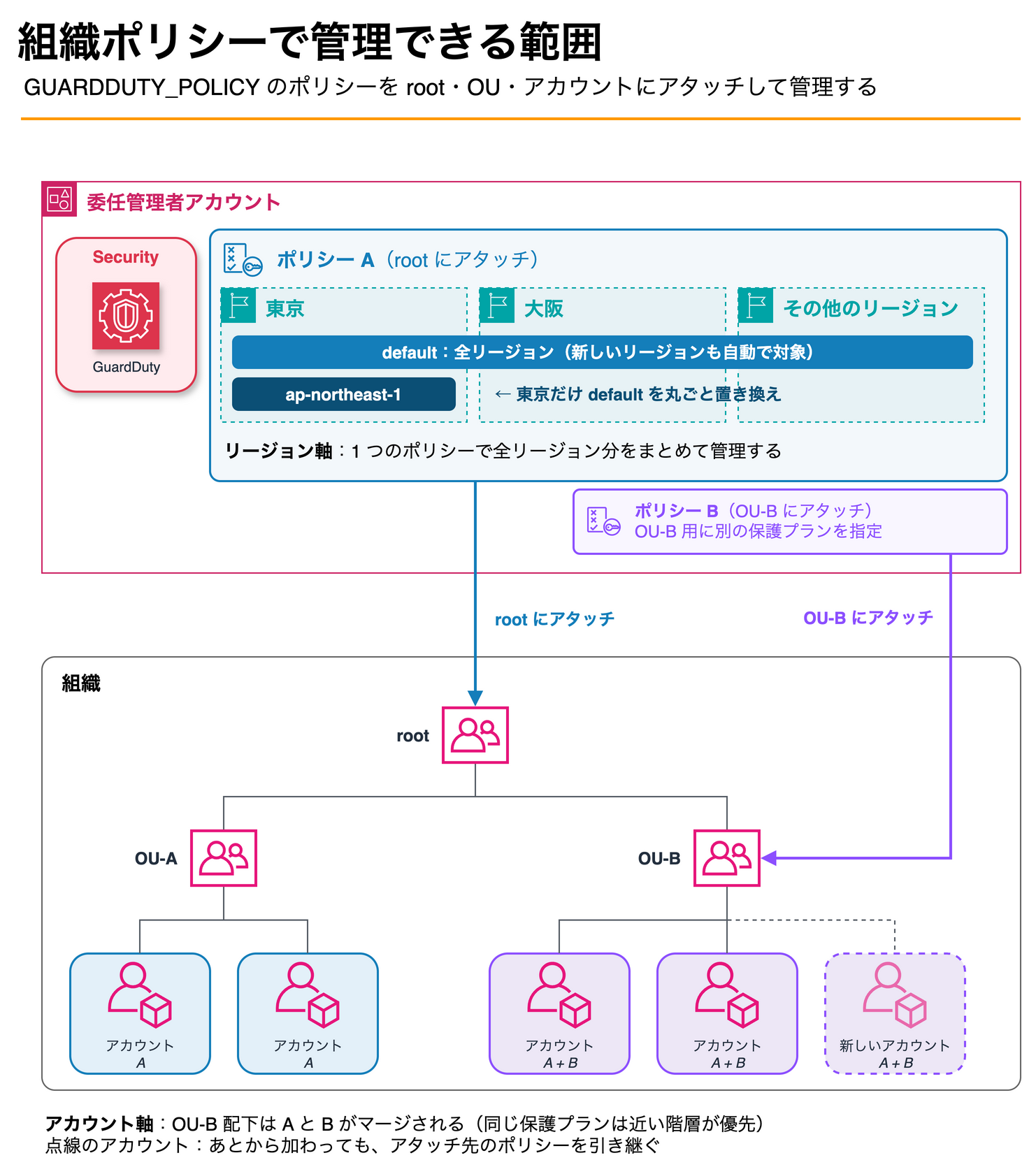
In this way, settings that were previously managed individually can now be managed collectively through policies. The clear benefits are as follows.
No Need to Go Around Configuring Each Region
Even when new regions are added, using default means they are automatically included, so you no longer need to worry about configuration discrepancies between regions.
Protection Plans Can Be Changed per OU
You can, for example, place a policy at the root as the organization-wide baseline and attach a different policy only to a specific OU.
When multiple policies apply, the upper and lower policies are merged. If the same protection plan is specified in both, the setting in the hierarchy closer to the account takes precedence.
Scope of Application Is Visible in a Single Policy
With conventional auto-enablement, it was also possible to bulk-enable protection plans for all accounts at once.
However, since settings were divided by region, you had to go through each region's settings to see what was enabled in which region.
With policies, the attachment target (root, OU, account), region, and protection plan are all consolidated into a single JSON.
You can understand what is applied where just by looking at the policy.
Trying It Out
Test Environment
I tried this in a test Organizations environment.
I proceeded with the following assumptions.
- Policy management is delegated to the GuardDuty delegated administrator account
- Delegation policy updates are done in the management account, and policy creation is done in the delegated administrator account. Both are operated from the GuardDuty console in the Tokyo region
- Auto-enablement was already configured, and member accounts have features like S3 Protection and RDS Protection enabled
- The policy is attached to only one member account
Updating the Delegation Policy in the Management Account
When you open the GuardDuty console in the delegated administrator account, "Organization Policies" has been added to the navigation.
However, upon opening it, "Create policy" was not selectable, and the following message was displayed.
Your delegated administrator cannot configure GuardDuty policies.
Your management account has not updated the delegation policy with required permissions. Contact your management account administrator to update the delegation policy from the GuardDuty Settings page.
The delegation policy needs to be updated.
As instructed by the message, open "Settings" in the management account's GuardDuty console.
There is a section called "Delegation policy," which indicated that the delegated administrator lacked sufficient permissions.
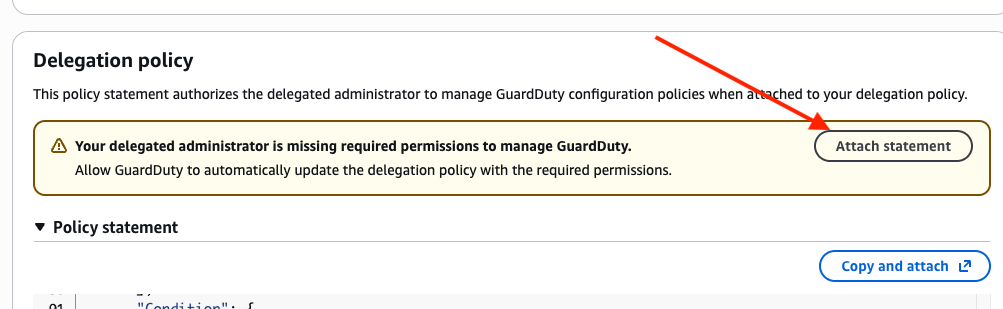
Selecting "Attach statement" allows GuardDuty to automatically append the required Statement to the delegation policy.
You can also copy the JSON yourself with "Copy and attach" and paste it manually.
When you click "Attach statement," a diff of the content to be appended is displayed.
Check the confirmation checkbox and select "Attach policy."
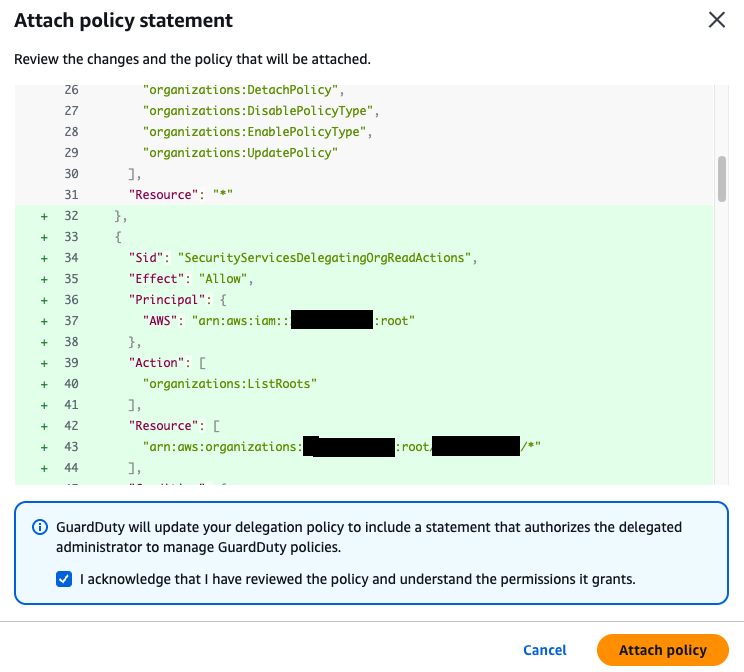
The existing Statements remained intact, and 5 new Statements were appended.
State Before Configuration
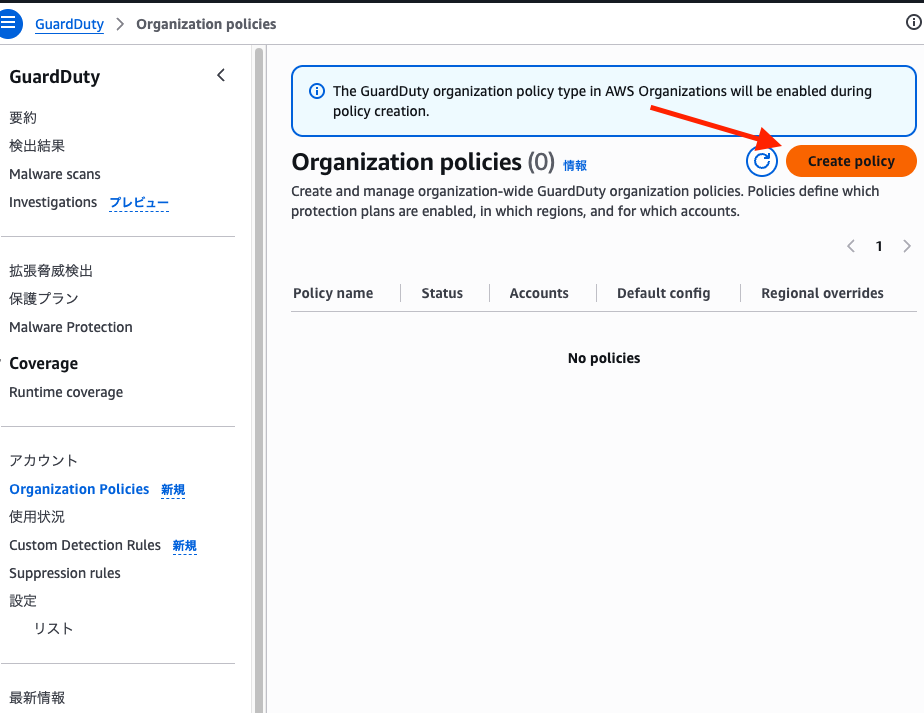
After updating the delegation policy, when I reopened "Organization Policies" in the delegated administrator account, "Create policy" became selectable.
A message at the top of the screen indicated that the policy type would be enabled when creating a policy.
The GuardDuty organization policy type in AWS Organizations will be enabled during policy creation.
Creating and Attaching a Policy
Click "Create policy" to proceed with policy creation.
Note that you can also create a policy by writing JSON directly from the "Amazon GuardDuty policies" page in the Organizations console.
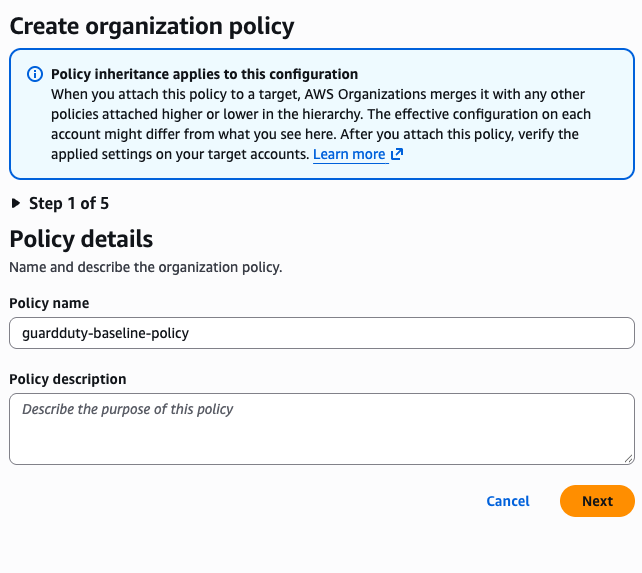
In Step 1, enter the policy name.
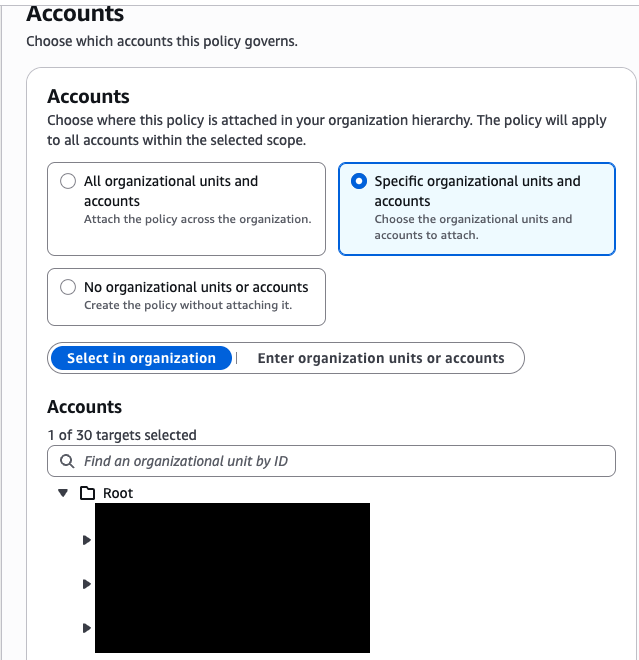
In Step 2, select the attachment target.
You can choose from the entire organization, specific OUs or accounts, or not attaching at all.
This time, I selected "Specific organizational units and accounts" and chose just one member account.
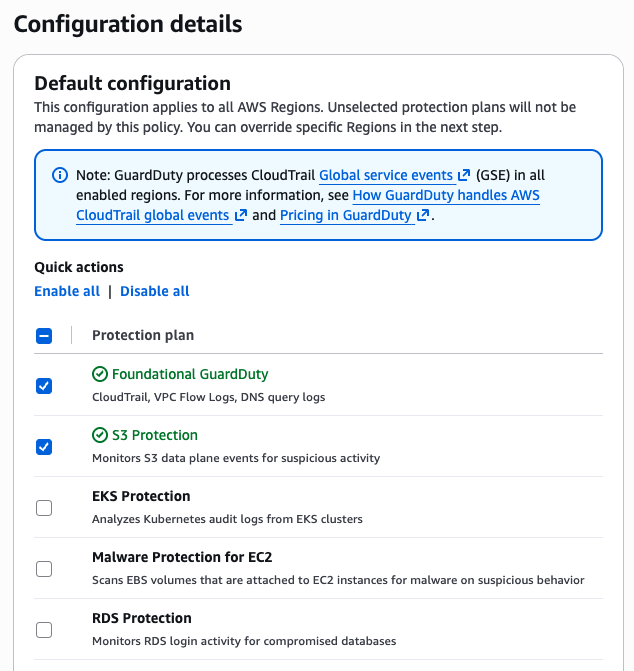
In Step 3, select the protection plans.
The "Default configuration" set here becomes the default block in the policy. The screen also states "This configuration applies to all AWS Regions."
Protection plans not selected will not be managed by this policy. This time, I selected Foundational GuardDuty and S3 Protection.
Step 4 is for per-region overrides. Select the Tokyo region with "Add regional override."
The Foundational GuardDuty and S3 Protection selected in default were pre-checked.
Since an override completely replaces default, the screen also displays "All features must be specified." I kept these two enabled, and additionally set EKS Protection to "Enable" this time.
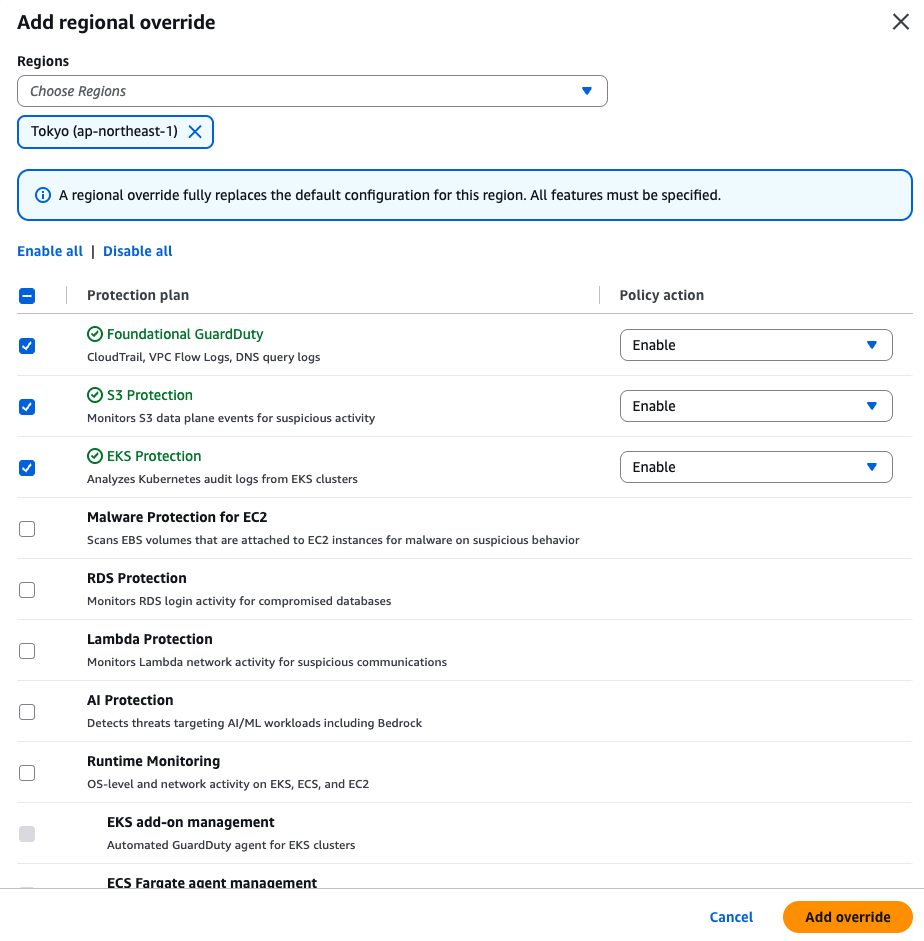
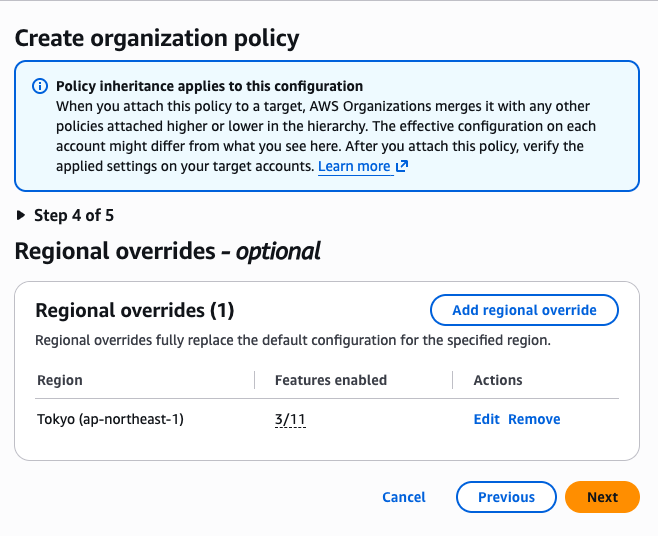
In Step 5, "Review and create," expanding "Policy document" lets you review the generated JSON.
With the settings configured this time, it looked like this.
{
  "guardduty": {
    "enablement": {
      "default": {
        "foundational": { "status": { "@@assign": "enabled" } },
        "s3_data_events": { "status": { "@@assign": "enabled" } }
      },
      "ap-northeast-1": {
        "foundational": { "status": { "@@assign": "enabled" } },
        "s3_data_events": { "status": { "@@assign": "enabled" } },
        "eks_audit_logs": { "status": { "@@assign": "enabled" } }
      }
    }
  }
}
default is the common baseline for all regions, and ap-northeast-1 is the override setting for the Tokyo region only.
Selecting "Create policy" successfully created the policy.
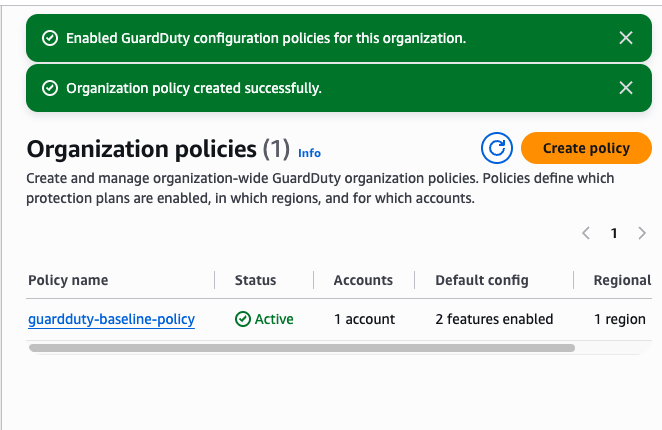
State After Configuration
Let's check the Accounts page to see how the settings have changed.
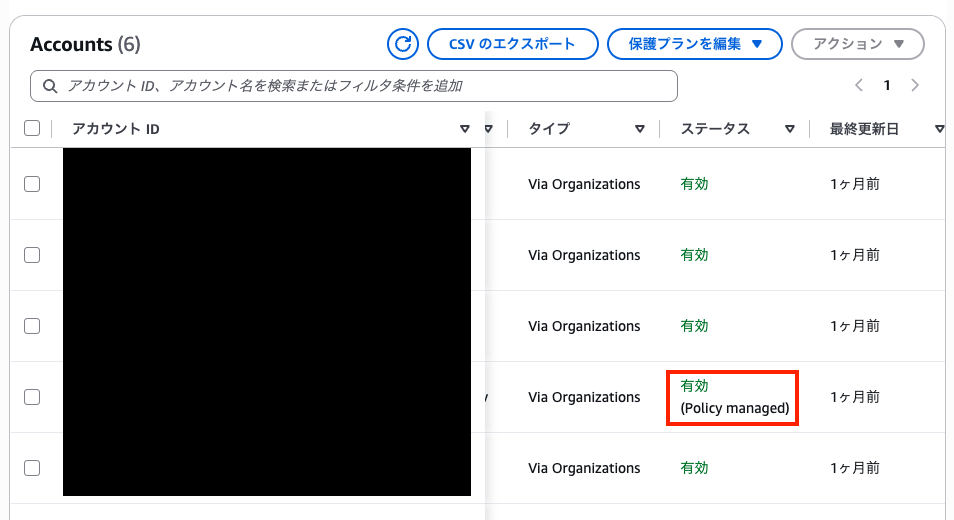
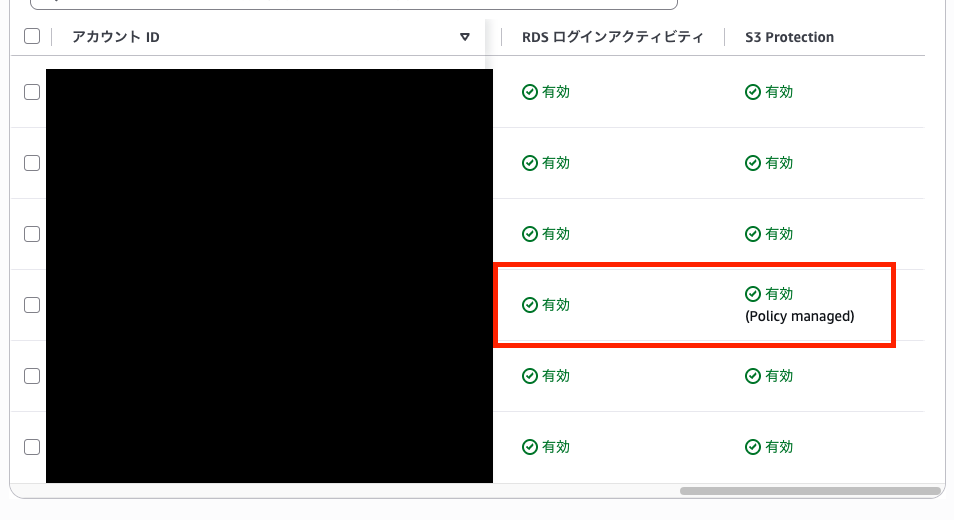
Only the account with the policy attached has its status changed to "Enabled (Policy managed)."
In my environment, the display changed about 1 minute after creating the policy.
Looking at the protection plan column, S3 Protection, which is managed by the policy, also had "(Policy managed)" appended.
On the other hand, RDS Protection, which was not included in the policy, remained as "Enabled" with no label. The policy appears to manage protection plans individually.
When I selected the attached account and opened S3 Protection from "Edit protection plans," the enable and disable operations were grayed out.
Even the delegated administrator cannot change protection plans managed by a policy.
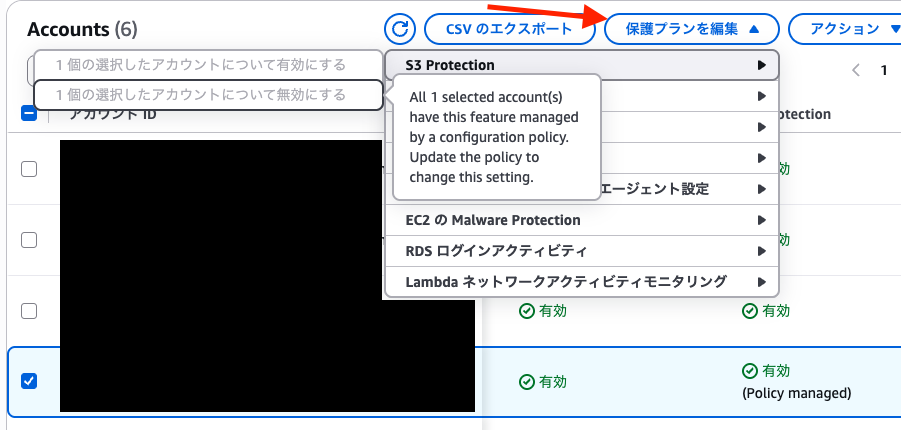
All 1 selected account(s) have this feature managed by a configuration policy. Update the policy to change this setting.
Let's also look at the organization's auto-enablement settings.
"Auto-enable for new accounts" for each protection plan all had "(Policy managed)" appended.
This was the same for RDS Protection, which was not included in the policy, and Runtime Monitoring, which was not previously auto-enabled.
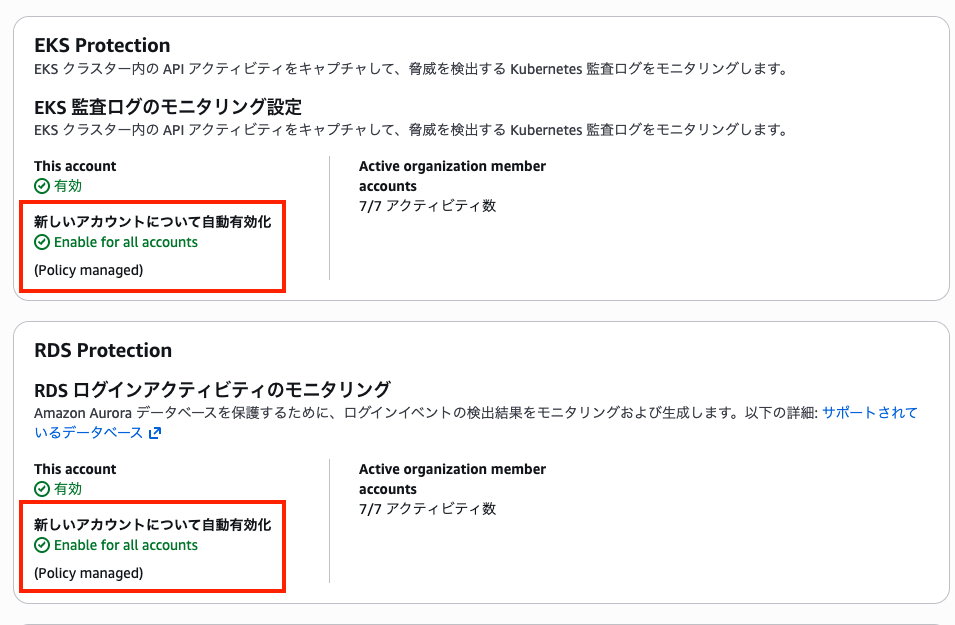
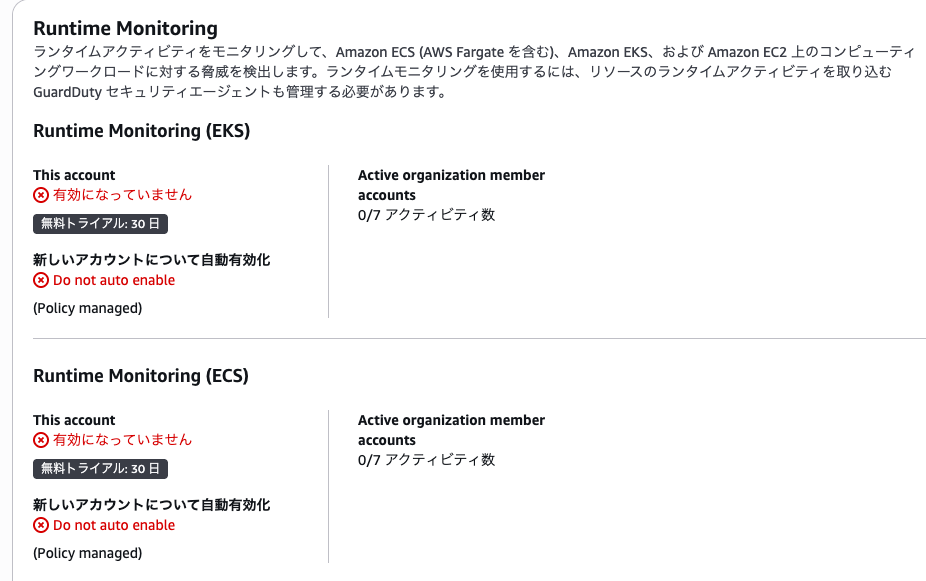
The displayed values are the auto-enablement settings that remained from before the policy was created.
The documentation states that once the policy type is enabled, region-level auto-enablement no longer applies, regardless of whether a policy is attached.
Note that "Enable for all accounts (Policy managed)" does not mean the policy has enabled it for all accounts.
It is best read as meaning the auto-enablement setting is currently not in effect.
Finally, I also checked the Osaka region.
For the attached account, S3 Protection written in default was "(Policy managed)."
EKS Protection, specified only for Tokyo, was not "(Policy managed)" in Osaka.
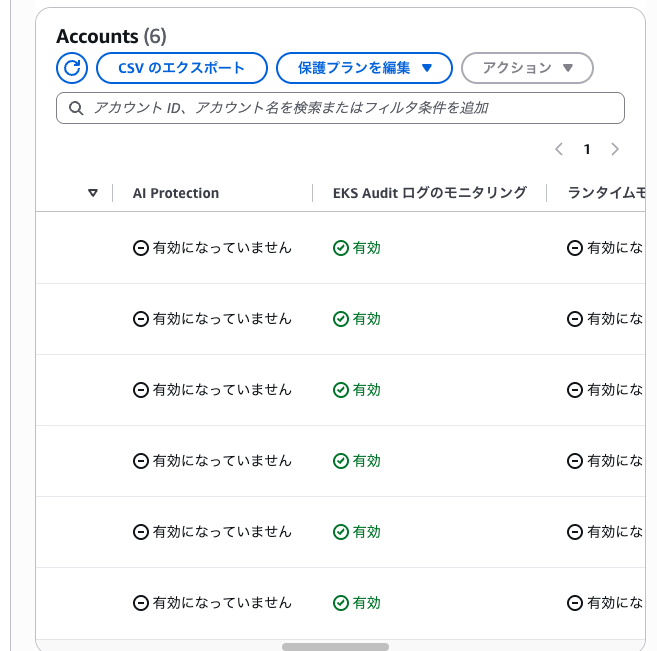
I was able to confirm that default applies to all regions, and regional overrides apply only to those specific regions.
Notes
Once the First Policy Is Created, the Existing Organization Auto-Enablement Stops
Once the GUARDDUTY_POLICY policy type is enabled, region-level auto-enablement no longer applies, even before any policy is attached.
In the GuardDuty console, the policy type is automatically enabled when the first policy is created.
Simply creating one policy will stop the auto-enablement for the entire organization.
In this test, even though only one account was attached, all organization auto-enablement settings had "(Policy managed)" appended.
If a policy is attached to the root, new accounts will also be enabled by the policy.
The problem arises when a policy is attached only to part of the organization, as in this test, and accounts are added outside the policy's scope.
If you rely on existing auto-enablement to enable new accounts, decide on the attachment targets so that new accounts are also covered by the policy before creating the first policy.
Be Aware of the Differences Between "Disabling," "Detaching," and "Disabling the Policy Type"
There are three operations to revert changes, each with different effects. Summarizing from the documentation:
| Operation | GuardDuty on target accounts | New accounts | Region-level auto-enablement |
|---|---|---|---|
Specify disabled in the policy |
Becomes disabled, and cannot be re-enabled from the console or API | Follows the policy | Remains stopped |
| Detach the policy | Remains in current state | Not automatically enabled (if another policy remains at a higher level, it continues to apply within that scope) | Remains stopped |
| Disable the policy type | Remains in current state | Follows the auto-enablement settings | Resumes with the original settings |
If you want to revert to conventional auto-enablement, disable the policy type. When the policy type is disabled, policies of that type are automatically detached. They are not deleted.
Even after detaching or disabling the policy type, GuardDuty and protection plans that were enabled by the policy remain enabled. If you want to stop them, you need to disable them separately.
Note that specifying disabled in the policy will stop protection plans even for currently active accounts.
Before saving, check which accounts and regions will be affected using the Accounts page and other resources.
Creating via Console Inserts a Default That May Result in Charges Across All Regions
The protection plans selected in Step 3 of the console are applied to all regions as the policy's default.
When a policy is attached, GuardDuty and protection plans are automatically enabled even for accounts that were not GuardDuty members, and charges apply across all target regions.
Additionally, since GuardDuty processes CloudTrail global service events in all enabled regions, charges may occur even in regions without any resources.
If you only want to manage specific regions, the documentation introduces a method of omitting default and writing only region-named blocks.
Things to Keep in Mind When Migrating to Policy Management
The protection plans configurable with auto-enablement can be managed across almost the same scope with policies.
However, organization auto-enablement and policies cannot be used together.
Once the policy type is enabled, auto-enablement settings stop working all at once for the entire organization, not per protection plan.
Therefore, keep the following in mind when migrating.
| Thing to keep in mind | Response |
|---|---|
| Accounts added outside the policy's scope are not automatically enabled | Attach to the root or OUs so that newly added accounts are also covered |
| Protection plans not written in the policy are not auto-enabled for new accounts | Write all protection plans that were used with auto-enablement into the policy |
| Auto-enablement settings managed by IaC will no longer take effect | Decide whether to move what IaC manages from auto-enablement settings to the policy |
In this test as well, "(Policy managed)" was appended to the auto-enablement setting for RDS Protection, which was not included in the policy.
Summary
It is now possible to centrally manage GuardDuty enablement using AWS Organizations declarative policies.
Since protection plans managed by a policy cannot be changed without updating the policy, this is well-suited for environments where you want to lock down a standard configuration.
On the other hand, once the first policy is created, the organization's auto-enablement stops, and accounts added outside the policy's scope are no longer automatically enabled.
For organizations using existing auto-enablement, it is best to decide how much to delegate to policies before creating the first policy.
This has been a report from Jun Suzuki.
References
- Amazon GuardDuty now supports centralized management using AWS Organizations declarative policies
- Managing accounts using organization policies - Amazon GuardDuty
- Considerations and limitations - Amazon GuardDuty
- Amazon GuardDuty policies - AWS Organizations
- [Update] The method for auto-enabling GuardDuty for member accounts in AWS Organizations has changed

