
Mitigating GitHub Actions compromise and supply chain risks: Using pinact to specify actions by hash value instead of version

This article was published more than one year ago. Please be aware that the information may be outdated.
This page has been translated by machine translation. View original
The third-party GitHub Actions action tj-actions/changed-files, which is used to obtain file diffs and similar information, was compromised, a backdoor was planted, and Git tags were also rewritten.
- Semgrep | 🚨 Popular GitHub Action tj-actions/changed-files is compromised
- Harden-Runner detection: tj-actions/changed-files action is compromised - StepSecurity
As a result, if you were calling tj-actions/changed-files with a tag version specification, you were affected by this compromise.
By following GitHub's official documentation "Security hardening for GitHub Actions" and pinning actions to immutable commit SHAs rather than mutable tags, you could have prevented the risk of this repository compromise.
In this article, we introduce how to use pinact, an OSS tool created by @szkdash, to pin actions with commit SHAs while also maintaining the convenience of tag (version) specification.
Pinning Actions to Commit SHAs Using pinact
To pin action versions in your repository's GitHub workflow files to commit SHAs, simply install pinact and run $ pinact run.
$ brew install pinact

$ pinact run

$ git diff

diff --git a/.github/workflows/deploy.yml b/.github/workflows/deploy.yml
index 7ec30ad..b930934 100644
--- a/.github/workflows/deploy.yml
+++ b/.github/workflows/deploy.yml
@@ -23,21 +23,21 @@ jobs:

     steps:
     - name: Checkout
-      uses: actions/checkout@v4
+      uses: actions/checkout@11bd71901bbe5b1630ceea73d27597364c9af683 # v4.2.2

     - name: Configure AWS Credentials
-      uses: aws-actions/configure-aws-credentials@v4
+      uses: aws-actions/configure-aws-credentials@e3dd6a429d7300a6a4c196c26e071d42e0343502 # v4.0.2
       with:
         role-to-assume: ${{ env.ROLE_ARN }}
         aws-region: ${{ env.AWS_REGION }}
...
This improves the security level by pinning to the commit SHA corresponding to the tag, while also leaving the tag information as a comment to make it easier for humans to manage.
For installation instructions for pinact in various environments, please refer to the following documentation:
pinact Can Coexist with Dependabot
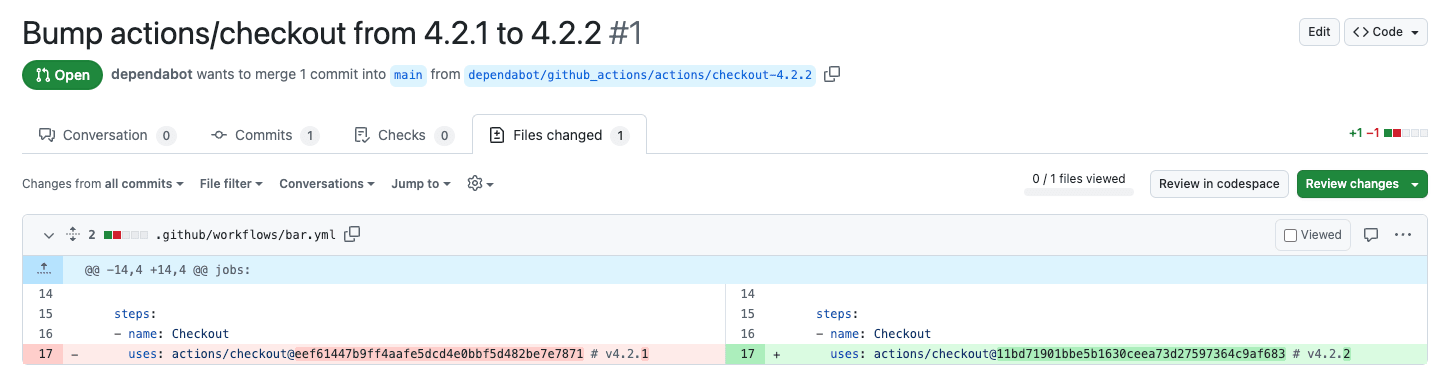
Using GitHub's Dependabot makes it possible to upgrade packages to their latest versions, and this also applies to Actions used in GitHub Actions.
Even when using the pinact format with hash SHA and tag assignment via comments, both the hash value and the comment tag will be updated.
Risk of GitHub Runner Compromise
As stated in the official GitHub documentation, a compromised runner has the following potential impacts:
- Access to secrets
- Data exfiltration from the runner
- Theft of
GITHUB_TOKEN - Tampering with repository contents
Mitigating Third-Party Action Risks
GitHub's official documentation recommends the following approaches to mitigate action risks:
- Pin actions to commit SHAs
- Audit source code
- Restrict available actions
Let me elaborate on the third point.
You can restrict available actions from Actions → General in your organization/repository settings.
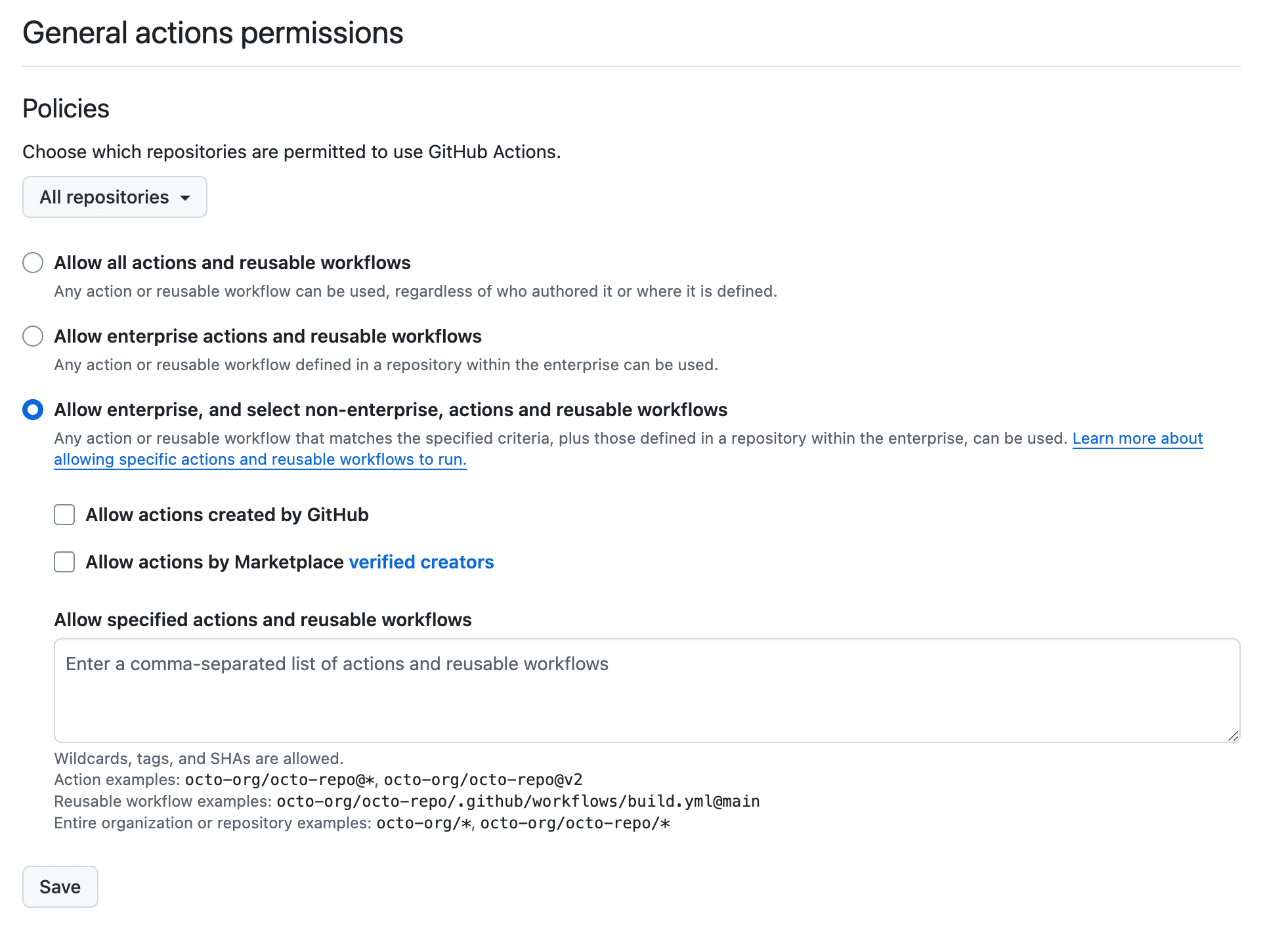
More specifically, check "Allow enterprise, and select non-enterprise, actions and reusable workflows" and then check:
- Allow actions created by GitHub
- Allow actions by Marketplace verified creators
Then, for third parties, you can reduce security risks by allowing third-party actions that have undergone code auditing via "Allow specified actions and reusable workflows."
Please note that this feature may be limited to specific plans for public and private repositories.
Making available third-party actions require approval means developers cannot immediately evaluate actions they want to use or try, which can also lead to reduced development efficiency, and it also increases the operational burden on GitHub administrators to handle approval requests.
Consider also providing sandbox environments and establishing usage request flows.
References:
- https://docs.github.com/enterprise-cloud@latest/actions/security-for-github-actions/security-guides/security-hardening-for-github-actions#using-third-party-actions
- https://docs.github.com/organizations/managing-organization-settings/disabling-or-limiting-github-actions-for-your-organization
Conclusion
The following methods are available to mitigate the security risks of GitHub third-party actions:
- Pin actions to commit SHAs rather than tags
- Audit source code
- Require approval for third-party actions
In the tj-actions/changed-files compromise incident that occurred in March 2025, a backdoor was planted and tags were also rewritten.
In this case, the issue could have been avoided using the first method of commit SHA pinning.
Using pinact makes it easy to implement commit SHA operations.
Similar technical blog posts have been published simultaneously. Please refer to them as well:
- GitHub Actionsの外部Actionのバージョンをhash指定にし、可読性を維持しつつバージョンを上げる - Hatena Developer Blog
- GitHub Actionsの外部ActionでVersionTagを使ってるものを一括でCommitHashにしたい。 - KAYAC Engineers' Blog
References
- https://docs.github.com/enterprise-cloud@latest/actions/security-for-github-actions/security-guides/security-hardening-for-github-actions#using-third-party-actions
- https://docs.github.com/organizations/managing-organization-settings/disabling-or-limiting-github-actions-for-your-organization
- https://github.com/suzuki-shunsuke/pinact
- pinact - GitHub Actions のバージョンを commit hash で固定
- Semgrep | 🚨 Popular GitHub Action tj-actions/changed-files is compromised
- Harden-Runner detection: tj-actions/changed-files action is compromised - StepSecurity
- GitHub Action supply chain attack: reviewdog/action-setup | Wiz Blog