I checked why the IAM Access Analyzer findings from the management account are not displayed in the Security Hub CSPM of the Audit account

This page has been translated by machine translation. View original
Hello! I'm Yoshida from the Cloud Business Division.
In a previous article, I organized the security service configuration for a multi-account environment based on a Control Tower setup.
This time, I looked into something I didn't cover in the previous article: "How are IAM Access Analyzer findings linked to Security Hub CSPM?"
Since the organization-level analyzer is created in the Audit account, I had assumed that findings for resources in the management account's home region would also be aggregated into the Audit account's Security Hub CSPM.
I'll briefly recap the content of the previous article before explaining what I found.
Recap of the Previous Article
Relationship Between the Management Account and Security Hub CSPM
In the previous article, I decided to exclude the management account's Security Hub CSPM from organization integration and manage it as standalone.
In a Control Tower environment, member accounts use AWS services only in the home region due to the region deny control (SCP).
However, since SCPs do not apply to the management account, I configured all regions to have security services enabled and findings aggregated to the Tokyo region.
When deploying via Security Hub CSPM central configuration for the organization, the cross-region aggregation settings of the delegated administrator (Audit) apply to all members. Since the Audit account's aggregation source is limited to the Control Tower home region only, including the management account as a member would prevent meeting the requirement to "aggregate all regions." For this reason, I excluded the management account from organization integration.
IAM Access Analyzer Configuration
In the Audit account, an organization-level external access analyzer (trust zone: organization) is created. This analyzer is created in the Control Tower home region, and in that region it analyzes resources across all accounts in the organization, including the management account.
Regions outside the scope of the region deny control are not covered by the organization-level analyzer, so a separate analyzer with a trust zone of "account" is created in the management account.
Verifying the Behavior
I'll explain using screenshots from the actual environment.
I apologize if this is hard to follow, but the accounts are as follows:
- Audit account
- Account ID starting with 5
- Management account
- Account ID starting with 0
Audit Account
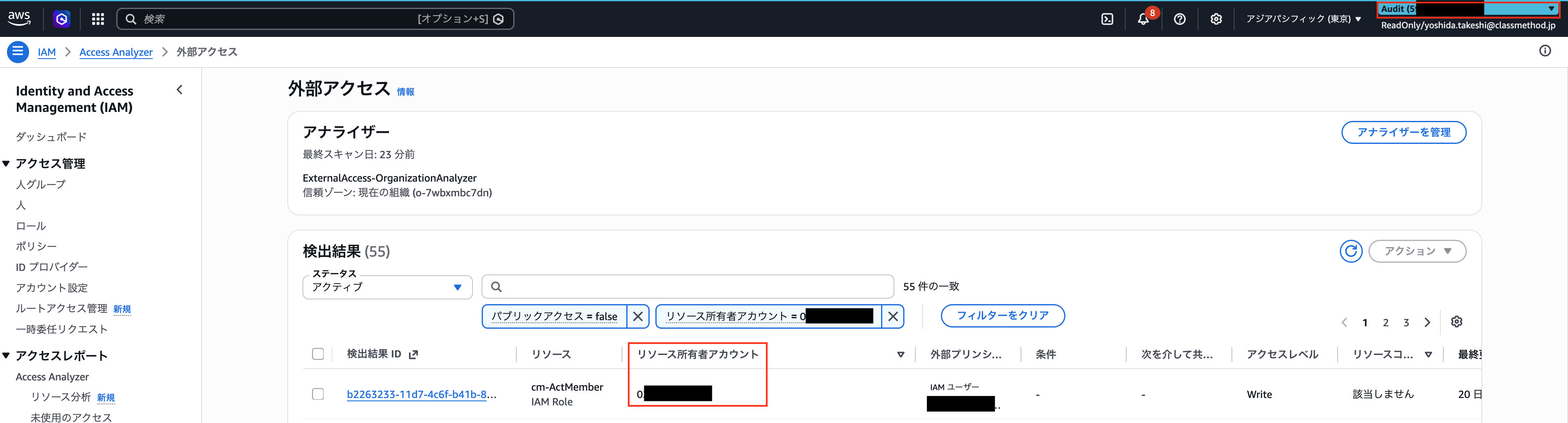
When filtering by the management account as the resource owner account in the Audit account's organization-level analyzer, findings are displayed.
In the IAM Access Analyzer console, the findings for the management account can be confirmed.
When checking IAM Access Analyzer findings in the Audit account's Security Hub CSPM, findings for member accounts are displayed.
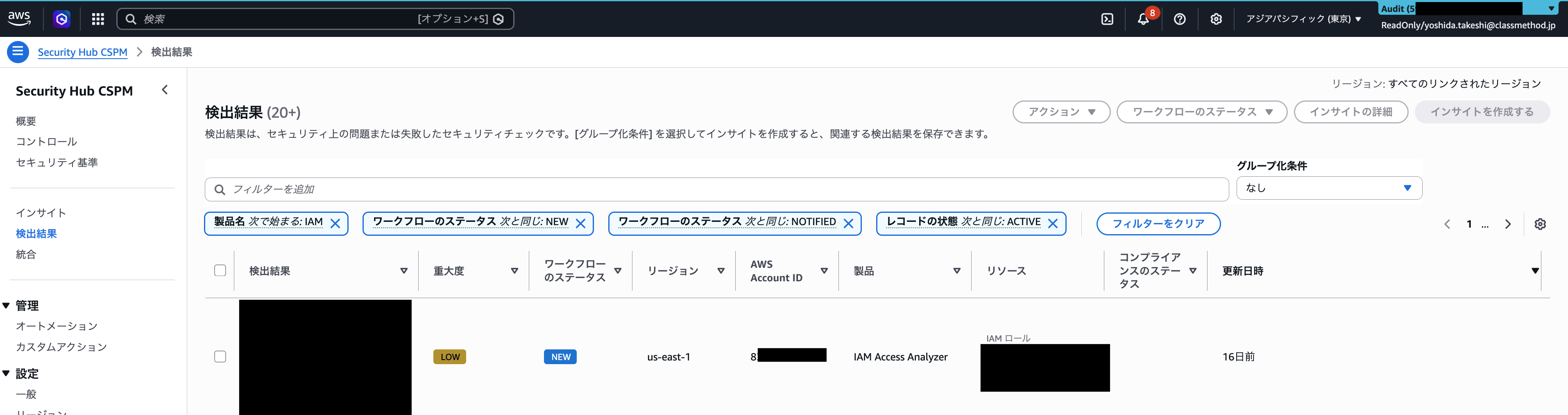
However, when filtering by the management account's account ID, the findings come up as 0.
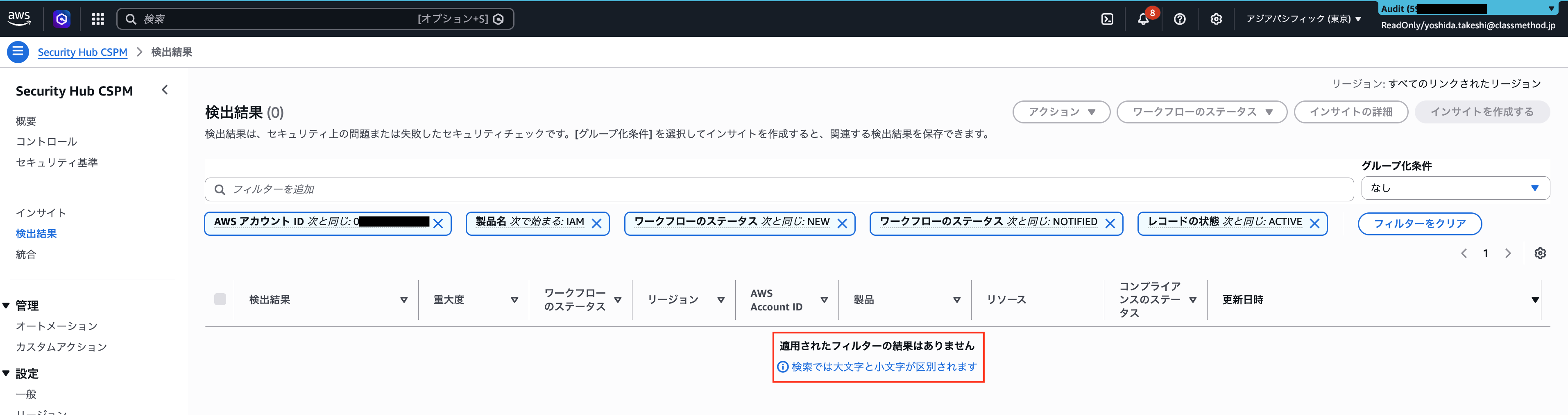
The management account's findings are visible in the IAM Access Analyzer console, but they do not appear in Security Hub CSPM.
Management Account
When checking the management account's own Security Hub CSPM, IAM Access Analyzer findings were displayed.
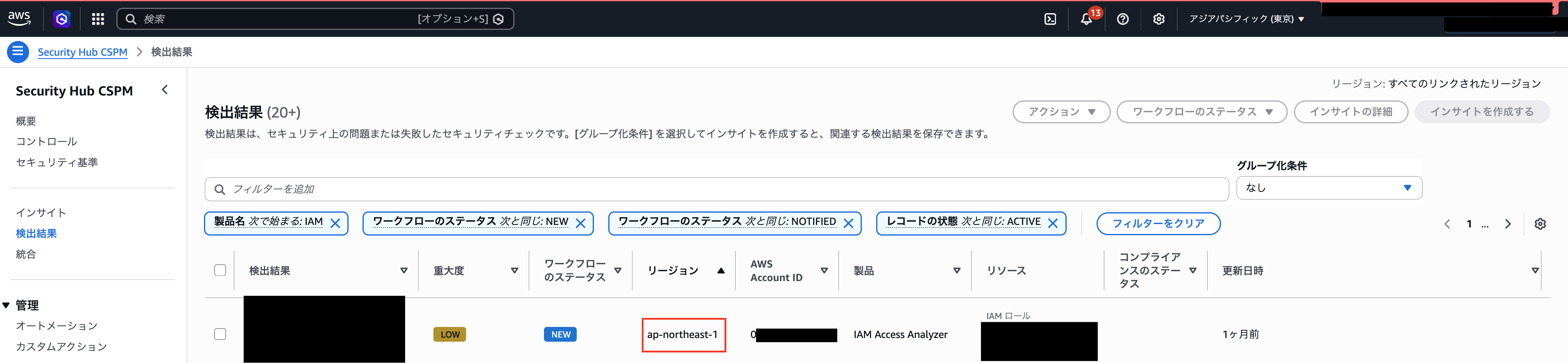
You can see that findings for the home region covered by the Audit account's organization analyzer (in this environment, the Tokyo region) are being ingested into the management account's Security Hub CSPM.
In other words, IAM Access Analyzer findings for the management account are not forwarded to the Audit account's Security Hub CSPM — they are viewed in the management account's own Security Hub CSPM.
How It Works
Let me explain why this behavior occurs, based on how Security Hub CSPM works.
Constraints of the BatchImportFindings API
The BatchImportFindings API, which ingests findings into Security Hub CSPM, has constraints regarding the calling account. ※1
BatchImportFindings must be called by one of the following:
- The account associated with the finding. The identifier of the associated account must match the value of the AwsAccountId attribute of the finding.
- An account that is allowlisted as an official Security Hub CSPM partner integration.
When the IAM Access Analyzer organization-level analyzer generates a finding for a resource in the management account, the AwsAccountId of that finding becomes the management account's ID. Due to the constraints of the BatchImportFindings API, the finding is ingested into the Security Hub CSPM of the account tied to AwsAccountId — that is, the management account's Security Hub CSPM.
Behavior of Security Hub CSPM Organization Integration
Security Hub CSPM does not copy member account findings to the delegated administrator account. ※2
Security Hub CSPM never copies findings from member accounts to the administrator account. Security Hub CSPM ingests all findings into a specific account in a specific region. The administrator account can view and manage the findings of member accounts in each region.
The delegated administrator (Audit) can view member account findings only when those accounts are registered as members in the Security Hub CSPM organization integration. Since the management account is excluded from Security Hub CSPM organization integration, findings for the management account cannot be viewed from the Audit account's Security Hub CSPM.
Flow of Findings
Here is a diagram summarizing what has been explained so far.
Findings are ingested via the BatchImportFindings API into the Security Hub CSPM of the account tied to AwsAccountId. Member account findings are not copied to the Audit account either — the Audit account views findings that have been ingested into each member account's own Security Hub CSPM, using its organization integration permissions.
Since the management account is excluded from organization integration, it cannot be viewed from the Audit account. The IAM Access Analyzer console displays management account findings as part of the organization-level analyzer's results, but the key point is that the path to Security Hub CSPM integration is separate.
Why Self-Managed Registration Doesn't Solve It Either
You might wonder: "If I register the management account as self-managed in Security Hub CSPM organization integration, couldn't Audit then view the management account's findings?"
However, even for self-managed accounts, the cross-region aggregation settings of the delegated administrator account (Audit) take precedence over central configuration. ※3
As explained at the beginning, the Audit account's Security Hub CSPM has its region aggregation source set to the Control Tower home region only. If the management account is registered as a member, the aggregation source region gets overwritten by Audit's setting (Control Tower home region only). This would prevent findings from regions outside the region deny control scope from being aggregated to the Tokyo region, creating a different problem.
The following blog post explains this behavior in detail.
Operational Policy
The method for checking IAM Access Analyzer findings by account type is as follows:
- Findings for member accounts (other than the management account) are checked in the Audit account's Security Hub CSPM
- Findings for the management account are checked in the management account's Security Hub CSPM
The management account's Security Hub CSPM has not only IAM Access Analyzer findings but also GuardDuty findings aggregated across regions in the same way.
Security findings for the management account are managed centrally on the management account itself.
For notifications of management account findings, I recommend aggregating them to the Audit account.
For details on the notification infrastructure, please refer to the following article.
Closing
I confirmed the reason why findings for the management account detected by IAM Access Analyzer's organization-level analyzer do not appear in the Audit account's Security Hub CSPM.
The key point is that the scope visible in the IAM Access Analyzer console differs from the destination of Security Hub CSPM integration. Understanding the constraints of the BatchImportFindings API and the behavior of Security Hub CSPM organization integration allows you to correctly understand where findings are ingested.
The management account is a special account to which SCPs do not apply, and I feel that a design where security monitoring is also managed separately from organization integration is practical.
That's all from Yoshida of the Cloud Business Division!
References
- ※1 BatchImportFindings for finding providers - AWS Security Hub
- ※2 Actions allowed for administrator and member accounts in Security Hub CSPM - AWS Security Hub
- ※3 AWS Security Hub Central Configuration: Cross-Region Aggregation Settings of the Delegated Account Are Applied Even for Self-Managed Accounts | DevelopersIO