![[Update] IAM Policy Simulator has migrated to the IAM console with added features](https://images.ctfassets.net/ct0aopd36mqt/wp-thumbnail-7bf2dfb6b7a0dd9b7561e87b396ccdc3/018019c86ac567eceba7268550750d9f/aws-iam?w=3840&fm=webp)
[Update] IAM Policy Simulator has migrated to the IAM console with added features

This page has been translated by machine translation. View original
Introduction
Hello everyone, this is Akaike.
There has been an update to the IAM Policy Simulator, which is used when checking IAM policy permissions.
However, just reading the official announcement made it a bit difficult to understand what was new and what was existing functionality.
So this time, I will summarize the migration of IAM Policy Simulator to the IAM console and the addition of new features, distinguishing between what was previously possible and what is newly introduced.
Overview of the Update
With this update, the following three things have changed in IAM Policy Simulator.
- Migrated from a standalone site to within the IAM console
- Added support for evaluation including SCP conditions and specifying custom SCP hierarchies via API
- It is now possible to reproduce more practical scenarios, such as "excluding specific policies"
Previous Behavior
Until now, IAM Policy Simulator was provided on the following standalone site, separate from the IAM console.
As a result, there was the hassle of having to open a separate site for verification, which, while minor, could feel slightly inconvenient at times.
Regarding SCPs, evaluation itself was possible before.
However, SCPs with conditions were not evaluated correctly, and it was not possible to reproduce conditions such as region restrictions or tag requirements in the simulator.
New Features
Management Console
Integration into the IAM Console
First, as the most straightforward change, IAM Policy Simulator has been integrated into the IAM console.
It can be accessed by selecting "Policy Simulator" from the navigation pane of the IAM console.
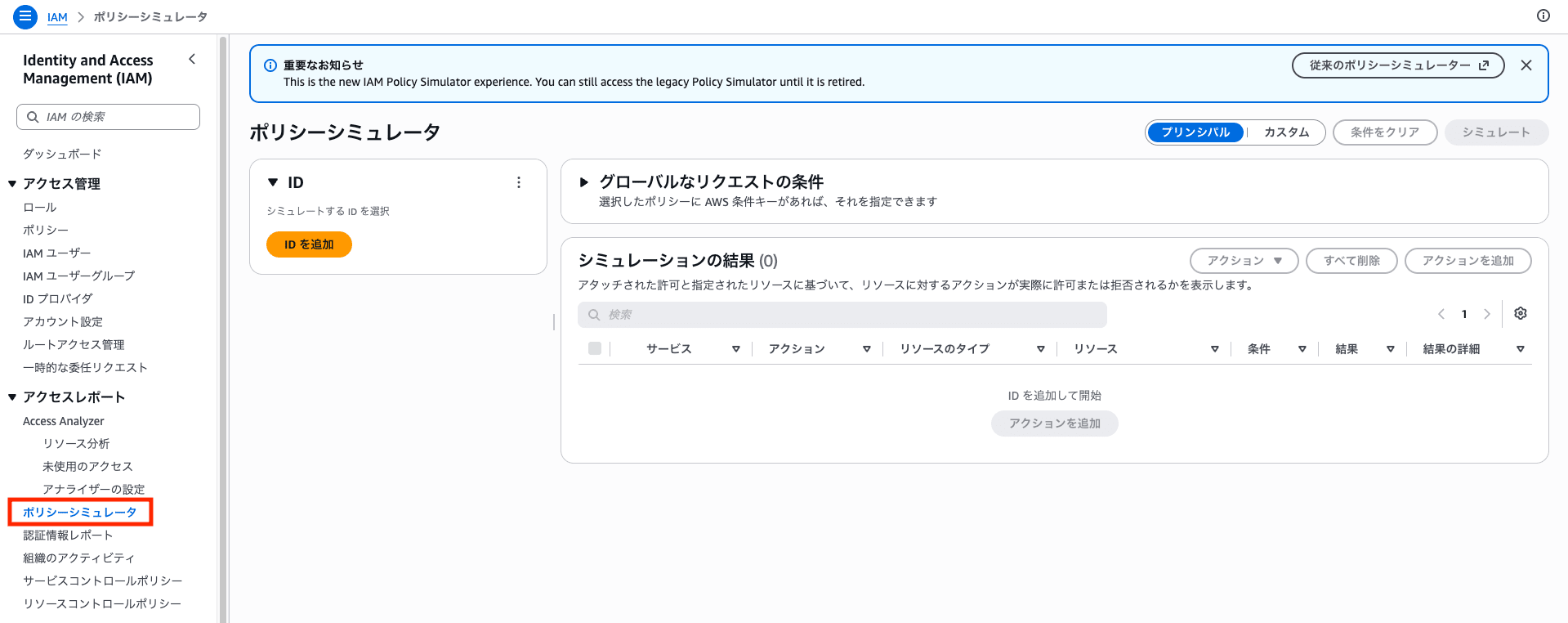
Since you can now test in the same place where you manage IAM policies, it has become easier to go back and forth between editing and verification.
Looking at the official documentation, it appears the legacy standalone site will no longer be maintained, so things will likely be consolidated into the IAM console going forward.
The standalone policy simulator console at https://policysim.aws.amazon.com/ is no longer maintained. Use the policy simulator in the IAM console.
API
Among the following features, evaluation of SCPs with conditions and cross-account evaluation cannot currently be performed from the management console and require the AWS CLI/API. (Policy exclusion is also available in the console.)
Details are available in the following API change history.
Simulation Including SCPs
SCP simulation itself was possible before, but this time, support has been added for evaluating SCPs that include conditions and resource scopes (such as region restrictions and tag requirements), as well as specifying arbitrary SCP hierarchies via API.
Specifically, the OrderedOrganizationPolicyInputList parameter has been added to SimulateCustomPolicy.
Policy Exclusion Simulation
This is a feature that allows you to exclude specific policies and check "what would happen if this policy were removed."
This was previously possible in the console, but this time the PolicyExclusionList parameter has been added to SimulatePrincipalPolicy, making exclusion possible via API as well.
Enhanced Cross-Account Simulation
In cross-account simulations, the decisions for both identity policies and resource policies are now returned separately, and the matching statements returned upon denial have been improved to be narrowed down to only the policies that influenced the decision.
Tried It Out
So I will try the following four things.
- Use the simulator integrated into the management console
- Use the new SCP feature (
OrderedOrganizationPolicyInputList) via API - Use the new feature for excluding specific policies (
PolicyExclusionList) via API - Use cross-account simulation via API
For verifications 1–3, the target will be an IAM role with an IAM policy that allows S3 read access to an S3 bucket.
{
  "Version": "2012-10-17",
  "Statement": [
    {
      "Sid": "AllowReadMyBucket",
      "Effect": "Allow",
      "Action": [
        "s3:GetObject",
        "s3:ListBucket"
      ],
      "Resource": [
        "arn:aws:s3:::akaike-sample-bucket",
        "arn:aws:s3:::akaike-sample-bucket/*"
      ]
    }
  ]
}
Note that the API parameters used in verifications 2–4 were added on July 30, 2026.
If your AWS CLI version is old, you will get an Unknown options error, so please update to the latest version.
For details on the CLI commands used in verification, please refer to the following.
Verification 1: Using the Simulator Integrated into the Management Console
Add s3:GetObject and s3:DeleteObject to the actions, specify arn:aws:s3:::akaike-sample-bucket/test.txt as the resource, and run "Simulate."
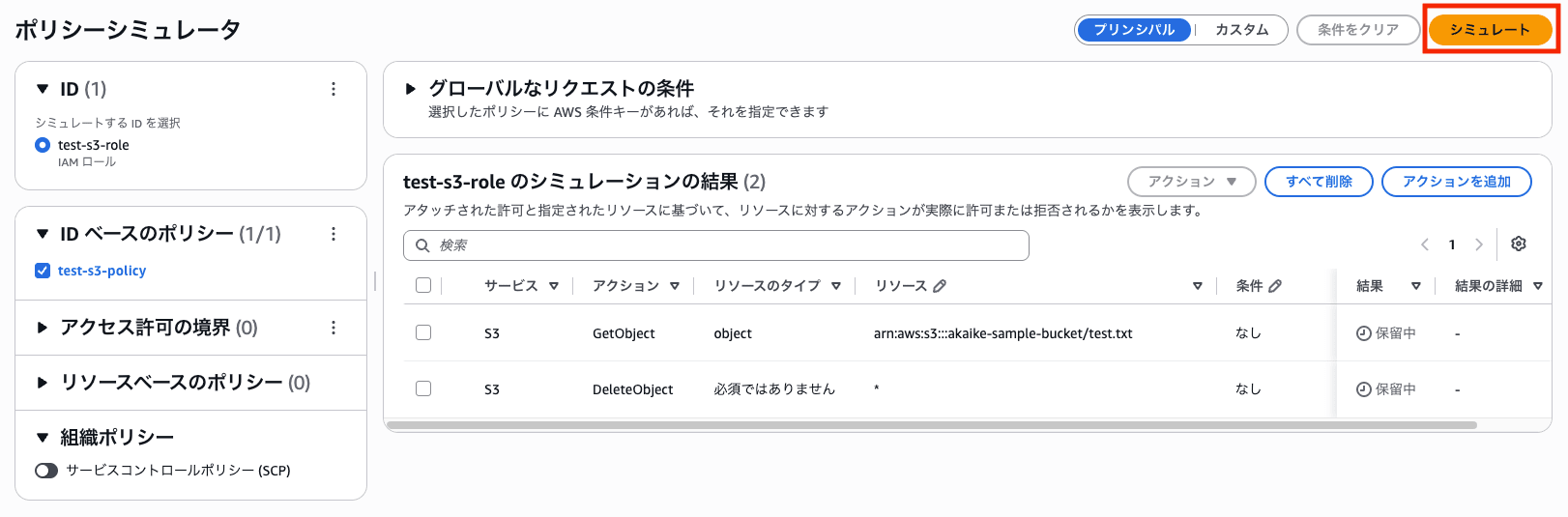
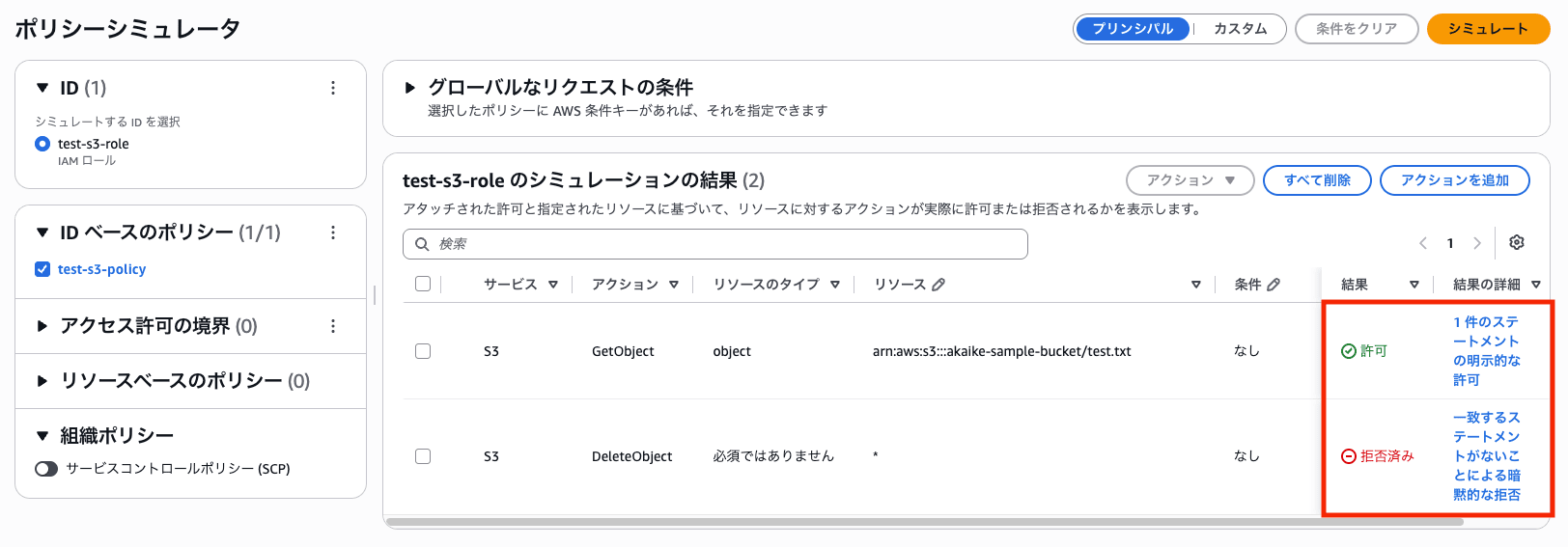
The result is that s3:GetObject is "allowed" (explicit allow from one statement) and s3:DeleteObject is "denied" (implicit deny due to no matching statement).
You can confirm that only the actions permitted by test-s3-policy are allowed through.
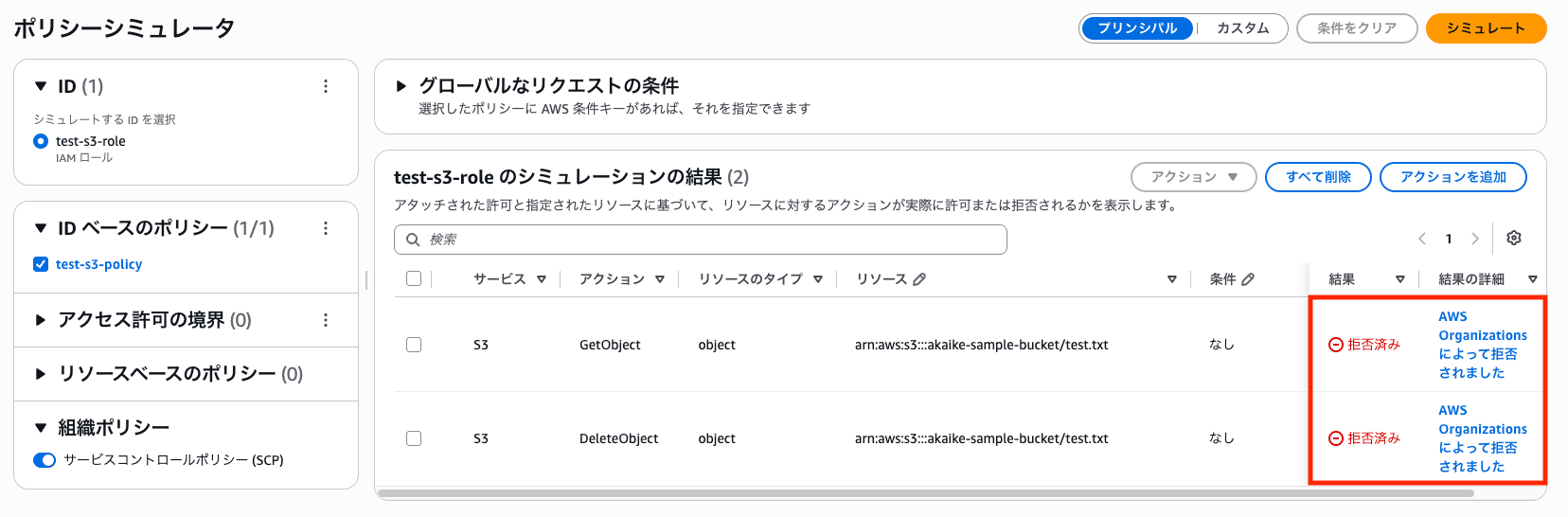
Next, turn on the "Service Control Policies (SCPs)" toggle under "Organization Policies" on the left side to include SCPs in the evaluation.
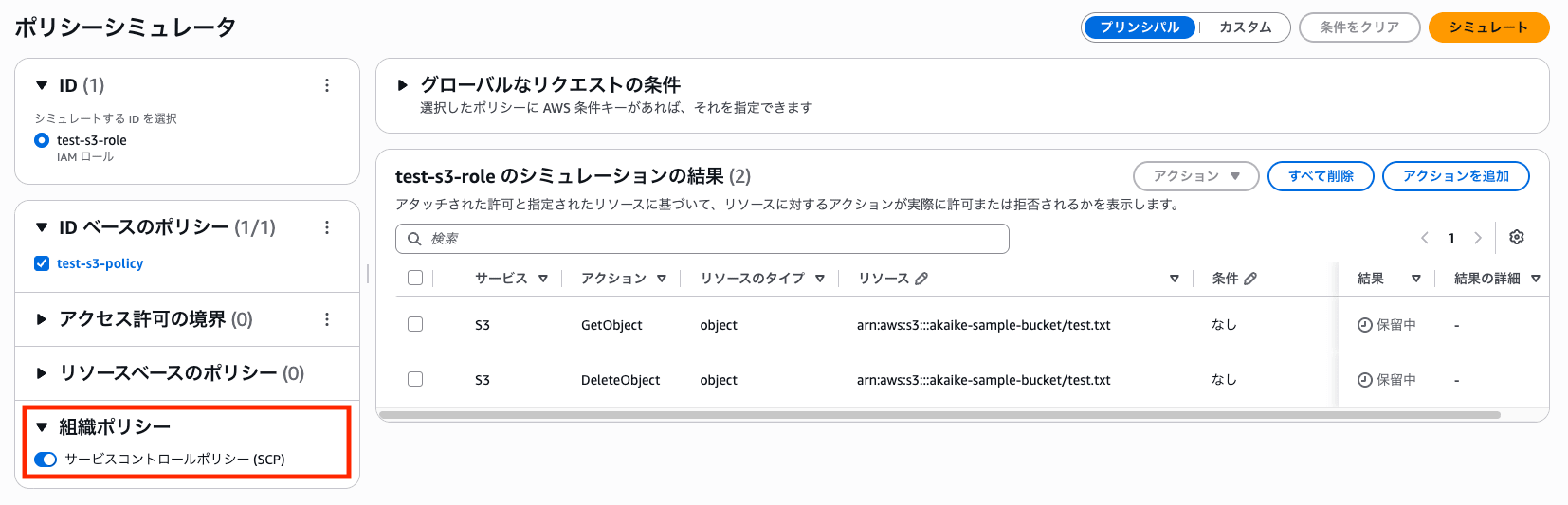
As a prerequisite, the following SCP that denies operations on the S3 bucket has been applied.
{
  "Version": "2012-10-17",
  "Statement": [
    {
      "Sid": "DenyS3OnSampleBucket",
      "Effect": "Deny",
      "Action": "s3:*",
      "Resource": [
        "arn:aws:s3:::akaike-sample-bucket",
        "arn:aws:s3:::akaike-sample-bucket/*"
      ]
    }
  ]
}
When simulating in this state, s3:GetObject, which was previously "allowed," also changes to "denied," and the details show "Denied by AWS Organizations."
Since the reason for denial is also stated explicitly, it's easy to understand.
Verification 2: Using the New SCP Feature (OrderedOrganizationPolicyInputList) via API
As shown in verification 1, including SCPs in the console itself was already possible before.
What is newly introduced this time is the evaluation of SCPs with conditions and the specification of arbitrary SCP hierarchies via API.
Since the console cannot set values for condition keys referenced only by SCPs (such as aws:RequestedRegion), the API is used for testing SCPs with conditions.
As an example, prepare an SCP that denies actions outside of ap-northeast-1 (Tokyo region).
{
  "Version": "2012-10-17",
  "Statement": [
    {
      "Sid": "DenyOutsideTokyo",
      "Effect": "Deny",
      "Action": "*",
      "Resource": "*",
      "Condition": {
        "StringNotEquals": {
          "aws:RequestedRegion": "ap-northeast-1"
        }
      }
    }
  ]
}
Pass this to --ordered-organization-policy-input-list.
This parameter is a list arranged in order from the organization root to the account hierarchy, with SCPs specified in the ServiceControlPolicyInputList of each layer.
There are two points to note here.
- The first is that
ServiceControlPolicyInputListtakes an array of strings- SCPs cannot be nested as JSON objects; the entire SCP JSON must be passed as a single string (hence the escaping with
\")
- SCPs cannot be nested as JSON objects; the entire SCP JSON must be passed as a single string (hence the escaping with
- The second is that SCPs require an explicit
Allowat each level of the hierarchy- Since the above SCP only has
Deny, placing it alone at the account hierarchy level means that when the Deny condition in Tokyo region does not trigger, there is noAllowat that level, resulting in an implicit denial.
- Since the above SCP only has
In actual organizations, FullAWSAccess is also applied to each account, so FullAWSAccess is included in the account hierarchy here as well.
Placing FullAWSAccess at the organization root and both FullAWSAccess and the above region-restriction SCP at the account hierarchy level results in the following.
[
  {
    "ServiceControlPolicyInputList": [
      "{\"Version\":\"2012-10-17\",\"Statement\":[{\"Effect\":\"Allow\",\"Action\":\"*\",\"Resource\":\"*\"}]}"
    ]
  },
  {
    "ServiceControlPolicyInputList": [
      "{\"Version\":\"2012-10-17\",\"Statement\":[{\"Effect\":\"Allow\",\"Action\":\"*\",\"Resource\":\"*\"}]}",
      "{\"Version\":\"2012-10-17\",\"Statement\":[{\"Sid\":\"DenyOutsideTokyo\",\"Effect\":\"Deny\",\"Action\":\"*\",\"Resource\":\"*\",\"Condition\":{\"StringNotEquals\":{\"aws:RequestedRegion\":\"ap-northeast-1\"}}}]}"
    ]
  }
]
Specify the value of the condition key aws:RequestedRegion with --context-entries and execute.
The identity policy to be verified (the IAM policy at the beginning) is passed via --policy-input-list.
Note that --policy-input-list is a parameter that takes an array of strings, so passing a JSON object file with file:// will result in an error as it won't be interpreted as an array (Policy input list item 1 has invalid content).
Here, the file contents are passed as a string using $(cat ...).
aws iam simulate-custom-policy \
  --policy-input-list "$(cat test-s3-policy.json)" \
  --ordered-organization-policy-input-list file://scp-input.json \
  --action-names "s3:GetObject" \
  --resource-arns "arn:aws:s3:::akaike-sample-bucket/test.txt" \
  --context-entries "ContextKeyName=aws:RequestedRegion,ContextKeyType=string,ContextKeyValues=us-east-1"
Setting aws:RequestedRegion to us-east-1 matches the SCP's Deny condition, so the result is explicitDeny.
"EvalActionName": "s3:GetObject",
"EvalDecision": "explicitDeny"
Conversely, setting it to ap-northeast-1 will no longer match the condition, and the action will be allowed.
aws iam simulate-custom-policy \
  --policy-input-list "$(cat test-s3-policy.json)" \
  --ordered-organization-policy-input-list file://scp-input.json \
  --action-names "s3:GetObject" \
  --resource-arns "arn:aws:s3:::akaike-sample-bucket/test.txt" \
  --context-entries "ContextKeyName=aws:RequestedRegion,ContextKeyType=string,ContextKeyValues=ap-northeast-1"
"EvalActionName": "s3:GetObject",
"EvalDecision": "allowed"
Verification 3: Using the New Policy Exclusion Feature (PolicyExclusionList) via API
This is a feature for excluding specific policies to check "what would happen if this policy were removed."
The operation of excluding policies via checkboxes in the console was already available before, but this time the PolicyExclusionList parameter has been added to SimulatePrincipalPolicy, making exclusion possible via API as well.
Here, consider a situation where AmazonS3FullAccess policy has also been attached to test-s3-role for testing purposes.
We want to verify "if the seemingly excessive AmazonS3FullAccess is removed, will read access to akaike-sample-bucket, which is needed for operations, still be maintained?"
Specify the ARN of AmazonS3FullAccess to be excluded in --policy-exclusion-list.
aws iam simulate-principal-policy \
  --policy-source-arn "arn:aws:iam::111111111111:role/test-s3-role" \
  --policy-exclusion-list '[{"PolicyArn":"arn:aws:iam::aws:policy/AmazonS3FullAccess"}]' \
  --action-names "s3:GetObject" \
  --resource-arns "arn:aws:s3:::akaike-sample-bucket/test.txt"
Even with AmazonS3FullAccess excluded, test-s3-policy still allows read access, so the result remains allowed.
"EvalActionName": "s3:GetObject"
"EvalDecision": "allowed"
And of course, excluding all policies will result in a deny.
aws iam simulate-principal-policy \
  --policy-source-arn "arn:aws:iam::111111111111:role/test-s3-role" \
  --policy-exclusion-list '[{"PolicyArn":"arn:aws:iam::aws:policy/AmazonS3FullAccess"},{"PolicyArn":"arn:aws:iam::111111111111:policy/test-s3-policy"}]' \
  --action-names "s3:GetObject" \
  --resource-arns "arn:aws:s3:::akaike-sample-bucket/test.txt"
"EvalActionName": "s3:GetObject"
"EvalDecision": "implicitDeny"
In this way, you can determine in advance whether excessive permissions can be safely removed, without actually changing the policies.
Verification 4: Using Cross-Account Simulation via API
Finally, cross-account simulation.
This is not a new feature from this update but has been provided previously as resource-based policy support; however, let's review it together.
First, as a constraint, cross-account evaluation cannot be done from the management console and requires the AWS CLI/API.
This is because the console has no field to specify the account that owns the resource (what the API calls ResourceOwner), and specifying a bucket from another account will be treated as the same account, resulting in success.
In cross-account scenarios, access is only permitted when both the identity policy on the accessing side and the bucket policy on the resource side allow it, and this cannot be reproduced in the console.
Here, prepare two roles in account A (test-s3-allow-role-1 and test-s3-allow-role-2) with the same policy allowing s3:GetObject attached.
{
  "Version": "2012-10-17",
  "Statement": [
    {
      "Sid": "AllowReadAccountBBucket",
      "Effect": "Allow",
      "Action": "s3:GetObject",
      "Resource": "arn:aws:s3:::akaike-sample-bucket/*"
    }
  ]
}
Meanwhile, assume that the bucket on account B's side has a bucket policy attached that allows read access only to test-s3-allow-role-1.
{
  "Version": "2012-10-17",
  "Statement": [
    {
      "Sid": "AllowRole1Read",
      "Effect": "Allow",
      "Principal": {
        "AWS": "arn:aws:iam::111111111111:role/test-s3-allow-role-1"
      },
      "Action": "s3:GetObject",
      "Resource": "arn:aws:s3:::akaike-sample-bucket/*"
    }
  ]
}
Using SimulatePrincipalPolicy and specifying the resource-side account (B) in --resource-owner allows reproducing the cross-account evaluation.
In --policy-source-arn, specify the role in account A to be verified. (The policies attached to this role are automatically retrieved.)
On the other hand, since the API does not automatically retrieve account B's bucket policy, it must be explicitly passed via --resource-policy.
aws iam simulate-principal-policy \
  --policy-source-arn "arn:aws:iam::111111111111:role/test-s3-allow-role-1" \
  --resource-policy file://bucket-policy.json \
  --resource-owner "arn:aws:iam::222222222222:root" \
  --action-names "s3:GetObject" \
  --resource-arns "arn:aws:s3:::akaike-sample-bucket/test.txt"
First, test-s3-allow-role-1 is allowed by both the identity side and the resource side (bucket policy), so the result is allowed.
Looking at EvalDecisionDetails, you can see that both types are allowing.
"EvalDecision": "allowed",
"EvalDecisionDetails": {
    "IAM Policy": "allowed",
    "Resource Policy": "allowed"
}
Changing --policy-source-arn to test-s3-allow-role-2, even though the identity side allows it, since it is not included in the bucket policy, it is not allowed on the resource side and is denied.
"EvalDecision": "implicitDeny",
"EvalDecisionDetails": {
    "IAM Policy": "allowed",
    "Resource Policy": "implicitDeny"
}
In this way, EvalDecisionDetails returns the decisions for both the identity policy and resource policy separately, allowing you to identify which side is the cause.
This update also improves the matching statements returned upon denial so that they are narrowed down to only the policies that influenced the decision.
Conclusion
That covers the update where IAM Policy Simulator migrated to the IAM console and new features were added.
IAM policy verification is unglamorous work but plays an important role in supporting security.
In particular, being able to simulate including SCPs and reproduce policy exclusion scenarios means that permissions can now be tested in a way that more closely resembles actual operations.
I hope this makes your IAM policy verification something you can carry out with greater confidence.
