I tried to see how light I could make the walkthrough images for a native app that users only see once

This page has been translated by machine translation. View original
I'm implementing a walkthrough screen in an iOS app and want to adopt a design using photo images. The walkthrough is only displayed on the first launch of the app. I was concerned about the impact on app size of allocating 1.5MB images for content that will only be viewed once (and there are multiple images at that).
I verified how much I could reduce the file size while maintaining text legibility and keeping the format manageable in xcassets for team development. This article introduces the results of comparing multiple approaches, from PNG optimization tools to JPEG encoders.
Verification Environment
- MacBook Pro (16-inch, 2021), Apple M1 Pro
- macOS Tahoe 26.4
- pngquant 3.0.3
- oxipng 10.1.1
- guetzli
- mozjpeg version 4.1.5 (build 20231012)
- Android Studio Panda 4 | 2025.3.4
Source Image
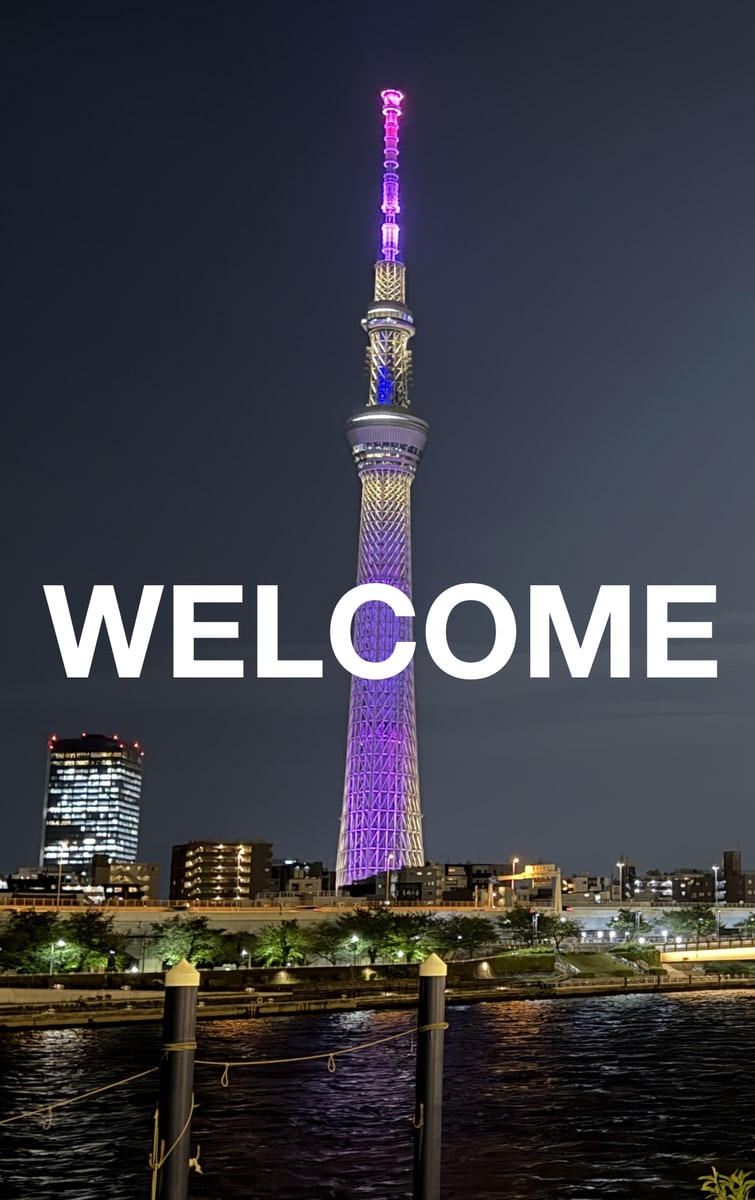
The original image is a 1.5MB PNG file with a text overlay design featuring the word "WELCOME" in white letters over a night view photo.
Quality Benchmark: Android Studio's WebP Conversion
For establishing a quality benchmark, I used Android Studio's WebP conversion feature as the passing bar. The converted size is 101KB, and while there is slight noise around the text, the quality is within acceptable range.
Note that WebP can be used as a file resource with UIImage or SwiftUI.Image on iOS 14 and later. However, since WebP format cannot be added to Xcode's xcassets, I decided not to adopt it for this use case where I want to manage assets in a team development setting.
Verification of Each Approach
1. PNG Optimization: pngquant (Lossy Compression)
pngquant is a tool that reduces file size by decreasing the number of colors. For photo images, quality degradation can occur, so adjustment of the quality range is necessary.
brew install pngquant

pngquant --quality=60-80 --output output_pngquant.png source.png
The converted size was 454KB. Due to the color reduction, posterization occurred in the gradients of the Tokyo Skytree's lighting (purple to pink), making them appear stepped. In particular, the blue color shifted toward purple, which was a concern as the color impression differed from the original image. The subtle gradients in the night sky also became somewhat uniform, giving an overall flat impression. Text edges are clean without block noise since it remains PNG.
2. PNG Optimization: oxipng (Lossless Compression)
oxipng is a tool that optimizes PNG metadata and compression algorithms. Quality is fully preserved, but the amount of reduction is limited.
brew install oxipng

oxipng -o max --out output_oxipng.png source.png
The converted size was 1.3MB, and since it is lossless, there is no degradation. However, the size reduction effect is minimal.
3. PNG Optimization: Combining pngquant → oxipng
This is a two-step process that first reduces the number of colors with pngquant, then further optimizes with oxipng. Combining them allows for maximum size reduction.
pngquant --quality=60-80 --output tmp.png source.png
oxipng -o max --out output_combined.png tmp.png
The converted size was 413KB. The visual quality is nearly equivalent to pngquant alone, with the same stepped gradients and flattened night sky. Adding oxipng reduces the file size by about 40KB, but the visual quality difference is negligible. With PNG, 413KB is the limit, and the target of 101KB was not achieved.
4. JPEG Conversion: Guetzli (by Google)
Guetzli is a high-quality JPEG encoder made by Google that performs compression based on human visual characteristics. It is said to produce smaller files than other tools at the same quality. The minimum quality setting is 84 and cannot be set lower. Also note that processing is very slow and conversion can take several minutes.
brew install guetzli

guetzli --quality 84 source.png output_guetzli.jpg
The converted size was 187KB. Thanks to the high quality setting of q84, ringing around the WELCOME text (white fringing) is barely noticeable. The lattice details of the Tokyo Skytree are well preserved, and the night sky gradient is smooth. The difference from PNG is only subtle texture changes, which is at a practically acceptable level, but the benchmark of 101KB was not achieved.
5. JPEG Conversion: mozjpeg (by Mozilla)
mozjpeg is a highly efficient JPEG encoder made by Mozilla that tends to produce smaller files than standard JPEG at the same quality setting. The lower the quality, the smaller the file size, but noise around text increases, so I verified at two levels: q80 and q60.
brew install mozjpeg

# quality 80
/opt/homebrew/opt/mozjpeg/bin/cjpeg -quality 80 -outfile output_mozjpeg_80.jpg source.png

# quality 60
/opt/homebrew/opt/mozjpeg/bin/cjpeg -quality 60 -outfile output_mozjpeg_60.jpg source.png
The converted size at q80 was 177KB. Visual quality is equivalent to Guetzli q84, with ringing around the text barely noticeable and both the Skytree details and night sky smooth. The result is about 10KB smaller than Guetzli.
The converted size at q60 was 105KB. A faint gray fringe (JPEG ringing) appears around the white edges of the WELCOME text. Slight block noise is also visible in the dark areas of the night sky, but it is less noticeable on actual devices due to the dark areas. Some detail of the Skytree lighting is lost, but overall it is within acceptable range.
Summary of Verification Results
mozjpeg q60 achieved nearly the same size as Android WebP while being the only option manageable in xcassets. If the quality around the text is within acceptable range after checking on an actual device, it is the top candidate.
Since size varies depending on the photo content, brightness, and amount of text, please treat this as a reference for the specific case in this article.
| Method | Size | xcassets Management |
|---|---|---|
| Original PNG | 1.5 MB | ◯ |
| oxipng (lossless) | 1.3 MB | ◯ |
| pngquant (q60-80) | 454 KB | ◯ |
| pngquant → oxipng | 413 KB | ◯ |
| Guetzli (q84) | 187 KB | ◯ |
| mozjpeg (q80) | 177 KB | ◯ |
| mozjpeg (q60) | 105 KB | ◯ |
| Android WebP (benchmark) | 101 KB | ✕ |
Visual Comparison of Image Quality
A comparison with crops from around the WELCOME text from each method's output. The top row shows PNG-based methods, and the bottom row shows JPEG-based methods.
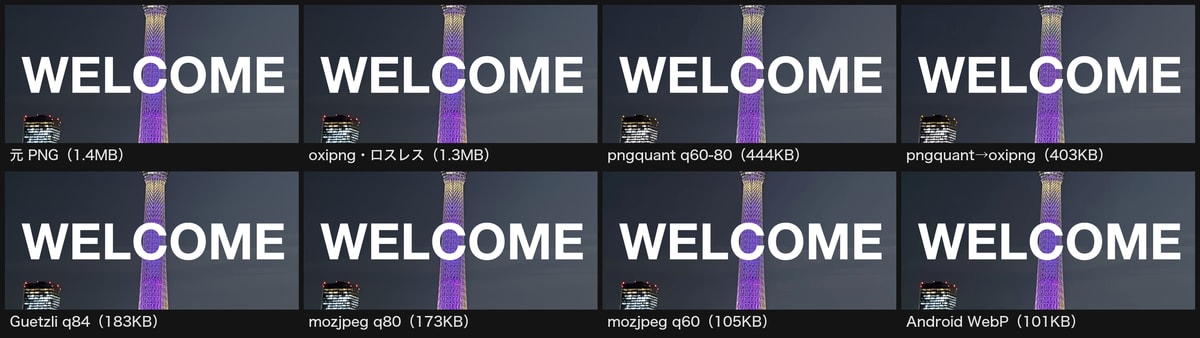
Note that re-encoding may occur when uploading to the blog, which could prevent the quality differences from being accurately conveyed, so the original image files used in the verification are available on GitHub. Please refer to these if you want to check the precise quality differences.
Degradation Tendencies in PNG-Based Methods
Color reduction by pngquant manifests as posterization of gradients. Additionally, reducing the number of colors can replace blues with nearby approximate colors that lean toward purple, which can change the impression of the lighting. Photos with many subtle color variations, such as night views, are particularly susceptible to this effect, making significant size reduction while staying in PNG format difficult.
| Method | Night Sky Gradient | Skytree Lighting | Text Edge |
|---|---|---|---|
| Original PNG / oxipng | Smooth | Smooth purple to pink | Sharp (perfect) |
| pngquant (q60-80) | Somewhat uniform, flat | Gradient is stepped, blue shifts toward purple | Clean (no blocks) |
| pngquant → oxipng | Same as pngquant | Same as pngquant | Clean (no blocks) |
Degradation Tendencies in JPEG-Based Methods
Degradation in JPEG-based methods mainly appears as ringing around text edges (a phenomenon where gray fringing appears at the edges of white text). It is barely noticeable at q80 and above, but at q60 it can be faintly detected at the edges of white text. Since this image is a night view (dark background), there is an advantageous condition where block noise is less noticeable even when it occurs.
| Method | Night Sky Gradient | Skytree Detail | Ringing Around Text |
|---|---|---|---|
| Guetzli (q84) | Smooth | Well preserved | Barely noticeable |
| mozjpeg (q80) | Smooth | Well preserved | Barely noticeable |
| mozjpeg (q60) | Slight blocks in dark areas | Somewhat lost | Faint fringing at text edges |
| Android WebP (benchmark) | Smooth | Well preserved | Barely noticeable |
Comparison with WebP
The WebP output from Android Studio (101KB) is nearly the same size as mozjpeg q60 (105KB), yet has less ringing around text and appears visually slightly higher quality. This reflects the superior compression efficiency of WebP, but the inability to manage it in xcassets is a practical drawback.
Conclusion
This verification revealed that, given the prerequisite of xcassets management, mozjpeg q60 offers the best balance of size and quality. It reduces the original 1.5MB image to 105KB, achieving nearly the same size as the Android WebP benchmark (101KB).
If quality is the top priority, Guetzli q84 or mozjpeg q80 (around 180KB) are candidates. Whether the fringing at text edges is acceptable needs to be confirmed on an actual device, and please note that results vary depending on the image content, brightness, and amount of text. If sticking to PNG, the practical limit is 413KB with the pngquant → oxipng combination, and this exercise reinforced that converting to JPEG is effective for significantly reducing the size of photo images.
If xcassets could manage WebP, there would be no discrepancy between iOS and Android and no need to worry about this. I hope Xcode adds support for this soon.
I hope this serves as a useful reference for anyone struggling with reducing the size of walkthrough images.