The Japanese label display of Apple Pay buttons has been changed in iOS 26.1

This page has been translated by machine translation. View original
I am currently implementing Apple Pay payment functionality in an iOS app. When checking functionality on iOS 26.1, I discovered that the Japanese label text for Apple Pay buttons has changed.
In iOS 26.1 with Japanese language settings, new wording like "この方法で〜: Apple Pay" (This method for ~: Apple Pay) has been adopted, particularly for the .buy and .inStore button types. Meanwhile, in English environments, while the text hasn't changed, there are subtle differences such as font size adjustments for certain button types.
This change was unexpected and may impact the user experience and UI layout of existing apps. This article introduces verification results and response methods regarding the label changes to Apple Pay buttons in iOS 26.1.
As of the time of writing this article (November 14, 2025), no official announcement from Apple regarding this change has been confirmed.
Test Environment
- Xcode 26.1.1
- iPhone 16 Pro / iOS 18.5 simulator
- iPhone 16 Pro / iOS 26.1 simulator
- Language settings: Japanese, English
Verification Results
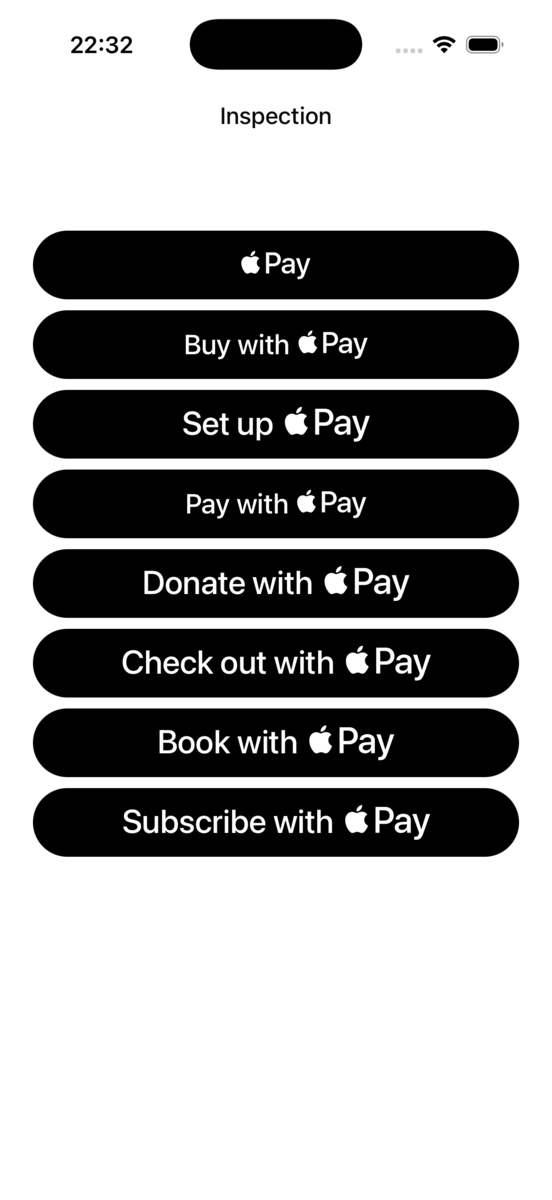
Below are the comparison results for each button type between iOS 18.5 and iOS 26.1.
| Language Setting | iOS 18.5 | iOS 26.1 |
|---|---|---|
| Japanese | 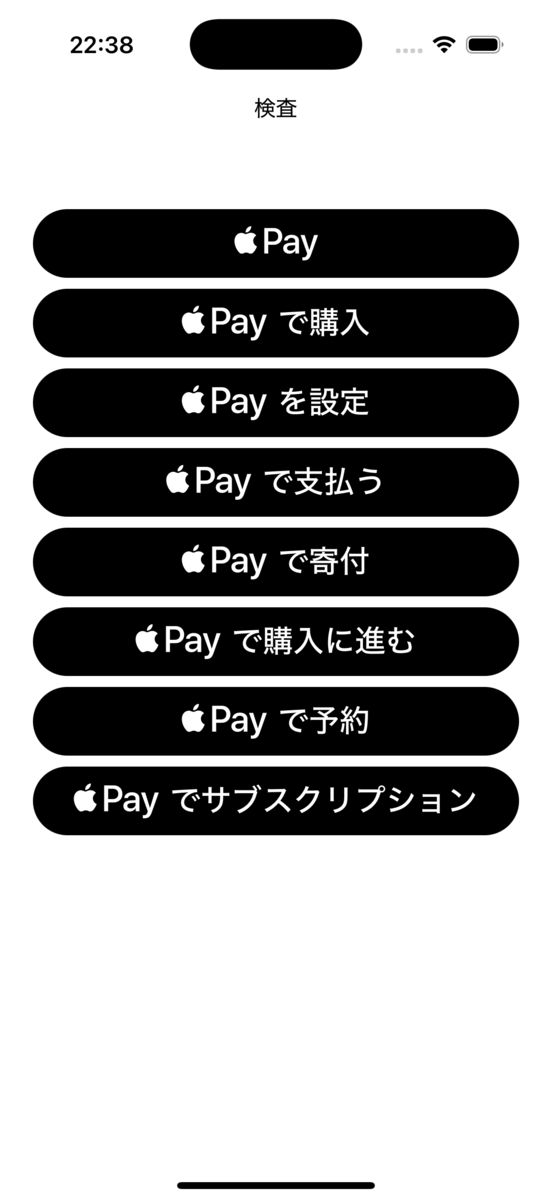 |
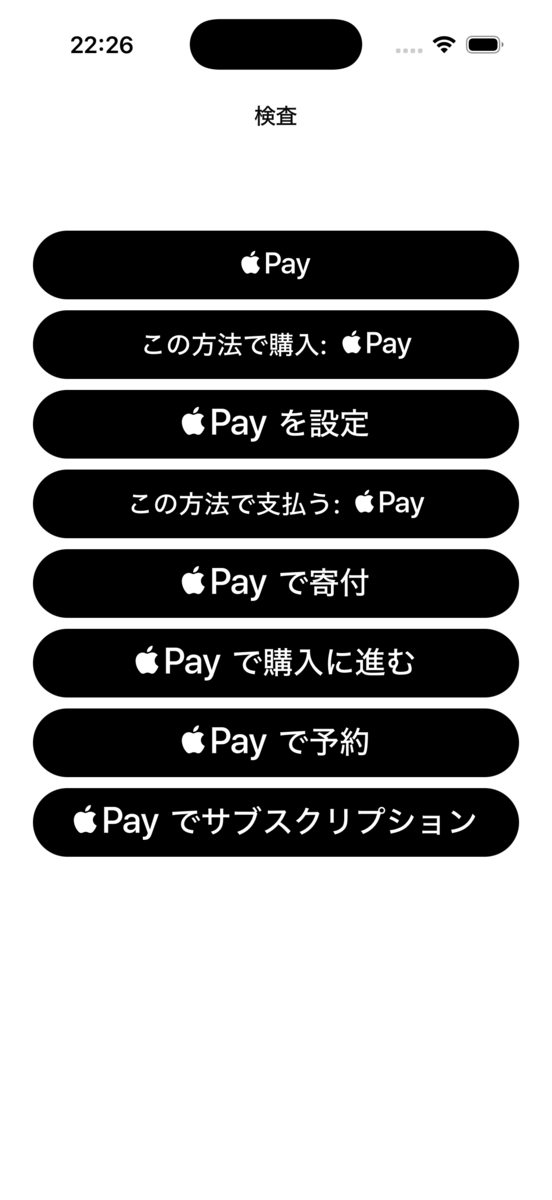 |
| English | 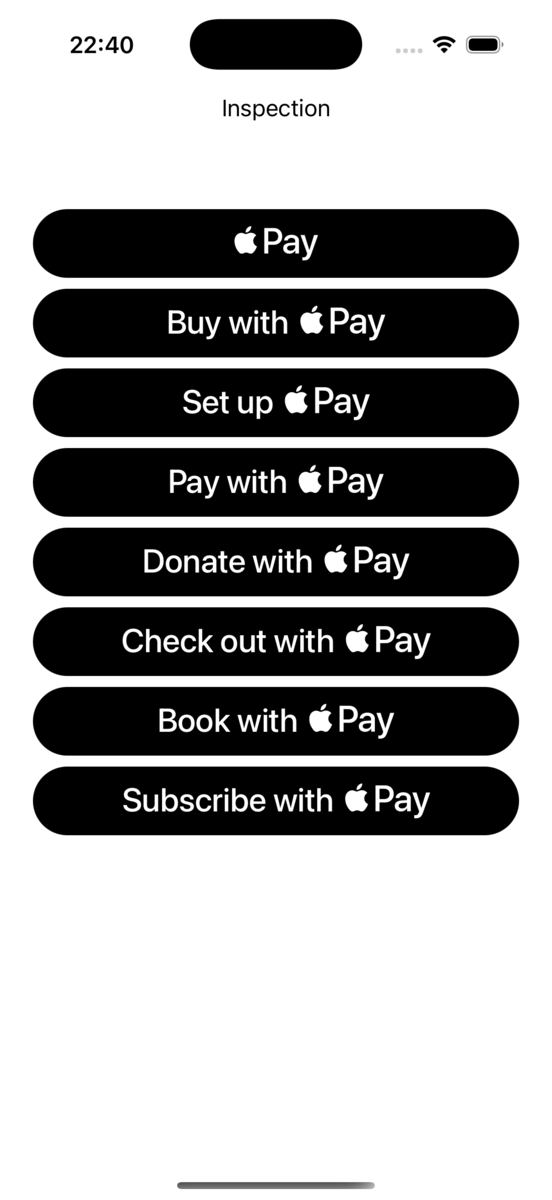 |
 |
These screenshots are from simulators, but the same Japanese label text changes have been confirmed on iPhone 17 Pro / iOS 26.1 (physical device).
Main Changes
In Japanese environments, the following button types had label changes:
| Button Type | iOS 18.5 | iOS 26.1 |
|---|---|---|
.buy |
Apple Payで購入 | この方法で購入: Apple Pay |
.inStore |
Apple Payで支払う | この方法で支払う: Apple Pay |
The following button types had no changes:
.plain: Apple Pay.setUp: Apple Payを設定.donate: Apple Payで寄付.checkout: Apple Payで購入に進む.book: Apple Payで予約.subscribe: Apple Payをサブスクリプション
In English environments, while the text didn't change, subtle differences were observed, such as smaller font sizes for the "Buy with" portion of the .buy button. Similar changes were made to .inStore.
While this is speculation, it's possible that Apple intends to soften direct expressions like "purchase" or "pay."
Sample Code
Here's the sample code used for verification:
import SwiftUI
import PassKit

struct ContentView: View {
    private let shape = RoundedRectangle(cornerRadius: 25, style: .circular)

    var body: some View {
        ScrollView {
            Group {
                PayWithApplePayButton(.plain, action: {}, fallback: {})
                    .frame(height: 50)
                    .clipShape(shape)

                PayWithApplePayButton(.buy, action: {}, fallback: {})
                    .frame(height: 50)
                    .clipShape(shape)

                PayWithApplePayButton(.setUp, action: {}, fallback: {})
                    .frame(height: 50)
                    .clipShape(shape)

                PayWithApplePayButton(.inStore, action: {}, fallback: {})
                    .frame(height: 50)
                    .clipShape(shape)

                PayWithApplePayButton(.donate, action: {}, fallback: {})
                    .frame(height: 50)
                    .clipShape(shape)

                PayWithApplePayButton(.checkout, action: {}, fallback: {})
                    .frame(height: 50)
                    .clipShape(shape)

                PayWithApplePayButton(.book, action: {}, fallback: {})
                    .frame(height: 50)
                    .clipShape(shape)

                PayWithApplePayButton(.subscribe, action: {}, fallback: {})
                    .frame(height: 50)
                    .clipShape(shape)
            }
            .padding(.horizontal, 24)
        }
        .toolbar {
            ToolbarItem(placement: .title) {
                Text("検査")
            }
        }
        .toolbarTitleDisplayMode(.large)
    }
}

#Preview {
    ContentView()
}
The sample code uses PayWithApplePayButton, but the Japanese label changes were also observed in the UIKit version, PKPaymentButton.
Label Differences Based on Button Height
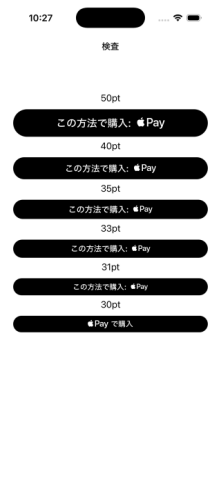
Interestingly, when the PayWithApplePayButton height is set to 30pt or less, the original wording is restored. Therefore, if you're using buttons with a height of 30pt or less, you won't be affected by this change.
Impact on Existing Apps
This change may have the following impacts:
Changes in User Experience
Users might be temporarily confused by the new button label text. In particular, users who have become accustomed to the same wording over the years might find the new wording jarring.
Impact on UI Layout
Because the text length has changed, the button width may change. Particularly if the button width is not fixed or if the button is adjacent to other UI elements, it's necessary to check that the layout doesn't break.
Impact on Customer Support
The change in wording might affect help page content or customer support inquiries. It's recommended to share this information with relevant departments in advance.
Summary
In iOS 26.1, the Japanese label text for Apple Pay buttons has changed. In particular, .buy and .inStore types have been changed to "この方法で〜: Apple Pay".
Since this is a system-level change, no response is needed on the app side, but it's recommended to check the following:
- That there are no UI layout issues
- That App Store screenshots don't show the old wording
- Whether help documents or FAQs need to be updated
By checking these items before updating to iOS 26.1, a smooth transition is possible.
Future Outlook
iOS 26.0 had major design changes, and in iOS 26.1, behaviors like in-app browser toolbars were reverted to be similar to iOS 18. It's possible that these Apple Pay button label changes might be fixed in the next iOS version.
Therefore, rather than responding immediately, it may be worth considering waiting to see what happens. However, considering the possibility of increased user inquiries, it's recommended to share information with customer support departments sooner rather than later.
References
- PayWithApplePayButton - PassKit | Apple Developer Documentation
- PKPaymentButton - PassKit | Apple Developer Documentation
- Apple Pay - Human Interface Guidelines | Apple Developer
Job Information: Classmethod is Hiring iOS Engineers
The Starbucks Digital Technology Department is hiring engineers who can develop iOS apps. We're looking forward to applications from people who want to work together while sharing new iOS support information on misc-ios and other platforms!
In addition, we're looking for iOS/Android lead engineers in the manufacturing sector. Let's talk about mobile app development together!