The Japanese label notation for the Apple Pay button has been changed in iOS 26.1

This page has been translated by machine translation. View original
I am currently implementing Apple Pay payment functionality in an iOS app. When testing on iOS 26.1, I discovered that the Japanese label text for Apple Pay buttons has changed.
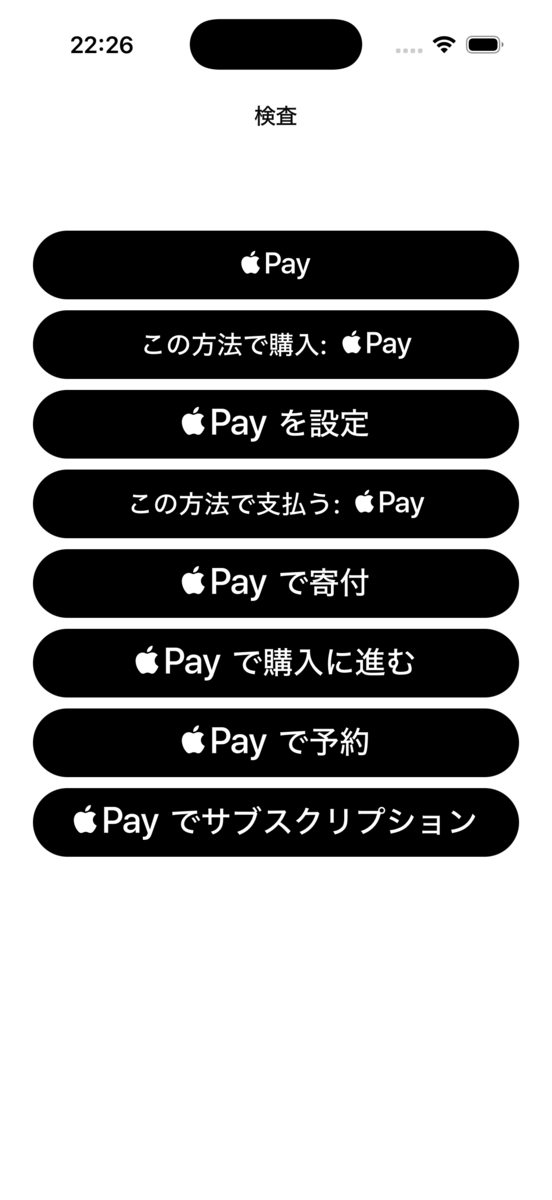
In a Japanese-language iOS 26.1 environment, the new phrasing "この方法で〜: Apple Pay" has been adopted specifically for the .buy and .inStore types. Meanwhile, in English environments, the wording itself did not change, but minor differences were confirmed, such as font size adjustments for some button types.
This change was unexpected and may affect the user experience and UI layout of existing apps. This article introduces the verification results and how to handle the label text changes in Apple Pay buttons on iOS 26.1.
Note that as of the time of writing this article (November 14, 2025), no official announcement from Apple regarding this change has been confirmed.
Verification Environment
- Xcode 26.1.1
- iPhone 16 Pro / iOS 18.5 Simulator
- iPhone 16 Pro / iOS 26.1 Simulator
- Language settings: Japanese, English
Verification Results
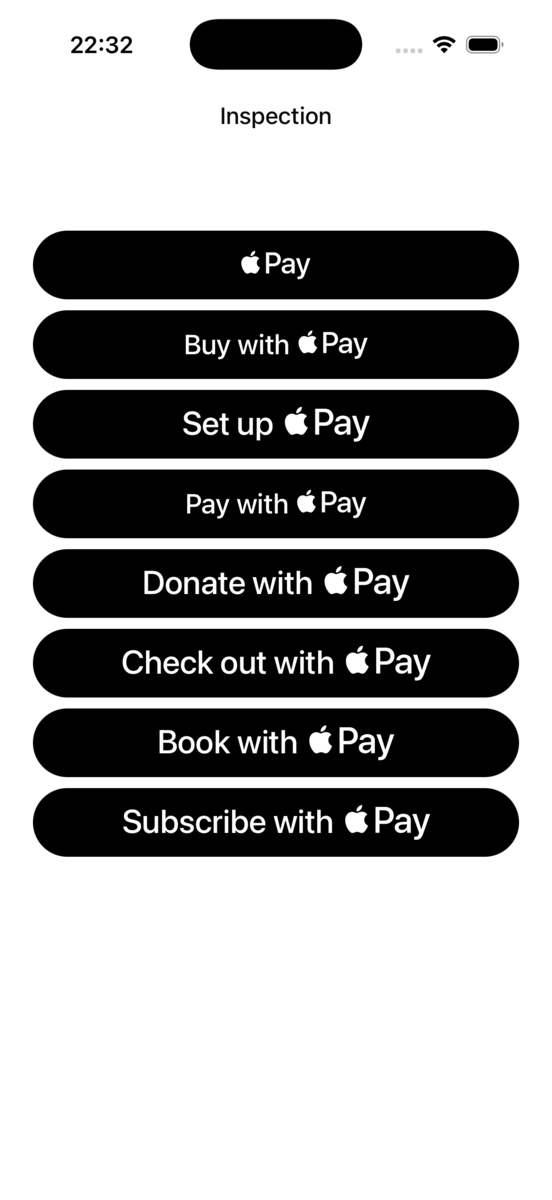
The following shows the results of comparing the label text for each button type between iOS 18.5 and iOS 26.1.
| Language Setting | iOS 18.5 | iOS 26.1 |
|---|---|---|
| Japanese | 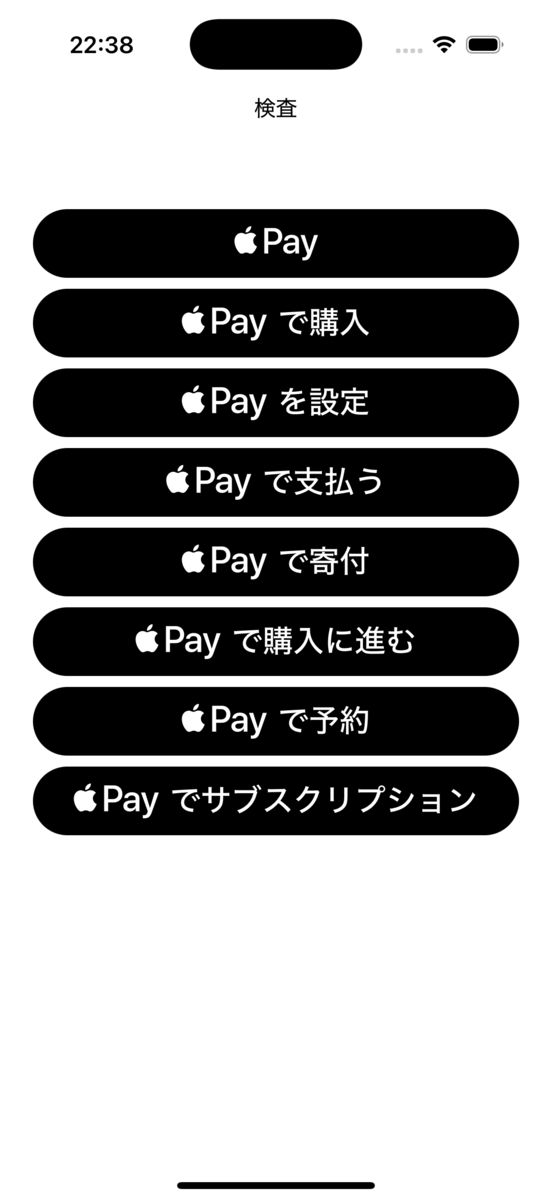 |
 |
| English | 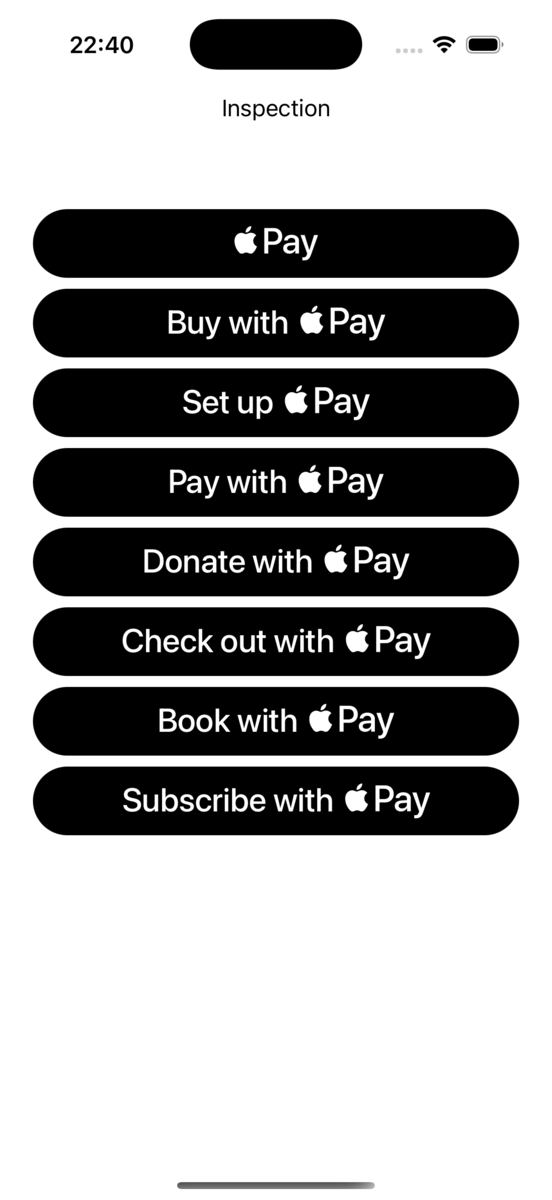 |
 |
These screenshots are from the simulator, but the same Japanese label text change has also been confirmed on iPhone 17 Pro / iOS 26.1 (physical device).
Key Changes
In Japanese environments, the following button types have changed their label text.
| Button Type | iOS 18.5 | iOS 26.1 |
|---|---|---|
.buy |
Buy with Apple Pay | Purchase this way: Apple Pay |
.inStore |
Pay with Apple Pay | Pay this way: Apple Pay |
The following button types had no changes.
.plain: Apple Pay.setUp: Set Up Apple Pay.donate: Donate with Apple Pay.checkout: Check Out with Apple Pay.book: Book with Apple Pay.subscribe: Subscribe with Apple Pay
In English environments, the wording did not change, but minor differences were confirmed, such as a smaller font size for the "Buy with" portion of .buy. The same change was observed for .inStore.
While speculative, this change may reflect Apple's intention to soften direct expressions like "purchase" or "pay."
Sample Code
The following is the sample code used for verification.
import SwiftUI
import PassKit

struct ContentView: View {
    private let shape = RoundedRectangle(cornerRadius: 25, style: .circular)

    var body: some View {
        ScrollView {
            Group {
                PayWithApplePayButton(.plain, action: {}, fallback: {})
                    .frame(height: 50)
                    .clipShape(shape)

                PayWithApplePayButton(.buy, action: {}, fallback: {})
                    .frame(height: 50)
                    .clipShape(shape)

                PayWithApplePayButton(.setUp, action: {}, fallback: {})
                    .frame(height: 50)
                    .clipShape(shape)

                PayWithApplePayButton(.inStore, action: {}, fallback: {})
                    .frame(height: 50)
                    .clipShape(shape)

                PayWithApplePayButton(.donate, action: {}, fallback: {})
                    .frame(height: 50)
                    .clipShape(shape)

                PayWithApplePayButton(.checkout, action: {}, fallback: {})
                    .frame(height: 50)
                    .clipShape(shape)

                PayWithApplePayButton(.book, action: {}, fallback: {})
                    .frame(height: 50)
                    .clipShape(shape)

                PayWithApplePayButton(.subscribe, action: {}, fallback: {})
                    .frame(height: 50)
                    .clipShape(shape)
            }
            .padding(.horizontal, 24)
        }
        .toolbar {
            ToolbarItem(placement: .title) {
                Text("Inspection")
            }
        }
        .toolbarTitleDisplayMode(.large)
    }
}

#Preview {
    ContentView()
}
The sample code uses PayWithApplePayButton, but the same Japanese label changes have been confirmed in the UIKit version, PKPaymentButton, as well.
Label Differences Based on Button Height
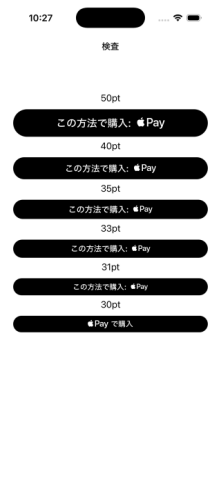
Interestingly, it was confirmed that setting the height of PayWithApplePayButton to 30pt or less reverts the label to the original text. Therefore, if you are using a button with a height of 30pt or less, you will not be affected by this change.
Impact on Existing Apps
This change may have the following effects.
Changes to User Experience
The change in button label text may temporarily confuse users. In particular, users who have been accustomed to the same wording for a long time may find the new text unfamiliar.
Impact on UI Layout
Since the length of the text changes, the width of the button may change as well. Especially if the button width is not fixed, or if the button is adjacent to other UI elements, it is necessary to verify that no layout issues occur.
Impact on Customer Support
The change in wording may affect the content of help pages and inquiries to customer support. It is recommended to share this information with relevant departments in advance.
Summary
In iOS 26.1, the Japanese label text for Apple Pay buttons has changed. In particular, the .buy and .inStore types have been changed to the phrasing "この方法で〜: Apple Pay."
Since this change is at the system level, no action is required on the app side, but it is recommended to verify the following points.
- Whether there are any UI layout issues
- Whether App Store screenshots are showing the old label text
- Whether help documentation or FAQs need to be updated
By confirming these points before updating to iOS 26.1, a smooth transition can be achieved.
Future Outlook
iOS 26.0 introduced major design changes, and there is a precedent where iOS 26.1 reverted behaviors such as the in-app browser toolbar back to how they worked in iOS 18. This Apple Pay button label change may also be corrected in a future iOS version.
Therefore, it may be worth considering the option of waiting and observing rather than taking immediate action. However, given the possibility of increased inquiries from users, it is recommended to share information with the customer support department early.
References
- PayWithApplePayButton - PassKit | Apple Developer Documentation
- PKPaymentButton - PassKit | Apple Developer Documentation
- Apple Pay - Human Interface Guidelines | Apple Developer
Job Openings: Classmethod is Hiring iOS Engineers
The Starbucks Digital Technology Division is looking for engineers with iOS app development experience. We are waiting for applications from those who would like to work with us, sharing and discussing new iOS updates together in channels like misc-ios!
We are also hiring iOS/Android lead engineers in the manufacturing sector. Let's talk about mobile app development together!