I tried building and running in production a tournament management app for an AWS-hosted futsal tournament using a serverless architecture!

This page has been translated by machine translation. View original
Hello, I'm Shunta Toda from the Retail App Co-Creation Division.
I participated in the AWS-hosted APN Partner Cup (an event where AWS partner companies gather to bond over futsal) through the futsal club inside Classmethod.

Every year we managed the timetable and match results using Google Sheets or Excel, but this year we thought "why not build a dedicated web app for the tournament?" — so we built a tournament management and spectating support app called Kick Summit App using Claude Code and used it on the day of the event.
The code is publicly available in this GitHub repository.
In this article, I'll cover why I built it, what the structure looks like, how I built it with Claude Code, and how it actually worked on the day.
What I Built
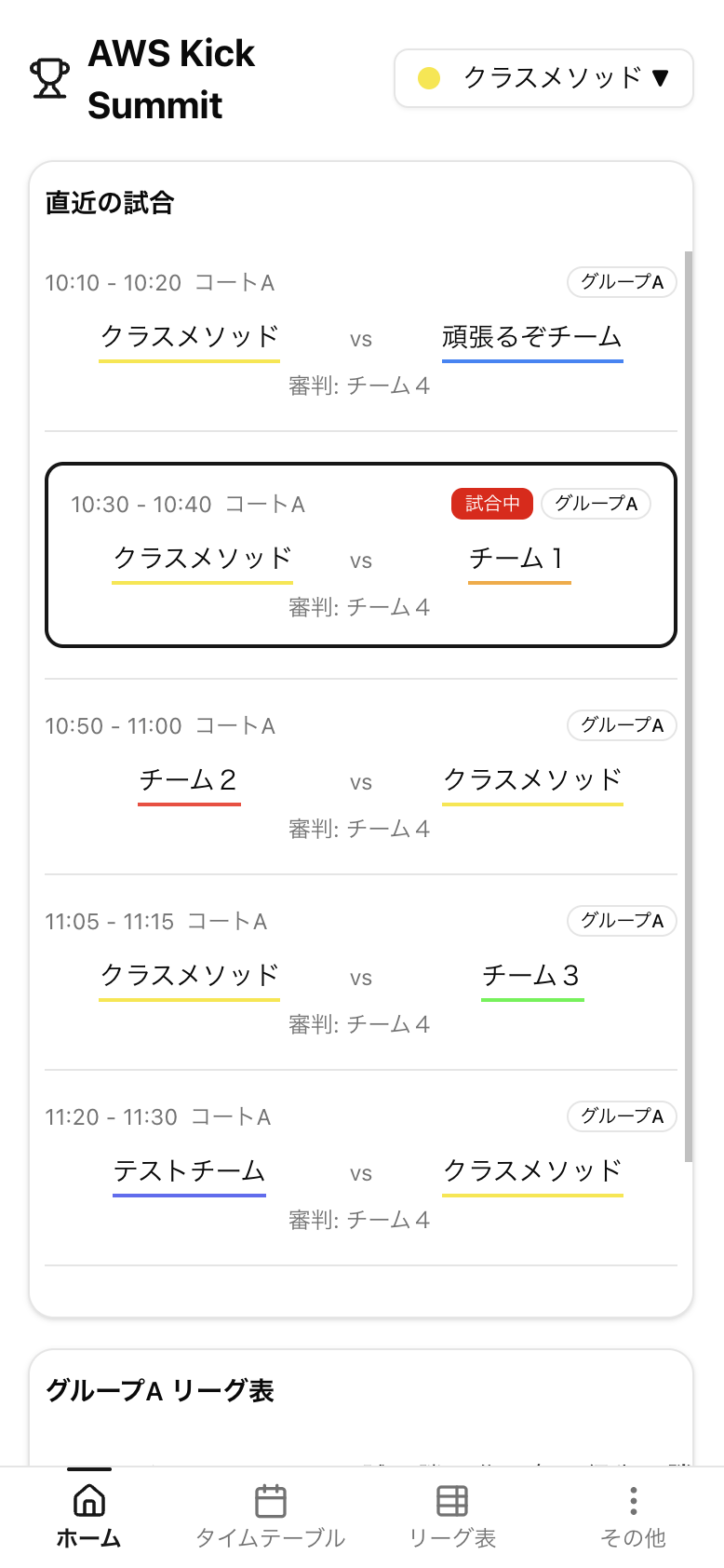
It's a web app designed to be used on a smartphone. It brings together the timetable, standings, score input, and more in one place.
| Screen | Purpose |
|---|---|
| Home | Your team's next match, recent results, and ongoing matches |
| Timetable | List of all matches |
| League Table | Group standings, points, and goal difference |
| Score Input | Only participating teams / referee teams / admins can enter scores |
Feature: UI is personalized by selecting "your team" at the start
The thing I cared about most in this app is the spec where you choose your own team on your first visit. Once selected, the choice is saved on that device, and from then on a UI optimized from your team's perspective is displayed.
For example, on the home screen you can see at a glance:
- Your team's next match — what time, which court, and who you're playing against
- When your team is on referee duty — which match and when
- Your team's current standing, points, and goal difference
When browsing the full match list in a spreadsheet, it was surprisingly tedious to filter out only the matches relevant to your team, and "when's our next match?" and "when are we refereeing?" would come up every time. By making the team selection the starting point to narrow down what's shown, that effort became almost zero.
Feature: Team selection also used for score input permission management
Furthermore, the selected team information is also repurposed for score input permission management. It's a simple mechanism, but only the following people can enter scores:
- Members of the teams playing in the match
- Members of the referee team for that match
- Admins (password login)
The idea was to shift from a setup where a single person on the organizing team entered everything to one where "anyone who notices can go ahead and enter it." By reusing the team selection directly for permission checks, access control works without building a full login system.
Features by Screen
Here's a look at what each screen can do.
Team Selection Screen
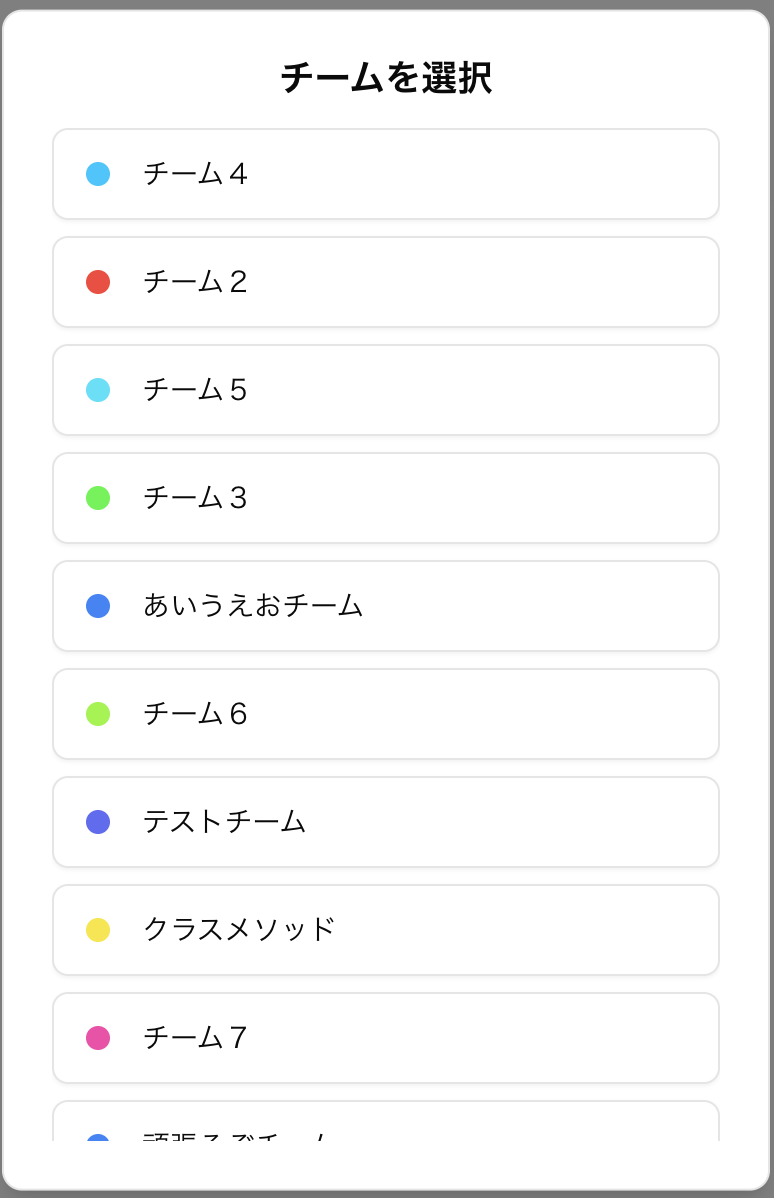
- This screen appears on your first visit, where you choose your team
- Your selected team is saved on your device (localStorage), and from the next visit your team's perspective UI is shown automatically
- You can tap your team name in the header at any time to change your selection
Home Screen
Based on your selected team, it shows only the information relevant to your team in one place.
- Next match: What time, which court, and who you're playing against
- Next referee duty: When and which match you're refereeing
- Ongoing matches: Real-time score of the match currently being played on the court
- Recent results: Your team's most recent match results
- Current standing: Your ranking, points, and goal difference within your group
It auto-refreshes every 30 seconds, so keeping your phone open will always show the latest state.
Timetable Screen
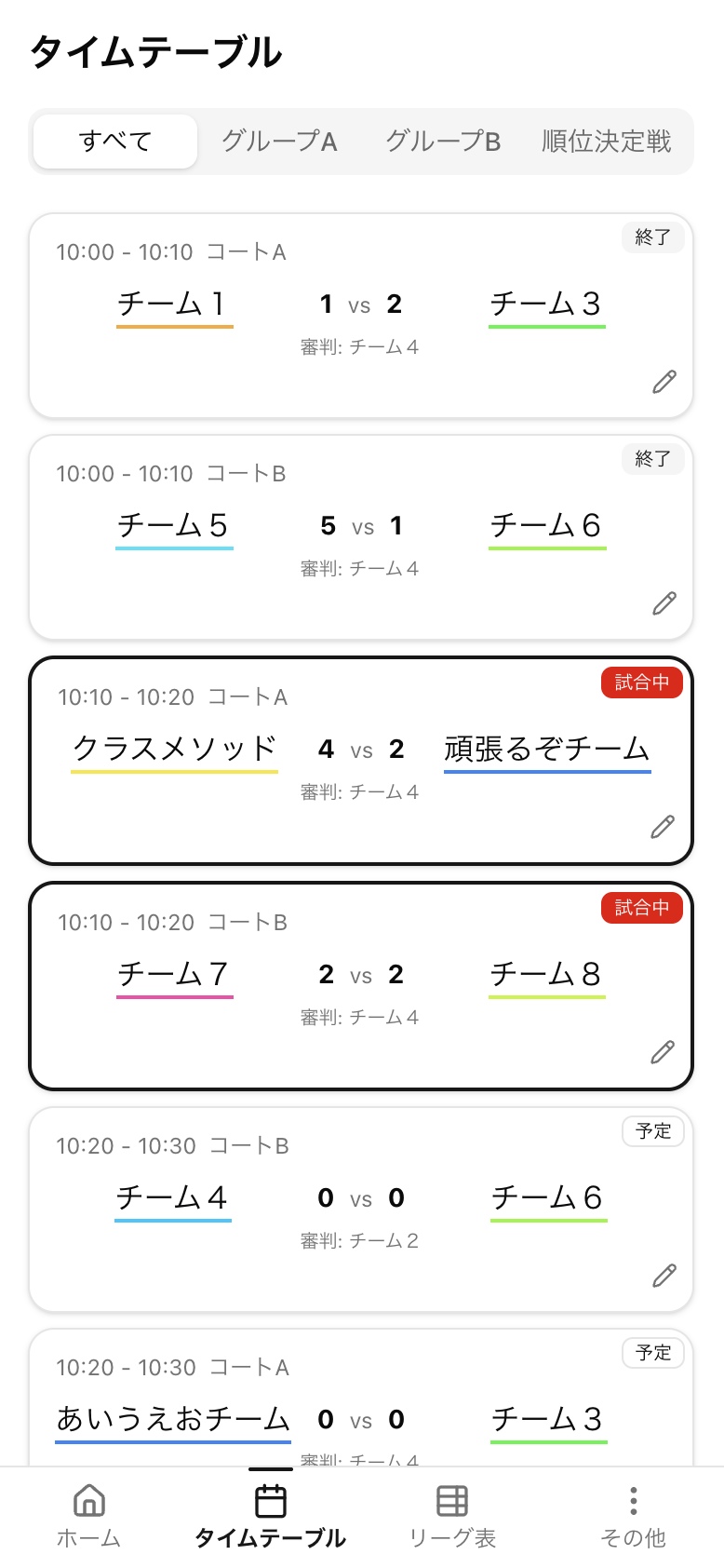
- Displays all matches in chronological order
- Each match shows the matchup / court / start time / score / status (scheduled / in progress / complete)
- Matches involving your team (playing or refereeing) are highlighted, making them easy to spot while scrolling
- Tapping a match card opens the score input dialog (only if you have permission)
League Table Screen
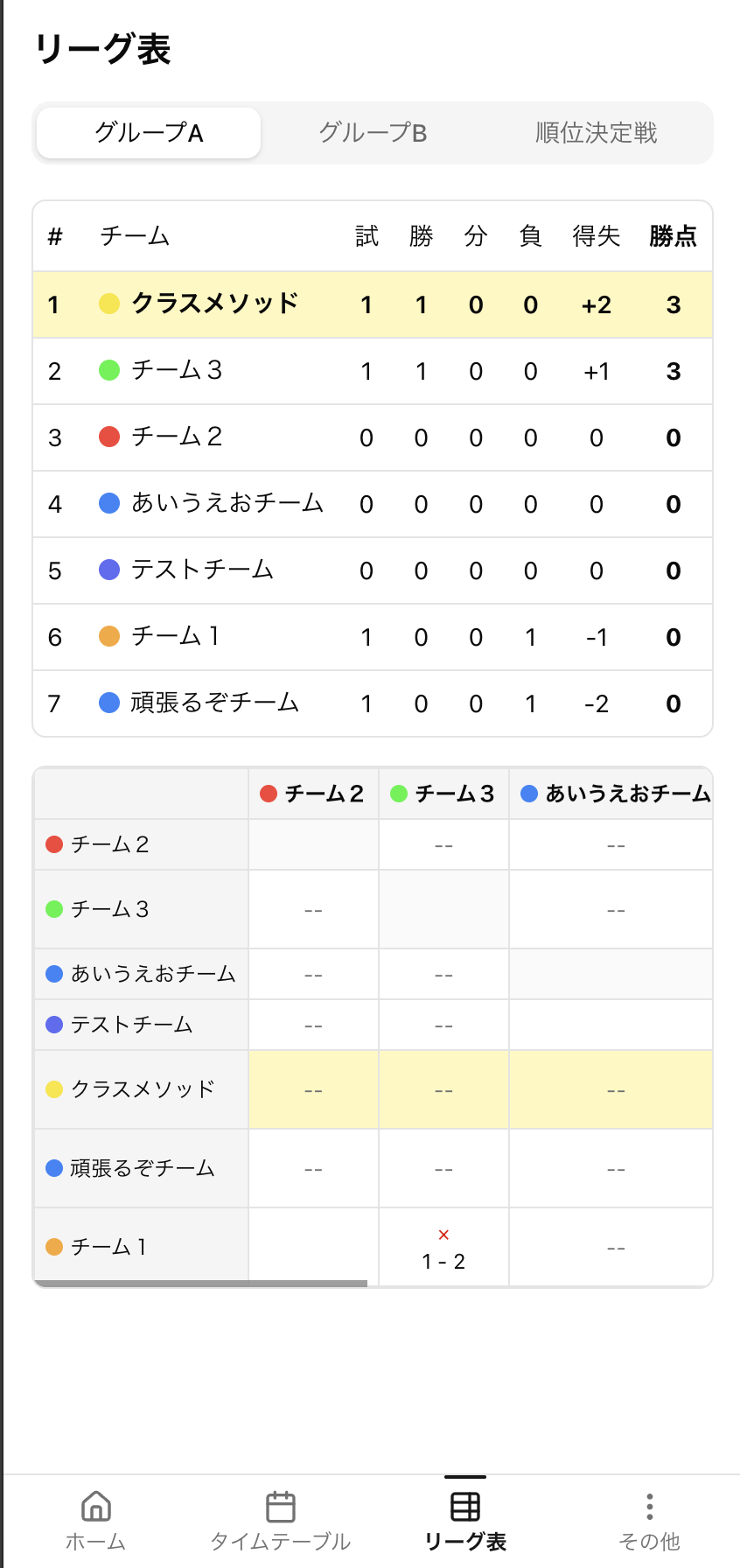
- Displays group standings via tab switching
- Columns: Rank / Team Name / Matches Played / Wins / Draws / Losses / Goals For / Goals Against / Goal Difference / Points
- When a match result is confirmed (match complete toggle ON), standings are automatically recalculated
- Your team's row is highlighted
Score Input Dialog
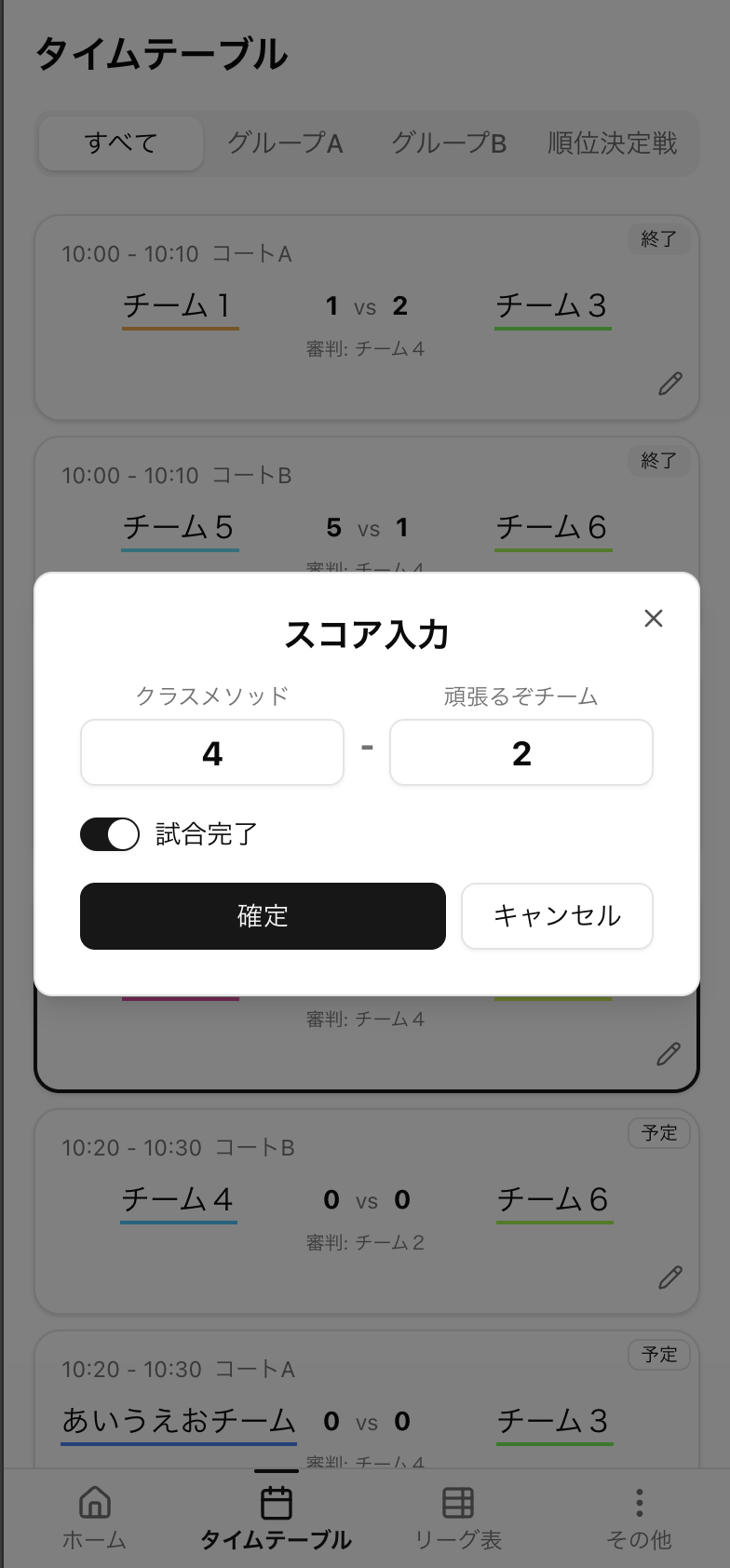
Opens when you tap a match card on the timetable or home screen.
- Enter scores for each half (first / second)
- Turning the match complete toggle ON triggers standing recalculation and tournament bracket updates
- Leave it OFF when updating the score partway through a match
- Only the following people can enter scores (the dialog won't even open for people without permission):
- Members of the teams playing in the match
- Members of the referee team for that match
- Admins (password login)
Tournament Info Screen
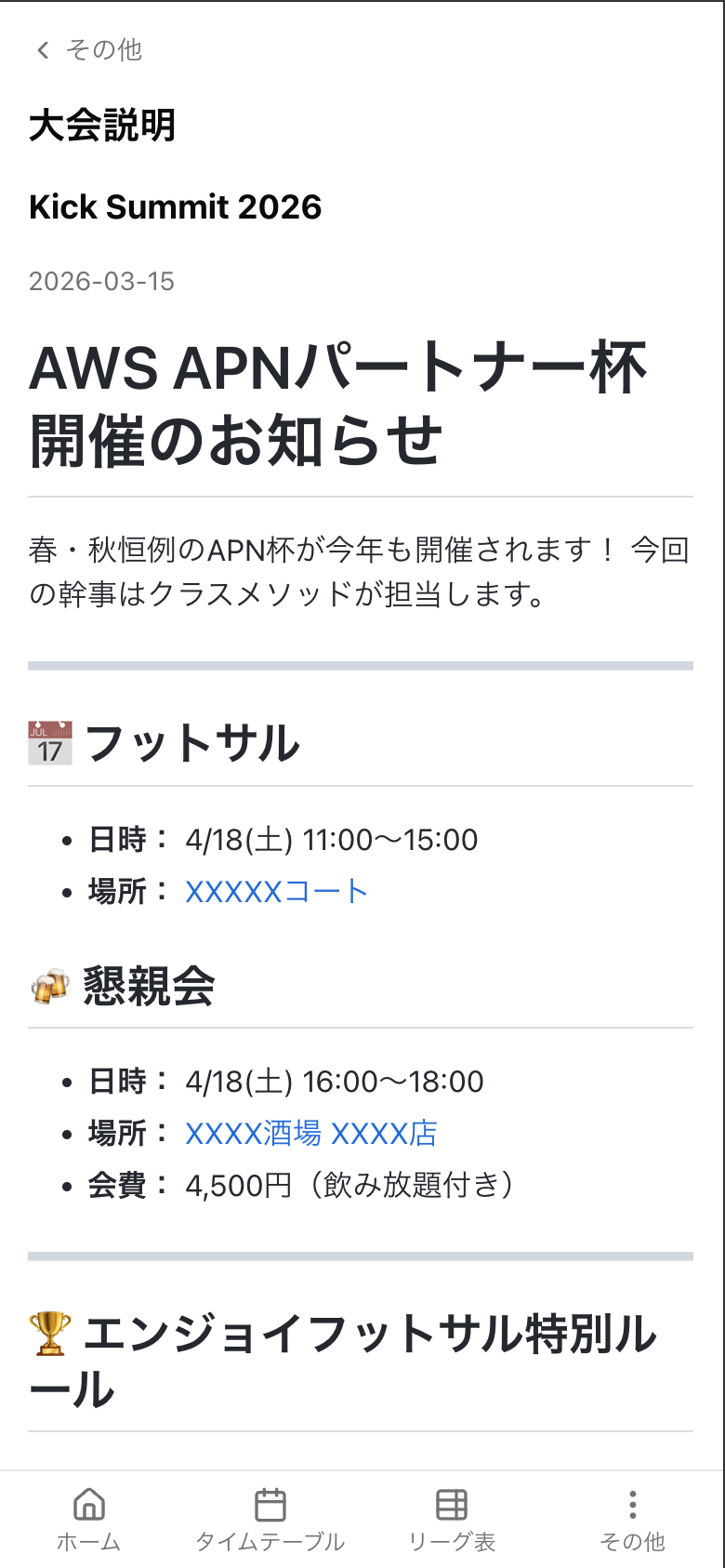
- A static page with the day's operational rules, time schedule, and score input procedures summarized in Markdown
- Set up as a reference page for first-time participants and anyone who wants to recall the procedures on the day
Other / Admin Login Screen
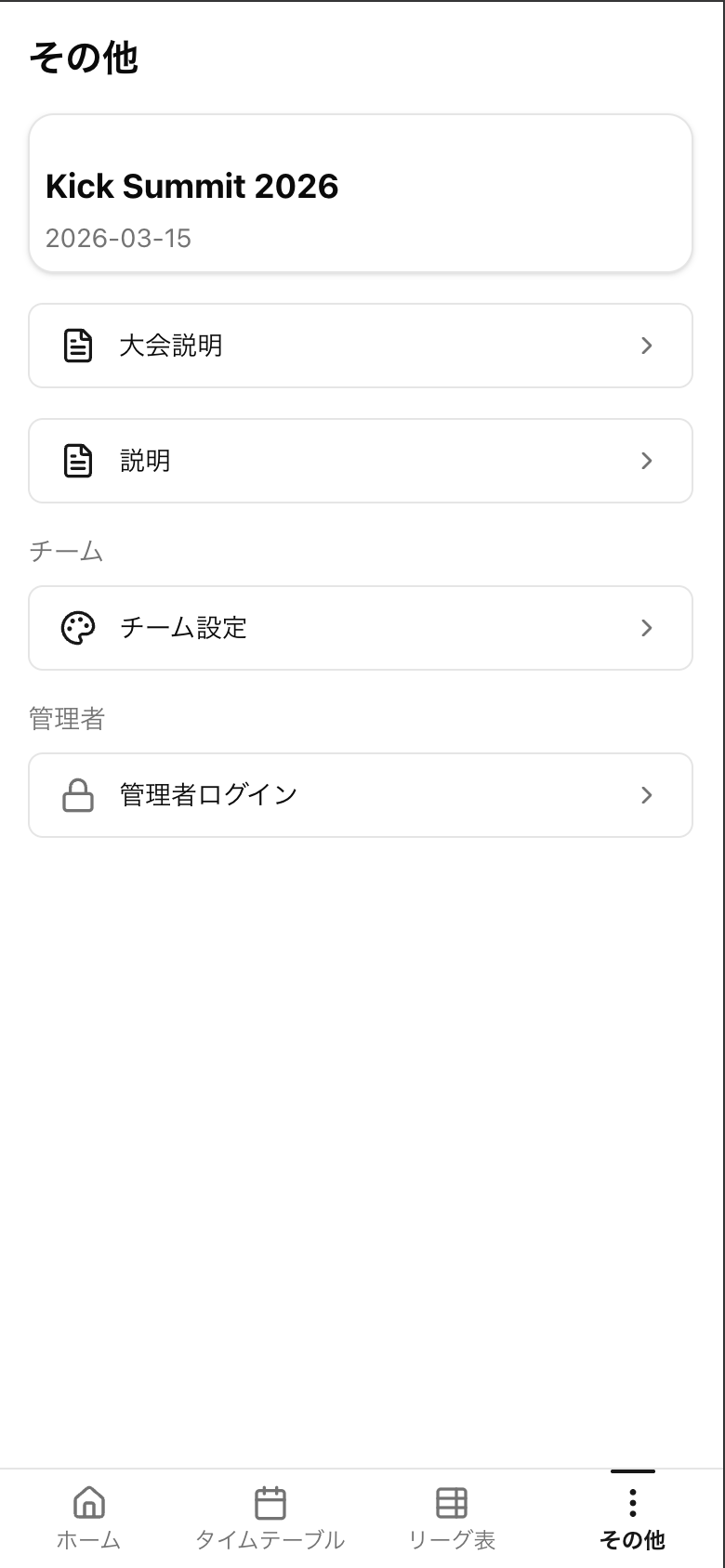
- Link to the tournament info page
- Admin login (password entry)
- Once logged in as admin, score input is enabled for all matches (for organizers)
Admin Panel Features
A set of organizer-only features accessible after admin login. Skipping screenshots and describing in text.
- Edit tournament basic info — Change tournament name / date / admin password
- Team management — Add, edit, and delete teams; set team names and team colors (HEX)
- Group management — Create and edit preliminary league groups; assign teams to each group
- Match management — Add, edit, and delete matches; set start time, court, matchup, and referee team
- Full match score input — Enter and edit scores for all matches even if not a participating or referee team
- Force match status changes — Manually switch between in-progress / complete (e.g., to roll back erroneous input)
- Seed data injection — Bulk insert sample data for development and testing
In actual operation, the expectation is to use this panel mainly for pre-tournament data setup (registering teams, groups, and matches) and correcting participant input errors, but it's set up as a "last resort" with a full set of management features.
Why I Built It
Every year at the futsal tournament, I felt the following pain points from both an organizer and participant perspective.
- The timetable ended up being managed in duplicate across paper and spreadsheets, with no way to see real-time progress on the day
- Tallying results, calculating standings, and updating the tournament bracket were all manual tasks for the organizers
- Spectators had a hard time checking "when's my next match?" from a match schedule image or spreadsheet
I started thinking that a web app that could solve all of these at once would reduce the organizer's workload and improve the experience for participants.
In addition, I had the following technical motivations I wanted to explore:
- Seriously using Next.js 16 (App Router) + Server Actions
- Validating a setup where Next.js runs on AWS Lambda with SSR via Lambda Web Adapter
- Validating a setup for low-cost operation with Lambda + DynamoDB
I also wanted to get some practice in a familiar domain before using these in production work.
Architecture
Tech Stack
| Layer | Technology |
|---|---|
| Framework | Next.js 16 (App Router, Turbopack) |
| Runtime | React 19, TypeScript 5.7 |
| Styling | Tailwind CSS v4, shadcn/ui |
| Validation | Zod |
| Infrastructure | AWS CDK v2 (TypeScript) |
| DB | Amazon DynamoDB (multi-table + GSI) |
| Compute | AWS Lambda (Docker / ARM64) + Lambda Web Adapter |
| API | Amazon API Gateway (HTTP API) |
| CDN | Amazon CloudFront |
| Package Management | pnpm 10 + Turborepo 2.8 |
| Local DB | DynamoDB Local (Docker Compose) |
Monorepo Structure
kick-summit-app/
├── packages/
│   ├── web/        # Next.js application
│   ├── infra/      # AWS CDK infrastructure definition
│   └── shared/     # Shared type definitions
├── scripts/        # Seed and setup scripts
└── docker-compose.yml
A minimal pnpm workspace + Turborepo setup. shared holds only the types referenced by both web and infra, keeping mutual dependencies minimal.
Overall Structure
This is a setup where Next.js is packaged as a Docker image and deployed to Lambda, with Lambda Web Adapter passing HTTP requests directly to the Node server. Since it avoids ECS or App Runner, it's a great fit for use cases like events where the app only runs for a few days or hours.
Frontend — Server Component First
App Router's Server Components are used throughout.
Page (Server Component)
  ├── Data fetching on the server (async/await)
  ├── Static display rendered on the server
  └── Only interactive parts separated into Client Components

Refresher (Client Component)
  └── Re-renders server components via router.refresh() every 30 seconds
Rather than WebSocket or SSE, I went with a simple implementation of 30-second polling + router.refresh() to re-execute server components. Given the frequency of match updates, this is sufficient, and Lambda billing is also easy to control by polling frequency.
Backend — DDD + Server Actions
Dependencies follow the inward direction, inspired by Clean Architecture.
The layers are as follows:
| Layer | Path | Role |
|---|---|---|
| Outer shell (entry) | src/lib/actions/<feature>.ts |
Server Actions. Entry point from the browser |
| Outer shell (exit) | src/server/infrastructure/repositories/ |
Access to DynamoDB |
| Usecase | src/server/usecase/<feature>/ |
Business logic |
| Domain | src/server/domain/ |
Entities / domain services / repository interfaces |
Server Actions and Infrastructure both belong to the same "outer shell" — one is the interface with the browser (entry), the other is the interface with DynamoDB (exit). Both may depend on the inside (Usecase / Domain), but the outer shell is never referenced from the inside.
The benefits of this concentric circle structure are as follows:
-
Hides DynamoDB from business logic — Since Usecases only touch repository interfaces, swapping out the DB later doesn't require rewriting Usecases
-
Can swap in an In-Memory repository for testing — Since repository implementations are injected via a DI container (
src/server/container.ts), you can inject an in-memory version during testing to unit test Usecases without DynamoDB Local -
The browser-side protocol (Server Actions / REST / GraphQL ...) is also swappable — Since the entry point is also in the outer shell, it can be replaced without touching the Usecase
-
No API Routes — everything goes through Server Actions
-
Zod validation is performed in 3 places: "domain layer schema," "DB response parsing," and "Server Actions input validation"
DynamoDB: Multi-Table + Composite Key GSI
DynamoDB is designed with multi-table + Composite Key GSIs. There are 4 tables: tournaments / groups / teams / matches.
I did not adopt single-table design. Given the conditions of this project —
- Diverse access patterns (by time order / by group / by status / individual match / all teams...)
- Being maintained long-term by a solo developer
— I decided that separating tables by entity keeps cognitive load lower, and localizes design changes when new access patterns are added.
The matches table has the following GSIs so that most screens can retrieve data with a single query.
| GSI | PK | SK | Purpose |
|---|---|---|---|
schedule-index |
tournamentId |
scheduledTime |
Timetable |
status-index |
[tournamentId, status] |
scheduledTime |
Ongoing matches |
group-index |
groupId |
scheduledTime |
Matches within a group |
By forming Composite Keys as [A, B], queries with compound conditions like "tournament × status" can also be written straightforwardly.
How I Built It with Claude Code
Almost all of the code in this app was written by Claude Code. On the other hand, the "structural skeleton" of architecture, directory layout, and technology choices was decided by me. Breaking down the division of responsibilities:
| Responsibility | Content |
|---|---|
| Myself | Technology stack selection, infrastructure design, layer architecture, directory structure, DB schema design, operational rules |
| Claude Code | Implementation following the above guidelines, tests, refactoring, documentation generation |
The "skeleton" parts I decided myself
Specifically, I made the following decisions myself before handing things over to Claude Code.
Infrastructure design
CloudFront → API Gateway (HTTP API) → Lambda (Lambda Web Adapter) → DynamoDB
The reason I chose Lambda + Lambda Web Adapter over ECS / App Runner is that I wanted a scale-to-zero setup for something that only runs for a few days around an event. With Lambda Web Adapter, there's no need to rewrite the Next.js code for Lambda — the same code that runs locally runs as-is.
Backend / Frontend structure
- 4-layer structure inspired by Clean Architecture (Server Actions / Application / Domain / Infrastructure)
- No REST API — all writes go through Server Actions
- Zod validation at 3 layers: domain / infrastructure / application
- Full adoption of App Router's Server Components, with Client Components only where necessary
- UI based on shadcn/ui (new-york), customized with Tailwind v4
For architectural choices like "Server Actions only," "use the repository pattern to decouple DynamoDB," and "use shadcn/ui" — leaving these to Claude Code tends to produce an overly standard setup (API Routes + fetch + plain Tailwind), so it was faster to decide these myself.
Directory structure
I also decided upfront on a feature-based structure with domain / application / infrastructure / components under packages/web/src/features/<feature>/. Left to its own devices, it tends to become a type-based structure with components/ lib/ utils/, so locking this down early is important.
The mechanism for passing "guidelines" to Claude Code
The skeleton I decided on is written into files that Claude Code reads automatically.
docs/architecture.md— Tech stack, page structure, layer structureDB設計.md— Table / GSI / access pattern listingCLAUDE.mdin each directory — Guidelines to follow in that directory
CLAUDE.md is a file that Claude Code automatically reads at the start of a conversation. Writing guidelines there like "only write through Server Actions" and "use Zod at 3 layers: domain / infra / application" means I don't have to repeat them in every prompt.
For tricky parts, I had Claude Code "rebuild"
During development I tried a design where all business logic was consolidated into custom Hooks, but measured against React's official guidelines, it turned out to be excessive abstraction.
Instead of rewriting the files myself one by one, I asked Claude Code to "look up React's official criteria for creating custom hooks, reassess the current state, and rebuild by deleting the hooks/ directory." It handled web search → understanding the full existing codebase → generating the diff all in one session, and the rebuild was done in half a day.
Large-scale refactors that humans tend to give up on partway through and settle for partial fixes get carried through to completion calmly by an agent.
Overall impression
Roughly speaking:
- Over 90% of the code was written by Claude Code
- On the other hand, architecture, directory structure, and technology choices were decided by me
- My own work centered on "directing the design," "PR review-equivalent checking," and "debugging assistance for broken parts"
- A volume that would have taken 3–4 weekends if I'd written it myself was completed in 1–2 weekends
That's how it felt. The biggest benefit was keeping the design intent in my own hands while boosting implementation speed — by dividing it as "design by human, code by Claude Code." Conversely, leaving the design entirely to Claude Code tends to produce a safe but uninteresting structure.
How Did It Actually Go on the Day?
What Went Well
Distributing score input worked out perfectly
By opening score input to the playing and referee teams, the organizers only needed to oversee the overall flow. In previous years the organizers were glued to their phones tallying results, but this year we could actually watch and participate normally.
"When's our next match?" was answered entirely on-screen
By showing "your team's next match," "recent results," and "ongoing matches" on the home screen, verbal questions like "what time is [team]'s match?" nearly stopped coming from participants. Just not having to open a spreadsheet made a noticeable difference.
Lambda Web Adapter was surprisingly straightforward
The cold starts I was worried about were around 1–2 seconds noticeable by feel with the ARM64 / 1024MB combination. For use cases where the app doesn't need to be always-on, it works just fine.
Cost also stayed at 0.2 USD per day
AWS costs on the day of the tournament came to about 0.2 USD per day (roughly 30 yen). The combination of Lambda + DynamoDB on-demand billing + CloudFront only charges for actual requests, so I was reminded again that this is truly the ideal setup for "event apps that only run for a few days."
Reflections
30-second polling feels "just right" but is a little laggy
After scoring a goal, a certain number of people would swipe to refresh the screen asking "has it updated yet?" Next time I'd like to consider SSE or API Gateway WebSocket API. That said, designing for persistent connections on Lambda has its own overhead, so it depends on the use case.
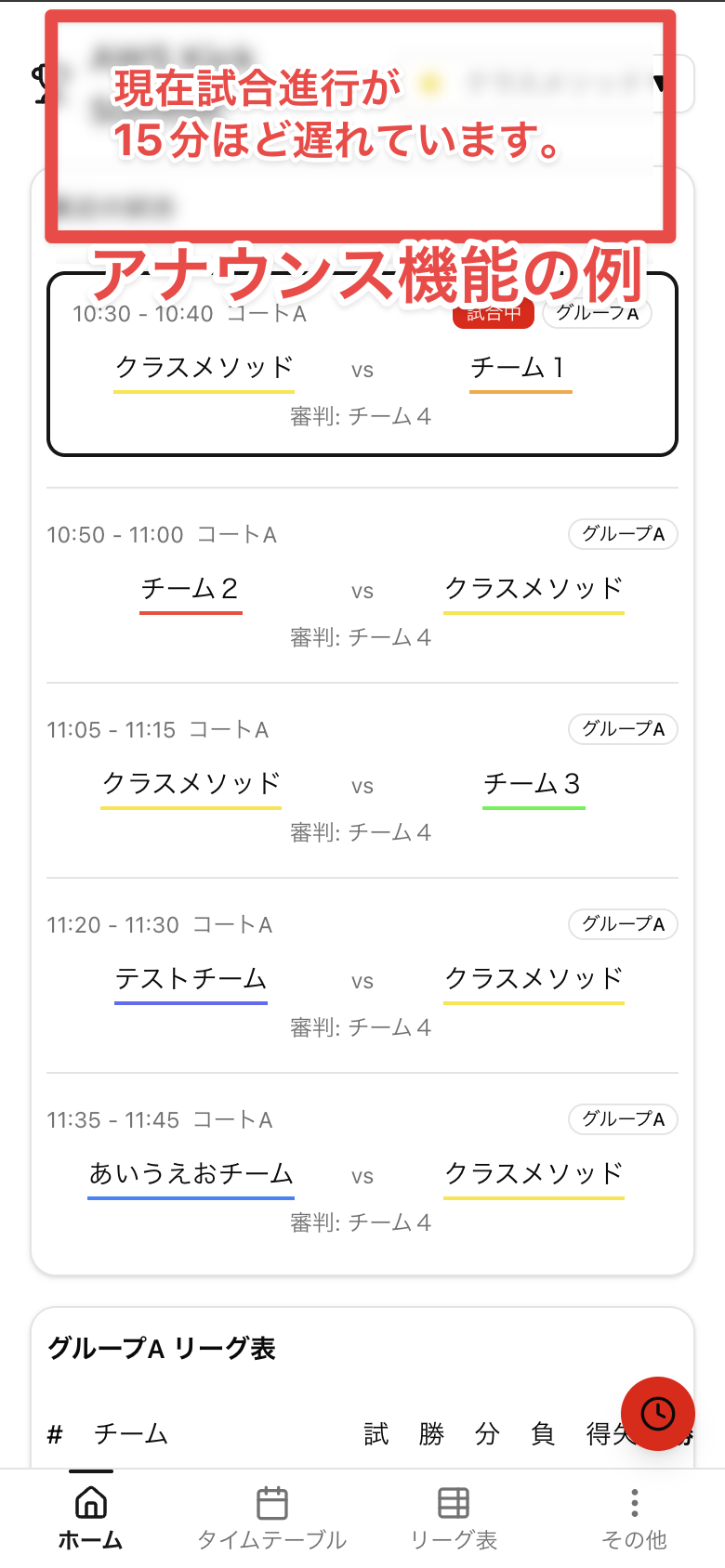
An announcement feature would have been nice
During the tournament, match timings drifted slightly, accumulating up to about 2 minutes of delay. Being able to display announcements from the tournament organizers in those cases would help users keep track of match progress.
What Was Hard
The pressure of carrying the live tournament on this app
More than any technical difficulty, the heaviest thing was the sense of responsibility that came with "if this app goes down, match scheduling and score calculations for the tournament stop." Since we went fully app-based rather than keeping a spreadsheet backup, if the app had gone down on the day, the entire tournament would have halted.
In the end, the app never went down, and we made it safely through to the final results announcement, which was a great relief.
Summary
I built a straightforward solution to a nearby "pain point" using Next.js 16 + AWS Lambda + DynamoDB.
Building it and actually running it on the day reinforced how Lambda Web Adapter + App Router Server Components + Server Actions writes even better than I expected. For "short-lived internal tools" like this tournament app, the combination is a great fit — easy development environment setup and low cost — and I was reminded again that it's truly the ideal setup for this kind of use case.
And above all, the division of "architecture, directory structure, and technology choices decided by me; code written by Claude Code" worked out really well. It felt like keeping the design intent in my hands while only boosting implementation speed, and I don't think I could have built this much for a personal project without Claude Code.
I hope this is useful for anyone thinking "I want to run my next futsal tournament with a homegrown app."
References
