I Tried Changing Kiro Enterprise Management Settings Using the AWS CLI

This page has been translated by machine translation. View original
Introduction
Kiro's Enterprise Management is now available in preview.
The policies managed in Enterprise Management Controls can be handled with the kiro-em command of the AWS CLI. The API reference is on the following page.
This time, I tried exporting a policy YAML (Kiro Governance Language, KGL) with the AWS CLI, updating it, and applying it.
Test Environment
- Region: us-east-1 (N. Virginia)
- Endpoint: https://management.us-east-1.kiro.dev
- AWS CLI: aws-cli/2.42.2
- jq: 1.8.1
- Service model: https://kiro.dev/downloads/kiro-em-cli-model.json
- Target policy: one existing policy already assigned to a profile
Preparation
Registering the Service Model
Because kiro-em is not bundled with the AWS CLI, I downloaded the service model and registered it with aws configure add-model.
curl -O https://kiro.dev/downloads/kiro-em-cli-model.json
aws configure add-model \
  --service-name kiro-em \
  --service-model file://kiro-em-cli-model.json
aws kiro-em help
When I ran aws kiro-em help, commands corresponding to 16 operations and help were displayed.
For kiro-em commands, specify --region us-east-1 and --endpoint-url https://management.us-east-1.kiro.dev every time. Both are values for the case where the Kiro profile is in us-east-1.
kiro-em Commands
The 16 operations are divided into four targets: resources, files, revisions, and profiles. All command names are appended after aws kiro-em.
| Target | Command | Description |
|---|---|---|
| Resource | create-enterprise-management-resource | Creates a resource and opens an empty draft |
| get-enterprise-management-resource | Gets the resource at a specified revision | |
| list-enterprise-management-resources | Lists resources. Also returns the assignment targets and the Live revision | |
| update-enterprise-management-resource | Updates metadata such as the display name | |
| delete-enterprise-management-resource | Soft-deletes a resource | |
| File | put-enterprise-management-resource-files | Writes files to the draft. Opens a draft if none exists |
| get-enterprise-management-resource-file | Gets a file at a specified revision | |
| list-enterprise-management-resource-files | Lists the files a revision has, without their contents | |
| delete-enterprise-management-resource-file | Deletes a single file from the draft | |
| Revision | validate-enterprise-management-resource | Validates the draft. Does not change state |
| publish-enterprise-management-resource | Turns the draft into a revision and makes it Live | |
| list-enterprise-management-resource-revisions | Lists the revision history | |
| restore-enterprise-management-resource | Makes the contents of a past revision Live as a new revision | |
| delete-enterprise-management-resource-draft | Discards the draft. The Live revision does not change | |
| Profile | associate-enterprise-management-resource | Assigns a resource to a profile |
| disassociate-enterprise-management-resource | Removes the assignment |
Checking the Target Policy
Using list-enterprise-management-resources, I checked the policy's resourceId, the profile it is assigned to, and the Live revision.
aws --region us-east-1 \
  --endpoint-url https://management.us-east-1.kiro.dev \
  kiro-em list-enterprise-management-resources
{
    "resources": [
        {
            "resourceId": "abc123",
            "name": "Profile Controls <プロファイルID>",
            "latestRevision": 2,
            "enforcingRevision": 2,
            "associatedScopes": [
                {
                    "scopeType": "PROFILE",
                    "scopeId": "<プロファイルID>"
                }
            ]
        }
    ]
}
Since there is only one assigned profile, the enforcingRevision of 2 is the Live revision as is.
Exporting the YAML
I specified --revision ENFORCING with get-enterprise-management-resource-file to get the YAML of the Live revision. The target file was profile-controls.kgl, which I confirmed with list-enterprise-management-resource-files. Since --output text appends a trailing newline, I extracted it from the JSON output with jq -j .content and saved it.
aws --region us-east-1 \
  --endpoint-url https://management.us-east-1.kiro.dev \
  kiro-em get-enterprise-management-resource-file \
  --resource-id abc123 \
  --type kgl \
  --path profile-controls.kgl \
  --revision ENFORCING \
  --output json \
  | jq -j .content > profile-controls.kgl
The saved profile-controls.kgl (Revision 2) matched Revision 2 displayed in the console's YAML view in the number of lines (50 lines), the number of allowed models (23), and the number of lines in settings (14 lines).
version: '0.1'
metadata:
  name: Profile Controls
  description: Copied from the Kiro profile settings. Kiro replaces this file each time those settings change, until the profile moves to Enterprise Management.
rules:
  - id: profile-controls-model-use
    capability: model_use
    effect: allow
    match:
      - auto
      - claude-opus-5.5
      - claude-sonnet-5.5
      - claude-haiku-5.5
      - gpt-5.6-sol
      - gpt-5.6-terra
      - gpt-5.6-luna
      - grok-4.7
      - kimi-k3
      - claude-opus-5
      - claude-sonnet-5
      - claude-opus-4.8
      - claude-opus-4.7
      - claude-opus-4.6
      - claude-sonnet-4.6
      - claude-fable-5.2
      - claude-fable-5.1
      - claude-haiku-4.5
      - deepseek-3.2
      - minimax-m2.5
      - minimax-m2.1
      - glm-5
      - qwen3-coder-next
  - id: profile-controls-apikey-create
    capability: apikey_create
    effect: allow
settings:
  model_governance.enabled: true
  default_model: auto
  mcp_tools.enabled: true
  web_tools.enabled: true
  cloud_sessions.enabled: true
  prompt_logging.enabled: true
  prompt_logging.destination: s3://kiro-prompt-logging-<アカウントID>/a
  usage_dashboard: true
  user_activity_report.enabled: true
  user_activity_report.csv_export: true
  user_activity_report.csv_destination: s3://kiro-activity-report-<アカウントID>/a
  user_activity_report.otel_export: false
  device_code_sign_in.enabled: true
  code_references: true
Updating and Applying the YAML
Writing to the Draft
I copied profile-controls.kgl to profile-controls-new.kgl and added - claude-sonnet-4.5 on the line after claude-sonnet-4.6.
I created the JSON (path, type, content) to pass to put-enterprise-management-resource-files with jq. I left the path as profile-controls.kgl.
jq -Rs '[{path:"profile-controls.kgl",type:"kgl",content:.}]' profile-controls-new.kgl > files.json
aws --region us-east-1 \
  --endpoint-url https://management.us-east-1.kiro.dev \
  kiro-em put-enterprise-management-resource-files \
  --resource-id abc123 \
  --files file://files.json
{
    "resourceId": "abc123",
    "fileCount": 1,
    "files": [
        {
            "path": "profile-controls.kgl",
            "type": "kgl",
            "sizeBytes": 1459,
            "storage": "STORED"
        }
    ],
    "eTag": "<eTag>"
}
This put opened a draft, and its eTag was returned.
Validation and Publish
Before publishing, I validated the draft with validate-enterprise-management-resource.
aws --region us-east-1 \
  --endpoint-url https://management.us-east-1.kiro.dev \
  kiro-em validate-enterprise-management-resource \
  --target byResource=abc123
{
    "isValid": true,
    "diagnostics": []
}
Next, I passed the eTag returned by put to --if-match and published.
aws --region us-east-1 \
  --endpoint-url https://management.us-east-1.kiro.dev \
  kiro-em publish-enterprise-management-resource \
  --resource-id abc123 \
  --if-match <eTag>
{
    "revision": 3,
    "parent": 2,
    "publishedAt": "2026-11-24T17:31:17.183000+09:00",
    "warnings": []
}
Confirming the Application
I ran list-enterprise-management-resources again and checked the Live revision.
"latestRevision": 3,
"enforcingRevision": 3,
I retrieved the Live YAML (Revision 3) with get-enterprise-management-resource-file specifying --revision ENFORCING. Compared with Revision 2, the only difference was the one added line.
       - claude-sonnet-4.6
+      - claude-sonnet-4.5
       - claude-fable-5.2
Reverting to the Original Content
I recreated files.json from the pre-edit profile-controls.kgl (the contents of Revision 2) and applied it with the same put, validate, and publish.
jq -Rs '[{path:"profile-controls.kgl",type:"kgl",content:.}]' profile-controls.kgl > files.json
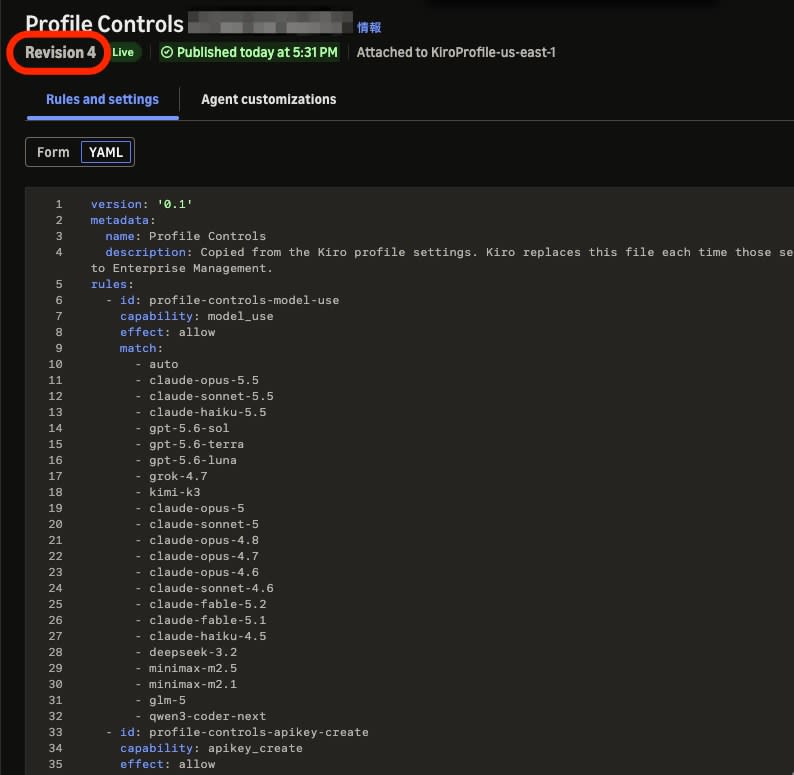
Revision 4, with Revision 3 as its parent, became Live, and its YAML had the same contents as Revision 2.
In the console's YAML view as well, Revision 4 was displayed as Live.
Summary
With the AWS CLI's kiro-em, I was able to confirm the whole flow of exporting a policy YAML, updating it, and publishing it.
Previously, no public API was provided for Kiro's management features, and although some information could be retrieved through non-public APIs, GUI operations were required.
With the newly supported AWS CLI kiro-em, we can expect configuration management of Kiro policies and other settings to become much easier. If you have had difficulties with the conventional GUI operations or configuration management, please give it a try.
