I Tried Checking Whether Kiro Crew Subagents Can Be Launched with Minimal Context Using Haiku 5.5

This page has been translated by machine translation. View original
Introduction
Recently, when running simple tasks like CI in Kiro Crew, I often spin up a cheap model as a subagent and delegate the work to it.
I often use Haiku 5.5 for subagents, but sometimes I feel that the subagents consume more credits than I'd expect for the amount of work.
That made me wonder: what is actually in the context window at the moment a subagent is launched?
Also, is it possible to start working with a nearly empty context window?
In the case of Haiku 5.5 in particular, the credit multiplier is 0.06x, and requests exceeding 100K tokens are 0.3x.
You want to use it cheaply and stay within 100K tokens at all costs, right?
I was curious about how subagents work in this regard, so I checked by chatting with Kiro.
Now, let's take a peek at a subagent's context!
Subagent launch options
Kiro Crew subagents are launched in a separate session from the parent conversation.
They can't see the intermediate progress of the parent conversation, but they are launched with the user's preferences, lessons, and project information carried over.
A tool called spawn_run is used to launch a subagent.
This tool has three options for choosing which context to carry over to the subagent.
They are include_memory, include_lessons, and include_project, and all of them default to true.
If you set one to false, you can launch the subagent without carrying over that group.
There is also an option called cwd that specifies the directory in which to launch the subagent.
If not specified, the subagent is launched in a dedicated directory created for each subagent.
To launch Haiku 5.5 with all three set to false, call spawn_run with the following arguments.
{
  "task": "依頼文",
  "model": "claude-haiku-5.5",
  "include_memory": false,
  "include_lessons": false,
  "include_project": false
}
However, the documentation didn't say what is contained in each group.
This makes it hard to tell which one to exclude to actually reduce something.
So let's check what is actually loaded, using the subagent's logs.
Checking from the session logs
Kiro Crew keeps the logs of subagent sessions in files.
These logs contain what was sent to the model as is, so by reading them we can check what was loaded.
Where the logs are and how to read them
The files we'll look at are in the following three places.
~/.kiro/
├── crew/
│   ├── subagents/
│   │   └── <実行ID>/
│   │       └── state.json        # contains session_id
│   └── usage/
│       └── tokens/
│           └── <日付>.jsonl      # one line per request. context_used is the token count
└── sessions/
    └── <ディレクトリ>/
        └── <session_id>/
            └── messages.jsonl    # what was sent to the model. One data item per line
The logs are in JSON format and reading them one entry at a time is tedious, so I asked Kiro to extract and aggregate the numbers from here on.
For example, the context window of a subagent launched without specifying anything looked like this.
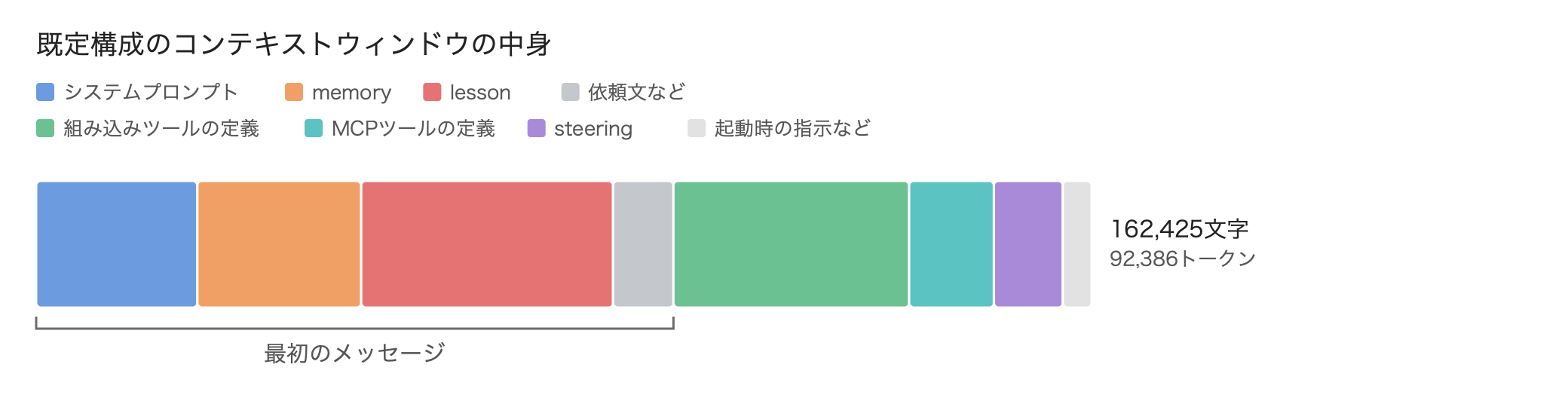
The four items on the left are the contents of the first message sent to the model.
The rest, such as tool definitions and steering, were passed separately from the first message.
In the folder with the same name as the session_id in state.json, there is messages.jsonl.
messages.jsonl is a file with one JSON data item per line.
Each data item has a field called type that indicates what kind of data it is.
There are many types, but the following four show what was passed at launch.
The rest are actions after launch, such as the subagent's replies and tool calls.
| type | What it contains |
|---|---|
| user | The first message itself that was sent to the model |
| session_start | The startup instructions and the contents of the steering files |
| steering_inclusion | The list of steering files |
| usage_summary | contextBreakdown (character counts per category, such as tool definitions and steering) |
The token count is in ~/.kiro/crew/usage/tokens/<日付>.jsonl.
Here is an excerpt of the line for the subagent in question.
{"slot": "subagent:4a42fe0485e587eb", "model": "claude-haiku-5.5", "credits": 0.07803083383084576, "context_used": 43648, "context_window": 1000000, "harness": "kas", "acp_session_id": "sess_275f3f1f-02a2-4187-98e0-5b4dfa014d5e"}
context_used seems to be the number of tokens in the context window at that point.
One line is added each time you send a request to the subagent.
When I asked an additional question, a line was added, and context_used increased by the amount of the conversation history.
What was loaded and what wasn't
Now let's launch Haiku 5.5 once each in the minimal configuration and the default configuration, and compare the logs.
The minimal configuration sets include_memory, include_lessons, and include_project all to false, and the default configuration is launched without specifying anything.
Both use the same task text, and cwd is not specified.
I made a diagram of what was in the first message and how much, for the minimal and default configurations.
Items that were present in both in the same way are colored gray and moved to the left.
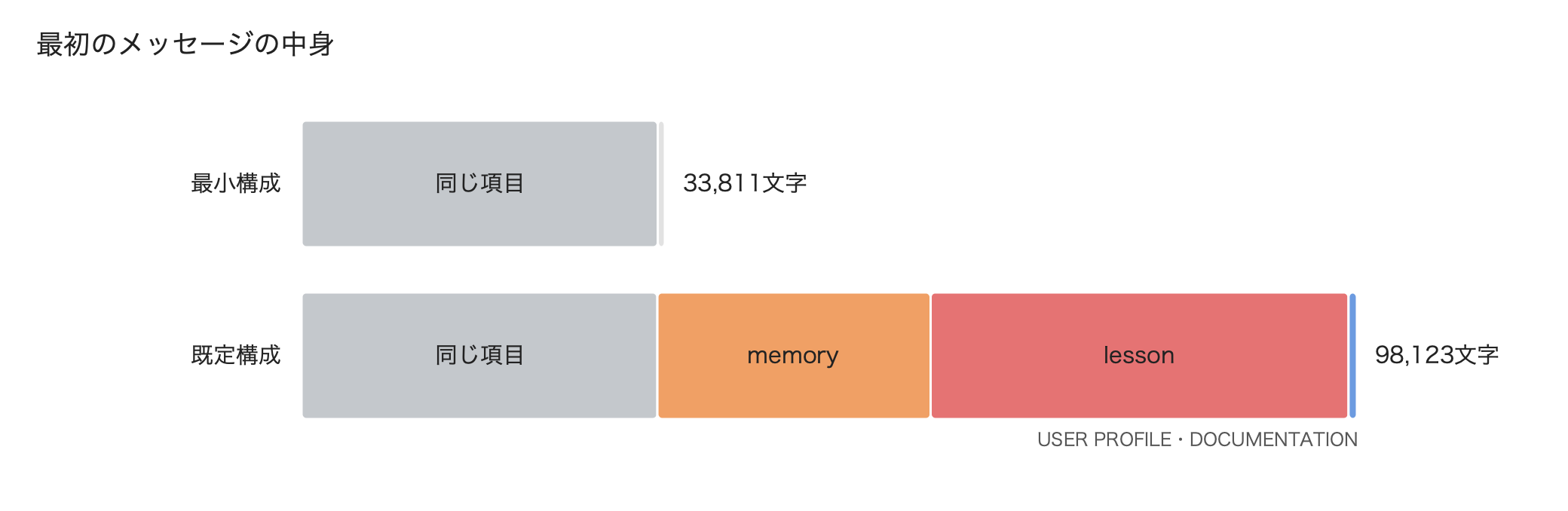
The message was 33,811 characters in the minimal configuration and 98,123 characters in the default configuration.
That's quite a difference.
The gray shared items include the system prompt (AGENT SYSTEM PROMPT) at 24,806 characters and the task text.
The items only in the default configuration were memory (user preferences), lessons (records of past corrections), USER PROFILE (the user's occupation and technical level), and DOCUMENTATION (the location of the Kiro Crew documentation).
These are the contents of the items excluded by include_*.
memory totaled about 25,000 characters, and lessons about 38,600 characters.
In my environment a lot of lessons had accumulated, so that seems to have been the biggest part.
There was a lot I didn't need, so I should clean it up regularly.
Conversely, the only item present only in the minimal configuration was CONTEXT SCOPE.
Here are its contents.
[CONTEXT SCOPE]
Your parent withheld: memory (user preferences, projects, prior sessions); lessons (learned corrections, user profile); project (docs pointer, steering files, project directory).
If the task needs any of it, say it was not provided and ask the parent -- do not guess.
[End of context scope]
It states which groups the parent excluded, and says to ask the parent rather than guess if needed.
This text seems to be added automatically when any of the include_* options is set to false.
It's nice that it instructs the subagent not to make up guesses about the excluded information.
By the way, it says project also includes steering files, but when I checked later, the project's steering was not excluded.
Steering is passed in steering_inclusion lines, separate from the first message.
In both configurations, the same 7 files from ~/.kiro/steering/ were included.
Finally, tokens and credits.
The minimal configuration had context_used of 42,415 tokens and credits of about 0.06.
The default configuration had context_used of 92,386 tokens and credits of about 0.12.
With the minimal configuration, both the token count and credits are roughly halved.
In the default configuration, at the time of the first request there were only about 7,600 tokens left before reaching 100K tokens, the limit for the 0.06x rate.
What include_project excludes
Huh? I can see that memory and lessons were excluded, but what does include_project exclude...?
Let's investigate a bit more.
include_project is the one of spawn_run's three options that decides whether to carry over project information to the subagent.
In the earlier comparison, the steering in ~/.kiro/steering/ was not excluded even with include_project=false.
However, since cwd wasn't specified that time, the subagent's working directory had neither project steering nor AGENTS.md.
So let's specify a test directory as cwd and compare by changing only include_project.
Preparing a test directory
The directories you can specify as cwd are only those under the directories set in subagent_cwd_allowed_roots.
This time I created a directory called ctx-probe under ~/workplace and placed two files containing passphrases.
The first is ~/workplace/ctx-probe/AGENTS.md.
# 実測テスト用のAGENTS.md(テスト後に削除する)

合言葉: CANARY-AGENTS-4402
The second is the project steering, which I placed at ~/workplace/ctx-probe/.kiro/steering/probe.md.
# 実測テスト用のプロジェクトsteering

合言葉: CANARY-STEER-7731
If a passphrase shows up in the log, we know that file was passed to the subagent.
Using this directory as cwd, I launched Haiku 5.5 with include_memory and include_lessons left false and only include_project changed between false and true.
Only the project guidance text was excluded
As with the minimal and default configurations, I made a diagram of the contents of the first message.
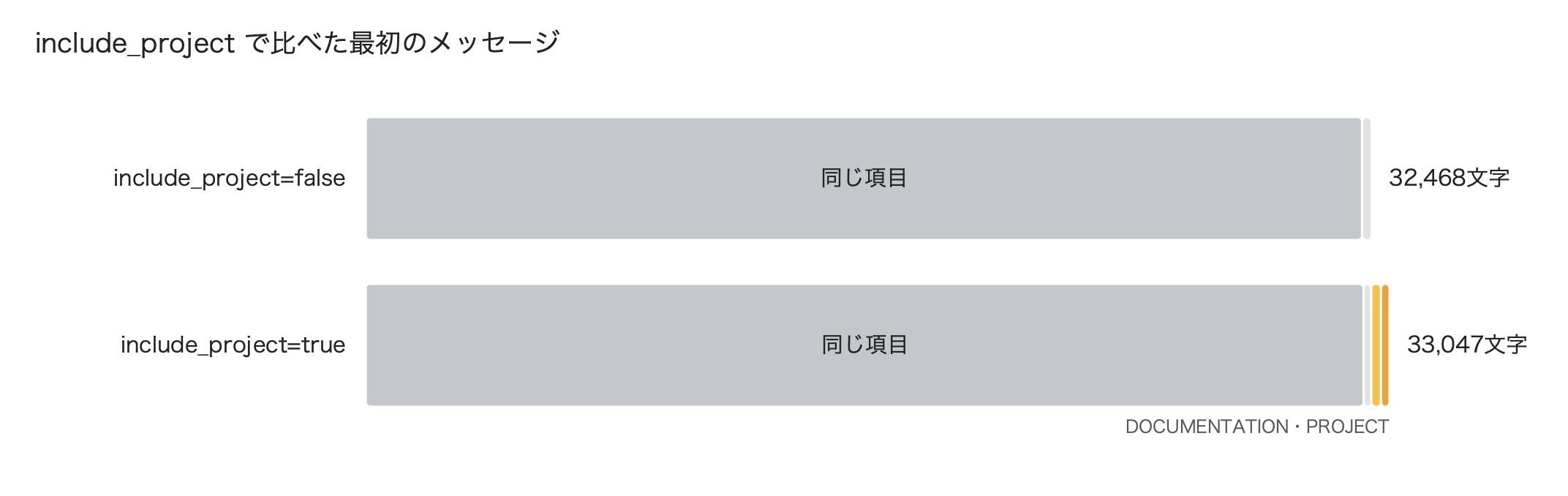
Only the include_project=true side had DOCUMENTATION (292 characters) and PROJECT (275 characters).
DOCUMENTATION contains the location of the folder with the documentation on how to use Kiro Crew itself, which is installed together with Kiro Crew, and PROJECT contains the path of the directory specified as cwd.
In CONTEXT SCOPE, the true side had project removed from the excluded groups, shrinking from 284 to 225 characters.
The first message was 32,468 characters for false and 33,047 characters for true, a difference of about 580 characters.
On the other hand, the passphrases appeared in both logs.
They appeared not in the first message but in steeringDocuments in the session_start line.
I had it output the list of steering that was passed.
workspace ~/workplace/ctx-probe/AGENTS.md
workspace ~/workplace/ctx-probe/.kiro/steering/probe.md
global ~/.kiro/steering/aws-agent-toolkit.md
global ~/.kiro/steering/claude-backend-search.md
global ~/.kiro/steering/github-pr-approval.md
global ~/.kiro/steering/instructions.md
global ~/.kiro/steering/natural-japanese.md
global ~/.kiro/steering/svg-output.md
global ~/.kiro/steering/task-intake.md
This is the log for include_project=false.
The true side had exactly the same 9 files.
The two with workspace scope are the AGENTS.md and probe.md I placed in cwd.
Even with include_project set to false, the project's steering and AGENTS.md were not excluded.
The token counts were also almost the same: 39,498 tokens for false and 39,844 tokens for true.
Conversely, this means that if you don't specify cwd, the project's steering and AGENTS.md are not loaded.
This is why only the 7 files from ~/.kiro/steering/ were passed in the comparison of the minimal and default configurations.
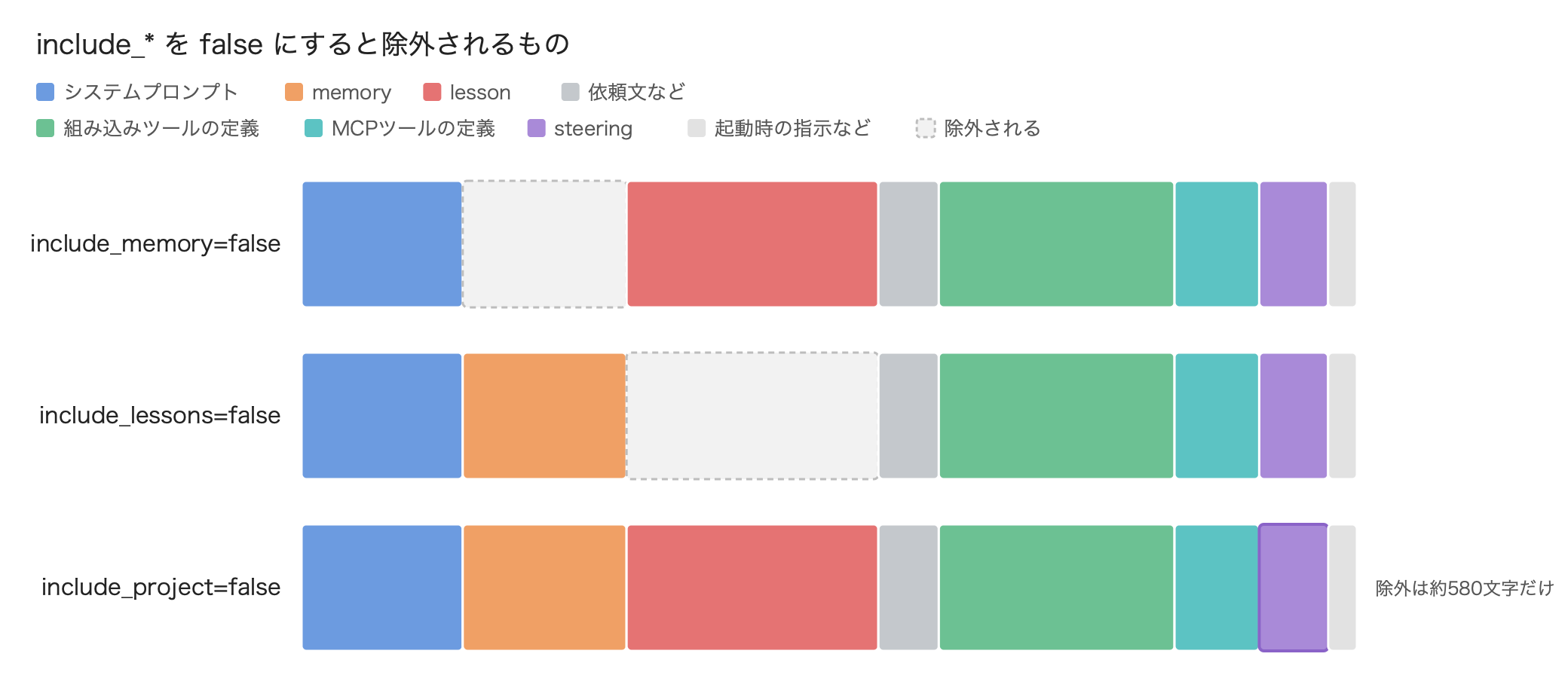
Even with include_project set to false, the reduction was only about 580 characters.
Since steering is loaded regardless of include_project, I think the amount reduced by setting it to false won't change much even if you have a lot of project steering.
If you leave it true, the subagent can start knowing the path of the directory it works in.
So I figured it's basically fine to leave include_project as true.
What remains even in the minimal configuration
So, what remains in the minimal configuration with all three set to false?
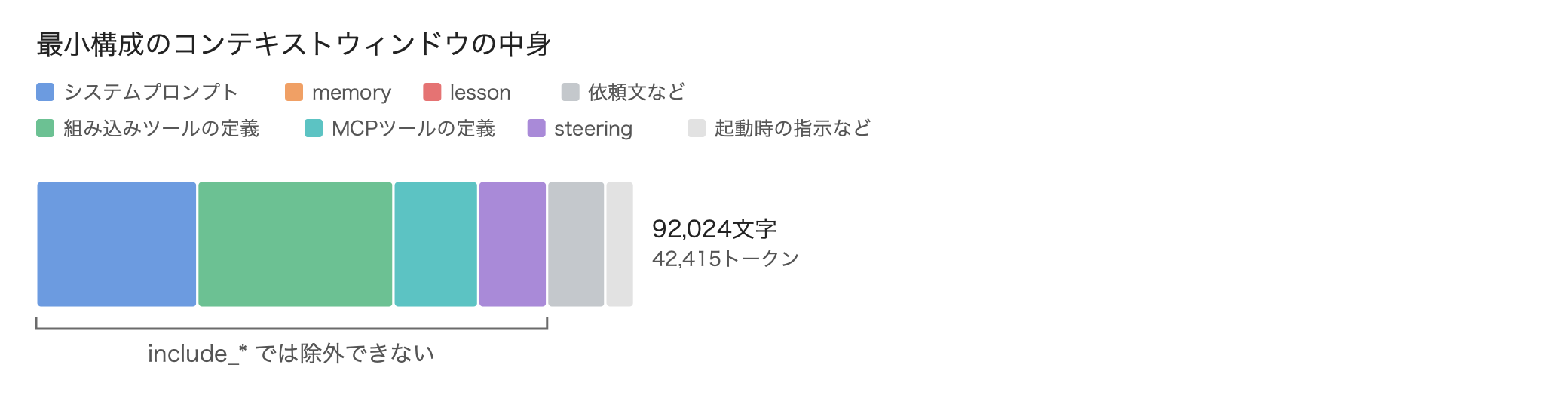
Even in the minimal configuration, about 92,000 characters were loaded in total.
The system prompt, tool definitions, and steering add up to about 78,600 characters, and these remain no matter how you combine the include_* options.
The steering was only the 7 files with inclusion: always from ~/.kiro/steering/; files with auto or fileMatch were not included.
Launching with a different agent
Finally, a little bonus.
Even with all include_* set to false, about 78,600 characters remained.
Since we're here, I decided to look for other places to trim.
The system prompt and tool definitions that remained even in the minimal configuration belong to Kiro Crew's standard agent (kirocrew).
spawn_run also has an option called agent that selects which agent launches the subagent.
When agent isn't specified, it was launched with the same agent as the parent.
That means that if we specify a lightweight agent, we might be able to reduce the system prompt and tool definitions too.
Kiro Crew comes with an agent called kirocrew-lite from the start.
It's a lightweight agent used for behind-the-scenes work such as automatic title generation, and looking at its definition file ~/.kiro/agents/kirocrew-lite.json, both tools and prompt were empty.
{
  "name": "kirocrew-lite",
  "model": "auto",
  "tools": [],
  "mcpServers": {},
  "prompt": "",
  "includeMcpJson": false
}
Now let's specify kirocrew-lite as the agent and launch with Haiku 5.5.
include_memory and include_lessons are false, and include_project is true.
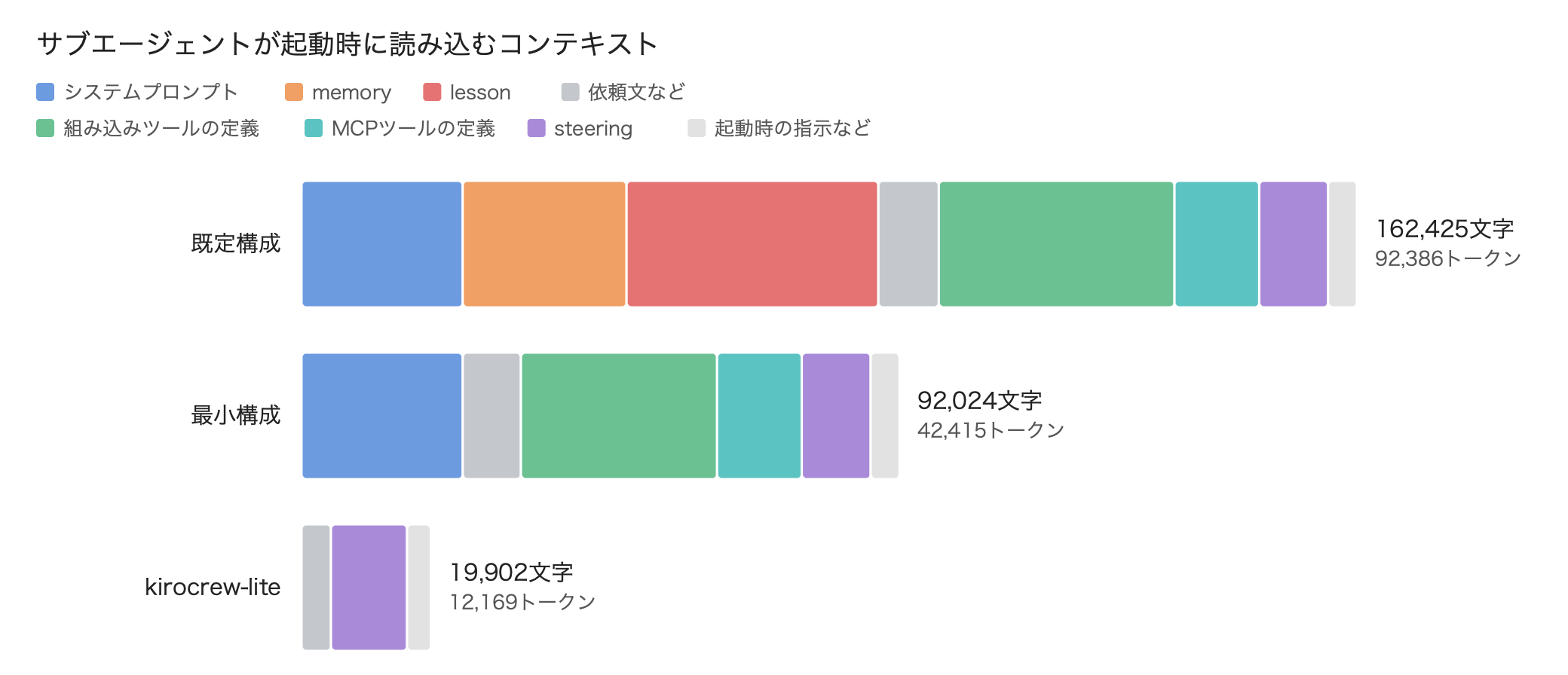
With kirocrew-lite, the total dropped to 19,902 characters and 12,169 tokens.
The tool definitions and the skill list were gone, and the first message didn't contain the system prompt either.
Only steering was not excluded even when the agent was changed.
Even compared with the minimal configuration, the token count is less than a third.
That's quite light.
However, kirocrew-lite has no tools at all, so it can't read files or run commands.
If you want it to do work such as running tests, you'll need to create an agent in ~/.kiro/agents/ yourself that has only the necessary tools.
Summary
This time, I checked whether a Kiro Crew subagent can be launched with the smallest possible context using Haiku 5.5.
Setting include_memory and include_lessons to false excluded memory and lessons, and both the token count and credits of the first request were roughly halved.
This should let Haiku work cheaply, quickly, and a lot.
It also gave me a chance to take stock, since there is a lot of steering that doesn't fundamentally need to be placed globally.