I tried out VPC connectivity for Lambda Web Functions

This page has been translated by machine translation. View original
Introduction
Lambda Web Functions, which became GA in October 2026, is a new type of Lambda function that directly receives and processes HTTP requests.
When connecting to resources inside a VPC from Lambda Web Functions, you use a Network Connector (hereafter referred to as "connector"), which is a separate resource from the Web Function.
In this article, I attached a shared connector to multiple Web Functions (CheckIP, STS, MySQL) and deployed them with cdkd. I verified the IP address via NAT, calling STS, and connecting to MySQL inside the VPC.
About Network Connector
Network Connector is the same resource type (AWS::Lambda::NetworkConnector) as the VPC Egress connector for Lambda MicroVMs.
The traditional VPC Lambda approach was to specify subnets and security groups in the function's own VpcConfig.
Web Functions and MicroVMs each create their own corresponding connector. A Web Functions connector can also be shared with other Web Functions.
| Web Functions | Lambda MicroVMs | Traditional VPC Lambda | |
|---|---|---|---|
| Connection configuration | Network Connector | Network Connector | Function's VpcConfig |
| How to attach | One version-qualified ARN in Revision's ServiceConfig.EgressNetworkConnectorArn | Connector ARN in run-microvm's --egress-network-connectors | Specify subnets and security groups on the function |
| ENI permissions | Connector's OperatorRole | Connector's OperatorRole | Function's execution role (AWSLambdaVPCAccessExecutionRole) |
Verification Details
Architecture
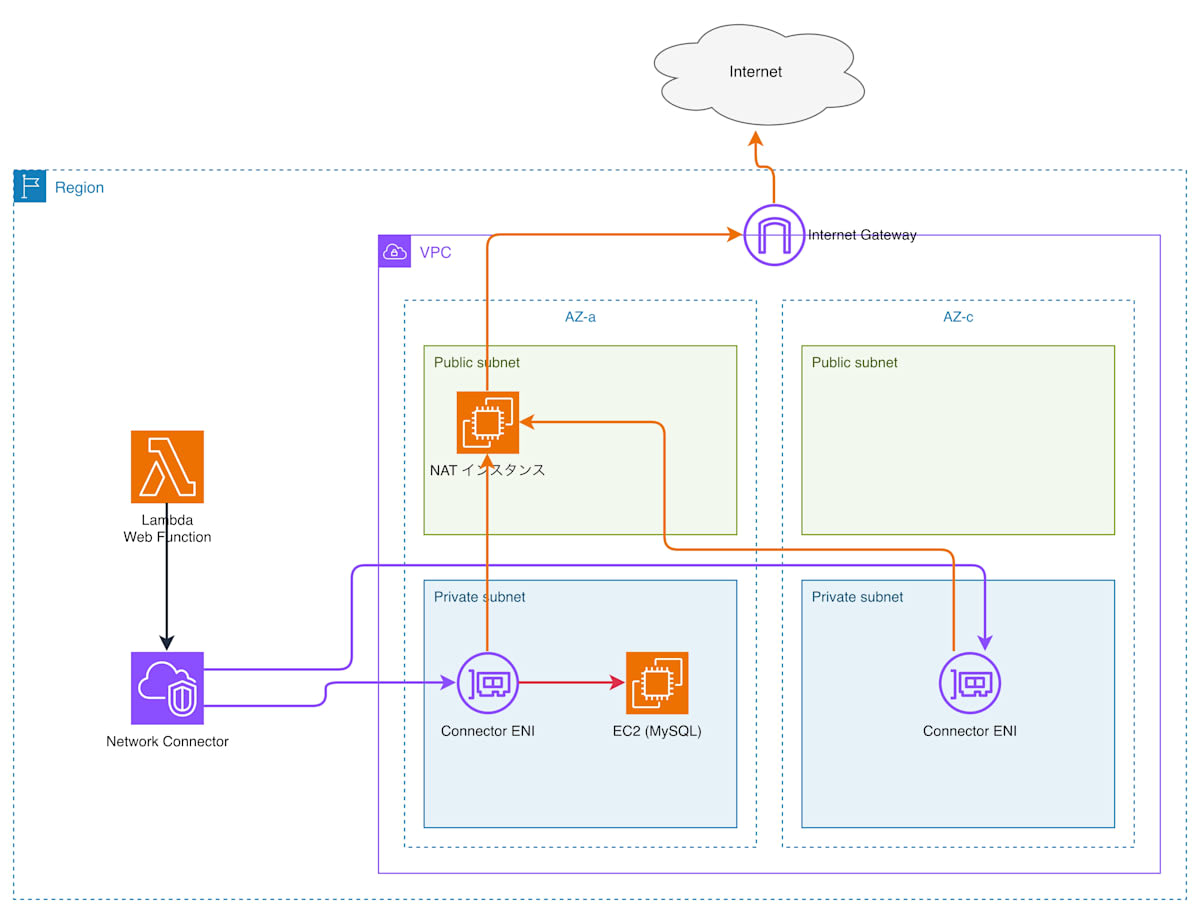
One connector is created, and each Web Function's Revision references it via a version-qualified ARN (<connector ARN>:<version number>). One Revision can reference only one connector. The endpoint type corresponding to the Revision that references the connector is HomeRegion.
To allow outbound internet access, the default route of the private subnets is pointed to the NAT instance.
MySQL (8.4) is placed on an EC2 instance in a private subnet within the same VPC. Installing MySQL and creating the demo database and app user were done separately on the EC2 instance after deployment. The MySQL security group allows only 3306/TCP from the connector's security group.
For the network-side (lib/net-stack.ts) definition, see "Full Code" at the end.
Defining a Web Function with a Connector in CDK
The connector is defined using OperatorRole and CfnNetworkConnector (lib/app-stack.ts). The trust policy of the OperatorRole allows the Lambda service to assume it, as in the documentation example.
Creating a connector was rejected with the following error when using a role with an aws:SourceAccount condition added to the trust policy. Removing the condition allowed it to be created.
The service is unable to assume the provided NetworkConnectorOperatorRole. Please verify the trust policy on the role.
OperatorRole definition
const operatorRole = new iam.Role(this, 'ConnectorOperatorRole', {
  assumedBy: new iam.ServicePrincipal('lambda.amazonaws.com'),
  inlinePolicies: {
    eni: new iam.PolicyDocument({
      statements: [
        new iam.PolicyStatement({
          sid: 'CreateENI',
          actions: ['ec2:CreateNetworkInterface'],
          resources: ['arn:aws:ec2:*:*:network-interface/*', 'arn:aws:ec2:*:*:subnet/*', 'arn:aws:ec2:*:*:security-group/*'],
        }),
        new iam.PolicyStatement({
          sid: 'TagENI',
          actions: ['ec2:CreateTags'],
          resources: ['arn:aws:ec2:*:*:network-interface/*'],
          conditions: { StringEquals: { 'ec2:ManagedResourceOperator': 'network-connectors.lambda.amazonaws.com' } },
        }),
      ],
    }),
  },
});
The connector itself is defined as follows.
const nc = new lambda.CfnNetworkConnector(this, 'Connector', {
  operatorRole: operatorRole.roleArn,
  configuration: {
    vpcEgressConfiguration: {
      associatedComputeResourceTypes: ['WebFunction'],
      networkProtocol: 'IPv4',
      securityGroupIds: [net.connectorSg.securityGroupId],
      subnetIds: net.vpc.isolatedSubnets.map((s) => s.subnetId),
    },
  },
});
nc.node.addDependency(operatorRole);
The Revision can be referenced after the connector's state transitions from PENDING to ACTIVE. cdkd waited until it became ACTIVE before creating the Revision.
The same version-qualified ARN of the connector is passed to all three Web Functions. The L1 (CfnWebFunctionRevision) in aws-cdk-lib 2.273.0 does not support the property for specifying the connector ARN. Therefore, addPropertyOverride is used to pass it to ServiceConfig.EgressNetworkConnectorArn.
revision.addPropertyOverride('ServiceConfig.EgressNetworkConnectorArn', nc.attrLatestVersionArn);
revision.node.addDependency(nc);
For the endpoint, authType was set to ApplicationManaged for verification purposes without authentication.
const endpoint = new lambda.CfnWebFunctionEndpoint(this, `${key}Endpoint`, {
  functionName: fn.ref,
  endpointName: 'main',
  endpointType: 'HomeRegion',
  authType: 'ApplicationManaged',
  revisionWeights: [{ revisionId: revision.attrRevisionId, weight: 100 }],
});
Deploying with cdkd
I prepared CDK stacks to create the VPC, connector, and Web Functions. There are two stacks: WebFnVpcNet for the VPC and NAT instance, and WebFnVpcApp for the connector and Web Functions. cdkd 0.299.3 was used for deployment. The commands are in the "Full Code" section at the end.
The WebFnVpcNet deployment took 87.43 seconds. The WebFnVpcApp deployment, which creates a new connector, took 290.01 seconds including the wait for ACTIVE. A deployment that added three Web Functions with the connector already in place took 49.45 seconds.
Verification
The three Web Functions each have separate endpoints. I sent requests to each endpoint using curl.
curl https://<endpoint-domain>/
IP Address via NAT (CheckIP)
The IP returned by the CheckIP function matched the public IP of the NAT instance.
{
  "function": "checkip",
  "checkip": "203.0.113.10",
  "elapsedMs": 259
}
STS
The STS function called GetCallerIdentity and received a response. Since the only VPC endpoints in this VPC are S3 and DynamoDB gateway types, the request to STS was routed through NAT.
{
  "function": "sts",
  "Account": "<ACCOUNT>",
  "Arn": "arn:aws:sts::<ACCOUNT>:assumed-role/WebFnVpcApp-ExecRole372216D6/webfn-sts",
  "UserId": "<ROLEID>:webfn-sts",
  "elapsedMs": 49
}
MySQL inside VPC
I installed MySQL on an EC2 instance in the private subnet, initialized the DB, and was able to connect via the same connector. The first response was as follows.
{
  "function": "db",
  "visits": 1,
  "mysqlVersion": "8.4.11",
  "dbHost": "<db-host>",
  "elapsedMs": 61
}
On the second call, visits became 2.
Shared Connector
Each Revision (status: Active) of webfn-checkip, webfn-sts, and webfn-db referenced the ARN of version 1 of the same connector.
Full Code
Code for all files
lib/app-stack.ts
import * as cdk from 'aws-cdk-lib';
import * as iam from 'aws-cdk-lib/aws-iam';
import * as lambda from 'aws-cdk-lib/aws-lambda';
import * as s3 from 'aws-cdk-lib/aws-s3';
import * as s3deploy from 'aws-cdk-lib/aws-s3-deployment';
import { Construct } from 'constructs';
import { NetStack } from './net-stack';

interface AppStackProps extends cdk.StackProps {
  net: NetStack;
}

// Three Web Functions (checkip / sts / db) share ONE Network Connector.
export class AppStack extends cdk.Stack {
  constructor(scope: Construct, id: string, props: AppStackProps) {
    super(scope, id, props);
    const { net } = props;
    const dbPassword = process.env.WEBFN_DB_PASSWORD;

    // Code bucket: versioning + bucket policy for lambda.amazonaws.com (Web Functions requirement)
    const codeBucket = new s3.Bucket(this, 'CodeBucket', {
      versioned: true,
      removalPolicy: cdk.RemovalPolicy.DESTROY,
      autoDeleteObjects: true,
      blockPublicAccess: s3.BlockPublicAccess.BLOCK_ALL,
    });
    codeBucket.addToResourcePolicy(new iam.PolicyStatement({
      principals: [new iam.ServicePrincipal('lambda.amazonaws.com')],
      actions: ['s3:GetObject', 's3:GetObjectVersion'],
      resources: [codeBucket.arnForObjects('*')],
      conditions: { ArnLike: { 'aws:SourceArn': `arn:${this.partition}:lambda:${this.region}:${this.account}:web-function/*` } },
    }));

    const execRole = new iam.Role(this, 'ExecRole', {
      assumedBy: new iam.ServicePrincipal('lambda.amazonaws.com'),
      managedPolicies: [iam.ManagedPolicy.fromAwsManagedPolicyName('service-role/AWSLambdaBasicExecutionRole')],
    });

    // The single shared connector (private subnets of both AZs; default route -> NAT instance)
    const operatorRole = new iam.Role(this, 'ConnectorOperatorRole', {
      assumedBy: new iam.ServicePrincipal('lambda.amazonaws.com'),
      inlinePolicies: {
        eni: new iam.PolicyDocument({
          statements: [
            new iam.PolicyStatement({
              sid: 'CreateENI',
              actions: ['ec2:CreateNetworkInterface'],
              resources: ['arn:aws:ec2:*:*:network-interface/*', 'arn:aws:ec2:*:*:subnet/*', 'arn:aws:ec2:*:*:security-group/*'],
            }),
            new iam.PolicyStatement({
              sid: 'TagENI',
              actions: ['ec2:CreateTags'],
              resources: ['arn:aws:ec2:*:*:network-interface/*'],
              conditions: { StringEquals: { 'ec2:ManagedResourceOperator': 'network-connectors.lambda.amazonaws.com' } },
            }),
          ],
        }),
      },
    });
    const nc = new lambda.CfnNetworkConnector(this, 'Connector', {
      operatorRole: operatorRole.roleArn,
      configuration: {
        vpcEgressConfiguration: {
          associatedComputeResourceTypes: ['WebFunction'],
          networkProtocol: 'IPv4',
          securityGroupIds: [net.connectorSg.securityGroupId],
          subnetIds: net.vpc.isolatedSubnets.map((s) => s.subnetId),
        },
      },
    });
    nc.node.addDependency(operatorRole);

    const makeWebFunction = (key: string, functionName: string, codeDir: string, env?: Record<string, string>) => {
      const deployment = new s3deploy.BucketDeployment(this, `${key}Code`, {
        sources: [s3deploy.Source.asset(codeDir)],
        destinationBucket: codeBucket,
        extract: false,
        prune: false,
      });
      const fn = new lambda.CfnWebFunction(this, `${key}Fn`, { functionName });
      const revision = new lambda.CfnWebFunctionRevision(this, `${key}Revision`, {
        functionName: fn.ref,
        buildConfig: {
          codeConfig: {
            s3Object: {
              bucket: codeBucket.bucketName,
              key: cdk.Fn.select(0, deployment.objectKeys),
              versionId: cdk.Fn.select(0, deployment.objectVersionIds),
            },
          },
          runtimeConfig: { runtime: 'nodejs24.x' },
        },
        serviceConfig: { executionRoleArn: execRole.roleArn, timeoutSeconds: 30, ...(env ? { environmentVariables: env } : {}) },
      });
      // The L1 in aws-cdk-lib 2.273.0 has no egressNetworkConnectorArn; use a property override.
      // Same version-qualified ARN for all three functions.
      revision.addPropertyOverride('ServiceConfig.EgressNetworkConnectorArn', nc.attrLatestVersionArn);
      revision.node.addDependency(nc);
      revision.node.addDependency(codeBucket.policy!);
      const endpoint = new lambda.CfnWebFunctionEndpoint(this, `${key}Endpoint`, {
        functionName: fn.ref,
        endpointName: 'main',
        endpointType: 'HomeRegion',
        authType: 'ApplicationManaged',
        revisionWeights: [{ revisionId: revision.attrRevisionId, weight: 100 }],
      });
      new cdk.CfnOutput(this, `${key}EndpointDomain`, { value: endpoint.attrDomainName });
    };

    makeWebFunction('CheckIp', 'webfn-checkip', 'app-checkip');
    makeWebFunction('Sts', 'webfn-sts', 'app-sts');
    if (dbPassword && net.dbPrivateIp) {
      // Test-only: throw-away password passed at deploy time (env WEBFN_DB_PASSWORD), never committed
      makeWebFunction('Db', 'webfn-db', 'app-db', { DB_HOST: net.dbPrivateIp, DB_PASSWORD: dbPassword });
    }
    new cdk.CfnOutput(this, 'ConnectorVersionArn', { value: nc.attrLatestVersionArn });
  }
}
lib/net-stack.ts
import * as cdk from 'aws-cdk-lib';
import * as ec2 from 'aws-cdk-lib/aws-ec2';
import * as iam from 'aws-cdk-lib/aws-iam';
import { Construct } from 'constructs';

export class NetStack extends cdk.Stack {
  public readonly vpc: ec2.Vpc;
  public readonly connectorSg: ec2.SecurityGroup;
  public dbPrivateIp?: string;

  constructor(scope: Construct, id: string, props: cdk.StackProps) {
    super(scope, id, props);

    // 192.168.0.0/20, 2 AZ x (public /24 + private /24). No NAT Gateway: the NAT instance is the default route.
    this.vpc = new ec2.Vpc(this, 'Vpc', {
      ipAddresses: ec2.IpAddresses.cidr('192.168.0.0/20'),
      maxAzs: 2,
      natGateways: 0,
      subnetConfiguration: [
        { name: 'public', subnetType: ec2.SubnetType.PUBLIC, cidrMask: 24 },
        { name: 'private', subnetType: ec2.SubnetType.PRIVATE_ISOLATED, cidrMask: 24 },
      ],
      gatewayEndpoints: {
        S3: { service: ec2.GatewayVpcEndpointAwsService.S3 },
        DynamoDB: { service: ec2.GatewayVpcEndpointAwsService.DYNAMODB },
      },
    });

    const natSg = new ec2.SecurityGroup(this, 'NatSg', { vpc: this.vpc, description: 'NAT instance', allowAllOutbound: true });
    natSg.addIngressRule(ec2.Peer.ipv4(this.vpc.vpcCidrBlock), ec2.Port.allTraffic(), 'all from VPC');

    const nat = new ec2.Instance(this, 'NatInstanceV2', {
      vpc: this.vpc,
      vpcSubnets: { subnetType: ec2.SubnetType.PUBLIC, availabilityZones: [this.vpc.availabilityZones[0]] },
      instanceType: new ec2.InstanceType('t8i.nano'),
      machineImage: ec2.MachineImage.latestAmazonLinux2023(),
      securityGroup: natSg,
      sourceDestCheck: false,
      associatePublicIpAddress: true,
      userData: ec2.UserData.custom([
        '#!/bin/bash',
        'exec > /var/log/nat-setup.log 2>&1',
        'trap "cat /var/log/nat-setup.log > /dev/console" EXIT',
        'set -x',
        // t8i.nano has 0.5 GiB: dnf is OOM-killed without swap
        'dd if=/dev/zero of=/swapfile bs=1M count=512',
        'chmod 600 /swapfile && mkswap /swapfile && swapon /swapfile',
        'free -m',
        'dnf install -y iptables-nft',
        'echo "net.ipv4.ip_forward = 1" > /etc/sysctl.d/99-nat.conf',
        'sysctl --system',
        'IF=$(ip -o -4 route show to default | awk \'{print $5}\' | head -1)',
        'iptables -t nat -A POSTROUTING -o "$IF" -s 192.168.0.0/20 -j MASQUERADE',
        'iptables -t nat -L -n -v',
      ].join('\n')),
    });

    // Default route of every private subnet -> NAT instance
    this.vpc.isolatedSubnets.forEach((subnet, i) => {
      new ec2.CfnRoute(this, `PrivateDefaultRoute${i}`, {
        routeTableId: subnet.routeTable.routeTableId,
        destinationCidrBlock: '0.0.0.0/0',
        instanceId: nat.instanceId,
      });
    });

    this.connectorSg = new ec2.SecurityGroup(this, 'ConnectorSg', { vpc: this.vpc, description: 'Network Connector ENIs', allowAllOutbound: true });

    // MySQL host (only when WEBFN_DB_PASSWORD is set): private subnet, reached from the Network Connector ENIs only.
    if (process.env.WEBFN_DB_PASSWORD) {
      const dbSg = new ec2.SecurityGroup(this, 'DbSg', { vpc: this.vpc, description: 'MySQL', allowAllOutbound: true });
      dbSg.addIngressRule(this.connectorSg, ec2.Port.tcp(3306), 'MySQL from Web Function connector');
      const dbRole = new iam.Role(this, 'DbRole', {
        assumedBy: new iam.ServicePrincipal('ec2.amazonaws.com'),
        managedPolicies: [iam.ManagedPolicy.fromAwsManagedPolicyName('AmazonSSMManagedInstanceCore')],
      });
      const db = new ec2.Instance(this, 'DbInstance', {
        vpc: this.vpc,
        vpcSubnets: { subnetType: ec2.SubnetType.PRIVATE_ISOLATED, availabilityZones: [this.vpc.availabilityZones[0]] },
        instanceType: new ec2.InstanceType('t3.small'),
        machineImage: ec2.MachineImage.latestAmazonLinux2023(),
        securityGroup: dbSg,
        role: dbRole,
      });
      // SSM agent and dnf need the NAT instance route first
      this.vpc.isolatedSubnets.forEach((_, i) => db.node.addDependency(this.node.findChild(`PrivateDefaultRoute${i}`)));
      this.dbPrivateIp = db.instancePrivateIp;
      new cdk.CfnOutput(this, 'DbInstanceId', { value: db.instanceId });
      new cdk.CfnOutput(this, 'DbPrivateIp', { value: db.instancePrivateIp });
    }

    new cdk.CfnOutput(this, 'NatPublicIp', { value: nat.instancePublicIp });
    new cdk.CfnOutput(this, 'NatInstanceId', { value: nat.instanceId });
  }
}
app-src/checkip.ts
import http from 'node:http';

// Web Function 1: outbound IP as seen from the internet (CheckIP). Port 3000 is where Lambda sends requests.
const port = Number(process.env.LOCAL_PORT ?? 3000);

http.createServer(async (_req, res) => {
  const started = Date.now();
  res.setHeader('content-type', 'application/json');
  try {
    const r = await fetch('https://checkip.amazonaws.com', { signal: AbortSignal.timeout(8000) });
    res.end(JSON.stringify({ function: 'checkip', checkip: (await r.text()).trim(), elapsedMs: Date.now() - started }, null, 2));
  } catch (e) {
    res.statusCode = 502;
    res.end(JSON.stringify({ function: 'checkip', error: (e as Error).name, message: (e as Error).message, elapsedMs: Date.now() - started }, null, 2));
  }
}).listen(port, () => console.log(`listening on port ${port}`));
app-src/sts.ts
import http from 'node:http';
import { STSClient, GetCallerIdentityCommand } from '@aws-sdk/client-sts';

// Web Function 2: STS GetCallerIdentity over the internet (no STS VPC endpoint exists).
const port = Number(process.env.LOCAL_PORT ?? 3000);
const sts = new STSClient({ region: process.env.AWS_REGION ?? 'ap-northeast-1' });

http.createServer(async (_req, res) => {
  const started = Date.now();
  res.setHeader('content-type', 'application/json');
  try {
    const id = await sts.send(new GetCallerIdentityCommand({}), { abortSignal: AbortSignal.timeout(8000) });
    res.end(JSON.stringify({ function: 'sts', Account: id.Account, Arn: id.Arn, UserId: id.UserId, elapsedMs: Date.now() - started }, null, 2));
  } catch (e) {
    res.statusCode = 502;
    res.end(JSON.stringify({ function: 'sts', error: (e as Error).name, message: (e as Error).message, elapsedMs: Date.now() - started }, null, 2));
  }
}).listen(port, () => console.log(`listening on port ${port}`));
app-src/db.ts
import http from 'node:http';
import mysql from 'mysql2/promise';

// Web Function 3: MySQL on an EC2 instance in the private subnet (VPC-internal traffic only).
const port = Number(process.env.LOCAL_PORT ?? 3000);

http.createServer(async (req, res) => {
  const started = Date.now();
  res.setHeader('content-type', 'application/json');
  try {
    const conn = await mysql.createConnection({
      host: process.env.DB_HOST, user: 'app', password: process.env.DB_PASSWORD, database: 'demo', connectTimeout: 5000,
    });
    try {
      await conn.query('CREATE TABLE IF NOT EXISTS visits (id INT AUTO_INCREMENT PRIMARY KEY, at TIMESTAMP DEFAULT CURRENT_TIMESTAMP, src VARCHAR(64))');
      await conn.query('INSERT INTO visits (src) VALUES (?)', [String(req.headers['x-forwarded-for'] ?? 'unknown').slice(0, 64)]);
      const [rows] = await conn.query('SELECT COUNT(*) AS visits, VERSION() AS mysqlVersion, @@hostname AS dbHost FROM visits');
      res.end(JSON.stringify({ function: 'db', ...(rows as Record<string, unknown>[])[0], elapsedMs: Date.now() - started }, null, 2));
    } finally {
      await conn.end();
    }
  } catch (e) {
    res.statusCode = 502;
    res.end(JSON.stringify({ function: 'db', error: (e as Error).name, message: (e as Error).message, elapsedMs: Date.now() - started }, null, 2));
  }
}).listen(port, () => console.log(`listening on port ${port}`));
bin/app.ts
import * as cdk from 'aws-cdk-lib';
import { NetStack } from '../lib/net-stack';
import { AppStack } from '../lib/app-stack';

const app = new cdk.App();
const env = { account: process.env.CDK_DEFAULT_ACCOUNT, region: 'ap-northeast-1' };

const net = new NetStack(app, 'WebFnVpcNet', { env });
new AppStack(app, 'WebFnVpcApp', { env, net });
build-app.sh
#!/bin/bash
# Bundle each app-src/<name>.ts into app-<name>/index.js (CJS, dependencies included) inside Docker.
set -euo pipefail
cd "$(dirname "$0")"
for n in checkip sts db; do
  docker run --rm --user "$(id -u):$(id -g)" -e HOME=/tmp -v "$PWD:/app" -w /app node:22 \
    npx esbuild "app-src/$n.ts" --bundle --platform=node --target=node22 --format=cjs --outfile="app-$n/index.js"
done
Deploy
# Bundle the code for the three functions
./build-app.sh
WEBFN_DB_PASSWORD=<password> cdkd deploy --all --yes
Summary
We were able to configure a VPC-enabled connector for Lambda Web Function using CDK (L1), and confirmed communication to the internet via NAT and access to a database within the VPC.
Creating a connector requires a few minutes of wait time, but by sharing a pre-created connector across multiple Web Functions, you can expect to reduce deployment wait times.
If you want to access resources within a VPC (RDS, ElastiCache, etc.) from a Web Function, please try using a connector.
