
Comparing the Delivery Performance of a Next.js (SSR) Page with Many Assets Using Lambda Web Functions and Lambda Web Adapter

This page has been translated by machine translation. View original
Introduction
On October 12, 2026, AWS Lambda Web Functions was announced.
The announcement article lists the advantages of Web Functions: an execution environment can handle multiple requests concurrently (up to 128 requests per environment), and cold starts are less likely to occur even when incoming traffic bursts.
This time, I prepared a Next.js test app (SSR) and deployed the same built app to both the newly available Web Functions and a Lambda function running the conventional Lambda Web Adapter (LWA). I checked what differences appear in browser display and in 30-second throughput measured with k6, and I will share the results.
Test Details
Test app and conditions
The app is a Next.js App Router app consisting of an SSR top page and an API (/api/ping) that returns fixed JSON. /api/ping is also used for the LWA readiness check. The top page has 150 next/dynamic widgets, and one page view fetches 1 HTML file and 156 JS files (246,645 bytes in total).
The environment is Next.js 16.4.0, React 19.3.0, Node.js 24, in the Tokyo region. Both are exposed without authentication, and both run the same built app. The LWA function has no reserved concurrency configured, so its concurrency limit is the account-wide limit (1000). The items that could not be aligned between the two are shown in the table below.
| Item | Web Functions | Function URL + LWA |
|---|---|---|
| Package format | zip | Container image |
| Public endpoint | Web Functions endpoint | Function URL |
| Concurrent requests per environment | Multiplexed (default limit 64) | 1 request |
| CPU / memory | 2 vCPU per environment (fixed). No memory setting | Memory 2048 MB (CPU is proportional to memory; no vCPU count setting) |
| Architecture | No setting | arm64 |
The upper limit of concurrent requests per environment for Web Functions can be set in the range 1 to 128 with maxConcurrencyPerEnvironment, and this time I left it at the default of 64. The fact that each environment has 2 vCPUs is also stated in the following documentation.
In conventional Lambda (the LWA side), CPU is allocated in proportion to the configured memory.
Test app code and the Dockerfile for the LWA side
For Widgets.js, only W001, W002, and W150 are shown; W003 to W149, which have the same form, are omitted. widgets/w002.js to widgets/w150.js have the same form as w001.js, and only the number and the DATA string differ. For DATA, each widget has a different random string of about 8 KB (8,000 characters) (replaced with '...' in the listing). This string is not included in the built widget chunks; each chunk is about 300 bytes, and only 8e3, which represents the length of DATA, remains.
artifacts/app/next.config.mjs
/** @type {import('next').NextConfig} */
const nextConfig = {
  output: 'standalone',
};

export default nextConfig;
artifacts/app/app/page.js
import Widgets from './Widgets';

// Render on the server for every request (SSR)
export const dynamic = 'force-dynamic';

export default function Home() {
  return (
    <main>
      <h1>Hello, world</h1>
      <p>Rendered on the server at {new Date().toISOString()}</p>
      <Widgets />
    </main>
  );
}
artifacts/app/app/Widgets.js
'use client';
import dynamic from 'next/dynamic';

const W001 = dynamic(() => import('./widgets/w001'));
const W002 = dynamic(() => import('./widgets/w002'));
const W150 = dynamic(() => import('./widgets/w150'));

export default function Widgets() {
  return (
    <ul>
      <W001 />
      <W002 />
      <W150 />
    </ul>
  );
}
artifacts/app/app/widgets/w001.js
'use client';
// Test widget 001. To split the chunks, give each its own data (about 8 KB).
const DATA = '...';
export default function W001() {
  return <li>widget 001: {DATA.length} bytes of embedded data</li>;
}
artifacts/app/app/api/ping/route.js
// Fixed short JSON for comparison.
export const dynamic = 'force-dynamic';

export function GET() {
  return Response.json({ ok: true });
}
artifacts/app/index.js (the entry point for Web Functions. It is copied to pkg/ after the build)
// Entry point for Lambda Web Functions.
// Next.js standalone reads HOSTNAME / PORT, so set them from
// AWS_LAMBDA_HTTP_ENDPOINT ("host:port") passed by Lambda, and then start.
const [host, port] = (process.env.AWS_LAMBDA_HTTP_ENDPOINT || '0.0.0.0:3000').split(':');
process.env.HOSTNAME = host;
process.env.PORT = port;

require('./server.js');
artifacts/package-next.sh (run after next build; it assembles the build artifact artifacts/pkg/ deployed to both)
#!/usr/bin/env bash
# Assemble the deployment package artifacts/pkg (run after the build)
set -euo pipefail
cd "$(dirname "$0")/app"
rm -rf ../pkg
cp -a .next/standalone ../pkg
mkdir -p ../pkg/.next
cp -a .next/static ../pkg/.next/static
[ -d public ] && cp -a public ../pkg/public
cp index.js ../pkg/index.js
For the LWA side, the same pkg/ is placed in a container image. Save the following as artifacts/Dockerfile (at the same level as pkg/) and build with artifacts/ as the build context.
# Lambda Web Adapter (LWA) version. Uses the same build artifact pkg/ as the Web Functions version as is.
FROM public.ecr.aws/docker/library/node:24-bookworm-slim

COPY --from=public.ecr.aws/awsguru/aws-lambda-adapter:1.1.0 /lambda-adapter /opt/extensions/lambda-adapter

ENV NODE_ENV=production \
    NEXT_TELEMETRY_DISABLED=1 \
    HOSTNAME=0.0.0.0 \
    PORT=8080 \
    AWS_LWA_PORT=8080 \
    AWS_LWA_READINESS_CHECK_PATH=/api/ping \
    AWS_LWA_READINESS_CHECK_HEALTHY_STATUS=200

WORKDIR /var/task
COPY pkg/ ./
CMD ["node", "server.js"]
Measurement method
For browser display, I opened the Web Functions and LWA pages respectively in Chrome DevTools (Network) on my local machine and checked them.
Throughput was measured by reproducing page loads with k6 (v2.3.0). The steps are as follows.
- Open the page in headless Chrome (Chromium 155.0.8059.39) and save the 157 retrieved paths to
assets150.json. - Each k6 VU fetches 1 HTML file and 156 assets (6 concurrent per host) as one page view, and repeats this with no wait time. It uses HTTP/1.1 and no cache.
- The first 5 seconds are excluded from aggregation as a warm-up, and the following 30 seconds are aggregated.
- Before each run, I update the function's environment variable (
COLD_TAG) to replace the execution environments, then access once with curl to bring up the first environment. The--environmentoption used on the LWA side replaces all of the function's environment variables, so I used it only on this test function, which has no environment variables in its configuration. - VUs are 10 and 20. One run per condition; the execution order is Web Functions → LWA for VU 10, and LWA → Web Functions for VU 20.
Pages/second and requests/second are the number of page views started during the 30-second aggregation window and the number of requests sent in those views, each divided by 30. Views still in progress at the end of the 30 seconds are also counted after waiting for completion. Page completion time is from the start of the HTML request to the completion of the last asset fetch.
For step 1, build the container for headless Chrome (collapsed section below) with the following command, and open the Web Functions page 3 times.
docker build -t vs-lwa-chrome:1 artifacts/chrome
URL=https://<Web Functions のエンドポイント>
mkdir -p out
docker run --rm --user "$(id -u):$(id -g)" -e HOME=/tmp -v "$PWD/out:/out" vs-lwa-chrome:1 \
  --url "$URL/" --label cap150-wf --sessions 1 --views 3 --out /out
Headless Chrome container used to get the asset list (Dockerfile, package.json, measure.mjs)
Place the following 3 files in artifacts/chrome/.
Dockerfile
# Container for headless Chrome measurement. Holds no credentials at all (only opens a public URL).
FROM node:24-bookworm-slim
RUN apt-get update \
 && apt-get install -y --no-install-recommends chromium fonts-noto-cjk ca-certificates \
 && rm -rf /var/lib/apt/lists/*
WORKDIR /work
COPY package.json package-lock.json* ./
RUN npm install --omit=dev
COPY measure.mjs ./
ENV CHROME_BIN=/usr/bin/chromium
ENTRYPOINT ["node", "measure.mjs"]
package.json
{
  "name": "chrome-measure",
  "version": "1.0.0",
  "private": true,
  "type": "module",
  "dependencies": {
    "puppeteer-core": "25.13.0"
  }
}
measure.mjs
// ヘッドレス Chrome で URL を開き、ネットワークイベントをすべて JSON で出力する。
// 使い方: node measure.mjs --url URL --label NAME --sessions N --views K --out DIR [--api-path /api/ping --api-count M]
// 1 セッション = 1 つの Chrome プロセス。--sessions 個のプロセスを同時に起動し、各セッションが --views 回ページを開く。
import puppeteer from 'puppeteer-core';
import fs from 'node:fs';
import os from 'node:os';
import path from 'node:path';

const args = Object.fromEntries(
  process.argv.slice(2).reduce((acc, cur, i, arr) => {
    if (cur.startsWith('--')) acc.push([cur.slice(2), arr[i + 1]]);
    return acc;
  }, [])
);
const url = args.url;
const label = args.label ?? 'run';
const sessions = Number(args.sessions ?? 1);
const views = Number(args.views ?? 1);
const outDir = args.out ?? '/out';
const apiPath = args['api-path'];
const apiCount = Number(args['api-count'] ?? 0);
const settleMs = Number(args['settle-ms'] ?? 1000);
fs.mkdirSync(outDir, { recursive: true });

const cpuSnap = () => os.cpus().map((c) => ({ ...c.times }));
const cpuBusy = (a, b) => {
  let busy = 0, total = 0;
  a.forEach((x, i) => {
    const y = b[i];
    const idle = y.idle - x.idle;
    const sum = Object.keys(y).reduce((s, k) => s + (y[k] - x[k]), 0);
    busy += sum - idle; total += sum;
  });
  return total ? busy / total : 0;
};

async function runSession(sid) {
  const prefix = `${label}-s${sid}`;
  const procLog = fs.createWriteStream(path.join(outDir, `${prefix}.chrome-stdio.log`));
  const sessionStartWall = Date.now();
  const sessionStartHr = performance.now();
  const browser = await puppeteer.launch({
    executablePath: process.env.CHROME_BIN,
    headless: true,
    dumpio: false,
    args: ['--no-sandbox', '--disable-gpu', '--disable-dev-shm-usage', '--no-first-run', '--disable-crash-reporter'],
  });
  const proc = browser.process();
  proc.stdout?.on('data', (d) => procLog.write(`[stdout] ${d}`));
  proc.stderr?.on('data', (d) => procLog.write(`[stderr] ${d}`));
  const version = await browser.version();
  const result = {
    label, session: sid, url, chromeVersion: version, chromePid: proc.pid,
    launchArgs: ['--no-sandbox', '--disable-gpu', '--disable-dev-shm-usage', '--no-first-run', '--disable-crash-reporter', '--headless'],
    sessionStartWall, launchedAfterMs: performance.now() - sessionStartHr, views: [],
  };

  for (let v = 0; v < views; v++) {
    const page = await browser.newPage();
    const client = await page.createCDPSession();
    await client.send('Network.enable');
    await client.send('Network.setCacheDisabled', { cacheDisabled: true });
    const events = [];
    for (const ev of ['requestWillBeSent', 'responseReceived', 'loadingFinished', 'loadingFailed', 'dataReceived', 'requestServedFromCache']) {
      client.on(`Network.${ev}`, (p) => events.push({ ev, wall: Date.now(), ...p }));
    }
    const consoleMsgs = [];
    page.on('console', (m) => consoleMsgs.push({ wall: Date.now(), type: m.type(), text: m.text() }));
    page.on('pageerror', (e) => consoleMsgs.push({ wall: Date.now(), type: 'pageerror', text: String(e) }));
    let loadEvt = null, dclEvt = null;
    client.on('Page.loadEventFired', (p) => (loadEvt = { wall: Date.now(), ts: p.timestamp }));
    client.on('Page.domContentEventFired', (p) => (dclEvt = { wall: Date.now(), ts: p.timestamp }));
    await client.send('Page.enable');

    const cpu0 = cpuSnap();
    const t0wall = Date.now();
    const t0 = performance.now();
    let navError = null;
    try {
      await page.goto(url, { waitUntil: 'networkidle0', timeout: 60000 });
    } catch (e) { navError = String(e); }
    const t1 = performance.now();
    const t1wall = Date.now();
    await new Promise((r) => setTimeout(r, settleMs));
    const cpuUtil = cpuBusy(cpu0, cpuSnap());

    // API 単発の対照: 同じ Chrome から fetch で呼ぶ
    const apiCalls = [];
    if (apiPath && apiCount > 0) {
      for (let i = 0; i < apiCount; i++) {
        const r = await page.evaluate(async (p) => {
          const s = performance.now();
          let status = -1, err = null;
          try { const res = await fetch(p, { cache: 'no-store' }); status = res.status; await res.text(); } catch (e) { err = String(e); }
          return { startedAtMs: s, durationMs: performance.now() - s, status, err };
        }, apiPath);
        apiCalls.push({ wall: Date.now(), ...r });
      }
    }

    result.views.push({
      view: v, kind: v === 0 ? 'first' : 'warm',
      navStartWall: t0wall, navEndWall: t1wall, navDurationMs: t1 - t0, navError,
      loadEvent: loadEvt, domContentLoaded: dclEvt, hostCpuBusyRatio: cpuUtil,
      events, consoleMsgs, apiCalls,
    });
    await page.close();
  }
  result.sessionEndWall = Date.now();
  await browser.close();
  procLog.end();
  fs.writeFileSync(path.join(outDir, `${prefix}.json`), JSON.stringify(result));
  return result;
}

const t0 = Date.now();
const all = await Promise.all(Array.from({ length: sessions }, (_, i) => runSession(i)));
const summary = all.map((s) => ({
  session: s.session,
  views: s.views.map((v) => ({
    view: v.view, kind: v.kind, navDurationMs: Math.round(v.navDurationMs),
    requests: v.events.filter((e) => e.ev === 'requestWillBeSent').length,
    statuses: v.events.filter((e) => e.ev === 'responseReceived').reduce((m, e) => { const k = e.response.status; m[k] = (m[k] || 0) + 1; return m; }, {}),
    failed: v.events.filter((e) => e.ev === 'loadingFailed').length,
    hostCpuBusyRatio: Number(v.hostCpuBusyRatio.toFixed(3)),
  })),
}));
console.log(JSON.stringify({ label, sessions, views, startedWall: t0, endedWall: Date.now(), chrome: all[0].chromeVersion, cpus: os.cpus().length, summary }, null, 1));
From the output JSON (cap150-wf-s0.json), extract the paths fetched in the 3rd view. Run the Python in out/, and place the resulting assets150.json in artifacts/. The Python code and the shape of assets150.json are as follows.
import json
d = json.load(open('cap150-wf-s0.json'))
v = d['views'][2]  # 3rd view (cache disabled)
rq = [e for e in v['events'] if e['ev'] == 'requestWillBeSent']
rs = {e['requestId']: e['response']['status'] for e in v['events'] if e['ev'] == 'responseReceived'}
paths = []
for e in rq:
    u = e['request']['url'].split('/', 3)[3]
    paths.append('/' + u)
html, assets = paths[0], [p for p, e in zip(paths[1:], rq[1:]) if rs.get(e['requestId']) == 200]
ua = rq[1]['request']['headers']['User-Agent']
json.dump({'html': html, 'assets': assets, 'headers': {'User-Agent': ua, 'Accept': '*/*'}}, open('assets150.json', 'w'), indent=0)
{
"html": "/",
"assets": [
"/_next/static/chunks/19wg2q9r2_sev.js",
"/_next/static/chunks/0fi453dere7a3.js"
],
"headers": {
"User-Agent": "Mozilla/5.0 (X11; Linux x86_64) AppleWebKit/537.36 (KHTML, like Gecko) HeadlessChrome/155.0.0.0 Safari/537.36",
"Accept": "*/*"
}
}
Only the first 2 of the 156 assets are shown. Place k6-throughput.js and assets150.json in artifacts/ and run k6 with the following command. This example is for VU 10 against Web Functions.
docker run --rm --network host --user "$(id -u):$(id -g)" \
  -e GODEBUG=http2client=0 -e BASE_URL="$URL" -e VUS=10 \
  -v "$PWD/artifacts:/work:ro" -v "$PWD/out:/out" grafana/k6:2.3.0 run --quiet \
  --summary-export /out/tp-v10-wf.summary.json /work/k6-throughput.js
The k6 script, and the run script including environment replacement
artifacts/k6-throughput.js
// 30-second throughput measurement. Each VU keeps loading pages with no wait time.
// The first 5 seconds are a warm-up (not aggregated). 1 HTML + 156 assets, 6 concurrent, HTTP/1.1, no cache.
import http from 'k6/http';
import exec from 'k6/execution';
import { Trend, Counter } from 'k6/metrics';

const spec = JSON.parse(open('/work/assets150.json'));
const BASE = __ENV.BASE_URL;
const VUS = Number(__ENV.VUS);
const params = { headers: spec.headers, timeout: '30s' };

const pageTime = new Trend('page_time', true);
const pages = new Counter('pages');
const reqs200 = new Counter('res_200');
const reqs429 = new Counter('res_429');
const reqs5xx = new Counter('res_5xx');
const reqsErr = new Counter('res_err');
const pagesFailed = new Counter('pages_failed');

export const options = {
  scenarios: {
    warm: { executor: 'constant-vus', vus: VUS, duration: '5s', gracefulStop: '0s' },
    main: { executor: 'constant-vus', vus: VUS, duration: '30s', startTime: '5s', gracefulStop: '35s' },
  },
  batch: 6,
  batchPerHost: 6,
  discardResponseBodies: true,
  summaryTrendStats: ['avg', 'med', 'p(95)', 'p(99)', 'max'],
};

export default function () {
  const main = exec.scenario.name === 'main';
  const t0 = Date.now();
  const all = [http.get(BASE + spec.html, params)].concat(
    http.batch(spec.assets.map((p) => ['GET', BASE + p, null, params]))
  );
  if (!main) return;
  let bad = false;
  for (const r of all) {
    if (r.status === 200) reqs200.add(1);
    else if (r.status === 429) { reqs429.add(1); bad = true; }
    else if (r.status >= 500) { reqs5xx.add(1); bad = true; }
    else if (r.status === 0) { reqsErr.add(1); bad = true; }
  }
  if (bad) pagesFailed.add(1);
  pages.add(1);
  pageTime.add(Date.now() - t0);
}
artifacts/run-tp.sh
#!/usr/bin/env bash
# Usage: run-tp.sh <wf|lwa> <vus> <tag>
# Replace the environment -> warm up once with curl -> 35 seconds with k6 (5-second warm-up + 30-second aggregation).
set -euo pipefail
ART="$(cd "$(dirname "$0")" && pwd)"; ROOT="$(dirname "$ART")"
. "$ART/endpoints.env"   # Defines WF150_URL and LWA150_URL
t=$1; vus=$2; tag=$3
stamp=$(date +%H%M%S)
if [ "$t" = wf ]; then
  url=$WF150_URL
  (cd "$ROOT" && aws lambda-web deploy --name vs-lwa-wf150 --env "COLD_TAG=$stamp" --region ap-northeast-1)
else
  url=$LWA150_URL
  aws lambda update-function-configuration --function-name vs-lwa-lwa150 --environment "Variables={COLD_TAG=$stamp}" --query '[LastUpdateStatus,State]' --output text --region ap-northeast-1
  aws lambda wait function-updated-v2 --function-name vs-lwa-lwa150 --region ap-northeast-1
fi
sleep 5
curl -sS -o /dev/null -w 'status=%{http_code} time_total=%{time_total}\n' --max-time 60 "$url/"
out="$ROOT/out"; mkdir -p "$out"
docker run --rm --network host --user "$(id -u):$(id -g)" \
  -e GODEBUG=http2client=0 -e BASE_URL="$url" -e VUS="$vus" \
  -v "$ART:/work:ro" -v "$out:/out" grafana/k6:2.3.0 run --quiet \
  --summary-export "/out/$tag.summary.json" /work/k6-throughput.js
Results
Browser display
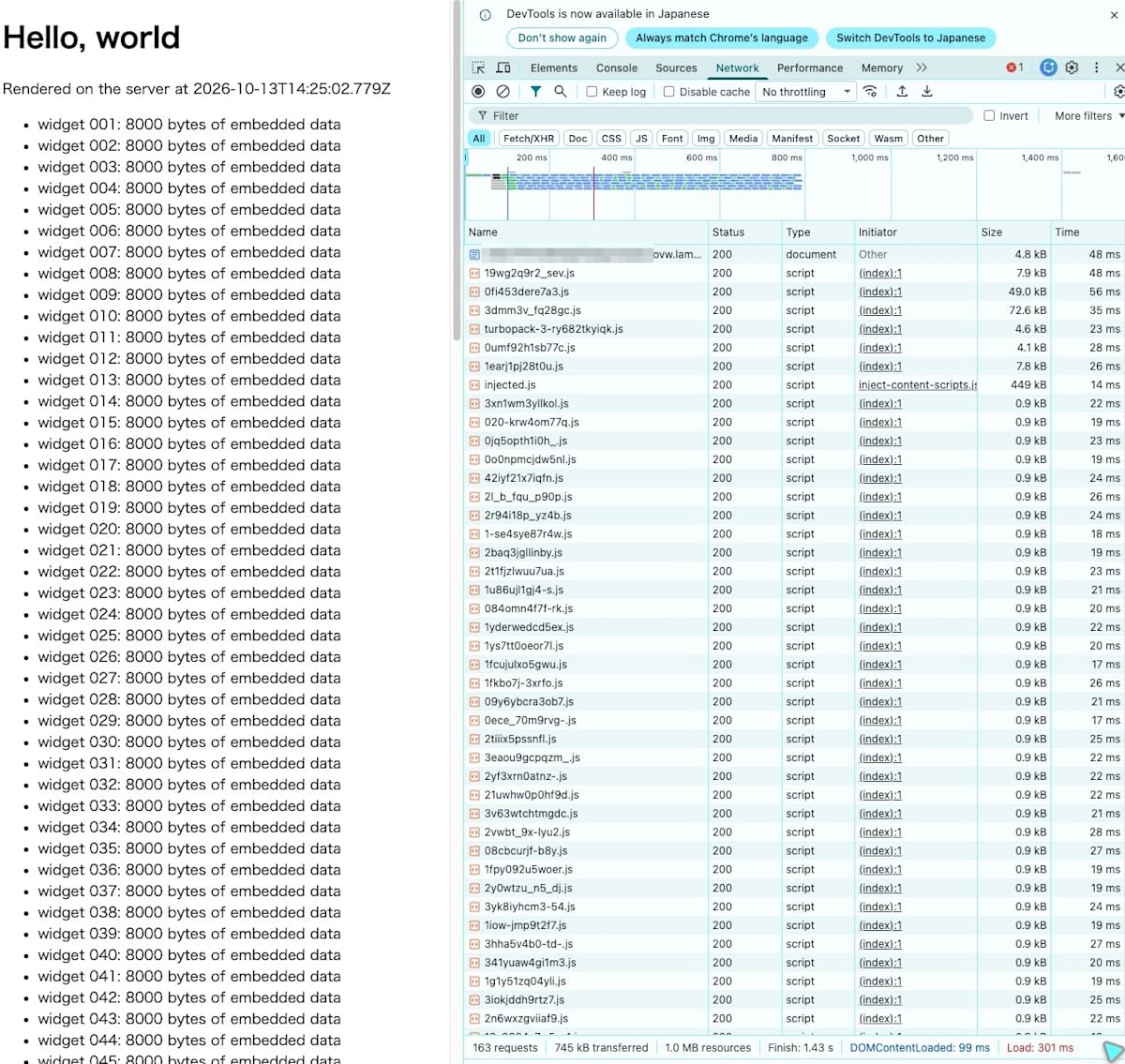
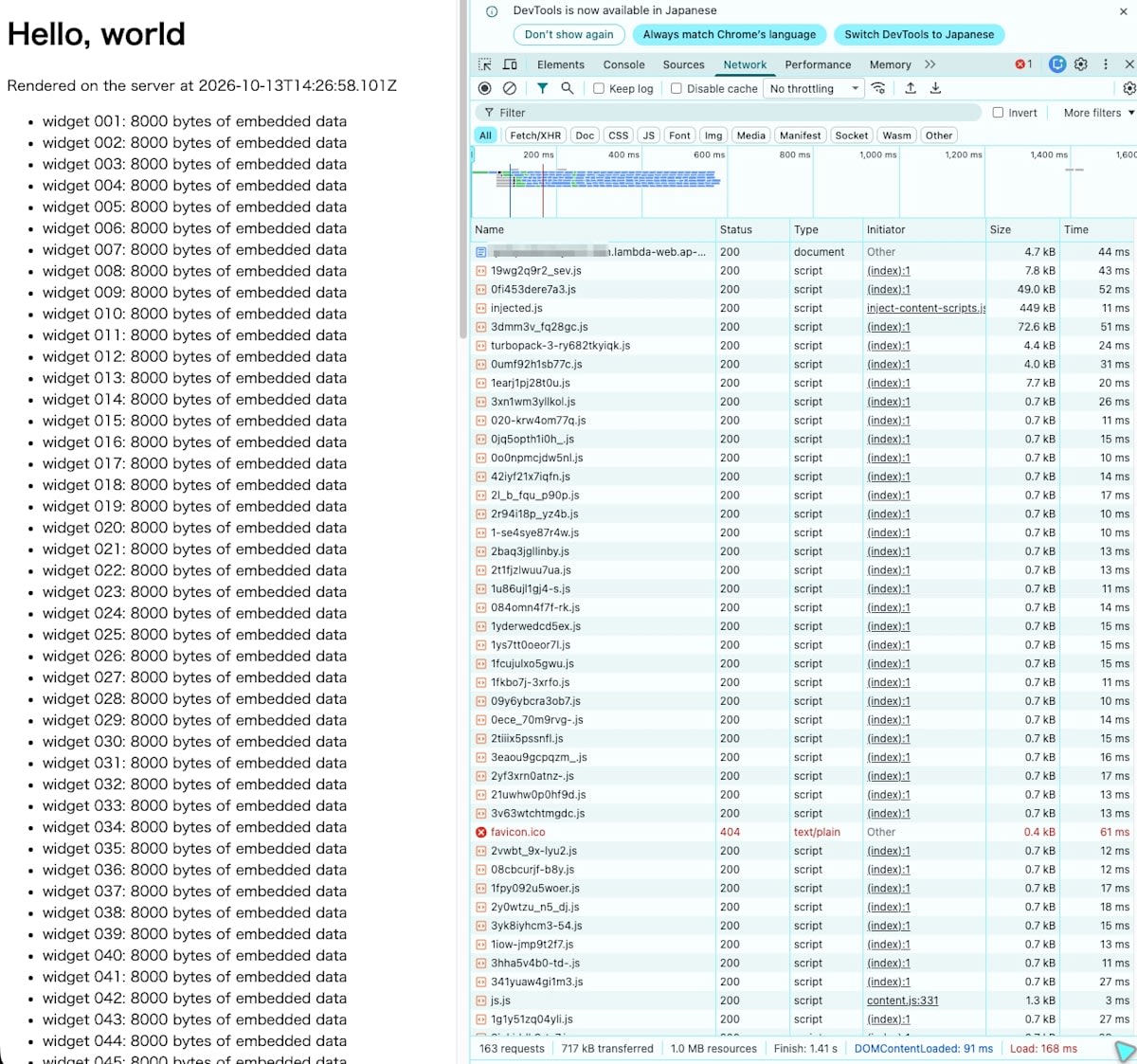
These are the screens after opening the page in Chrome DevTools (Network) on my local machine and super-reloading several times until the values stabilized. What to look at is Load and the Time of each individual JS file. The request count of 163 includes browser extension scripts (such as injected.js).
The LWA Function URL had Finish 1.43 s, DOMContentLoaded 99 ms, and Load 301 ms. The Time of small JS files was mostly around 19 to 25 ms.
Web Functions had Finish 1.41 s, DOMContentLoaded 91 ms, and Load 168 ms. The Time of small JS files was mostly around 10 to 17 ms.
30-second throughput
| VU | Target | Pages/s | Requests/s | Median page completion | p95 | p99 |
|---|---|---|---|---|---|---|
| 10 | Web Functions | 22.9 | 3,595 | 439 ms | 472 ms | 486 ms |
| 10 | LWA | 17.4 | 2,727 | 575 ms | 620 ms | 782 ms |
| 20 | Web Functions | 44.9 | 7,055 | 447 ms | 480 ms | 521 ms |
| 20 | LWA | 34.7 | 5,443 | 575 ms | 626 ms | 738 ms |
Web Functions achieved about 1.3 times the pages/second at both VU 10 and 20, and the median completion time was a little over 20% shorter. The p99 of Web Functions (486 ms at VU 10, 521 ms at VU 20) is shorter than the LWA median (575 ms) in both cases. There were 0 occurrences of 429, 5xx, and timeouts in all 4 runs.
Execution environment initializations (cold starts) during aggregation were 0 for Web Functions at both VU 10 and VU 20, and for LWA, 0 at VU 10 and 6 at VU 20. Looking at the whole run, most initializations occurred during the 5-second warm-up.
The maximum concurrent executions of the LWA function (the per-minute maximum of ConcurrentExecutions) was 45 at VU 10 and 90 at VU 20. The number of active Web Functions environments (the per-minute maximum of EndpointActiveEnvironments) was 41 at VU 10 and 83 at VU 20. The k6 concurrent connections are at most 60 at VU 10 and at most 120 at VU 20 (number of VUs × 6).
Differences in logs
For the view captured in the DevTools screens (the last super-reload), here are excerpts from the CloudWatch Logs records. The display times were 14:25:02 UTC for LWA and 14:26:58 UTC for Web Functions.
The LWA function outputs 3 lines per request: START, END, and REPORT. The following are the 3 lines for the first request of this view (started at 14:25:02.773 UTC). The sets of 3 lines for each request in this view were spread across 6 execution environments (log streams).
START RequestId: 12ce6618-289b-4903-87ce-7ab2edfa92ec Version: $LATEST
END RequestId: 12ce6618-289b-4903-87ce-7ab2edfa92ec
REPORT RequestId: 12ce6618-289b-4903-87ce-7ab2edfa92ec	Duration: 23.20 ms	Billed Duration: 24 ms	Memory Size: 2048 MB	Max Memory Used: 137 MB
The Web Functions platform outputs records per execution environment, not per request. The following are 5 records excerpted from one of the execution environments that received the last view (whose instanceId begins with b4167130). In order, they are the environment startup (initStart, initReport), invokeStart, the per-minute summary (invokeSummary), and the record at environment termination (invokeReport).
{"timestamp": "2026-10-13T14:20:56.511Z", "level": "INFO", "type": "platform.initStart", "region": "ap-northeast-1", "record": {"runtimeVersion": "nodejs24.x:nodejs.web24.v14", "runtimeVersionArn": "arn:aws:lambda:ap-northeast-1::runtime/nodejs24.x/version/nodejs.web24.v14", "functionName": "vs-lwa-wf150", "revisionId": "rev-2rmso", "instanceId": "b4167130-a681-4c9a-891c-35aeb658a761", "initializationType": "native-http"}}
{"timestamp": "2026-10-13T14:20:56.861Z", "level": "INFO", "type": "platform.initReport", "region": "ap-northeast-1", "record": {"status": "success", "instanceId": "b4167130-a681-4c9a-891c-35aeb658a761", "initializationType": "native-http", "metrics": {"totalDurationMs": 431.0, "totalCpuTimeMs": 356.0, "maxMemoryUsageMb": 174}}}
{"timestamp": "2026-10-13T14:20:56.862Z", "level": "INFO", "type": "platform.invokeStart", "region": "ap-northeast-1", "record": {"functionName": "vs-lwa-wf150", "revisionId": "rev-2rmso", "instanceId": "b4167130-a681-4c9a-891c-35aeb658a761"}}
{"timestamp": "2026-10-13T14:27:56.849Z", "level": "INFO", "type": "platform.invokeSummary", "region": "ap-northeast-1", "record": {"startTime": "2026-10-13T14:26:56.851507152Z", "instanceId": "b4167130-a681-4c9a-891c-35aeb658a761", "metrics": {"requests": 32, "concurrentRequests": 1, "cpuTimeMs": 153.0, "maxMemoryUsageMb": 209}}}
{"timestamp": "2026-10-13T14:32:23.163Z", "level": "INFO", "type": "platform.invokeReport", "region": "ap-northeast-1", "record": {"status": "success", "instanceId": "b4167130-a681-4c9a-891c-35aeb658a761", "metrics": {"totalCpuTimeMs": 1706.0, "totalDurationMs": 686323.0, "totalRequests": 258, "concurrentRequests": 2, "maxMemoryUsageMb": 209}}}
invokeSummary is the summary for the minute that includes the last view (14:26:56 to 14:27:56 UTC). This environment received 32 requests, and concurrentRequests was 1. invokeReport is the record for the roughly 11 minutes during which the environment was running: 258 requests in total, and concurrentRequests was 2.
Per-request lines can be emitted from the app. I prepared a separate small Next.js app (50 requests per page view) and deployed it to Web Functions. This version emits one line per request with console.log from proxy.js.
import { NextResponse } from 'next/server';

export function proxy(request) {
  console.log(JSON.stringify({ msg: 'access', method: request.method, path: request.nextUrl.pathname }));
  return NextResponse.next();
}

export const config = {
  matcher: ['/:path*'],
};
requestId, endpointName, and region were attached to the output lines even though the app specified nothing.
{"timestamp": "2026-10-13T05:48:08.420Z", "level": "INFO", "message": "{\"msg\":\"access\",\"method\":\"GET\",\"path\":\"/\"}", "requestId": "JXTL5L5UJXKYTI4Y46USXMARWI", "endpointName": "dev", "region": "ap-northeast-1"}
When I matched the response header lambda-web-request-id against the requestId in the logs, every one of the 50 responses in one page view had a line with the same value, and the paths also matched.
This is the log volume output to CloudWatch Logs in each throughput measurement run. The log volume and counts are values for the whole run including the 5-second warm-up (from 5 seconds before k6 started to 45 seconds after). The request counts are values for the 30-second aggregation window. The LWA function uses the default log settings. Web Functions outputs to 2 log groups (/aws/lambda/web/vs-lwa-wf150 and /aws/lambda/web/vs-lwa-wf150.local), so the totals are shown.
| VU | Target | Log volume | Log entries | Requests during aggregation |
|---|---|---|---|---|
| 10 | Web Functions | 0.15 MB (145,110 B) | 656 | 107,859 |
| 10 | LWA | 31 MB (31,007,766 B) | 272,103 | 81,797 |
| 20 | Web Functions | 0.32 MB (321,490 B) | 1,410 | 211,636 |
| 20 | LWA | 61 MB (61,359,202 B) | 538,437 | 163,280 |
The log volume is the sum of the message body lengths of each log entry counted with Logs Insights, plus 26 bytes per entry. 26 bytes is the size that CloudWatch Logs adds per entry to the ingested volume.
LWA logs 3 entries per request, so dividing the entry count by 3 gives the number of executions (90,701 at VU 10 and 179,479 at VU 20). Because this includes the warm-up, it is larger than the request count during aggregation in the table. Dividing the log volume by the number of executions gives about 342 bytes per request, which grows in proportion to the number of requests. In this setup without access logs, the Web Functions log volume was about 1/200 of LWA's.
If you do not need to keep access logs, Web Functions may also reduce CloudWatch Logs costs compared with LWA.
Summary
Even compared with the situation where no cold starts occur with LWA (0 during aggregation at VU 10), Web Functions achieved about 1.3 times the pages/second, and the median page completion time was a little over 20% shorter.
A conventional Lambda function running LWA can also be used as a public web environment, but one execution environment can process only one request at a time. As many environments as the number of simultaneous requests are needed, and for the shortfall you wait for cold starts. Provisioned Concurrency, which reserves environments in advance, can mitigate this, but you pay for the reserved capacity, and estimating the required number also becomes difficult.
Web Functions is designed so that one execution environment can handle multiple requests at the same time, but under this load the number of environments grew to 83 at VU 20. These results alone cannot tell whether the speed difference is due to multiplexing.
If managing concurrency in conventional Lambda puts an operational burden on you, or if you need stable performance, Web Functions is an option. The same goes for those who adopted ECS (Fargate, Express Mode) as the successor to App Runner but find deployment and operations complex. Please give Web Functions a try as an easy-to-use web delivery environment.
