
Have you noticed different behavior between LLM chat UIs and APIs? Here's a cross-provider breakdown of causes and solutions

This page has been translated by machine translation. View original
Introduction
"A prompt that worked perfectly in ChatGPT gives completely different results when I bring it to the API..."
Have you ever experienced this? I often go through the flow of testing prompts in a chat UI before porting them to the API, and I've noticed that the behavior can change even with the same prompt, so I looked into the cause.
To get straight to the point, this isn't just an OpenAI problem — the same pattern exists with Claude (Anthropic) and Gemini (Google) as well. In this article, I'll organize why the behavior differs and how to handle it with each provider.
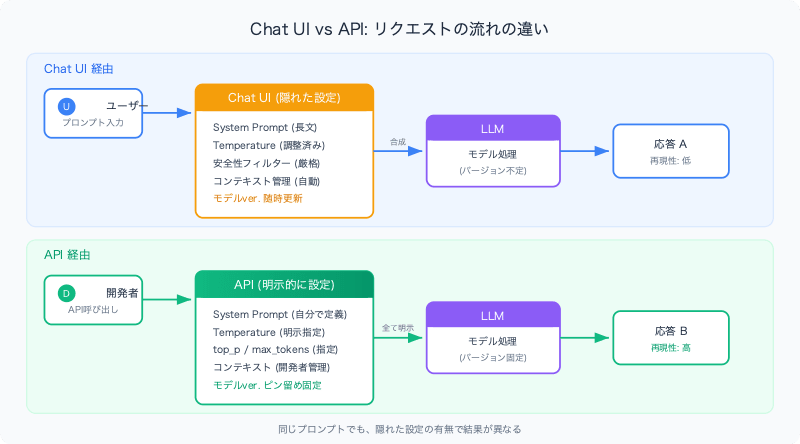
Why Results Differ Between Chat UI and API
The causes of behavioral differences fall into two major layers.
1. Model Version Mismatch
Even with the same model name, the snapshot running under the hood can differ between chat UIs (ChatGPT, claude.ai, Gemini app) and the API.
- Chat UIs are updated by providers at any time (change logs are often not released)
- The API uses a default alias unless a version is explicitly specified
- The alias itself can also be switched by the provider
2. Hidden Default Settings
Chat UIs have many settings applied that are invisible to users:
| Setting | Chat UI | API |
|---|---|---|
| System Prompt | Pre-configured by provider (lengthy) | Not set (blank) or specified by you |
| Temperature | Value optimized for conversation | Model default value (may differ) |
| Top-p / Top-k | Adjusted | Model default |
| Safety Filters | Set more strictly | Varies by API (configurable) |
| Context Management | Auto-summarization and truncation | Controlled by developer |
In other words, when something "worked" in the chat UI, there is a high chance it worked in combination with a set of invisible settings.
Model Versioning: How Each Provider Works
Below are representative patterns for specifying model versions (specific version names change over time).
OpenAI
gpt-4o              ← Alias (subject to change)
gpt-4o-2024-08-06   ← Pinned snapshot (fixed)
- When OpenAI switches an alias (
gpt-4o) to a new snapshot, behavior changes - Pinned versions (with a date) do not change
- The model used on the ChatGPT side may be a version not yet released via API
Anthropic (Claude)
claude-sonnet-4-5-20250514   ← Pinned (fixed)
claude-sonnet-4-5-latest     ← Alias (subject to change)
- claude.ai has its own system prompt and parameter settings
- In the API, specifying a pinned version locks it completely
- The
latestalias is updated by Anthropic when a new model is released
Google (Gemini)
gemini-2.0-flash-001   ← Pinned (fixed)
gemini-2.0-flash       ← Alias (subject to change)
- The same pattern applies between the Gemini app and the API
- Results from Google AI Studio may also differ from the API (because Studio has its own defaults)
Cross-Provider Comparison
| Aspect | OpenAI | Anthropic | |
|---|---|---|---|
| Pinned version format | model-YYYY-MM-DD |
model-YYYYMMDD |
model-NNN |
| Alias update frequency | Every few months | At model release | At model release |
| Chat UI update frequency | Frequent (weekly level) | Approximately monthly | Frequent |
| UI system prompt disclosure | Not disclosed (leaks exist) | Not disclosed | Not disclosed |
| API deprecation notice | Yes (approx. 6 months in advance) | Yes | Yes |
| Chat UI → API migration difficulty | Medium–High (hidden system prompt is lengthy) | Medium (relatively fewer parameter differences) | Medium–High (added gap with AI Studio) |
Practical Checklist for Prompt Migration
A checklist for moving prompts validated in a chat UI to the API:
1. Lock the Model Version
# Bad: Aliases are subject to change
model = "gpt-4o"

# Good: Use a pinned version
model = "gpt-4o-2024-08-06"
2. Explicitly Specify Parameters
# Do not rely on chat UI defaults
response = client.chat.completions.create(
    model="gpt-4o-2024-08-06",
    temperature=0.7,        # Explicitly specified
    top_p=1.0,              # Explicitly specified
    max_tokens=4096,        # Explicitly specified
    messages=[...]
)
3. Reproduce the System Prompt
There is an invisible system prompt in the chat UI. In the API, you need to set it yourself:
messages = [
    {"role": "system", "content": "You are..."},  # Define yourself
    {"role": "user", "content": "The actual prompt"}
]
4. Build a Test Environment
- Run the same prompt × same parameters multiple times to check for variance
- Note that Temperature=0 is not completely deterministic (especially with OpenAI)
- Save chat UI results as a baseline and compare with API results
5. Prepare for Version Updates
- Pinned versions also have an EOL (End of Life)
- Put a mechanism in place to monitor deprecation notices (each company's changelog and status page)
- Regularly conduct migration tests to new versions
Summary
| Lesson | Decision Criteria for Production |
|---|---|
| Chat UI is a "trial environment," not "production" | Prototype in UI, always re-validate production implementation via API |
| Aliases are convenient but unstable | Use pinned versions in production |
| Invisible settings influence results | Always explicitly set temperature, system prompt, and top_p |
| The same problem occurs with all providers | The same checklist can be used when switching providers |
As a framework: API (pinned version) = stable and reproducible, Chat UI = highly volatile (providers adjust at any time). Keeping this in mind will speed up root cause analysis when issues arise.
