# A Thorough Comparison of Structured Output in OpenAI, Gemini, and Claude — How to Reliably Get JSON Schema Compliance # OpenAI / Gemini / Claude 構造化出力 完全比較
## 1. 構造化出力の実装アーキテクチャ概観
```
┌─────────────────────────────────────────────────────────────┐
│ Structured Output の位置づけ │
├───────────────┬──────────────────┬──────────────────────────┤
│ OpenAI │ Gemini │ Claude │
├───────────────┼──────────────────┼──────────────────────────┤
│ Strict Mode │ responseSchema │ tool_use 経由 │
│ (JSON Schema) │ (OpenAPI subset) │ (JSON Schema subset) │
│ │ │ │
│ Function │ Function │ Native JSON Mode │
│ Calling 統合 │ Calling 統合 │ (claude-3-5以降) │
└───────────────┴──────────────────┴──────────────────────────┘
```
---
## 2. Constrained Decoding の仕組み
### 2.1 理論的背景
```
通常のデコード:
Token t+1 = argmax P(token | context)
→ 全語彙から自由選択
制約付きデコード:
Token t+1 = argmax P(token | context) × MASK(schema)
→ スキーマを満たすトークンのみ許可
```
### 2.2 各社の実装アプローチ
```
OpenAI (Strict Mode)
┌────────────────────────────────────────────┐
│ 1. スキーマをコンパイル時にステートマシン化 │
│ 2. デコード中に有効トークンのみマスク │
│ 3. 保証: 必ずvalidなJSONが出力される │
│ │
│ 技術: CFG-guided decoding │
│ (Context-Free Grammar) │
└────────────────────────────────────────────┘
Gemini (responseSchema)
┌────────────────────────────────────────────┐
│ 1. OpenAPI subsetをサポート │
│ 2. Constrained decodingを適用 │
│ 3. ただしschema違反が稀に発生 │
│ (複雑なスキーマで確率的失敗あり) │
└────────────────────────────────────────────┘
Claude (tool_use / JSON mode)
┌────────────────────────────────────────────┐
│ 1. Tool use経由: 完全な制約なし │
│ → モデルがschemaを「理解」して従う │
│ 2. RLHF/訓練で構造遵守を学習 │
│ 3. 原理的にはベストエフォート │
│ (実用上は非常に高精度) │
└────────────────────────────────────────────┘
```
---
## 3. OpenAI 実装詳細
### 3.1 Structured Output (Strict Mode)
```python
from openai import OpenAI
from pydantic import BaseModel, Field
from typing import Optional, List
import json
client = OpenAI()
# ─── Pydantic モデル定義 ───────────────────────────────────
class Address(BaseModel):
street: str
city: str
postal_code: str
country: str = "Japan" # デフォルト値 → Strictでは無視注意
class UserProfile(BaseModel):
user_id: int
name: str
email: str
age: Optional[int] = None # Nullable + Optional
address: Optional[Address] = None
tags: List[str] = Field(default_factory=list)
is_active: bool
# ─── API 呼び出し ─────────────────────────────────────────
def extract_user_strict(text: str) -> UserProfile:
response = client.beta.chat.completions.parse(
model="gpt-4o-2024-08-06",
messages=[
{
"role": "system",
"content": "テキストからユーザー情報を抽出してください。"
},
{
"role": "user",
"content": text
}
],
response_format=UserProfile, # Pydanticモデルを直接渡す
# → 内部でJSON Schemaに変換 + strict: true が自動設定
)
# parse済みオブジェクトが返る
return response.choices[0].message.parsed
# ─── 低レベルAPI (JSON Schema直接指定) ──────────────────────
def extract_user_raw_schema(text: str) -> dict:
schema = {
"type": "json_schema",
"json_schema": {
"name": "user_profile",
"strict": True, # ← Constrained Decodingの有効化
"schema": {
"type": "object",
"properties": {
"user_id": {"type": "integer"},
"name": {"type": "string"},
"email": {"type": "string"},
# ⚠️ Strict Mode での Nullable の書き方
"age": {
"anyOf": [
{"type": "integer"},
{"type": "null"}
]
},
"address": {
"anyOf": [
{
"type": "object",
"properties": {
"street": {"type": "string"},
"city": {"type": "string"},
"postal_code": {"type": "string"}
},
"required": ["street", "city", "postal_code"],
"additionalProperties": False # Strict必須
},
{"type": "null"}
]
},
"tags": {
"type": "array",
"items": {"type": "string"}
},
"is_active": {"type": "boolean"}
},
# ⚠️ Strict Mode: required は ALL properties を含める必要あり
"required": ["user_id", "name", "email", "age", "address", "tags", "is_active"],
"additionalProperties": False # Strict Mode では必須
}
}
}
response = client.chat.completions.create(
model="gpt-4o-2024-08-06",
messages=[
{"role": "system", "content": "テキストからユーザー情報を抽出してください。"},
{"role": "user", "content": text}
],
response_format=schema
)
return json.loads(response.choices[0].message.content)
# ─── Function Calling 経由 ───────────────────────────────────
def extract_user_function(text: str) -> dict:
tools = [
{
"type": "function",
"function": {
"name": "save_user_profile",
"description": "ユーザープロフィールを保存する",
"strict": True, # Function CallingでもStrict対応
"parameters": {
"type": "object",
"properties": {
"name": {"type": "string"},
"email": {"type": "string"},
# Optionalフィールド → anyOf with null
"phone": {
"anyOf": [
{"type": "string"},
{"type": "null"}
],
"description": "電話番号 (任意)"
}
},
"required": ["name", "email", "phone"], # nullableでもrequiredに含める
"additionalProperties": False
}
}
}
]
response = client.chat.completions.create(
model="gpt-4o-2024-08-06",
messages=[{"role": "user", "content": text}],
tools=tools,
tool_choice={"type": "function", "function": {"name": "save_user_profile"}}
)
tool_call = response.choices[0].message.tool_calls[0]
return json.loads(tool_call.function.arguments)
# ─── 使用例 ──────────────────────────────────────────────────
if __name__ == "__main__":
text = "田中太郎、メール: tanaka@example.com、32歳、東京在住"
user = extract_user_strict(text)
print(f"Name: {user.name}, Age: {user.age}, Active: {user.is_active}")
# → Name: 田中太郎, Age: 32, Active: True
```
### 3.2 OpenAI Strict Mode の制約事項
```python
# ❌ Strict Mode で使えないJSON Schema機能
UNSUPPORTED_IN_STRICT = {
"keywords": [
"default", # デフォルト値指定不可
"if/then/else", # 条件分岐不可
"allOf (複数)", # 2つ以上のallOf不可
"not", # 否定不可
"contains", # 配列contains不可
"patternProperties", # パターンキー不可
"unevaluatedProperties",
"$ref (再帰以外)", # 単純な$refは制限あり
],
"constraints": [
"additionalProperties: trueは不可 (falseのみ)",
"requiredは全プロパティ列挙が必要",
"ネスト深度制限: 5レベル",
"スキーマ総プロパティ数: 100以下推奨",
]
}
# ✅ Strict Modeで使える再帰スキーマの例
recursive_schema = {
"type": "json_schema",
"json_schema": {
"name": "tree_node",
"strict": True,
"schema": {
"$defs": {
"TreeNode": {
"type": "object",
"properties": {
"value": {"type": "string"},
"children": {
"type": "array",
"items": {"$ref": "#/$defs/TreeNode"} # 再帰OKこれは
}
},
"required": ["value", "children"],
"additionalProperties": False
}
},
"$ref": "#/$defs/TreeNode"
}
}
}
```
---
## 4. Gemini 実装詳細
### 4.1 responseSchema を使った構造化出力
```python
import google.generativeai as genai
from google.generativeai.types import GenerationConfig
import json
import os
genai.configure(api_key=os.environ["GEMINI_API_KEY"])
# ─── OpenAPI Subset での Schema 定義 ─────────────────────────
# GeminiはJSON SchemaではなくOpenAPI 3.0 subsetを使用
# 主な違い: nullableの表現方法が異なる
def extract_user_gemini(text: str) -> dict:
model = genai.GenerativeModel("gemini-1.5-pro")
# ⚠️ GeminiのNullable: JSON Schemaの anyOf ではなく OpenAPIの nullable: true
response_schema = {
"type": "OBJECT", # 大文字表記
"properties": {
"user_id": {
"type": "INTEGER"
},
"name": {
"type": "STRING"
},
"email": {
"type": "STRING"
},
# ✅ Gemini の Nullable 表現
"age": {
"type": "INTEGER",
"nullable": True # ← OpenAPI方言
# ❌ JSON Schema方言は使えない:
# "anyOf": [{"type": "integer"}, {"type": "null"}]
},
"address": {
"type": "OBJECT",
"nullable": True,
"properties": {
"street": {"type": "STRING"},
"city": {"type": "STRING"},
"postal_code": {"type": "STRING"}
}
# ⚠️ Geminiでは required 内のフィールドが省略可能な場合あり
},
"tags": {
"type": "ARRAY",
"items": {"type": "STRING"}
},
"is_active": {
"type": "BOOLEAN"
}
},
"required": ["user_id", "name", "email", "is_active"]
# ↑ Geminiでは required は本当に必須なものだけ列挙 (OpenAI Strictとは逆)
}
response = model.generate_content(
f"以下のテキストからユーザー情報を抽出: {text}",
generation_config=GenerationConfig(
response_mime_type="application/json",
response_schema=response_schema,
temperature=0, # 構造化出力では低温度推奨
)
)
return json.loads(response.text)
# ─── 新SDK (google-genai) での書き方 ─────────────────────────
from google import genai as new_genai
from google.genai import types
def extract_user_new_sdk(text: str) -> dict:
client = new_genai.Client(api_key=os.environ["GEMINI_API_KEY"])
response = client.models.generate_content(
model="gemini-2.0-flash",
contents=f"ユーザー情報を抽出: {text}",
config=types.GenerateContentConfig(
response_mime_type="application/json",
response_schema={
"type": "object",
"properties": {
"name": {"type": "string"},
"email": {"type": "string"},
"age": {
"type": "integer",
"nullable": True
}
},
"required": ["name", "email"]
}
)
)
return json.loads(response.text)
# ─── Gemini Function Calling ──────────────────────────────────
def extract_with_function_calling(text: str) -> dict:
model = genai.GenerativeModel("gemini-1.5-pro")
extract_user_fn = genai.protos.FunctionDeclaration(
name="extract_user",
description="テキストからユーザー情報を抽出",
parameters=genai.protos.Schema(
type=genai.protos.Type.OBJECT,
properties={
"name": genai.protos.Schema(type=genai.protos.Type.STRING),
"email": genai.protos.Schema(type=genai.protos.Type.STRING),
"age": genai.protos.Schema(
type=genai.protos.Type.INTEGER,
nullable=True
)
},
required=["name", "email"]
)
)
tool = genai.protos.Tool(function_declarations=[extract_user_fn])
response = model.generate_content(
text,
tools=[tool],
tool_config={"function_calling_config": {"mode": "ANY"}}
)
fc = response.candidates[0].content.parts[0].function_call
return dict(fc.args)
# ─── Gemini固有の注意点 ───────────────────────────────────────
"""
⚠️ Gemini Schema の落とし穴:
1. anyOf/oneOf/allOf は未サポート (2024時点)
→ 代替: nullable: true
2. 型の大文字/小文字混在
- response_schemaでは小文字"string"も動作
- 公式はSCREAMING_SNAKE (STRING, INTEGER等)
3. enum の動作差
- JSON Schema: {"type": "string", "enum": ["a", "b"]}
- Gemini: 同じ記法でOKだが強制力が弱い
4. required の意味論
- OpenAI Strict: 全フィールドをrequiredに含める
- Gemini: 真に必須なフィールドのみ (Optionalは含めない)
"""
```
### 4.2 Gemini 型システム対応表
```python
# Gemini の型対応 (OpenAPI subset)
GEMINI_TYPES = {
# JSON Schema → Gemini OpenAPI
"string": "STRING",
"integer": "INTEGER",
"number": "NUMBER", # floatも含む
"boolean": "BOOLEAN",
"object": "OBJECT",
"array": "ARRAY",
# ⚠️ "null" 型は存在しない → nullable: true で表現
}
# Gemini でサポートされるフォーマット
GEMINI_FORMATS = {
"string": ["date", "date-time", "enum"], # 限定的
"number": ["float", "double"],
"integer": ["int32", "int64"],
# JSON SchemaのURIやemail formatは未サポート
}
# enum の正しい書き方
enum_schema = {
"type": "STRING",
"enum": ["PENDING", "ACTIVE", "INACTIVE"],
# format: "enum" は任意 (なくても動く)
}
```
---
## 5. Claude 実装詳細
### 5.1 Tool Use 経由の構造化出力
```python
import anthropic
import json
from typing import Optional, List
client = anthropic.Anthropic()
# ─── Tool Use による構造化出力 (推奨方法) ───────────────────
def extract_user_claude(text: str) -> dict:
tools = [
{
"name": "save_user_profile",
"description": "抽出したユーザー情報を保存する。情報が不明な場合はnullを使用。",
"input_schema": {
"type": "object",
"properties": {
"user_id": {
"type": "integer",
"description": "ユーザーID"
},
"name": {
"type": "string",
"description": "氏名"
},
"email": {
"type": "string",
"description": "メールアドレス"
},
# ✅ Claude の Nullable: JSON Schema anyOf 方言
"age": {
"anyOf": [
{"type": "integer"},
{"type": "null"}
],
"description": "年齢 (不明な場合はnull)"
},
# または単純にdescriptionで指示
"phone": {
"type": "string",
"description": "電話番号。不明な場合は空文字"
# Claudeはdescriptionの自然言語指示に従う
},
"address": {
"anyOf": [
{
"type": "object",
"properties": {
"street": {"type": "string"},
"city": {"type": "string"},
"postal_code": {"type": "string"}
},
"required": ["street", "city"]
# ⚠️ additionalProperties不要 (Strict Modeなし)
},
{"type": "null"}
]
},
"tags": {
"type": "array",
"items": {"type": "string"},
"default": [] # Claudeはdefaultを参考にする
},
"is_active": {
"type": "boolean"
}
},
# ✅ Claude: required は本当に必須なもののみでOK
"required": ["name", "email", "is_active"]
}
}
]
response = client.messages.create(
model="claude-opus-4-5",
max_tokens=1024,
tools=tools,
tool_choice={"type": "tool", "name": "save_user_profile"}, # 強制実行
messages=[
{
"role": "user",
"content": f"以下のテキストからユーザー情報を抽出してください:\n\n{text}"
}
]
)
# tool_use ブロックを取得
for block in response.content:
if block.type == "tool_use":
return block.input
raise ValueError("Tool use block not found")
# ─── Native JSON Mode (claude-3-5-sonnet以降) ─────────────
def extract_user_json_mode(text: str) -> dict:
"""
Tool useなしでJSONを強制出力
ただしスキーマの強制力はtool useより弱い
"""
response = client.messages.create(
model="claude-opus-4-5",
max_tokens=1024,
messages=[
{
"role": "user",
"content": f"""
以下のテキストからユーザー情報を抽出し、JSON形式で返してください。
テキスト: {text}
出力形式:
{{
"name": "string",
"email": "string",
"age": number | null,
"is_active": boolean
}}
JSONのみ出力してください。
"""
}
],
# Native JSON mode: prefillでJSON開始を強制
# ↓ assistantターンの先頭を固定
)
return json.loads(response.content[0].text)
# ─── Prefill テクニック (JSON強制) ───────────────────────────
def extract_with_prefill(text: str) -> dict:
"""
Assistantのprefillで'{' を埋め込みJSONを強制
Native toolsが使えない場合の代替
"""
response = client.messages.create(
model="claude-opus-4-5",
max_tokens=1024,
messages=[
{
"role": "user",
"content": f"次のテキストからname, email, ageを抽出してJSONで: {text}"
},
{
"role": "assistant",
"content": "{" # ← Prefill: JSONの開始を強制
}
]
)
# prefillの'{' + 続きを結合
raw = "{" + response.content[0].text
# 末尾に'}' がない場合の処理
if not raw.rstrip().endswith("}"):
raw = raw.rstrip() + "}"
return json.loads(raw)
# ─── 複数ツールからの選択 ───────────────────────────────────
def classify_and_extract(text: str) -> dict:
"""
Claudeの強み: 複数ツールを定義してモデルが状況に応じて選択
"""
tools = [
{
"name": "extract_person",
"description": "個人情報を抽出",
"input_schema": {
"type": "object",
"properties": {
"name": {"type": "string"},
"age": {"anyOf": [{"type": "integer"}, {"type": "null"}]},
"type": {"type": "string", "enum": ["person"]}
},
"required": ["name", "type"]
}
},
{
"name": "extract_company",
"description": "企業情報を抽出",
"input_schema": {
"type": "object",
"properties": {
"company_name": {"type": "string"},
"industry": {"type": "string"},
"employee_count": {
"anyOf": [{"type": "integer"}, {"type": "null"}]
},
"type": {"type": "string", "enum": ["company"]}
},
"required": ["company_name", "type"]
}
}
]
response = client.messages.create(
model="claude-opus-4-5",
max_tokens=512,
tools=tools,
# tool_choice: "auto" → モデルが適切なツールを選択
messages=[{"role": "user", "content": f"情報を抽出: {text}"}]
)
for block in response.content:
if block.type == "tool_use":
return {"tool": block.name, "data": block.input}
```
---
## 6. Nullable 型の方言差 完全対応表
```python
"""
Nullable 型の表現方法 - 3プラットフォーム比較
"""
# ──────────────────────────────────────────────────────────────
# JSON Schema ドラフト版との対応
# ──────────────────────────────────────────────────────────────
nullable_comparison = {
# ─── JSON Schema draft-07 (標準) ────────────────────
"json_schema_draft07": {
"nullable_string": {
"type": ["string", "null"] # type配列で表現
},
"nullable_object": {
"oneOf": [
{"type": "object", "properties": {...}},
{"type": "null"}
]
}
},
# ─── JSON Schema draft 2019-09 / 2020-12 (最新) ─────
"json_schema_modern": {
"nullable_string": {
"anyOf": [
{"type": "string"},
{"type": "null"}
]
}
},
# ─── OpenAI (JSON Schema 2020-12 準拠) ──────────────
"openai": {
# ✅ 推奨: anyOf with null
"nullable_string": {
"anyOf": [
{"type": "string"},
{"type": "null"}
]
},
# ✅ これも動作
"nullable_string_alt": {
"type": ["string", "null"] # draft-07スタイルも受け入れ
},
# ❌ Strict Modeでは nullable: true は非サポート
"nullable_strict_wrong": {
"type": "string",
"nullable": True # これは無視される
}
},
# ─── Gemini (OpenAPI 3.0 Subset) ────────────────────
"gemini": {
# ✅ 唯一の正式方法: nullable: true
"nullable_string": {
"type": "STRING",
"nullable": True
},
# ❌ anyOf は未サポート
"nullable_anyof_wrong": {
"anyOf": [
{"type": "string"},
{"type": "null"}
]
# → エラーまたは無視される
},
# ❌ type配列は未サポート
"nullable_array_wrong": {
"type": ["STRING", "null"] # 動作しない
}
},
# ─── Claude (JSON Schema subset, 寛容) ─────────────
"claude": {
# ✅ anyOf (推奨)
"nullable_string": {
"anyOf": [
{"type": "string"},
{"type": "null"}
]
},
# ✅ これも動作 (モデルが解釈)
"nullable_string_alt": {
"type": "string",
"nullable": True # モデルが理解して従う
},
# ✅ descriptionでの指示も有効
"nullable_string_description": {
"type": "string",
"description": "ユーザー名。不明な場合はnullを返すこと"
}
}
}
# ──────────────────────────────────────────────────────────────
# クロスプラットフォーム互換スキーマの書き方
# ──────────────────────────────────────────────────────────────
def build_nullable_field(base_schema: dict, platform: str = "universal") -> dict:
"""プラットフォームに応じたnullableフィールドを生成"""
if platform == "openai":
return {"anyOf": [base_schema, {"type": "null"}]}
elif platform == "gemini":
return {**base_schema, "nullable": True}
elif platform == "claude":
return {"anyOf": [base_schema, {"type": "null"}]}
else: # universal: OpenAIとClaudeは通る、Geminiは部分対応
return {"anyOf": [base_schema, {"type": "null"}]}
# 実践的な型変換ユーティリティ
class SchemaConverter:
"""JSON SchemaをプラットフォームごとのSchemaに変換"""
@staticmethod
def to_gemini(schema: dict) -> dict:
"""JSON Schema → Gemini OpenAPI Schema"""
type_map = {
"string": "STRING", "integer": "INTEGER",
"number": "NUMBER", "boolean": "BOOLEAN",
"object": "OBJECT", "array": "ARRAY"
}
result = {}
# anyOf [type, null] → nullable: true
if "anyOf" in schema:
non_null = [s for s in schema["anyOf"] if s.get("type") != "null"]
has_null = any(s.get("type") == "null" for s in schema["anyOf"])
if len(non_null) == 1:
result = SchemaConverter.to_gemini(non_null[0])
if has_null:
result["nullable"] = True
return result
if "type" in schema:
t = schema["type"]
if isinstance(t, list): # ["string", "null"]
non_null_types = [x for x in t if x != "null"]
result["type"] = type_map.get(non_null_types[0], non_null_types[0]).upper()
if "null" in t:
result["nullable"] = True
else:
result["type"] = type_map.get(t, t).upper()
if "properties" in schema:
result["properties"] = {
k: SchemaConverter.to_gemini(v)
for k, v in schema["properties"].items()
}
if "items" in schema:
result["items"] = SchemaConverter.to_gemini(schema["items"])
if "required" in schema:
result["required"] = schema["required"]
if "enum" in schema:
result["enum"] = schema["enum"]
if "description" in schema:
result["description"] = schema["description"]
return result
```
---
## 7. Required / Optional フィールドの挙動差
```python
"""
Required/Optional の意味論的差異
"""
required_optional_analysis = {
"openai_strict": {
"rule": "全プロパティをrequiredに含める",
"optional_pattern": "anyOf + null で表現",
"example": {
"properties": {
"name": {"type": "string"},
"nickname": {
"anyOf": [{"type": "string"}, {"type": "null"}],
"description": "ニックネーム (任意)"
}
},
# ← nickname も required に含める (Strict Mode のルール)
"required": ["name", "nickname"],
"additionalProperties": False
},
"behavior": "モデルはnicknameを常に出力、値がない場合はnull",
"missing_field": "生成不可 (スキーマ違反はConstrained Decodingで防止)"
},
"openai_non_strict": {
"rule": "requiredに含まれないフィールドは省略可能",
"example": {
"properties": {
"name": {"type": "string"},
"nickname": {"type": "string"} # nullable指定なし
},
"required": ["name"] # nickはoptional
},
"behavior": "nicknameは省略される場合あり (キー自体が消える)",
"missing_field": "キーが存在しない可能性あり → dict.get()推奨"
},
"gemini": {
"rule": "requiredに含まれないフィールドは省略される場合あり",
"example": {
"type": "OBJECT",
"properties": {
"name": {"type": "STRING"},
"age": {"type": "INTEGER", "nullable": True}
},
"required": ["name"] # age は optional
},
"behavior": """
- ageが不明 → キー自体が存在しないことがある
- nullable: true でも省略される場合あり
- 対策: レスポンス後に .get("age") で安全アクセス
""",
"gotcha": "nullableとrequired非指定の組み合わせで挙動が不安定"
},
"claude": {
"rule": "requiredは参考程度、descriptionの自然言語が優先",
"example": {
"properties": {
"name": {"type": "string"},
"age": {
"anyOf": [{"type": "integer"}, {"type": "null"}],
"description": "年齢。必ず値またはnullを返すこと" # ← これが重要
}
},
"required": ["name"]
},
"behavior": "descriptionで明示的に指示するとnullを返す確率UP",
"recommendation": "schemaとdescriptionを組み合わせた二重指定"
}
}
# ─── 各プラットフォームの欠損値ハンドリング ─────────────────
def safe_parse_response(data: dict, platform: str) -> dict:
"""プラットフォームごとの安全なフィールドアクセス"""
if platform == "openai_strict":
# Strict Modeなら全フィールドが保証される
return {
"name": data["name"], # KeyError は理論上発生しない
"age": data["age"], # null の可能性はある
"address": data["address"] # null の可能性はある
}
else:
# Non-strict / Gemini / Claude: 防御的アクセス
return {
"name": data.get("name", "Unknown"),
"age": data.get("age"), # None で安全に
"address": data.get("address"), # None で安全に
# Geminiでは数値型が文字列で返る場合も
"user_id": int(data["user_id"]) if "user_id" in data else None
}
```
---
## 8. 実践比較: 同一タスクの実装
```python
"""
同一の抽出タスクを3プラットフォームで実装
タスク: 請求書テキストから構造化データを抽出
"""
INVOICE_TEXT = """
請求書 No.2024-0892
発行日: 2024年11月15日
支払期限: 2024年12月15日
請求先: 株式会社サンプル
担当者: 山田花子
商品:
- Webシステム開発 (20h × 15,000円): 300,000円
- サーバー費用 (月額): 50,000円
- 消費税 (10%): 35,000円
合計: 385,000円
備考: 銀行振込にてお支払いください
"""
# ─── 共通スキーマ (JSON Schema標準) ────────────────────────
BASE_SCHEMA = {
"type": "object",
"properties": {
"invoice_number": {"type": "string"},
"issue_date": {"type": "string", "description": "ISO 8601形式"},
"due_date": {"type": "string"},
"client_name": {"type": "string"},
"contact_person": {
"anyOf": [{"type": "string"}, {"type": "null"}]
},
"items": {
"type": "array",
"items": {
"type": "object",
"properties": {
"description": {"type": "string"},
"amount": {"type": "integer"}
},
"required": ["description", "amount"]
}
},
"subtotal": {"type": "integer"},
"tax": {"type": "integer"},
"total": {"type": "integer"},
"notes": {
"anyOf": [{"type": "string"}, {"type": "null"}]
}
},
"required": ["invoice_number", "issue_date", "due_date",
"client_name", "items", "total"]
}
# ─── OpenAI 実装 ─────────────────────────────────────────────
def extract_invoice_openai(text: str) -> dict:
from pydantic import BaseModel
from typing import List
class InvoiceItem(BaseModel):
description: str
amount: int
class Invoice(BaseModel):
invoice_number: str
issue_date: str
due_date: str
client_name: str
contact_person: Optional[str] = None
items: List[InvoiceItem]
subtotal: Optional[int] = None
tax: Optional[int] = None
total: int
notes: Optional[str] = None
response = client_openai.beta.chat.completions.parse(
model="gpt-4o-2024-08-06",
messages=[
{"role": "system", "content": "請求書から情報を抽出してください。日付はISO 8601形式で。"},
{"role": "user", "content": text}
],
response_format=Invoice
)
result = response.choices[0].message.parsed
return result.model_dump()
# ─── Gemini 実装 ─────────────────────────────────────────────
def extract_invoice_gemini(text: str) -> dict:
model = genai.GenerativeModel("gemini-1.5-pro")
# JSON Schemaをgemini用に変換
gemini_schema = {
"type": "OBJECT",
"properties": {
"invoice_number": {"type": "STRING"},
"issue_date": {"type": "STRING"},
"due_date": {"type": "STRING"},
"client_name": {"type": "STRING"},
"contact_person": {"type": "STRING", "nullable": True},
"items": {
"type": "ARRAY",
"items": {
"type": "OBJECT",
"properties": {
"description": {"type": "STRING"},
"amount": {"type": "INTEGER"}
}
}
},
"subtotal": {"type": "INTEGER", "nullable": True},
"tax": {"type": "INTEGER", "nullable": True},
"total": {"type": "INTEGER"},
"notes": {"type": "STRING", "nullable": True}
},
"required": ["invoice_number", "issue_date", "due_date",
"client_name", "items", "total"]
}
response = model.generate_content(
f"請求書から情報を抽出。日付はISO 8601形式。\n\n{text}",
generation_config=GenerationConfig(
response_mime_type="application/json",
response_schema=gemini_schema,
temperature=0
)
)
data = json.loads(response.text)
# 数値型が文字列で返る場合の後処理
if "total" in data and isinstance(data["total"], str):
data["total"] = int(data["total"].replace(",", ""))
return data
# ─── Claude 実装 ─────────────────────────────────────────────
def extract_invoice_claude(text: str) -> dict:
tools = [
{
"name": "save_invoice",
"description": "抽出した請求書データを保存する",
"input_schema": {
"type": "object",
"properties": {
"invoice_number": {
"type": "string",
"description": "請求書番号"
},
"issue_date": {
"type": "string",
"description": "発行日 (ISO 8601: YYYY-MM-DD)"
},
"due_date": {
"type": "string",
"description": "支払期限 (ISO 8601: YYYY-MM-DD)"
},
"client_name": {"type": "string"},
"contact_person": {
"anyOf": [{"type": "string"}, {"type": "null"}],
"description": "担当者名。記載なければnull"
},
"items": {
"type": "array",
"items": {
"type": "object",
"properties": {
"description": {"type": "string"},
"amount": {
"type": "integer",
"description": "金額 (円、整数)"
}
},
"required": ["description", "amount"]
}
},
"subtotal": {
"anyOf": [{"type": "integer"}, {"type": "null"}]
},
"tax": {
"anyOf": [{"type": "integer"}, {"type": "null"}]
},
"total": {
"type": "integer",
"description": "税込合計金額 (円)"
},
"notes": {
"anyOf": [{"type": "string"}, {"type": "null"}]
}
},
"required": ["invoice_number", "issue_date", "due_date",
"client_name", "items", "total"]
}
}
]
response = client_claude.messages.create(
model="claude-opus-4-5",
max_tokens=2048,
tools=tools,
tool_choice={"type": "tool", "name": "save_invoice"},
messages=[
{
"role": "user",
"content": f"請求書から情報を抽出してください:\n\n{text}"
}
]
)
for block in response.content:
if block.type == "tool_use":
return block.input
raise ValueError("No tool use found")
# ─── 3プラットフォーム一括実行 ────────────────────────────────
def compare_all_platforms(text: str) -> dict:
results = {}
for platform, func in [
("openai", extract_invoice_openai),
("gemini", extract_invoice_gemini),
("claude", extract_invoice_claude)
]:
try:
results[platform] = {
"status": "success",
"data": func(text)
}
except Exception as e:
results[platform] = {
"status": "error",
"error": str(e)
}
return results
```
---
## 9. 総合比較表とプラットフォーム選定指針
```python
PLATFORM_COMPARISON = {
"structured_output_method": {
"openai": "response_format (Strict/Non-strict) + Function Calling",
"gemini": "responseSchema (MIME type) + Function Calling",
"claude": "Tool Use (推奨) + Prefill + JSON mode"
},
"schema_standard": {
"openai": "JSON Schema 2020-12 (サブセット)",
"gemini": "OpenAPI 3.0 Specification (サブセット)",
"claude": "JSON Schema (寛容、バージョン不問)"
},
"nullable_syntax": {
"openai": 'anyOf: [{type: T}, {type: "null"}]',
"gemini": "nullable: true",
"claude": 'anyOf (推奨) または description指示'
},
"required_semantics": {
"openai_strict": "全フィールドをrequiredに含める (省略不可)",
"openai_default": "真に必須なもののみ",
"gemini": "真に必須なもののみ (省略発生しやすい)",
"claude": "参考程度 (descriptionが実質的に優先)"
},
"guarantee_level": {
"openai_strict": "★★★★★ Constrained Decoding保証",
"gemini": "★★★★☆ 高精度だが稀に違反",
"claude": "★★★★☆ 高精度 (訓練ベース)"
},
"schema_complexity": {
"openai_strict": "制限あり (depth≤5, props≤100, limited keywords)",
"gemini": "中程度 (anyOf/oneOf未対応, format限定)",
"claude": "高い自由度 (複雑なスキーマも対応)"
},
"additional_properties": {
"openai_strict": "必ずfalse (自動強制)",
"gemini": "任意",
"claude": "任意 (指定なしでもスキーマ準拠)"
},
"best_for": {
"openai": "厳密な型保証が必要、本番システム、パース保証",
"gemini": "Google Cloudエコシステム、シンプルなスキーマ",
"claude": "複雑なスキーマ、自然言語指示との組み合わせ、柔軟性"
}
}
# ─── 選定フローチャート ──────────────────────────────────────
"""
構造化出力プラットフォーム選定
スキーマの型安全性が最重要?
├── YES → OpenAI Strict Mode
│ (Constrained Decodingで100%保証)
└── NO
├── Google Cloud/Vertex AIを使用?
│ └── YES → Gemini responseSchema
│
├── 自然言語的なスキーマ記述が必要?
│ └── YES → Claude Tool Use
│
├── 複雑な条件分岐スキーマ (if/then等)?
│ └── YES → Claude Tool Use (JSON Schema完全対応)
│
└── シンプルな抽出で十分?
└── いずれも選択可 → コスト・速度で決定
"""
```
---
## 10. エラーハンドリングとデバッグ
```python
import logging
from dataclasses import dataclass
from typing import Any
@dataclass
class ParseResult:
success: bool
data: Any
raw_response: str
error: Optional[str] = None
platform: str = ""
# ─── 堅牢なパーサー ──────────────────────────────────────────
def robust_json_extract(
text: str,
schema: dict,
platform: str,
max_retries: int = 3
) -> ParseResult:
"""リトライロジック付き構造化出力"""
extractors = {
"openai": extract_invoice_openai,
"gemini": extract_invoice_gemini,
"claude": extract_invoice_claude
}
last_error = None
for attempt in range(max_retries):
try:
data = extractors[platform](text)
# 基本バリデーション
required_fields = schema.get("required", [])
missing = [f for f in required_fields if f not in data]
if missing and platform != "openai": # Strictは保証済み
raise ValueError(f"Missing required fields: {missing}")
return ParseResult(
success=True,
data=data,
raw_response=json.dumps(data),
platform=platform
)
except json.JSONDecodeError as e:
last_error = f"JSON parse error: {e}"
logging.warning(f"[{platform}] Attempt {attempt+1}: {last_error}")
except ValueError as e:
last_error = str(e)
logging.warning(f"[{platform}] Attempt {attempt+1}: {last_error}")
except Exception as e:
last_error = str(e)
logging.error(f"[{platform}] Unexpected error: {last_error}")
break
return ParseResult(
success=False,
data=None,
raw_response="",
error=last_error,
platform=platform
)
# ─── スキーマ違反の検出 ──────────────────────────────────────
import jsonschema
def validate_response(data: dict, schema: dict) -> tuple[bool, list]:
"""JSON Schemaバリデーション"""
validator = jsonschema.Draft202012Validator(schema)
errors = list(validator.iter_errors(data))
return len(errors) == 0, [str(e.message) for e in errors]
# OpenAI Strictでも稀にvalidation漏れがあるため二重チェック推奨
```
---
## まとめ
```
┌─────────────────────────────────────────────────────────────┐
│ Key Takeaways │
├─────────────────────────────────────────────────────────────┤
│ │
│ Nullable: │
│ OpenAI/Claude → anyOf [{type:T}, {type:"null"}] │
│ Gemini → nullable: true (OpenAPI方言) │
│ │
│ Required: │
│ OpenAI Strict → 全フィールド必須記載 (nullableでも) │
│ Gemini/Claude → 真に必須なもののみ │
│ │
│ 保証レベル: │
│ OpenAI Strict = 数学的保証 (CFG-guided decoding) │
│ Gemini/Claude = 統計的高精度 (実用上99%+) │
│ │
│ クロスプラットフォーム: │
│ SchemaConverterで変換 + 防御的なdict.get()アクセス │
│ │
└─────────────────────────────────────────────────────────────┘
```
This page has been translated by machine translation. View original
Introduction
Have you ever struggled with the problem of "the returned JSON doesn't conform to the schema" when feeding LLM output into downstream processing?
Simply instructing the model to "return JSON" in the prompt can result in extra keys being mixed in, wrong types, or JSON that is outright broken. Each platform takes a different approach to guarantee schema compliance.
This article compares the structured output mechanisms of OpenAI, Gemini, and Claude with API code examples, and digs into implementation pitfalls such as "Required vs Optional fields" and "differences in how Nullable types are written."
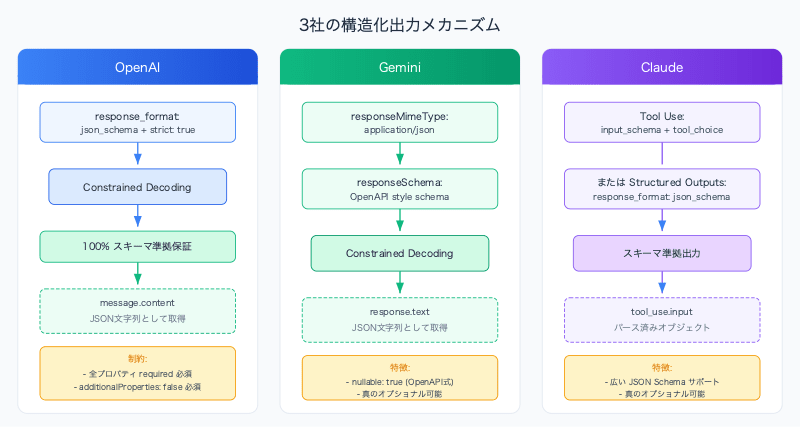
The Three Companies' Structured Output Approaches
First, let's organize how each platform achieves schema compliance.
OpenAI uses a method where a JSON Schema is passed directly to the response_format parameter. Specifying strict: true enables Constrained Decoding , which guarantees that the model's output will 100% conform to the schema.
from openai import OpenAI client = OpenAI() response = client.chat.completions.create( model = "gpt-4o" , messages = [{ "role" : "user" , "content" : "Extract: John is 30, lives in Tokyo" }], response_format = { "type" : "json_schema" , "json_schema" : { "name" : "person" , "strict" : True , "schema" : { "type" : "object" , "properties" : { "name" : { "type" : "string" }, "age" : { "type" : "integer" }, "city" : { "type" : "string" } }, "required" : [ "name" , "age" , "city" ], "additionalProperties" : False } } } ) # A JSON string is returned in message.content # {"name": "John", "age": 30, "city": "Tokyo"} Key points:
strict: true enables Constrained Decoding and guarantees 100% schema complianceadditionalProperties: false is required at every object levelAll properties must be included in required (described later)
Only a subset of JSON Schema is supported (oneOf is not allowed, $ref is limited)
Gemini — responseMimeType + responseSchema
Gemini uses a two-step approach: responseMimeType specifies the output format, and responseSchema defines the structure.
from google import genai from google.genai import types client = genai.Client() response = client.models.generate_content( model = "gemini-2.5-flash" , contents = "Extract: John is 30, lives in Tokyo" , config = types.GenerateContentConfig( response_mime_type = "application/json" , response_schema = { "type" : "object" , "properties" : { "name" : { "type" : "string" }, "age" : { "type" : "integer" }, "city" : { "type" : "string" } }, "required" : [ "name" , "age" , "city" ] } ) ) # A JSON string is returned in response.text # {"name": "John", "age": 30, "city": "Tokyo"} Key points:
response_mime_type alone = valid JSON is guaranteed, but schema compliance is notAdding response_schema enables constrained decoding to produce schema-compliant output
enum specification also supports classification tasksPydantic models can be passed directly as the schema
Claude natively supported Structured Outputs (specifying json_schema in response_format) in the second half of 2025. Tool Use + forced tool_choice , which has been used since before that, also remains a valid approach. Here we show an example of the more widely used Tool Use method.
import anthropic client = anthropic.Anthropic() response = client.messages.create( model = "claude-sonnet-4-20250514" , max_tokens = 1024 , messages = [{ "role" : "user" , "content" : "Extract: John is 30, lives in Tokyo" }], tools = [{ "name" : "extract_person" , "description" : "Extract person info" , "input_schema" : { "type" : "object" , "properties" : { "name" : { "type" : "string" }, "age" : { "type" : "integer" }, "city" : { "type" : "string" } }, "required" : [ "name" , "age" , "city" ] } }], tool_choice = { "type" : "tool" , "name" : "extract_person" } ) # Retrieved from the input field of the tool_use block tool_block = next (b for b in response.content if b.type == "tool_use" ) result = tool_block.input # {"name": "John", "age": 30, "city": "Tokyo"} Key points:
Native JSON mode via Structured Outputs (response_format: json_schema) is also available (from the second half of 2025)
Tool Use schema + forced tool_choice also achieves highly reliable schema compliance
Tool Use output is stored not in the text of message.content, but in the input field of the tool_use block
Broader JSON Schema support than OpenAI's strict mode
Comparison Summary
OpenAI
Gemini
Claude
Mechanism response_format.json_schemaresponseMimeType + responseSchemaTool Use + tool_choice
Schema guarantee strict: true → 100%responseSchema → constrained decodingTool schema → high reliability
JSON-only mode type: "json_object" (no schema)responseMimeType aloneNone
Constrained Decoding Yes (explicit)
Yes
Yes (guaranteed with Structured Outputs)
Where to retrieve output message.contentresponse.texttool_use.input
Schema dialect JSON Schema subset
OpenAPI style
JSON Schema (full support)
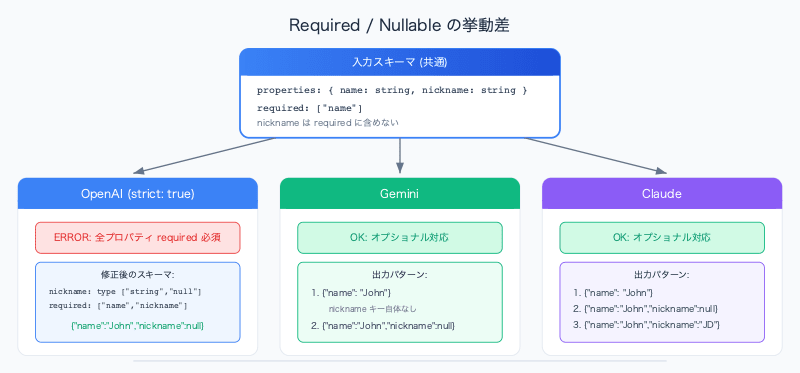
Required vs Optional — The Pitfall of "Required Fields"
When you start using structured output, you'll quickly run into the case of "wanting to make a field optional." This is where the behavior of the three providers differs significantly.
OpenAI: All Fields Must Be required
In OpenAI's strict: true mode, there is a constraint that all properties must be included in the required array .
{ "strict" : true , "schema" : { "type" : "object" , "properties" : { "name" : { "type" : "string" }, "nickname" : { "type" : [ "string" , "null" ] } }, "required" : [ "name" , "nickname" ], // nickname is also required "additionalProperties" : false } } // Output: {"name": "John", "nickname": null} ← field always present, value may be null // The field key itself will never be absent from the output To express "optional," make the type ["string", "null"] so it is required but nullable . The field key itself will never be missing from the output.
Gemini: True Optional Fields Are Possible
In Gemini, fields not included in required may be completely omitted from the output. The nullable syntax also uses the OpenAPI style nullable: true.
response_schema = { "type" : "object" , "properties" : { "name" : { "type" : "string" }, "nickname" : { "type" : "string" , "nullable" : True } }, "required" : [ "name" ] # nickname is not included in required } # Output: {"name": "John"} ← the nickname key itself is absent # Output: {"name": "John", "nickname": null} ← this is also valid Claude: Follows Standard JSON Schema Rules
Claude's Tool Use schema conforms to standard JSON Schema, and fields not included in required are optional.
input_schema = { "type" : "object" , "properties" : { "name" : { "type" : "string" }, "nickname" : { "type" : [ "string" , "null" ]} }, "required" : [ "name" ] # nickname is optional } # Output: {"name": "John"} ← OK # Output: {"name": "John", "nickname": null} ← OK # Output: {"name": "John", "nickname": "JD"} ← OK Required Behavior Comparison
OpenAI (strict)
Gemini
Claude
Optional fields Not possible — all properties must be required
Possible
Possible
Alternative for "optional" "type": ["string", "null"]Exclude from required
Exclude from required
Field absence Never happens
Can happen
Can happen
When using OpenAI's strict mode, downstream parsers should be implemented with the assumption that "keys always exist, but the value may be null." On the other hand, when using Gemini or Claude, you need to account for the possibility that "the key itself may not exist."
Nullable Types — Dialect Differences Between JSON Schema and OpenAPI
The syntax for expressing "a value can be null" differs between platforms. This stems from historical differences between the JSON Schema and OpenAPI specifications.
JSON Schema Style: type Array
OpenAI and Claude use the type array, which is the standard JSON Schema syntax.
{ "type" : [ "string" , "null" ] } This means "either string or null." It is the Union Type of JSON Schema.
OpenAPI Style: nullable Keyword
Gemini uses the nullable keyword from OpenAPI (formerly Swagger) style.
{ "type" : "string" , "nullable" : true } The meaning is the same, but the syntax is different.
Nullable Syntax Comparison
Syntax
Example
Dialect
OpenAI "type": ["string", "null"]{"nickname": {"type": ["string", "null"]}}JSON Schema
Gemini "nullable": true{"nickname": {"type": "string", "nullable": true}}OpenAPI
Claude "type": ["string", "null"]{"nickname": {"type": ["string", "null"]}}JSON Schema
As an implementation note, when sharing schema definitions across multiple platforms, a conversion layer to absorb these dialect differences will be necessary.
Summary
OpenAI guarantees schema compliance most explicitly with strict: true + additionalProperties: false. However, it has an all-fields-required constraint, and optionality must be substituted with nullableGemini uses a two-step approach of responseMimeType + responseSchema, which is the cleanest as an API. Be mindful of the OpenAPI-style nullableClaude uses the somewhat indirect method of Tool Use + forced tool_choice, but full JSON Schema support makes it the most flexible
Regardless of which platform you use, keep the following in mind:
Just instructing "return JSON" in the prompt is not enough — always use the dedicated structured output featureHow optional fields are handled differs by platform — this directly affects downstream parser implementationBe aware of schema dialect differences — when supporting multiple platforms, consider a conversion layer