
I tried to organize the local LLM situation in 2026

This page has been translated by machine translation. View original
Introduction
Hello, I'm Morishige from Classmethod's Manufacturing Business Technology Department.
From 2025 to 2026, the local LLM scene has been moving so fast that I can barely keep up. The impact of DeepSeek-R1, the expansion of Ollama's features, the improvement of Qwen2.5's Japanese performance, and the news that Claude Code can now run on local LLMs. Feeling like "I need to catch up properly soon," I wrote this article partly to organize my own thoughts.
This article is aimed at developers who regularly use coding AIs like Claude Code, GitHub Copilot, and Cursor, and organizes the local LLM options available as of January 2026. I'll answer questions like "Which model should I choose?", "Is the license okay?", and "What specs do I need?"
Why API Users Are Moving to Local LLMs
Improved Performance of Open-Source LLMs
Entering 2026, the performance of open-source LLMs has been improving rapidly. Especially in the coding domain, some models have started achieving scores comparable to commercial models on certain benchmarks. The perception that "open-source models have lower accuracy than commercial models" may be gradually becoming a thing of the past.
Differences in Cost Structure
The cost structure differs significantly between API billing and investing in your own GPU.
API billing is pay-as-you-go, making it inexpensive when usage is low. On the other hand, a self-hosted GPU environment has high upfront costs, but the unit cost decreases as usage increases. In some cases, once the monthly token processing volume exceeds a certain threshold, a self-hosted environment can be more cost-effective overall.
Which is better depends on your usage pattern, but it's nice to be in a situation where it's not "API only" but rather "you have options."
Handling Data Confidentiality
When dealing with "data that cannot be sent outside," local LLMs are a strong option. Data that cannot be sent to the cloud for compliance reasons—such as medical data, financial data, and internal confidential information—can be processed safely in a local environment.
Comparison of Major Models in 2026
Here's the main part. I've organized the major models attracting attention as of January 2026 by use case.
Recommended Models by Use Case
| Use Case | Recommended Model | Reason for Selection |
|---|---|---|
| Coding completion | Qwen3 or Qwen2.5-Coder | Stable JSON output, Apache 2.0 license |
| Coding (mid-size) | Devstral Small 2 | SWE-bench 68%, 256K context |
| General chat | Llama 3.3 | 128k context support, wide range of sizes |
| Cost efficiency | Qwen3-30B-A3B | MoE structure with effectively 3B active, Apache 2.0 |
| Lightweight/edge | gpt-oss-20b or Qwen3-1.7B | Runs on 16GB/8GB, reasoning model or lightweight general-purpose |
| Multimodal | Gemma 3-27B | Text, image, and video support, 140 languages |
| Math/reasoning | Nemotron 3 Nano | AIME 89.1%, 1M context |
| Reasoning tasks | DeepSeek-V3.2 | GPT-5 level, integrated reasoning and Agent |
Detailed Model Comparison
| Model | Strong Areas | Size | License | Features |
|---|---|---|---|---|
| Qwen3-14B | General/Japanese | 14B | Apache 2.0 | Performance equivalent to Qwen2.5-32B |
| Qwen3-30B-A3B | Cost efficiency | 30B (3B active) | Apache 2.0 | Lightweight operation with MoE |
| Qwen2.5-Coder | Code generation/JSON | 0.5B–32B | Apache 2.0 | Supports 29 languages |
| Qwen3-Coder | Agent/code generation | 480B (35B active) | Apache 2.0 | 256K context |
| Devstral Small 2 | Coding | 24B | Apache 2.0 | SWE-bench 68%, 256K context |
| gpt-oss-20b | Reasoning | 21B (3.6B active) | Apache 2.0 | OpenAI's first open-weight model |
| GLM-4.7-Flash | Reasoning/fast generation | 30B (3B active) | MIT | 24GB recommended, stability issues |
| Gemma 3-27B | Multimodal | 27B | Gemma proprietary | 140 languages, 128K context |
| Nemotron 3 Nano | Math/reasoning | 31.6B (3.6B active) | NVIDIA proprietary | Hybrid Mamba-Transformer MoE, 20 languages |
| DeepSeek-V3.2 | Reasoning/Agent integration | 671B (37B active) | MIT | Integrated reasoning and Agent, R1 successor |
| Kimi K2.5 | Agent/multimodal | 1T (32B active) | Modified MIT | Agent Swarm, 256K context |
| Llama 3.3 | General chat | 1B–405B | Meta proprietary | 128k context |
What Changed with Qwen3
The Qwen3 series, released in April 2025, significantly changed the local LLM landscape. Compared to the previous generation Qwen2.5, performance has improved even at the same parameter count. To put it simply, Qwen3-1.7B delivers performance equivalent to Qwen2.5-3B, and Qwen3-14B delivers performance equivalent to Qwen2.5-32B. In other words, you can now get equivalent quality with less VRAM.
Qwen3 includes Dense models (0.6B–32B) and MoE models (30B-A3B, 235B-A22B). In particular, Qwen3-30B-A3B has a total of 30B parameters but uses a MoE configuration where only 3B are effectively active, making it operable with 16GB VRAM. It's a strong option if you prioritize cost efficiency. With support for 119 languages, Japanese performance is also high, carrying on the strength of Qwen2.5's Japanese capabilities.
Also, Qwen3-Coder, released in July 2025, uses a MoE configuration that activates only 35B of its 480B total parameters and has recorded scores comparable to Claude Sonnet 4 on SWE-Bench Verified. However, running this locally as an individual is not currently realistic (requires 290GB VRAM). We'll have to wait for future releases of smaller Coder-specialized variants.
Personally, I think starting with the Qwen series is the best approach if you're new to local LLMs.
GLM-4.7-Flash Is Getting Attention Overseas
On January 19, 2026, GLM-4.7-Flash from Tsinghua University was released and has been attracting attention in overseas AI communities. With a MoE configuration of 30B total parameters (3B active), it has recorded a high score of 59.2% on SWE-bench (approximately 2.7 times that of Qwen2.5-Coder).
The reasons for the attention are as follows:
- Fully open-source (MIT license)
- Operates on 24GB+ VRAM (realistic on RTX 4090 or M3 Max)
- Compatible with OpenAI/Claude API, immediately compatible with existing tools (Cursor, etc.)
- Extremely low API pricing (input $0.07/1M, output $0.40/1M)
Local execution is also easy, with confirmed operation on llama.cpp and text-generation-webui. Along with Qwen2.5-Coder, it looks set to be a strong option for personal local environments.
Notes for Japanese Language Environments
A concern here is Japanese language performance. Many of the models above were trained primarily on English, and there are pros and cons to using them in Japanese.
| Model | Japanese Performance | Notes |
|---|---|---|
| Qwen3 series | ◎ | Supports 119 languages, inherits Qwen2.5's strengths |
| Qwen2.5 series | ◎ | Industry-leading class, some scores exceeding GPT-4 |
| Qwen3-Coder | ◎ | Based on Qwen3, supports 119 languages, good Japanese performance |
| Gemma 3 | ○ | Supports 140 languages, Japanese fine-tuned versions available |
| Nemotron 3 | ◎ | Supports 20 languages, trained on 682.8B Japanese tokens. JCommonsenseQA 92.5% (1035/1119) |
| DeepSeek-V3.2 | ○ | Official Japanese support from V3 onwards |
| Kimi K2.5 | ○ | Multilingual support, Japanese-specific benchmarks not yet published |
| gpt-oss | ○ | Multilingual support, Japanese is reasonably usable |
| GLM-4.7-Flash | ◎ | High Japanese performance, rated above DeepSeek |
| Devstral Small 2 | △ | Focuses on English and code, Japanese is limited |
| Llama 3.3 | △ | English-focused, may respond in English even when asked in Japanese |
For Japanese use, it's practical to focus on the Qwen3 series. I listed Llama 3.3 for "general chat" use, but in a Japanese environment, Qwen3-8B or Qwen3-14B will likely yield better results. (My assessment of Japanese performance is quite subjective...)
Nemotron 3 Nano supports 20 languages and has a substantial 682.8B tokens of Japanese training data. When I actually ran JCommonsenseQA (1,119 questions, 3-shot) on a DGX Spark, the result was 92.5% (1035/1119). This is on par with Gemma 3 12B (91.8%) and gpt-oss:20b (92.7%), which is impressive accuracy for 3.6B active parameters. NVIDIA has also published a synthetic persona dataset for Japan, Nemotron-Personas-Japan (1 million records, CC BY 4.0), which is being used for Japanese LLM fine-tuning.
Also, if you want to use Llama-based models, Japanese fine-tuned versions like ELYZA-Llama-3-JP-8B and Swallow are also options. They are published on Hugging Face and can also be used with Ollama.
Key Points to Watch Regarding Licenses
When using open-source LLMs commercially, you also need to pay attention to licenses. Even "free" models have different conditions, so let's organize them.
License Classification
| License | Representative Models | Commercial Use | Modification/Redistribution |
|---|---|---|---|
| Apache 2.0 | Qwen, Mistral, gpt-oss | Completely free | Free |
| Meta proprietary | Llama series | Basically OK (with conditions) | Conditional |
| Other free | DeepSeek, GLM, etc. | Basically free (check terms) | Depends on terms |
If in doubt, choosing Apache 2.0 (Qwen/Mistral series) is the safe bet. Llama is also practically fine in many cases, but if there's a possibility of scaling up in the future, models with Apache 2.0 licenses are safer from the start.
Hardware Requirements and Selection Guidelines
"Which models can run in my environment?" is something I'm sure many people are wondering. Here's a guide to models you can run based on VRAM capacity.
Model Selection Guide by VRAM
| VRAM | Runnable Models | Quantization | Use Case |
|---|---|---|---|
| 8GB | Qwen3-1.7B, Qwen 7B | 4bit | Light use, experimentation |
| 16GB | gpt-oss-20b, Qwen3-14B, Nemotron 3 Nano, Llama 8B | 8bit | Personal development, code completion |
| 24GB | Devstral Small 2, Gemma 3-27B, GLM-4.7-Flash | 4bit | Coding, reasoning |
| 24GB | Llama 70B | 4bit | Full-scale use, RAG |
| 48GB+ | Llama 405B | 8bit | Large-scale production |
| 150GB+ | Qwen3-Coder-480B (quantized) | 4bit | Enterprise |
About Quantization
"Quantization" is a technique that reduces the required memory at the cost of some model accuracy. Using 4-bit quantization can sometimes allow you to run a model that originally requires 48GB on 24GB. The impact on quality depends on the use case, but for coding assistance, 4-bit is practically sufficient.
Tool Selection Guide
There are several tools for running local LLMs, but here's a summary of recommendations as of 2026.
Comparison of Major Tools
| Tool | Recommendation | Features | CPU MoE Support | Best For |
|---|---|---|---|---|
| Ollama | ★★★★★ | Works with one command, API compatible | ✗ | People who want to try it out quickly via CLI |
| vLLM | ★★★★☆ | High throughput, optimized for production | △ (supplementary) | Production environments requiring high-volume request processing |
| LM Studio | ★★★★☆ | Visually operable via GUI | ◎ | Non-engineers, people who prefer GUI |
| llama.cpp | ★★★☆☆ | Lightweight and highly customizable | ◎ | Advanced users, edge devices |
About MoE Models and CPU MoE Offloading
MoE models (Qwen3-30B-A3B, gpt-oss-120b, etc.) activate only a subset of Experts when processing each token. Using the --n-cpu-moe option in llama.cpp, you can place Expert weights in CPU RAM while keeping the Attention layers in GPU VRAM, allowing you to run large-scale MoE models at practical speeds even with limited VRAM. LM Studio has also supported this feature in the GUI since v0.3.23.
Community reports show cases where gpt-oss-120b achieved about 3.5x the speed of Ollama (GitHub Issue #11772). If you want to use MoE models seriously, consider trying llama.cpp or LM Studio as well.
Note that in unified memory environments like Apple Silicon Macs or NVIDIA DGX Spark, where the CPU and GPU share the same memory pool, there is no memory-saving benefit from CPU MoE Offloading. On the other hand, since there is no PCIe transfer bottleneck when loading Experts, unified memory is structurally well-suited for MoE models.
Why I Recommend Ollama
If you're trying local LLMs for the first time, Ollama is the easiest option. If you need to handle large numbers of concurrent requests in a serious production environment, vLLM becomes an option (the setup is not as easy as Ollama, but throughput under high load can be several to nearly 20 times that of Ollama).
# Installation (Mac/Linux)
curl -fsSL https://ollama.com/install.sh | sh

# Fetch and run a model
ollama pull qwen2.5-coder:7b
ollama run qwen2.5-coder:7b
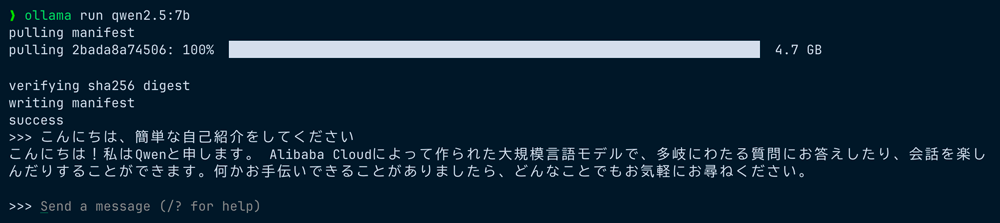
Running ollama run also automatically fetches the model. Japanese responses are smooth.
That's all it takes to get a local LLM running. Installation via Homebrew is also supported.
# Install via Homebrew
brew install ollama
Since Ollama also provides an OpenAI-compatible API endpoint, migrating from existing code is easy. I recommend the approach of "start with Ollama to get a feel for it."
For those who want to manage models and chat via a Web UI, LM Studio is also recommended. It allows you to search, download, and run models entirely through a GUI, and also features a local server with OpenAI compatibility. If you prefer to operate things visually rather than through CLI, give it a try.
About API Compatibility
In addition to the OpenAI API-compatible endpoint (/v1/chat/completions), Ollama also provides an Anthropic API-compatible endpoint (/v1/messages). Since v0.15, the ollama launch claude command has also been added, making it possible to try integration with Claude Code.
However, there are currently some challenges with Claude Code integration. For details, please refer to the related article "Trying to Run Claude Code Locally with Ollama v0.15" where I've summarized my verification results.
Summary
Finally, here's a summary of the concrete steps for getting started with local LLMs.
Step 1: Choose a Model
| Use Case | Recommended Model |
|---|---|
| Coding (24GB+) | Devstral Small 2 or Qwen2.5-Coder |
| Coding (16GB) | Qwen3-14B or gpt-oss-20b |
| General chat (Japanese) | Qwen3-14B |
| General chat (English) | Llama 3.3 |
| Lightweight/trial | Qwen3-1.7B or gpt-oss-20b |
Step 2: Check Your Hardware
If you have less than 16GB VRAM, choose a 4-bit or 8-bit quantized model. It will also run on a MacBook's unified memory, but inference speed will be slower than a dedicated GPU.
Step 3: Start with Ollama
# Installation
curl -fsSL https://ollama.com/install.sh | sh

# To try general chat (Japanese)
ollama pull qwen3:8b
ollama run qwen3:8b

# To try coding completion
ollama pull qwen2.5-coder:7b
ollama run qwen2.5-coder:7b
I feel that this year is the turning point when open-source LLMs transition from "hobby experiments" to "practical tools." If you have API experience, migrating to local LLMs is easier than you might imagine.
For Japanese language environments, the Qwen3 series is currently the recommended choice. Qwen3-14B can deliver performance equivalent to Qwen2.5-32B with less than half the VRAM, making it excellent in terms of cost performance. Why not try running Qwen3 with Ollama first to get a feel for it? You may be able to experience the unique benefits of local LLMs, such as cost reduction and ensuring data confidentiality.
Reference Links
- Ollama Official Website
- LM Studio Official Website
- vLLM Official Documentation
- Hugging Face Open LLM Leaderboard
- Qwen3 Official Blog
- Qwen2.5-Coder Model Card
- Qwen3-Coder Official Blog
- Qwen3-Coder GitHub
- gpt-oss Hugging Face
- Devstral Small 2 Official Blog
- GLM-4.7-Flash Official (Z.AI)
- GLM-4.7-Flash Hugging Face
- Llama 3.3 Official Page
- DeepSeek-V3.2 Official Blog
- Kimi K2.5 Hugging Face
- Gemma 3 Official Blog
- Gemma 3 Hugging Face
- Nemotron 3 Nano Official Blog
- Nemotron-Personas-Japan (HuggingFace)
- ELYZA Official Website

