
I Tried Out NVIDIA's VLM "Cosmos 3" Locally

This page has been translated by machine translation. View original
Introduction
Hello, I'm Uchikaneku from the Manufacturing Business Technology Department at Classmethod.
This time I tried out a local LLM (VLM), something I've been interested in for a while.
This article focuses on setup; I'll do the full-scale evaluation in a separate article.
What is Cosmos 3?
Cosmos 3 is an open model published by NVIDIA for "physical AI" such as industrial robots and autonomous driving.
It is not a single model; there are multiple models depending on use case and specs.
The model's functions fall broadly into Reasoner (looks at images and videos and answers in text = the role of a VLM) and Generator (generates videos and robot motions). This time I won't touch media generation, so I'll use Nano and only the Reasoner function.
The reason I chose Nano is that the sample code specifies model_name = "nvidia/Cosmos3-Nano", so I simply followed that for now.
What runs locally is the cosmos-framework side.
There is no need to clone the Cosmos 3 repository. The model itself is downloaded from Hugging Face. (Described later)
By the way, its predecessor Cosmos-Reason2 exists, but the README says development has ended and it is now maintenance-only, recommending migration to Cosmos 3, so I won't cover it this time. If you're curious, please check the link.
Test Environment
The testing was done on the DGX Spark in the Yodoyabashi office.
This is an AI workstation sold by NVIDIA, and it has monster specs including a whopping 128GB of memory, but I'll skip the details since they stray from the main topic.
For details, please see this article.
| Item | Details |
|---|---|
| Device | NVIDIA DGX Spark |
| SoC | NVIDIA GB10 Grace Blackwell Superchip |
| Memory | 128GB unified memory (shared by CPU/GPU) |
| OS | DGX OS 7.6.0 (Ubuntu 24.04 based) |
| Architecture | aarch64 (Arm) |
| NVIDIA driver | 580.178.04 |
| CUDA | 13.0 |
| Python | 3.13.14 |
| uv | 0.11.29 |
| PyTorch | 2.11.0 |
| transformers | 5.8.0 |
| accelerate | 1.13.0 |
| Model | nvidia/Cosmos3-Nano |
Checks Before Running on a Shared Machine
As a premise, the test environment is shared by multiple people, so before running anything I check, as a matter of etiquette, that no one else is working on the machine.
Check whether anyone is logged in
# Check whether anyone else is logged in
$ who
cm-uchiganeku pts/0        2026-11-20 13:03
It looks like only I am using it right now.
Check whether logged-out users are running anything
$ ps -eo user,pid,%cpu,%mem,etime,cmd --sort=-%cpu | head
USER         PID %CPU %MEM     ELAPSED CMD
user-a      4993  0.3  0.3 11-05:41:42 claude ...
user-a     54325  0.1  0.2 11-05:20:14 node ...
gdm         3154  0.0  0.2 11-05:41:53 /usr/bin/gnome-shell
(一部省略・マスクしています)
claude and node have been running for 11 days straight, but judging from the CPU usage they look like resident processes that are just idle, so it doesn't seem they are actively being used for something.
Note that %CPU is an average rather than the current value, so something might be running right now, but I'll verify that in the following steps.
Check just in case that no process is using the GPU
$ nvidia-smi
Fri Nov 20 15:41:02 2026
+-----------------------------------------------------------------------------------------+
| NVIDIA-SMI 580.178.04             Driver Version: 580.178.04     CUDA Version: 13.0     |
+-----------------------------------------+------------------------+----------------------+
| GPU  Name                 Persistence-M | Bus-Id          Disp.A | Volatile Uncorr. ECC |
| Fan  Temp   Perf          Pwr:Usage/Cap |           Memory-Usage | GPU-Util  Compute M. |
|                                         |                        |               MIG M. |
|=========================================+========================+======================|
|   0  NVIDIA GB10                    On  |   0000000F:01:00.0 Off |                  N/A |
| N/A   34C    P8              4W /  N/A  | Not Supported          |      0%      Default |
|                                         |                        |                  N/A |
+-----------------------------------------+------------------------+----------------------+

+-----------------------------------------------------------------------------------------+
| Processes:                                                                              |
|  GPU   GI   CI              PID   Type   Process name                        GPU Memory |
|        ID   ID                                                               Usage      |
|=========================================================================================|
|    0   N/A  N/A            2851      G   /usr/lib/xorg/Xorg                      126MiB |
|    0   N/A  N/A            3154      G   /usr/bin/gnome-shell                     23MiB |
+-----------------------------------------------------------------------------------------+
Only Xorg and gnome-shell for display are there, and GPU-Util is 0%. The GPU doesn't seem to be in use.
Check whether there is enough memory
$ free -h
               total        used        free      shared  buff/cache   available
Mem:           121Gi       4.2Gi        90Gi        19Mi        27Gi       117Gi
Swap:           15Gi          0B        15Gi
The CPU is a 20-core ARM64-based chip, sharing 128GB of LPDDR5x memory with the integrated GPU (iGPU).
Source: System Overview - NVIDIA DGX Spark Porting Guide (CPU Architecture)
The DGX Spark shares memory between the CPU and GPU, and apparently the memory used by the GPU is taken from the same pool as the OS, so I check the memory occupancy as well.
available is 117Gi, so it doesn't look like anything is hogging it.
Since the checks showed no problems, let's actually run it.
Setup
Installing uv
The official README states that uv version 0.11.29 is required, so I install it with 0.11.29 specified.
Install the package with the required
uvversion,0.11.29
# Install uv with a specified version
$ curl -LsSf https://astral.sh/uv/0.11.29/install.sh | sh
$ uv --version
uv 0.11.29 (aarch64-unknown-linux-gnu)
Logging in to Hugging Face
Log in to Hugging Face from the console.
Hugging Face is a platform for publishing and sharing AI model weight files and datasets.
The model this time is not gated, so you can download it without logging in, but without logging in the download speed is throttled and it is absurdly slow, so I strongly recommend logging in. (For this model, it showed about 13 hours remaining without logging in.)
Naturally you can't log in without an account, so if you don't have one, create one here and log in on your browser.
# Log in from the console
# For the authentication method, choose Log in with your browser. Use the up/down arrow keys to select and press Enter to confirm
$ uvx hf auth login
? How would you like to log in?  [Use arrows, Enter to confirm]
> Log in with your browser
  Paste an access token

# Your default browser will open automatically; enter the 8-character code shown in the console.
# If it doesn't open, copy the displayed URL and paste it into the browser's address bar
? How would you like to log in? Log in with your browser

    Open this URL in your browser:
        https://hf.co/oauth/device

    And enter the code: XXXX-XXXX

    Waiting for authorization.
After entering the code, press the button labeled Authorize.
If the browser shows "You're all set!", the login was successful.
# If Login successful. appears on the screen, it worked.
    Waiting for authorization..............
Token is valid.
The token `oauth-cm-uchiganeku` has been saved to /home/cm-uchiganeku/.cache/huggingface/stored_tokens
Your token has been saved to /home/cm-uchiganeku/.cache/huggingface/token
Login successful.
The current active token is: `oauth-cm-uchiganeku`
Note: This token will be refreshed automatically when it expires.
Cloning cosmos-framework
Clone the repository containing the code for running Cosmos 3 and inference samples.
# Fetch only the latest state with --depth 1 (no past history)
$ git clone --depth 1 https://github.com/NVIDIA/cosmos-framework.git
$ cd cosmos-framework

# Check the fetched commit
$ git log -1 --format="%H %cd"
a3fb34690e157972a9d04244c11b16022c9d6479 Fri Nov 20 21:13:45 2026 -0800
The commit ID at the time of writing is a3fb34690e157972a9d04244c11b16022c9d6479.
Running the official sample
Run the official sample bundled with the cloned repository.
The sample defines the required dependencies, so uv run alone takes care of everything from environment setup to execution.
#!/usr/bin/env -S uv run --script
# SPDX-FileCopyrightText: Copyright (c) 2026 NVIDIA CORPORATION & AFFILIATES. All rights reserved.
# SPDX-License-Identifier: OpenMDW-1.1

# /// script
# requires-python = ">=3.10"
# dependencies = [
#   "accelerate==1.13.0",
#   "torch==2.11.0",
#   "torchvision",
#   "transformers==5.8.0",
#   "transformers-cosmos3",
# ]
# [tool.uv.sources]
# transformers-cosmos3 = { path = "../", editable = true }
# ///
$ cd packages/transformers-cosmos3

# Run the sample
$ uv run scripts/inference_example.py
The model is downloaded on the first run, so it will probably take a little while.
In my environment it took about 15 minutes.
Verifying Operation
Let's look at the contents and results of the sample we ran.
packages/transformers-cosmos3/scripts/inference_example.py
To roughly explain what it does, the section below loads a single image and instructs the local model to describe it in detail.
# Create inputs
conversation = [
    {
        "role": "user",
        "content": [
            {
                "type": "image",
                "image": "https://github.com/nvidia-cosmos/cosmos-dependencies/raw/2b17a2413bd86b2cf9b03823637108851e4ddf2d/inputs/vision/robot_153.jpg",
            },
            {"type": "text", "text": "Caption the image in detail."},
        ],
    },
]

# Process inputs
inputs = processor.apply_chat_template(
    conversation,
    tokenize=True,
    add_generation_prompt=True,
    return_dict=True,
    return_tensors="pt",
    processor_kwargs={"fps": 4},
)
inputs = inputs.to(model.device)

# Run inference
generated_ids = model.generate(**inputs, max_new_tokens=4096)
Execution result
$ uv run scripts/inference_example.py
Uninstalled 1 package in 0.61ms
Installed 1 package in 3ms
Fetching 8 files: 100%|████████████████████████████████████████████████| 8/8 [15:30<00:00, 116.34s/it]
Download complete: 100%|█████████████████████████████████████████| 31.5G/31.5G [15:31<00:00, 33.8MB/s]
Loading weights: 100%|██████████████████████████████████████████████████████████████████████████| 750/750 [00:00<00:00, 1185.12it/s]
generation_config.json: 100%|██████████████████████████████████████████████████████████████████████| 269/269 [00:00<00:00, 3.17MB/s]
preprocessor_config.json: 100%|████████████████████████████████████████████████████████████████████| 390/390 [00:00<00:00, 4.83MB/s]
chat_template.json: 5.50kB [00:00, 30.9MB/s]
tokenizer_config.json: 10.9kB [00:00, 59.6MB/s]
vocab.json: 2.78MB [00:00, 41.0MB/s]
merges.txt: 1.67MB [00:00, 43.5MB/s]
tokenizer.json: 7.03MB [00:00, 48.0MB/s]
video_preprocessor_config.json: 100%|██████████████████████████████████████████████████████████████| 385/385 [00:00<00:00, 4.76MB/s]
--------------------
The image depicts a high-tech laboratory or workshop setting, characterized by a light-colored wooden table at the center. On this table, there are two robotic arms with gray and black metallic components, resembling human hands. The robotic arms are positioned on either side of a dark brown, square wooden block, which is elevated on a black metal frame.

In the background, there is a person dressed in a blue and white jacket, black pants, and black shoes, standing near a black office chair with a black cushion. The floor is tiled with gray tiles, and there is a black and yellow caution tape on the left side.

To the right, there is a black desk equipped with a computer monitor and a red apple placed on top of a brown wooden surface. A black tripod is also visible in the background. The scene is illuminated by a light source from the top right, casting shadows on the table and floor. The overall environment suggests a high-tech workspace, possibly used for robotics or engineering experiments.
--------------------
Checking the Answer
The image that was loaded is this one.
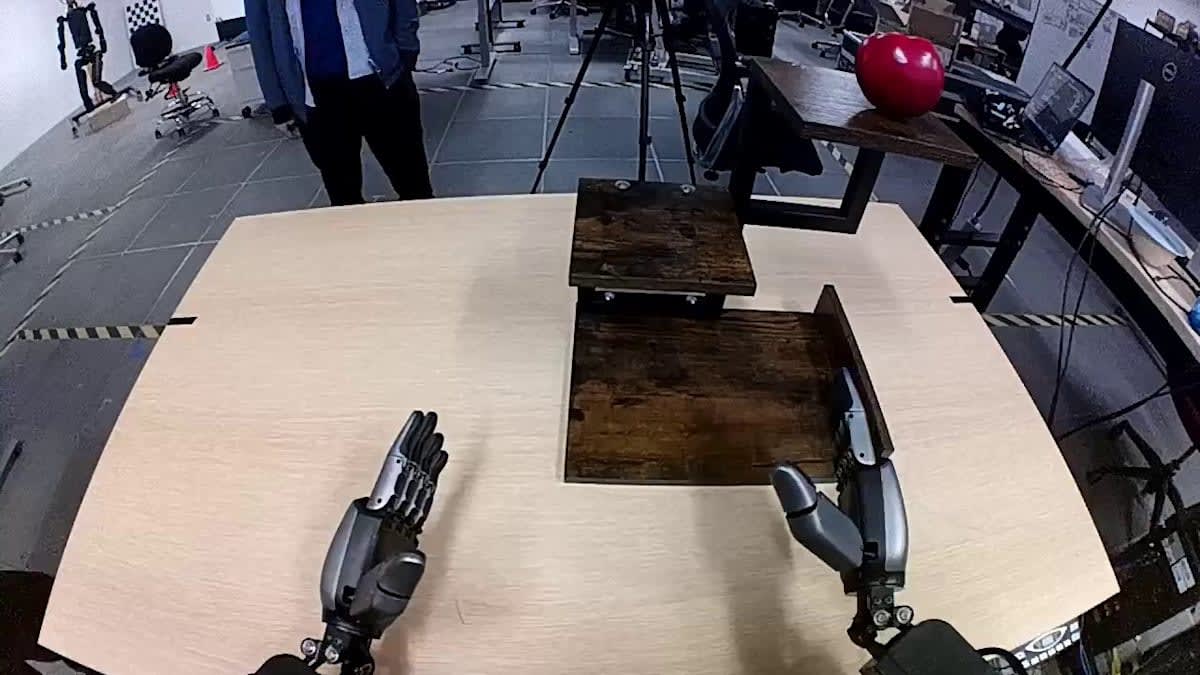
Source: NVIDIA cosmos-dependencies (Apache License 2.0)
The translation of the model's answer is as follows. (Translated with Claude Opus 5.5)
この画像は、ハイテクな実験室または作業場の様子を写しており、中央に明るい色の木製テーブルがあるのが特徴です。テーブルの上には、灰色と黒の金属部品でできた、人間の手に似た2本のロボットアームがあります。ロボットアームは、黒い金属フレームの上に据えられた濃い茶色の四角い木製ブロックを挟むように、その両側に配置されています。

背景には、青と白のジャケット、黒いズボン、黒い靴を身に着けた人物が、黒いクッションの付いた黒い事務椅子の近くに立っています。床は灰色のタイル張りで、左側には黒と黄色の注意テープがあります。

右側には、コンピューターのモニターが置かれた黒い机があり、茶色の木製の台の上には赤いリンゴが置かれています。背景には黒い三脚も見えます。シーンは右上からの光で照らされていて、テーブルや床に影が落ちています。全体的な環境から、ロボット工学やエンジニアリングの実験に使われているハイテクな作業空間であることがうかがえます。
| Item | Verdict |
|---|---|
| Light-colored wooden table in the center | ✅ Correct |
| Human-hand-like robot arms on left and right | ✅ Correct |
| Dark brown wooden stand in the center | ✅ Correct (described as a "block") |
| Person in the back (blue jacket, black pants) | ✅ Correct |
| The person's black shoes | 🤔 Cannot be determined from the image |
| Black office chair | ✅ Correct |
| Gray tiled floor | ✅ Correct |
| Black and yellow caution tape | ✅ Correct |
| Desk and monitor on the right | ✅ Correct |
| Red apple on the wooden stand | ✅ Correct |
| Black tripod | ✅ Correct |
| Lighting from the top right | 🤔 Cannot be determined from the image |
| Humanoid robot and traffic cone at the back left | 🙊 Not mentioned |
It interprets most things accurately, such as the wooden table, the robot arms on the left and right, and the dark stand in the center (interpreted as a block), but we can also see that it outputs information that cannot be determined from the image, such as the black shoes and the lighting from the top right.
Also, it makes no mention of the black humanoid robot at the back left (it might be a mannequin) or the red traffic cone, both of which a human can see, so some oversights are also visible.
Trying My Own Image
Since I'm here, I'll also try an image I took myself.

I rewrote the image location and prompt in Create inputs, and the image is placed on the same machine.
# Create inputs
conversation = [
    {
        "role": "user",
        "content": [
            {
                "type": "image",
                "image": "/home/cm-uchiganeku/cosmos-framework/blog_test_resources/65BA1C3A-19F3-4E0D-8559-C34A26FBCB59.jpg",
            },
            {"type": "text", "text": "この生き物について日本語で解説してください。"}
        ],
    },
]
Execution result
$ uv run scripts/blog_example.py
Installed 58 packages in 91ms
Fetching 8 files: 100%|████████████████████| 8/8 [00:00<00:00, 4522.77it/s]
Download complete: : 0.00B [00:00, ?B/s]
Loading weights: 100%|████████████████████| 750/750 [00:00<00:00, 1242.45it/s]
--------------------
画像に写っているのは、白と茶色の毛色を持つ猫です。この猫は、木製の机の上に横たわっており、体を机の縁に沿って伸ばしています。猫の顔はカメラの方を向いており、大きな緑色の目でこちらを見つめています。猫の前足は机の縁から下に垂れ下がっており、後ろ足は机の上に置かれています。猫の体は白と茶色の毛色で、頭部と背中には茶色の毛が、体の下部と前足には白い毛が見られます。猫の表情はリラックスしており、目は少し開いています。猫の周囲には、机の下に置かれた茶色の布や、机の下に見える床が見えます。
--------------------
The visual description gives the impression of being quite accurate. "The eyes are slightly open" actually looks more like the eyes are wide open. Even discounting that, it seems good at reading what is going on in an image.
However, even though I asked it to "explain", the output centers on describing appearance rather than explaining the cat itself.
Where I Got Stuck
1. An error occurs due to a uv version mismatch
error: Required uv version `==0.11.29` does not match the running version `0.13.9`. Update `uv` by
       running `uv self update 0.11.29`.
- Symptom: When I ran the sample code with the latest uv (0.13.9), it stopped with an error message.
- Cause: cosmos-framework pins the uv version to 0.11.29, so a version mismatch caused the error.
- Fix: Reinstalled uv with 0.11.29 specified (see the Setup section).
2. Downloads are extremely slow when not logged in to Hugging Face
Warning: You are sending unauthenticated requests to the HF Hub. Please set a HF_TOKEN to enable higher rate limits and faster downloads.
- Symptom: The model download speed on the first run was far too slow. It only reached about 643kB/s, with 13 hours remaining, so I aborted.
- Cause: Since the model is not gated, downloading itself is possible even when not logged in, but if you aren't logged in to Hugging Face on the console, heavy speed limits are applied to downloads.
- Fix: After logging in to Hugging Face and re-running, the download speed improved, and the download finished in 15 minutes 31 seconds at an average of about 33.8MB/s.
3. The output broke when I rewrote the sample code to use the lighter Edge (4B) model
$ uv run scripts/inference_example.py
(中略)
[transformers] You are using a model of type `cosmos3_edge` to instantiate a model of type `cosmos3_omni`. This may be expected if you are loading a checkpoint that shares a subset of the architecture (e.g., loading a `sam2_video` checkpoint into `Sam2Model`), but is otherwise not supported and can yield errors. Please verify that the checkpoint is compatible with the model you are instantiating.
(中略)
[transformers] Cosmos3ForConditionalGeneration LOAD REPORT from: nvidia/Cosmos3-Edge
Key                                                                      | Status     |
-------------------------------------------------------------------------+------------+-
model.visual.encoder.layers.{0...26}.layer_norm1.weight                  | UNEXPECTED |
model.visual.embeddings.position_embedding.weight                        | UNEXPECTED |
model.projector.linear_fc2.weight                                        | UNEXPECTED |
(中略)
model.visual.blocks.{0...26}.mlp.linear_fc1.weight                       | MISSING    |
model.language_model.layers.{0...27}.mlp.gate_proj.weight                | MISSING    |
model.visual.merger.linear_fc2.weight                                    | MISSING    |
(中略)

Notes:
- UNEXPECTED:	can be ignored when loading from different task/architecture; not ok if you expect identical arch.
- MISSING:	those params were newly initialized because missing from the checkpoint. Consider training on your downstream task.
(中略)
--------------------
 Centrum점이 PW� Wellington kā centres聲優actly parc Wellington kāーキ � � parc centre**:
(以下、意味不明な文字列が続くため省略)
--------------------
- Symptom: On the first attempt, I tried to verify operation with the lightweight Edge (4B) model, but it spat out meaningless strings and did not work properly.
- Cause: The sample code's weight-loading process is geared toward the Nano family, and for Edge, which has a different model structure, the weights are not loaded correctly.
- Fix: Run with the default Nano specified. If you want to use Edge, rather than forcibly rewriting the sample, the model card describes how to run it with vLLM. (Not tested this time)
Cleanup
The model files are fairly large, so I delete them after testing. (Especially since this is a shared environment)
# Log out of Hugging Face
$ uvx hf auth logout

# The model itself (Nano is about 31.5GB, the Edge I tried is about 7.7GB)
$ rm -rf ~/.cache/huggingface/hub/models--nvidia--Cosmos3-Nano
$ rm -rf ~/.cache/huggingface/hub/models--nvidia--Cosmos3-Edge

# The cloned repository
$ rm -rf ~/cosmos-framework

# The environment and cache created by uv
$ uv cache clean
Summary
This was my first time touching a local LLM (VLM), but the setup itself went relatively smoothly.
Honestly, the descriptions were more accurate than I expected, and I felt it understood the details of the image quite well.
Some factories likely have information they don't want to send outside at all, so for uses that don't require overly complex reasoning, I think it could well become an option compared with cloud-based AI.
By the way, at the time of writing (November 2026), the DGX Spark costs around 1.5 million yen (the lowest price on Kakaku.com; it varies by retailer).
In future articles, I'm thinking of building automation that simulates actual factory use cases and comparing performance and cost with cloud-based AI.
Thank you for reading.