
I tried deploying Epic Games' Lore server to AWS Fargate + S3 + DynamoDB with Terraform

This page has been translated by machine translation. View original
Introduction
Epic Games' version control system Lore allows self-hosting of the server (loreserver). In addition to local disk, AWS S3 and DynamoDB can be chosen as storage backends. This article covers deploying loreserver on AWS and verifying that it can actually be used from a local lore client.
The goal of the configuration is to delegate as much as possible to managed services. By placing immutable data in S3 and mutable state in DynamoDB, storage becomes serverless. By delegating loreserver execution to ECS Fargate, there is no need to maintain EC2 instances.
loreserver worked without issues with the S3 and DynamoDB backends, and was successfully deployed on Fargate with the ability to push from local. The only Lore-specific dependencies are S3 and DynamoDB; everything else is a general Fargate configuration. However, there are some tricks to the DynamoDB table schema that must be created in advance, and the permissions required for the task role.
What is Lore
Lore is an open-source version control system published by Epic Games in June 2026. It primarily targets projects where code and large binaries coexist, especially game and entertainment production. The server can be self-hosted, and AWS S3 and DynamoDB can be chosen as storage backends.
Verification Environment
- Region: ap-northeast-1 (Tokyo)
- Terraform: 1.15
- Docker (buildx): used for image builds
- Authentication: using aws-vault profile
Target Audience
- Cloud engineers who want to self-host Lore for their team
- Those considering adopting Lore for game development or entertainment production who want to get a sense of operational requirements
References
- Lore Official Repository (GitHub)
- Lore Official Documentation
- Lore System Design (description of S3/DynamoDB backend)
- Local server deployment (official how-to)
Configuration
The overall configuration is as follows. The client connects to loreserver on Fargate via a Network Load Balancer, and loreserver reads and writes to S3 and DynamoDB.
- The immutable store is placed in S3, and the mutable store and lock store are placed in DynamoDB. Both are serverless and can be used on a pay-per-use basis without worrying about capacity.
- loreserver execution is handled by ECS Fargate. There are no EC2 instances to maintain, and task residency and scaling are delegated to AWS.
- Communication with clients uses gRPC over TCP. Lore can also use QUIC over UDP, but since clone and push can be completed with TCP alone, the load balancer can be kept simple.
- The load balancer uses a Network Load Balancer TCP listener.
Prerequisites: Lore Specifications
Before deployment, there are some important points to understand about the loreserver AWS backend.
When loreserver starts up, it checks for the existence of the configured S3 bucket and DynamoDB tables. If they do not exist, it stops with an error. This means the bucket and tables must be created in advance. They are not created automatically.
Four DynamoDB tables are required, each with a defined key schema. Attribute types: B is binary, S is string.
- fragments: partition key
hash(B), sort keyrepository_context(B) - metadata: partition key
hash(B) - mutable: partition key
repository_id(B), sort keykey(B) - locks: partition key
hash(B), sort keyrepositoryBranch(B), and 3 GSIs
The 3 GSIs for the locks table are as follows, all with ALL projection:
- owner-repo-branch: partition key
ownerId(S), sort keyrepositoryBranch(B) - repo-branch: partition key
repository(B), sort keybranch(B) - repo-branch-description: partition key
repositoryBranch(B), sort keydescription(S)
These schemas were confirmed from Lore's source code (lore-aws/src/store).
Step 1: Create Storage with Terraform
First, create the S3 bucket and 4 DynamoDB tables. This is the Lore-specific part. DynamoDB is set to on-demand (PAY_PER_REQUEST) to keep costs low.
For the locks table, attributes referenced by GSIs must also be defined as attributes. In Terraform, this is written as follows (excerpt):
resource "aws_dynamodb_table" "locks" {
  name         = "lorec-locks"
  billing_mode = "PAY_PER_REQUEST"
  hash_key     = "hash"
  range_key    = "repositoryBranch"

  attribute { name = "hash"             type = "B" }
  attribute { name = "repositoryBranch" type = "B" }
  attribute { name = "repository"       type = "B" }
  attribute { name = "branch"           type = "B" }
  attribute { name = "ownerId"          type = "S" }
  attribute { name = "description"      type = "S" }

  global_secondary_index {
    name            = "owner-repo-branch"
    hash_key        = "ownerId"
    range_key       = "repositoryBranch"
    projection_type = "ALL"
  }
  # repo-branch and repo-branch-description are defined similarly
}
The fragments, metadata, and mutable tables are defined simply according to the schemas described above.
Step 2: IAM Task Role
Create a task role for loreserver to access S3 and DynamoDB. An important note: CRUD permissions alone (such as GetItem and PutItem) are not sufficient. Since loreserver verifies table existence at startup using DescribeTable, dynamodb:DescribeTable is required. Without this, the container will crash immediately after starting (details described later).
The DynamoDB actions to grant to the task role are as follows:
actions = [
  "dynamodb:DescribeTable",
  "dynamodb:GetItem",
  "dynamodb:PutItem",
  "dynamodb:UpdateItem",
  "dynamodb:DeleteItem",
  "dynamodb:Query",
  "dynamodb:BatchGetItem",
  "dynamodb:BatchWriteItem",
  "dynamodb:ConditionCheckItem",
]
Target resources are the ARNs of the 4 tables and index/* for the locks table. For S3, grant GetObject, PutObject, and ListBucket on the target bucket.
Step 3: Build Container Image and Push to ECR
Build the loreserver container image from the Dockerfile in the official repository.
The first point to note is the CPU architecture. Use linux/amd64 images for Fargate. Lore's arm64 image assumes SVE instructions for Graviton3, and does not work on Apple Silicon or Fargate ARM64 (Graviton2). Building amd64 with emulation on Apple Silicon takes several to tens of minutes for Rust compilation, but it does complete.
The second point is how to pass configuration. The official image reads configuration from /etc/lore/config. Create an overlay image with a local.toml pointing to the AWS backend baked in.
FROM lore-server:base-amd64
COPY local.toml /etc/lore/config/local.toml
local.toml should be as follows. Since actual AWS is used, no endpoint is specified, and s3_force_path_style is set to false. Match the bucket name and table names to those created in Step 1.
[immutable_store]
mode = "aws"
[mutable_store]
mode = "aws"
[lock_store]
mode = "aws"

[plugins.aws.immutable_store]
s3_bucket = "lorec-store-<account ID>"
s3_region = "ap-northeast-1"
s3_force_path_style = false
dynamodb_fragments_table = "lorec-fragments"
dynamodb_metadata_table = "lorec-metadata"
dynamodb_region = "ap-northeast-1"

[plugins.aws.mutable_store]
dynamodb_table = "lorec-mutable"
dynamodb_region = "ap-northeast-1"

[plugins.aws.lock_store]
dynamodb_table = "lorec-locks"
dynamodb_region = "ap-northeast-1"
Push the built image to ECR.
Step 4: Network and Fargate
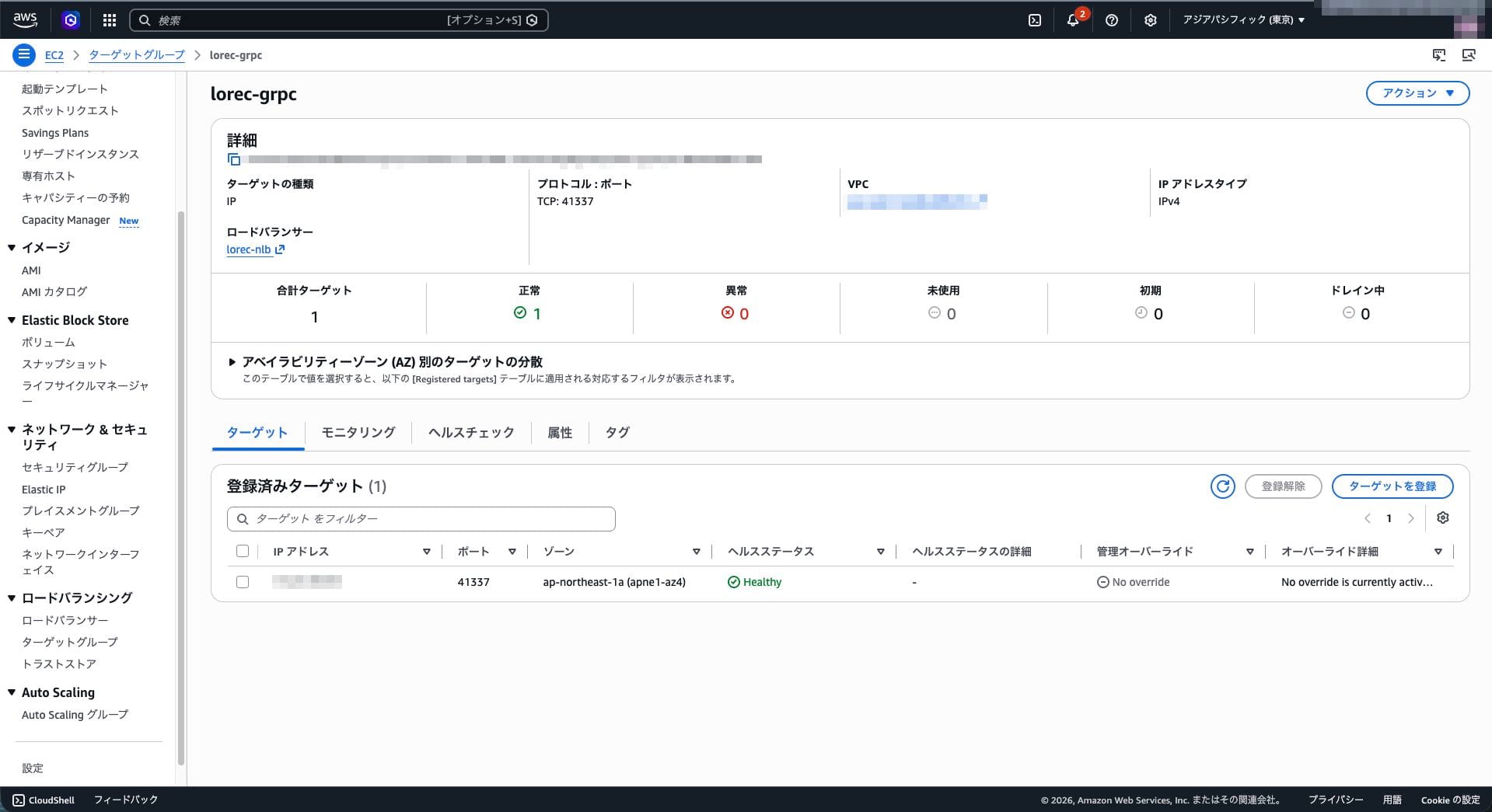
Create a Network Load Balancer and direct the TCP listener on port 41337 to the Fargate service's target group. Set the target group health check to point to loreserver's HTTP endpoint 41339 at /health_check.
Use a two-tier security group setup. The NLB security group allows only port 41337 from your own IP, and the task security group only accepts traffic from the NLB security group. This allows public exposure while limiting access to yourself.
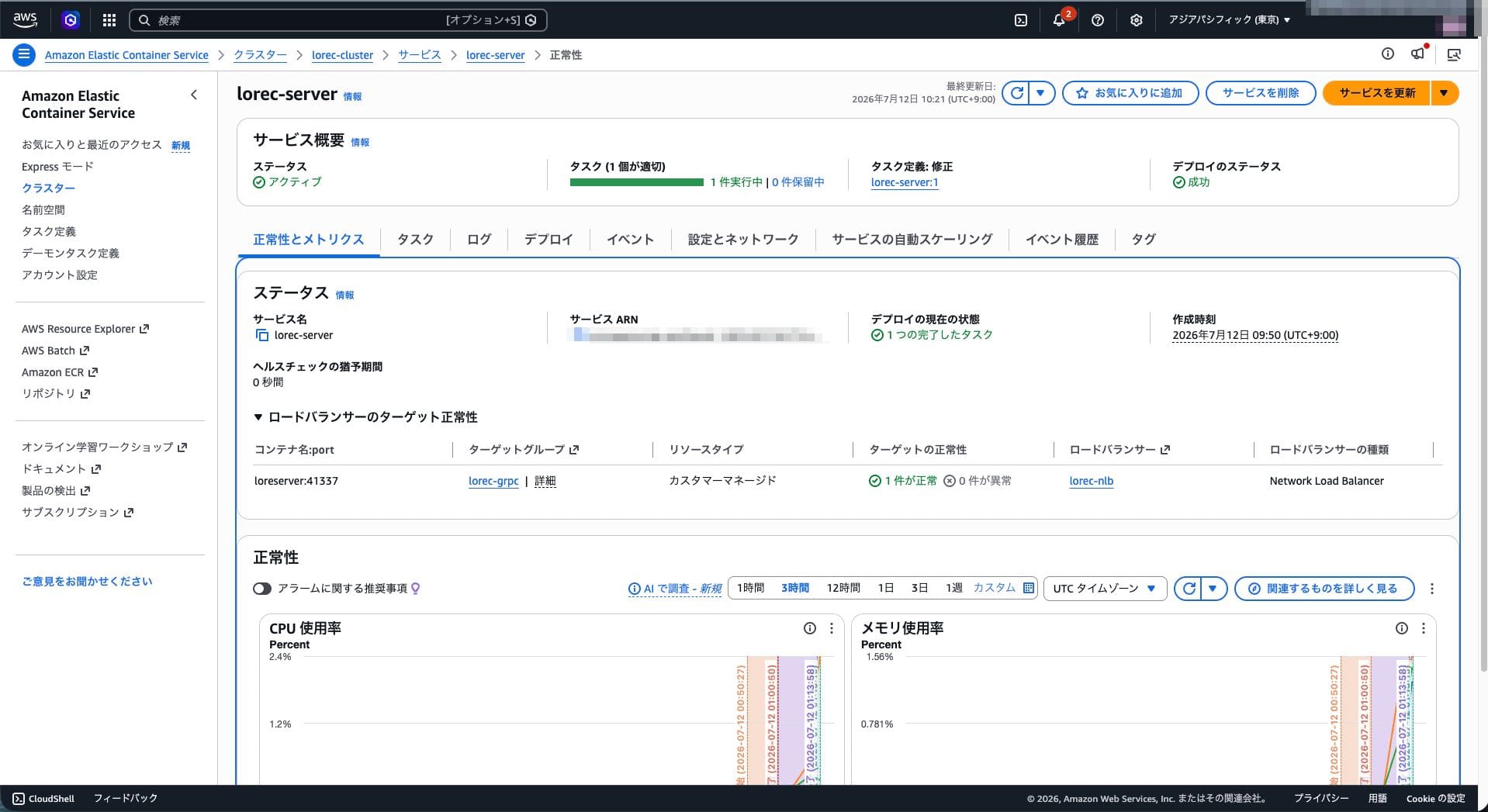
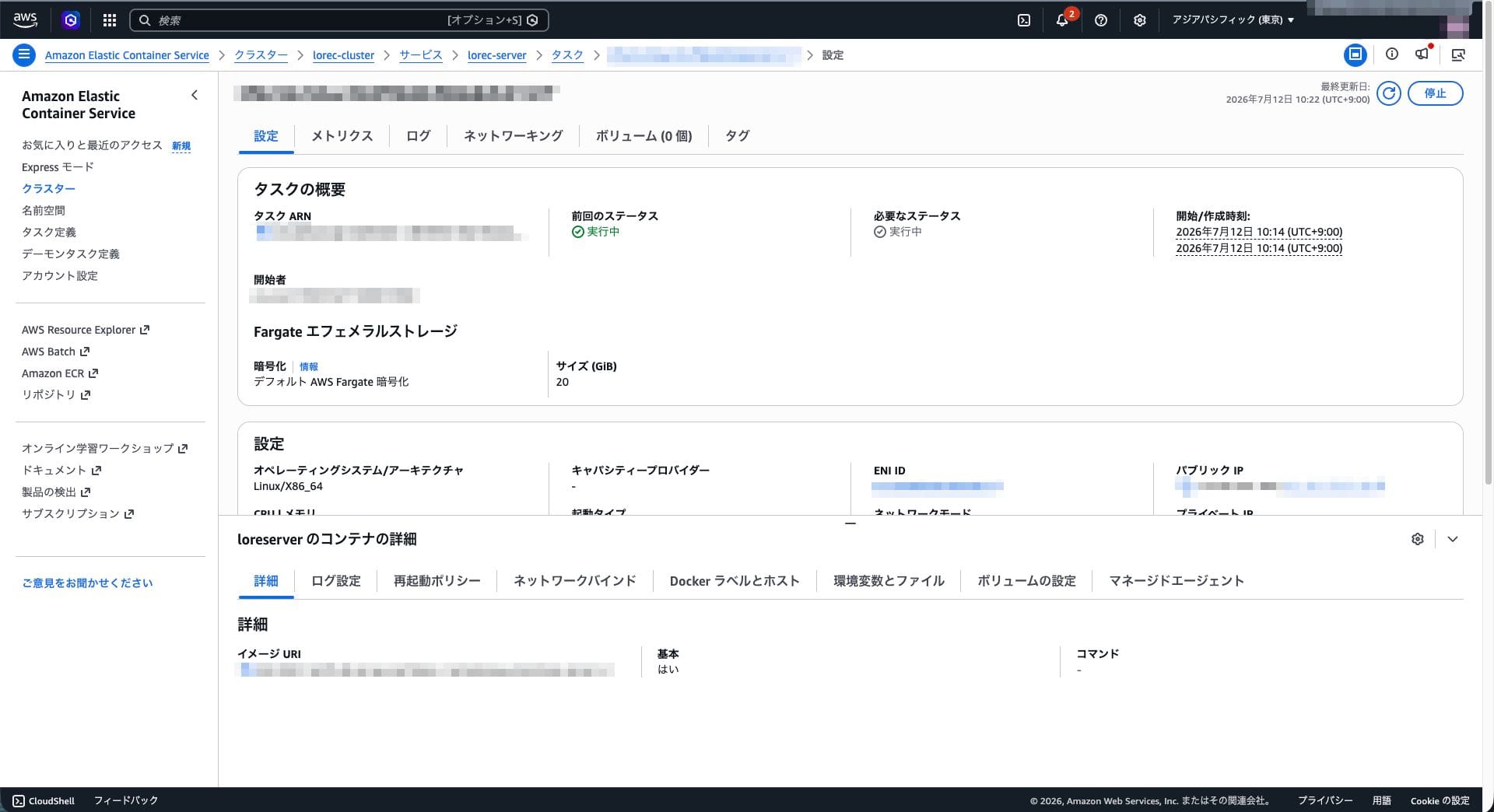
In the Fargate task definition, specify the architecture as X86_64, use the ECR image, ports 41337 and 41339, the task role from Step 2, and awslogs for logging. Set the service desired task count to 1 and associate it with the NLB target group.
Step 5: Deploy
Apply Terraform to create S3, DynamoDB, ECR, NLB, and Fargate. After pushing the image to ECR, once the Fargate service starts a task and the NLB target becomes healthy, the setup is complete.
Trouble: Task Crashes Immediately After Starting
This was the first issue encountered after deployment. The Fargate task terminates immediately after starting and repeatedly restarts. The running task count for the ECS service stays at 0, and the NLB target does not progress past initial.
ECS events do not show details. The cause is in the container logs. Looking at the CloudWatch Logs log group /ecs/lorec-server, the following error was present:
Plugin 'aws' initialization failed: Failed to create DynamoDB client:
AccessDeniedException: User: .../lorec-task/... is not authorized to
perform: dynamodb:DescribeTable on resource: .../table/lorec-fragments
because no identity-based policy allows the dynamodb:DescribeTable action
loreserver verifies table existence using DescribeTable at startup. Since only CRUD permissions were granted to the task role, this check resulted in a permission error and caused a crash. Adding dynamodb:DescribeTable as described in Step 2 resolved the issue and the server started normally.
When a Fargate task terminates immediately, check the container's CloudWatch Logs rather than ECS events. The loreserver AWS backend requires DescribeTable for existence verification at startup, in addition to CRUD operations.
Connectivity Verification
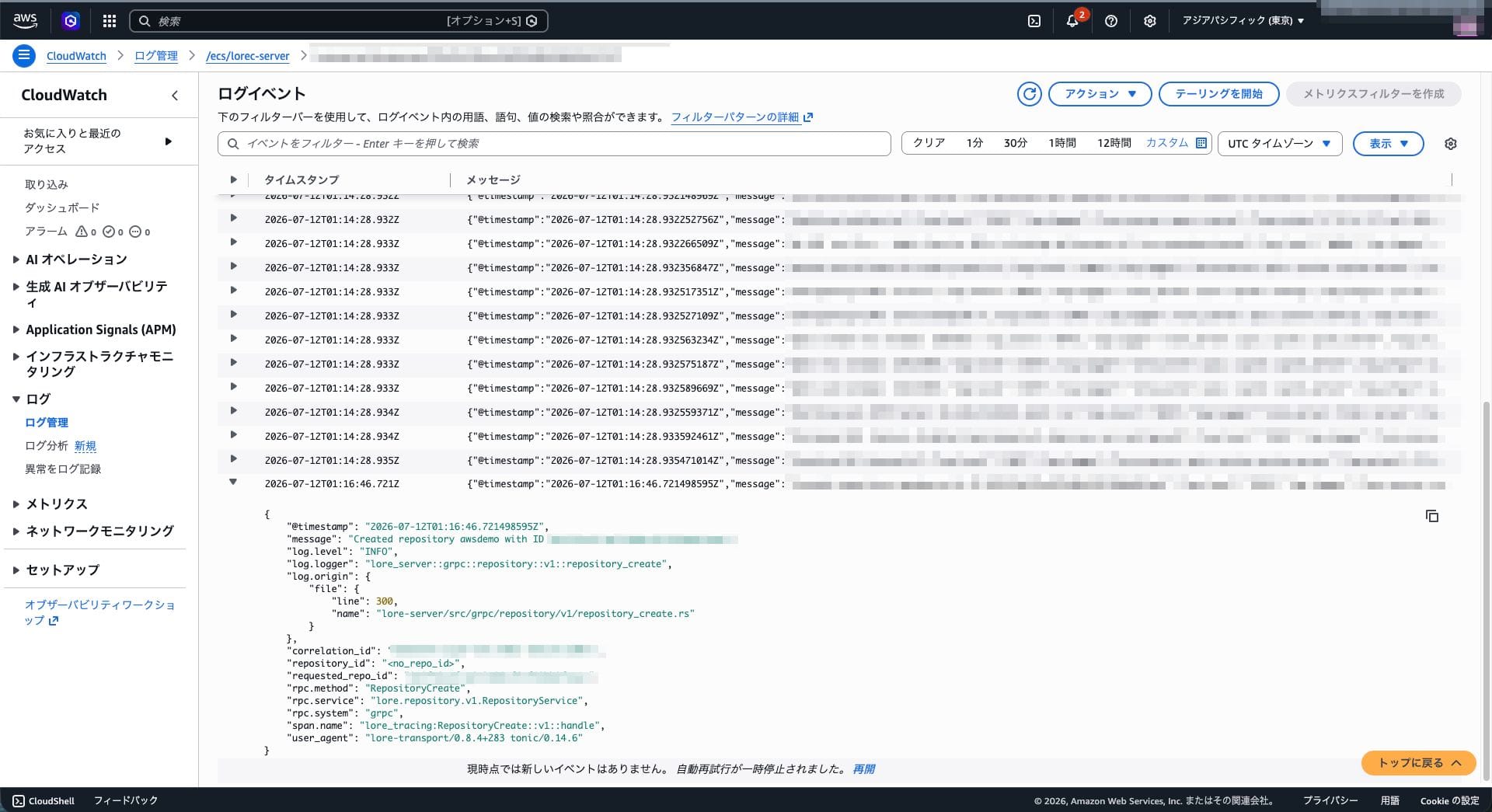
Once the task starts and the NLB target becomes healthy, connect from the local lore client. Connect using grpc:// to the NLB DNS name.
lore repository create grpc://<NLB DNS>:41337/awsdemo
lore stage asset.bin
lore commit --identity <name> "v1 on fargate"
lore push
lore clone grpc://<NLB DNS>:41337/awsdemo ./cloned
Everything from create through push and clone succeeded, and the contents of the cloned file matched the original. The local lore client reached loreserver on Fargate via the NLB and completed a round trip.
The data stored in AWS was also verified. For a repository containing a single small file, the results were as follows:
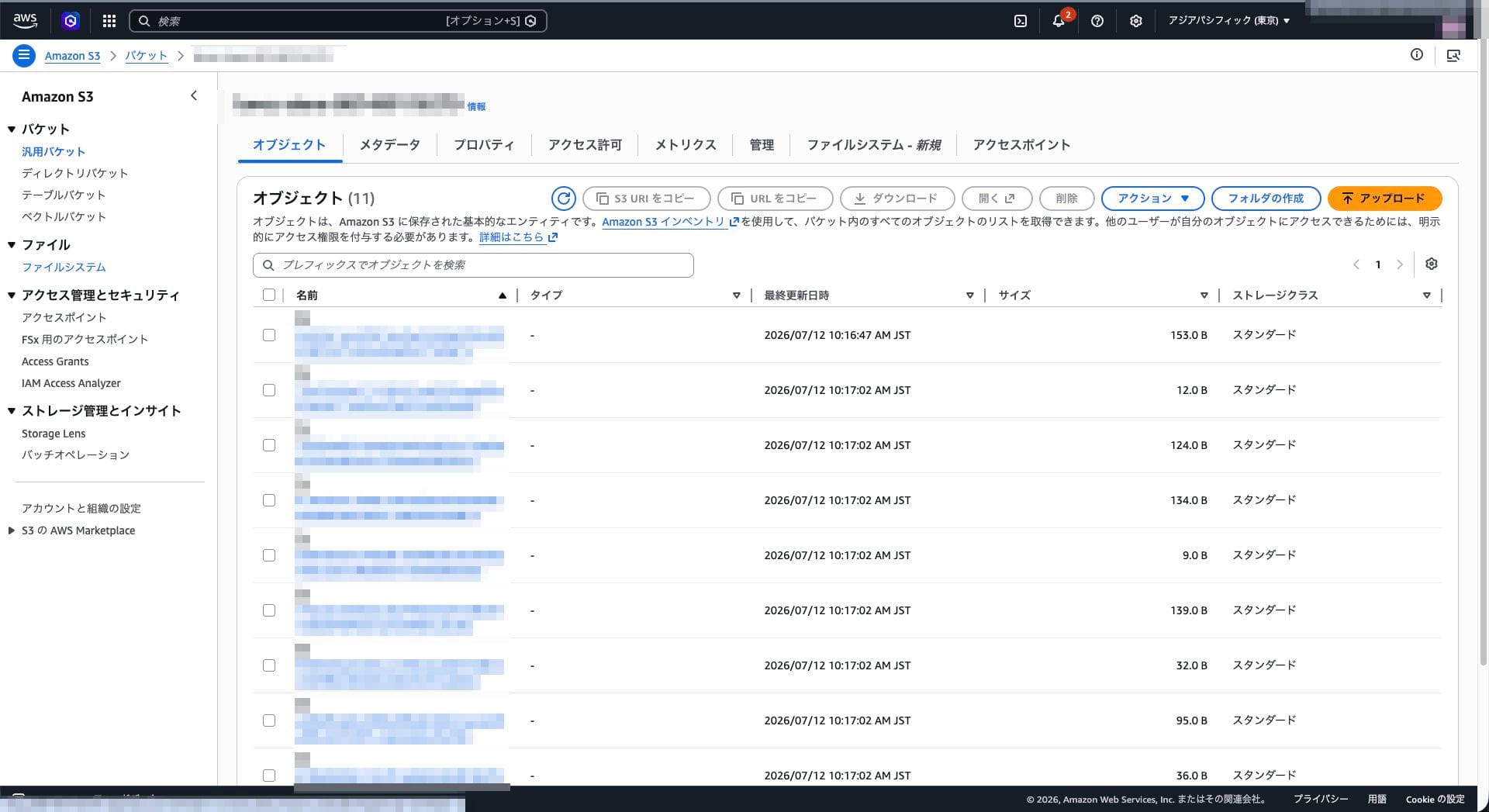
S3 bucket: 11 objects. Keys are BLAKE3 hashes, stored using content-addressable method
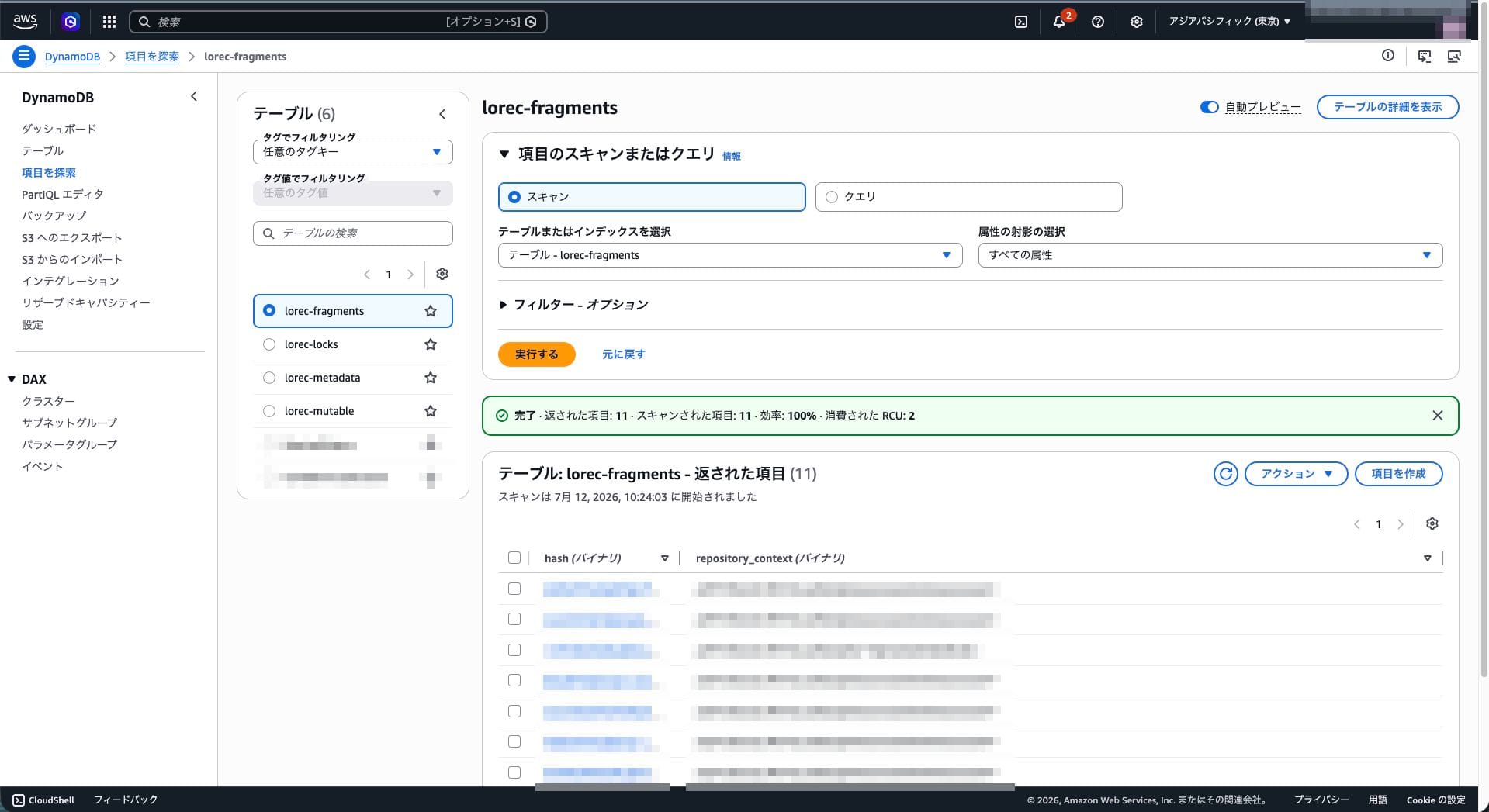
DynamoDB: 11 fragments, 11 metadata, 5 mutable, 0 locks
This matches the count confirmed in the local environment, confirming that loreserver on Fargate is correctly using actual S3 and DynamoDB.
Summary
loreserver was deployed on AWS Fargate + S3 + DynamoDB using Terraform, and the ability to push from a local client was verified.
What became clear through this process is that the only Lore-specific dependencies are S3 and DynamoDB. Everything else is a general configuration for running on Fargate. Since storage is serverless, making loreserver run on Fargate results in a stateless execution environment, making operations easier.
However, there were some tricks. DynamoDB tables must be created in advance with a defined schema, dynamodb:DescribeTable is required in the task role, and amd64 images are mandatory for Fargate. In particular, insufficient DescribeTable permissions manifests in the hard-to-diagnose form of a crash immediately after startup.
The configuration in this article is for verification purposes, with access limited to your own IP. Note that production-ready work such as enabling authentication and placing the service in a private subnet will need to be addressed separately.
Appendix: Full Implementation
This is the complete Terraform and image definition used in this article. Replace allowed_cidr with your own global IP, and replace s3_bucket in local.toml with your own account ID.
Terraform files
terraform {
  required_version = ">= 1.5"
  required_providers {
    aws = {
      source  = "hashicorp/aws"
      version = ">= 5.40"
    }
  }
}

provider "aws" {
  region = var.region

  default_tags {
    tags = {
      Project   = "blog-lore-article-c"
      ManagedBy = "terraform"
    }
  }
}

data "aws_caller_identity" "current" {}
variable "region" {
  description = "Deployment target region"
  type        = string
  default     = "ap-northeast-1"
}

variable "name_prefix" {
  description = "Prefix for resource names"
  type        = string
  default     = "lorec"
}

variable "allowed_cidr" {
  description = "Source CIDR allowed to access the NLB (your global IP)"
  type        = string
  # Override with -var at runtime, or replace this with your own IP
  default     = "203.0.113.10/32"
}

variable "image_tag" {
  description = "Tag for the loreserver container image"
  type        = string
  default     = "v1"
}

variable "task_cpu" {
  description = "CPU units for the Fargate task"
  type        = number
  default     = 512
}

variable "task_memory" {
  description = "Memory for the Fargate task (MiB)"
  type        = number
  default     = 1024
}
# S3 bucket for immutable data
resource "aws_s3_bucket" "store" {
  bucket        = "${var.name_prefix}-store-${data.aws_caller_identity.current.account_id}"
  force_destroy = true
}

resource "aws_s3_bucket_public_access_block" "store" {
  bucket                  = aws_s3_bucket.store.id
  block_public_acls       = true
  block_public_policy     = true
  ignore_public_acls      = true
  restrict_public_buckets = true
}

# fragments table
resource "aws_dynamodb_table" "fragments" {
  name         = "${var.name_prefix}-fragments"
  billing_mode = "PAY_PER_REQUEST"
  hash_key     = "hash"
  range_key    = "repository_context"

  attribute {
    name = "hash"
    type = "B"
  }
  attribute {
    name = "repository_context"
    type = "B"
  }
}

# metadata table
resource "aws_dynamodb_table" "metadata" {
  name         = "${var.name_prefix}-metadata"
  billing_mode = "PAY_PER_REQUEST"
  hash_key     = "hash"

  attribute {
    name = "hash"
    type = "B"
  }
}

# mutable table
resource "aws_dynamodb_table" "mutable" {
  name         = "${var.name_prefix}-mutable"
  billing_mode = "PAY_PER_REQUEST"
  hash_key     = "repository_id"
  range_key    = "key"

  attribute {
    name = "repository_id"
    type = "B"
  }
  attribute {
    name = "key"
    type = "B"
  }
}

# locks table (3 GSIs)
resource "aws_dynamodb_table" "locks" {
  name         = "${var.name_prefix}-locks"
  billing_mode = "PAY_PER_REQUEST"
  hash_key     = "hash"
  range_key    = "repositoryBranch"

  attribute {
    name = "hash"
    type = "B"
  }
  attribute {
    name = "repositoryBranch"
    type = "B"
  }
  attribute {
    name = "repository"
    type = "B"
  }
  attribute {
    name = "branch"
    type = "B"
  }
  attribute {
    name = "ownerId"
    type = "S"
  }
  attribute {
    name = "description"
    type = "S"
  }

  global_secondary_index {
    name            = "owner-repo-branch"
    hash_key        = "ownerId"
    range_key       = "repositoryBranch"
    projection_type = "ALL"
  }
  global_secondary_index {
    name            = "repo-branch"
    hash_key        = "repository"
    range_key       = "branch"
    projection_type = "ALL"
  }
  global_secondary_index {
    name            = "repo-branch-description"
    hash_key        = "repositoryBranch"
    range_key       = "description"
    projection_type = "ALL"
  }
}
data "aws_iam_policy_document" "ecs_assume" {
  statement {
    actions = ["sts:AssumeRole"]
    principals {
      type        = "Service"
      identifiers = ["ecs-tasks.amazonaws.com"]
    }
  }
}

# Task execution role: pull from ECR and write to CloudWatch Logs
resource "aws_iam_role" "execution" {
  name               = "${var.name_prefix}-exec"
  assume_role_policy = data.aws_iam_policy_document.ecs_assume.json
}

resource "aws_iam_role_policy_attachment" "execution" {
  role       = aws_iam_role.execution.name
  policy_arn = "arn:aws:iam::aws:policy/service-role/AmazonECSTaskExecutionRolePolicy"
}

# Task role: permissions for loreserver to access S3 and DynamoDB
resource "aws_iam_role" "task" {
  name               = "${var.name_prefix}-task"
  assume_role_policy = data.aws_iam_policy_document.ecs_assume.json
}

data "aws_iam_policy_document" "task" {
  statement {
    sid     = "S3"
    actions = ["s3:GetObject", "s3:PutObject", "s3:DeleteObject", "s3:ListBucket"]
    resources = [
      aws_s3_bucket.store.arn,
      "${aws_s3_bucket.store.arn}/*",
    ]
  }
  statement {
    sid = "DynamoDB"
    actions = [
      "dynamodb:DescribeTable",
      "dynamodb:GetItem",
      "dynamodb:PutItem",
      "dynamodb:UpdateItem",
      "dynamodb:DeleteItem",
      "dynamodb:Query",
      "dynamodb:BatchGetItem",
      "dynamodb:BatchWriteItem",
      "dynamodb:ConditionCheckItem",
    ]
    resources = [
      aws_dynamodb_table.fragments.arn,
      aws_dynamodb_table.metadata.arn,
      aws_dynamodb_table.mutable.arn,
      aws_dynamodb_table.locks.arn,
      "${aws_dynamodb_table.locks.arn}/index/*",
    ]
  }
}

resource "aws_iam_role_policy" "task" {
  name   = "${var.name_prefix}-task-policy"
  role   = aws_iam_role.task.id
  policy = data.aws_iam_policy_document.task.json
}
data "aws_vpc" "default" {
  default = true
}

data "aws_subnets" "default" {
  filter {
    name   = "vpc-id"
    values = [data.aws_vpc.default.id]
  }
}

# Security group for NLB: allow only ports 41337 / 41339 from your IP
resource "aws_security_group" "nlb" {
  name        = "${var.name_prefix}-nlb"
  description = "Allow lore ports from the operator IP only"
  vpc_id      = data.aws_vpc.default.id

  ingress {
    description = "gRPC/QUIC"
    from_port   = 41337
    to_port     = 41337
    protocol    = "tcp"
    cidr_blocks = [var.allowed_cidr]
  }
  ingress {
    description = "HTTP health"
    from_port   = 41339
    to_port     = 41339
    protocol    = "tcp"
    cidr_blocks = [var.allowed_cidr]
  }
  egress {
    from_port   = 0
    to_port     = 0
    protocol    = "-1"
    cidr_blocks = ["0.0.0.0/0"]
  }
}

# Security group for Fargate tasks: accept traffic from NLB only
resource "aws_security_group" "task" {
  name        = "${var.name_prefix}-task"
  description = "Allow lore ports from the NLB security group"
  vpc_id      = data.aws_vpc.default.id

  ingress {
    description     = "gRPC/QUIC from NLB"
    from_port       = 41337
    to_port         = 41337
    protocol        = "tcp"
    security_groups = [aws_security_group.nlb.id]
  }
  ingress {
    description     = "HTTP health from NLB"
    from_port       = 41339
    to_port         = 41339
    protocol        = "tcp"
    security_groups = [aws_security_group.nlb.id]
  }
  egress {
    from_port   = 0
    to_port     = 0
    protocol    = "-1"
    cidr_blocks = ["0.0.0.0/0"]
  }
}

resource "aws_lb" "nlb" {
  name               = "${var.name_prefix}-nlb"
  internal           = false
  load_balancer_type = "network"
  security_groups    = [aws_security_group.nlb.id]
  subnets            = data.aws_subnets.default.ids
}

# Target group for gRPC/TCP (target_type = ip because of Fargate awsvpc)
resource "aws_lb_target_group" "grpc" {
  name        = "${var.name_prefix}-grpc"
  port        = 41337
  protocol    = "TCP"
  target_type = "ip"
  vpc_id      = data.aws_vpc.default.id

  health_check {
    protocol = "HTTP"
    port     = "41339"
    path     = "/health_check"
    interval = 30
  }
}

resource "aws_lb_listener" "grpc" {
  load_balancer_arn = aws_lb.nlb.arn
  port              = 41337
  protocol          = "TCP"

  default_action {
    type             = "forward"
    target_group_arn = aws_lb_target_group.grpc.arn
  }
}
resource "aws_ecr_repository" "lore" {
  name                 = "${var.name_prefix}-server"
  image_tag_mutability = "MUTABLE"
  force_delete         = true
}

resource "aws_cloudwatch_log_group" "lore" {
  name              = "/ecs/${var.name_prefix}-server"
  retention_in_days = 7
}

resource "aws_ecs_cluster" "lore" {
  name = "${var.name_prefix}-cluster"
}

resource "aws_ecs_task_definition" "lore" {
  family                   = "${var.name_prefix}-server"
  requires_compatibilities = ["FARGATE"]
  network_mode             = "awsvpc"
  cpu                      = var.task_cpu
  memory                   = var.task_memory
  execution_role_arn       = aws_iam_role.execution.arn
  task_role_arn            = aws_iam_role.task.arn

  runtime_platform {
    operating_system_family = "LINUX"
    cpu_architecture        = "X86_64"
  }

  container_definitions = jsonencode([
    {
      name      = "loreserver"
      image     = "${aws_ecr_repository.lore.repository_url}:${var.image_tag}"
      essential = true
      portMappings = [
        { containerPort = 41337, protocol = "tcp" },
        { containerPort = 41339, protocol = "tcp" },
      ]
      logConfiguration = {
        logDriver = "awslogs"
        options = {
          "awslogs-group"         = aws_cloudwatch_log_group.lore.name
          "awslogs-region"        = var.region
          "awslogs-stream-prefix" = "loreserver"
        }
      }
    }
  ])
}

resource "aws_ecs_service" "lore" {
  name            = "${var.name_prefix}-server"
  cluster         = aws_ecs_cluster.lore.id
  task_definition = aws_ecs_task_definition.lore.arn
  desired_count   = 1
  launch_type     = "FARGATE"

  network_configuration {
    subnets          = data.aws_subnets.default.ids
    security_groups  = [aws_security_group.task.id]
    assign_public_ip = true
  }

  load_balancer {
    target_group_arn = aws_lb_target_group.grpc.arn
    container_name   = "loreserver"
    container_port   = 41337
  }

  depends_on = [aws_lb_listener.grpc]
}
output "nlb_dns" {
  description = "DNS name of the NLB. Clients connect via grpc://<this value>:41337"
  value       = aws_lb.nlb.dns_name
}

output "ecr_repository_url" {
  description = "Push destination for the loreserver image"
  value       = aws_ecr_repository.lore.repository_url
}

output "s3_bucket" {
  value = aws_s3_bucket.store.bucket
}

output "dynamodb_tables" {
  value = {
    fragments = aws_dynamodb_table.fragments.name
    metadata  = aws_dynamodb_table.metadata.name
    mutable   = aws_dynamodb_table.mutable.name
    locks     = aws_dynamodb_table.locks.name
  }
}

output "ecs_cluster" {
  value = aws_ecs_cluster.lore.name
}

output "ecs_service" {
  value = aws_ecs_service.lore.name
}
Container image (Dockerfile and local.toml)
Build lore-server:base-amd64 from lore-server/Dockerfile in the official repository, then use it as the base to bake in local.toml.
# An overlay that bakes an AWS-backend local.toml into the official pre-built
# image (lore-server:base-amd64). local.toml is placed in /etc/lore/config and
# is read after docker.toml for LORE_ENV=docker, overriding mode to aws.
FROM lore-server:base-amd64
COPY local.toml /etc/lore/config/local.toml
Set s3_bucket to the same value as the Terraform output s3_bucket.
[immutable_store]
mode = "aws"

[mutable_store]
mode = "aws"

[lock_store]
mode = "aws"

[plugins.aws.immutable_store]
s3_bucket = "lorec-store-<account ID>"
s3_region = "ap-northeast-1"
s3_force_path_style = false
dynamodb_fragments_table = "lorec-fragments"
dynamodb_metadata_table = "lorec-metadata"
dynamodb_region = "ap-northeast-1"
timeout_millis = 120000

[plugins.aws.mutable_store]
dynamodb_table = "lorec-mutable"
dynamodb_region = "ap-northeast-1"
timeout_millis = 120000

[plugins.aws.lock_store]
dynamodb_table = "lorec-locks"
dynamodb_region = "ap-northeast-1"
timeout_millis = 120000