Understanding the True Nature of MCP: From the Tool Use Agent Loop to JSON-RPC 2.0 Two-Layer Error Handling

This page has been translated by machine translation. View original
Introduction
While implementing an agent using Tool Use with the Claude API, a question suddenly came to mind.
"What exactly is MCP (Model Context Protocol)? How is it different from Tool Use?"
As I investigated, I arrived at the fact that LLMs don't even know MCP exists, and from there, a series of questions unraveled in chain — from MCP's architectural philosophy to the mechanics of its communication foundation, JSON-RPC 2.0.
This article shares that journey of exploration.
The Correct Message Structure for a Tool Use Agent Loop
First, the basics. When implementing an agent with tool use enabled via the Claude API, you need to understand the correct design of the agent loop.
The Flow of the Loop
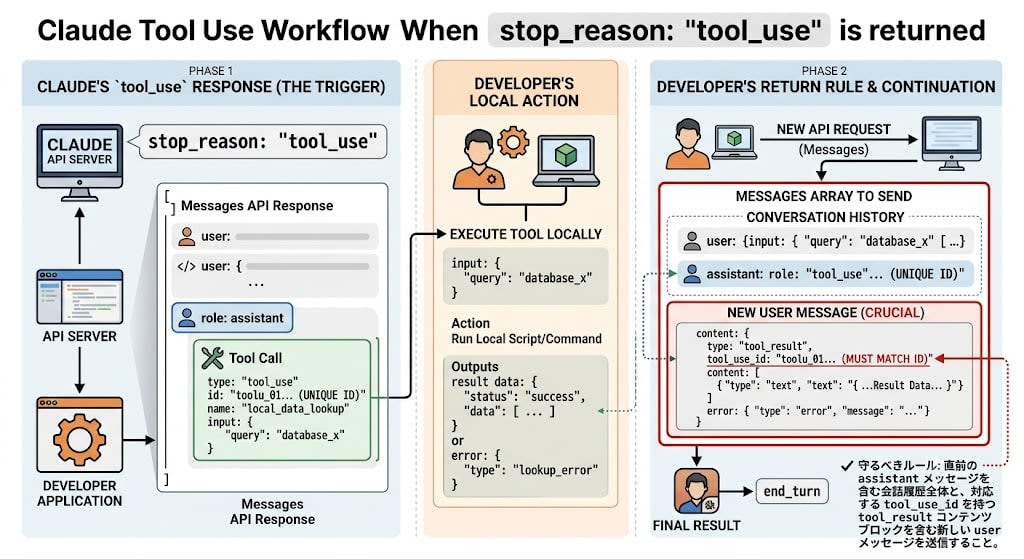
When Claude returns stop_reason: "tool_use", the developer must execute the tool locally and return the result to the API. The rule to follow here is clear.
Send the entire conversation history including the immediately preceding assistant message, and a new user message containing a tool_result content block with the corresponding tool_use_id.
{
  "messages": [
    {
      "role": "user",
      "content": "Check the current weather in Tokyo."
    },
    {
      "role": "assistant",
      "content": [
        {
          "type": "tool_use",
          "id": "toolu_xyz123",
          "name": "get_weather",
          "input": { "city": "Tokyo" }
        }
      ]
    },
    {
      "role": "user",
      "content": [
        {
          "type": "tool_result",
          "tool_use_id": "toolu_xyz123",
          "content": "Sunny, 22 degrees Celsius"
        }
      ]
    }
  ]
}
Why the user Role?
You might wonder, "The assistant made the tool call, so why does the user return the result?"
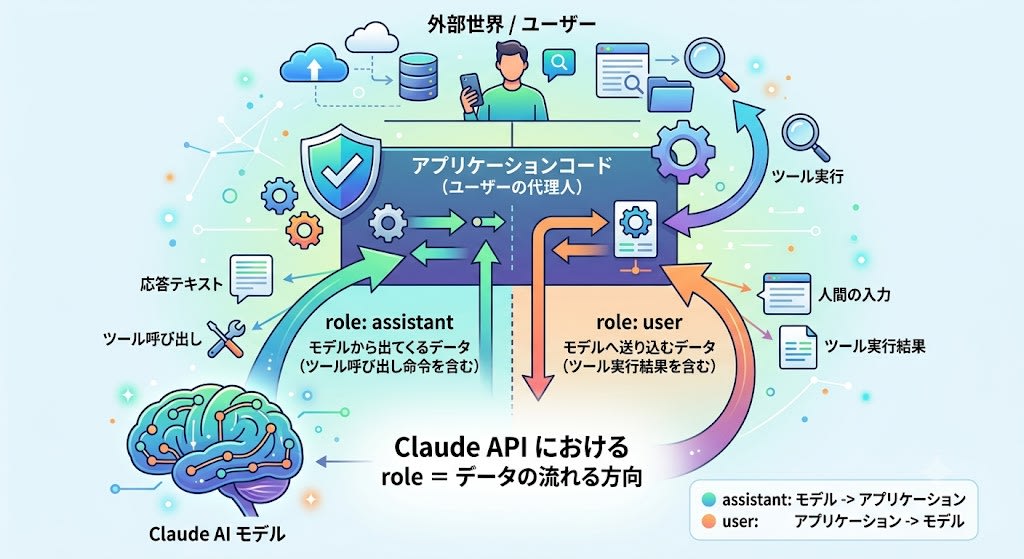
In the Claude API, role represents the direction data flows.
| Role | Meaning |
|---|---|
assistant |
Data coming from the model (including tool call instructions) |
user |
Data being sent to the model (including tool execution results) |
The application code acts as a "proxy" for the user, serving the role of conveying facts obtained from the external world to the model.
Handling Errors
Even if tool execution fails due to a timeout or other reason, sending the tool_result cannot be omitted. Omitting it will result in an API error (400 Bad Request). On error, set is_error: true and describe the error details in content.
{
  "type": "tool_result",
  "tool_use_id": "toolu_01A2B3C4D5",
  "content": "Error: The external API request timed out after 10 seconds.",
  "is_error": true
}
This allows Claude to recognize the fact of the error and autonomously decide whether to explain it to the user or retry.
MCP Does Not Exist for the LLM
Here is the main point. The Tool Use rules above are exactly the same even when using MCP.
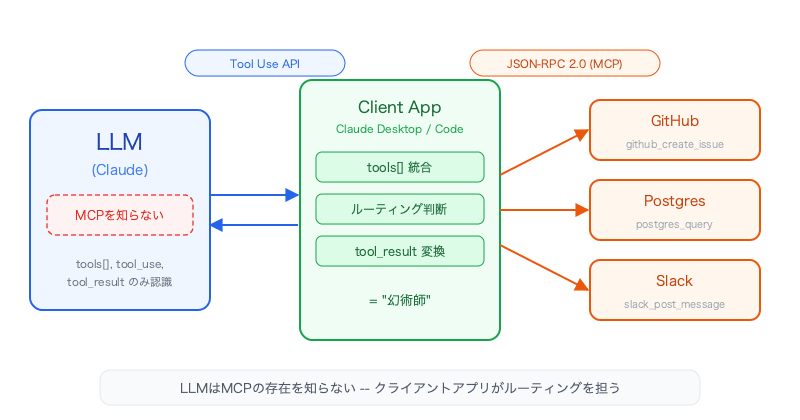
That's because Claude has absolutely no knowledge of MCP's existence.
The Client App as "Illusionist"
In the MCP architecture, a client app (Claude Desktop, Claude Code, a custom agent, etc.) sits in the middle and performs the following processing.
Phase 1: Aggregating the Tool List
The client app queries the connected MCP servers with "what tools do you have?" and bundles the retrieved tool definitions into a standard tools array, which it then sends to the Claude API.
"tools": [
  { "name": "github_create_issue", "description": "..." },
  { "name": "postgres_query", "description": "..." },
  { "name": "slack_post_message", "description": "..." }
]
From Claude's perspective, there is no way to distinguish whether these came from an MCP server or a locally written function.
Phase 2: Claude Simply Calls Standard Tool Use
{
  "type": "tool_use",
  "name": "postgres_query",
  "input": { "query": "SELECT * FROM users WHERE active = true" }
}
Claude doesn't know "how it will be executed." It simply outputs a structured JSON intent and stops.
Phase 3: The Client App Decides Routing
The client app looks at the name in tool_use and decides:
- If it's a local function → execute directly
- If it's an MCP server tool → forward to the relevant server via JSON-RPC
Phase 4: Return the Result via tool_result
The result received from the MCP server is wrapped in a standard tool_result message block and returned to Claude.
MCP = HTTP for the AI Era, Microservices for LLMs
So if the LLM doesn't know about MCP, why did Anthropic create it?
The answer is decoupling. Just as HTTP separated web browsers from web servers, MCP separates AI clients from tools and data sources.
Structural Similarity to HTTP
| Perspective | HTTP | MCP |
|---|---|---|
| What doesn't the client need to know? | Server implementation language, DB type | Tool implementation language, authentication flow |
| What doesn't the server need to know? | Client OS, device | Which LLM is calling |
| Shared contract | HTTP methods, status codes | JSON-RPC 2.0, three primitives |
The Microservices Analogy
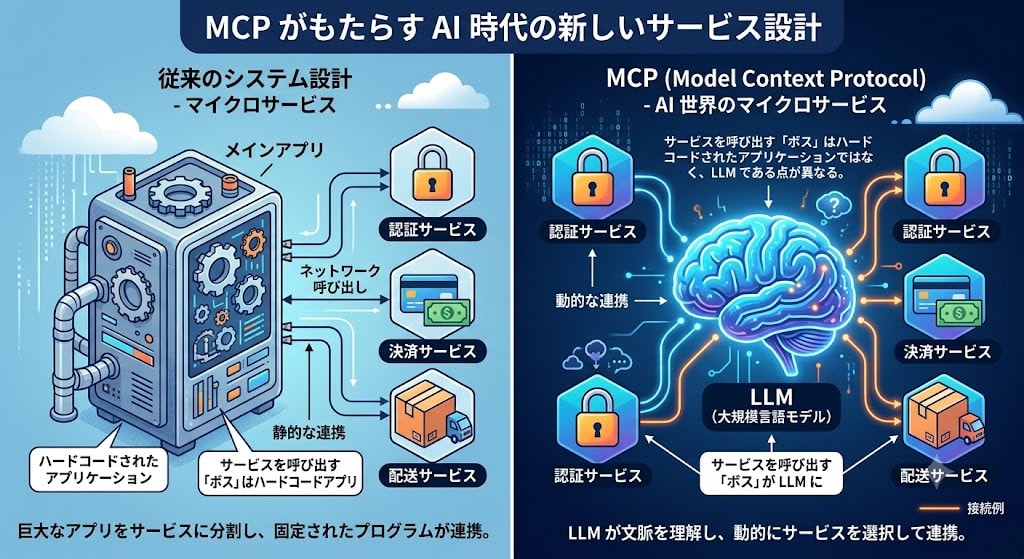
In traditional system design, a large application is split into microservices (auth service, payment service, shipping service, etc.), and the main app uses the features it needs via network calls.
MCP is doing exactly the same thing in the AI world. The difference is that the "boss" calling the services is not a hardcoded application, but an LLM.
MCP is like microservices. If microservices are for applications, MCP is for LLMs.
The Problem Before MCP
Before MCP, if five different AI coding assistants (Cursor, Claude Desktop, Continue.dev, Aider, an in-house agent, etc.) wanted to implement GitHub integration, they each had to reinvent the same wheel five times over. And each implementation was incompatible with the others.
With MCP, if one developer creates a great GitHub MCP server, all AI client apps can use it immediately.
The Reality of the Ecosystem
That said, MCP cannot prevent "100 developers creating 100 MCP servers for the same app." It's the same as having 50 string-padding packages on npm.
What matters is that where effort is directed has changed. Instead of "each app developer privately rewriting the same basic tools," it has become "the community competing to build the best public MCP servers."
JSON-RPC 2.0: Schema Enforcement for the Communication Protocol
The communication foundation supporting MCP is JSON-RPC 2.0.
The Difference Between JSON and JSON-RPC 2.0
JSON is a data format; JSON-RPC 2.0 is a strict contract. If JSON is "the alphabet," then JSON-RPC 2.0 is like a "legal contract" written in that alphabet.
JSON only defines syntax and has no rules about meaning.
{ "coffee": "iced", "temperature": 2, "is_good": true }
JSON-RPC 2.0, on the other hand, enforces a strict structure for remote procedure calls (RPC).
The Request Contract
{
  "jsonrpc": "2.0",
  "method": "tools/call",
  "params": { "name": "fetch_file", "path": "./src/main.ts" },
  "id": "request-abc-123"
}
Three required keys: jsonrpc (version), method (the function name to execute), id (request identifier). params (arguments) is optional, but is typically included in MCP.
The Response Contract
{
  "jsonrpc": "2.0",
  "result": { "content": "console.log('hello world');" },
  "id": "request-abc-123"
}
The Error Contract
{
  "jsonrpc": "2.0",
  "error": { "code": -32602, "message": "File not found at specified path" },
  "id": "request-abc-123"
}
Automatic Rejection of Schema Violations
JSON-RPC 2.0 automatically detects and rejects schema violations.
| Violation Type | Error Code | When It Occurs |
|---|---|---|
| Parse error | -32700 |
JSON syntax error (e.g., missing closing bracket) |
| Invalid Request | -32600 |
Missing required key (jsonrpc or method absent) |
| Method not found | -32601 |
Calling a non-existent method |
| Invalid params | -32602 |
Incorrect parameter type or structure |
Why This Matters for LLMs
Since LLMs dynamically generate tool parameters, hallucinated tool names or missing parameters can occur. With JSON-RPC 2.0's schema enforcement, MCP servers won't crash and instead return standardized error codes. The client app feeds that error back to Claude, and Claude self-corrects and re-requests — resulting in a robust loop.
The Dual-Layer Structure of HTTP Status Codes and JSON-RPC Error Codes
JSON-RPC 2.0 coexists with HTTP status codes (400, 500, etc.) rather than replacing them.
A Two-Layer Security Model
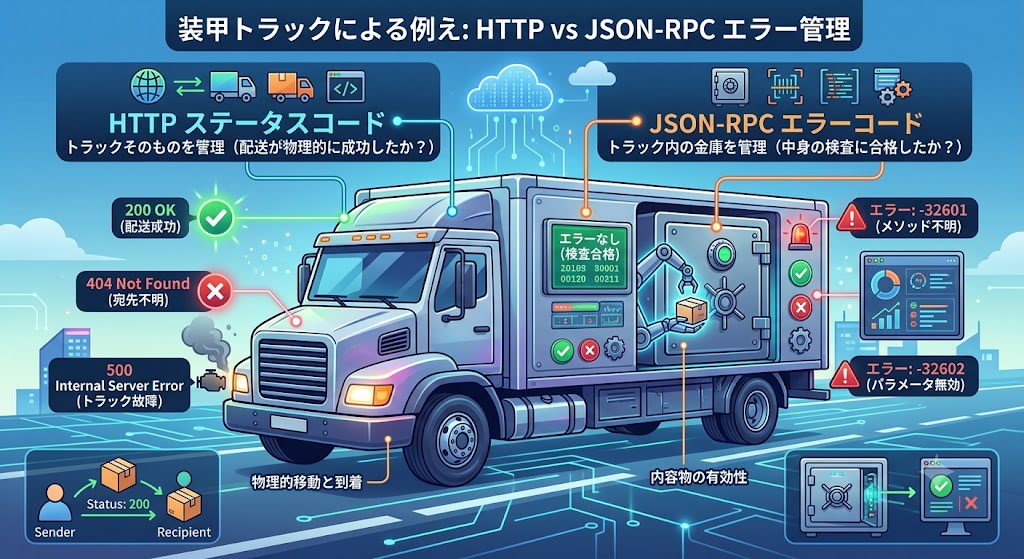
An armored truck analogy makes this easy to understand.
- HTTP status codes → Manage the truck itself (did the delivery physically succeed?)
- JSON-RPC error codes → Manage the safe inside the truck (did the contents pass inspection?)
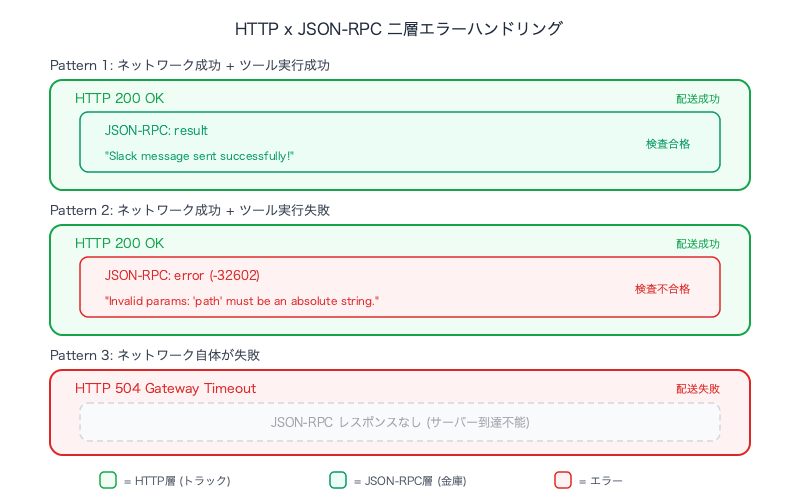
Pattern 1: Network Success + Tool Execution Success
HTTP/1.1 200 OK

{
  "jsonrpc": "2.0",
  "result": { "status": "Slack message sent successfully!" },
  "id": "mcp-msg-99"
}
Pattern 2: Network Success + Tool Execution Failure
HTTP returns 200 OK, yet there is an internal error. The network delivery succeeded, but the contents failed inspection.
HTTP/1.1 200 OK

{
  "jsonrpc": "2.0",
  "error": { "code": -32602, "message": "Invalid params: 'path' must be an absolute string." },
  "id": "claude-bad-request-1"
}
Pattern 3: Network Itself Fails
If the MCP server crashes, it cannot even return a JSON-RPC response.
HTTP/1.1 504 Gateway Timeout
| Layer | What It Means | Example |
|---|---|---|
| HTTP (4xx, 5xx) | The pipe is broken | Server unreachable, timeout |
| JSON-RPC (-32xxx) | The pipe is fine, but the data sent through it failed inspection | Method not found, invalid parameters |
Summary
Here is a summary of the understanding gained through this exploration.
| Concept | Essence |
|---|---|
| Tool Use agent loop | A strict alternating pattern of assistant: tool_use → user: tool_result. Full preservation of conversation history is required |
| The relationship between MCP and LLMs | The LLM doesn't know about MCP. The client app decides routing |
| The value of MCP | HTTP for the AI era. A decoupling standard regardless of platform or language |
| JSON-RPC 2.0 | A schema enforcement layer for the communication protocol. Coexists on a separate layer from HTTP status codes |
As a practical decision criterion, thinking of MCP as "microservices for LLMs" is the most useful framing. If traditional microservices are for applications, MCP is for LLMs. It layers the JSON-RPC 2.0 contract on top of HTTP and is composed of three primitives (Prompts, Resources, Tools). With this understanding, you should rarely find yourself at a loss when making design decisions around MCP.
