If AWS Health Notification Emails Are Duplicated in Classmethod Members, Disable Trusted Access for User Notifications

This page has been translated by machine translation. View original
Why AWS Health Notification Emails Are Duplicated in Classmethod Members and How to Fix It
Hello, this is Shimon from the Consulting Department.
Customers of Classmethod Members who use AWS Organizations sometimes enable the organization settings of AWS User Notifications (trusted access and a delegated administrator) in order to see the AWS Health events of all accounts in one place.
Then, if multiple accounts use the same address as their technical notification destination, even though the setting is meant to consolidate things in one place, notification emails for the same event arrive at that technical notification destination two, three times over.
This makes it easy for notifications that truly require action to get buried among them.
Conclusion
- In Members, deregister the User Notifications delegated administrator and disable trusted access. If each account's technical notification destination is the same address, enabling it has no consolidation effect, and emails for the same event just pile up at that technical notification destination
- The goal of seeing the Health events of all accounts in one place is met by the AWS Health organizational view
- Enable trusted access for AWS Health and register a Health delegated administrator. If it is already enabled, be careful not to confuse it with the User Notifications settings and disable it by mistake
- In the AWS Health Dashboard of the Health delegated administrator account, you can check the events of all accounts without increasing the number of emails
1. How emails from AWS reach you in Members
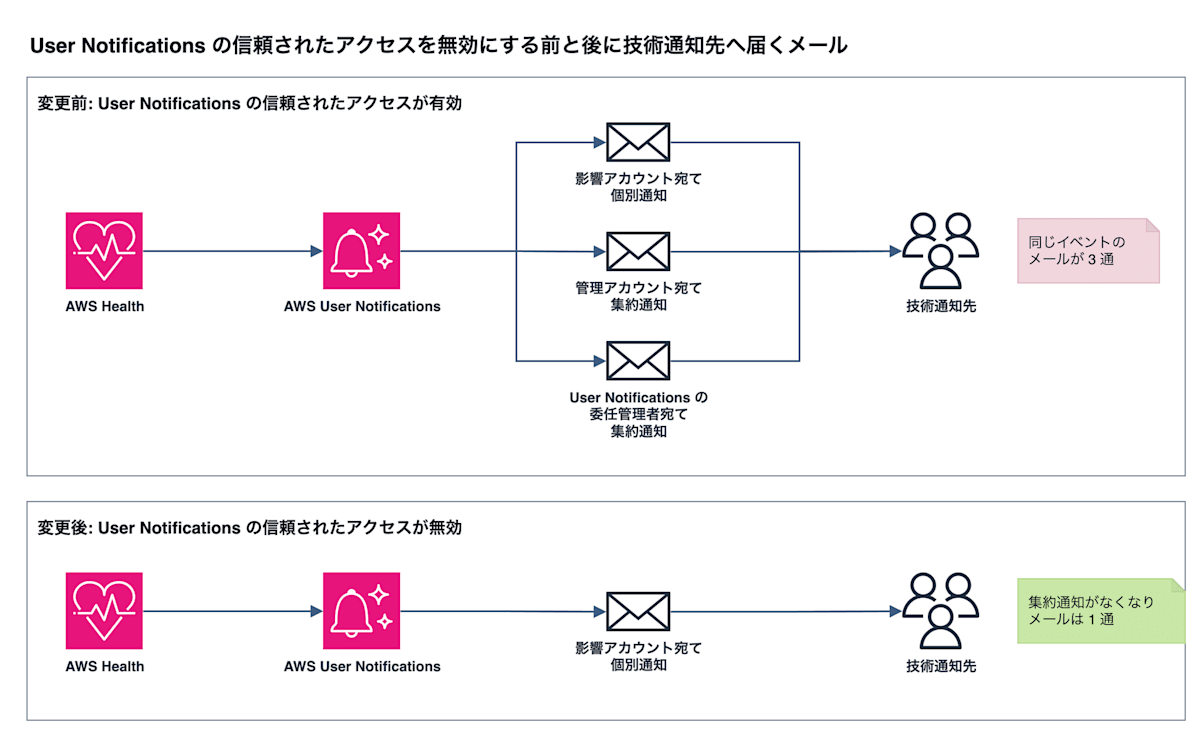
For AWS accounts in Members, Classmethod manages the root user's email address.
Emails from AWS addressed to the root user are forwarded by Classmethod, depending on their content, to the notification destinations registered in the Members Portal.
AWS Health notifications such as maintenance and service changes are sent to the technical notification destination, out of the three types of notification destinations (billing, technical, security).
Notification destinations are set per AWS account.
If you set the same address (such as a team mailing list) for multiple accounts, the emails addressed to each account are gathered in a single inbox.
On the other hand, the root user's address differs for each account, so even if the technical notification destination is the same, they are separate recipients from AWS's point of view.
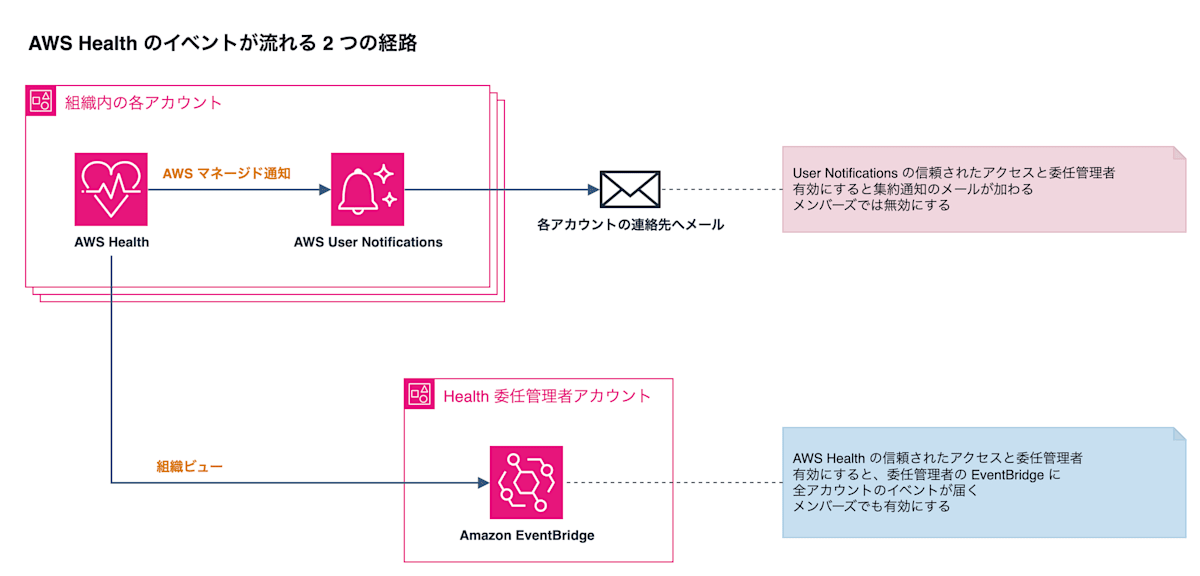
2. Differences between the organization settings of User Notifications and AWS Health
AWS Health is a service that notifies you, as Health events, of AWS maintenance, outages, service changes, and so on that affect your account.
The Health events of each account arrive in that account's Amazon EventBridge.
User Notifications is a service that delivers events to people.
It sends Health events by email as AWS managed notifications to each account's contacts (such as the root user's email address).
The two services each have their own separate pair of "trusted access" and "delegated administrator," and because the consoles look similar, they are easy to confuse.
Only the User Notifications pair causes duplicate emails; the AWS Health pair does not affect the number of emails.
| Service | Behavior when trusted access and a delegated administrator are enabled | Handling in Members |
|---|---|---|
| User Notifications | The management account and each delegated administrator receive, by email, an aggregated notification that bundles all affected accounts | Disable |
| AWS Health | In the delegated administrator account, you can check the events of all accounts (organizational view) | Enable |
3. Why one Health event becomes multiple emails in Members
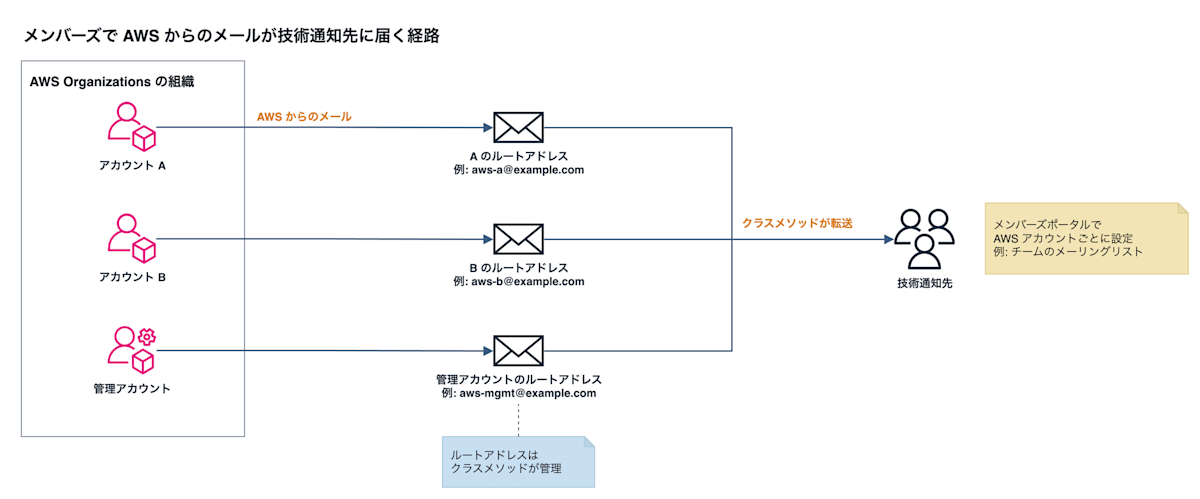
When trusted access for User Notifications is enabled, in addition to the individual notification to the affected account itself, aggregated notifications arrive at the management account and each delegated administrator.
Only when the account contact email address is the same for the management account or delegated administrator and the member account, the individual notification to the member account is not sent (deduplication).
Addresses differentiated with plus addressing are also treated as the same address.
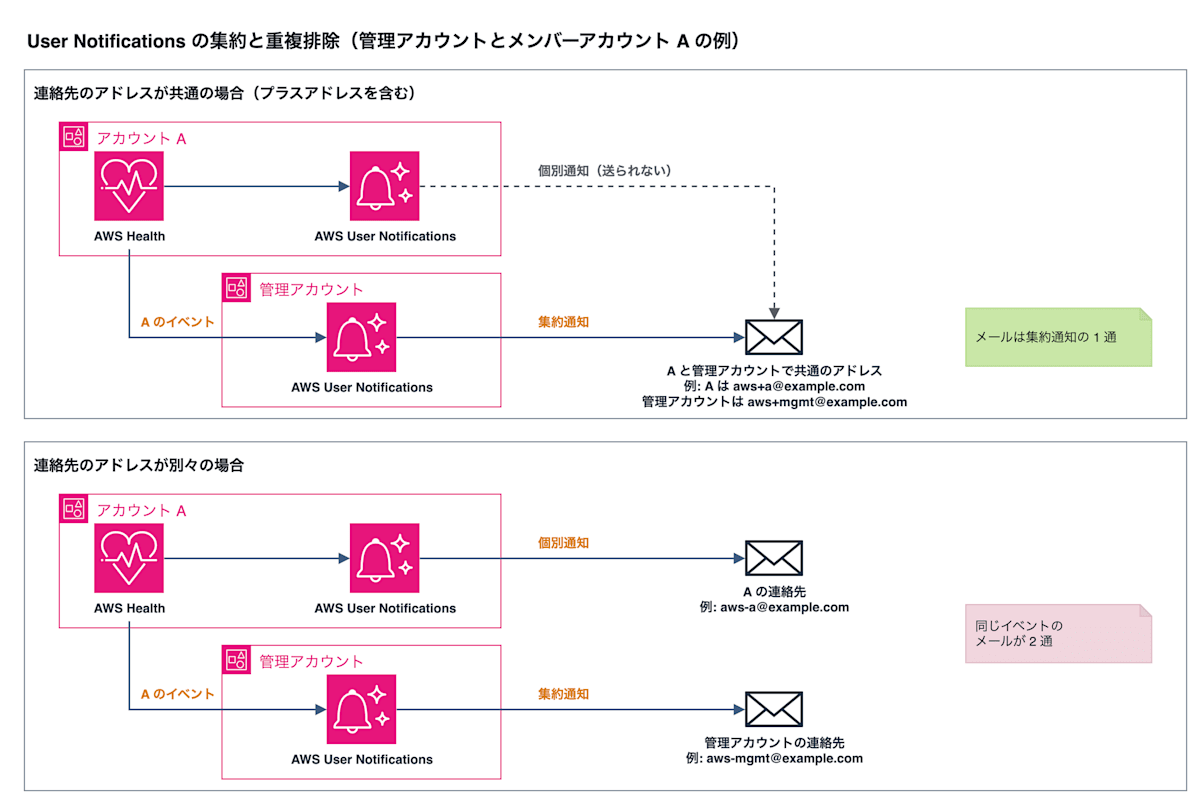
The root user addresses in Members differ for each account and are not in a plus-address relationship, so this condition is not met.
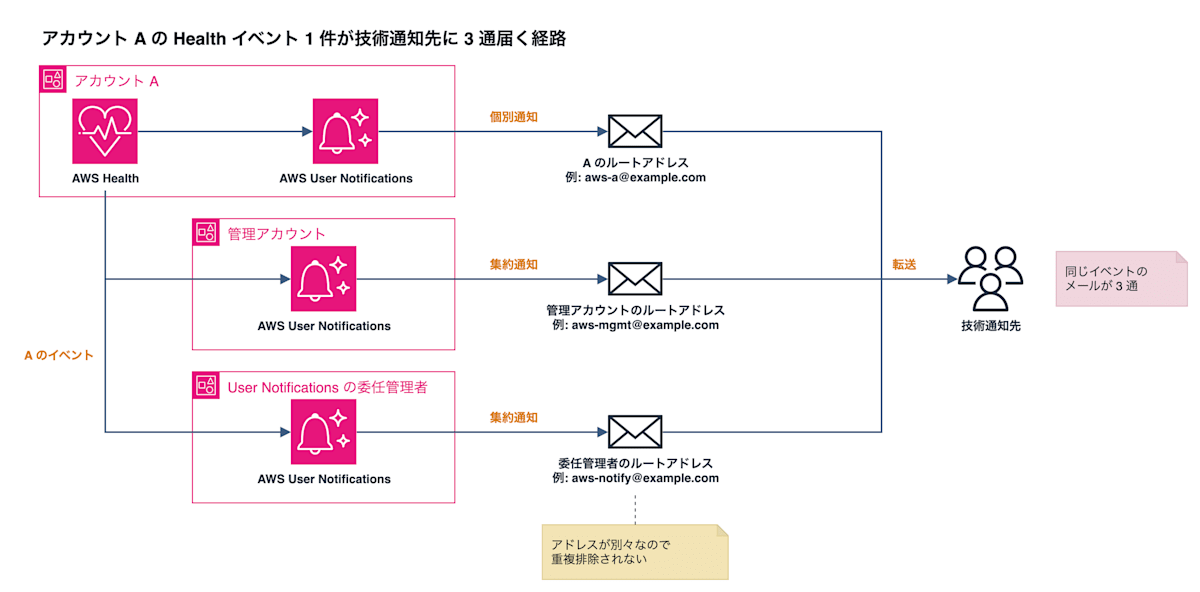
The aggregated notifications to the management account and the delegated administrator are also forwarded from their respective root user addresses to the technical notification destination.
Without a User Notifications delegated administrator, there are 2 emails (the affected account and the management account), and each additional delegated administrator adds 1 more.
4. Disabling the User Notifications organization settings
In the management account, open the organization settings in the User Notifications console and stop the aggregated notifications to the management account and delegated administrators.
- Deregister the User Notifications delegated administrator
- Disable trusted access
From then on, the Health event emails arriving from User Notifications will be only one individual notification per affected account.
5. Seeing the Health events of all accounts in one place
We assume you enabled the User Notifications organization settings because you wanted to check the Health events of all accounts in one place.
For that purpose, use the AWS Health organizational view.
In the management account, enable trusted access for AWS Health and register one of the member accounts as the Health delegated administrator.
Then, the Health events of all accounts arrive in that delegated administrator account.
If it is already enabled and a delegated administrator is already registered, this step is unnecessary.
In the delegated administrator account, open the AWS Health Dashboard and, in the navigation pane, select organizational health (shown as Your organization health in English); you can check the events of all accounts together with the affected accounts.
Since you are only checking on the dashboard, emails to the technical notification destination do not increase.
Summary
In Members, the root user addresses differ for each account, so User Notifications aggregation cannot deduplicate and only increases the number of emails.
If you deregister the User Notifications delegated administrator and disable trusted access, the email returns to a single one addressed to the affected account.
If you want to check the events of all accounts in one place, gather them in the delegated administrator account with the AWS Health organizational view and check them in that account's AWS Health Dashboard.