
Catching mistakes in mise.toml in your editor with mise lsp: Trying diagnostics, completion, and quick fixes in Neovim

This page has been translated by machine translation. View original
Hi there! I'm Yuji Nishimura from the Ops team!
The configuration file mise.toml for mise is handy because you can write tool versions, environment variables, and even tasks in a single file. On the other hand, I felt it was hard to notice in the editor when you misspell a configuration key or write a nonexistent name in a task's depends.
mise 2026.10.18 added mise lsp, a language server for mise.toml. In this article, I connect mise lsp to Neovim, open a mise.toml with deliberate mistakes, and try out how diagnostics, quick fixes, completion, and hover behave. I also send LSP requests directly without an editor to check the response of each feature.
What mise lsp can do
mise lsp is a Language Server Protocol server that is launched by the editor and communicates over standard input/output. According to the release notes and the official documentation, it has the following features.
- Diagnostics: TOML syntax errors, unknown keys (with suggested candidates), type mismatches, deprecated keys, nonexistent task names, and circular task dependencies
- Quick fix: replace an unknown key or task name with a suggested candidate, rewrite a deprecated key to its successor key
- Completion and hover: configuration keys, tool names in
[tools], and task names such as independs - Go to task definition, find references, and rename
- The same formatting as mise fmt
- Semantic tokens: coloring of task names, tool names, and so on (added in 2026.10.19)
I summarized the overall relationships in a self-made diagram, as shown below.
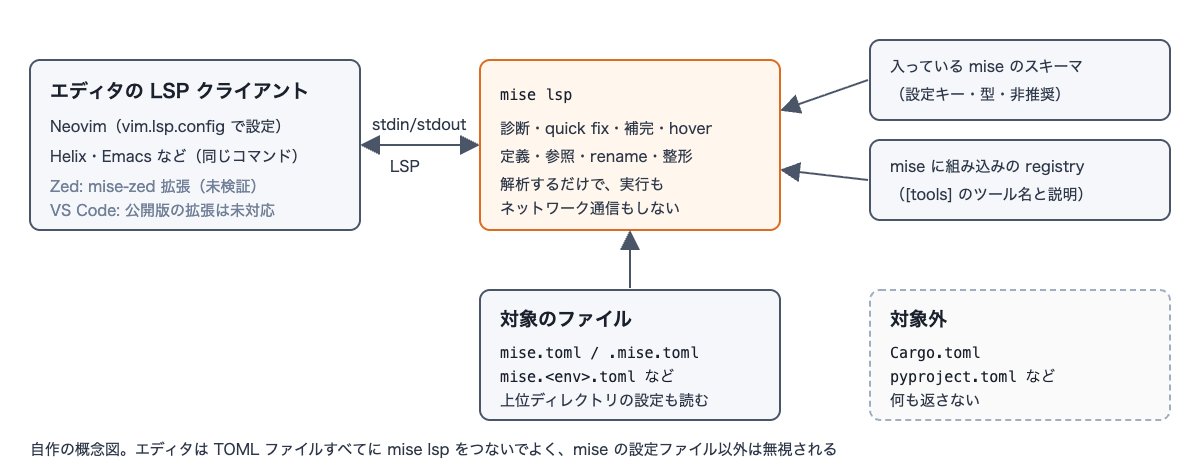
mise lsp reads the list and types of configuration keys from the schema of the installed mise. As a result, the diagnostics match the version of mise you are using. Also, according to the official documentation, mise lsp ignores files other than mise configuration files such as mise.toml. Therefore, even if you connect it to all TOML files on the editor side, it is said not to affect Cargo.toml or pyproject.toml (I check Cargo.toml later).
Connecting to Neovim
I used the Neovim configuration from the official documentation. It is a vim.lsp.config configuration available in Neovim 0.11 and later. The last line is something I added to display diagnostics at the end of the line. In Neovim 0.11 and later, end-of-line display (virtual text) is off by default.
vim.lsp.config("mise", {
  cmd = { "mise", "lsp" },
  filetypes = { "toml" },
  root_markers = { "mise.toml", ".mise.toml" },
})
vim.lsp.enable("mise")
vim.diagnostic.config({ virtual_text = true })
With a mise older than 2026.10.18, mise lsp is treated as a project task named lsp. You can check whether your mise supports it by seeing whether the output of mise help lsp contains Usage: mise lsp.
The following operations were done in plain Neovim without any completion plugin. Hover is K, code action is :lua vim.lsp.buf.code_action() (in 0.11 and later it can also be called with the default key gra), and completion is <C-x><C-o> in insert mode.
Trying it with a mise.toml containing typos
I deliberately put five kinds of mistakes into the following mise.toml.
env_path = ["./bin"]

[tools]
node = "24"

[settings]
experimantal = true
jobs = "four"

[tasks.build]
description = "Build the app"
run = "echo build"
depends = ["lnt"]

[tasks.lint]
description = "Lint the sources"
run = "echo lint"
depends = ["test"]

[tasks.test]
run = "echo test"
depends = ["lint"]
- Line 1: the deprecated key
env_path - Line 7: a misspelling of
experimental - Line 8: a string for
jobs, which takes an integer - Line 13: the nonexistent task
lnt - Lines 18 and 22: a circular dependency between
lintandtest
Five kinds of mistakes produce six diagnostics
When I opened the file, six diagnostics were displayed at the end of lines, since the circular dependency appears on two lines.
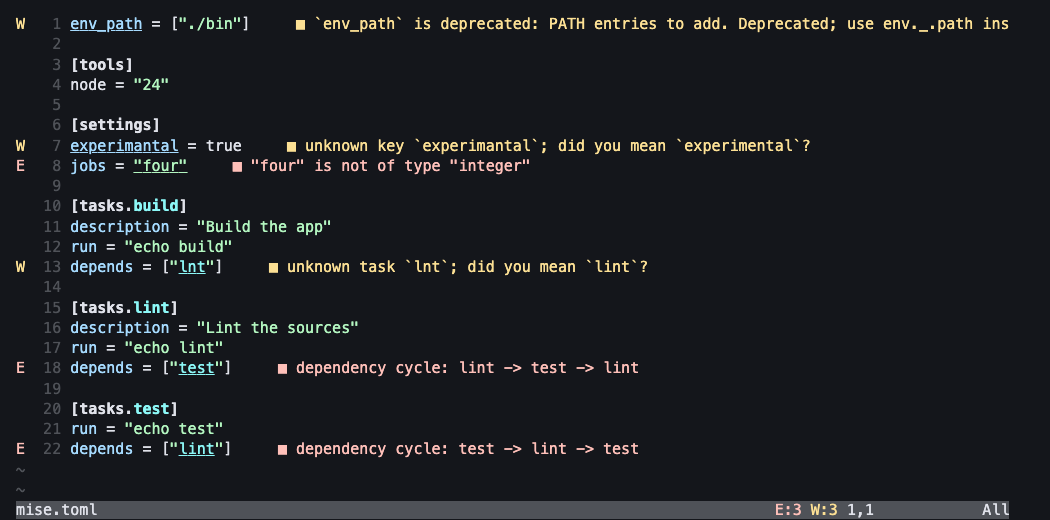
| Line | Kind | Severity | Message |
|---|---|---|---|
| 1 | deprecated-key |
Warning | env_path is deprecated ... use env._.path instead. This will be removed in mise 2027.4.0. |
| 7 | unknown-key |
Warning | unknown key experimantal; did you mean experimental? |
| 8 | invalid-value |
Error | "four" is not of type "integer" |
| 13 | unknown-task |
Warning | unknown task lnt; did you mean lint? |
| 18 | task-cycle |
Error | dependency cycle: lint -> test -> lint |
| 22 | task-cycle |
Error | dependency cycle: test -> lint -> test |
For deprecated keys, even the version in which they are scheduled for removal (mise 2027.4.0) is shown, so you also know the migration deadline. Circular task dependencies are often noticed only when you run mise run, so being able to find them while editing seems helpful.
Quick fixes are offered for three kinds of mistakes
When I called the code action on line 7, a fix to replace it with the suggested experimental appeared.
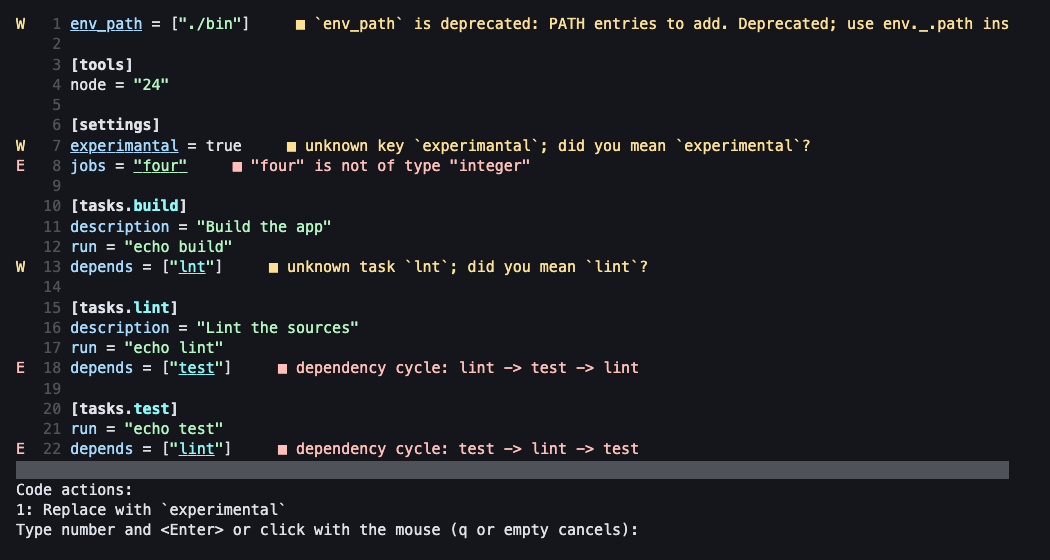
When I sent LSP requests directly with the script described later, quick fixes were attached to the following three diagnostics.
experimantal→ replace withexperimentalenv_path→ replace withenv._.path(only the key name is rewritten; the value["./bin"]stays as is)lnt→ replace withlint
env._.path = ["./bin"] is a dotted key in TOML, so it means the same as writing _.path in an [env] table. If the file has a separate [env] table, the same table would be defined twice, so it seems you need to move it into [env] (I haven't tried this combination). No quick fix is offered for the type mismatch (jobs = "four") or the circular dependency, so you need to fix them yourself.
Viewing a tool's backend or a task's command with hover
When I placed the cursor on node in [tools] and hovered, the tool's description and backend were displayed.
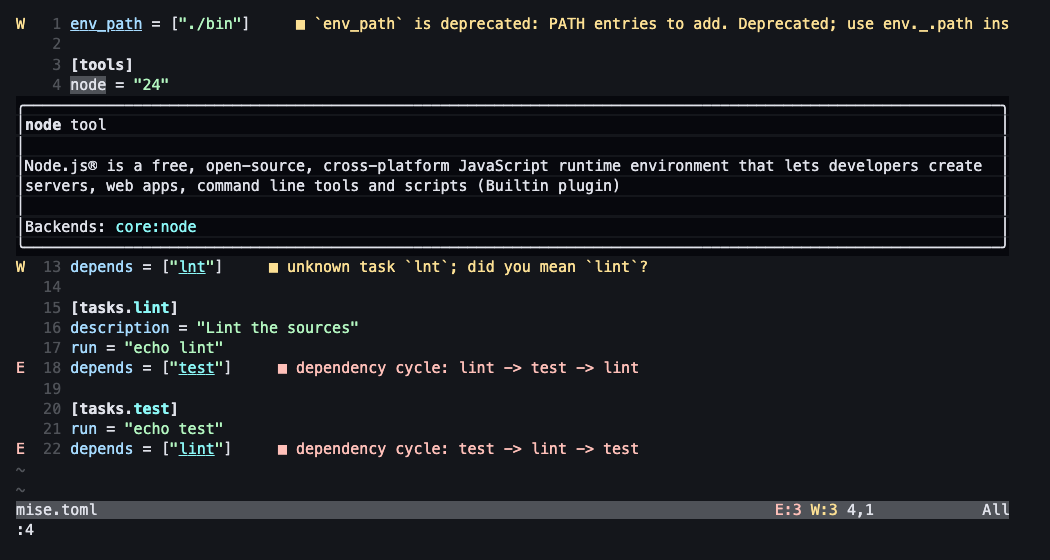
Over a configuration key, the type and description were displayed (example: settings.jobs is an integer, the number of jobs to run concurrently). Over a task name written in depends, the task's description and its run command appear.
Completing defined tasks inside depends
The next screen is after applying the quick fixes on lines 1 and 7. When I cleared the contents of depends = ["lnt"] on line 13 and called completion, lint (with its description) and test appeared as candidates.
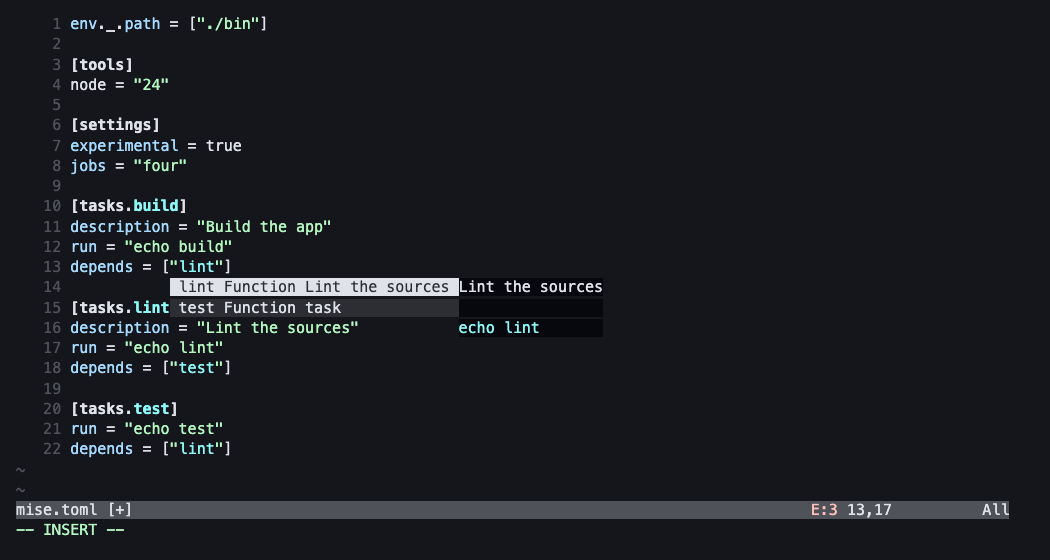
With completion sent directly to the LSP, build and test were returned inside the depends of [tasks.lint], and lint itself was not included in the candidates. When I called completion at the beginning of a line directly under [settings], 147 configuration keys were returned (for mise 2026.10.19; the count varies with version and position).
Checking the LSP responses without an editor
For parts that are hard to understand from the screen alone, I wrote a small Python script that launches mise lsp as a child process and sends LSP messages directly. The results are as follows.
| What I tried | Result |
|---|---|
| Capabilities returned by initialize | codeAction, completion, definition, documentFormatting, hover, references, rename, semanticTokens |
Go to definition from depends = ["lint"] |
The position of [tasks.lint] |
Find references to lint |
Two places: [tasks.lint] and depends = ["lint"] |
Rename lint to check |
An edit that rewrites the two places above. The misspelled lnt is not affected |
Format a different mise.toml with the spaces removed (node="24") |
An edit that fixes it to node = "24". Same as the output of mise fmt |
Cargo.toml with a typo |
Returns none of diagnostics, hover, or formatting |
It works even in a directory that is not trusted
The directory used for verification had not been mise trusted, so mise tasks ls failed with "not trusted". Even so, mise lsp returned diagnostics and hover. According to the official documentation, mise lsp only parses the configuration and neither expands templates nor executes commands. You can check the mise.toml of a freshly cloned repository in the editor before trusting it.
Other editors
Regarding Zed, the official documentation explains that the mise-zed extension launches mise lsp. I haven't tried it this time.
Summary
- With
mise lsp, added in mise 2026.10.18, I could check typos inmise.tomlwhile editing. The targets are misspellings, type mismatches, deprecated keys, nonexistent task names, and circular task dependencies - Quick fixes are offered for misspellings, deprecated keys, and nonexistent task names. Type mismatches and circular dependencies need to be fixed by yourself
- In completion, defined tasks (excluding the task itself) appeared in
depends, and in hover, tool backends and taskruncommands appeared - In Neovim, it connected with the
vim.lsp.configconfiguration from the official documentation - Diagnostics and hover were returned even for a
mise.tomlin an untrusted directory. Nothing was returned forCargo.toml, so connecting it to all TOML files does not get in the way of other files