
Use `mise tasks set` to modify tasks in mise.toml while preserving comments, and delete them with `rm`

This page has been translated by machine translation. View original
Hello! I'm Yuji Nishimura from the Operations Department!
There are times when I want to add or fix mise tasks from shell scripts or coding agents. Until now, the only thing the CLI could do was add tasks with mise tasks add. For changes such as only altering a description, adding a single environment variable, or deleting a task that is no longer used, you had to rewrite the whole definition with add or edit mise.toml directly. Rewriting with sed or regular expressions easily breaks comments and neighboring tasks.
mise 2026.10.25 added mise tasks set, which modifies an existing task, and mise tasks rm, which deletes one. The release notes present them as features suited for use from scripts and coding agents.
mise tasks set build --description "Build for release"
mise tasks set test --env-var CI=1 --unset quiet
mise tasks rm --yes scratch
Using set and rm requires mise 2026.10.25 or later. In this article, I checked the following points with mise 2026.11.0.
- The range that
setrewrites, and the comments that remain - Checking before writing with
--dry-runand--json - How the target file to write to is chosen
- The confirmation prompt of
rm, and the range that gets deleted - How commands passed after
--are handled
I won't cover the --once option of mise watch, which was introduced in the same 2026.10.25, or how to use the --usage and --confirm options added to add.
Choosing between add, set, and rm
Based on the release notes and the CLI reference, I organized the roles of the three commands.
| Command | Target | Behavior |
|---|---|---|
mise tasks add |
New task | Writes [tasks.<name>]. Adding the same content again changes nothing |
mise tasks set |
Existing TOML task | Rewrites only the fields you pass. --unset removes a field. It errors if the task doesn't exist |
mise tasks rm (alias remove) |
TOML task, file task (a task that is a script placed in mise-tasks/ etc.) |
Deletes the task's table, or the file task's script. Asks for confirmation unless --yes is given |
All three let you choose the file to write to with --env, --global, and --path, and also accept --json and --dry-run. In 2026.10.25, --env-var, --tools, --usage, and --confirm were added to add, and set accepts the same flags.
When I used add to write different content for a task with the same name, in 2026.11.0 it was replaced without any warning even without --force. According to the release notes, this replacement is planned to produce a warning from 2027.5.0 and be rejected from 2028.5.0. For scripts that run only on the current mise, it advises adding --force now.
Trying it out
Environment
- macOS 26.7.2 (arm64)
- mise 2026.11.0 (I placed the GitHub Releases binary in a location separate from my regular mise, and ran it with HOME pointing to a verification directory)
- For comparison: mise 2026.10.24
When I ran mise tasks set build --description x on 2026.10.24 for comparison, set was treated as a task name, and it exited with the error error: unrecognized subcommand 'build'.
The test mise.toml is as follows. I included a heading comment and an end-of-line comment.
# Task definitions shared by the team
[tools]
node = "24"

# --- Build ---
[tasks.build]
description = "Build the app"  # Also called from CI
run = "npm run build"
sources = ["src/**/*.ts"]
outputs = ["dist/**"]

# --- Test ---
[tasks.test]
run = "npm test"
quiet = true
1. Changing only the necessary fields with set
I changed the description and command of build, and for test I added an environment variable and a tool and removed quiet. The command written after -- replaces the task's run. There are caveats about how arguments after -- are handled, so I'll look at them in detail in the later section "Caveats for commands passed after --".
mise tasks set build --description "Build for release" -- npm run build -- --mode production
mise tasks set test --env-var CI=1 --tools node@24 --unset quiet
Here is the diff against the original file after running them.
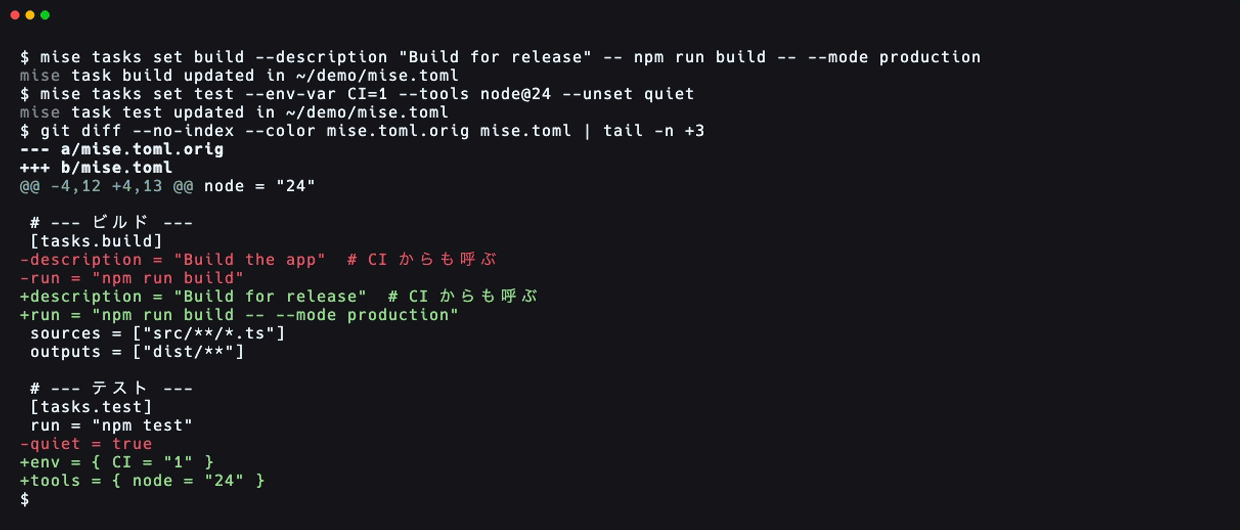
Only the lines of the fields I passed changed. The # Also called from CI at the end of the description line remains on the same line even after the value changed. The heading comments, sources and outputs, and [tools] are also unchanged.
--env-var and --tools were written as inline tables, like env = { CI = "1" } and tools = { node = "24" }. According to the CLI reference, these two add or replace only a single entry inside env and tools. On the other hand, list fields such as --depends and --sources replace the whole list (I'll check --sources in the next section).
Also, when I ran mise tasks set lint --description x on a nonexistent task, it printed mise ERROR no task named lint and exited with exit code 1. set never creates a new task, so you won't accidentally end up with an extra task by running it meaning to modify one.
2. Checking before writing with --dry-run and --json
With --dry-run, the file doesn't change. In 2026.11.0, --dry-run alone only printed a single line, mise task build would be updated in .../mise.toml, and I couldn't tell what would change. If you want to see the contents, use it together with --json.
mise tasks set build --dry-run --json --sources "src/**/*.ts" --sources "package.json"
{
  "task": "build",
  "action": "updated",
  "kind": "toml",
  "path": "/path/to/proj/mise.toml",
  "table": {
    "description": "Build for release",
    "run": "npm run build -- --mode production",
    "sources": [
      "src/**/*.ts",
      "package.json"
    ],
    "outputs": [
      "dist/**"
    ]
  },
  "newly_trusted": false,
  "dry_run": true
}
table contains the whole task after writing, not a diff. The sources in table was not added to the original value but replaced by the two values I passed.
With --json, the JSON went to standard output and nothing went to standard error. The updated in ... and added to ... messages that appear without --json go to standard error. In a script, you can pipe standard output straight into jq.
3. Choosing the file to write to
The target file is determined by the flags and by which file contains the task. Based on the official documentation Which file mise writes to and the results this time, I made my own conceptual diagram (it is not an official diagram). --env local writes to mise.local.toml in the current directory, --global writes to the global config, and --path writes to the specified file. Without a flag, add writes to the shared-side file of the directory with the nearest config (normally mise.toml; or mise.local.toml if that's the only one). set and rm look for the file that defines that task.
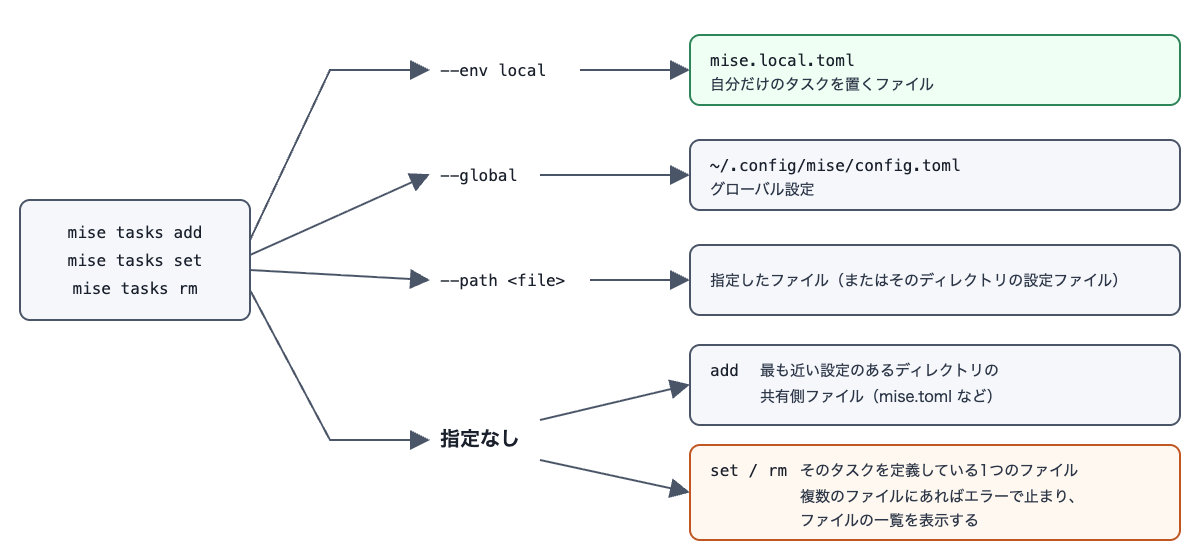
Tasks only for yourself can be placed in mise.local.toml with --env local.
mise tasks add --env local lint --tools node@24 -- npx eslint .
[tasks.lint]
tools = { node = "24" }
run = "npx eslint ."
In a directory with both mise.toml and mise.local.toml, running add without flags wrote to mise.toml.
If a task with the same name exists in two files, set and rm stop without rewriting either file. I tried it with test placed in both mise.toml and mise.local.toml (rm gave the same error even with --yes).
mise tasks set test --description "changed"
mise ERROR task test is defined in several files (/path/to/proj/mise.local.toml, /path/to/proj/mise.toml); choose one with --path, --env or --global
With --env local, only test in mise.local.toml was updated.
When I ran add in a directory that I hadn't yet trusted, mise trusted the directory itself and printed the following message to standard error. The CLI reference explains this as an action to let mise load the file it wrote.
mise task hello added to /path/to/proj2/mise.toml
mise trusted /path/to/proj2 so that mise loads /path/to/proj2/mise.toml; `mise trust --untrust /path/to/proj2` undoes it
The CLI reference says that set also trusts the target file, and that in safe mode (MISE_SAFE=1) it only writes without trusting. I haven't tried these two this time.
4. The confirmation prompt of rm, and the range that gets deleted
When I ran rm without --yes and without a terminal (running with standard input set to /dev/null), it exited with the following error.
mise tasks rm scratch </dev/null
mise ERROR mise tasks rm requires confirmation but there was nobody to ask; pass --yes to proceed non-interactively
It doesn't hang waiting for confirmation input, and ends with exit code 1. I haven't tried how the confirmation prompt is displayed when run from a terminal. To see the target before deleting, you can use --dry-run --json.
mise tasks rm --dry-run --json scratch
[
  {
    "task": "scratch",
    "action": "removed",
    "kind": "toml",
    "path": "/path/to/proj3/mise.toml",
    "table": {
      "run": "echo scratch"
    },
    "newly_trusted": false,
    "dry_run": true
  }
]
Unlike set, the --json of rm returns an array. With jq, you extract it like .[0].path.
In the following file, I deleted scratch and build in order, with --yes.
# Shared tasks
[tasks.build]
run = "echo build"

# Runs after build
[tasks.ci]
depends = ["build"]
run = "echo ci"

[tasks.scratch]  # For temporary experiments
run = "echo scratch"
mise tasks rm --yes scratch
mise tasks rm --yes build
# Runs after build
[tasks.ci]
depends = ["build"]
run = "echo ci"
The [tasks.scratch] table disappeared along with its end-of-line comment. rm also deletes the comment immediately before a table together with the table. The comment # Shared tasks at the top of the file, which was above [tasks.build], also disappeared along with build. The result was the same even for a file with one blank line between the comment and the table.
Tasks that depend on the deleted task remain as they are. Even when I deleted build while ci had depends = ["build"], the definition of ci didn't change. Running mise tasks validate at that point reported Dependency 'build' not found [missing-dependency]. Running validate after rm lets you notice broken dependencies.
When I ran rm on a file task, the script file was deleted.
5. What set and rm don't rewrite
For the following targets, set and rm stopped with an error without rewriting any file.
| Target | Result |
|---|---|
Tasks loaded via task_config.includes (a setting that loads tasks from another TOML file) |
set stops with the error task lint is defined in .../tasks.toml, which mise tasks set does not edit, and rm with ... which mise tasks rm does not edit |
set on a file task |
Stops with the error task hello is a file task (...); change its script, for example with `mise tasks edit hello` |
To fix a file task's script, use mise tasks edit as the error suggests.
The release notes say that rm also doesn't delete tasks inferred from package.json. I haven't verified this behavior because I didn't set up a configuration that loads package.json tasks.
Caveats for commands passed after --
Arguments written after -- in add and set are quoted for the shell, word by word and only where necessary, before going into run. For this reason, if you pass the whole command as a single string, the entire string is treated as a single-word command name. In the source code (v2026.11.0 src/cli/tasks/write.rs) as well, the run string was built with shell_words::join.
| How it was passed | Written run |
Result of mise run |
|---|---|---|
-- "echo a b" |
'echo a b' |
sh: echo a b: command not found (exit code 127) |
-- echo --mode=prod "a b" |
echo '--mode=prod' 'a b' |
--mode=prod a b |
-- echo one "&&" echo two |
echo one '&&' echo two |
one && echo two (&& is output as literal text) |
-- echo '$HOME' |
echo '$HOME' |
$HOME (not expanded) |
-- sh -c "echo one && echo two" |
sh -c 'echo one && echo two' |
one, two |
Pass the command and arguments separated word by word. When you want to use &&, pipes, or variable expansion, passing a single string to sh -c as in the last example worked. Pipes and variables also work as follows.
mise tasks set hello -- sh -c 'echo one | tr a-z A-Z'   # Output of mise run hello: ONE
mise tasks set hello -- sh -c 'echo $HOME'              # Output of mise run hello: HOME at runtime
Strings containing variables must be enclosed in single quotes. When I wrote it with double quotes, like sh -c "echo $GREETING", the shell that ran mise tasks set expanded it first, and the expanded value was written, like run = "sh -c 'echo from-caller'". If a command is so long that it's hard to read even wrapped in sh -c, editing mise.toml directly would probably be more readable.
Discussion of the results
The reason the end-of-line comment remained after the value changed is probably that set handles the file with DocumentMut from toml_edit, which can edit TOML while preserving comments and whitespace. I speculate that the comment directly before the table was deleted by rm because toml_edit holds the comment immediately before a table as that table's decoration. In the source code as well, the code that removes an emptied [tasks] heading had a note to the effect that a heading with a comment attached is kept, because removing it would remove the comment too.
set on a nonexistent task, set and rm on a task that is in several files or loaded via includes, and rm without a terminal all printed an error message and exited with exit code 1. Since nothing is written by guesswork, scripts and agents can check the exit code and decide the next step.
Because arguments are quoted, a && or | contained in an argument never caused another command to be run afterward. On the other hand, when you wrap in sh -c to use shell features, the contents of the wrapped string are interpreted by the shell. If you embed a value received from outside into the sh -c string, be aware that this protection doesn't apply.
Impressions
When asking a coding agent to add or fix tasks, having it use mise tasks add or set rather than editing mise.toml directly seems likely to keep the diffs smaller. If you run it after looking at the result of --dry-run --json, you can also review what will be written.
Being able to put tasks for yourself in and out of mise.local.toml with --env local also felt convenient. It reduces the worry of accidentally rewriting the shared mise.toml.
The comment directly before the table disappearing with rm was different from what I expected. I had thought only the table would be deleted.
Summary
I tried mise tasks set and mise tasks rm, added in mise 2026.10.25, on 2026.11.0. set rewrites only the fields you pass and leaves other fields and comments. You can check the task after writing with --dry-run --json. If the same task exists in several files, it stops rather than rewriting by guesswork.
Please note the following points when using them.
- The target file can be chosen with
--env local,--global, and--path. Without a flag,addwrites to the shared-side file (normallymise.toml), whilesetandrmwrite to the one file that defines the task - In an environment without a terminal,
rmstops with an error unless--yesis given. The comment directly before the table is deleted too. Tasks that depend on a deleted task remain, so check withmise tasks validate - Arguments after
--are quoted word by word. Pass commands separated word by word, wrap&&and pipes insh -c, and enclose variables in single quotes - TOML tasks loaded via includes are outside the scope of
setandrm. File tasks are outside the scope ofset, and withrmthey are deleted along with the script addreplaces a task with the same name but different content even without--force(as of 2026.11.0)
I hope this helps someone.