
Next.js + FastAPI delivered via nginx subpath: 3 pitfalls I encountered — trailingSlash, routing separation, and MuleSoft SSE buffering

This page has been translated by machine translation. View original
Introduction
I ran into three routing-related pitfalls while deploying a monorepo app with Next.js (frontend) + FastAPI (backend) served via an nginx subpath.
basePathalone results in 404 — thetrailingSlashtrap- Separating frontend and backend routing — splitting two services with nginx
- API Gateway buffering SSE — streaming gets stuck through MuleSoft
The solutions themselves are simple, but each one took a long time to isolate. I hope this serves as a reference for anyone working with the same setup, so I'll explain it alongside nginx basics and the role of API Gateways.
Prerequisites & Environment
| Item | Value |
|---|---|
| Next.js | 16 (App Router) |
| FastAPI | 0.115+ |
| Nginx | 1.24 |
| Docker Compose | Yes (with port mapping) |
| MuleSoft | Anypoint Platform (CloudHub) |
Architecture
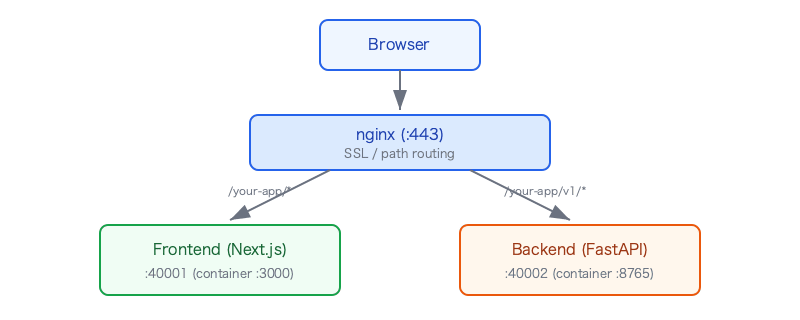
The frontend and backend each run in Docker containers, with host ports assigned via docker-compose.override.yml.
# docker-compose.override.yml
services:
  frontend:
    ports:
      - "40001:3000"
  backend:
    ports:
      - "40002:8765"
What is nginx — and why is it needed in the first place?
Some might wonder: "Next.js already has a development server, so why do we need nginx in front of it?"
nginx is a reverse proxy and web server. Its main roles are as follows:
| Role | Description |
|---|---|
| Reverse proxy | Forwards requests from clients to application servers behind it |
| Path-based routing | Routes to different services based on the URL path (/app-a/ → port 3000, /app-b/ → port 5000) |
| SSL termination | nginx handles HTTPS encryption/decryption, so backend apps only need to communicate over HTTP |
| Static file serving | Serves HTML/CSS/JS/images directly without going through the app server |
| Load balancing | Distributes requests across multiple app servers |
In our case, nginx's path-based routing was essential because we needed to host 40+ apps on a single server.
https://host/app-a/  →  localhost:3000 (React)
https://host/app-b/  →  localhost:5000 (Streamlit)
https://host/your-app/ →  localhost:40001 (Next.js) ← this app
...(40+ locations in total)
Is Next.js alone not enough?
Next.js's next start is a production-ready HTTP server. There's nothing wrong with serving an app with Next.js by itself. In fact, on platforms like Vercel and AWS Amplify, Next.js runs without nginx.
However, nginx becomes necessary in the following cases:
- Hosting multiple apps together — serving multiple services under subpaths on a single domain/IP
- Centralized SSL termination — it's impractical for each app to manage its own SSL certificate
- Integration with existing nginx infrastructure — adding an app to a server already managed by nginx
Conversely, if you're serving a single app on a dedicated domain, nginx is unnecessary. next start alone is sufficient.
Pitfall 1: basePath alone causes 404 on nginx subpath
Configuration
// next.config.ts
const nextConfig: NextConfig = {
  basePath: "/your-app",
};
location /your-app/ {
    proxy_pass http://localhost:40001/;
    proxy_set_header Host $host;
    proxy_set_header X-Real-IP $remote_addr;
    proxy_set_header X-Forwarded-For $proxy_add_x_forwarded_for;
    proxy_set_header X-Forwarded-Proto $scheme;
    proxy_http_version 1.1;
    proxy_set_header Upgrade $http_upgrade;
    proxy_set_header Connection "upgrade";
    proxy_buffering off;
    proxy_read_timeout 120s;
    client_max_body_size 20m;
}
Here is a breakdown of the directives used in the location block above.
Proxy forwarding
| Directive | Value | Role |
|---|---|---|
proxy_pass |
http://localhost:40001/ |
The URL to forward requests to. The trailing / is important — it strips the location prefix (/your-app/) before forwarding (explained later) |
proxy_http_version |
1.1 |
Use HTTP/1.1 for communication with the backend. The default is 1.0, but without 1.1, Connection: keep-alive and WebSocket Upgrade won't work |
Header forwarding
| Directive | Value | Role |
|---|---|---|
proxy_set_header Host |
$host |
Passes the original request's Host header as-is to the backend. Without this, nginx's own hostname (localhost) is sent, which breaks URL generation and redirects on the app side |
proxy_set_header X-Real-IP |
$remote_addr |
Passes the client's real IP address to the backend. Since the request origin appears to be nginx's IP when going through a proxy, this is needed when logs or auth require the client IP |
proxy_set_header X-Forwarded-For |
$proxy_add_x_forwarded_for |
Records the full chain of proxy IP addresses, separated by commas. Unlike X-Real-IP, which only passes the immediate client IP, this allows tracking the route even through multi-hop proxies |
proxy_set_header X-Forwarded-Proto |
$scheme |
Tells the backend whether the original request was http or https. Necessary when SSL is terminated at nginx, so the app can correctly determine the protocol when generating redirect URLs |
proxy_set_header Upgrade |
$http_upgrade |
Forwards the WebSocket upgrade header. Used by Next.js HMR (Hot Module Replacement) during development |
proxy_set_header Connection |
"upgrade" |
Used together with the Upgrade header to enable protocol switching from HTTP to WebSocket |
Buffering, timeout, and body size
| Directive | Value | Role |
|---|---|---|
proxy_buffering |
off |
Sends data to the client immediately without nginx buffering the backend response. Required for SSE streaming |
proxy_read_timeout |
120s |
Maximum time to wait for a response from the backend. The default is 60s, but requests that take time to respond — such as AI inference — require this to be extended to avoid timeouts |
client_max_body_size |
20m |
Maximum size of the request body accepted from the client. The default is 1MB, but this needs to be increased when file uploads are involved |
The trailing slash in proxy_pass is an easy detail to overlook.
# ✅ /your-app/settings/ → localhost:40001/settings/ (prefix stripped)
location /your-app/ {
    proxy_pass http://localhost:40001/;
}

# ❌ /your-app/settings/ → localhost:40001/your-app/settings/ (prefix remains)
location /your-app/ {
    proxy_pass http://localhost:40001;
}
Symptom
| URL | Result |
|---|---|
https://host/your-app/ |
Displays correctly |
https://host/your-app |
404 |
With a trailing slash it works, but without the slash, it returns 404. Since it's natural to type or bookmark URLs without trailing slashes, almost everyone hit this 404.
Cause
nginx's location /your-app/ only matches URLs with a trailing slash. When /your-app (without slash) is requested, nginx attempts to evaluate it as a directory via try_files, but since Next.js isn't serving static files, it can't be interpreted as a directory, and nginx returns 404.
The issue was on the Next.js output side. With basePath alone, Next.js does not append trailing slashes.
Fix
 const nextConfig: NextConfig = {
   basePath: "/your-app",
+  trailingSlash: true,
 };
With this setting, Next.js automatically appends a trailing slash to all generated URLs.
- Root page:
/your-app/ - Each page:
/your-app/settings/ - API routes:
/your-app/api/chat/
No changes to nginx are needed.
Why it's hard to notice
- No issue occurs in local development (
pnpm dev) — Next.js's dev server handles routing on its own and responds correctly regardless of whether a trailing slash is present - The official
basePathdocs don't explicitly mention combining it withtrailingSlash— they're documented as separate config options, making it hard to see that both are needed together when serving under an nginx subpath - It looks like an nginx misconfiguration — since a 404 is returned, you suspect the
locationblock is wrong and end up repeatedly tweaking the nginx config
Verifying with an SSH tunnel
If the deployment target is on a closed network, you can validate access through nginx using a local browser. I prepared a script that forwards the deployment target's nginx (port 80) to localhost via an SSH tunnel.
pnpm nginx # localhost:8081 → deployment target:80 (via nginx)
Access via both direct connection and through nginx, then compare the differences.
| Method | URL | Result |
|---|---|---|
| Direct connection | http://localhost:8080/your-app |
Displays |
| Via nginx | http://localhost:8081/your-app |
404 |
| Via nginx | http://localhost:8081/your-app/ |
Displays |
From this difference — "only 404 without slash via nginx" — I was able to pinpoint the cause as "the URL output from Next.js."
Pitfall 2: Separating frontend and backend routing
Problem
An issue arose where "accessing /your-app/v1/healthz returns 404."
This endpoint is implemented in the FastAPI backend, but nginx was forwarding all requests to the frontend (Next.js).
# Original config — everything goes to the frontend
location /your-app/ {
    proxy_pass http://localhost:40001/;
}
Since Next.js doesn't know about /v1/healthz, it naturally returns 404.
Understanding the architecture
This app consists of two servers.
| Service | Port | Role |
|---|---|---|
| Frontend (Next.js) | 40001 | UI serving + BFF (API routes) |
| Backend (FastAPI) | 40002 | AI chat, search, health checks, etc. |
Requests from the browser have two paths:
- UI/BFF path:
Browser → nginx → Frontend(:40001)— access to HTML pages and Next.js API routes - Backend API path:
Browser/External → nginx → Backend(:40002)— direct access to FastAPI endpoints
Fix: path-based routing in nginx
All backend endpoints were unified under the /v1/ prefix. This keeps the nginx routing rules simple.
# /your-app/v1/* → backend (FastAPI)
location /your-app/v1/ {
    proxy_pass http://localhost:40002/v1/;
    proxy_set_header Host $host;
    proxy_set_header X-Real-IP $remote_addr;
    proxy_set_header X-Forwarded-For $proxy_add_x_forwarded_for;
    proxy_set_header X-Forwarded-Proto $scheme;
    proxy_http_version 1.1;
    proxy_set_header Upgrade $http_upgrade;
    proxy_set_header Connection "upgrade";
    proxy_buffering off;
    proxy_read_timeout 120s;
    client_max_body_size 20m;
}

# /your-app/* → frontend (Next.js)
location /your-app/ {
    proxy_pass http://localhost:40001/;
    proxy_set_header Host $host;
    proxy_set_header X-Real-IP $remote_addr;
    proxy_set_header X-Forwarded-For $proxy_add_x_forwarded_for;
    proxy_set_header X-Forwarded-Proto $scheme;
    proxy_http_version 1.1;
    proxy_set_header Upgrade $http_upgrade;
    proxy_set_header Connection "upgrade";
    proxy_buffering off;
    proxy_read_timeout 120s;
    client_max_body_size 20m;
}
Since nginx evaluates locations using longest match, /your-app/v1/healthz matches /your-app/v1/ and is forwarded to the backend, while /your-app/settings/ matches /your-app/ and is forwarded to the frontend.
Key point: unifying the API prefix
The reason this routing was easy to implement is that all backend endpoints live under /v1/. If /healthz or /readyz were at the root level, the nginx location rules would become more complex.
# FastAPI side — all unified under /v1/
app.include_router(health.router, prefix="/v1")  # /v1/healthz, /v1/readyz
app.include_router(chat.router,   prefix="/v1")  # /v1/chat
app.include_router(search.router, prefix="/v1")  # /v1/search
Lesson: When hosting multiple services under a reverse proxy, unifying the API prefix makes routing dramatically simpler.
The BFF (Backend for Frontend) pattern in Next.js
At this point, you might wonder: "If the frontend and backend are separate servers, can't the browser just call the backend API directly?"
In practice, Next.js API routes act as a BFF (Backend for Frontend) intermediary.
Browser → /your-app/api/chat → Next.js API route → FastAPI /v1/chat
Browser → /your-app/api/resources → Next.js API route → FastAPI /v1/resources
Benefits of the BFF pattern:
- No CORS needed — the browser only accesses Next.js API routes on the same origin
- Credential hiding — API Gateway credentials are kept in server-side API routes and never exposed to the browser
- Response transformation — backend responses can be shaped for the frontend
This pattern becomes important in the next topic: integration with the API Gateway.
Pitfall 3: MuleSoft (API Gateway) buffering SSE
What is an API Gateway
An API Gateway is a proxy server placed in front of backend APIs. It's similar to nginx but specialized for API management, security, and governance.
| Feature | nginx | API Gateway (MuleSoft, etc.) |
|---|---|---|
| Reverse proxy | ○ | ○ |
| SSL termination | ○ | ○ |
| Auth & authorization | △ (Basic auth only) | ○ (OAuth, API Key, rate limiting) |
| API catalog & portal | × | ○ |
| Usage monitoring | × | ○ |
| OpenAPI schema management | × | ○ |
In our setup, MuleSoft Anypoint Platform was used as the API Gateway. External applications accessing the backend API authenticate via MuleSoft using a client_id / client_secret.
Architecture
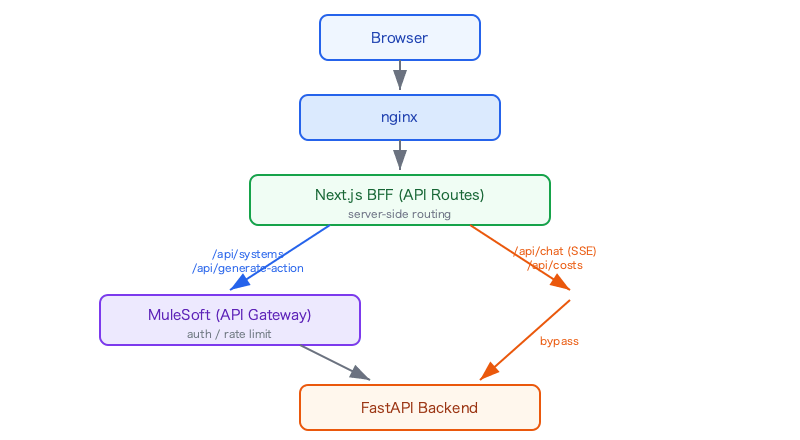
When calling the backend from a Next.js BFF route, MuleSoft authentication headers are added.
// frontend/lib/backend-fetch.ts
export const BACKEND_URL =
  process.env.BACKEND_URL || INTERNAL_BACKEND_URL;

export const mulesoftHeaders: Record<string, string> = {
  ...(clientId && { client_id: clientId }),
  ...(clientSecret && { client_secret: clientSecret }),
};
Problem: SSE streaming doesn't work at all
The chat feature streams responses via SSE (Server-Sent Events). It worked fine locally and over direct connections, but as soon as MuleSoft was introduced, streaming stopped.
Symptoms:
- After sending a request, nothing appears for 22 seconds
- After 22 seconds, the entire response arrives all at once
- In other words, it became a batch response instead of streaming
Debugging: measuring chunks with TransformStream
To visualize when SSE chunks were arriving, I added debug logging using TransformStream.
// frontend/app/api/chat/route.ts
const { readable, writable } = new TransformStream();
const writer = writable.getWriter();
const reader = res.body.getReader();

(async () => {
  let chunk_count = 0;
  try {
    while (true) {
      const { done, value } = await reader.read();
      if (done) break;
      chunk_count++;
      const text = decoder.decode(value, { stream: true });
      const events = text.match(/^event: .+$/gm);
      console.log("[chat] chunk#%d +%dms events=%s bytes=%d",
        chunk_count, Date.now() - t0,
        events?.join(",") ?? "(none)", value.length);
      await writer.write(value);
    }
  } finally {
    writer.close();
  }
})();
Log output (via MuleSoft):
[chat] fetching https://mulesoft-gateway.example.com/your-app/v1/chat
[chat] response status=200 latency=22431ms
[chat] chunk#1 +22435ms events=event: token,event: token,...,event: result bytes=18562
[chat] stream ended chunks=1 total=22438ms
Only one chunk. All SSE events from 22 seconds worth of streaming were buffered into a single chunk.
Direct connection log (for comparison):
[chat] fetching http://backend:8765/v1/chat
[chat] response status=200 latency=245ms
[chat] chunk#1 +248ms events=event: systems bytes=312
[chat] chunk#2 +1203ms events=event: token bytes=45
[chat] chunk#3 +1245ms events=event: token bytes=38
...
[chat] chunk#47 +8932ms events=event: result bytes=2841
[chat] stream ended chunks=47 total=8935ms
47 chunks arriving sequentially.
Cause
After checking with MuleSoft, we received the following response:
- MuleSoft buffers responses by default by design
- Automatic detection is based on headers such as Content-Length and Transfer-Encoding: chunked, and in this case those conditions were not met
- Explicitly enabling SSE passthrough is "possible"
- However, the listener needs to be separated from other endpoints (those that don't stream)
In other words, to pass SSE through MuleSoft:
- The backend must return appropriate headers (
Transfer-Encoding: chunked) - The SSE listener must be isolated from non-SSE endpoints (requires changes to MuleSoft configuration)
Solution: bypass MuleSoft for chat only
Since modifying the MuleSoft configuration would take significant effort, we adopted the approach of connecting the chat endpoint directly to the backend, bypassing MuleSoft.
// chat — direct connection (for SSE streaming)
import { INTERNAL_BACKEND_URL } from "@/lib/backend-fetch";

const res = await fetch(`${INTERNAL_BACKEND_URL}/v1/chat`, {
  method: "POST",
  headers: { "Content-Type": "application/json" },  // no MuleSoft headers
  body: JSON.stringify(body),
});
// resources, actions — via MuleSoft (standard JSON API)
import { BACKEND_URL, mulesoftHeaders } from "@/lib/backend-fetch";

const res = await fetch(`${BACKEND_URL}/v1/resources`, {
  headers: { ...mulesoftHeaders },
});
Final BFF route routing:
| Endpoint | Route | Reason |
|---|---|---|
/v1/chat |
Direct | SSE streaming required |
/v1/resources |
API Gateway | Standard JSON API |
/v1/actions |
API Gateway | Standard JSON API |
/v1/admin/* |
Direct | Internal admin use (not registered in API Gateway) |
This change only required modifying Next.js BFF routes (server-side), with no changes to nginx. Thanks to the BFF pattern, nothing changed from the browser's perspective — only the backend connection target was switched.
nginx and API Gateway — when to use each
Based on the experience so far, here is a summary of the roles of nginx, API Gateway, and BFF.
When is nginx needed?
| Scenario | nginx | Reason |
|---|---|---|
| Multiple apps on one domain | Needed | Path-based routing |
| Centralized SSL termination | Needed | Impractical for each app to manage SSL individually |
| Single app on a dedicated domain | Not needed | next start is sufficient |
| PaaS (Vercel, Amplify, etc.) | Not needed | The platform handles routing |
When is an API Gateway needed?
| Scenario | API Gateway | Reason |
|---|---|---|
| Exposing APIs to external partners | Effective | Auth, rate limiting, usage monitoring |
| Multiple internal teams sharing an API | Effective | API catalog, version management |
| Internal admin-only APIs | Not needed | Auth/monitoring overhead isn't worth it |
| Heavy use of SSE or WebSocket | Worth evaluating | Buffering and timeout issues may arise |
Layer breakdown
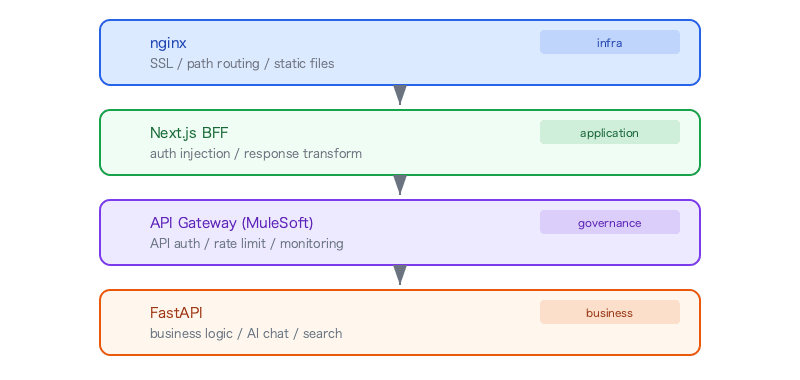
Each layer has independent concerns. In the SSE buffering issue, the BFF pattern made it easy to decide to "bypass the governance layer."
Docker Compose port design
To host many apps on a single server, each team is assigned a port range and mapped in docker-compose.override.yml.
# The base docker-compose.yml does not include port definitions
services:
  frontend:
    build:
      context: .
      dockerfile: Dockerfile.frontend

# Ports are specified in the environment-specific override
# docker-compose.override.yml
services:
  frontend:
    ports:
      - "40001:3000"  # use port 40001 in this environment
  backend:
    ports:
      - "40002:8765"
docker-compose.override.yml is a file that Docker Compose automatically merges into the base configuration. Committing it to the repository means it's applied automatically at deployment, eliminating the need for manual setup.
Summary
| Pitfall | Cause | Fix |
|---|---|---|
| 404 on subpath | basePath alone doesn't add trailing slashes |
Add trailingSlash: true (one line) |
| Backend API returns 404 | nginx was forwarding everything to the frontend | Add a routing rule to split by /v1/ prefix |
| SSE is buffered | MuleSoft buffers the entire response by design | Bypass MuleSoft for the SSE endpoint only |
What all three issues have in common is that they don't reproduce in local development and only appear once deployed, when requests pass through intermediate layers (nginx, API Gateway).
Countermeasures:
- Reproduce the production-like path with an SSH tunnel — set up an environment where you can access through nginx from localhost
- Add debug logging before investigating — like the TransformStream chunk measurement in this case, insert logs to identify the problem area before diving in
- Unify the API prefix — under a reverse proxy, a prefix like
/v1/greatly simplifies routing design - Use the BFF pattern for flexible connection targets — design so that the connection target can be switched server-side without changing the API as seen from the browser