![[Undocumented] VM-Generation ID is available on Nitro generation EC2 instance types](https://images.ctfassets.net/ct0aopd36mqt/wp-thumbnail-bac3d29aa65f45576f73094798087ee5/039ad6f8a7d8f18da47986d21c447f48/amazon-ec2?w=3840&fm=webp)
[Undocumented] VM-Generation ID is available on Nitro generation EC2 instance types

This page has been translated by machine translation. View original
Shibata here.
While compiling backup and restore procedures for Active Directory domain controllers built on Amazon EC2, I noticed a particular sentence in a re:Post article that caught my attention.
This article describes the procedure for using image backups (AMIs) to restore domain controllers, and as a prerequisite states:
Prerequisite: The domain controller instance must run on the AWS Nitro System because virtualized domain controllers that are restored from AMIs require a VM-Generation ID.
It explicitly states that "a Nitro generation instance type must be specified in order to use VM-Generation ID."
Until now, VM-Generation ID had not been supported on AWS hypervisors, and I had never seen it explicitly mentioned as supported in official documentation, so I investigated further.
Conclusion First
After researching the AWS documentation again, I was unable to find any statement that AWS hypervisors officially support VM-Generation ID.
However, when actually building a domain controller on a Nitro generation instance type, VM-Generation ID is indeed set — meaning it is "working in practice even though official support has not been stated."
It is unclear when this became available, but regarding VM-Generation ID itself, documentation for Linux distributions appears to have been added around 2022, and descriptions for Windows OS were added around 2024 in the following document.
Based on the content, it appears to follow Microsoft's specifications.
However, this page only describes an overview of VM-Generation ID and contains no specific information about AWS's support status.
Since the aforementioned re:Post article is official AWS content, the reliability of the feature itself can be considered reasonably trustworthy.
For this reason, I arrived at the conclusion that "official support cannot be expected, but it works as-is."
Verification
From here, I will verify the actual behavior.
I tested both a non-Nitro instance (t2.large) and a Nitro instance (t3.large) in the Tokyo region of my AWS verification account.

I used the latest Windows Server 2019 AMI as of today (ami-0d45bba068714e860 : Windows_Server-2019-Japanese-Full-Base-2026.09.17) and configured each as a separate domain controller. I used an older OS since T2 instances are included.
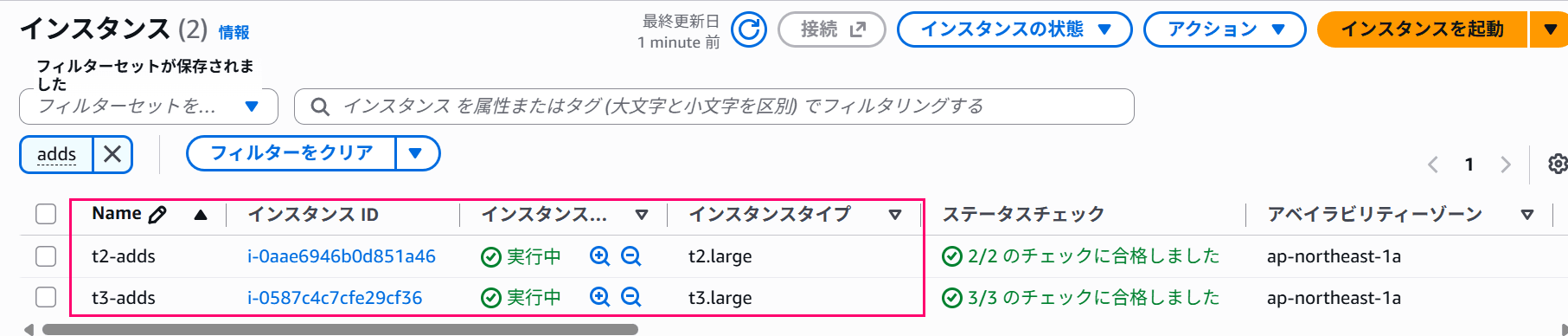
The VPC configuration and steps for setting up as a domain controller are omitted.
For Non-Nitro Instances
First, let's check the driver information related to VM-Generation ID (Microsoft Hyper-V Generation Counter) on the non-Nitro instance (t2.large).
The Microsoft Hyper-V Generation Counter can be found in Device Manager or searched using the following PowerShell command.
# 1. Search PnP device list
Get-CimInstance Win32_PnPEntity | Where-Object { $_.Name -eq 'Microsoft Hyper-V 世代カウンター' }
# 2. Search driver information
Get-CimInstance Win32_PnPSignedDriver | Where-Object { $_.DeviceName -eq 'Microsoft Hyper-V Generation Counter' }
Running these commands on a non-Nitro instance returns no results, as shown below.
# Nothing detected...
PS C:\> Get-CimInstance Win32_PnPEntity | Where-Object { $_.Name -eq 'Microsoft Hyper-V 世代カウンター' }
PS C:\> Get-CimInstance Win32_PnPSignedDriver | Where-Object { $_.DeviceName -eq 'Microsoft Hyper-V Generation Counter' }
PS C:\>
Next, let's check the Active Directory side.
In Active Directory, the VM-Generation ID is recorded in the msDS-GenerationId attribute of the domain controller.
The value of the msDS-GenerationId attribute can be checked using ADSI Edit or with the following PowerShell command.
# Retrieve the msDS-GenerationId attribute value for the target server (this machine in this case)
Get-ADComputer $(hostname) -Properties msDS-GenerationId | Select-Object Name, msDS-GenerationId

# Convert msDS-GenerationId attribute value from Byte[] to String
Get-ADComputer $(hostname) -Properties msDS-GenerationId | ForEach-Object { [BitConverter]::ToString($_."msDS-GenerationId") }
The result shows that the msDS-GenerationId attribute is not set.
# Attribute value is not set
PS C:\> Get-ADComputer $(hostname) -Properties msDS-GenerationId | Select-Object Name, msDS-GenerationId

Name   msDS-GenerationId
----   -----------------
T2ADDS
The same result is confirmed via ADSI Edit.
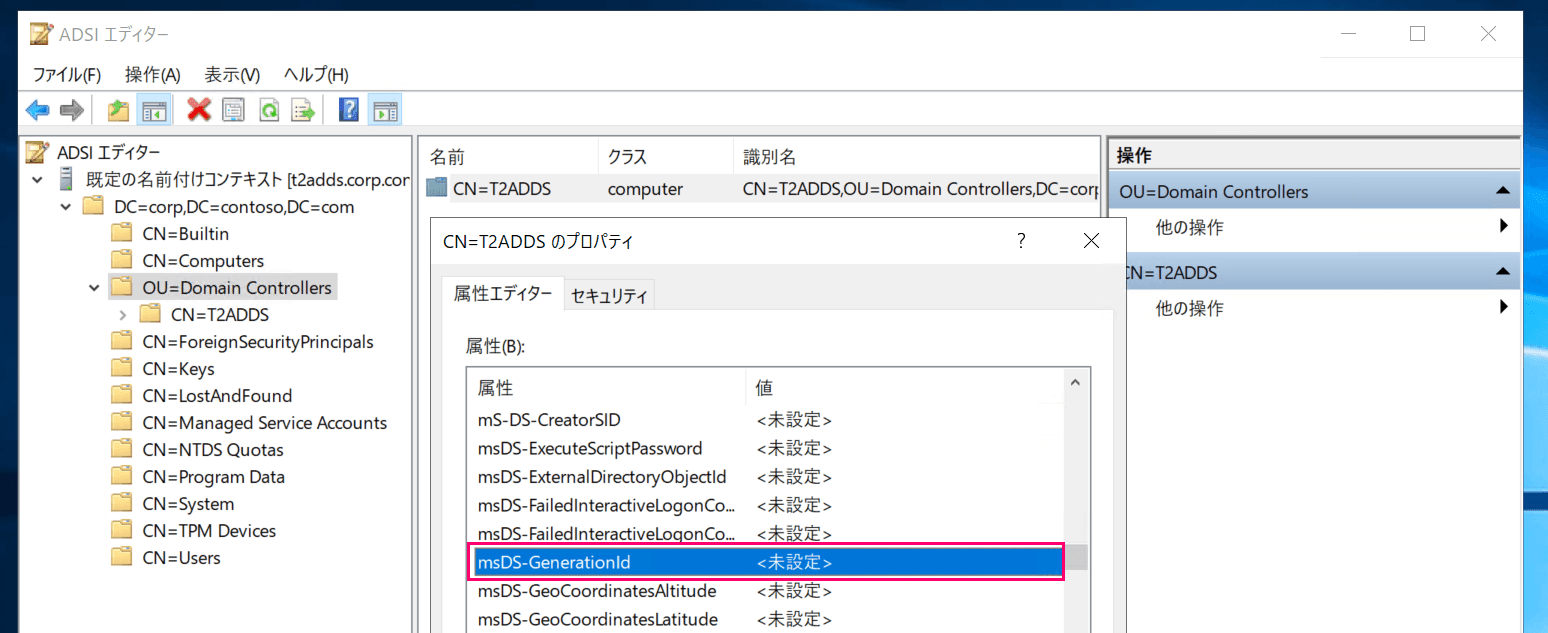
This confirms that VM-Generation ID is not available on non-Nitro instances.
For Nitro Instances
Next, let's check the driver information related to VM-Generation ID on the Nitro instance (t3.large).
Running the same commands as in the previous section returns the following results — this time, driver information is accessible.
# Driver information is retrievable
PS C:\> Get-CimInstance Win32_PnPEntity | Where-Object { $_.Name -eq 'Microsoft Hyper-V 世代カウンター' }

Caption                     : Microsoft Hyper-V 世代カウンター
Description                 : Microsoft Hyper-V 世代カウンター
InstallDate                 :
Name                        : Microsoft Hyper-V 世代カウンター
Status                      : OK
Availability                :
ConfigManagerErrorCode      : 0
ConfigManagerUserConfig     : False
CreationClassName           : Win32_PnPEntity
DeviceID                    : ACPI\AMZN0000\2&DABA3FF&0
ErrorCleared                :
ErrorDescription            :
LastErrorCode               :
PNPDeviceID                 : ACPI\AMZN0000\2&DABA3FF&0
PowerManagementCapabilities :
PowerManagementSupported    :
StatusInfo                  :
SystemCreationClassName     : Win32_ComputerSystem
SystemName                  : T3ADDS
ClassGuid                   : {4d36e97d-e325-11ce-bfc1-08002be10318}
CompatibleID                : {ACPI\VM_Gen_Counter, VM_Gen_Counter}
HardwareID                  : {ACPI\VEN_AMZN&DEV_0000, ACPI\AMZN0000, *AMZN0000}
Manufacturer                : Microsoft
PNPClass                    : System
Present                     : True
Service                     : gencounter
PSComputerName              :

PS C:\> Get-CimInstance Win32_PnPSignedDriver | Where-Object { $_.DeviceName -eq 'Microsoft Hyper-V Generation Counter' }

Caption                 :
Description             : Microsoft Hyper-V Generation Counter
InstallDate             :
Name                    :
Status                  :
CreationClassName       :
Started                 :
StartMode               :
SystemCreationClassName :
SystemName              :
ClassGuid               : {4d36e97d-e325-11ce-bfc1-08002be10318}
CompatID                : ACPI\VM_Gen_Counter
DeviceClass             : SYSTEM
DeviceID                : ACPI\AMZN0000\2&DABA3FF&0
DeviceName              : Microsoft Hyper-V Generation Counter
DevLoader               :
DriverDate              : 2006/06/21 0:00:00
DriverName              :
DriverProviderName      : Microsoft
DriverVersion           : 10.0.17763.1
FriendlyName            :
HardWareID              : ACPI\VEN_AMZN&DEV_0000
InfName                 : wgencounter.inf
IsSigned                : True
Location                :
Manufacturer            : Microsoft
PDO                     : \Device\00000013
Signer                  : Microsoft Windows
PSComputerName          :
It is also visible from Device Manager.
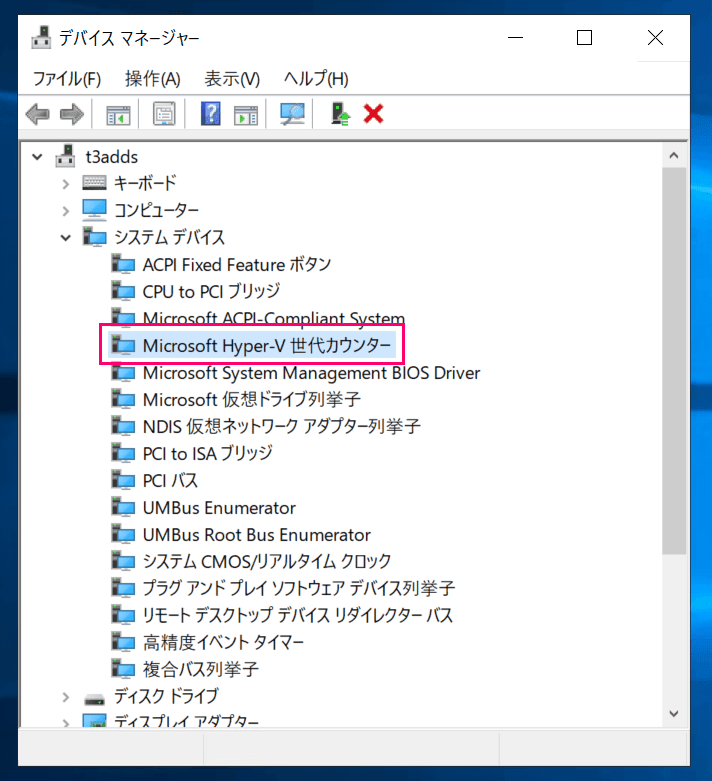
Retrieving the msDS-GenerationId attribute value yields the following result.
# Retrieve the msDS-GenerationId attribute value for the target server (this machine in this case)
PS C:\> Get-ADComputer $(hostname) -Properties msDS-GenerationId | Select-Object Name, msDS-GenerationId

Name   msDS-GenerationId
----   -----------------
T3ADDS {8, 121, 33, 236...}

# Convert msDS-GenerationId attribute value from Byte[] to String
PS C:\> Get-ADComputer $(hostname) -Properties msDS-GenerationId | ForEach-Object { [BitConverter]::ToString($_."msDS-GenerationId") }
08-79-21-EC-44-FF-E3-7D
The ADSI Edit result is as follows.
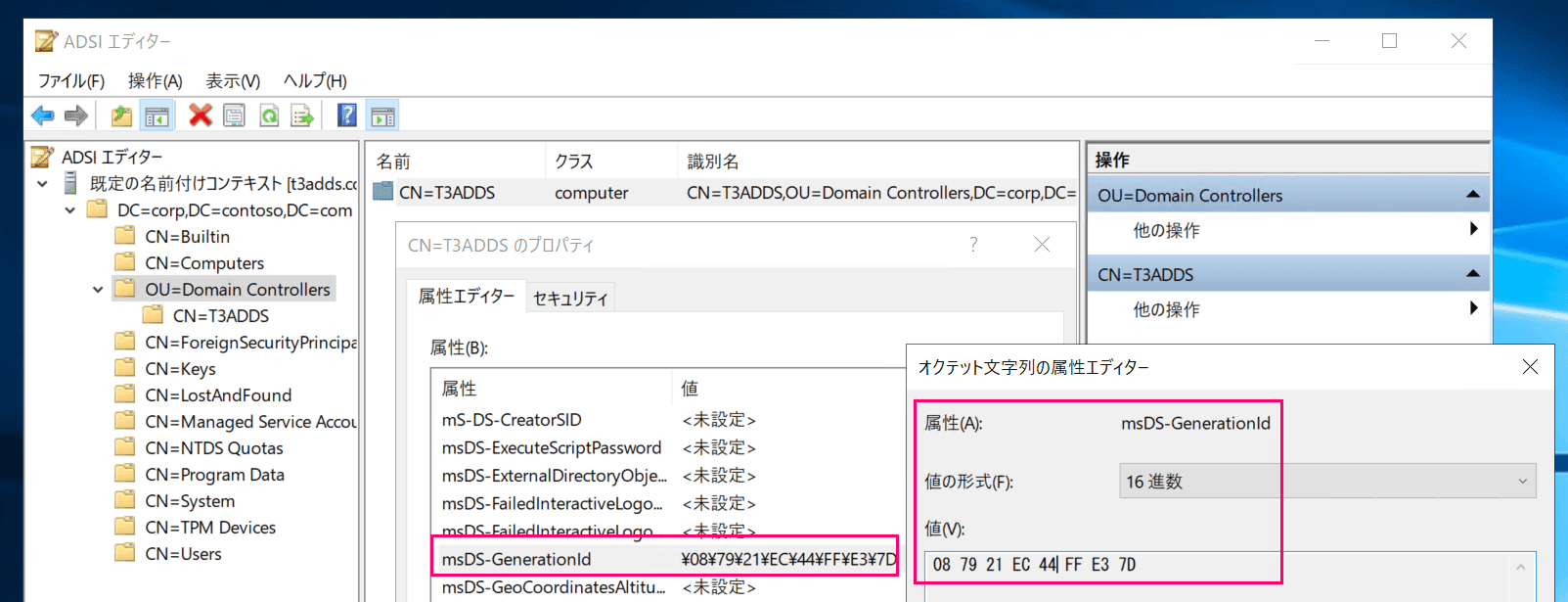
Additionally, event logs related to VM-Generation ID were found in the Directory Service event log.
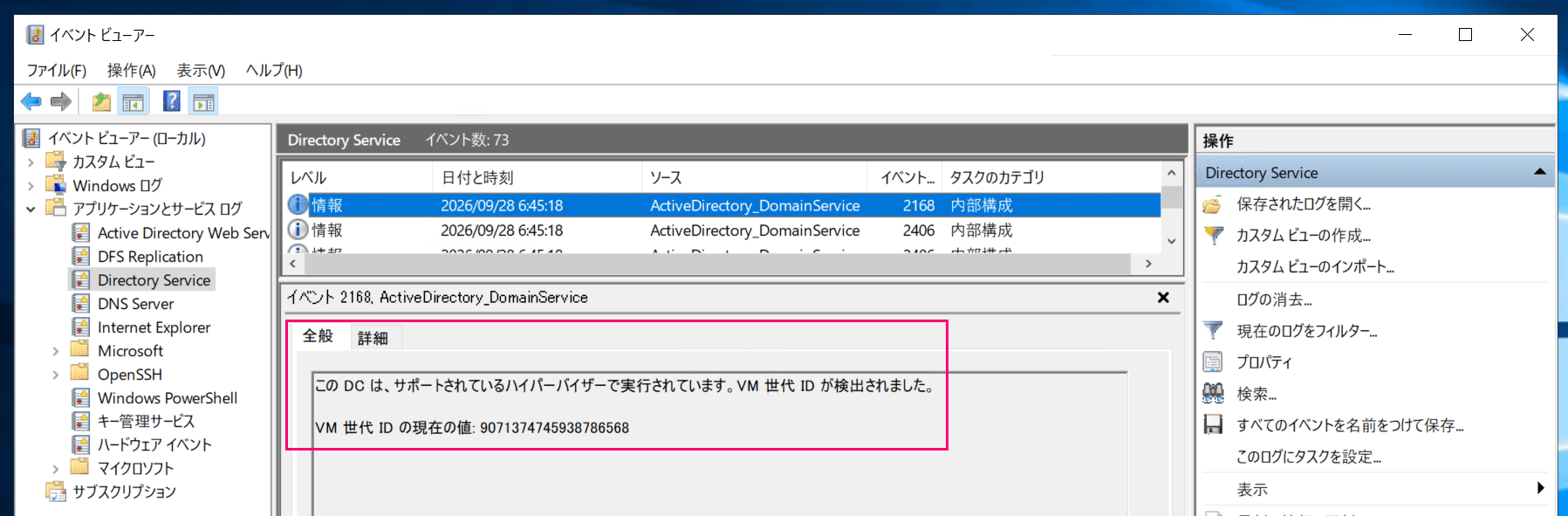
An example of an event log related to VM-Generation ID
Furthermore, without going into detail, I confirmed that once a VM-Generation ID is set, it does not change under the following conditions:
- Instance reboot
- Instance type change from Nitro to Nitro (
m8i-flex.large)- No change in the value retrieved from the hypervisor
- Instance type change from Nitro to non-Nitro (
t2.large)- Non-Nitro instances cannot retrieve VM-Generation ID from the hypervisor, but no change in the attribute value stored in the computer object
I also confirmed that the ID changed when restored from an EBS snapshot, and that the domain controller was able to detect the change.[1]
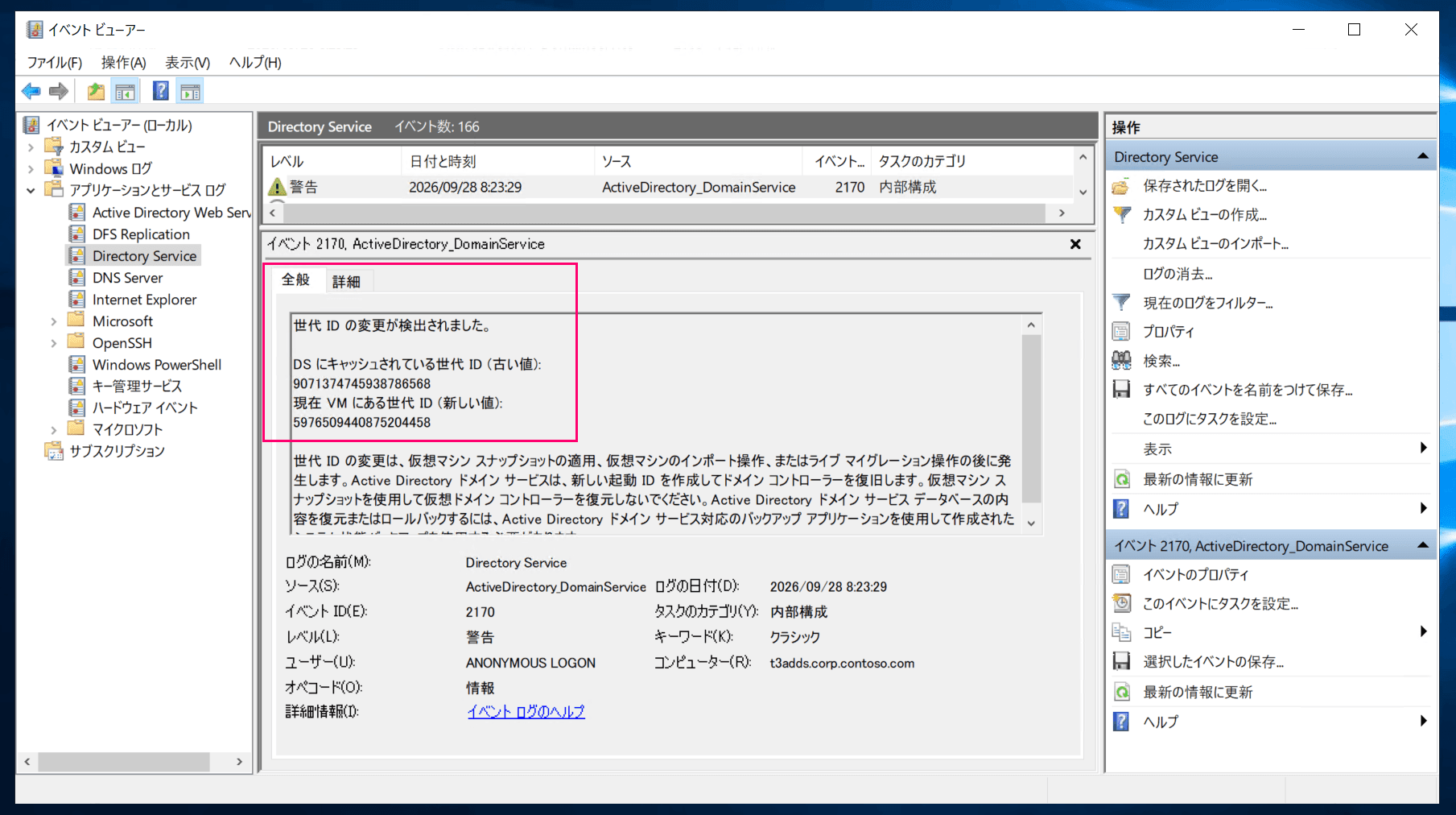
Event log detecting a VM-Generation ID change
A generation ID change has been detected.

Generation ID cached in DS (old value):
9071374745938786568
Generation ID currently in VM (new value):
5976509440875204458

A generation ID change occurs after a virtual machine snapshot is applied, a virtual machine import operation, or a live migration operation. Active Directory Domain Services will create a new invocation ID to recover the domain controller. Do not use virtual machine snapshots to restore virtual domain controllers. A system state backup created with an Active Directory Domain Services-aware backup application must be used to restore or roll back the contents of the Active Directory Domain Services database.
VM-Generation ID is indeed working on Nitro instances.
Closing
That is all.
I had always believed VM-Generation ID was not available on EC2, so I am surprised by these results.
As mentioned at the beginning, official support cannot be expected, but having the feature is far better than not having it.
When building a domain controller on EC2, always choose a Nitro generation instance type.
Since this is a single EC2 environment, I was unable to verify whether the domain controller behavior after detection was appropriate ↩︎
