NLB access logs can now be directly forwarded to CloudWatch Logs

This page has been translated by machine translation. View original
On November 12, 2025, there was an update to Network Load Balancer (NLB) access logs.
Until now, the standard practice for NLB access logs was to "output to S3, wait a few minutes, then analyze with Athena." With this update, direct delivery to CloudWatch Logs, S3, and Kinesis Data Firehose is now supported, similar to CloudFront's standard access logs v2.
Amazon CloudWatch supports logs for Network Load Balancer access logs | AWS What's New
This enables real-time log monitoring using CloudWatch Logs Live Tail, fast query processing with CloudWatch Logs Insights, and the use of structured logs in JSON format.
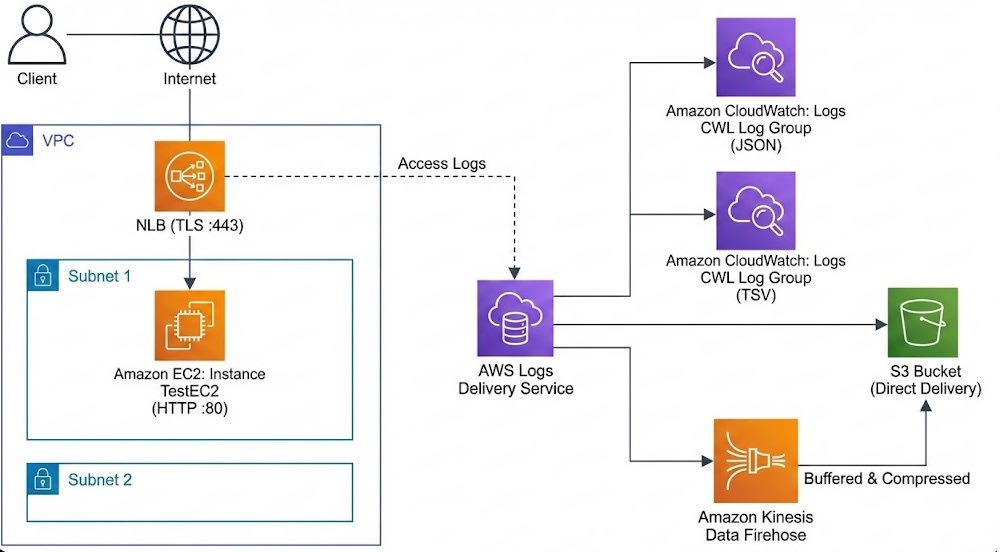
In this article, I'll introduce my experience testing this new feature (Logs Delivery API) by building a test environment with CloudFormation that delivers logs to four destinations: CloudWatch Logs (JSON/TSV), S3, and Kinesis Data Firehose.
Test Environment
Taking advantage of the specification that allows up to 10 deliveries per delivery source, I verified the following formats simultaneously:
- CloudWatch Logs (JSON)
- Recommended setting. Outputs as structured logs, eliminating the need for parsing when searching with CloudWatch Logs Insights.
- CloudWatch Logs (Plain)
- Traditional TSV (tab-separated) format. Useful when migrating without changing existing log monitoring infrastructure.
- Amazon S3 (Plain)
- Compatible with traditional access log format (GZIP compressed).
- Amazon S3 (JSON)
- New format. Stored in JSONL (newline-delimited JSON) format.
- Amazon S3 (W3C)
- New format. W3C Extended Log File Format.
- Amazon S3 (Parquet)
- New format. Stored in Apache Parquet format. Expect reduced Athena scanning costs and improved performance.
- Amazon Kinesis Data Firehose
- Used for forwarding to third-party products like Splunk or Datadog, or for pre-processing (ETL) before data lake storage.
Architecture Diagram
CloudFormation Template
Here's the template used for testing.
Deploying this template will automatically provision the NLB, test EC2, and the seven log delivery patterns mentioned above.
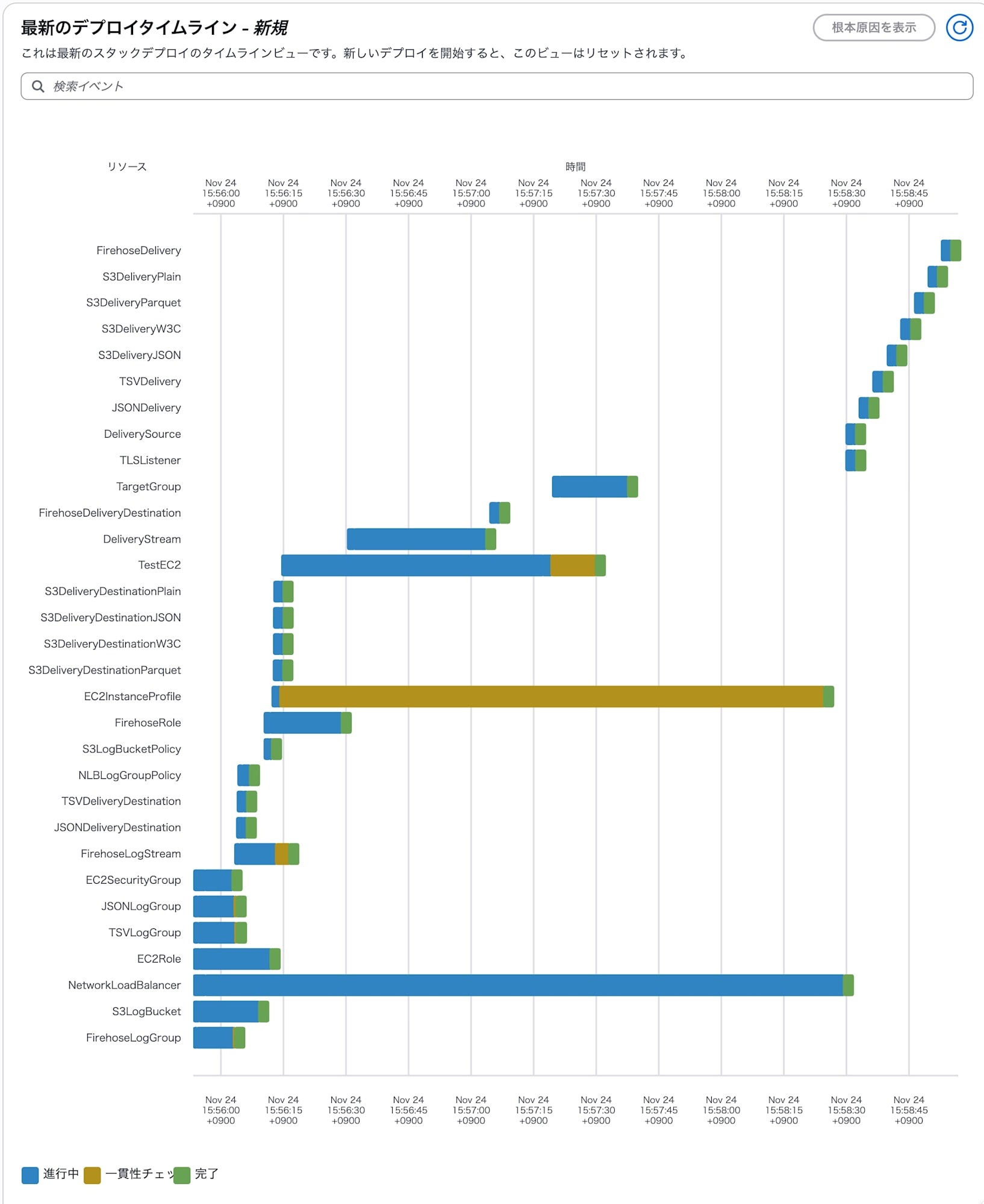
AWS::Logs::Delivery uses DependsOn for sequential processing to avoid errors caused by parallel execution.
  TSVDelivery:
    Type: AWS::Logs::Delivery
    DependsOn: JSONDelivery
    Properties:
      DeliverySourceName: !Ref DeliverySource
      DeliveryDestinationArn: !GetAtt TSVDeliveryDestination.Arn
  S3DeliveryJSON:
    Type: AWS::Logs::Delivery
    DependsOn: TSVDelivery
    Properties:
      DeliverySourceName: !Ref DeliverySource
      DeliveryDestinationArn: !GetAtt S3DeliveryDestinationJSON.Arn
Test Environment Creation Template (Click to expand)
- To use TLS listener, create a certificate with ACM in advance and specify the certificate ARN as a parameter.
- Assumes operation in a Default VPC environment.
AWSTemplateFormatVersion: '2010-09-09'
Description: 'NLB with all logging destinations (CloudWatch JSON/TSV, S3 x4 formats, Firehose) - Default VPC'

Parameters:
  CertificateArn:
    Type: String
    Description: ARN of the ACM Certificate for HTTPS listener

  VpcId:
    Type: AWS::EC2::VPC::Id
    Description: VPC ID for resources

  Subnet1:
    Type: AWS::EC2::Subnet::Id
    Description: First subnet for NLB

  Subnet2:
    Type: AWS::EC2::Subnet::Id
    Description: Second subnet for NLB

Resources:
  EC2SecurityGroup:
    Type: AWS::EC2::SecurityGroup
    Properties:
      GroupDescription: Allow HTTP traffic
      VpcId: !Ref VpcId
      SecurityGroupIngress:
        - IpProtocol: tcp
          FromPort: 80
          ToPort: 80
          CidrIp: 0.0.0.0/0

  EC2Role:
    Type: AWS::IAM::Role
    Properties:
      AssumeRolePolicyDocument:
        Version: '2012-10-17'
        Statement:
          - Effect: Allow
            Principal:
              Service: ec2.amazonaws.com
            Action: sts:AssumeRole
      ManagedPolicyArns:
        - arn:aws:iam::aws:policy/AmazonSSMManagedInstanceCore

  EC2InstanceProfile:
    Type: AWS::IAM::InstanceProfile
    Properties:
      Roles:
        - !Ref EC2Role

  TestEC2:
    Type: AWS::EC2::Instance
    Properties:
      ImageId: !Sub '{{resolve:ssm:/aws/service/ami-amazon-linux-latest/al2023-ami-kernel-default-arm64}}'
      InstanceType: t4g.nano
      IamInstanceProfile: !Ref EC2InstanceProfile
      SecurityGroupIds:
        - !Ref EC2SecurityGroup
      UserData:
        Fn::Base64: |
          #!/bin/bash
          yum update -y
          yum install -y httpd
          systemctl start httpd
          systemctl enable httpd
          echo "<h1>NLB Logging Test - $(hostname)</h1>" > /var/www/html/index.html

  TargetGroup:
    Type: AWS::ElasticLoadBalancingV2::TargetGroup
    Properties:
      Name: !Sub '${AWS::StackName}-tg'
      Port: 80
      Protocol: TCP
      VpcId: !Ref VpcId
      HealthCheckEnabled: true
      HealthCheckProtocol: TCP
      Targets:
        - Id: !Ref TestEC2
          Port: 80

  NetworkLoadBalancer:
    Type: AWS::ElasticLoadBalancingV2::LoadBalancer
    Properties:
      Name: !Sub '${AWS::StackName}-nlb'
      Type: network
      Scheme: internet-facing
      Subnets:
        - !Ref Subnet1
        - !Ref Subnet2

  TLSListener:
    Type: AWS::ElasticLoadBalancingV2::Listener
    Properties:
      DefaultActions:
        - Type: forward
          TargetGroupArn: !Ref TargetGroup
      LoadBalancerArn: !Ref NetworkLoadBalancer
      Port: 443
      Protocol: TLS
      Certificates:
        - CertificateArn: !Ref CertificateArn
      SslPolicy: ELBSecurityPolicy-TLS13-1-2-2021-06

  DeliverySource:
    Type: AWS::Logs::DeliverySource
    Properties:
      Name: !Sub '${AWS::StackName}-source'
      ResourceArn: !Ref NetworkLoadBalancer
      LogType: NLB_ACCESS_LOGS

  NLBLogGroupPolicy:
    Type: AWS::Logs::ResourcePolicy
    Properties:
      PolicyName: !Sub '${AWS::StackName}-policy'
      PolicyDocument: !Sub |
        {
          "Version": "2012-10-17",
          "Statement": [
            {
              "Sid": "AllowLogDelivery",
              "Effect": "Allow",
              "Principal": {
                "Service": "delivery.logs.amazonaws.com"
              },
              "Action": [
                "logs:CreateLogStream",
                "logs:PutLogEvents"
              ],
              "Resource": [
                "${JSONLogGroup.Arn}",
                "${TSVLogGroup.Arn}"
              ],
              "Condition": {
                "StringEquals": {
                  "aws:SourceAccount": "${AWS::AccountId}"
                }
              }
            }
          ]
        }

  # 1. CloudWatch Logs (JSON)
  JSONLogGroup:
    Type: AWS::Logs::LogGroup
    Properties:
      LogGroupName: !Sub '/aws/vendedlogs/nlb/${AWS::StackName}/json'
      RetentionInDays: 3

  JSONDeliveryDestination:
    Type: AWS::Logs::DeliveryDestination
    Properties:
      Name: !Sub '${AWS::StackName}-json'
      OutputFormat: json
      DestinationResourceArn: !GetAtt JSONLogGroup.Arn

  JSONDelivery:
    Type: AWS::Logs::Delivery
    Properties:
      DeliverySourceName: !Ref DeliverySource
      DeliveryDestinationArn: !GetAtt JSONDeliveryDestination.Arn

  # 2. CloudWatch Logs (TSV)
  TSVLogGroup:
    Type: AWS::Logs::LogGroup
    Properties:
      LogGroupName: !Sub '/aws/vendedlogs/nlb/${AWS::StackName}/tsv'
      RetentionInDays: 3

  TSVDeliveryDestination:
    Type: AWS::Logs::DeliveryDestination
    Properties:
      Name: !Sub '${AWS::StackName}-tsv'
      OutputFormat: plain
      DestinationResourceArn: !GetAtt TSVLogGroup.Arn

  TSVDelivery:
    Type: AWS::Logs::Delivery
    DependsOn: JSONDelivery
    Properties:
      DeliverySourceName: !Ref DeliverySource
      DeliveryDestinationArn: !GetAtt TSVDeliveryDestination.Arn

  S3LogBucket:
    Type: AWS::S3::Bucket
    Properties:
      BucketName: !Sub 'nlb-logs-${AWS::StackName}-${AWS::AccountId}'
      PublicAccessBlockConfiguration:
        BlockPublicAcls: true
        BlockPublicPolicy: true
        IgnorePublicAcls: true
        RestrictPublicBuckets: true
      LifecycleConfiguration:
        Rules:
          - Id: DeleteOldLogs
            Status: Enabled
            ExpirationInDays: 7

  S3LogBucketPolicy:
    Type: AWS::S3::BucketPolicy
    Properties:
      Bucket: !Ref S3LogBucket
      PolicyDocument:
        Version: '2012-10-17'
        Statement:
          - Sid: AWSLogDeliveryWrite
            Effect: Allow
            Principal:
              Service: delivery.logs.amazonaws.com
            Action: s3:PutObject
            Resource: !Sub '${S3LogBucket.Arn}/*'
            Condition:
              StringEquals:
                s3:x-amz-acl: bucket-owner-full-control
                aws:SourceAccount: !Ref AWS::AccountId
          - Sid: AWSLogDeliveryAclCheck
            Effect: Allow
            Principal:
              Service: delivery.logs.amazonaws.com
            Action: s3:GetBucketAcl
            Resource: !GetAtt S3LogBucket.Arn
            Condition:
              StringEquals:
                aws:SourceAccount: !Ref AWS::AccountId

  # 3. S3 (JSON)
  S3DeliveryDestinationJSON:
    Type: AWS::Logs::DeliveryDestination
    DependsOn: S3LogBucketPolicy
    Properties:
      Name: !Sub '${AWS::StackName}-s3-json'
      OutputFormat: json
      DestinationResourceArn: !Sub '${S3LogBucket.Arn}/json'

  S3DeliveryJSON:
    Type: AWS::Logs::Delivery
    DependsOn: TSVDelivery
    Properties:
      DeliverySourceName: !Ref DeliverySource
      DeliveryDestinationArn: !GetAtt S3DeliveryDestinationJSON.Arn

  # 4. S3 (W3C)
  S3DeliveryDestinationW3C:
    Type: AWS::Logs::DeliveryDestination
    DependsOn: S3LogBucketPolicy
    Properties:
      Name: !Sub '${AWS::StackName}-s3-w3c'
      OutputFormat: w3c
      DestinationResourceArn: !Sub '${S3LogBucket.Arn}/w3c'

  S3DeliveryW3C:
    Type: AWS::Logs::Delivery
    DependsOn: S3DeliveryJSON
    Properties:
      DeliverySourceName: !Ref DeliverySource
      DeliveryDestinationArn: !GetAtt S3DeliveryDestinationW3C.Arn

  # 5. S3 (Parquet)
  S3DeliveryDestinationParquet:
    Type: AWS::Logs::DeliveryDestination
    DependsOn: S3LogBucketPolicy
    Properties:
      Name: !Sub '${AWS::StackName}-s3-parquet'
      OutputFormat: parquet
      DestinationResourceArn: !Sub '${S3LogBucket.Arn}/parquet'

  S3DeliveryParquet:
    Type: AWS::Logs::Delivery
    DependsOn: S3DeliveryW3C
    Properties:
      DeliverySourceName: !Ref DeliverySource
      DeliveryDestinationArn: !GetAtt S3DeliveryDestinationParquet.Arn

  # 6. S3 (Plain)
  S3DeliveryDestinationPlain:
    Type: AWS::Logs::DeliveryDestination
    DependsOn: S3LogBucketPolicy
    Properties:
      Name: !Sub '${AWS::StackName}-s3-plain'
      OutputFormat: plain
      DestinationResourceArn: !Sub '${S3LogBucket.Arn}/plain'

  S3DeliveryPlain:
    Type: AWS::Logs::Delivery
    DependsOn: S3DeliveryParquet
    Properties:
      DeliverySourceName: !Ref DeliverySource
      DeliveryDestinationArn: !GetAtt S3DeliveryDestinationPlain.Arn

  # 7. Firehose
  FirehoseRole:
    Type: AWS::IAM::Role
    Properties:
      AssumeRolePolicyDocument:
        Version: '2012-10-17'
        Statement:
          - Effect: Allow
            Principal:
              Service: firehose.amazonaws.com
            Action: sts:AssumeRole
      Policies:
        - PolicyName: FirehoseS3Policy
          PolicyDocument:
            Version: '2012-10-17'
            Statement:
              - Effect: Allow
                Action:
                  - s3:PutObject
                  - s3:GetObject
                  - s3:ListBucket
                Resource:
                  - !GetAtt S3LogBucket.Arn
                  - !Sub '${S3LogBucket.Arn}/*'
              - Effect: Allow
                Action:
                  - logs:PutLogEvents
                Resource: '*'

  FirehoseLogGroup:
    Type: AWS::Logs::LogGroup
    Properties:
      LogGroupName: !Sub '/aws/kinesisfirehose/${AWS::StackName}'
      RetentionInDays: 1

  FirehoseLogStream:
    Type: AWS::Logs::LogStream
    Properties:
      LogGroupName: !Ref FirehoseLogGroup
      LogStreamName: S3Delivery

  DeliveryStream:
    Type: AWS::KinesisFirehose::DeliveryStream
    Properties:
      DeliveryStreamName: !Sub '${AWS::StackName}-firehose'
      DeliveryStreamType: DirectPut
      S3DestinationConfiguration:
        BucketARN: !GetAtt S3LogBucket.Arn
        Prefix: firehose/
        ErrorOutputPrefix: firehose-errors/
        RoleARN: !GetAtt FirehoseRole.Arn
        BufferingHints:
          IntervalInSeconds: 60
          SizeInMBs: 1
        CompressionFormat: GZIP
        CloudWatchLoggingOptions:
          Enabled: true
          LogGroupName: !Ref FirehoseLogGroup
          LogStreamName: !Ref FirehoseLogStream

  FirehoseDeliveryDestination:
    Type: AWS::Logs::DeliveryDestination
    Properties:
      Name: !Sub '${AWS::StackName}-firehose'
      OutputFormat: json
      DestinationResourceArn: !GetAtt DeliveryStream.Arn

  FirehoseDelivery:
    Type: AWS::Logs::Delivery
    DependsOn: S3DeliveryPlain
    Properties:
      DeliverySourceName: !Ref DeliverySource
      DeliveryDestinationArn: !GetAtt FirehoseDeliveryDestination.Arn

Outputs:
  NLBDNSName:
    Description: NLB DNS Name
    Value: !GetAtt NetworkLoadBalancer.DNSName

  TestCommand:
    Description: Command to generate traffic
    Value: !Sub 'curl -k https://${NetworkLoadBalancer.DNSName}'

  JSONLogGroup:
    Description: CloudWatch Logs (JSON)
    Value: !Ref JSONLogGroup

  TSVLogGroup:
    Description: CloudWatch Logs (TSV)
    Value: !Ref TSVLogGroup

  S3Bucket:
    Description: S3 Bucket (json/, w3c/, parquet/, plain/ prefixes)
    Value: !Ref S3LogBucket

  FirehoseStream:
    Description: Kinesis Data Firehose
    Value: !Ref DeliveryStream
Verification
Using the CloudFormation stack we built, I verified the new NLB log delivery functionality.
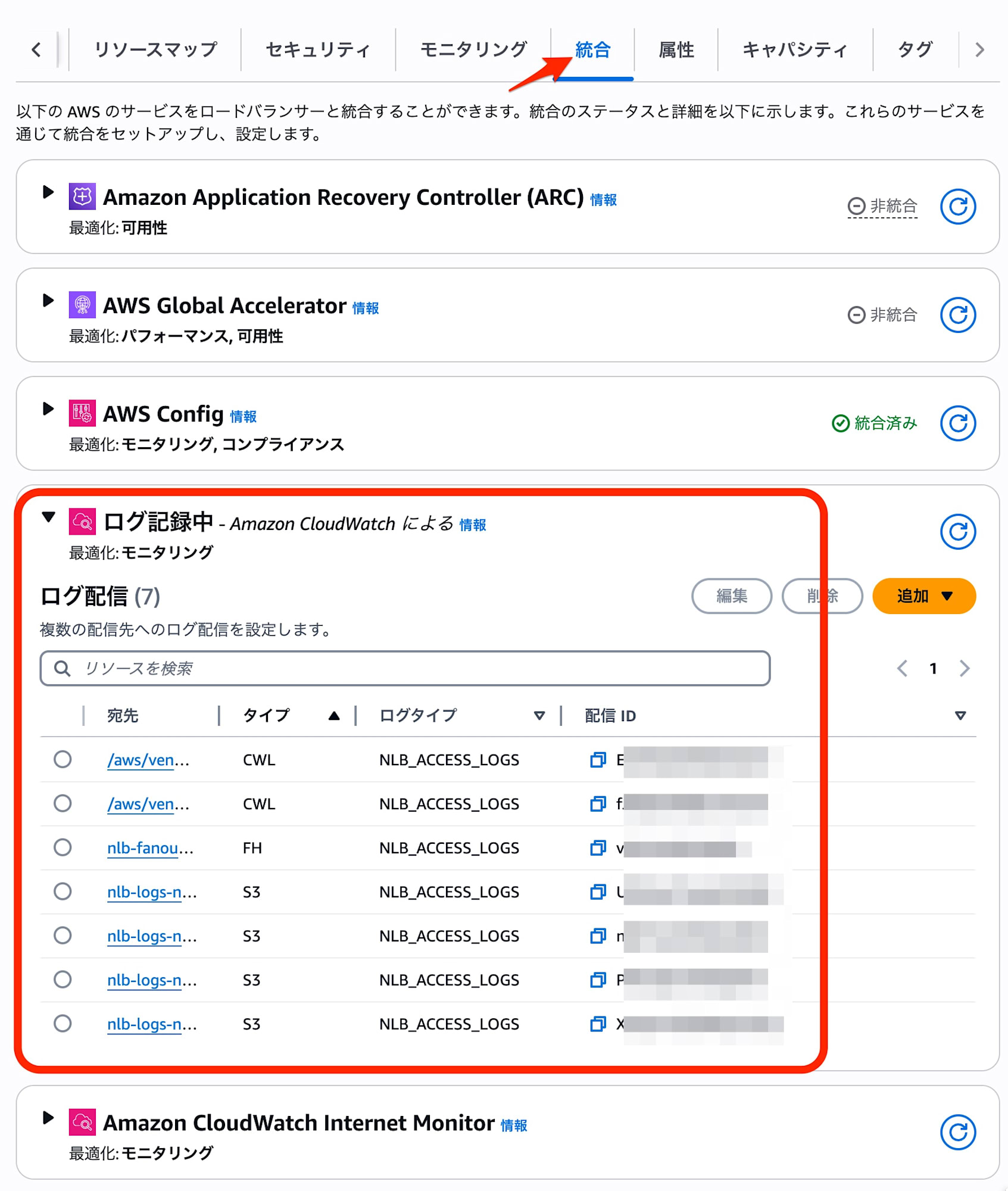
After deployment, you can confirm the configured log destinations (CloudWatch Logs, S3, Firehose) from the "Integrations" tab in the NLB console.
Generating Traffic
I sent curl requests from a test client to the NLB and checked the log output.
for i in {1..10}; do curl -k -s https://nlb-test.elb.ap-northeast-1.amazonaws.com && echo " - Request $i"; sleep 1; done
1. Delivery to CloudWatch Logs
JSON format
When the output format is omitted (or set to json), logs are output in structured JSON format.
This eliminates the need to write complex parse commands when querying with CloudWatch Logs Insights, significantly improving analysis efficiency.
{
    "id": "nlb/app/net/nlb-test/xxxxxxxxxxxxxxxx",
    "timestamp": "2025-11-24T08:00:00.123Z",
    "version": "1.0",
    "type": "tcp",
    "listener_arn": "arn:aws:elasticloadbalancing:ap-northeast-1:123456789012:listener/net/nlb-test/xxxxxxxxxxxxxxxx/xxxxxxxxxxxxxxxx",
    "client_ip": "203.0.113.10",
    "client_port": 54321,
    "target_ip": "10.0.1.50",
    "target_port": 80,
    "connection_status": "success",
    "bytes_received": 150,
    "bytes_sent": 500
}
Plain format (TSV compatible)
By setting the output format to plain with a field separator of \t (tab), logs are output in the traditional space-separated (TSV compatible) format.
Comparing the TSV logs output with the new feature and the conventional S3 output (legacy method), I confirmed that the field count and order match. This is useful when you want to minimize the impact on existing log analysis infrastructure.
Current TSV log (field breakdown)
 1: tls
 2: 2.0
 3: 2025-11-23T18:23:09
 4: net/nlb-auto-tokyo/xxxxxxxxxxxxxxxx
 5: xxxxxxxxxxxxxxxx
 6: 203.0.113.10:57510
 7: 172.31.xx.xx:443
 8: 752
 9: 379
10: 238
...
Reference: Legacy log (field breakdown)
 1: tls
 2: 2.0
 3: 2020-04-01T08:51:42
 4: net/my-network-loadbalancer/xxxxxxxxxxxxxxxx
 5: xxxxxxxxxxxxxxxx
 6: 72.21.xx.xx:51341
 7: 172.100.xx.xx:443
 ...
2. Delivery to Amazon S3
For S3 delivery, I verified output in different formats for each specified prefix in the bucket.
Plain format
Logs in the same format as traditional access logs were output in GZIP compressed format.
S3 URI
s3://nlb-logs-123456789012/plain/AWSLogs/.../xxxxxxxx.log.gz
Log sample
tls 2.0 2025-11-24T07:00:20 net/nlb-test/xxxxxxxxxxxxxxxx xxxxxxxxxxxxxxxx ...
JSON format
Saved as newline-delimited "JSONL" format, compressed with GZIP.
The JSON structure of each line was equivalent to the content stored in CloudWatch Logs.
S3 URI
s3://nlb-logs-123456789012/json/AWSLogs/.../xxxxxxxx.log.gz
W3C format
In this test configuration, I confirmed that the output was the same as the plain specification with tab separators.
S3 URI
s3://nlb-logs-123456789012/w3c/AWSLogs/.../xxxxxxxx.log.gz
Parquet format
Output in Apache Parquet format. Using S3 Select to run queries, I was able to retrieve structured data equivalent to the JSON configuration.
Cost reduction and performance improvements can be expected with analytics tools that support Parquet format, such as Athena.
S3 URI
s3://nlb-logs-123456789012/parquet/AWSLogs/.../xxxxxxxx.log.parquet
S3 Select query result sample
{
  "type": "tls",
  "version": "2.0",
  "time": "2025-11-24T07:00:20",
  "elb": "net/nlb-test/xxxxxxxxxxxxxxxx",
  ...
}
3. Delivery to Kinesis Data Firehose
I used Firehose with default settings. I confirmed that files saved to the S3 destination were GZIP compressed files with newline-delimited JSON (JSONL). This enables real-time log transfer to third-party monitoring platforms like Splunk or Datadog.
S3 URI
s3://nlb-logs-123456789012/firehose/2025/11/24/07/nlb-test-firehose-1-2025-11-24-07-01-04-xxxxxxxx-xxxx-xxxx-xxxx-xxxxxxxxxxxx.gz
Consider using Firehose if you need ETL processing in addition to long-term access log storage, such as filtering logs to keep, extracting log items, optimizing storage formats, and managing partitions.
Important Considerations
When using the new method (Logs Delivery API), log delivery charges (Vended Logs fees) vary depending on the destination.
Delivery to S3 is free (unless Parquet conversion is performed), but please note that usage-based charges apply when delivering to CloudWatch Logs or Firehose.
Use Cases for "Legacy Settings"
The traditional "legacy settings" remain a valid option if "S3 is sufficient for logs and conversion to JSON or Parquet format is unnecessary," or if you want to keep your CloudFormation description simple.
  NetworkLoadBalancer:
    Type: AWS::ElasticLoadBalancingV2::LoadBalancer
    Properties:
      # ...
      LoadBalancerAttributes:
        # Traditional settings (free delivery)
        - Key: access_logs.s3.enabled
          Value: 'true'
        - Key: access_logs.s3.bucket
          Value: !Ref LogsBucket
Summary
Now that NLB logs can be sent to CloudWatch Logs, we can expect a dramatic improvement in initial incident investigation (such as checking errors with Live Tail).
For regular use, enable log output to S3 only with any output format.
For periods when real-time log investigation is necessary, enabling CloudWatch Logs output temporarily can provide cost-effective usage.
Consider the balance between cost and convenience when selecting the appropriate log output destination for your requirements.