A Basic Guide for Those Just Starting with NocoBase — What It Can Do and How to Think About It

This page has been translated by machine translation. View original
Introduction
Hello, I'm Sugiura. It's been quite a while since I last wrote an article on DevelopersIO.
Starting in May 2026, I joined a team that operates NocoBase, an open-source no-code/low-code development platform, as part of my work. It's been about two months since I started using it.
When I started, I looked for information in Japanese and found that there were still few comprehensive Japanese articles about NocoBase, so I ended up catching up by reading the official English documentation through trial and error. So I decided to write a series of articles that I wish I had when I was getting started.
- Part 1 (this article): The basics of NocoBase — what it can do and what kind of tool it is conceptually
- Part 2: What's new in NocoBase 2.x — the version history and key features
- Part 3 and beyond: Hands-on with local startup, API, official tutorials, AI features, and more
The goal is that by the time you finish reading this article, you'll be in a position to roughly judge whether "NocoBase could be an option for me (or my company)." Note that I entered NocoBase from the 2.x series and have no experience with the 1.x series. This series is written with 2.x as the premise.
What is NocoBase
NocoBase is an open-source no-code development platform (the official website also has a Japanese page). The source code is published as OSS on GitHub. The developers describe it as "an open-source AI + no-code development platform for rapidly building enterprise business systems" (from the Japanese README). As of 2026, they are foregrounding the concept of "AI and humans collaborating to build business systems."
The first three things I made sure to understand were:
1. Self-hosting is the premise. When you hear "no-code tool," you might think of SaaS products like Airtable or kintone, but NocoBase is deployed and used on your own infrastructure (whether cloud or on-premises). The biggest feature is that you can keep data under your own organization's control, but in exchange, you're responsible for managing the DB, backups, and other operations yourself.
2. Plugin architecture. In a configuration that the official documentation calls "microkernel design," the core is kept small and all functionality is provided as plugins. Standard features are also plugins, and missing features can be extended with custom plugins built following common rules. The fact that there is room built in from the start to supplement what can't be done in the GUI with code is reassuring for engineers.
3. Coexistence of OSS and commercial offerings. In addition to the free OSS version (Community Edition), there are paid editions (Standard / Professional / Enterprise). The core license was changed from AGPL-3.0 to Apache-2.0 in conjunction with the official 2.0 release in February 2026 (official announcement). The fact that the license has become more favorable for commercial use and customization is a tailwind for those just getting started. What you can do for free and what requires a paid plan is something you'll want to nail down before starting, so I'll revisit it later.
- For comparisons with competitors, the official blog's vs Airtable and vs NocoDB (both in Japanese) are useful references (please keep in mind that they represent the official perspective)
Core Concepts of NocoBase — Separation of Data Model and UI
The most important thing to understand about NocoBase is the philosophy that "data model" and "UI" are separated. I'll reorganize the concepts explained in the official documentation's How NocoBase Works (Japanese version) into the language used when actually working with it.
In Excel and spreadsheet-type tools, a "table" is both the data and the screen. In NocoBase, by contrast, you first define the data structure and then separately build how it will be displayed. The flow follows three stages: "Collection → Block → Action."
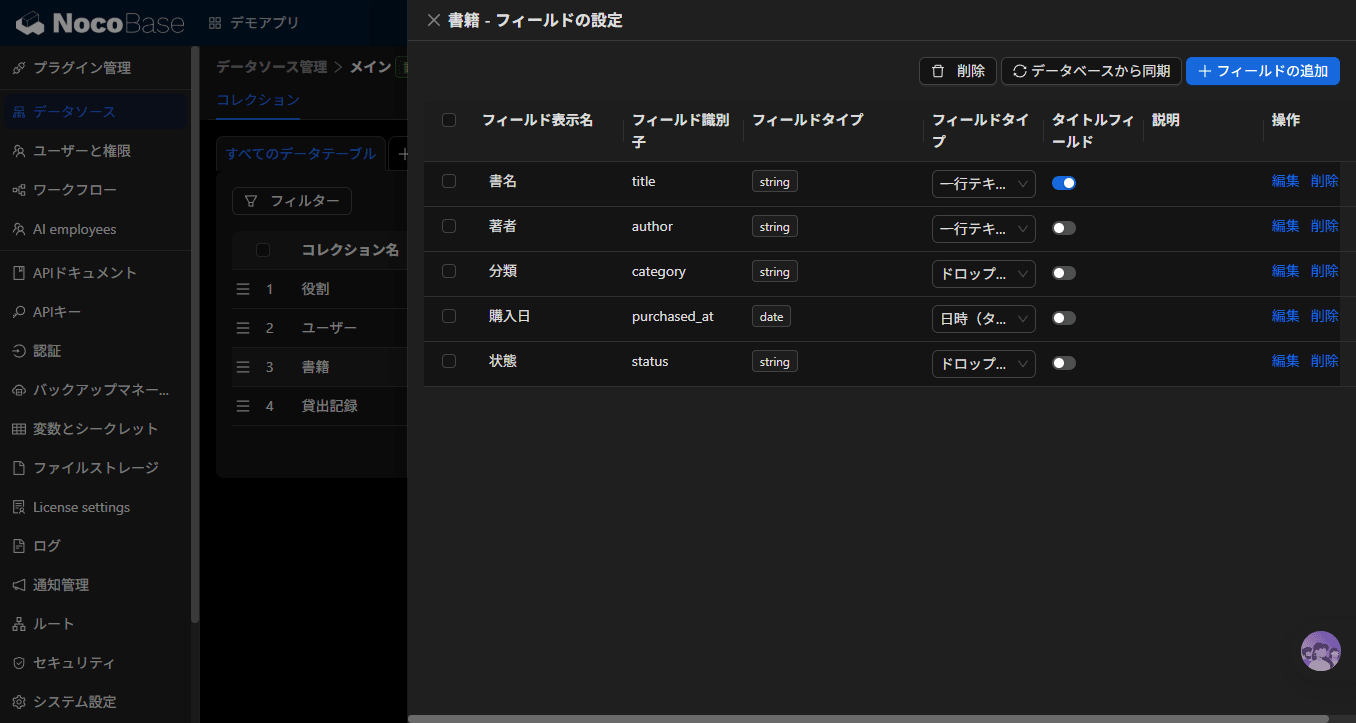
Collections — Defining the Data Structure
A collection is essentially a table. You define fields (strings, numbers, dates, selections, etc.) in a collection and connect collections to each other with relations (one-to-many, many-to-many, etc.). With a feel similar to RDB table design, you can directly represent the structure of your business data.
In addition to databases managed by NocoBase itself, there is also a feature to connect existing external databases (MySQL / PostgreSQL, etc.) as data sources (this is a feature of paid editions, Standard Edition and above).
When you define a collection, REST APIs for reading and writing that data also become automatically available. Since both screens and APIs are created from the same data model, the same data can be accessed from external systems and scripts as well (APIs will be covered in detail in a later installment of this series).
Blocks — Building How Data is Displayed
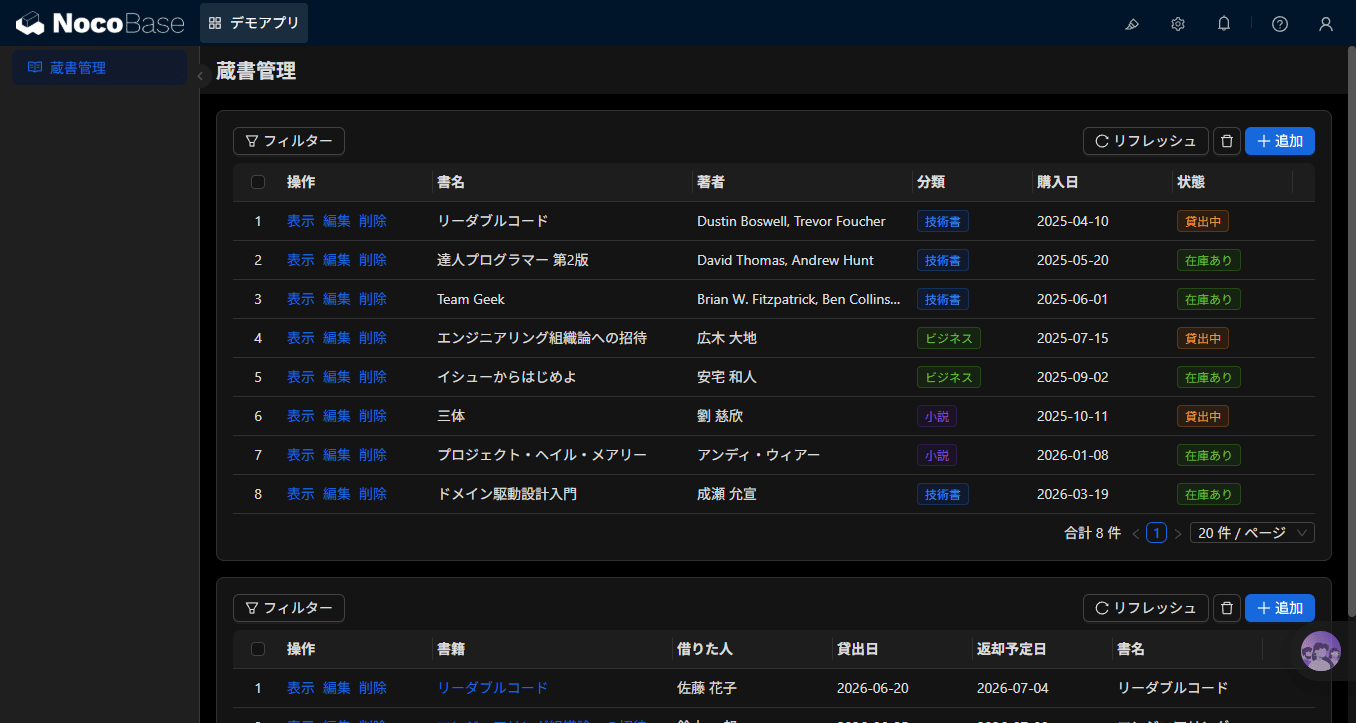
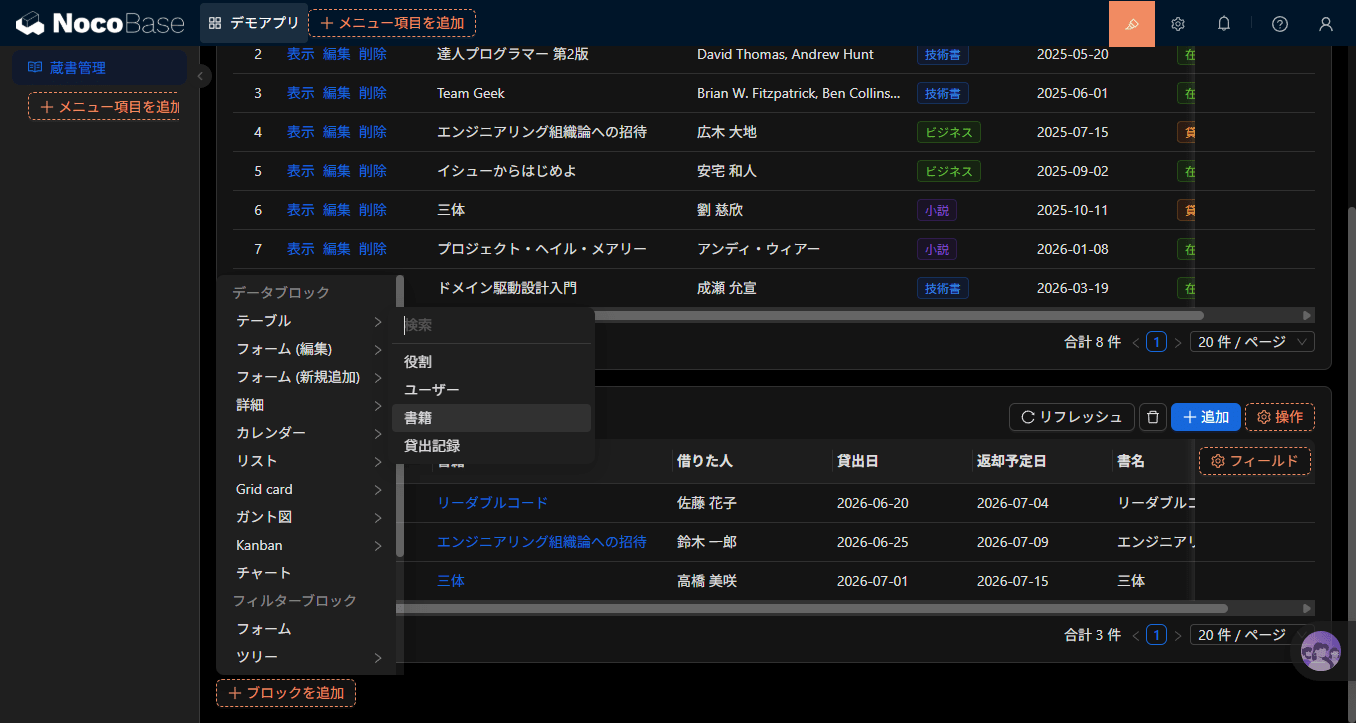
A block is a UI component placed on a page. Tables (lists), forms, details, calendars, charts, and more allow the same collection's data to be displayed in various ways.
What's distinctive is that there is no separation between the admin screen and the user screen — you switch the actual screen you use into edit mode and place blocks right there on the spot in a WYSIWYG manner. There's no back-and-forth of "build it in the settings screen, then check it in preview…" — you build the screen exactly as you see it.
Actions — Adding Operations
You add actions to blocks (operation buttons such as add, edit, delete, export, etc.). You can configure which actions are visible to whom, meaning screens like "a list for viewing only" or "a form exclusively for registration" can be built with just the GUI.
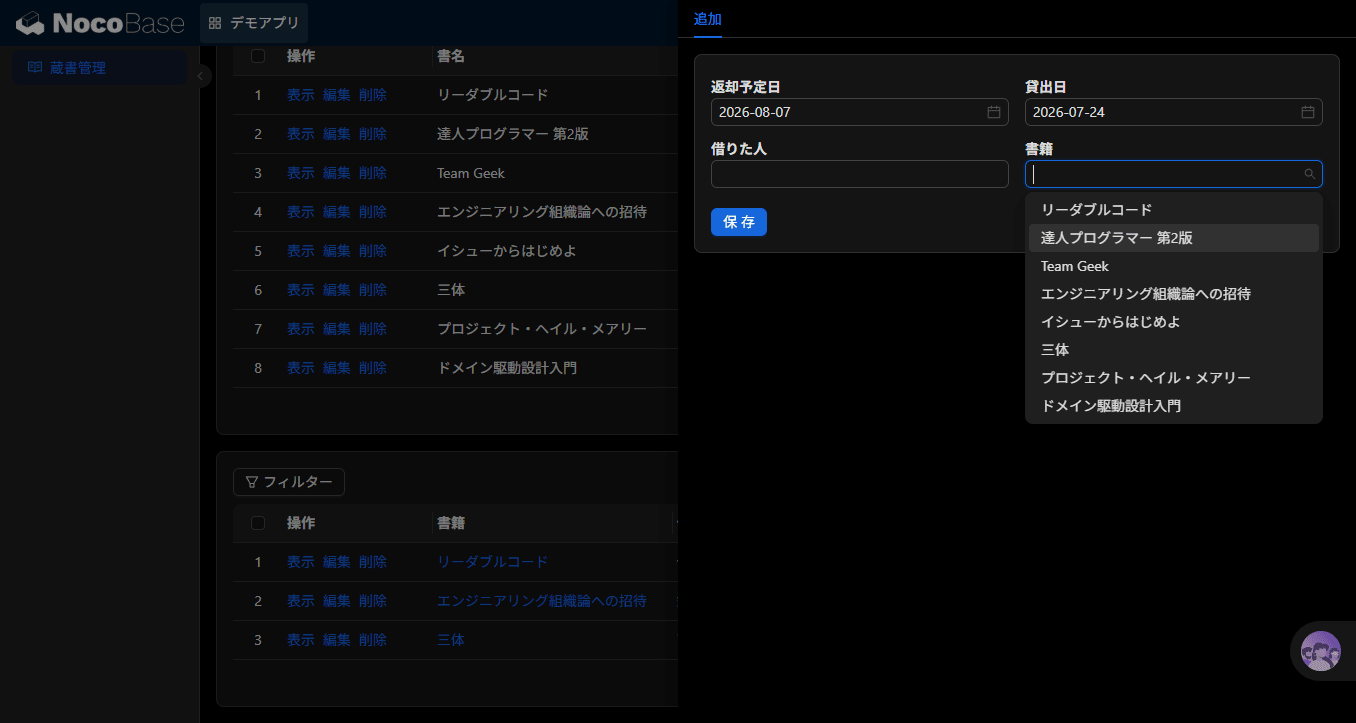
Permissions, Workflows, and Plugins
Around this basic structure, the features needed for business systems are in place.
- Permissions (roles): Role-based access control lets you configure in detail "who can do what" at the collection level, field level, and action level
- Workflows: Processes can be automated with triggers such as "when a record is added" or "at this time every day." Conditions and data operations are connected as nodes
- Plugins: All the features mentioned so far are provided as plugins and can be enabled or disabled from the admin screen
NocoBase is a tool for building business systems through an accumulation of steps: "create a table → place it on a screen → add operations and permissions → add automation." Once you have this way of thinking in your head, it becomes easier to figure out where to look in the official documentation.
How to Get Started
Since it's self-hosted, you first need to prepare an environment to run it. The official documentation presents three methods:
| Method | Best for |
|---|---|
| Docker Compose | Those who want to try it first / production use (fastest) |
| create-nocobase-app | Those who want to treat it as a Node.js project and have plugin development in mind |
| Git source | Those who want to run it from source code / contribution purposes |
All you need is a container runtime environment (such as Docker) and a database (such as PostgreSQL). For local testing, it's easy to spin up everything including the DB with Docker Compose.
This article won't go into the steps in detail. In Part 3 of the series, I plan to actually go through spinning it up locally with Docker Compose.
What It's Well-Suited For
Based on two months of use, I've thought about what NocoBase is and isn't well-suited for.
Things I feel it's suited for:
- In-house business systems: "Standard in-house business apps" like master data management, ledgers, requests and approvals, and dashboards are exactly its forte. They can be built with a combination of collections, blocks, and permissions.
- Cases where you want to keep data under your organization's control: It's well-suited for work handling data that's hard to put on SaaS. Being self-hosted means you can use the data without sending it outside.
- Cases where existing SaaS doesn't fit specialized operations: I feel the customizability is quite high. Since you can build and extend with custom plugins, there's room to accommodate work that doesn't fit within the package's boundaries through custom development.
Things to consider carefully:
- When you can't secure operational resources: As is the nature of self-hosting, the effort of infrastructure, backups, and upgrades incurs ongoing costs. Since this doesn't end with "build it and you're done," whether you can sustain an operations and maintenance structure is the key decision point.
- When requirements are specialized or large-scale: As a common observation about no-code platforms, things that greatly deviate from standard features require more plugin development. The extensibility is a good thing, but the development costs can end up being larger than expected.
Compared to kintone or Airtable, the biggest dividing line is "buy it as SaaS or operate OSS yourself." In contrast to SaaS with per-user pricing, NocoBase even in the free Community Edition has no limits on the number of users or records (stated explicitly on the official pricing page). On the other hand, labor costs for operations and infrastructure costs do apply. Whether one is cheaper depends on scale and structure, so rather than jumping at it with "it's free so let's use NocoBase," I think it's better to compare total costs.
Things to Know Before You Start (Basics)
Knowing these things before making an adoption decision will help you avoid stumbling later.
1. Be prepared for self-hosting. Repeating myself, but the management of the DB, backups, and upgrades all fall within your own responsibility. If you start with the mindset of a managed SaaS, this is where you'll feel the first gap. On the flip side, keeping data under your own control and the high degree of customization freedom are the good points of self-hosting.
2. Confirm the line between OSS and commercial from the start. In addition to the free Community edition, there are three paid tiers — Standard / Professional / Enterprise — and the required edition differs depending on the feature. For example, external database connections require Standard or above, and approval workflows require Professional or above (as of July 2026). Additionally, SSO, audit logs, and cluster configurations are on the paid side. Checking in advance "which tier includes the features needed for what I want to build" will save you from having to redo your design later when you discover "this feature was paid."
3. Japanese information is still limited. The official documentation has a Japanese version, but there are moments when the translation feels uneven, so for checking detailed behavior, I recommend referring to the English version and verifying with actual hands-on testing. In the community, the most active category on the Forum is Chinese (with more than twice as many topics as the English category), followed by the English category; there is a Japanese category as well but it still has very few topics. Interactions on GitHub Issues are primarily in English. Since Chinese is a bit of a high hurdle for me, I follow the English category and GitHub Issues.
Note that topics like "how to distinguish between 1.x and 2.x information" and "how to keep up with the fast release cycle" are version-related matters that will be covered in detail in Part 2 of the series.
Summary
I think the axes for evaluating NocoBase come down to these three points:
- Separation of data model and UI: The philosophy of building business systems through an accumulation of collections → blocks → actions
- Plugin architecture: Microkernel design where even standard features are plugins. Room to extend with code is built in from the start
- Self-hosting: In exchange for data sovereignty, you take on operational responsibility
Next time, in "What's New in NocoBase 2.x," I'll organize the version history, the key topics of 2.x including AI features, and how to deal with 1.x information.
If you have any feedback or requests, please let me know in the comments.