
The Story of How I, a Business Professional Who Has Inhabited the IT Industry for a Quarter Century, Built My Own App

This page has been translated by machine translation. View original
I'm Yoshizaki from the Growth Group of the Retail App Co-Creation Department.
The Retail App Co-Creation Department provides application development solutions to business companies.
Among them, our Growth Group supports many clients in shopping, restaurants, fashion brands, professional sports, and more — from initial app development through operations, maintenance, additional development, and business growth.
As a group manager, I oversee various projects large and small every day.
As a result, the majority of my day gets filled with internal and external meetings.
It is an extremely difficult task to organize and process these in parallel and sequentially with my outdated-spec brain resources.
That's when generative AI appeared.
What helps me most of all is Gemini's meeting minutes feature that integrates with Google Calendar.
By reviewing these, I can efficiently store the information, decisions, and next tasks from those moments into my brain.
However, there are meetings that slip through this minutes network.
Those are meetings on clients' Teams or Zoom, or in-person meetings at venues where no internet connection is provided.
The lack of meeting minutes for these situations had been a source of frustration.
When I complained about this to my supervisor, I got the response: "You can do that on a Mac alone. Though you'd need to ask some engineer."
That made me snap and I started acting on spinal reflex drive — or rather, AI-driven development.
And what was born is a macOS native app called Gijiro, made with Claude Code.
It records, transcribes, and identifies speakers entirely within the Mac without connecting to the internet, and outputs meeting minutes in Markdown.
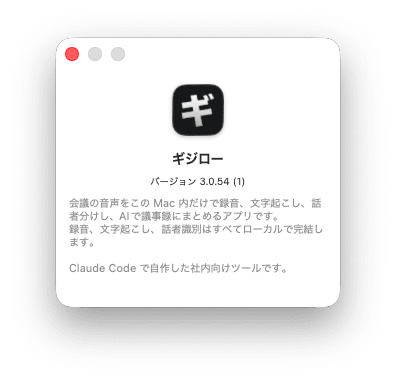
Let me repeat: I cannot write code.
When I was in middle school, I used to just type in BASIC listings published in the magazine "Bemagazine" and have fun running them. That era was the peak of my coding skills.
In my private life, I learned CGI from "Tohoho's WWW Introduction," set up an internet bulletin board, built text sites with Homepage Builder, and launched blogs with Movable Type and WordPress — but that's where I stopped.
Yet thanks to AI, I've been able to do something like this.
Living long has its rewards.
I repeatedly revised the requirements at breakneck speed. (AI doesn't complain.)
While using it myself and having colleagues use it, I proceeded with fixes, refactoring, and additional feature development — and the version I currently have in hand has already reached 3.0.54.
So in this article, I won't write about the implementation details, but rather why the spec turned out the way it did.
It's a story of what I chose first — "I want this kind of experience" — and what I selected to make it happen.
I don't want client information placed somewhere I don't understand
We do client work.
What we discuss in meetings is precious information entrusted to us by our clients.
There are many meeting minutes SaaS products in the world, and if you pay, there are astonishingly convenient ones.
With that as a given, it still feels uncomfortable that the meeting audio itself ends up somewhere outside the company that I don't fully understand.
When "it's convenient, but I can't use it for this meeting" keeps piling up, you end up not using that tool at all.
So I made completing everything without connecting to the internet the first requirement for Gijiro.
Fortunately, today's Macs have the performance to do exactly that.
Transcription uses Whisper, and speaker identification also runs a dedicated model on the Neural Engine inside the Mac.
There's a bit of time needed for the first download only, but even a one-hour meeting finishes processing in a practical amount of time, and audio files never leave the network.
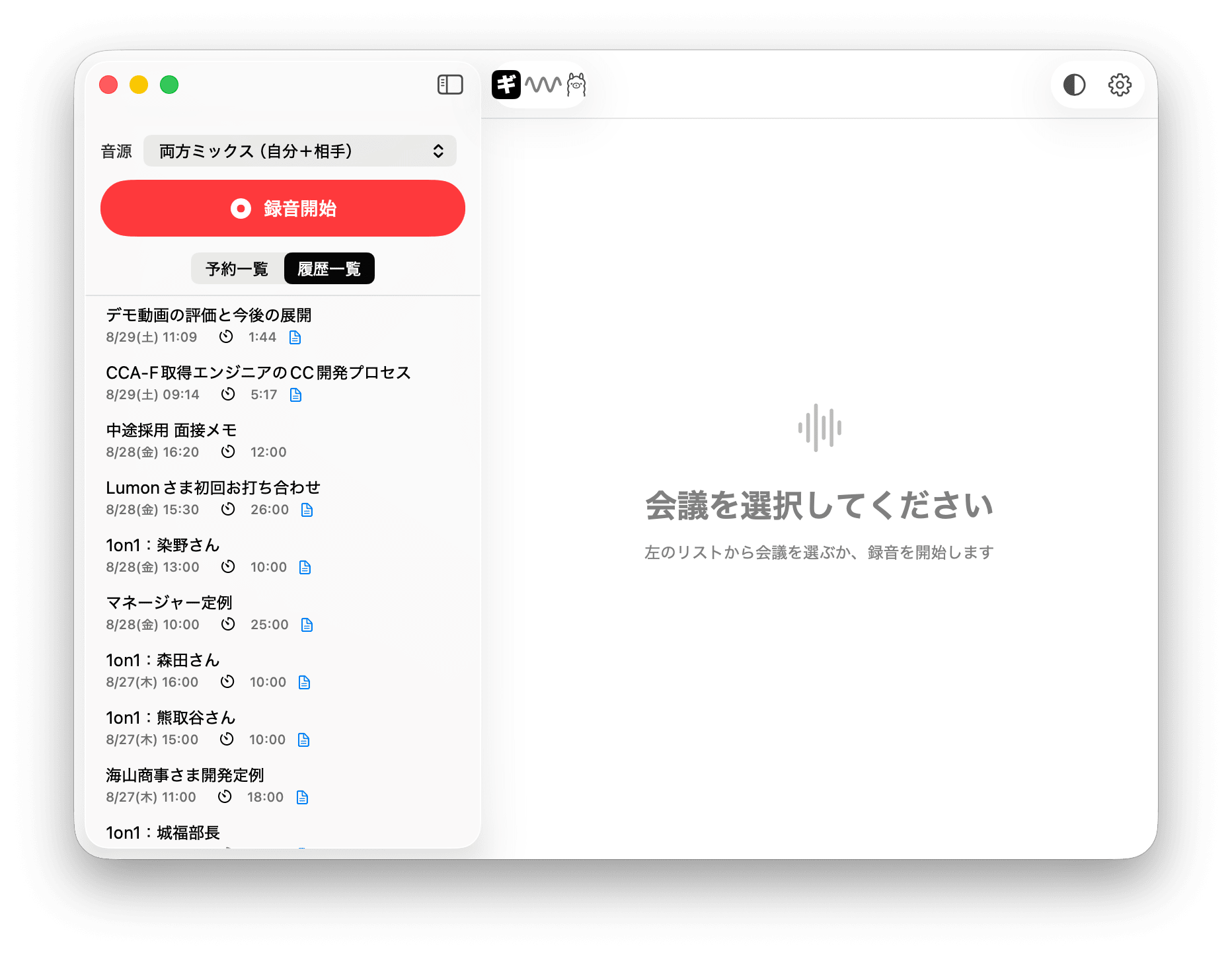
The discovery that Ollama is actually quite good
Only the meeting minutes generation (summarization) requires an LLM, and here I made the engine selectable.
One option is the Claude API, but the other selling point of "Gijiro" is Ollama.
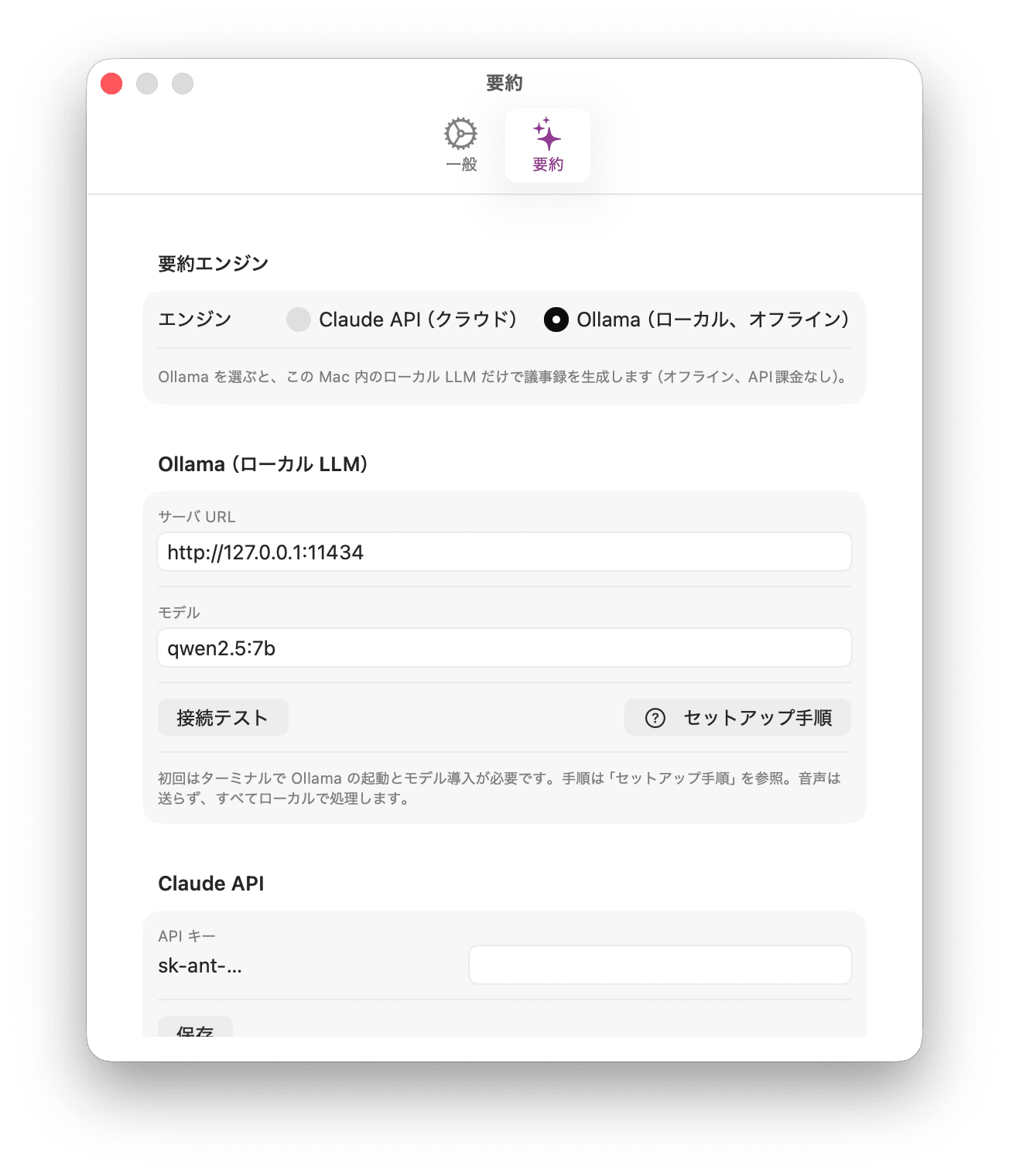
The trigger was purely a hobby — local LLMs seemed interesting, so I was running them and playing around on my home PC.
It started with the thought: "Hey, for things at this level, couldn't Ollama's Qwen handle it?"
Totally beside the point, but Ollama's logo is cute.
And then there's that pressing reason I mentioned at the beginning.
Client meeting rooms quite often have no internet environment.
Those are exactly the places where I want to take meeting minutes, yet cloud-dependent tools grind to a halt there.
If everything from recording to meeting minutes generation completes entirely locally, it should be unstoppable...
And when I actually integrated it, Ollama turned out to be quite good.
Admittedly it doesn't quite reach the same quality as Claude, but it can produce meeting minutes with decisions and to-dos properly listed without any issues.
Offline, zero API charges, and reasonable quality — I'd strongly recommend this use case to anyone who hasn't tried a local LLM.
However, out of 100 points, it's about 45.
That's because raw transcription as-is is still not practically usable.
You can't tell who said what, and proper nouns get missed one after another.
There were two major walls to clear to make it work as meeting minutes.
Knowing who said what
I believe this is what determines whether meeting minutes are usable, and it's where I experimented the most.
Never mixing up "myself" and "the other party"
During online meetings, Gijiro saves the microphone (myself) and Mac's playback side (the other party) as separate tracks.
Speaker separation is done locally on the Mac.
However, relying solely on this means people with similar voices get grouped together, and there are quite a few mistakes.
But "my voice comes in from the microphone, the other party's voice comes in from the Mac's playback side" is not AI inference — it's a confirmed fact based on the recording path.
So I compare the volume of both channels for each utterance and definitively assign "myself" if the microphone side is louder, and "other party" if the speaker side is louder.
Even if speaker separation fails, at minimum, correct minutes showing "myself / other party" are preserved.
This was a case where not letting AI make the judgment was more reliable.
There was supposed to be a feature where registered voices appear with names
I made it so that speaking for a few seconds on the settings screen and registering a name saves that person's voice characteristics.
In subsequent meetings, the same voice would automatically be given that name — a feature I was quite proud of — but in practice, I simply cannot ask someone to "Could you register your voice for a moment?"
Asking a client to do this is not realistic even if it's fine with colleagues, so while the feature itself was correct, it was wrong as a workflow.
So I made it possible to assign names afterward
That's why I created the "Voice Library."
When a meeting is transcribed, unregistered voices are automatically accumulated here.
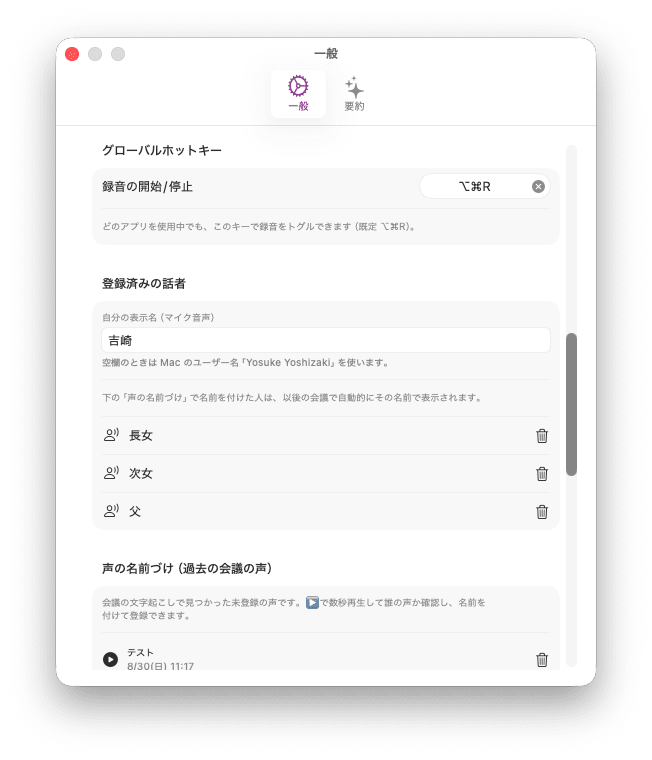
The settings screen shows a list of "Who is this voice?" and each can be played for a few seconds.
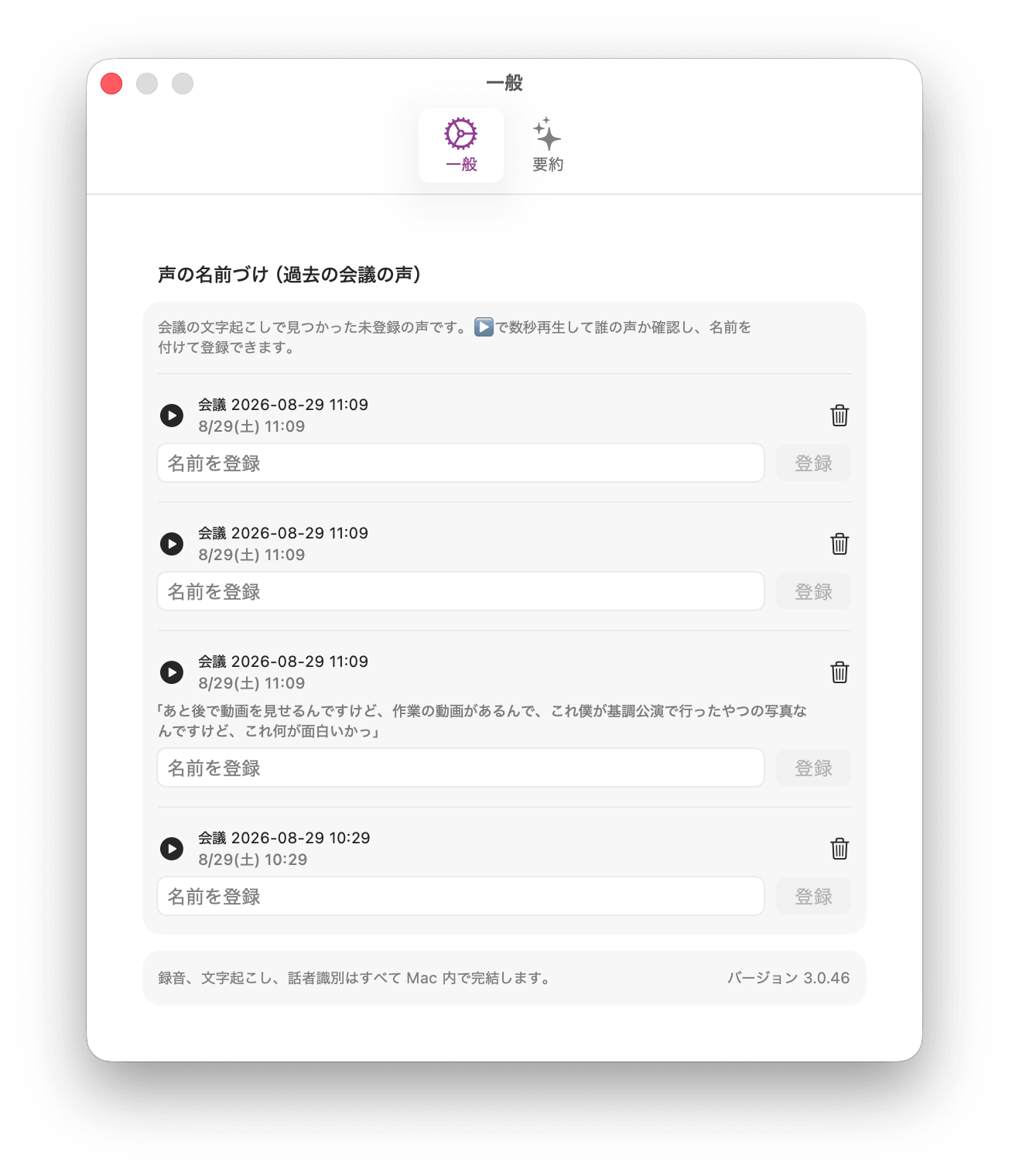
If you listen and recognize who it is, you assign a name on the spot, and from that point on, that person will automatically be displayed by name in subsequent meetings.
Without having to work hard in advance, accuracy improves on its own as you use it.
I thought I was getting pretty close, but it still wasn't enough.
In the end, correcting directly on the transcription was fastest
This is the most recently added feature.
The Voice Library is convenient, but identifying someone just by hearing their isolated voice is surprisingly difficult.
While reading the transcription you immediately think "Oh, this is so-and-so," but when you're just played a few seconds of extracted audio, it's surprisingly hard to tell.
So I made it possible to click directly on a speaker name in the transcription view and edit it.
- Correcting a speaker name applies to all utterances from that meeting at once
- Correcting to a real name chains that person's utterances together and learns their voiceprint
- In subsequent meetings, that voice is automatically assigned the name
I also added a feature to reassign speakers on a per-utterance basis for cases where speaker separation incorrectly grouped two different people as one.
Add a new speaker and assign only the relevant utterances to them.
The voiceprint is then re-learned from the reassigned audio.
In other words, fixing labels while reviewing the minutes becomes training data for the next session.
The fixing process starts becoming a little enjoyable since it gets more accurate the more you use it.
Company names and personal names almost never come out right
And that's the second wall.
Our Retail App Co-Creation Department is called "Purisou" internally.
Generic transcription tools will neatly miss department and product abbreviations.
Our company has an enormous number of internal proprietary terms, so if left as-is, the minutes end up full of mysterious proper nouns — and minutes with broken proper nouns kill any motivation to review them.
So I added a dictionary registration feature to Gijiro.
You register one word at a time in the format "official spelling, alternate spelling, alternate spelling…" separated by commas.
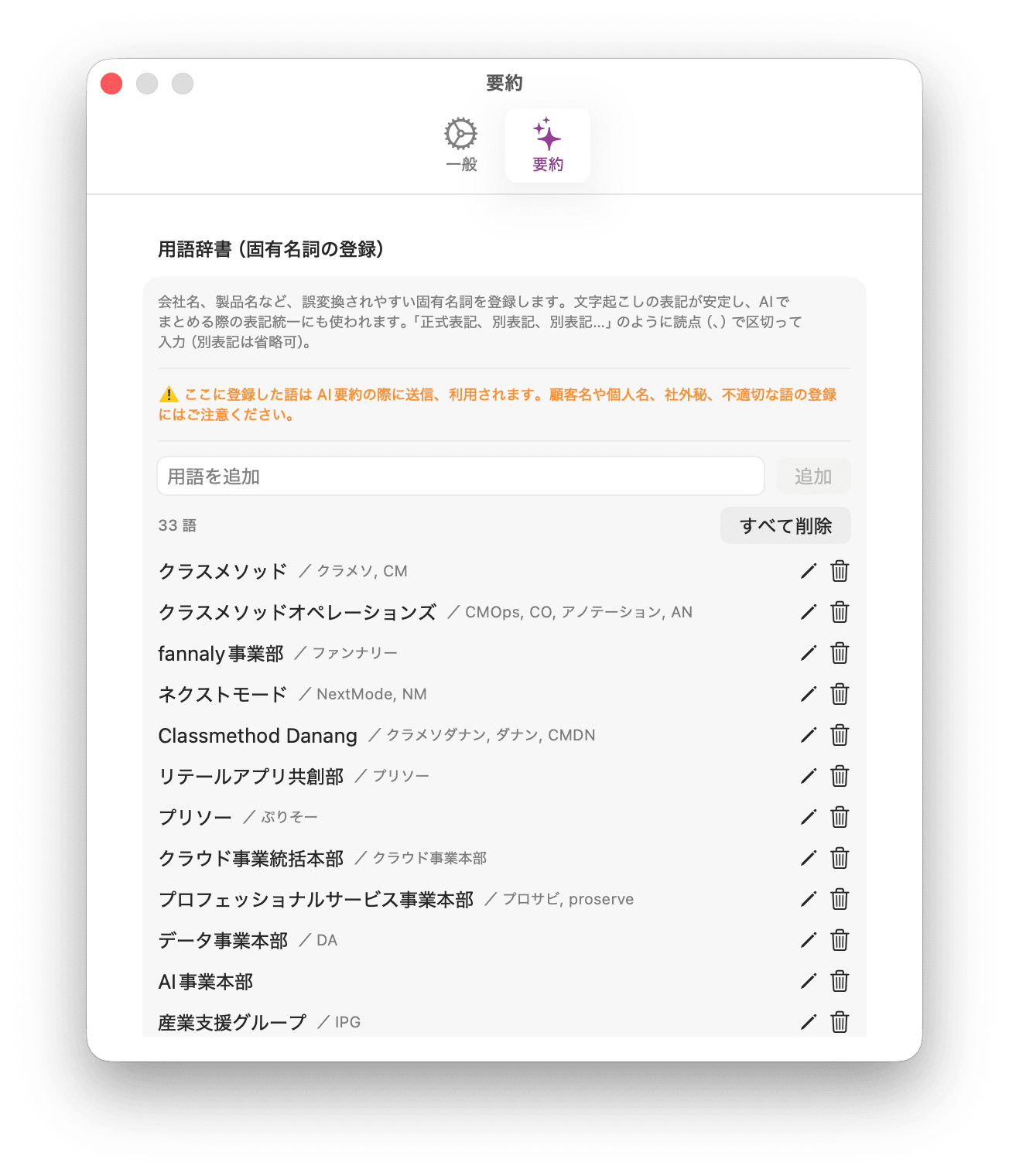
- During transcription: The registered official spellings are passed as vocabulary hints to ensure correct recognition
- When generating minutes: The entire dictionary is passed with the instruction to "correct any misspellings to these official spellings and unify notation"
I also made it so that names of people whose voices are registered are passed along with the dictionary.
Personal names are a treasure trove of misrecognition, so getting these right makes the readability of the minutes completely different.
Made it possible to add information that doesn't appear in the meeting
There's information that inevitably doesn't appear in the transcription.
The contents of materials shown via screen sharing, assumptions that weren't verbally shared, or tasks that came to mind during or after the meeting.
So I created a free memo field called a context note.
You can write in it during recording, or add to it after transcription is complete, and re-generating improves the quality of the minutes.
Write a URL and it will fetch the content and use it as material — registering a local folder or related repository will have it reflected.
The quality of meeting minutes is determined more by the information (context) you provide than by the AI's intelligence.
This was the thing I felt most strongly after building it.
I always forget to start and stop recording
Honestly, this was the most pressing issue.
The busier the day, the more likely I am to forget to press the record button.
And after finishing, I forget to stop it and end up with two hours recorded.
I've lost count of how many times this has happened...
So I added scheduled recording.
Register the day of the week, time, repeat pattern (daily, weekdays, weekly), and recording duration, and it automatically starts at the specified time and stops automatically after the specified duration.
This completely eliminated the operational burden for regular meetings.
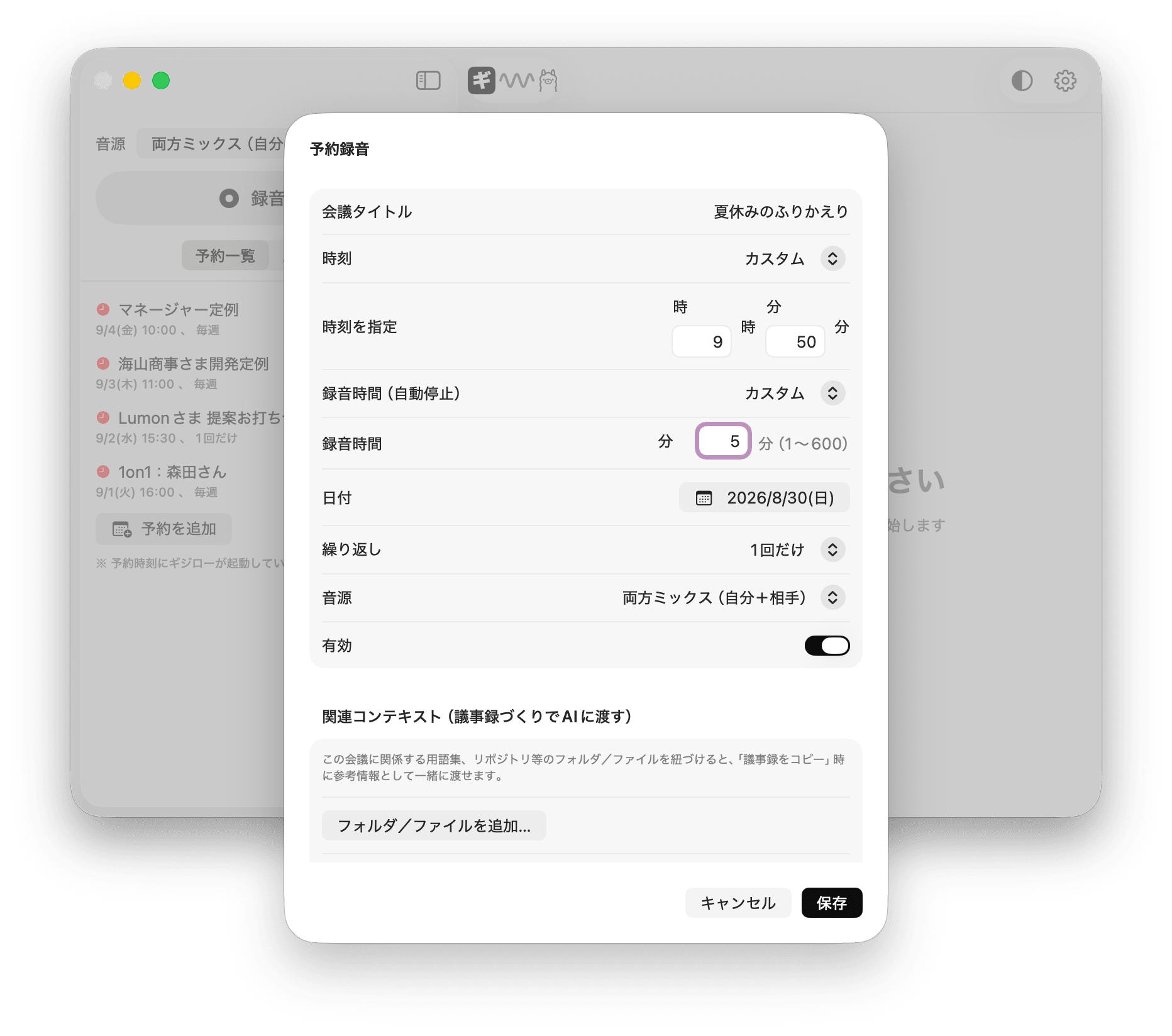
And as I used it, the spec grew.
Meetings run long.
There's no avoiding this. It has to be extendable or it doesn't work.
So I made it possible to extend by clicking "+30 minutes" and similar options from a notification.
Meetings are back-to-back.
The scheduled time for the next meeting arrives while the previous one is still running over.
So I made it so that when the next scheduled time arrives during a recording, it gets queued temporarily, and the moment the previous recording stops, the next one starts automatically.
Building this reminded me of the scheduled recording feature on old VCRs.
There was a tragic situation where if a professional baseball night game went into extra innings, Friday Road Show would shift entirely later, and the recording of a movie you'd been looking forward to would cut off just before the climax (does that resonate...?).
It's like directly borrowing the "This is it!" feeling from when scheduled recording with EPG (Electronic Program Guide) came along and absorbed that problem.
And on the last day of summer vacation, I tried it with my children
I'm writing this article on the very last day of summer vacation.
Since I had the chance, I launched Gijiro on a Mac with Wi-Fi off and did a "summer vacation review" interview with my third-year middle school eldest daughter and sixth-grade elementary school second daughter.
I set up scheduled recording for microphone-only (in-person meeting) mode from 9:50 for 5 minutes and gathered everyone at the living room table.
I had written just two lines in the context note in advance:
My eldest daughter is in 3rd year of middle school, had a concert for her club (brass band), and has entrance exams coming up
My second daughter is in 6th grade of elementary school, practices cheer, and is working on a front walkover
Recording was 3 minutes and 29 seconds.
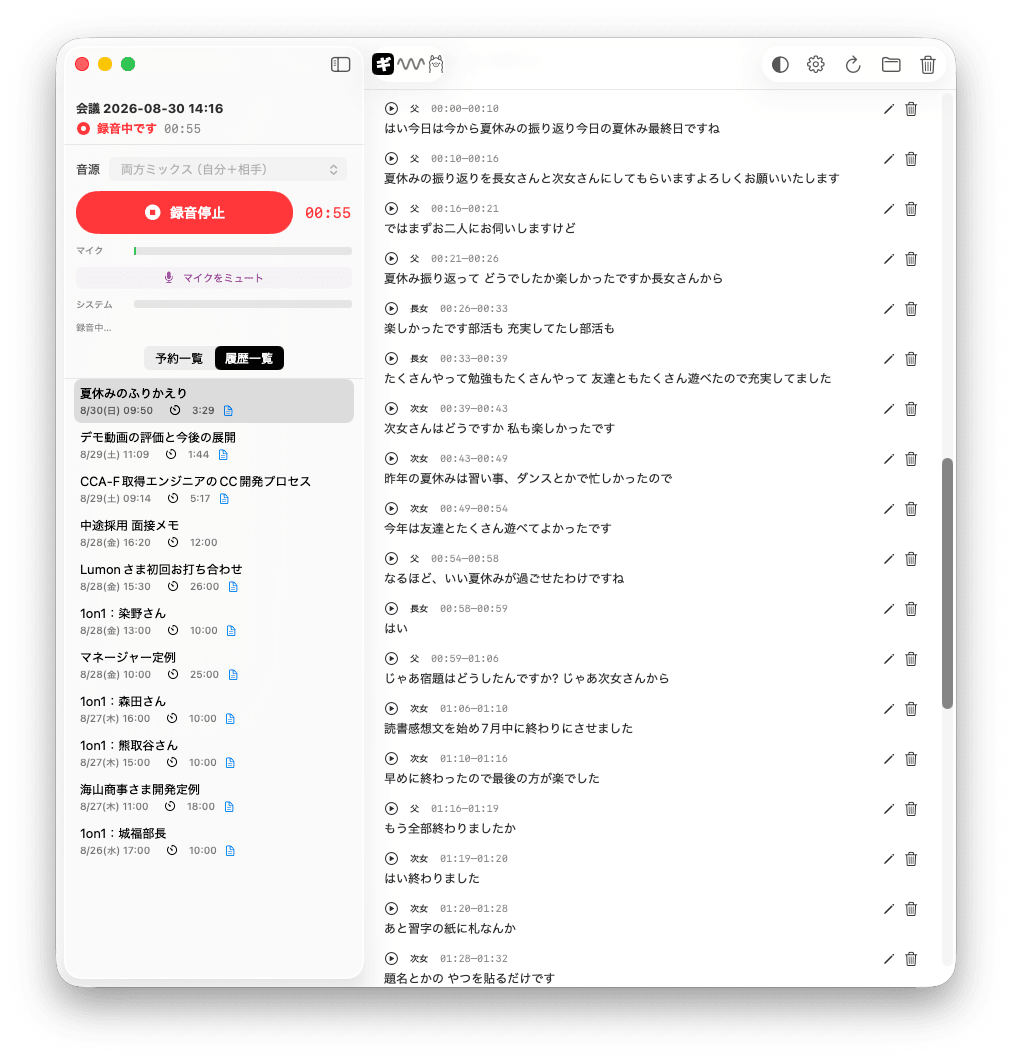
The transcription came out divided into "Father," "Eldest Daughter," and "Second Daughter," but this didn't happen automatically.
The sisters' voices are so similar that speaker separation barely worked.
The two were grouped as a single speaker, and as-is, whose utterances were whose was completely jumbled.
That's where the earlier "correct directly on the transcription" feature came in.
Reassigning a few lines to my second daughter triggered learning and the rest fell into place.
If I hadn't fixed this, the meeting minutes content would remain with "Eldest Daughter" and "Second Daughter" mixed together.
I tested this with family — probably the people in the world with the most similar voices — but as a result, it made the value of the correction feature very clear.
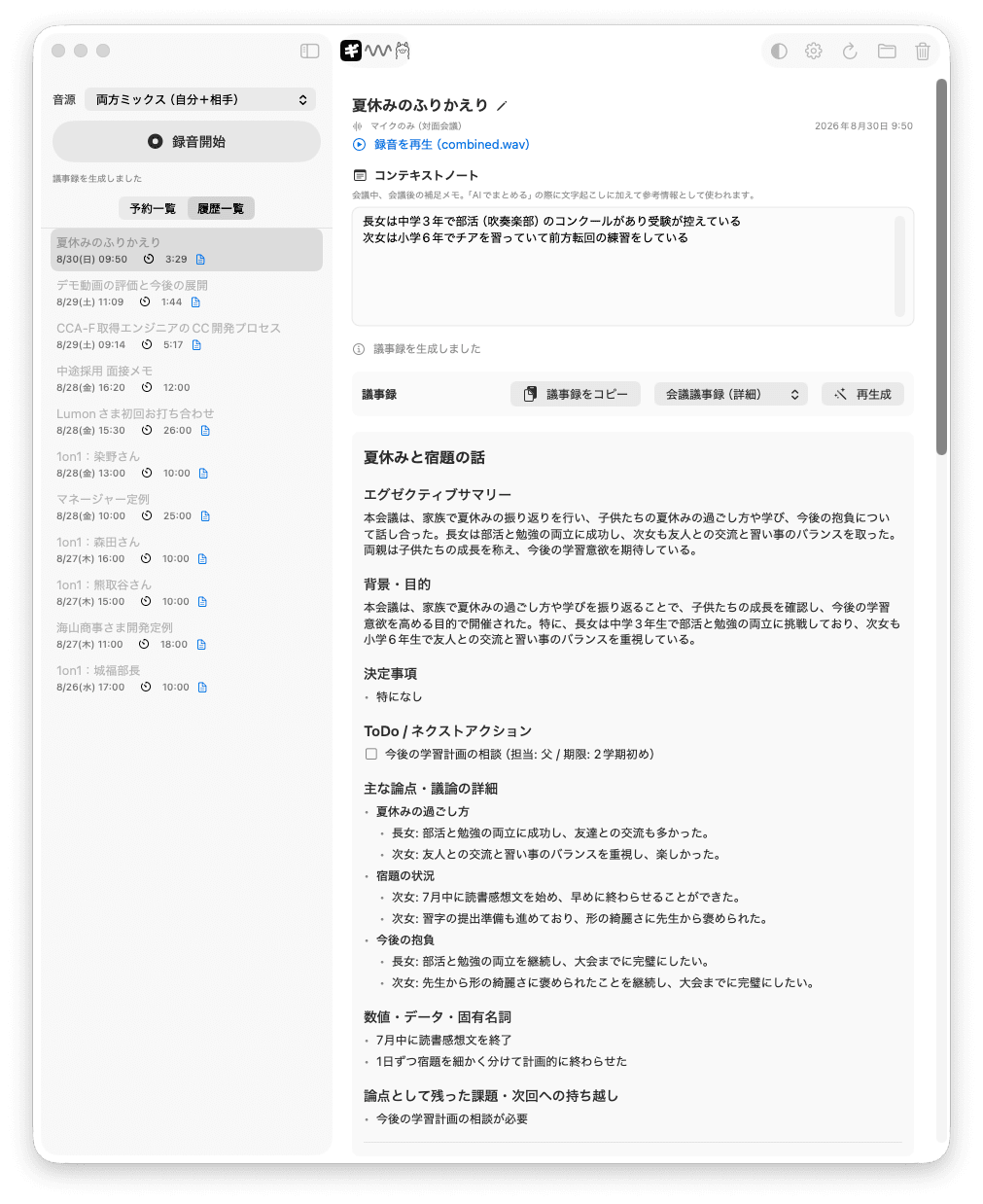
The summarization engine for the generated minutes is of course Ollama.
And in the end, this remained:
To-Do / Next Actions
☐ Discuss future study plans (Assigned to: Father / Deadline: Start of 2nd semester)
Father — meaning me — got more homework...
Throughout all of this, the Mac never once connected to the internet.
Recording, transcription, speaker identification, and meeting minutes generation — all of it completed entirely within this Mac.
Meeting minutes can be created even in a conference room without internet — the first requirement was confirmed on the last day of summer vacation in my living room.
I never expected I'd be doing this verification with my family.
In closing
Throughout the building process, almost everything I got stuck on was the spec, not the implementation.
How many minutes for auto-stop?
How to display it when a speaker can't be identified?
These are things AI can't answer for you.
Only I, who knows how I work, can decide them.
Put another way: the time AI took over "how to build it" was replaced by more time to think about "what kind of experience I want."
Gijiro is still being developed as a completely personal tool — and something I can actually use in daily meetings is right here in my hands. (Oh, this is fun.)
I want to tell my past self who was pasting "under construction" GIFs with Homepage Builder: "25 years from now, you're going to build your own macOS app that runs speech recognition."
Come to think of it, back then I did a little dance when even a single comment came in on the bulletin board I'd set up.
Now I'm keeping a creature that quietly sits in the corner of conference rooms and spits out meeting minutes.
You never know what life will bring.
"I have something I want to build — someone, please! Please!!"
This is a line I've been saying for the past quarter century.
And to make it worse, I couldn't just say it and leave it at that.
I persuaded fellow engineers, even started a company together with them, and failed.
I had passion but couldn't move my own hands.
Everyone I pulled into that back then — I'm truly sorry.
Now I'm building apps on my own.
No one gets pulled in, and there's no one to apologize to.
This feels like something from a full quarter century is finally being reclaimed.
Once again — living long truly has its rewards.
