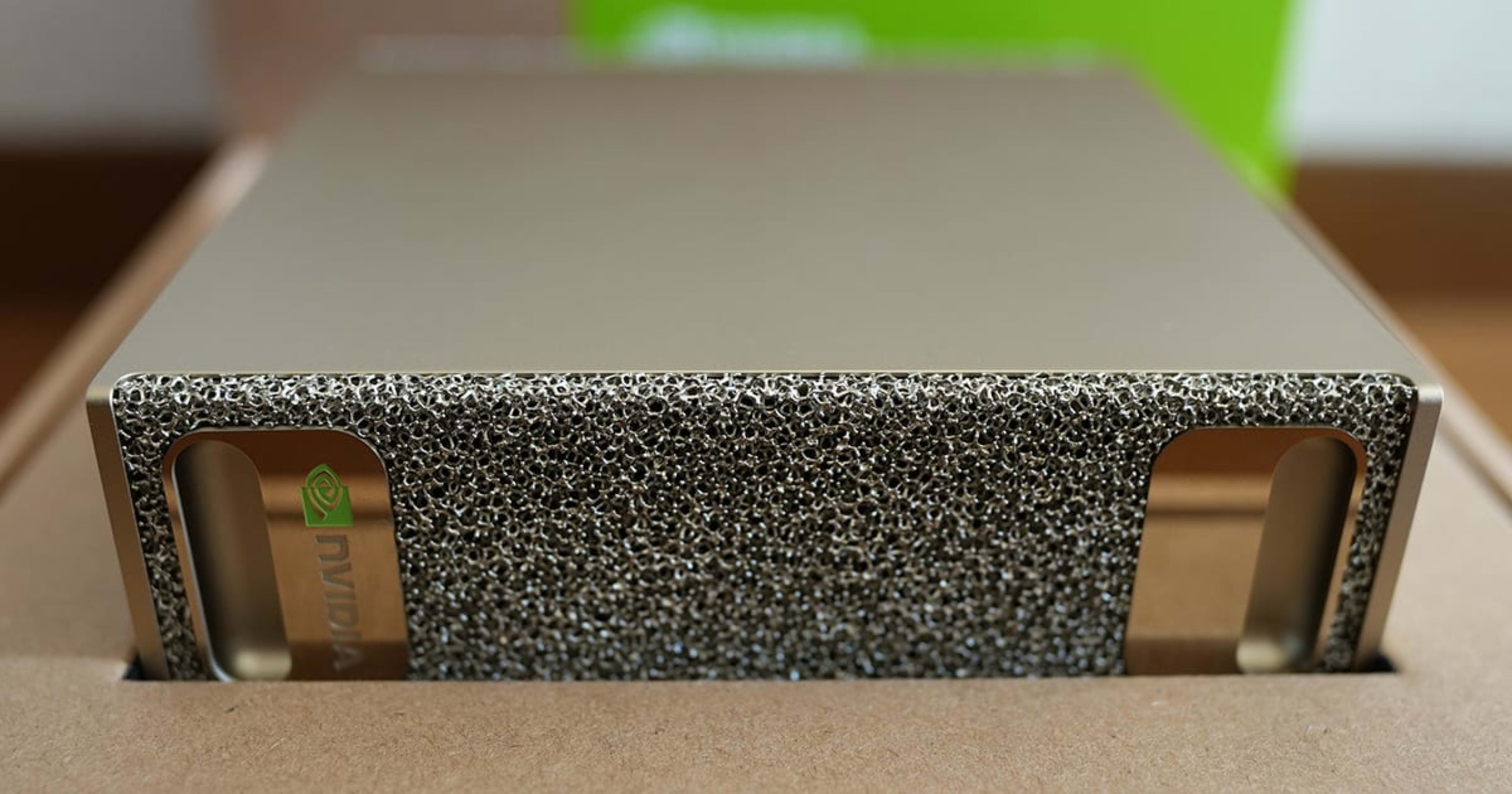
The NVIDIA DGX Spark has arrived

This page has been translated by machine translation. View original
Introduction
Hello, I'm Morishige from Classmethod's Manufacturing Business Technology Division.
A dog-type robot recently arrived at the Classmethod office, but actually, an NVIDIA DGX Spark had also arrived :)
This machine is equipped with a large 128GB memory — just how large of a model can it run? In this article, I'll share the results of actually trying it out, from setting up the DGX Spark to challenging a 235B parameter model.
What is DGX Spark?
Summary in 3 lines
- A $3,999 desktop AI workstation released by NVIDIA
- 128GB unified memory allows large models to run on a single machine
- ARM Ubuntu environment that is developer-friendly
Specs comparison table
Here's a side-by-side comparison with commonly compared configurations.
| Item | DGX Spark | Mac Studio M3 Ultra | RTX 4090 |
|---|---|---|---|
| Price | $3,999 | From $3,999 (96GB) | $1,599 (MSRP) |
| From $9,499 (512GB) | Street price $1,800–$2,755 (January 2026) | ||
| Memory | 128GB LPDDR5x | Up to 512GB | 24GB GDDR6X |
| Memory Bandwidth | 273 GB/s | 819 GB/s | 1,008 GB/s |
| FP16 Performance | ~62 TFLOPS (estimated)※ | 26 TFLOPS | 83 TFLOPS |
| Power Consumption | 170W (TDP) | ~200W | ~450W |
| OS | Ubuntu 24.04 ARM | macOS | Windows/Linux |
| Noise Level | Nearly silent | Nearly silent | Fan noise present |
※ The GB10's FP16 performance has not been officially announced. This is a community-estimated value (approximately 62 TFLOPS for FP32 accumulation, approximately 123 TFLOPS for FP16 accumulation). The only official spec is 1 PFLOPS (FP4 sparse). Even so, the estimated FP16 value is approximately 2.4x that of the M3 Ultra.
From unboxing to first boot
Unboxing
When I opened the box, a surprisingly compact unit appeared. It has a size feel similar to a slightly larger Mac mini.
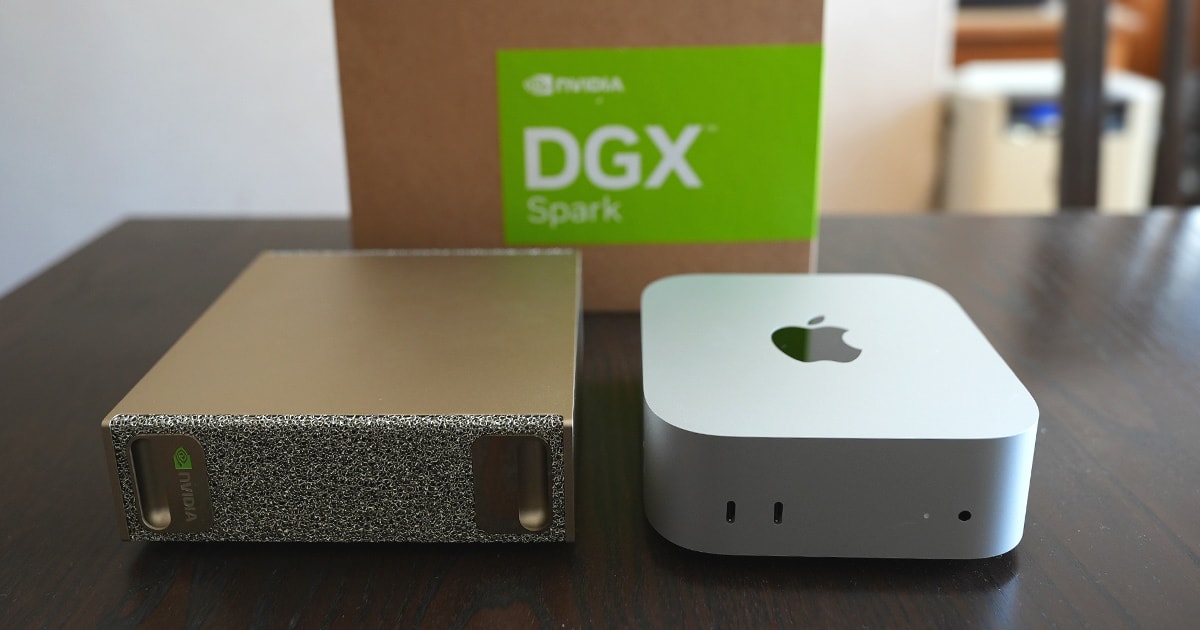
Physical specs and power consumption
Reference power consumption values (from Reddit and NVIDIA Forums)
| State | Power Consumption |
|---|---|
| Idle | ~40-45W |
| Under CPU load | ~120-130W |
| LLM inference (large model) | ~135-140W |
| Peak | ~195W |
GPU utilization rises to around 95% during inference, but immediately returns to idle (~5W) once inference finishes, so there's no need to worry about standby power consumption.
First boot and onboarding
The DGX Spark comes with Ubuntu 24.04 ARM pre-installed. The flow is: power on → set up via browser through a Wi-Fi hotspot → software update (15–20 minutes, do not interrupt). Once setup is complete, you can operate it via SSH or by connecting a monitor directly.
Although it's an ARM environment, most major development tools worked without issue.
Setting up the inference environment
Onboarding with Open WebUI
NVIDIA's official onboarding guide introduces a method for chatting from a browser using Open WebUI + Ollama. There are two setup methods.
Using NVIDIA Sync (easy)
If the NVIDIA Sync app is already installed, you can launch Open WebUI from a remote terminal with a single click from the GUI. The steps simply follow the NVIDIA Sync tab in the official guide, so I'll skip them here.
Manually starting a Docker container
If you're not using NVIDIA Sync, set it up with the following steps.
# Setting up Docker permissions (first time only)
docker ps  # If you get permission denied, run the following
sudo usermod -aG docker $USER
newgrp docker

# Start the Open WebUI + Ollama container
docker run -d -p 8080:8080 --gpus=all \
  -v open-webui:/app/backend/data \
  -v open-webui-ollama:/root/.ollama \
  --name open-webui \
  ghcr.io/open-webui/open-webui:ollama
After starting, access http://localhost:8080 in your browser, and the admin account creation screen will appear. Once you've created an account, proceed to the chat screen.
Next, download the gpt-oss:20b model. gpt-oss is OpenAI's first open-weight model (21B/3.6B active, MoE, Apache 2.0). It's lightweight yet high-performance, making it suitable for onboarding. You can search for and pull gpt-oss:20b from the model selection menu in Open WebUI, or run the following command from the terminal.
# Download the gpt-oss:20b model
docker exec open-webui ollama pull gpt-oss:20b
Selecting gpt-oss:20b from the model selection screen in Open WebUI will allow you to chat from the browser. Onboarding is complete once you've reached this point.
Cleanup (if you want to start over)
docker stop open-webui && docker rm open-webui
docker rmi ghcr.io/open-webui/open-webui:ollama
docker volume rm open-webui open-webui-ollama
Actually running it
Now that we've confirmed basic operation with Open WebUI, let's operate directly via the Ollama CLI and try out models suited for the DGX Spark.
Since Ollama is bundled inside the Open WebUI Docker container, CLI operations are possible via docker exec. You can also install Ollama separately on the host side.
# When using Ollama inside the container
docker exec -it open-webui ollama run gpt-oss:20b

# When installing Ollama on the host side
curl -fsSL https://ollama.com/install.sh | sh
ollama run gpt-oss:20b
For more details on model selection, please also refer to A look at the local LLM landscape in 2026. Since the Qwen3 release in April 2025, higher-performing models have become available with the same VRAM, and the choices have increased considerably.
| Use Case | Recommended Model for 128GB | Size | Memory Estimate |
|---|---|---|---|
| Code completion | Qwen2.5-Coder 32B | 32B | ~20GB |
| General chat (Japanese) | Qwen3-14B | 14B | ~9GB |
| Fast inference | GLM-4.7-Flash | 30B (3B active) | ~18GB |
| Lightweight / onboarding | gpt-oss:20b | 21B (3.6B active) | ~12GB |
| Large-scale / high quality | gpt-oss:120b | 120B | ~65GB |
| Pushing the limits | Qwen3-235B-A22B | 235B (22B active) | ~112GB |
Here, I picked two of these and actually ran them.
Code completion with Qwen2.5-Coder 32B
I also tried a model specialized for code completion. It has 32B parameters, but with 128GB memory it runs with plenty of room to spare.
ollama run qwen2.5-coder:32b
When I gave it the same Fibonacci problem, it presented two patterns: a recursive version and a loop version.
>>> Write a function in TypeScript to calculate the Fibonacci sequence

// Method using a loop
function fibonacciIterative(n: number): number {
    if (n <= 0) return 0;
    if (n === 1) return 1;

    let a = 0, b = 1, temp: number;

    for (let i = 2; i <= n; i++) {
        temp = a + b;
        a = b;
        b = temp;
    }

    return b;
}
Since it immediately returns code without Thinking, it's well-suited for code completion use cases. Combined with editor extensions like Continue.dev, it could serve as a locally self-contained code completion environment. For projects handling confidential code, I think this configuration is a realistic option.
Note that Qwen3-14B, released in April 2025, achieves Qwen2.5-32B-equivalent performance with less VRAM. It might be worth considering switching to Qwen3-14B for general chat purposes. Also, Qwen3-Coder was released in July 2025, but at 480B parameters (35B active), it requires over 290GB of VRAM for local execution. I'm looking forward to the release of a smaller Coder-specialized variant.
Fast inference with GLM-4.7-Flash
GLM-4.7-Flash was released in January 2026 and has been attracting attention in overseas AI communities. It has a 30B parameter (3B active) MoE configuration and has recorded a score of 59.2% on SWE-bench (approximately 2.7x that of Qwen2.5-Coder). Being open source (MIT license) is also an attractive point.
ollama run glm-4.7-flash
When I gave it the same Fibonacci problem, it organized an implementation plan in the Thinking section and then returned three implementation patterns (array version, variable version, recursive version) along with a usage guide. Since it's a Thinking model, there's a short wait before the response starts, but the output content is thorough.
>>> Write a function in TypeScript to calculate the Fibonacci sequence

<think>
(Considering implementation approach: organizing 3 patterns — array version, variable version, recursive version...)
</think>

// 2. Calculate the Nth number (efficient)
function getNthFibonacci(n: number): number {
  if (n <= 1) return n;

  let prev = 0;
  let curr = 1;

  for (let i = 2; i <= n; i++) {
    const temp = prev + curr;
    prev = curr;
    curr = temp;
  }

  return curr;
}
Thanks to MoE, only 3B parameters are actually active, making it nimble. It's also well-suited for operations like running multiple models simultaneously and switching between them by use case.
prefill vs decode - The difference in perceived speed
LLM inference has two phases.
| Phase | Processing content | DGX Spark characteristics |
|---|---|---|
| prefill | Reading the prompt | Fast ⚡ Computational performance shines |
| decode | Generating tokens one by one | Average ~ Memory bandwidth is the bottleneck |
More details in the "Advanced Topics" section below.
Benchmark results
Reference values with llama.cpp (Q4_K_M quantization, from Reddit - LocalLLaMA)
| Model | Prefill (tok/s) | Decode (tok/s) | Notes |
|---|---|---|---|
| Llama 3.1 8B | 7,614 | 38.0 | Community measurement |
| Llama 3.1 70B | 1,911 | 4.4 | Verified |
※ The 8B figures are community measurements. They may vary depending on the environment and settings.
I'll also include my own actual measurements via Ollama. Measured with the same prompt (generating a TypeScript Fibonacci function).
| Model | Prefill (tok/s) | Decode (tok/s) | Memory Usage | Notes |
|---|---|---|---|---|
| gpt-oss:20b | 13.97 | 61.46 | ~12GB | Actual measurement |
| gpt-oss:120b | 282.14 | 38.74 | ~65GB | Actual measurement |
Since gpt-oss:20b has MoE with only 3.6B active parameters, the decode speed is a comfortable 61 tok/s. On the other hand, gpt-oss:120b has an exceptionally fast prefill at 282 tok/s, which is a case where DGX Spark's computational performance shines. Decode was 39 tok/s, which felt about the same speed as reading.
In terms of perception, 8B–14B models can be used at practical speeds for code completion and chat. 70B models work but are slow, making them more suitable for batch processing.
Challenging the limits of 128GB memory
"Let's see the performance of NVIDIA's desktop AI!"
Here's the main topic. How far can we push the DGX Spark's 128GB memory? I tried some large-scale models that would "just barely run."
Of the 128GB, about 115GB is realistically available for models after GPU and OS reservations.
Qwen3-235B-A22B (operation confirmed)
First up is Qwen3-235B-A22B. It has 235B parameters, but thanks to the MoE (Mixture of Experts) architecture, only 22B parameters are actually active. Note that what is currently publicly available is Qwen3-235B-A22B-Instruct-2507 (released July 2025, updated in August to support 1 million token context).
| Item | Value |
|---|---|
| Parameters | 235B (total) / 22B (active) |
| Architecture | MoE (128 experts, 8 active) |
| Quantization | Q3_K_L (for 128GB) / Q4_K_M (higher precision) |
| Memory Usage | Q3_K_L: ~112GB / Q4_K_M: ~142GB |
| Japanese Performance | Good (supports 119 languages) |
| License | Apache 2.0 |
A word of caution here. The official Ollama qwen3:235b-a22b is Q4_K_M quantization at about 142GB. Since the effective capacity is 115GB, Q4_K_M will definitely run out of memory. When I actually tried it, the entire system froze the moment I ran ollama run qwen3:235b-a22b...
The Q3_K_L version (~112GB) theoretically fits, but with only about 3GB remaining, there's almost no room for the KV cache (the context-holding area during inference). While it might barely run with short prompts, it's hard to call it practical.
# ❌ Q4_K_M (142GB) won't run with 128GB memory
ollama pull qwen3:235b-a22b  # → Causes freezing

# ⚠️ Q3_K_L (112GB) is just barely possible. Get the GGUF from HuggingFace and import it
# https://huggingface.co/bartowski/Qwen3-235B-A22B-GGUF
ollama create qwen3-235b-q3kl -f Modelfile
As for what is a practical upper limit for running comfortably on 128GB, I think gpt-oss:120b (memory usage ~65GB) is about the realistic ceiling. To comfortably use 235B-class models, it seems like you'd need to connect two units with a cluster cable for a 256GB configuration, or wait for techniques that can maintain quality with Q2_K or lower quantization to emerge.
Measuring Japanese language performance with the JGLUE benchmark
I evaluated using JGLUE's JCommonsenseQA (Japanese 5-choice commonsense reasoning).
Example question:
Q: What is mainly eaten by children?
Choices: (1) Back fat (2) ## Children's curry ## (3) Super spicy curry (4) Coffee (5) Lemon
Reference scores
| Model | JCommonsenseQA | Correct answers | Notes |
|---|---|---|---|
| Human (JGLUE original paper) | 98.8% | — | Reference value (Dev) |
| Gemma 3 27B | 93.9% | 1051/1119 | Measured on DGX Spark |
| gpt-oss:20b | 92.7% | 1037/1119 | Measured on DGX Spark |
| Nemotron 3 Nano | 92.5% | 1035/1119 | Measured on DGX Spark |
| Gemma 3 12B | 91.8% | 1027/1119 | Measured on DGX Spark |
| Qwen2.5-Coder 32B | 90.1% | 1008/1119 | Measured on DGX Spark |
| GLM-4.7-Flash | 81.9% | 917/1119 | Measured on DGX Spark (with Thinking) |
| Random (5 choices) | 20% | — | Baseline |
※ Evaluated with 3-shot evaluation (temperature=0) on all 1,119 questions from the JCommonsenseQA v1.3 validation set. Human scores are from the JGLUE paper (LREC 2022): Dev 98.8%, Test 99.0%.
The result of Gemma 3 27B topping at 93.9% was a bit surprising. Google's multilingual model claims to support 140 languages, but it's also quite strong in Japanese commonsense reasoning. Both gpt-oss:20b and Nemotron 3 Nano are MoE models with 3.6B active parameters, but they're neck and neck in the 92% range, showing that even small active parameters can handle Japanese commonsense reasoning quite well.
What's interesting is Gemma 3 12B's 91.8%. That's an impressive score for a 12B-class model. On the other hand, GLM-4.7-Flash scores a high 59.2% on SWE-bench, but is a somewhat modest 81.9% in Japanese commonsense reasoning. I think this clearly illustrates the strengths and weaknesses of coding-specialized models.
lm-evaluation-harness (Stability AI version) was used for evaluation.
Integration into development workflow
The combination of DGX Spark and Ollama works well with the Continue.dev extension for VS Code. Since you can utilize a locally running LLM for code completion, it can be used with peace of mind even for projects handling confidential code.
I plan to investigate the detailed configuration method and the actual experience of using it in development and write an article about it.
Advanced Topics
On the bandwidth bottleneck
The biggest limitation of the DGX Spark is its memory bandwidth of 273 GB/s. This is equivalent to about 1/3 of the Mac Studio M3 Ultra (819 GB/s) and about 1/4 of the RTX 4090 (1,008 GB/s). In the decode phase of LLM inference, model weights are repeatedly loaded, so narrow bandwidth leads to slower response speeds.
| Case | DGX Spark | Mac Studio |
|---|---|---|
| prefill (computational performance effective) | Advantageous | — |
| Batch inference / fine-tuning | Advantageous | — |
| Small to medium models (70B and below) | Advantageous | — |
| decode (bandwidth effective) | — | Advantageous |
| Interactive inference with large models (120B+) | — | Advantageous |
Compatibility between unified memory and MoE models
In recent local LLMs, CPU MoE Offloading using llama.cpp's --n-cpu-moe option is attracting attention. It's a technique for running large-scale MoE models even with limited VRAM by offloading the Expert weights from GPU VRAM to system RAM.
However, the situation is different for unified memory architectures like DGX Spark and Apple Silicon. Since the CPU and GPU share the same memory pool, the concept of "offloading from VRAM to RAM" doesn't apply in the first place, and there's no memory-saving effect from CPU MoE Offloading. The same is true for the Mac Studio M3 Ultra.
Conversely, unified memory also has advantages in terms of compatibility with MoE models. In discrete GPU configurations, PCIe transfer (effective ~16 GB/s) becomes a bottleneck when loading Experts, but with unified memory, you can access them directly at memory bandwidth speeds (DGX Spark: 273 GB/s, M3 Ultra: 819 GB/s), so it operates without offloading penalties. The fact that 235B-A22B can run (as long as it fits in memory) is also a benefit of this architecture.
CUDA version and compatibility
Let's check the CUDA environment on the DGX Spark.
$ nvcc --version
nvcc: NVIDIA (R) Cuda compiler driver
Cuda compilation tools, release 13.0, V13.0.88
Build cuda_13.0.r13.0/compiler.36424714_0
This is a CUDA 13.0 and driver 580.126.09 configuration. Due to the unified memory architecture, nvidia-smi's Memory-Usage shows "Not Supported."
nvidia-smi output
$ nvidia-smi
+-----------------------------------------------------------------------------------------+
| NVIDIA-SMI 580.126.09             Driver Version: 580.126.09     CUDA Version: 13.0     |
+-----------------------------------------+------------------------+----------------------+
| GPU  Name                 Persistence-M | Bus-Id          Disp.A | Volatile Uncorr. ECC |
| Fan  Temp   Perf          Pwr:Usage/Cap |           Memory-Usage | GPU-Util  Compute M. |
|=========================================+========================+======================|
|   0  NVIDIA GB10                    On  |   0000000F:01:00.0 Off |                  N/A |
| N/A   69C    P0             42W /  N/A  | Not Supported          |     93%      Default |
+-----------------------------------------+------------------------+----------------------+
llama.cpp and Ollama are compatible with CUDA 13, and no practical issues occurred. On the other hand, libraries from the CUDA 11/12 era may fail to build. Including the fact that it's an ARM (aarch64) environment, it's a good idea to check the compatibility of the tools you want to use in advance.
For reference, I'll also include details of the system configuration.
| Item | Value |
|---|---|
| OS | Ubuntu 24.04.3 LTS (Noble Numbat) |
| Kernel | 6.14.0-1015-nvidia (aarch64) |
| CPU | Cortex-X925 ×10 + Cortex-A725 ×10 (20 cores) |
| Memory | 128GB LPDDR5x (OS recognized: 119GB) |
| GPU | NVIDIA GB10 (CUDA 13.0) |
| Driver | 580.126.09 |
| Ollama | 0.15.2 |
Summary
The DGX Spark is one of the few realistic options available today for developers who want to "handle confidential code locally" or "try large-scale MoE models on a single machine." With 128GB unified memory, it can comfortably run models up to the gpt-oss:120b class, and it can be placed in an office thanks to its quiet, low-power-consumption design. I felt it's a machine that truly shines for workloads that can't be sent to the cloud, such as refactoring assistance for confidential code or building RAG systems.
On the other hand, due to the constraint of 273 GB/s memory bandwidth, it yields to the Mac Studio M3 Ultra (819 GB/s) in interactive response speed for large models. If you want the fastest inference speed, go with an RTX 4090 or Mac Studio; if macOS is a must, go with Mac Studio; if you want to keep costs down, it's better to start with cloud APIs first. If the use case and budget align, it's a machine with quite high satisfaction as a local LLM environment.
Reference Links
Official Documentation
- NVIDIA DGX Spark Official Page
- NVIDIA DGX Spark Documentation
- NVIDIA DGX Spark First Boot Guide
- Connect to your Spark (Onboarding)
- Open WebUI on Spark (Inference environment setup)
- NVIDIA DGX Spark Porting Guide
- Canonical - NVIDIA DGX Spark Ubuntu Base
Tools & Software
Model-related
- Qwen3 Official Blog
- Qwen3-Coder GitHub
- gpt-oss Hugging Face
- Devstral Small 2 Official Blog
- GLM-4.7-Flash Hugging Face
- A look at the local LLM landscape in 2026
Benchmarks & Comparison Articles
- Reddit - Performance of llama.cpp on NVIDIA DGX Spark
- Reddit - DGX Spark AMA
- ServeTheHome - DGX Spark Review
- Engadget - NVIDIA starts selling its $3,999 DGX Spark
- LMSYS - NVIDIA DGX Spark In-Depth Review

