I organized an overview of NVIDIA VSS

This page has been translated by machine translation. View original
Introduction
Hello! I'm tanaka-takeru from Classmethod's Manufacturing Business Technology Department.
Recently, I tried launching NVIDIA's VSS (Video Search and Summarization) Blueprint (a reference implementation published by NVIDIA) on Brev. This time, I'll organize the overall picture of VSS and what it can do.
First, I'll cover the system architecture from the official documentation, and then trace the flow of representative workflows provided by VSS.
What you'll learn from this article:
- VSS system architecture (what microservices it consists of and how they interact)
- What each of the 5 representative workflows does (Q&A, long-form summarization, alert verification, real-time alerts, and search)
Let me introduce the main players first.
- VSS (Video Search and Summarization): A blueprint for performing video search, summarization, Q&A, and alerts in natural language
- LLM (Large Language Model): A model that reads and writes text. The recommended VSS configuration uses Nemotron-series models, but this can be changed depending on the profile and settings.
- VLM (Vision Language Model): A model that looks at video/images and converts them into words. You can choose from models supported by VSS, such as the Cosmos Reason series.
- NIM (NVIDIA Inference Microservices): NVIDIA's mechanism for providing models as APIs. VSS can use not only locally deployed NIMs, but also remote inference endpoints depending on configuration.
This is a bit long, but I hope you'll at least check out the parts that interest you.
System Architecture
Let's start with the official system architecture diagram. The VSS documentation is as follows.
The official high-level architecture diagram can be found on the following page.
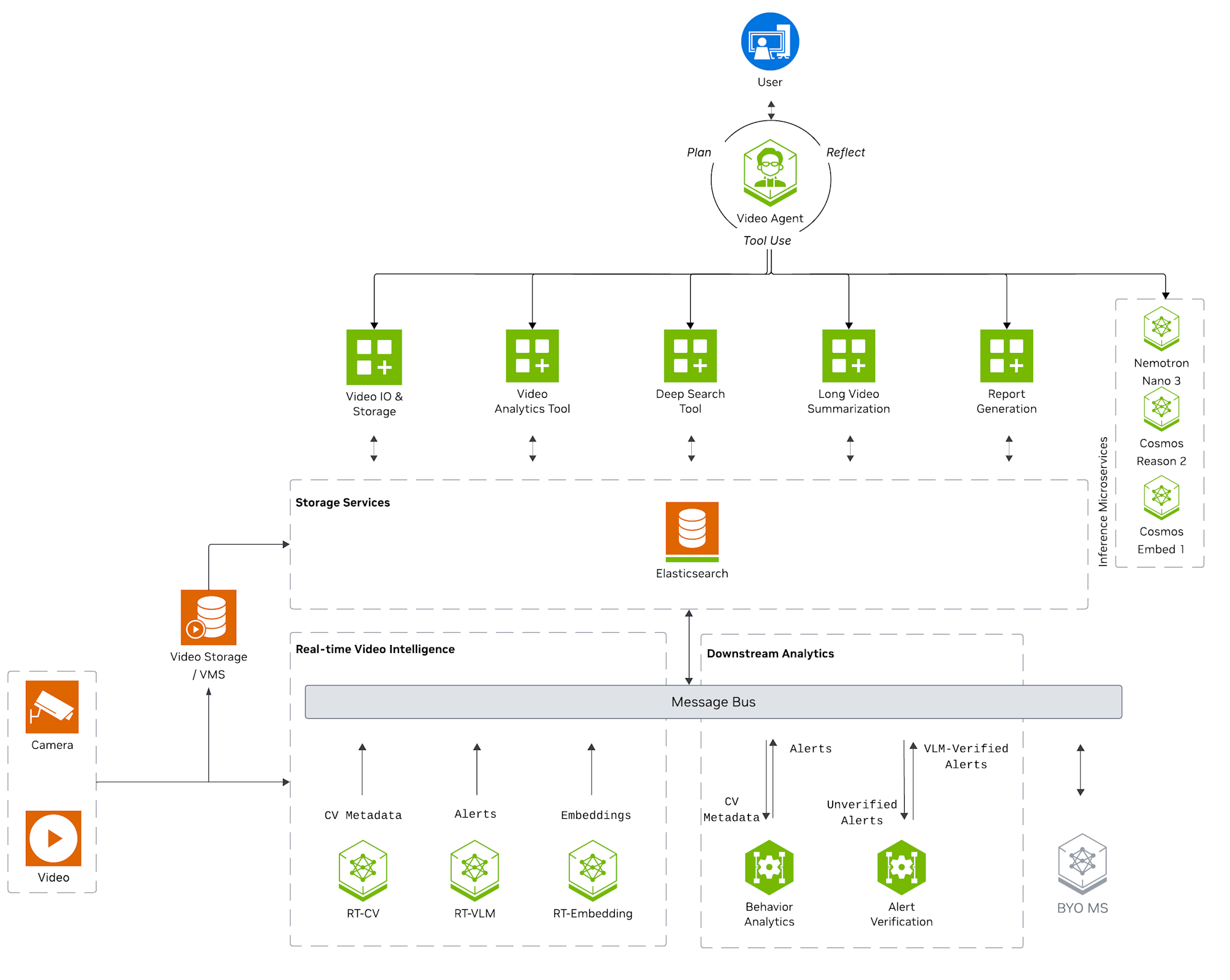
What the diagram shows is that VSS is not a single model, but a collection of multiple microservices with different roles. The official documentation divides these services into three broad areas.
VSS is organized into three areas of processing and analysis: real-time video intelligence (feature extraction, embeddings, and stream understanding with results published to a message broker), downstream analytics (enrichment of metadata into trajectories, incidents, and verified alerts), and agentic and offline processing (orchestrated tools for search, Q&A, summarization, and clip retrieval, including via the Model Context Protocol).
The image is divided into the following three areas.
- ① real-time video intelligence: Extracts features from video. Handles object detection (RT-CV), embedding generation (RT-Embedding), and VLM-based interpretation (RT-VLM).
- ② downstream analytics: Analyzes extracted metadata (Behavior Analytics) and processes it into meaningful events.
- ③ agentic and offline processing: Bundles tools like reporting, Q&A, and search, and processes natural language requests.
Following these three areas, here is a summary of the main components that appear in the diagram.
| Area | Component | Representative Examples | Role |
|---|---|---|---|
| ① | RT-VLM | Cosmos Reason, Qwen3-VL, etc. | Watches video and converts it to words |
| ① | RT-CV | RT-DETR, Grounding DINO, Sparse4D, etc. | Detects and tracks objects |
| ① | RT-Embedding | Video embedding (Cosmos-Embed1) | Vectorizes video |
| ② | Behavior Analytics | Behavior analysis | Assembles alerts from detections |
| ② | Alert Verification | VLM-based verification | Reduces false positives in alerts |
| ③ | VSS Agent | Agent (command center) | Receives requests and calls tools |
| ③ | LLM | Nemotron, etc. (configurable) | Reading and writing text |
| Common Infrastructure | VIOS / VST | Video ingestion and storage | Manages video data |
| Common Infrastructure | Message Broker | Kafka / Redis / MQTT | Relays messages between services |
| Common Infrastructure | Database | PostgreSQL / Elasticsearch | Stores metadata and alerts |
| Common Infrastructure | Observability | Phoenix, Grafana, Prometheus, etc. | Visualizes and monitors the state of agents and services |
The models and middleware in the table are representative examples, and the actual configuration varies by VSS version, profile, and settings. Also, in the Blueprint, not all of these are always running. For example, the base profile handles Q&A and report generation, while long-form summarization is handled by the lvs profile. Each profile is designed so that detection and embedding services that are not needed for that workflow are not started.
Organizing Each Workflow with Sequence Diagrams
Now that we have an overview of the system architecture, let's dig deeper into what it can do. VSS provides multiple Agent Workflows that combine these components.
We provide multiple reference Agent Workflows which demonstrate how the individual components can be leveraged by an agent:
Depending on the goal — whether you want to summarize, generate alerts, or search — components are combined to realize the workflow.
- Q&A and report generation (short clips)
- Long-form video summarization
- Alert verification
- Real-time alerts
- Video search (alpha)
Let's start with the simplest one: Q&A and report generation.
Workflow 1: Q&A and Report Generation
The flow I tried in my previous article corresponds to this. The image is uploading one short video and asking "What is happening in this video?" The official quick start explains it as follows.
Video retrieval, VLM-based Q&A, and report generation on short video clips
Let me put together a sequence diagram showing how the user's input flows through the system.
Let me briefly summarize the participants in the diagram (this applies to the subsequent sequence diagrams as well).
- VSS Agent UI: The user's interface (Web UI)
- VSS Agent: The command center that receives requests and orchestrates which components to call and in what order
- VLM (e.g., Cosmos Reason): Watches video/images and converts them to words
- LLM (e.g., Nemotron): Reads and writes text
- VIOS / VST: Manages video data
VLM watches the video, LLM reads and writes based on that — this division of roles is the basic form of VSS responses.
In Q&A, the video_understanding tool performs VLM analysis according to the question. In report generation, a dedicated prompt and template is used to format VLM analysis results into Markdown or PDF. The number of VLM calls varies depending on the profile and settings.
Note on video length and tokens
NVIDIA explains that for standard VLMs, the video processed at one time is typically a short clip of less than 1 minute.
Standard VLMs are limited to processing short video clips, usually less than 1 minute, depending on the number of subsampled frames and level of detail required.
"1 minute" should be understood as a rough guideline rather than a fixed upper limit. We'll look at this in more detail later.
Workflow 2: Long-Form Video Summarization
This workflow summarizes large video data and outputs the content as text. A key feature is that the video data is split into multiple chunks for processing.
The Video Summarization Workflow enables analysis and summarization of video content without being constrained by the standard VLM context window limitations, allowing for the analysis of long-form video content.
The flow looks like this in a diagram.
First, the long video is cut into chunk_duration-second segments that the VLM can process. Each chunk is densely captioned by the configured VLM, and the CA-RAG in the Video Summarization Microservice aggregates them as timed events. The configured Summarization LLM then generates an overall summary. The VLM and LLM can be swapped out through configuration.
chunk_duration is an important parameter. Shorter chunks mean more VLM calls but finer visibility. Longer chunks mean fewer calls, but more frame skipping within each chunk, making it easier to miss details.
Note: Relationship between resolution, fps, video length, and tokens
The number of sampling frames passed to the VLM and the level of detail required for each frame determine the token count.Here is an estimate for using Cosmos3 Nano Reasoner, which is the standard for some profiles in the current VSS (note: this formula does not apply directly to VSS in general or other VLMs).
Cosmos3 Nano Reasoner does not tokenize video as a simple "list of still images" separately — instead, it converts a unit spanning 32×32 pixels spatially and 2 frames temporally, i.e., 32 × 32 × 2 = 2,048 pixel-frames worth, into 1 visual token.Therefore, the number of visual tokens can be estimated roughly as follows.
Total visual tokens ≈ Number of sampling frames × width × height / 2,048The key point here is that this is not the total number of frames in the original video, but the number of frames actually passed to the VLM after preprocessing. Increasing this frame count and the resolution increases the number of visual tokens and inference cost. Actual values are also affected by resolution rounding and preprocessing. In the Cosmos3 model-specific API reference, it is shown that a 32×32×2 patch corresponds to 1 multimodal token, and it works best with 16K or fewer multimodal tokens. NVIDIA Cosmos3 Reasoner API
Based on the formula above, the approximate number of tokens per frame when input as video is as follows. Since Cosmos3 processes 2 frames as a pair, this differs from the token count when inputting a single image.
Input Resolution Tokens per video frame 720p (1280×720) Approx. 460 1080p (1920×1080) Approx. 1,020 2048×2048 Approx. 2,048 ※ Assumes an even number of frames, calculated by rounding up remainders to 32-pixel units.
※ 2048×2048 is a calculation example here and does not indicate an upper limit for input resolution.For example, sampling 1080p-equivalent frames at 2fps for 1 minute — all 120 frames passed to the VLM without downscaling — the token count with 32×32×2 patches would be roughly as follows.
120 / 2 × 1920 / 32 × 1080 / 32
= 60 × 60 × 34
= 121,500 tokens
This is approximately 16 times larger input than the 7,840 tokens/inference configuration used in VSS performance benchmarks. In the benchmark, 80 frames of 448×448 are processed as a 10-second chunk, using 7,840 visual tokens per inference. NVIDIA RTVI-VLM Performance
Also, somewhat confusingly, resolution, fps, and time are not always in a three-way tradeoff. VSS has two frame selection modes:
- In FPS-specified mode, sampling frames ≈ fps × chunk duration, so resolution, fps, and time all affect token count.
- In the standard fixed-frame-count mode, a fixed number of frames are taken at equal intervals from each chunk. In this case, even if chunk_duration is increased, token count barely changes if the frame count stays the same. However, the interval between frames widens, making temporal information coarser.
In long-form summarization, the per-chunk analysis results are aggregated in a downstream step.
From a GPU utilization perspective, NVIDIA recommends 30–60 second chunks for the Video Summarization Microservice. NVIDIA Video Summarization Microservice — Best Practices
Workflow 3: Alert Verification
Next is the task of detecting arbitrary events from continuously flowing video data. Since continuous VLM inference on a video stream puts a high load on the GPU, object detection models and VLMs are used in combination.
Realtime processing of videos using perception (object detection, tracking) and behavior analytics to generate alerts, which are subsequently verified with VLM to reduce false positives
Here is the sequence diagram.
Here, RT-CV continuously processes the stream at the configured inference FPS. Then, only the alert candidates that the rules flag as suspicious are input to the VLM to verify whether they are real. Object detection models cast a wide net for candidates (reducing missed detections), while VLM confirms them (reducing false positives). This division of labor minimizes calls to the GPU-intensive VLM and enables streaming processing.
As for how to define the events to capture, they can be defined in three parts.
- What to detect: Specify the key objects for the event in text (e.g., fallen bottle). Since Grounding DINO has an open vocabulary, you can add targets in natural language.
- What constitutes an alert: Write rules in the Behavior Analytics settings, such as entering a zone, 5 or more present, or lingering in a zone.
- How to verify if it's real: Write a confirmation prompt in the VLM verification settings (e.g., "Is a fallen bottle actually visible? Answer yes/no.").
Incidentally, while this workflow presupposes live RTSP video, pre-recorded video can also be used. A tool called NVStreamer can input a video file as an RTSP stream, allowing the same pipeline to be used. During the verification phase, previously recorded video data can be processed in batch to check feasibility.
Workflow 4: Real-Time Alerts
Some anomalies are hard to express with the rules described above. For example, cases where you want to describe something vaguely like "unusual work" or "unsafe posture." In such cases, instead of generating candidates solely through object detection and fixed rules, Real-Time Alerts — where the VLM directly evaluates sampled video intervals — becomes an option.
Continuous processing of video streams through VLM for anomaly detection
Here is the sequence diagram.
Compared to the previous Alert Verification (Workflow 3), the VLM is positioned further upstream, and the VLM directly and continuously watches the video to determine anomalies. This places a higher GPU load than the configuration where only candidate intervals are verified by the VLM. Therefore, this profile defaults to processing 1 stream simultaneously.
※ However, this is a value based on the profile's default settings and GPU requirements, and is not a fundamental upper limit of VSS or RTVI-VLM. Whether multiple streams can be handled depends on hardware, model, number of input frames, resolution, and deployment settings. Since alert verification can limit VLM calls to candidate intervals, when comparing both approaches, you need to estimate together the benefit of flexibly defining events and the available computational resources.
Humans define anomalies in natural language (e.g., "when someone without PPE enters," "when a box falls over"). Rather than leaving it to the VLM to decide what's anomalous, humans specify in words what constitutes an anomaly, and the VLM determines whether that has occurred — this is the division of responsibility.
It seems worth choosing the way you write rules based on what VLMs are good and bad at. Based on my experience testing with short clips, I had the impression that VLMs are relatively accurate at yes/no judgments like "Is ◯◯ visible?", while vague questions like "anything unusual in general" tend to produce inconsistent answers. Even though it's flexible, I believe that the more you specify rules with concrete and clear conditions that can be answered with yes/no, the more stable the results will be (this is still a hypothesis from a small number of data points).
Workflow 5: Video Search ※Alpha Version
Finally, this is a workflow not for reading one video or monitoring, but for finding "that scene" from a large archive of recordings. It is still in alpha.
Natural language search across video archives using video embeddings (alpha)
Source: Video Search — VSS Documentation
This search workflow has multiple paths. The following is a simplified diagram of the path that runs Embed Search from Vision Agent Chat and confirms candidates with Critic Agent. The direct search API path, Attribute Search, Fusion Search, and Search by Image are omitted.
Whereas the previous Q&A was "read one video and answer," search is a workflow that "finds and ranks results from multiple videos." In the Embed Search shown in the diagram, each video is pre-vectorized through embeddings and accumulated, and the search query is also converted to a vector in the same space to retrieve similar candidates.
The current Search Workflow has four search methods.
- Embed Search: Searches by similarity between video embeddings and natural language queries
- Attribute Search: Searches object attributes extracted by RT-CV
- Fusion Search: Combines embedding and attribute results for search
- Search by Image: Searches for scenes similar to an input image
When evaluating search quality, it is necessary to check the distribution of the embedding space and its fitness for the task. In particular, event order, frequency, and negation conditions may not always be distinguishable with simple cosine similarity alone. It is important to evaluate using real data you expect to use, with metrics like Recall and Precision.
For reference, in separate experiments with Qwen-series models on a small number of cases, similarities between different video clips were concentrated in the range of 0.97–0.99, and anisotropy was considered as a possible hypothesis for the cause. Anisotropy is the phenomenon where vectors are distributed in a biased direction.
※ Preprocessing, pooling, and normalization are also candidate causes, and anisotropy could not be confirmed as the definitive explanation; nor is this a result showing the properties of Cosmos-Embed1 or VSS. Verifying the hypothesis requires analysis of similarity distributions, principal components, eigenvalues, etc. over many samples.
The current Search profile has the Critic Agent enabled by default, which checks the top candidates against the search conditions using a VLM and assigns confirmed or rejected. This is an officially provided mechanism for improving search accuracy. NVIDIA VSS — Search Workflow
Conclusion
Starting from the VSS system architecture, I organized 5 workflows with sequence diagrams. When I first saw VSS, I was confused by the number of services and unique concepts, but summarizing them by use case and data flow helped me organize the overall picture.
Also, VSS allows you to configure VLM and LLM inference endpoints, and you can choose from supported local NIMs or remote services depending on your needs. In other words, it is designed so that models can be swapped out.
Since LLM/VLM are the core components for realizing tasks, I think a good approach is to proceed in stages:
Decompose what you want to do into minimally sufficient tasks
↓
Small-scale verification of whether it can be solved by the core LLM/VLM
↓
Orchestrate with the VSS platform according to the operational phase
I felt that this stepwise approach can bring you closer to production without unnecessary rework.
If the optimization is limited to a single step, simply introducing a VLM on its own may be sufficient, but I think the true value of VSS lies in treating video information as one of many manufacturing data sources and horizontally deploying and linking it at the line or factory level.
I would like to continue deepening my understanding by actually running each workflow.

