
Appending Under a Specified Heading Using the Obsidian 1.15 CLI

This page has been translated by machine translation. View original
Hello! I'm Yuji Nishimura from the Ops team!
You can now specify where to append in Obsidian's today's daily note by using a heading such as "Log". This is handy when you want to leave a one-line result in the daily note at the end of a work script. Adding heading=Log to daily:append of the Obsidian CLI, which you operate from the terminal, appends to the end of that section.
The conventional daily:append, and append of the Obsidian URI, which you operate through dedicated obsidian://... links, appended to the end of the file. To specify a heading with these operations, you had to use a community plugin such as Advanced URI.
Obsidian 1.15, released publicly on November 2, 2026, added heading for specifying a heading to appends in the URI and CLI. In this article, I'll verify in a test Vault where the content is appended, how to specify the heading, spacing for controlling blank lines in the URI, and the behavior when the heading isn't found. I'll also compare it with 1.14.5.
Parameters added in 1.15
- Target version / date: Obsidian 1.15.0 desktop (released ahead of time as an early access (Catalyst) version on 2026-10-22, and publicly on 2026-11-02)
- Key changes: The changelog states that you can now append / prepend to a heading with the URI and CLI, and that you can control the line breaks before and after the appended content
- Official documentation: In PR #1137 of the official help repository, the parameters were added to the Obsidian URI and Obsidian CLI pages
| Route | Target | Parameters available in 1.15 |
|---|---|---|
| URI | new / daily actions |
heading (specified together with append or prepend), spacing=auto (default) / newline / inline |
| CLI | append / prepend / daily:append / daily:prepend |
heading=<name>. Whether a line break is added is switched with the existing inline flag |
How to write the CLI and URI for appending under a heading
To append to a heading in the daily note with the CLI, write it as follows. Enable the CLI and prepare ## Log and ## Tasks in today's daily note before running it. If today's note doesn't exist yet, set the headings in the template described below. For the third example, which specifies a regular note, Sample.md needs ## Log.
# Append to the end of the Log heading's section
obsidian daily:append heading=Log content="- 10:30 レビュー依頼に返信"

# Prepend to the beginning of the Tasks heading's section
obsidian daily:prepend heading=Tasks content="- [ ] 見積もりを送る"

# When specifying a note other than the daily note
obsidian append path=Sample.md heading=Log content="- 10:30 追記"
To use the obsidian command, enable the CLI in Obsidian's settings (Settings → General → Command line interface, as written in the official help) and register it in your PATH following the instructions. On macOS, /usr/local/bin/obsidian is created as a symbolic link to obsidian-cli inside the app. According to the official help, the CLI requires installer version 1.12.7 or later, and the Obsidian app must be running (if it isn't running, the first command launches it). If you have multiple Vaults, put vault= as the first parameter, like obsidian vault=<name> daily:append ....
For the URI, combine append=true (or prepend=true) with heading. For appending to an existing note, too, the URI uses the new action with append=true. For the daily note, use the daily action. If you add bullet points one line at a time, adding spacing=newline keeps blank lines from being inserted.
open "obsidian://daily?vault=HeadingTest&append=true&heading=Log&spacing=newline&silent=true&content=-%2011%3A00%20%E9%9B%BB%E8%A9%B1"
Replace vault with your own Vault name (this example uses the name of the test Vault). Values such as content need to be URL-encoded, and the example above appends - 11:00 電話. With silent=true, the appended note isn't opened.
Environment tested
- macOS 26.7.2 (Apple silicon)
- Obsidian 1.15.0 (installer version 1.12.7), and 1.14.5 for comparison
- Test Vault "HeadingTest"
- Core plugin Daily notes: folder
Daily, formatYYYY-MM-DD, templateTemplates/Daily
I didn't register it in the PATH and ran the in-app obsidian-cli (/Applications/Obsidian.app/Contents/MacOS/obsidian-cli) directly. With the normal CLI registration, a symbolic link to this file is created, so the command examples are written with obsidian. Most URIs were opened by passing them to obsidian-cli, like obsidian-cli "obsidian://new?...". I also opened one new example and one daily example with the open command, and confirmed that they append to the same position.
Appending to a daily note created from a template
If you run daily:append on a day when today's daily note doesn't exist yet, the daily note is created and then the content is appended. If no template is set, an empty note is created and you get a "heading not found" error (described later). So put the target headings in the template.
# {{date}}

## Tasks

## Log

## Memo
With no daily note for today, I ran the CLI three times.
obsidian daily:append heading=Log content="- 10:00 定例ミーティング"
obsidian daily:append heading=Log content="- 10:30 レビュー依頼に返信"
obsidian daily:prepend heading=Tasks content="- [ ] 見積もりを送る"
Added to: Daily/2026-11-03.md
Added to: Daily/2026-11-03.md
Added to: Daily/2026-11-03.md
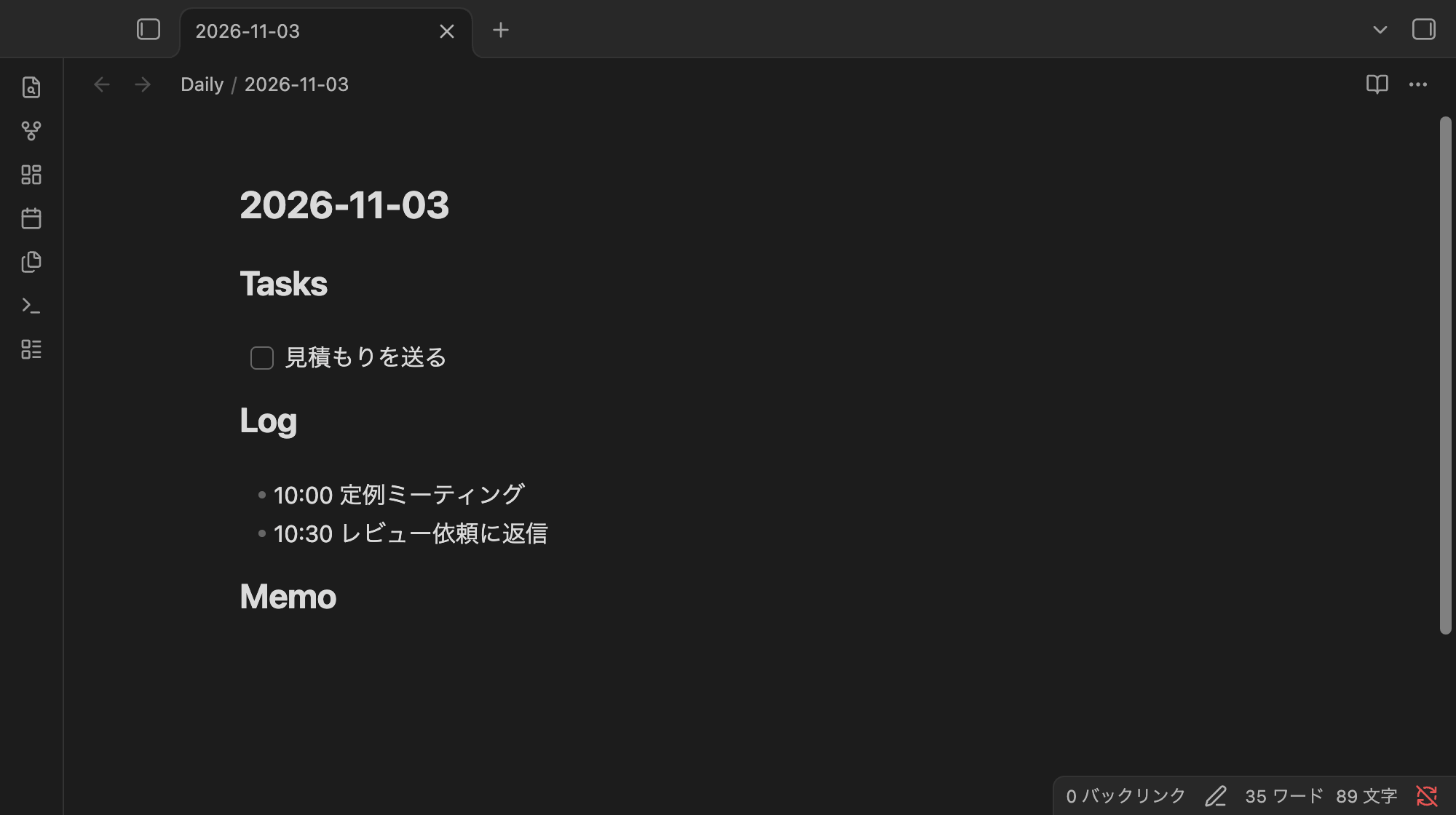
The first run created the daily note from the template, and the content went straight under ## Log. The content of the second run followed on the line after the first.
# 2026-11-03

## Tasks

- [ ] 見積もりを送る
## Log

- 10:00 定例ミーティング
- 10:30 レビュー依頼に返信
## Memo
In a section like the template's, where there is only a blank line under the heading, the content went in after that blank line. In the source, the line right after the appended line is ## Memo.
The next image shows the note opened in Obsidian after the appends. Tasks has a checkbox, and Log has two bullet lines.
Where in the section the content goes
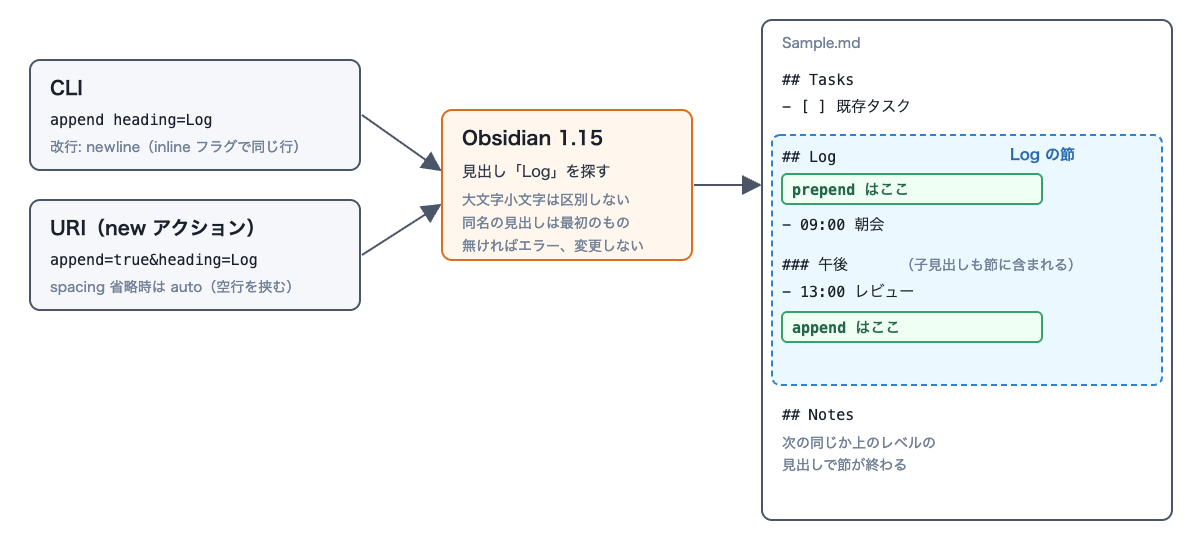
The range from a heading up to just before the next heading of the same or a higher level is treated as one section. Content added with append goes at the end of the section, and with prepend it goes right under the heading (if the line right after the heading is blank, after that blank line).
The next figure is a conceptual diagram I made myself, not an official architecture diagram. Whether you specify it from the CLI or the URI, the range to append to is the same. The ## Log section runs up to just before ## Notes, and includes the child heading ### 午後.
To see the case with child headings and existing lines, I prepared a separate note, Sample.md.
---
tags: daily
---
# 2026-11-03

## Tasks
- [ ] 既存タスク

## Log
- 09:00 朝会

### 午後
- 13:00 レビュー

## Notes
メモ
I ran the following command.
obsidian append path=Sample.md heading=Log content="- 10:30 追記"
It went not right after ## Log, but after the last line of the child heading ### 午後.
 ### 午後
 - 13:00 レビュー
+- 10:30 追記

 ## Notes
With prepend heading=Tasks, it went right under the heading, and the existing task shifted back by one line.
 ## Tasks
+- [ ] 先頭に入るタスク
 - [ ] 既存タスク
Other conditions I checked and their results are as follows.
| Condition | Result |
|---|---|
| Nothing under the heading (the next heading comes right after) | Both append and prepend go right under the heading |
| Section at the end of the file (no trailing newline) | Goes after the last line, and no trailing newline is added |
Including \n in content with the CLI |
Treated as a line break, and multiple lines go in |
Adding inline with the CLI |
No line break; it is written continuing the last line of the section (メモ → メモ(inline で追記)) |
Conditions under which the name written in heading matches
I also checked what you can write in heading to get a match.
| Specification | Result |
|---|---|
heading=Log |
Goes into the ## Log section |
heading=log |
Case-insensitive; goes into the ## Log section |
heading="## Log" |
Goes into the ## Log section even with the # |
heading=午後 |
Goes into the child heading ### 午後 section, and stops before ## Notes |
heading="Log#午後" |
Results in Error: Heading “Log#午後” not found in file., and the file doesn't change |
heading=Log in a note with two ## Log headings of the same name |
Goes into the first ## Log section |
Child headings can be specified by name alone, and the notation of tracing from the parent heading, like Log#午後, didn't match in 1.15.0. When there are two ## Log headings of the same name, the content went into the first section.
With the URI, choose how blank lines are inserted with spacing
If you omit spacing in the URI, it becomes auto, which puts one blank line between the content and the existing content. The result differs from the CLI default (a line break only).
open "obsidian://new?vault=HeadingTest&file=Sample&append=true&heading=Log&content=-%2010%3A30%20%E8%BF%BD%E8%A8%98"
 ### 午後
 - 13:00 レビュー

+- 10:30 追記
+
 ## Notes
A blank line goes between - 13:00 レビュー and - 10:30 追記. When I checked in Obsidian's reading view, the two items were still in the same list, but they were displayed as a "loose list" in which each item is wrapped in a paragraph (<p>). With spacing=newline, as with the CLI, it goes on the line right after the previous line, and the items didn't become paragraphs.
 ### 午後
 - 13:00 レビュー
+- 10:30 追記

 ## Notes
With spacing=inline, no line break is inserted, and just like the CLI's inline, it is written continuing the last line of the section.
When prepend=true is used with spacing omitted, the content goes right under the heading, with one blank line between it and the existing content.
 ## Tasks
+- [ ] 先頭
+
 - [ ] 既存タスク
Because auto inserts a blank line, it suits adding paragraphs. If you add bullet points or logs one line at a time, use newline.
When the heading isn't found
When the heading isn't found, neither the CLI nor the URI appends anything, and the file isn't changed. However, how the error is conveyed differs.
The CLI displays the error on standard output. In 1.15.0, the exit code was 0 in this case too.
obsidian append path=Sample.md heading=Nothing content="- 存在しない見出し"
echo "exit=$?"
Error: Heading “Nothing” not found in file.
exit=0
When calling it from a shell script, a failure can't be detected from the exit code in 1.15.0, so check whether the standard output starts with Error:. The handling of exit codes may change in a future update.
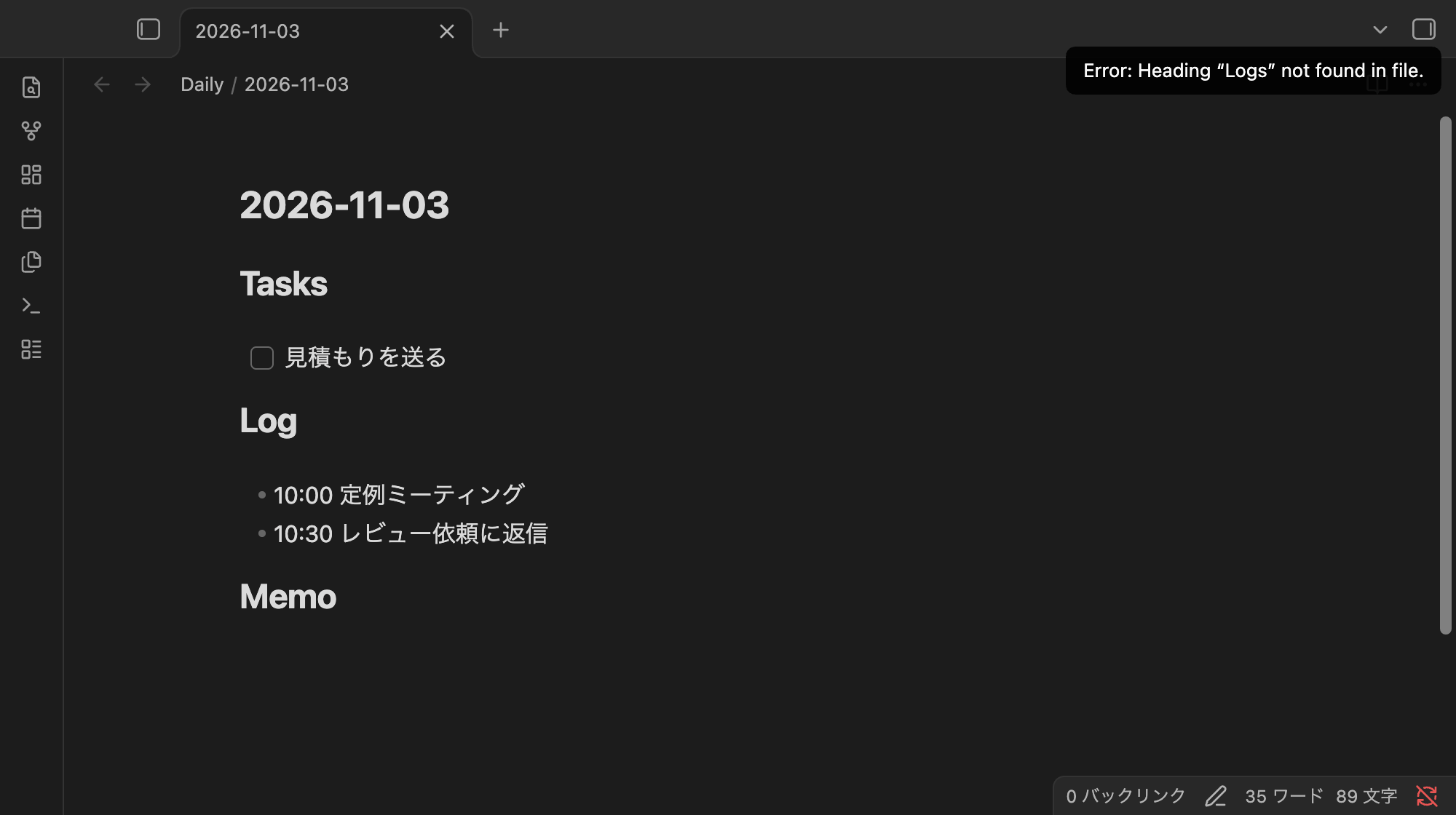
With the URI, a notification appears on the Obsidian screen. The next image shows the screen when I opened a URI specifying the nonexistent heading Logs. Error: Heading “Logs” not found in file. is displayed at the top right, and the note is unchanged.
When heading is specified in the URI without append / prepend, the note also stayed unchanged, and a notification The “heading” URI parameter requires “append” or “prepend.” appeared.
If the target note doesn't exist yet, an empty note is created and then the error occurs.
For the daily note, if you put the headings in the template as in the first example, writing goes under the heading from the first append of the day. I haven't tried appending with the URI's daily action from a state where today's note doesn't exist.
In 1.14.5, heading is ignored
For comparison, I ran the same CLI commands in 1.14.5 and opened the same URIs. The CLI displayed Appended to: Sample.md without any error, and in both cases heading was ignored and the content was appended to the end of the file. Both the CLI and the URI produced the following diff.
 ## Notes
 メモ
+
+- 10:30 追記
\ No newline at end of file
1.14.5's obsidian help append has no heading line. If you use Obsidian on multiple machines, run obsidian version on each machine before building it into a script, and check that it is 1.15 or later.
obsidian version
1.15.0 (installer 1.12.7)
Summary
- Obsidian 1.15 added
heading, which lets you specify a heading's section to append to. It applies to the CLI'sappend/prepend/daily:append/daily:prependand the URI'snew/dailyactions - Content added with
appendgoes at the end of the section, including child headings, and withprependit goes right under the heading. Heading names are case-insensitive, and child headings are specified by name alone. If there are multiple headings of the same name, it goes into the first one - The URI inserts a blank line if you omit
spacing. If you add bullet points one line at a time, addingspacing=newlinegives the same result as the CLI - If the heading isn't found, nothing is appended. The CLI in 1.15.0 displays the error on standard output with exit code still 0, and the URI shows a notification
- To append to a daily note that hasn't been created yet, prepare the headings in the template
- In 1.14.5,
headingis ignored and the content goes at the end of the file. Before using it, check withobsidian versionthat you are on 1.15 or later
I hope this helps someone.