How I Realized with OpenJD That Small Fixes Should Take Responsibility for Proving Bugs #OSSContribution

This page has been translated by machine translation. View original
Introduction
In a rendering environment I built for work on AWS Deadline Cloud, I ran into a phenomenon where 3ds Max jobs kept stalling partway through without producing any error. After investigating, I found the cause was a bug in the OpenJD adaptor runtime. I submitted an Issue and a one-line fix PR, and it was merged.
Even for a small fix, I feel that you should take responsibility yourself for identifying the cause of the bug and proving it with a test before handing it over. The PR I submitted was improved through review and released as 0.9.6. If you encounter the same phenomenon, updating the adaptor runtime to 0.9.6 or later will resolve it.
In this article, I describe how to recognize this bug for those who operate rendering. I also write about what I felt after submitting a fix, for those who are hesitating to report to OSS.
I have summarized the investigation techniques in the following two articles.
What is OpenJD
Open Job Description (OpenJD) is an open specification for describing jobs such as rendering. AWS Deadline Cloud runs jobs based on this specification. Adaptors that run DCCs such as 3ds Max delegate common processing to a library called openjd-adaptor-runtime-for-python. The fix this time went to the repository of this library.
References
- Open Job Description specifications and documentation (GitHub)
- What is AWS Deadline Cloud (AWS documentation)
The bug and its cause
What prompted me to submit the fix PR was encountering a problem where rendering a certain heavy 3ds Max scene did not fail but stopped progressing at the same progress point every time. When I lowered the log verbosity, the progress went a little further but still stopped there. When I set the log verbosity to the lowest level, the progress did reach 100%. However, at the moment it reached 100%, the adaptor could not detect that rendering had completed, and it stopped progressing there as well. In the end, changing the log verbosity did not work as a workaround.
The deciding factor was examining the threads of the adaptor's Python process with py-spy. The thread that reads the standard output of 3ds Max was dead, and the following exception remained in the adaptor's output log.
Exception in thread AdaptorRuntimeStdoutLogger:
Traceback (most recent call last):
  File "<frozen codecs>", line 322, in decode
UnicodeDecodeError: 'utf-8' codec can't decode byte 0xc7 in position 2: invalid continuation byte
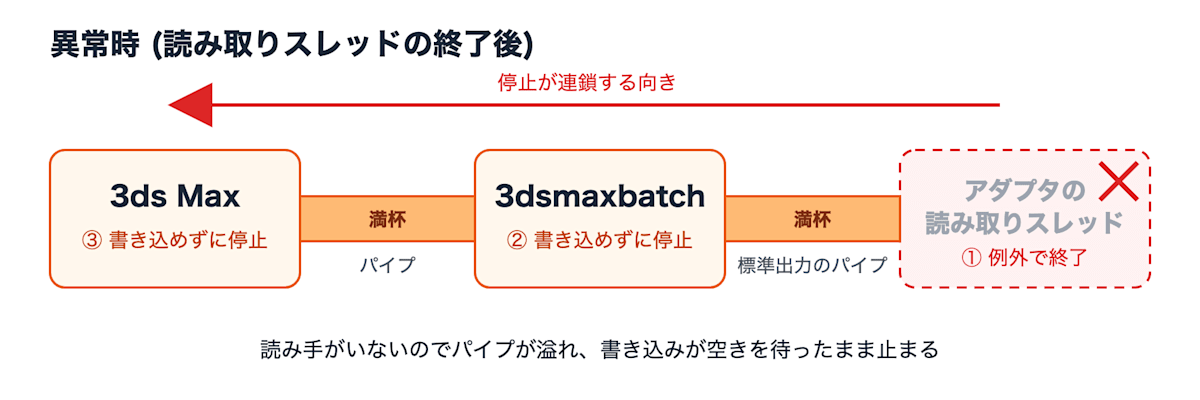
The adaptor runtime was reading the subprocess output as strict UTF-8. When 3ds Max emitted a non-UTF-8 byte (0xc7), the reader thread terminated with an exception. A pipe with no reader fills up, and 3ds Max stalls on writing output. The reason the stopping position varied with the amount of logging was this pipe overflow. The more logs there were, the sooner the pipe overflowed, so the process stopped at an earlier position.
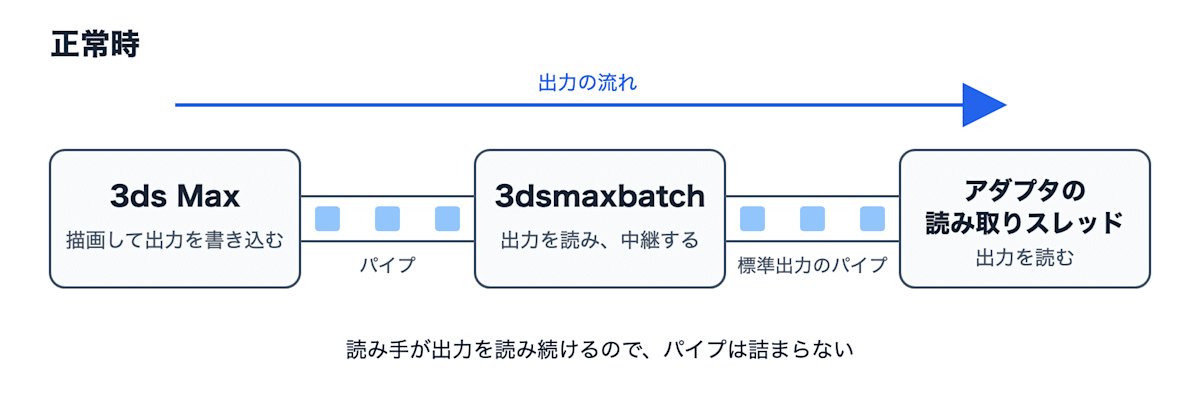
3ds Max runs as two processes: the main one that does the rendering, and 3dsmaxbatch, which relays its output. Writes do not produce an error but keep waiting for space to free up in the pipe, so the job keeps stalling without failing. Here is a rough diagram of the flow up to the stall. In the normal case, the reader keeps reading the output, so the pipe does not get clogged.
When the reader thread terminates, the pipe overflows and the upstream stops in numbered order.
The fix I submitted
Locally, I had worked around it by rebuilding an image with the fix included, but the maintenance burden of keeping a patch remained. AWS Support also advised me to report it to the official repository, so I filed Issue #274 and submitted the following PR.
What I changed was the arguments passed to subprocess.Popen, which starts the subprocess. Only the character encoding (encoding) was specified, and the handling of undecodable bytes (errors) was not, so the default strict handling raised an exception. I added errors="replace" here so that undecodable bytes are replaced with a replacement character.
         # Create the subprocess
         popen_params: Dict[str, Any] = dict(
             args=args,
             stdin=subprocess.PIPE,
             stderr=subprocess.PIPE,
             stdout=subprocess.PIPE,
             encoding=encoding,
+            errors="replace",
             cwd=startup_directory,
         )
*The actual diff also includes a comment explaining the reason, but it is omitted here.
There were two points I was careful about when submitting.
First, I narrowed the scope to a single defect. The reader thread was built in a way that it could also terminate on other exceptions, but since an existing test protected that behavior as a specification, I only mentioned it in the Issue.
Second, I attached a regression test. It launches a subprocess that emits non-UTF-8 bytes and verifies that subsequent lines are logged, and I confirmed that it fails on the pre-fix code before submitting. Incidentally, I initially forgot to add the DCO sign-off to the commit, so the check failed and I redid it.
About 4 days later, two maintainers approved it and it was merged. In the review, it was suggested that backslashreplace is better than errors="replace" because the original byte values remain in the log, making it easier to investigate the character encoding a DCC emits. The maintainer made this change themselves in #277, and it was released as 0.9.6.
Lessons learned
Before submitting, I felt the value of sending a one-line fix upstream was small. However, I think it is hard for a maintainer to judge from a one-line diff alone why the change is needed. I believe the small fix was accepted because I identified the cause, narrowed the scope to a single defect that I could prove myself, and demonstrated the bug with a test that fails before the fix. The improvement suggested in review was an opportunity to learn a perspective my fix had lacked. It was an experience that made me realize that precisely for small fixes, you should take responsibility yourself for proving why they are necessary.
Conclusion
If a DCC job such as 3ds Max silently stalls, please update the adaptor runtime to 0.9.6 or later and check whether there is an exception in the thread that reads the output. If you have fixed an OSS bug at work, please try returning your local patch upstream, along with an explanation of the cause and a test that reproduces the bug. I thank the maintainers for their prompt review. I hope this article is helpful to those who have encountered the same phenomenon and those who are hesitating to report to OSS.