
I tried setting up a development environment by connecting the Pi coding agent to Switchyard

This page has been translated by machine translation. View original
Introduction
Hello, I'm Morishige from Classmethod's Manufacturing Business Technology Division.
In my usual development work, I've been using Claude Code and OpenCode, but recently I've switched my daily coding agent to Pi coding agent.
Pi is a terminal-focused coding agent built around a small core and extensions, operating under the philosophy of "Primitives, not features." Features like MCP, subagents, plan mode, and permission popups are not built into the core — if you need them, you add them via extensions or packages. I find this clear-cut approach and the lightness of the TUI interesting, and I wanted to build it to fit my own work environment.
On the other hand, I haven't changed the route through which models are called. In a previous article, I introduced a team AI environment that connected OpenCode to NVIDIA NeMo Switchyard, using open-weight models split into strong and weak roles (as of 2026-08-08).
This time, I'll keep that model routing layer in place and swap out the client layer that developers interact with to Pi. I'll see whether I can bring in existing Switchyard, Agent Skills, and MCP assets by adding only the necessary extensions to the small core. I'll also measure how much the initial input grows when loading a global AGENTS.md and Skills.
In this article, I'll introduce a configuration that connects Pi to Switchyard and adds Agent Skills, MCP, subagents, permissions, and small UI extensions for daily use. I hope this resonates with people who want to swap the entry point of their coding agent while keeping an open-weight model-centered development environment.
Replacing the Client Layer of the Team AI Environment with Pi
The overall configuration can be summarized in a single diagram as follows.
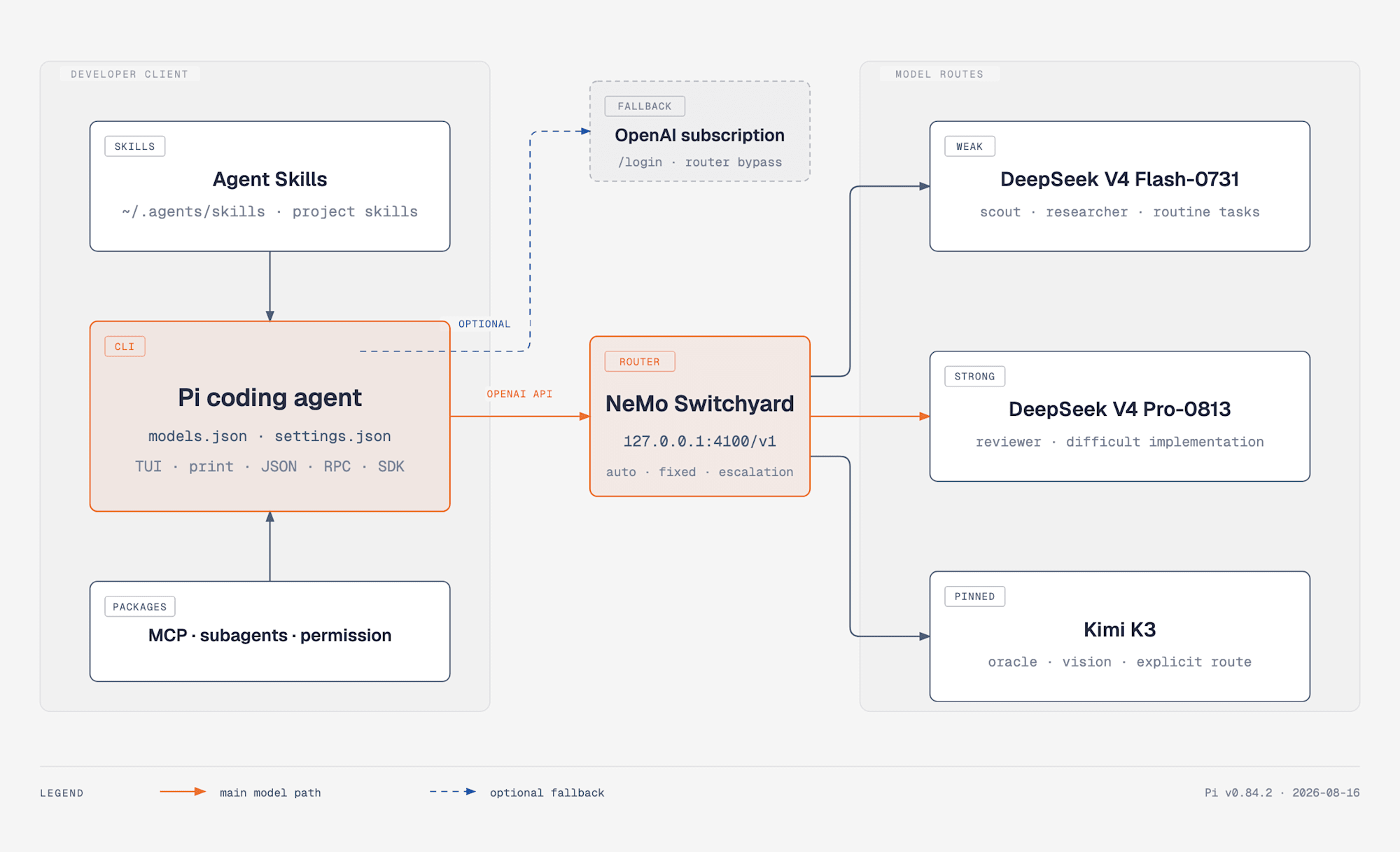
Normal model calls go from Pi to Switchyard, using fixed routes of weak, strong, and Kimi K3 depending on the role. The OpenAI subscription remains as a separate route that does not go through the router.
What changed from the previous article is the developer client on the left side. The Switchyard API, the strong and weak models, the team's shared Agent Skills, and the RAG MCP server remain the same.
In the current configuration, normal tasks go to auto, research subagents to weak-only, reviews to strong-only, and deep design discussions or image inputs to k3-only. Since I treat Switchyard's route IDs as a stable interface, the settings on the Pi side don't change even if the underlying model is swapped.
At the time the previous article was published, Kimi K3 was placed in the strong tier, but in the current distribution settings, weak-only is DeepSeek V4 Flash-0731, strong-only is DeepSeek V4 Pro-0813, and k3-only is a fixed route chosen explicitly. In this article, I won't repeat model selection comparisons and will use the current settings as-is.
Pi Chooses Primitives Over Features
Pi's README describes the default core as 4 tools: read, write, edit, and bash. The current CLI also has grep, find, and ls as built-in tools, and the tools available at startup can be narrowed down via settings. What matters more than the number of tools is that the harness doesn't over-determine the workflow.
Here I've listed representative features that Pi doesn't include internally, alongside what I chose for each this time.
| Desired feature | Boundary Pi provides | What I chose this time |
|---|---|---|
| Project-specific procedures | Agent Skills / AGENTS.md | .agents/skills/ |
| RAG and external tools | Extension / custom tool | pi-mcp-adapter |
| Division of research, implementation, and review | subprocess / Extension | pi-subagents |
| Confirmation before execution | tool_call event |
pi-permission-system |
| Saving plans | Prompt template / file | project-local plan |
| Execution environment isolation | tool override / external sandbox | Using trusted workspace as the base, with further consideration |
Rather than disabling features from a fully-loaded harness, you start small and add only what you need. You have more decisions to make yourself, but I like that it's easy to trace where each behavior was added from.
Another characteristic of Pi is that it guides users to documentation for extensions, Skills, and the SDK. If you want a certain behavior that doesn't exist yet, you can have Pi write an extension and reload it on the spot with /reload. However, the user is the initiator of change. It's not that features are quietly added in the background — it feels more like building your own tools while watching the diff.
Why the System Prompt Works with Under 1,000 Tokens
Pi's system prompt, even combined with tool definitions, stays under 1,000 tokens. In a design explanation article, creator Mario Zechner explains that frontier models have been sufficiently trained with RL for agentic coding and already understand themselves what they should do as a coding agent. Compared to Claude Code or Codex, which have system prompts on the scale of several thousand tokens, this is one order of magnitude different.
When I read this explanation, I found the gap from my intuition a few years ago interesting. In the early days of LLMs, prompt engineering was mainstream — carefully specifying roles and output formats with long preambles. There was a time when you'd coax behavior out of models starting with incantations like "You are an excellent programmer." As model instruction tuning and RL progressed, the focus of effort shifted from "how to give instructions" to "what to put in context." Giving goals and letting the model plan autonomously, returning tool execution results in a loop, loading only the necessary documents as needed — this is the flow known as context engineering.
I understand Pi's philosophy as reflecting this shift in its design. Since how to behave as an agent is baked into the model's weights, the harness doesn't need to teach it anew each time. The harness's job is narrowed to ensuring that users can understand and control what goes into the context. I understand the small system prompt not as meaning preliminary instructions are no longer needed, but as a decision that instructions always needed have moved to the model side, and remaining instructions vary per task and environment, so users should choose and add them.
In fact, as I'll describe later, in my own environment I'm loading about 3,000 tokens of AGENTS.md and a Skills list, so instructions haven't gone to zero. The difference is that I can explain the entire amount myself. Unlike the incantations of the prompt engineering era, the added context is my own operational asset — if it doesn't work, I can remove it, and I can carry it over even if I switch the underlying model. Understanding this clearly was the main reason Pi's philosophy resonated with me.
Connecting Pi to Switchyard
For installation, I used bun to match my usual toolchain. I'm using a configuration that doesn't execute lifecycle scripts for dependency packages.
bun add -g --ignore-scripts @earendil-works/pi-coding-agent
pi --version
On the Switchyard side, I'm using the distribution bundle introduced in the previous article. Pi onboarding and example settings have also been added to the same repository.
I define an OpenAI Chat Completions-compatible provider in ~/.pi/agent/models.json. The following is an example with just the key points.
{
  "providers": {
    "switchyard": {
      "baseUrl": "http://127.0.0.1:4100/v1",
      "api": "openai-completions",
      "apiKey": "local-dummy",
      "models": [
        { "id": "auto", "input": ["text"] },
        { "id": "weak-only", "input": ["text"] },
        { "id": "strong-only", "input": ["text"] },
        {
          "id": "k3-only",
          "reasoning": true,
          "input": ["text", "image"]
        }
      ]
    }
  }
}
apiKey is a dummy value for using Switchyard locally. Since Pi doesn't show providers without authentication credentials as candidates in /model, I place a value even for local endpoints that don't check the key. This is not intended for writing external API keys directly.
The example above only shows the 4 routes I use regularly. The pi-models.json.example in the distribution bundle defines 6 routes including auto-esc and qwen3.7-plus. auto-esc is an escalation path for non-interactive use that starts from weak, and qwen3.7-plus is a fixed route supporting image input.
In the standard configuration for this article, I set the default in settings.json to Switchyard's auto.
{
  "defaultProvider": "switchyard",
  "defaultModel": "auto",
  "enableInstallTelemetry": false,
  "enableAnalytics": false
}
After configuration, 6 routes were visible.
provider    model         context  max-out  thinking  images
switchyard  auto          262.1K   16.4K    no        no
switchyard  auto-esc      262.1K   16.4K    no        no
switchyard  k3-only       262.1K   16.4K    yes       yes
switchyard  qwen3.7-plus  262.1K   16.4K    no        yes
switchyard  strong-only   262.1K   16.4K    no        no
switchyard  weak-only     262.1K   16.4K    no        no
The context and max-out values in this list are not automatically retrieved from Switchyard — they are the contextWindow: 262144 and maxTokens: 16384 values set in models.json. Switchyard's /v1/models currently returns context_window: null. Meanwhile, on the Fireworks API backend, the context_length for Flash-0731, Pro-0813, and Kimi K3 is 1,048,576, and the official model page for Qwen3.7 Plus states 262k tokens.
The backend capacity of the main models is 1M tokens, but to suppress session bloat and align handling across routes, I'm operating all routes at 262K on the Pi side. Pi judges automatic compaction at the point where it subtracts the reserved area for responses from this value. In the current configuration reserving a default of 16,384 tokens, the boundary is 245,760 tokens. The 16.4K is not the maximum output of the backend, but the maximum value Pi requests in a single response.
In the TUI, you can switch routes via /model or Ctrl+L. I normally leave it on auto and only select a fixed route when the purpose is clear.
Carrying Over Agent Skills and Prompt Templates
Pi supports the Agent Skills standard and searches ~/.agents/skills/ globally and .agents/skills/ per project. As one example, in my environment, I use ~/.agents/skills/ as a common hub visible from Claude Code, OpenCode, Codex, and Pi.
For instance, web search procedures go in the web-search Skill, and the manner of internal knowledge search goes in the rag-kb Skill. The policy is to keep a single source of truth for SKILL.md without duplicating the same explanation for each harness.
Similarly as an example, I placed project-specific explicit commands in prompt templates under .pi/prompts/. In this workspace, /context-load <project> and /context-save <project> fall into this category. The actual procedures have .agents/skills/project-context/ as the master, and Pi's template is a thin entry point that reads that reference each time.
With this division, capabilities requiring judgment go to Skills, routine operations explicitly invoked by the user go to prompt templates, and rules to always follow go to AGENTS.md, giving each a clear role. Without modifying Pi's core, I was able to bring in existing operational assets as-is.
Adding Missing Features by Choosing Packages
In the initial environment, I focused on adding 4 packages. Versions are from actual measurements on 2026-08-16.
| package | version | What it adds |
|---|---|---|
pi-mcp-adapter |
2.26.0 | A single proxy tool for MCP and lazy discovery |
pi-subagents |
0.50.0 | Subagents with roles and workflows |
@gotgenes/pi-permission-system |
25.4.0 | allow / ask / deny and path gates |
@narumitw/pi-btw |
0.51.0 | Side questions thrown without mixing into the main conversation |
Use Pi's package manager for installation.
pi install npm:pi-mcp-adapter
pi install npm:pi-subagents
pi install npm:@gotgenes/pi-permission-system
pi install npm:@narumitw/pi-btw
pi-mcp-adapter doesn't expand all registered MCP tool schemas from the start, but finds only what's needed in sequence through a single mcp tool: status, search, then tool. In my environment, weak models progressed to RAG searches through this discovery. Since the tool definition at the entry point stays small even as MCP servers increase, it's a configuration that pairs well with the weak tier.
pi-subagents provides roles such as scout, researcher, worker, reviewer, and oracle. Rather than baking a single subagent design into Pi's core, you can choose the workflow you need from the package side — a very Pi-like way of adding things.
From here, I'll look at the UI side I added after installing packages to reduce friction in daily use.
Arranging the UI for Daily Use with Extensions
Even with MCP and subagents working, it's hard to focus on work if the daily screen is information overload. Extensions are what actually add screen elements and behavior, while packages are the distribution unit. The pi-btw from the previous section is also an extension installed from a package, letting you throw a short question with /btw without mixing it into the main conversation. I've layered my own additions and modified Pi examples on top of this.
| extension | Purpose |
|---|---|
pi-btw |
Throw a short question with /btw without mixing it into the main conversation |
questionnaire |
Ask multiple confirmation items or questions with choices together in the TUI |
plan-mode |
Handle read-only investigation, plan saving, and progress display during execution |
focus-ui |
Hide successful Bash output, display model, thinking, Git, and context usage rate in the Footer |
turn-recap |
Display a short window after processing ends showing work summary, changes, verification, and next tasks |
questionnaire and plan-mode start from extension examples provided by Pi. I added processing to plan mode to save generated plans under the project directory, and a check to not overwrite existing files or files outside the project.
I've packaged the custom parts and modified examples separately from the Switchyard distribution bundle into an independent Pi package. You can install everything with the following command.
pi install git:github.com/himorishige/pi-coding-agent-extensions
Narrowing Bash Output and Footer to Only Necessary Information
focus-ui hides successful Bash commands and output when collapsed, leaving only the command and error for failures. You can expand for details with Ctrl+O.
The Footer displays the model in use and thinking level in model:level format. Next to that is the working directory, Git branch, and the count of staged, modified, and untracked files. On the right end, it shows context usage rate and compaction count. When usage exceeds 80%, the bar turns red, so you can judge from just the bottom of the screen that the next compaction is near.

Example Footer. The model and thinking level are shown side by side as GPT-5.6 Sol:high, and the right end displays a 90% context usage rate in warning color.
Connecting to Next Tasks from Turn Recap
I gave turn-recap both a fast mode that doesn't make additional model calls and a smart mode that has the model write the summary and suggested next tasks. I'm currently using smart mode.
{
  "mode": "smart",
  "model": "openai-codex/gpt-5.6-luna",
  "thinkingLevel": "low",
  "timeoutMs": 30000
}
Changed files and verification results are pulled from the tool execution history, and the model is only tasked with the summary and suggested next tasks. Since the summary is a separate completion, the main conversation history is not polluted. You can review the next tasks suggested by Recap and send them to the input field after confirmation.
Fixing the Route Used by Each Subagent
Rather than leaving everything to Switchyard's automatic routing, I'm fixing the route on the Pi side for processes with a clear role.
{
  "subagents": {
    "defaultModel": "switchyard/weak-only",
    "agentOverrides": {
      "reviewer": {
        "model": "switchyard/strong-only"
      },
      "oracle": {
        "model": "switchyard/k3-only"
      }
    }
  }
}
Scout and researcher are mainly file exploration and web searches, so they're fixed to weak; reviewer is on strong; and oracle, for consulting on design decisions, is on Kimi K3. Normal main interactions remain on auto.
The research for this article's published information was also delegated to researcher, routed to Switchyard's weak-only. Rather than fixing an expensive model to the role of looking up official documentation, only the parts that need review of the output use strong.
For model provider outages, fallback models from OpenAI Codex can also be configured per role. However, since this fallback doesn't go through Switchyard, it's treated as a separate route when aggregating team usage metrics.
Understanding the Boundaries of Permission and Sandbox
Pi doesn't include a permission popup in its core and executes tools with the launching user's permissions. The official README also indicates that if needed, you should either create confirmation processing via an extension or isolate it on the execution environment side using containers or similar.
What I want to think about separately here are three things: Project Trust, permission, and sandbox.
| Boundary | What it protects | What it doesn't protect |
|---|---|---|
| Project Trust | Automatically not reading project-local settings / extensions / Skills from untrusted repositories | Does not isolate tool execution after trust is granted |
| permission rule | Allowing / asking / denying specific paths or command formats | Does not stop all alternative execution methods with the same intent |
| OS-level sandbox | Enforces execution boundaries for filesystem and network | Does not guarantee the safety of package or Skill contents |
In the pi-permission-system smoke test, the .env path deny and headless fail-closed worked as intended. On the other hand, even when a specific delete command was denied, the model could achieve the same goal using a different command format. String patterns work on format, but they are not a mechanism to isolate intent itself.
Also, Pi packages and extensions can execute arbitrary code with user permissions. It's a prerequisite to check the source before adding a package and not to skip the Project Trust confirmation when opening a repository for the first time. Currently I'm layering permission rules on a trusted workspace, but I'm considering a configuration that sends tasks requiring stronger isolation to containers or a sandbox.
Initial Input Only Grows by What You Add
The smallness of Pi's core and the initial input always being small in actual use are different things. I measured this in an empty temporary directory using the same prompt and weak-only, with extensions and prompt templates disabled. The workspace-dgx AGENTS.md and project Skills were not loaded.
| Condition | input |
|---|---|
| Pi minimal configuration | 1,540 |
| Minimal + global AGENTS.md | 1,719 (+179) |
| Minimal + global Skills | 4,532 (+2,992) |
| AGENTS.md + Skills | 4,711 (total +3,171) |
Under these conditions, the global AGENTS.md added 179 tokens, the Skill names and descriptions enumerated at startup added 2,992 tokens, for a total increase of 3,171 tokens. Skill body content is progressive disclosure loaded only when a task matches, so it's not included in this figure.
The connection to Switchyard itself completed with status 200 in both headless execution with auto and k3-only with an image attached.
Pi's core remains small, but if you add AGENTS.md and Skill descriptions, the input increases accordingly. The strength of Pi is not that "choosing a small harness means everything you add stays light," but that you can explain the added context yourself — that's how I see it.
Keeping the OpenAI Subscription as a Separate Route
Pi allows adding subscription auth for ChatGPT Plus/Pro, Claude Pro/Max, and GitHub Copilot via /login. Models available within your contracted plan's usage quota appear in /model, so you can switch between them from the same TUI as Switchyard.
In this configuration, I'm not using the OpenAI subscription as the normal route. I keep normal work and subagents on Switchyard to maintain open-weight model usage records in the routing log. Subscription use is limited to provider outages, verification with a different provider, and auxiliary processing outside the main conversation such as turn recap summaries.
The reason for this delineation is that being technically able to use both and deciding which to make the main route operationally are different questions. Calling subscription models directly bypasses Switchyard's classifier and doesn't appear in the routing log. If you're tracking numbers as a team environment, it's easier to explain later if you decide on a single normal route.
Summary
I introduced a development environment that connects Pi coding agent to Switchyard and selectively adds Agent Skills, MCP, subagents, permissions, and UI extensions for daily use. The model routing layer maintains the configuration from the previous article, with only the developer-facing client swapped out to Pi.
What I find interesting about Pi is not simply that its system prompt is small, but that you can trace which features were added from which boundary. In actual use, initial input also grows from loading AGENTS.md and Skills, and adding permissions doesn't replace a sandbox. I appreciate that none of this is hidden, and that you can add only what you need for your own use case — that's the reason I switched to it for daily use.
Next, I'd like to try running Pi in a sandbox environment like NVIDIA OpenShell, taking advantage of Pi's nature of operating with almost no confirmation prompts.
Reference Links
- Pi coding agent
- earendil-works/pi
- The Pi Coding Agent — Design philosophy by Mario Zechner
- NVIDIA-NeMo/Switchyard
- Qwen3.7 Plus - Fireworks AI
- Kimi K3 - Fireworks AI
- switchyard-opencode-bundle — Contains Pi onboarding and example settings
- pi-coding-agent-extensions — UI extensions in regular use and modified examples
- pi-btw — Side question extension that doesn't pollute the main conversation
- Team AI Environment Running from Development to Business Use with Open-Weight Models

