Using --isolated-context in Playwright CLI 0.1.23 to Hold the Login State of Two Users in a Single Session

This page has been translated by machine translation. View original
Hello! I'm Yuji Nishimura from the Ops team!
How does what an admin approved appear on a regular user's screen? How does a message sent in chat reach the other side? When checking the behavior of a web app, there are times when you want to see the screens of two logged-in users side by side.
With Playwright CLI (playwright-cli), you previously had to start two sessions (browsers) with -s=<name> and switch the target of each command. v0.1.23, released on November 1, 2026 (JST), adds --isolated-context to tab-new, so you can now open tabs with separate cookies and storage within a single session.
This article shares the results of testing, with a test app, the steps to hold two users' login states in a single session, how far that state is shared, and when it disappears. I also checked which tab cookie-list and state-save act on, whether you can carry state over with state-load after closing the session, and whether route mocks and device emulation are separated per tab. Finally, I summarize when to use this versus separating sessions with -s.
Conclusion first: the shortest way to use it
# The first user logs in on the default tab as usual
playwright-cli open https://example.com/login
# The second user opens a tab in a separate, named context
playwright-cli tab-new https://example.com/login --isolated-context=user-b
# Switch tabs and check each screen
playwright-cli tab-list
playwright-cli tab-select 0
The behavior I confirmed is as follows.
| What I checked | Result |
|---|---|
| A named tab vs. the default tab | cookies and localStorage are separated |
| A second tab with the same name | Uses the first tab's login state as is |
| After closing all named tabs | If the session continues, the login state remains even when reopening with the same name |
| After closing the session | Named contexts disappear. In 0.1.23, they did not remain even when the profile was saved with --profile |
Running state-load in the next session on a file saved with state-save |
I could start from the previous login state in a tab with the same name |
cookie-list and state-save |
Only the current tab's context is targeted |
route and open --device |
Applied to named tabs in the same way |
If you want to compare two users' screens in a single flow, --isolated-context is handy because you can keep one browser running and switch with tab-select. If you want to keep saving a profile for each user, or change route mocks or device emulation per user, separating sessions with -s as before is a better fit.
What is --isolated-context?
Playwright browsers keep cookies and localStorage separate in units called browser contexts. Until now, a playwright-cli session used only a single default context.
In v0.1.23, tab-new [url] --isolated-context=<name> can create a tab in a named context. According to the description of microsoft/playwright#43087, which added this feature, tabs with the same name share cookies and storage, and are separated from tabs with different names and from default tabs. This PR also adds an isolatedContext argument, used when opening a new tab, to the browser_tabs tool that operates tabs in Playwright MCP. I did not try the MCP side this time, so I can't judge from this article's results how it behaves when used via MCP.
playwright-cli is a CLI intended for having AI agents operate a browser. The Sessions page introduces a way to pin the agent's target to a single session using the environment variable PLAYWRIGHT_CLI_SESSION. This change makes it possible to prepare a second user inside a session even while the session stays pinned to one.
Trying it out
Environment
- @playwright/cli 0.1.23 (bundled playwright-core is 1.65.0-alpha-2026-10-30)
- Google Chrome 156.0.8078.80 / 157.0.8103.38 (the
chromethatplaywright-cliuses by default; it auto-updated partway through testing) - Node.js v24.22.1
- macOS 26.7.2 (Apple Silicon)
To avoid changing my everyday environment, I installed it in a test directory with pnpm add @playwright/cli@0.1.23 and ran node_modules/.bin/playwright-cli. Note that the release notes describe updating with npm install -g @playwright/cli@0.1.23.
The test app is a server at http://127.0.0.1:8765/ written using only Node.js standard modules. When you access /login?user=<name>, it issues a cookie sid=<name> (HttpOnly) with no expiration and redirects back to the top page. The top page shows the logged-in user name and the name that the page's script wrote to localStorage's lastUser.
tab-new --help showed the following option added.
Options:
  --isolated-context          name of an isolated browser context to create the tab in. tabs in the same isolated context share cookies and storage.
1. Holding two users' login states in one session
To compare with the -s approach later, from here on I used a named session iso. I also confirmed that, as in the "Conclusion first" section, the same steps can open tabs for two users in the default session without -s.
First, log in as alice on the default tab, then open a tab with --isolated-context=user-b.
playwright-cli -s=iso open http://127.0.0.1:8765/
playwright-cli -s=iso goto 'http://127.0.0.1:8765/login?user=alice'
playwright-cli -s=iso tab-new http://127.0.0.1:8765/ --isolated-context=user-b
The new tab did not have alice's cookie and opened in the "Not signed in" state. The result of tab-new shows which context the tab belongs to.
- 0: [Test App - Signed in as alice](http://127.0.0.1:8765/)
- 1: (current) [Test App - Not signed in](http://127.0.0.1:8765/) [isolatedContext: user-b]
...
### Page
- Page URL: http://127.0.0.1:8765/
- Page Title: Test App - Not signed in
- Isolated context: user-b
Log in as bob on this tab.
playwright-cli -s=iso goto 'http://127.0.0.1:8765/login?user=bob'
The image below shows the result of running the following commands in order after logging in as bob.
playwright-cli -s=iso tab-list
playwright-cli -s=iso cookie-list
playwright-cli -s=iso tab-select 0 >/dev/null && playwright-cli -s=iso cookie-list

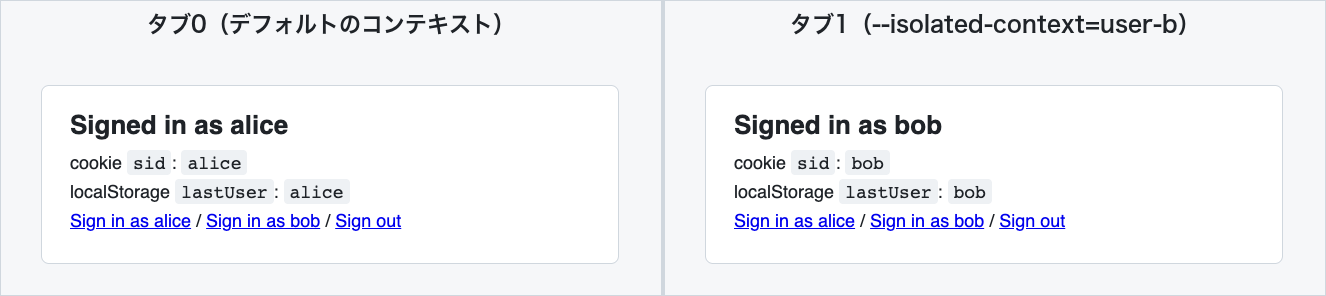
cookie-list returns only the cookies in the current tab's context. It was sid=bob on tab 1, and sid=alice after switching with tab-select 0.
When I took a screenshot on each tab, the same URL was displayed as a different user. The localStorage lastUser is also alice on tab 0 and bob on tab 1. The headings at the top of the image were added so you can tell which tab is which.
2. Tabs with the same name share the login state
When I opened another tab with the same user-b, it was displayed as bob without any login operation.
playwright-cli -s=iso tab-new http://127.0.0.1:8765/ --isolated-context=user-b
- 0: [Test App - Signed in as alice](http://127.0.0.1:8765/)
- 1: [Test App - Signed in as bob](http://127.0.0.1:8765/) [isolatedContext: user-b]
- 2: (current) [Test App - Signed in as bob](http://127.0.0.1:8765/) [isolatedContext: user-b]
Running cookie-list and localstorage-list on this tab returned sid=bob and lastUser=bob.
Next, I also opened tabs with the name default and with a name I hadn't used yet (user-c).
playwright-cli -s=iso tab-new http://127.0.0.1:8765/ --isolated-context=default
playwright-cli -s=iso tab-new http://127.0.0.1:8765/ --isolated-context=user-c
- 0: [Test App - Signed in as alice](http://127.0.0.1:8765/)
- 1: [Test App - Signed in as bob](http://127.0.0.1:8765/) [isolatedContext: user-b]
- 2: [Test App - Signed in as bob](http://127.0.0.1:8765/) [isolatedContext: user-b]
- 3: [Test App - Signed in as alice](http://127.0.0.1:8765/)
- 4: (current) [Test App - Not signed in](http://127.0.0.1:8765/) [isolatedContext: user-c]
- Tab 3, with
--isolated-context=default, went into the default context and was displayed as alice. The description of theisolatedContextargument that the PR added to thebrowser_tabstool also says that when it is omitted ordefaultis specified, the tab is created in the default context - Tab 4, with
user-c, opened with no one logged in. If you add more names, you can open them as separate login states (I did not try logging in a third user)
3. Traces are separated per context
Running tracing-start created separate files for each context.
$ playwright-cli -s=iso tracing-start
### Result
Trace recording started
- [Action log](.playwright-cli/traces/trace-1793751668716.trace)
- [Network log](.playwright-cli/traces/trace-1793751668716.network)
- [Action log (isolatedContext: user-b)](.playwright-cli/traces/trace-1793751668716-user-b.trace)
- [Network log (isolatedContext: user-b)](.playwright-cli/traces/trace-1793751668716-user-b.network)
- [Action log (isolatedContext: user-c)](.playwright-cli/traces/trace-1793751668716-user-c.trace)
- [Network log (isolatedContext: user-c)](.playwright-cli/traces/trace-1793751668716-user-c.network)
- [Resources](.playwright-cli/traces/resources)
The file names carry the context name, like -user-b and -user-c, and tracing-stop also saved a trace for each context. The PR description says trace and video recording span all contexts. What I confirmed this time was only that the trace files are separated. Since I did not open the contents in the Trace Viewer, I have not confirmed whether each file contains only that context's operations. I also did not try video recording.
4. Contexts remain after closing tabs while the session lasts, and disappear when the session is closed
I closed both user-b tabs with tab-close.
playwright-cli -s=iso tab-close 2
playwright-cli -s=iso tab-close 1
- 0: [Test App - Signed in as alice](http://127.0.0.1:8765/)
- 1: [Test App - Signed in as alice](http://127.0.0.1:8765/)
- 2: (current) [Test App - Not signed in](http://127.0.0.1:8765/) [isolatedContext: user-c]
user-b does not appear in tab-list at this point. In 0.1.23, tab-list is a list of tabs, so contexts without tabs were not displayed. Now I open a tab with --isolated-context=user-b again.
playwright-cli -s=iso tab-new http://127.0.0.1:8765/ --isolated-context=user-b
- 3: (current) [Test App - Signed in as bob](http://127.0.0.1:8765/) [isolatedContext: user-b]
It was still bob without logging in again. A named context does not disappear along with its tabs; it remains while the session continues.
On the other hand, when I closed the session, reopened it, and created a tab with the same name, it returned to "Not signed in".
playwright-cli -s=iso close
playwright-cli -s=iso open http://127.0.0.1:8765/
playwright-cli -s=iso tab-new http://127.0.0.1:8765/ --isolated-context=user-b
- Page Title: Test App - Not signed in
- Isolated context: user-b
I also tried open --profile=<dir>, which saves the profile to disk. A named tab could be created without errors. The test app's sid is a cookie with no expiration and disappears when the browser is closed, so as is, I couldn't compare whether it remains after closing. So I set cookies with an expiration via cookie-set on both the default tab and the user-b tab, then reopened the session.
playwright-cli -s=iso open --profile=./profile-persist http://127.0.0.1:8765/
playwright-cli -s=iso cookie-set sid alice --domain=127.0.0.1 --path=/ --expires=$(( $(date +%s) + 3600 ))
playwright-cli -s=iso tab-new http://127.0.0.1:8765/ --isolated-context=user-b
playwright-cli -s=iso cookie-set sid bob --domain=127.0.0.1 --path=/ --expires=$(( $(date +%s) + 3600 ))
playwright-cli -s=iso close
# Reopen with the same profile
playwright-cli -s=iso open --profile=./profile-persist http://127.0.0.1:8765/
playwright-cli -s=iso tab-new http://127.0.0.1:8765/ --isolated-context=user-b
After reopening, the default tab was restored with alice's login state, and the user-b tab was "Not signed in". Looking at the PR's implementation, named contexts are created with browser.newContext(), separately from the default context that uses the --profile directory. Therefore, they are not written to the profile directory.
5. Writing the login state to a file and carrying it over
Since named contexts disappear when the session is closed, I also tried state-save, which writes the login state to a file. state-save and state-load also target the current tab's context.
Moving it to a tab with a different name in the same session
I tried this right after reopening the user-b tab in section 4 (before closing the session). Tabs 0 and 1 are alice (default), tab 2 is user-c (not logged in), and tab 3 is user-b (bob).
# Save with the user-b tab (tab 3) selected
playwright-cli -s=iso state-save user-b-state.json
# Select the user-c tab, where no one is logged in yet, and load
playwright-cli -s=iso tab-select 2
playwright-cli -s=iso state-load user-b-state.json
playwright-cli -s=iso reload
The saved file contained only bob's cookie and the localStorage for http://127.0.0.1:8765 (lastUser=bob). alice's cookie was not included.
{
  "cookies": [
    {
      "name": "sid",
      "value": "bob",
      "domain": "127.0.0.1",
      "path": "/",
      "expires": -1,
      "httpOnly": true,
      "secure": false,
      "sameSite": "Lax"
    }
  ],
  "origins": [
    {
      "origin": "http://127.0.0.1:8765",
      "localStorage": [
        { "name": "lastUser", "value": "bob" }
      ]
    }
  ]
}
After reload following state-load, the user-c tab was displayed as bob, and the default tab remained alice.
Loading after closing the session
Next, I tried whether I could return to bob with the exported file even after closing the session. Using the same steps as in section 1, I ran state-save on the user-b tab logged in as bob, closed the session, and then ran the following commands.
playwright-cli -s=iso open http://127.0.0.1:8765/
# Open a named tab without a URL and run state-load before loading the page
playwright-cli -s=iso tab-new --isolated-context=user-b
playwright-cli -s=iso state-load user-b-state.json
playwright-cli -s=iso goto http://127.0.0.1:8765/
- Page Title: Test App - Signed in as bob
- Isolated context: user-b
The user-b tab in the reopened session was displayed as bob without any login operation. On this tab, cookie-list returned sid=bob and localstorage-list returned lastUser=bob. The default tab remained "Not signed in". The test app's sid is a cookie with no expiration ("expires": -1 in the file), but it was usable in the new session when loaded with state-load.
I opened tab-new without a URL in order to put the login state in before loading the page. For a tab opened with a URL, I ran state-load and then reload to refresh the display, as in the previous steps.
Loading this file makes other tabs logged in as that user too. When using it with a real service, it seems best to put it in .gitignore so it isn't committed to the repository, and delete it when you're done.
6. route and device emulation also apply to named tabs
The PR description says that request replacement via route, allow/deny origin settings, and init scripts are applied to all contexts. Of these, I tried route. I also checked device emulation via open --device, which the PR does not mention.
In the session reopened in the second half of section 5 (tab 0 is the default, tab 1 is bob's user-b), I selected tab 0 and added a route. The test app has no /hello page, so if route isn't applied, the top page is returned.
playwright-cli -s=iso tab-select 0
playwright-cli -s=iso route '**/hello' --body='mocked by route' --content-type=text/plain
playwright-cli -s=iso goto http://127.0.0.1:8765/hello
playwright-cli -s=iso eval "document.body.innerText"
Next, I opened the same URL on the user-b tab and on a newly opened user-c tab. Finally, I ran unroute on the user-b tab.
playwright-cli -s=iso tab-select 1
playwright-cli -s=iso goto http://127.0.0.1:8765/hello
playwright-cli -s=iso eval "document.body.innerText"
playwright-cli -s=iso tab-new http://127.0.0.1:8765/hello --isolated-context=user-c
playwright-cli -s=iso eval "document.body.innerText"
# Go back to the user-b tab and remove the route
playwright-cli -s=iso tab-select 1
playwright-cli -s=iso unroute '**/hello'
| Tab | After route |
After unroute on the user-b tab |
|---|---|---|
| Default tab | "mocked by route" |
Top page (Not signed in) |
user-b tab |
"mocked by route" |
Top page (Signed in as bob) |
user-c tab opened after route |
"mocked by route" |
Top page (Not signed in) |
Both the route added on the default tab and the unroute run on the user-b tab were reflected on all tabs. The Playwright code displayed in the route result is page.context().route(...), but in practice it was applied to all contexts, not just the current tab's context.
For device emulation, I compared the values on the default tab and the user-b tab in a session started with --device="iPhone 15".
playwright-cli -s=dev open http://127.0.0.1:8765/ --device="iPhone 15"
playwright-cli -s=dev eval '`screen=${screen.width}x${screen.height} dpr=${devicePixelRatio} touch=${navigator.maxTouchPoints} mobile=${/iPhone/.test(navigator.userAgent)}`'
playwright-cli -s=dev tab-new http://127.0.0.1:8765/ --isolated-context=user-b
# Run the same eval again
| Tab | eval result |
|---|---|
| Default tab | screen=393x852 dpr=3 touch=1 mobile=true |
user-b tab |
screen=393x852 dpr=3 touch=1 mobile=true |
(Reference) user-b tab in a session without --device |
screen=1280x720 dpr=1 touch=0 mobile=false |
The named tab also opened with the iPhone 15 emulation specified in open. In the implementation of playwright-core bundled with 0.1.23, named contexts are also created with browser.newContext() passing the session's context settings (contextOptions). The 0.1.23 tab-new has no option to specify a device.
I did not test whether init scripts and allow/deny origins specified in a config file apply to all contexts. If you use these in a config file, you'll need to check the actual behavior to see whether they also apply to the second user's tab.
Differences from separating with -s
As of November 7, 2026, the official Sessions page includes an example (Workflow: isolated testing) that splits an admin and a regular user into two sessions.
# Admin session
playwright-cli -s=admin open https://app.example.com --persistent
playwright-cli -s=admin state-load admin-auth.json
playwright-cli -s=admin goto /admin/settings

# User session
playwright-cli -s=user open https://app.example.com --persistent
playwright-cli -s=user state-load user-auth.json
playwright-cli -s=user goto /dashboard

# Monitor both
playwright-cli show
The part of this example that loads two users' login states with state-load and lines up the screens can be consolidated into one session using the steps from the second half of section 5 (tab-new --isolated-context=<name> → state-load → goto). However, what is kept in the profile by --persistent or --profile is only the default context; named contexts are not kept (confirmed with --profile in section 4).
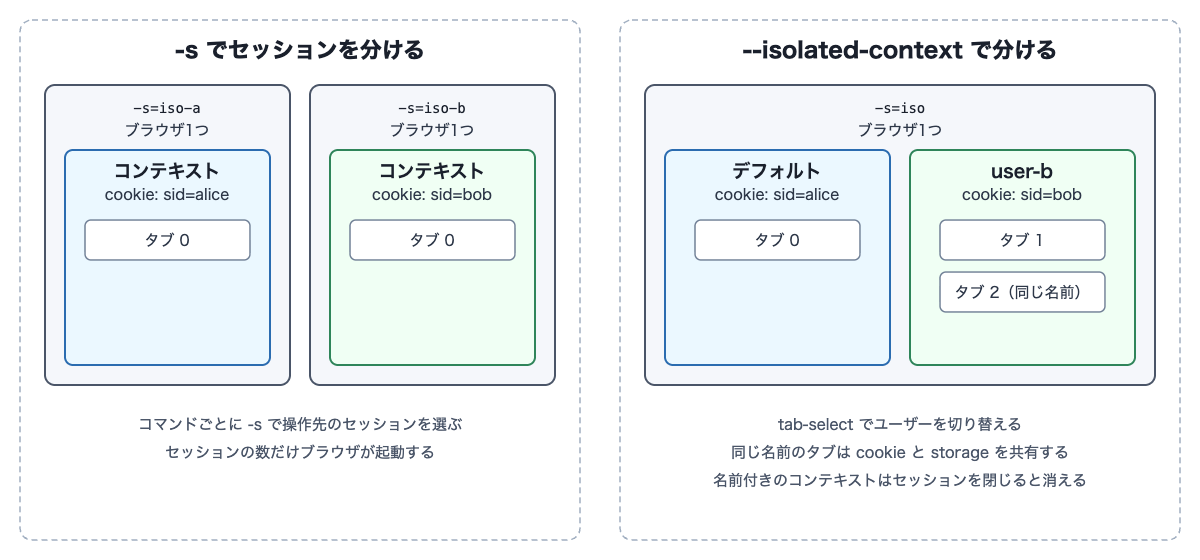
To compare the two approaches, I logged in as alice and bob in two sessions, -s=iso-a and -s=iso-b. playwright-cli list showed two browsers side by side, with different pids. When I added named contexts to a single session, list showed only one browser, iso.
The next diagram is a conceptual diagram I made myself, not an official architecture diagram. The left shows the method of starting a browser per session with -s, and the right shows the method of adding named contexts inside a single session's browser. On the right, tabs with the same name share a context.
Separate with -s=<name> |
Separate with --isolated-context=<name> |
|
|---|---|---|
| Browser | Started per session | Contexts are added inside one browser |
| Switching users | Swap -s on each command |
Pick a tab with tab-select |
| Saving login state | Can be saved with the whole profile using --persistent / --profile |
Disappears when the session is closed. To carry it over to the next session, use state-save and state-load |
| Trace | Recorded per session | One recording produces per-context files |
route mocks |
Set per session | Applied to all contexts |
| Device and browser type | Selectable per session with open --device or --browser |
What you choose in open is used by all contexts |
If you want to keep saving a profile for each user, or change mocks or device emulation per user, separating sessions with -s, as in the official example, is a better fit.
Discussion of the results
In the PR's implementation, named contexts are not closed along with their tabs; they are closed all together by the processing when the session ends (dispose()). Because tab-list does not display contexts without tabs, reusing the same name starts from the previous login state. If you want to retry from a logged-out state, you either use a name you haven't used yet or reopen the session. I did not try selecting a named tab and clearing it with something like cookie-clear.
The PR description says "cookie, storage and network tools act on the current tab's context," which matched the results of cookie-list, localstorage-list, state-save, and state-load acting on the current tab's context. In the same bullet point, route is listed on the side that applies to all contexts, as "Init scripts, origin filters and routes apply to every context." The fact that route and unroute acted on all tabs in section 6 was also consistent with this description.
Within the range I tried, what was separated by named contexts was cookies and localStorage (the login state), while route mocks and the device emulation of open --device were common across the session.
Impressions from trying it
You don't need to start another browser to prepare a second user. This time I only ran the commands by hand, but even when leaving it to an AI agent, you wouldn't need to instruct it to swap -s, and it should be able to read whose tab is whose from [isolatedContext: ...] in tab-list.
What differed from my expectation was that named contexts remained even after closing all the tabs. Looking at tab-list doesn't reveal contexts without tabs, so I felt it would be easy to overlook. The lifetime of a context is not described on the Tabs page or in tab-new --help, so it seems good to test it once yourself, as I did here.
Summary
- In Playwright CLI 0.1.23,
tab-new [url] --isolated-context=<name>can create tabs with separate cookies and storage within a single session - Tabs with the same name share the login state, and are separated from default tabs and tabs with different names
- Named contexts remain during the session even after all tabs are closed, and disappear when the session is closed. In 0.1.23, they did not remain even when saved with
--profile cookie-listandstate-savetarget the current tab's context. The login state exported withstate-savecould be loaded withstate-loadinto a differently named context in the same session- Even in a reopened session, running
state-loadon a tab with the same name let me start from the previous login state routemocks and the device emulation ofopen --devicealso apply to named tabs- If you want to compare two users' screens in a single flow, use
--isolated-context; if you want to keep saving a profile per user, or change mocks or devices,-sis a better fit
I hope this helps someone.
Reference links: