Investigating the Cause of Failed E2E Tests with Playwright's Trace Viewer

This page has been translated by machine translation. View original
Hello! I'm Yuji Nishimura from the Operations Department!
Even if an E2E test fails with an "element not found" error, that alone doesn't tell you whether the selector is wrong, the screen is rendering slowly, or an API call failed. When a test fails in CI, you may also be unable to view the screen as it was at that moment on your own machine.
With Playwright's Trace Viewer, you can review the actions taken during the test run, DOM snapshots, network traffic, and more after the fact.
This time, I built a sample in which the API that loads an order list returns a 500. Using the timeout of a display test as a clue, I track down the API failure, then restore a normal response and get the test to pass. This is not an article about reproducing a CI-specific failure; it's a local walkthrough of how to read the investigation material that you can also keep in CI.
Look at the failed action first, then the screen, then the network
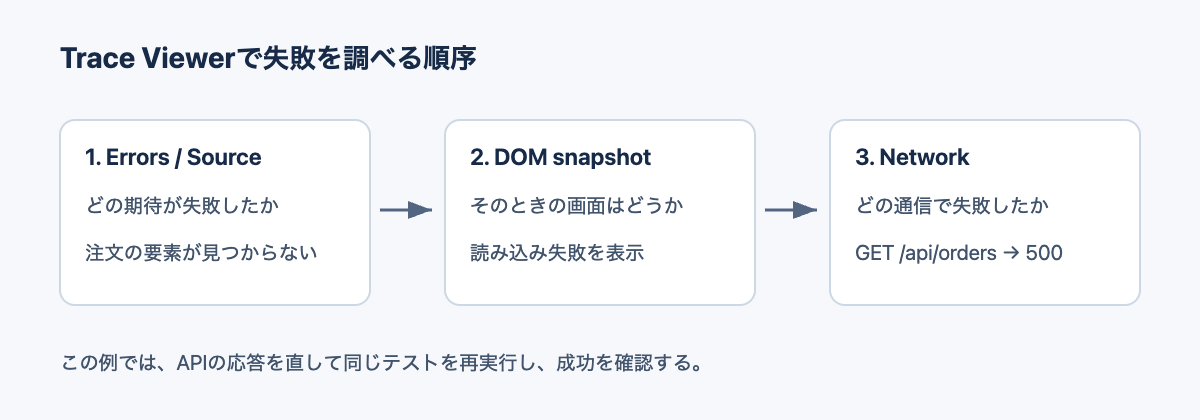
Once you open the trace, check things in the following order.
- In Errors / Source, look at the failed expectation and the location in the code
- Select the failed action and look at the state of the screen in the DOM snapshot
- In Network, look at the status and response body of the related request
In this example, the test expected the order ORDER-001 to be displayed. However, the screen showed a load failure, and the API returned a 500. In this state, extending the expect's wait time will not make the order appear.
Below is a conceptual diagram of the investigation procedure that I made myself. It is not an official architecture diagram.
Keep the trace of a failed test
In an existing Playwright Test project, add the setting to use.trace in playwright.config.ts. Since I wanted to investigate the first failure, I used retain-on-failure, which keeps a record even without retries.
import { defineConfig } from '@playwright/test';

export default defineConfig({
  use: {
    trace: 'retain-on-failure',
  },
});
The trace recording settings mainly offer the following options.
| Setting | When the trace is kept | When to use it |
|---|---|---|
retain-on-failure |
Records every run and deletes the traces of runs that succeeded | When you want to investigate even the first failure |
on-first-retry |
Records the first retry | CI with retries configured |
on |
Records regardless of success or failure | When you also want to check the actions of successful runs |
After a failure, you can open the trace with pnpm exec playwright show-trace <path to trace.zip> shown in the output. If you already have a trace, you can continue reading from "Check before and after the failure in Trace Viewer" below.
on-first-retry is not a recording of the first run. With retries: 0 left as is, there are no retries, so this setting does not generate a trace.
Also, this article uses Playwright Test settings. The approach of using context.tracing directly does not record expect information, so use.trace is better suited when you also want to investigate the test's assertions.
Run a sample where the API fails
The environment I checked is macOS 26.6.1 (Apple Silicon), Node.js v24.21.0, pnpm 12.14.0, and Playwright Test 1.64.1. This is not an example that depends on a bug in a specific version.
In a new directory, prepare the test runner and Chromium.
mkdir playwright-trace-demo
cd playwright-trace-demo
pnpm add -D -E @playwright/test@1.64.1
pnpm exec playwright install chromium
mkdir tests
Create a page that loads the order list
server.mjs serves the page and the API from the same server. By default the API returns a 500, and only when started with FIXED=1 does it return the order data with a 200. No external services or databases are used.
import http from 'node:http';
const fixed = process.env.FIXED === '1';
http.createServer((req, res) => {
  if (req.url === '/api/orders') {
    res.writeHead(fixed ? 200 : 500, { 'Content-Type': 'application/json' });
    res.end(JSON.stringify(fixed ? [{ id: 'ORDER-001' }] : { error: 'Order database unavailable' }));
    return;
  }
  res.writeHead(200, { 'Content-Type': 'text/html; charset=utf-8' });
  res.end(`<!doctype html><html lang="en"><title>Orders demo</title>
<style>body{font:20px system-ui;max-width:680px;margin:64px auto}button{font:inherit;padding:10px 20px}#status{margin-top:24px;color:#9c2525}</style>
<h1>Orders</h1><button>Load orders</button><p id="status">Ready</p><ul></ul>
<script>
document.querySelector('button').onclick = async () => {
  const response = await fetch('/api/orders');
  if (!response.ok) {
    document.querySelector('#status').textContent = 'Could not load orders';
    return;
  }
  const orders = await response.json();
  document.querySelector('#status').textContent = 'Loaded';
  document.querySelector('ul').replaceChildren(...orders.map(order => {
    const li = document.createElement('li'); li.textContent = order.id; return li;
  }));
};
</script></html>`);
}).listen(4173, '127.0.0.1');
Prepare the test and config
The test only verifies that the order number is displayed after clicking the button.
import { test, expect } from '@playwright/test';
test('loads orders', async ({ page }) => {
  await page.goto('/');
  await page.getByRole('button', { name: 'Load orders' }).click();
  await expect(page.getByRole('listitem')).toHaveText('ORDER-001');
});
The server is started with Playwright's webServer. The complete config file used here is as follows. Replace the earlier example that contained only the trace setting with this content.
import { defineConfig } from '@playwright/test';
export default defineConfig({
  testDir: './tests',
  retries: 0,
  reporter: [['list'], ['html', { open: 'never' }]],
  use: { baseURL: 'http://127.0.0.1:4173', trace: 'retain-on-failure' },
  webServer: {
    command: 'node server.mjs',
    url: 'http://127.0.0.1:4173',
    reuseExistingServer: false,
  },
});
pnpm exec playwright test
The result was one failure. The main error is as follows.
Error: expect(locator).toHaveText(expected) failed

Locator: getByRole('listitem')
Expected: "ORDER-001"
Timeout: 5000ms
Error: element(s) not found
All this output tells us is that "the expected element was not found even after waiting 5 seconds." We still don't know whether an API failure is the cause.
Check before and after the failure in Trace Viewer
The failure output shows where trace.zip was saved and the command to open it. For this test name, the path was as follows.
pnpm exec playwright show-trace test-results/orders-loads-orders/trace.zip
The save location changes depending on the test name and project settings, so in practice use the path shown in the test results.
Check the failed expect in Errors and Source
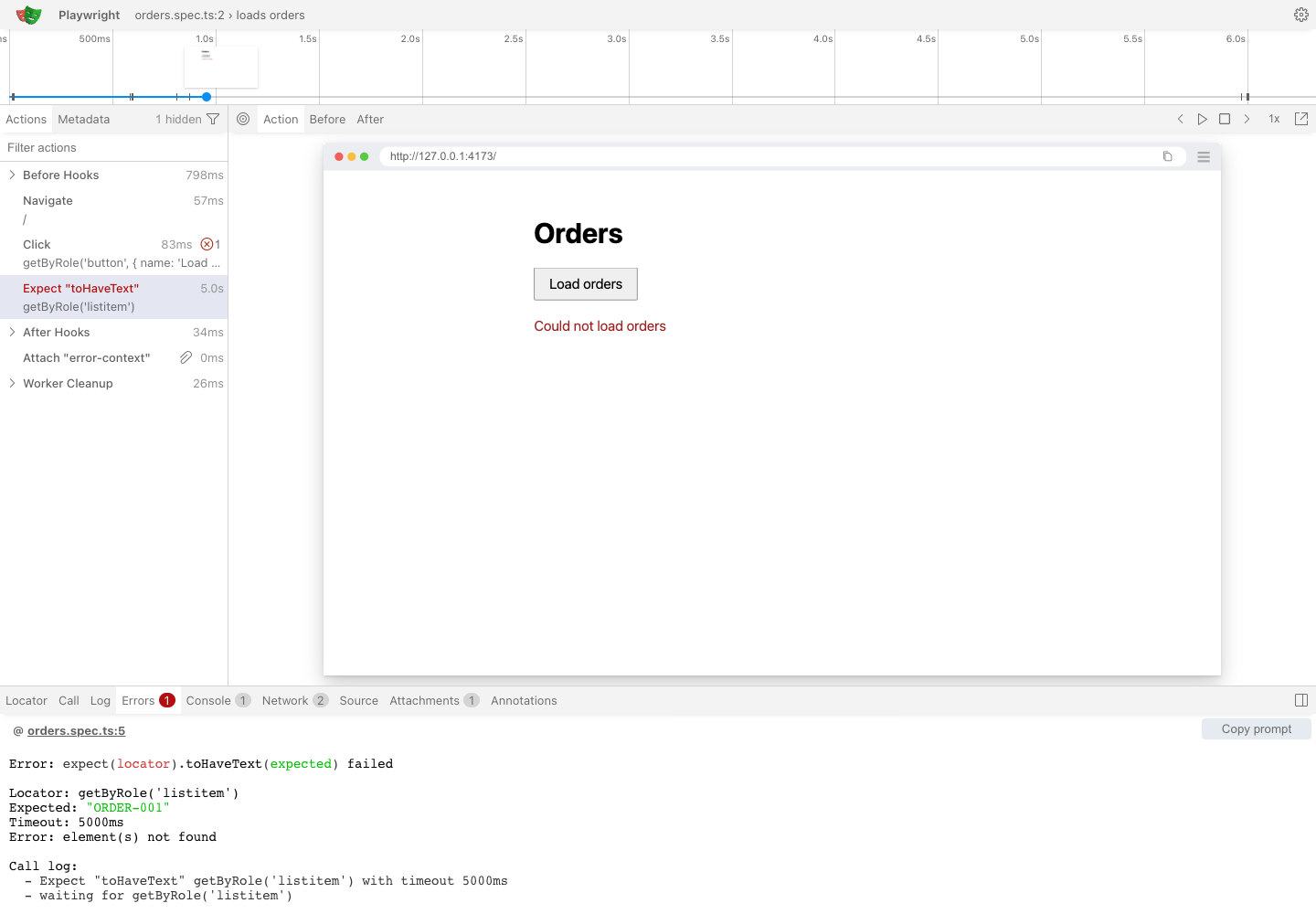
In the action list on the left, select the red Expect "toHaveText" and open Errors at the bottom. This time, the expect on getByRole('listitem') had failed. In Source, you can see the corresponding test code.
In the following image, the failed expect is on the left, the screen at that time is in the center, and the error details are at the bottom.
Check the state of the screen in the snapshot
Instead of an order number, the screen showed Could not load orders. This tells us that the order element the test is looking for does not exist, and that the app is displaying a load failure.
What is displayed here is a recorded DOM snapshot. Unlike a still image from a recording, you can switch between the states before and after an action. This time, with the failed expect selected, I checked the load failure display.
Check the 500 response and body in Network
Open Network and select the request to /api/orders. In Headers I could confirm the status was 500 Internal Server Error, and in Response I could confirm the following body.
{"error":"Order database unavailable"}
Below is the screen showing Response. You can check the screen where loading the orders failed together with the API's error body.
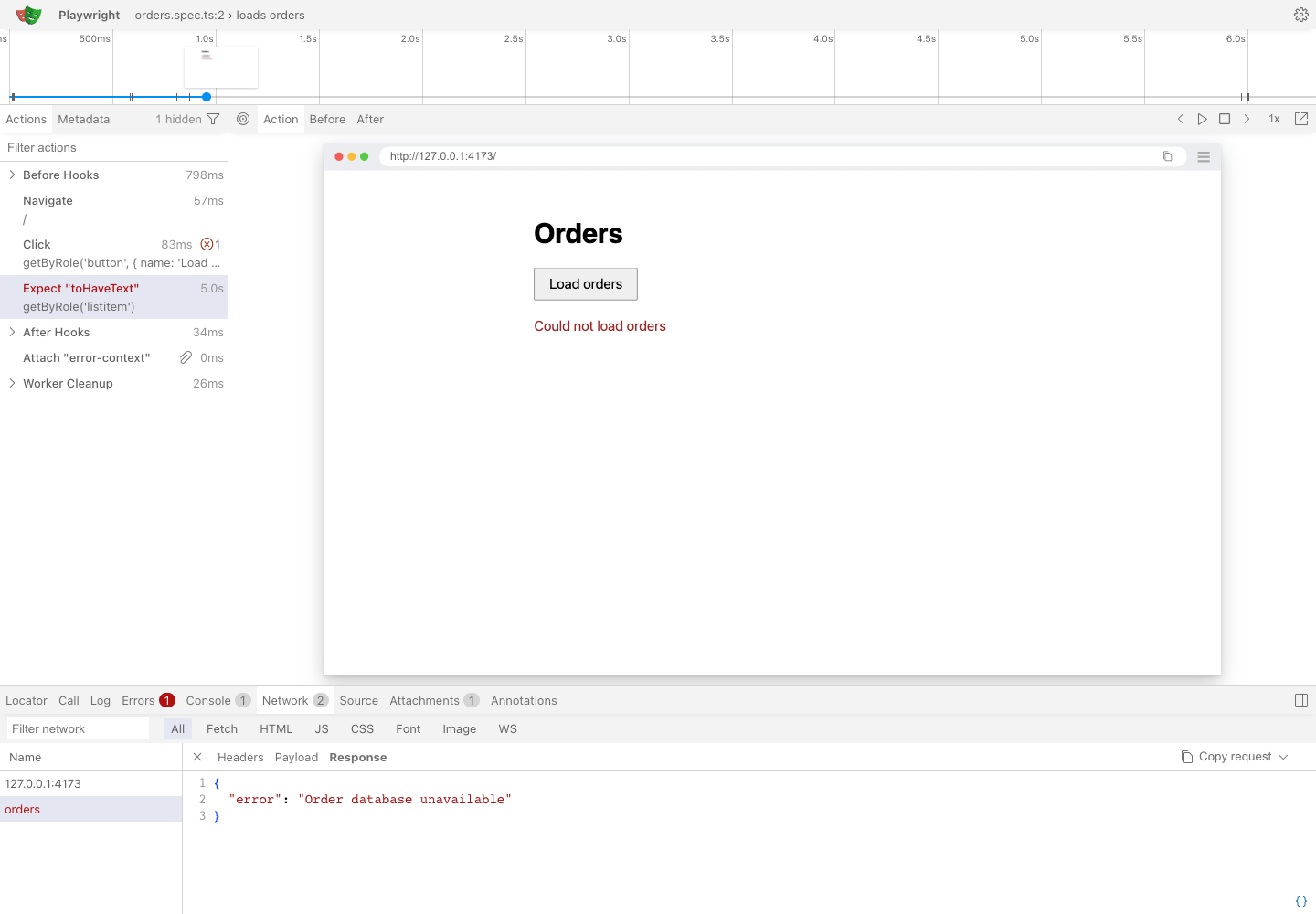
In the sample, I implemented it so that when the API returns a 500, an error is shown on screen and no order element is created. The expect timeout occurred as a result of that.
In a real app, the next step would be to investigate the API-side logs and the connection destination. Even if Trace Viewer lets you confirm the 500 response, it does not tell you the cause of the database failure. The Order database unavailable here is just a fixed message returned by the sample.
When there is a lot of traffic, you can narrow down by URL with the Network filter. Also, double-clicking an action narrows the view to the traffic during that action. If you can't find the request, you also need to check the time range.
Restore a normal response and rerun the same test
Switch the sample API to a 200 response. The environment variable is also passed to the webServer child process, so the test code is not changed.
FIXED=1 pnpm exec playwright test
On rerun, ORDER-001 was displayed and one test passed.
1 passed
With the retain-on-failure setting, no trace was kept for the successful run. This switch is a mechanism for trying out the investigation procedure; in a real app, the flow would be to fix the API-side problem you isolated and then run the same test.
In CI, combine retries with saving artifacts
The official documentation recommends on-first-retry for CI. The changes for a single retry are as follows. Keep existing settings such as baseURL and webServer, and reflect the changes in retries and use.trace.
import { defineConfig } from '@playwright/test';

export default defineConfig({
  retries: process.env.CI ? 1 : 0,
  use: {
    trace: process.env.CI ? 'on-first-retry' : 'retain-on-failure',
  },
});
The first failure may not reproduce on retry, so retain-on-failure is a candidate when you want to see the first failure itself. Since on, which keeps every run, adds recording overhead, it seems best to use it only for the period when it's needed.
To check after the CI job has finished, you also need a setting to save the HTML report and traces as artifacts. If you use the HTML report, you can download the whole report, open it with show-report, and investigate from the trace of the target test.
The failure and success in this example were checked locally. Saving artifacts in CI is an operational example based on the official documentation.
Summary
When a Playwright test times out, following "the failed expect → the state of the screen → the network" in Trace Viewer lets you narrow down where to investigate next.
In this example, from the error that the order element could not be found, we were able to confirm the load failure on the screen and the API's 500 response. When configuring, it's also worth keeping in mind the difference: retain-on-failure if you want to keep the first failure, and on-first-retry if you want to focus on recording during retries.