
Prevent secret commits with pre-commit and gitleaks

This page has been translated by machine translation. View original
I'm emi, a coffee lover.
When leaving development to AI agents like Claude Code, there's a possibility that API keys or passwords could get mixed into the generated code and committed as-is.
As a countermeasure, I tried pre-commit and gitleaks, a mechanism that detects secrets right before a commit and stops it.
Conclusion First
By configuring pre-commit to call gitleaks, the moment I tried to git commit a file containing a secret, it was detected and the commit was aborted.
gitleaks and pre-commit
Since I don't do much development work on a regular basis, I'll describe an overview of what these tools are, for my own reference as well.
gitleaks
gitleaks is a tool that detects secrets such as API keys and passwords from source code and commit history.
- It scans code and commits, and reports any strings that look like secrets as findings
- When it detects a secret, it returns exit code 1, which allows
pre-committo abort the commit
Git Hooks
Git has a feature called hooks. It's a mechanism that automatically runs specified scripts at timings such as commit or push.
There are the following types of hooks. ※ These are just a few; there are others as well.
- pre-commit hook
- A hook that runs right before a commit is finalized. If something here returns an error, the
commitis aborted. For example, stopping acommitif secrets are mixed in
- A hook that runs right before a commit is finalized. If something here returns an error, the
- commit-msg hook
- A hook that runs after the commit message is entered
- pre-push hook
- A hook that runs right before a push
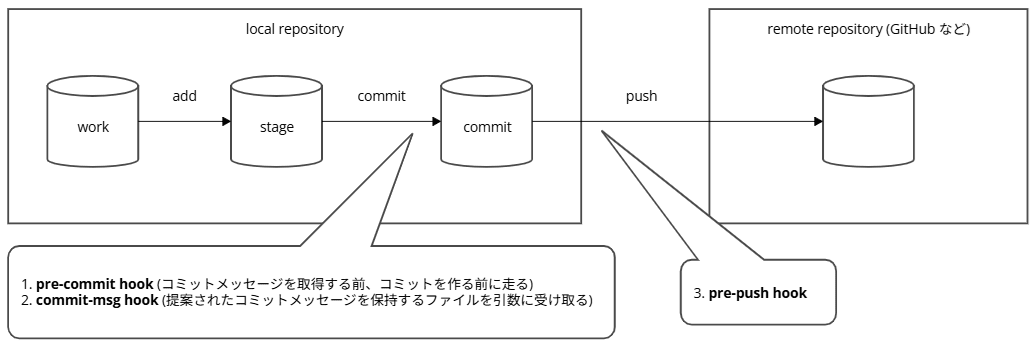
Here is an image of where in the flow of work (working tree) → stage → commit → push each hook runs.
Uses of the commit-msg hook
-
pre-commit hook: Runs before the commit message is obtained, before the commit is created
-
commit-msg hook: Runs receiving as an argument the file that holds the proposed commit message
- Order: pre-commit hook → message input → commit-msg hook
-
Uses of the commit-msg hook
- Since the pre-commit hook doesn't receive the message, use this when you want to inspect the message itself
- Normalize commit messages to a standard format
- Inspect the message and reject the commit if there's a problem
- If the exit code is non-zero, the commit is aborted
- The default bundled with Git stops the commit when it detects duplicate
Signed-off-bylines - Examples
- Enforce Conventional Commits format (such as
feat:orfix:), require ticket numbers to always be included
- Enforce Conventional Commits format (such as
The actual body of these hooks is a shell script placed under .git/hooks/ in the repository. The timing of execution is determined by the filename, and they are placed like .git/hooks/pre-commit, .git/hooks/commit-msg, .git/hooks/pre-push. No file extension is needed.
repository/
└── .git/
    └── hooks/
        ├── pre-commit
        ├── commit-msg
        └── pre-push
pre-commit sample
When you create a repository with git init, samples bundled with Git are placed in .git/hooks/ with .sample appended. The sample for the pre-commit hook is pre-commit.sample, and its contents are the following shell script (some comments omitted).
#!/bin/sh
#
# An example hook script to verify what is about to be committed.
# Called by "git commit" with no arguments.  The hook should
# exit with non-zero status after issuing an appropriate message if
# it wants to stop the commit.
#
# To enable this hook, rename this file to "pre-commit".

if git rev-parse --verify HEAD >/dev/null 2>&1
then
	against=HEAD
else
	# Initial commit: diff against an empty tree object
	against=$(git hash-object -t tree /dev/null)
fi

# (omitted) If a non-ASCII filename is about to be added, stop with exit 1

# If there are whitespace errors, print the offending file names and fail.
exec git diff-index --check --cached $against --
This sample exits with exit 1 (non-zero) and stops the commit if it finds non-ASCII filenames or trailing whitespace errors.
The comment says "exit with a non-zero status to stop the commit" and "rename the file to pre-commit to enable this hook."
It means please remove the .sample extension and rename it to pre-commit when you use it.
.git/ is the local working directory of the repository and is not included in git clone or git push targets. Therefore, scripts placed directly in this location cannot be shared with a team, and each person needs to prepare them manually.
pre-commit (the tool)
The name is a bit confusing, but separate from Git's pre-commit hook, there is a tool called pre-commit. It's a Python program installed via pip that makes it easier to manage the checks run by the pre-commit hook.
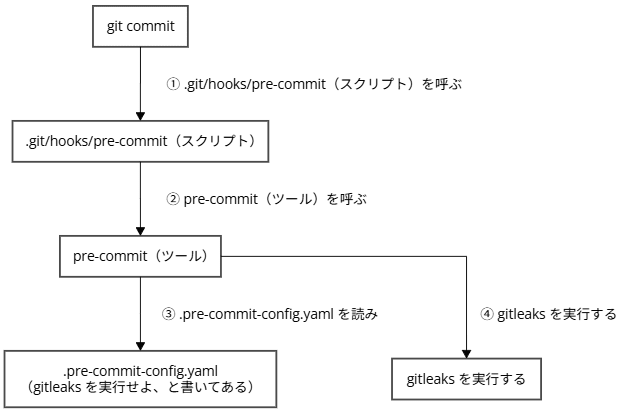
When pre-commit (the tool) is called from the pre-commit hook, it executes the checks written in the configuration file (.pre-commit-config.yaml) — in this case, gitleaks.
Differences from a bare pre-commit hook
Let's compare the flow for achieving "detect secrets with gitleaks before committing."
With a bare pre-commit hook
With a bare pre-commit hook, you write the check contents yourself directly in .git/hooks/pre-commit.
#!/bin/sh
# gitleaks needs to be installed separately by each person
gitleaks protect --staged || exit 1
This approach has drawbacks.
- Each person needs to install
gitleaksseparately on their own - Since
.git/hooks/is not included ingit cloneorgit push, this script cannot be shared with the team, and each member needs to place it manually - Versions and implementations tend to vary from person to person
Using pre-commit (the tool)
When using pre-commit (the tool), the only thing you need to prepare yourself is one configuration file called .pre-commit-config.yaml. In .pre-commit-config.yaml, you only write the check tool to use (gitleaks, etc.) and its version.
The contents to write are as follows.
repos:
  - repo: https://github.com/gitleaks/gitleaks
    rev: v8.30.1
    hooks:
      - id: gitleaks
Once you place .pre-commit-config.yaml, run pre-commit install just once. This only needs to be done once at the start, and running it causes pre-commit (the tool) to create a script called .git/hooks/pre-commit. The contents of the generated file are as follows.
#!/usr/bin/env bash
# File generated by pre-commit: https://pre-commit.com

# start templated
INSTALL_PYTHON=/usr/bin/python3
ARGS=(hook-impl --config=.pre-commit-config.yaml --hook-type=pre-commit)
# end templated

HERE="$(cd "$(dirname "$0")" && pwd)"
ARGS+=(--hook-dir "$HERE" -- "$@")

if [ -x "$INSTALL_PYTHON" ]; then
    exec "$INSTALL_PYTHON" -mpre_commit "${ARGS[@]}"
elif command -v pre-commit > /dev/null; then
    exec pre-commit "${ARGS[@]}"
else
    echo '`pre-commit` not found.  Did you forget to activate your virtualenv?' 1>&2
    exit 1
fi
All this script does is call pre-commit (the tool). It passes the configuration file to read with --config=.pre-commit-config.yaml.
From then on, every time you git commit, the following flow runs automatically.
git commitexecutes.git/hooks/pre-commit(the script)- The script calls
pre-commit(the tool) pre-commit(the tool) reads.pre-commit-config.yaml- It executes
gitleaksas written in the configuration file
With this approach, the drawbacks of the bare pre-commit hook are resolved.
- Even without installing
gitleaksyourself,pre-commitwill fetch it from therepoin the configuration file - Since
.pre-commit-config.yamlis placed at the repository root (same level as.git/), it can be committed along with the repository. Unlike placing it directly in.git/hooks/, the configuration can be shared with the team - The version can be pinned with
rev, so the same check runs for all team members
It's a bit confusing. To summarize:
- At
pre-commit installtime (the first time only)pre-commit(the tool) creates.git/hooks/pre-commit(the script)
- At
git committimegit commitcalls.git/hooks/pre-commit(the script), and.git/hooks/pre-commit(the script) callspre-commit(the tool)pre-commit(the tool) reads.pre-commit-config.yamland runsgitleaks
Folder Structure Used for Verification
This time I created a disposable verification repository lab/ and tried it out. The folder structure is as follows.
(working folder)/
└── lab/                          ← Repository initialized with git init for verification
    ├── .git/
    │   └── hooks/
    │       └── pre-commit        ← Auto-generated by pre-commit install
    ├── .pre-commit-config.yaml   ← Configuration file you write yourself (repository root)
    ├── config.py                 ← Verification file with secrets mixed in
    └── README.md
Operating Environment
- Ubuntu on WSL
- Git 2.34.1
- pre-commit 4.6.2 (installed via
pip) - gitleaks v8.30.1 (fetched via
pre-commit) - Claude Code v2.1.248
I didn't install gitleaks separately myself; I left it to pre-commit to fetch. By writing the gitleaks repository in .pre-commit-config.yaml, it will be fetched when run.
Step 1: Check the Installation Status
First, I checked whether gitleaks and pre-commit were already installed in the current environment, as well as whether candidate installation methods (apt / snap / go / Homebrew / pip) were available.
echo "=== gitleaks ==="; which gitleaks; echo "=== pre-commit ==="; which pre-commit; echo "=== pipx ==="; which pipx; echo "=== pip3 ==="; which pip3; echo "=== go ==="; which go && go version; echo "=== snap ==="; which snap; echo "=== brew ==="; which brew; echo "=== apt-cache gitleaks ==="; apt-cache policy gitleaks 2>/dev/null | head -n 5
▼ Execution result
emikihoge@<hostname>:~/work/xx$ echo "=== gitleaks ==="; which gitleaks; echo "=== pre-commit ==="; which pre-commit; echo "=== pipx ==="; which pipx; echo "=== pip3 ==="; which pip3; echo "=== go ==="; which go && go version; echo "=== snap ==="; which snap; echo "=== brew ==="; which brew; echo "=== apt-cache gitleaks ==="; apt-cache policy gitleaks 2>/dev/null | head -n 5
=== gitleaks ===
=== pre-commit ===
=== pipx ===
=== pip3 ===
/usr/bin/pip3
=== go ===
=== snap ===
/usr/bin/snap
=== brew ===
=== apt-cache gitleaks ===
emikihoge@<hostname>:~/work/xx$
Neither gitleaks nor pre-commit were installed, and pip3 was available. I decided to install pre-commit via pip this time.
Step 2: Install pre-commit
Install pre-commit via pip.
pip3 install --user pre-commit
Execution result
emikihoge@<hostname>:~/work/xx$ pip3 install --user pre-commit
Collecting pre-commit
  Downloading pre_commit-4.6.2-py2.py3-none-any.whl (226 kB)
     ━━━━━━━━━━━━━━━━━━━━━━━━━━━━━━━━━━━━━━━━ 226.2/226.2 KB 2.1 MB/s eta 0:00:00
Collecting identify>=1.0.0
  Downloading identify-2.6.19-py2.py3-none-any.whl (99 kB)
     ━━━━━━━━━━━━━━━━━━━━━━━━━━━━━━━━━━━━━━━━ 99.4/99.4 KB 7.8 MB/s eta 0:00:00
Collecting virtualenv>=20.10.0
  Downloading virtualenv-21.7.11-py3-none-any.whl (5.3 MB)
     ━━━━━━━━━━━━━━━━━━━━━━━━━━━━━━━━━━━━━━━━ 5.3/5.3 MB 24.9 MB/s eta 0:00:00
Requirement already satisfied: pyyaml>=5.1 in /usr/lib/python3/dist-packages (from pre-commit) (5.4.1)
Collecting nodeenv>=0.11.1
  Downloading nodeenv-1.10.0-py2.py3-none-any.whl (23 kB)
Collecting cfgv>=2.0.0
  Downloading cfgv-3.5.0-py2.py3-none-any.whl (7.4 kB)
Collecting distlib<1,>=0.3.7
  Downloading distlib-0.4.3-py2.py3-none-any.whl (470 kB)
     ━━━━━━━━━━━━━━━━━━━━━━━━━━━━━━━━━━━━━━━━ 470.6/470.6 KB 12.4 MB/s eta 0:00:00
Collecting python-discovery>=1.6
  Downloading python_discovery-1.6.0-py3-none-any.whl (38 kB)
Collecting typing-extensions>=4.13.2
  Downloading typing_extensions-4.16.0-py3-none-any.whl (45 kB)
     ━━━━━━━━━━━━━━━━━━━━━━━━━━━━━━━━━━━━━━━━ 45.6/45.6 KB 4.0 MB/s eta 0:00:00
Collecting filelock<4,>=3.24.2
  Downloading filelock-3.32.7-py3-none-any.whl (100 kB)
     ━━━━━━━━━━━━━━━━━━━━━━━━━━━━━━━━━━━━━━━━ 100.2/100.2 KB 7.1 MB/s eta 0:00:00
Collecting platformdirs<5,>=3.9.1
  Downloading platformdirs-4.11.9-py3-none-any.whl (24 kB)
Installing collected packages: distlib, typing-extensions, platformdirs, nodeenv, identify, filelock, cfgv, python-discovery, virtualenv, pre-commit
Successfully installed cfgv-3.5.0 distlib-0.4.3 filelock-3.32.7 identify-2.6.19 nodeenv-1.10.0 platformdirs-4.11.9 pre-commit-4.6.2 python-discovery-1.6.0 typing-extensions-4.16.0 virtualenv-21.7.11
emikihoge@<hostname>:~/work/xx$
It was installed in ~/.local/bin, and the PATH was already configured.
which pre-commit; pre-commit --version
▼ Execution result
emikihoge@<hostname>:~/work/xx$ which pre-commit; pre-commit --version
/home/emikihoge/.local/bin/pre-commit
pre-commit 4.6.2
emikihoge@<hostname>:~/work/xx$
Step 3: Create a Verification Repository
Create a disposable verification repository. I stored the working directory path in a variable called BASE and reused it going forward (the path is masked as /path/to/project).
BASE="/path/to/project"; mkdir -p "$BASE/lab" && cd "$BASE/lab" && git init -q && git config user.email "test@example.com" && git config user.name "test" && echo "# gitleaks lab" > README.md && git add README.md && git commit -qm "init" && echo "OK: lab created" && pwd && git log --oneline
▼ Execution result
emikihoge@<hostname>:~/work/xx$ BASE="/path/to/project"; mkdir -p "$BASE/lab" && cd "$BASE/lab" && git init -q && git config user.email "test@example.com" && git config user.name "test" && echo "# gitleaks lab" > README.md && git add README.md && git commit -qm "init" && echo "OK: lab created" && pwd && git log --oneline
OK: lab created
/path/to/project/lab
a12414b (HEAD -> master) init
emikihoge@<hostname>:~/work/xx$
Step 4: Create .pre-commit-config.yaml
Create .pre-commit-config.yaml and write it to call gitleaks. The writing format is summarized in the official pre-commit documentation.
The content I wrote this time is as follows.
repos:
  - repo: https://github.com/gitleaks/gitleaks
    rev: v8.30.1
    hooks:
      - id: gitleaks
repos- A list of check tools (repositories) to use. This time it's just
gitleaks
- A list of check tools (repositories) to use. This time it's just
repo- The repository URL from which the hook code will be
git cloned. Specifies thegitleaksGitHub repository - Since
pre-commitfetchesgitleaksfrom here, you can use it without installinggitleaksseparately
- The repository URL from which the hook code will be
rev- Specifies which point in time to fetch the
gitleakscode from GitHub.revstands for revision - Ways to specify "a point in time in code" in Git include tag names (e.g.,
v8.30.1), commit SHAs (e.g.,84f01ac...), branch names, andHEAD. Of these, tags and SHAs don't change their contents, but branch names andHEADchange when new commits are added - Only tags or SHAs — things whose contents don't change — can be written in
rev. Sincepre-commitcaches the fetchedgitleaksand reuses it, branch names likemainorHEAD(which change) cannot be used - This time, I specified the tag
v8.30.1, the latest release at the time of writing this article. By pinning with a tag, the samev8.30.1gitleaksruns whenever and by whoever it's executed
- Specifies which point in time to fetch the
hooks- A list of which hooks to use among those provided by that repository
- A single repository may provide multiple hooks, each with an
id(name).repodetermines "which repository to fetch from," and theidinhooksselects "which check to use among those" idis not something you name yourself; it's determined by the providing repository. The hooks provided are defined with IDs in.pre-commit-hooks.yamlat the root of the providing repository, so users look there to find and specify the ID they want to useid- The identifier (name) of the hook to use. The
.pre-commit-hooks.yamlin thegitleaksrepository definesgitleaks(standard version),gitleaks-docker, andgitleaks-system. This time I specified the standard versionid: gitleaks
- The identifier (name) of the hook to use. The
When you want to use multiple checks, list the ids under hooks. For example, to use two from the standard repository pre-commit/pre-commit-hooks, write it like this:
.pre-commit-config.yaml (example with multiple IDs listed)
repos:
  - repo: https://github.com/pre-commit/pre-commit-hooks
    rev: v6.0.0
    hooks:
      - id: trailing-whitespace   # Check that removes trailing whitespace
      - id: end-of-file-fixer     # Check that fixes end of file
This time it's just gitleaks, so there's only one id.
The .pre-commit-config.yaml I prepared this time means "Please fetch gitleaks v8.30.1 from GitHub right before committing and run it."
Step 5: Register with the Git Hook
Register with the Git hook.
Run pre-commit install. This registers the contents of .pre-commit-config.yaml with the Git pre-commit hook and creates .git/hooks/pre-commit.
I'm also running ls -la .git/hooks/pre-commit at the same time. This is to confirm that .git/hooks/pre-commit was actually created and that execute permissions (the leading -rwxr-xr-x) are set.
BASE="/path/to/project"; cd "$BASE/lab" && pre-commit install && ls -la .git/hooks/pre-commit
▼ Execution result
emikihoge@<hostname>:~/work/xx$ BASE="/path/to/project"; cd "$BASE/lab" && pre-commit install && ls -la .git/hooks/pre-commit
pre-commit installed at .git/hooks/pre-commit
-rwxr-xr-x 1 emikihoge emikihoge 598 Sep 18 09:42 .git/hooks/pre-commit
emikihoge@<hostname>:~/work/xx$
Step 6: Check the Contents of the Generated Hook
Verify that the generated .git/hooks/pre-commit is indeed "a script that just calls pre-commit (the tool)."
BASE="/path/to/project"; cd "$BASE/lab" && cat .git/hooks/pre-commit
▼ Execution result
emikihoge@<hostname>:~/work/xx$ BASE="/path/to/project"; cd "$BASE/lab" && cat .git/hooks/pre-commit
#!/usr/bin/env bash
# File generated by pre-commit: https://pre-commit.com
# ID: 138fd403232d2ddd5efb44317e38bf03

# start templated
INSTALL_PYTHON=/usr/bin/python3
ARGS=(hook-impl --config=.pre-commit-config.yaml --hook-type=pre-commit)
# end templated

HERE="$(cd "$(dirname "$0")" && pwd)"
ARGS+=(--hook-dir "$HERE" -- "$@")

if [ -x "$INSTALL_PYTHON" ]; then
    exec "$INSTALL_PYTHON" -mpre_commit "${ARGS[@]}"
elif command -v pre-commit > /dev/null; then
    exec pre-commit "${ARGS[@]}"
else
    echo '`pre-commit` not found.  Did you forget to activate your virtualenv?' 1>&2
    exit 1
fi
emikihoge@<hostname>:~/work/xx$
As seen at the beginning, the check itself is not written there; it only calls pre-commit (the tool).
Step 7: Prepare a File with Dummy Values That Will Be Detected
I prepared config.py under the assumption that Claude Code created a configuration file containing AWS credentials.
config.py is a file with secrets mixed in, placed at the root of the verification repository lab/.
(working folder)/
└── lab/                          ← Repository initialized with git init for verification
    ├── .git/
    │   └── hooks/
    │       └── pre-commit        ← Auto-generated by pre-commit install
    ├── .pre-commit-config.yaml   ← Configuration file you write yourself (repository root)
    ├── config.py                 ← Verification file with secrets mixed in
    └── README.md
As for the dummy values to put in here, I didn't want to create random ones myself in case they accidentally matched someone else's real secret somewhere, so I used sample values already published by gitleaks.
AKIAIMNOJVGFDXXXE4OA
An example of this value being detected as an AWS access key is also shown in the gitleaks documentation.
Note that AWS authentication uses a combination of Access Key ID and Secret Access Key. Since I used the known sample value for the Access Key ID, I created a randomly generated string myself for the Secret side that only resembles the format.
AWS_ACCESS_KEY_ID = "AKIAIMNOJVGFDXXXE4OA"
AWS_SECRET_ACCESS_KEY = "kQ9pxxxxxxxxxxxxxxxxxxxxxxxxxxxxxxxxxxx"
Actually, at the beginning of the verification I had common sample values in there, and at that time the commit went through. I'll mention that later.
Step 8: Stage the Changed Values
Since I don't do much development on a regular basis, I'll organize "stage" and "commit" here for my own reference.
In Git, rather than immediately recording changed files in history, you proceed in two stages.
git add(stage)- The operation of selecting "include this file in the next record" and placing it in a waiting area called the staging area
- At this point it's not yet recorded in history. This is the stage where you're selecting what to record beforehand
git commit(commit)- The operation of recording the files placed in the stage as a single set of changes in history
- This is where it's first recorded in the repository's history
The pre-commit and gitleaks checks in this case run right before this git commit (commit finalization). So the flow is: first git add the file to the stage, then when you git commit, the checks run.
First, git add config.py and .pre-commit-config.yaml to place them in the stage.
BASE="/path/to/project"; cd "$BASE/lab" && git add config.py .pre-commit-config.yaml && echo "---- staged ----" && git status
▼ Execution result
emikihoge@<hostname>:~/work/xx$ BASE="/path/to/project"; cd "$BASE/lab" && git add config.py .pre-commit-config.yaml && echo "---- staged ----" && git status
---- staged ----
On branch master
Changes to be committed:
  (use "git restore --staged <file>..." to unstage)
        new file:   .pre-commit-config.yaml
        new file:   config.py

emikihoge@<hostname>:~/work/xx$
The reason I'm adding .pre-commit-config.yaml together with config.py here is due to some trial and error that I'll touch on later in an aside.
※ Naturally, .pre-commit-config.yaml would normally be committed first.
Step 9: The Commit Was Stopped
Commit with the staged state.
BASE="/path/to/project"; cd "$BASE/lab" && git commit -m "add config"; echo "---- exit code: $? ----"
▼ Execution result
emikihoge@<hostname>:~/work/xx$ BASE="/path/to/project"; cd "$BASE/lab" && git commit -m "add config"; echo "---- exit code: $? ----"
Detect hardcoded secrets.................................................Failed
- hook id: gitleaks
- exit code: 1

    ○
    │╲
    │ ○
    ○ ░
    ░    gitleaks

    Finding:     AWS_SECRET_ACCESS_KEY = "REDACTED"
    Secret:      REDACTED
    RuleID:      generic-api-key
    Entropy:     5.131556
    File:        config.py
    Line:        2
    Fingerprint: config.py:generic-api-key:2

    Finding:     ...WS_ACCESS_KEY_ID = "REDACTED
    Secret:      REDACTED
    RuleID:      aws-access-token
    Entropy:     3.646439
    File:        config.py
    Line:        1
    Fingerprint: config.py:aws-access-token:1

    11:45AM INF 0 commits scanned.
    11:45AM INF scanned ~212 bytes (212 bytes) in 295ms
    11:45AM WRN leaks found: 2

---- exit code: 1 ----
emikihoge@<hostname>:~/work/xx$
It returned Failed and the commit was aborted. The flow was: gitleaks returned exit code 1, and git commit failed as a result.
There were 2 findings. Line 1 is the Access Key ID (aws-access-token), and line 2 is the Secret side string, which was picked up as a generic API key (generic-api-key) due to its high randomness. This was an unexpected bonus, but it became a real-world example of how string-like secrets are also detected.
Step 10: Confirm That It Is Really Stopped
Confirm that the commit is really stopped.
BASE="/path/to/project"; cd "$BASE/lab" && echo "=== log ===" && git log --oneline && echo "=== status ===" && git status
▼ Execution result
emikihoge@<hostname>:~/work/xx$ BASE="/path/to/project"; cd "$BASE/lab" && echo "=== log ===" && git log --oneline && echo "=== status ===" && git status
=== log ===
a12414b (HEAD -> master) init
=== status ===
On branch master
Changes to be committed:
  (use "git restore --staged <file>..." to unstage)
        new file:   .pre-commit-config.yaml
        new file:   config.py

emikihoge@<hostname>:~/work/xx$
- Below
=== log ===(output ofgit log --oneline)- A command that outputs commit history one line at a time
- Only the initial
initline is shown - If the commit in Step 9 had succeeded, there should be an
add configline added, but since it's not there, we can tell thecommitwas not made
- Below
=== status ===underChanges to be committed:(output ofgit status)- A command that shows the current state
config.pyand.pre-commit-config.yamlare shown asnew file- The files are still staged from
git add, not yetgit committed (not recorded in history)
Only the initial init remains in the commit history, and add config is not there. The files remain locally, but are not recorded in history. We can see that they were stopped right before the commit.
Side note: Sample values allowed the commit to pass
During verification, I initially entered commonly used sample values. The config.py at that time was as follows.
AWS_ACCESS_KEY_ID = "AKIAIOSFODNN7EXAMPLE"
AWS_SECRET_ACCESS_KEY = "wJalrXUtnFEMI/K7MDENG/bPxRfiCYEXAMPLEKEY"
AKIAIOSFODNN7EXAMPLE is a dummy sample value also used in official AWS documentation.
I created config.py with this value, ran git add, and tried to commit.
emikihoge@<hostname>:~/work/xx$ BASE="/path/to/project"; cd "$BASE/lab" && cat > config.py <<'EOF'
# Configuration file assumed to have been generated by Claude Code
AWS_ACCESS_KEY_ID = "AKIAIOSFODNN7EXAMPLE"
AWS_SECRET_ACCESS_KEY = "wJalrXUtnFEMI/K7MDENG/bPxRfiCYEXAMPLEKEY"
EOF
git add config.py && echo "OK: config.py staged"
OK: config.py staged
emikihoge@<hostname>:~/work/xx$
emikihoge@<hostname>:~/work/xx$ BASE="/path/to/project"; cd "$BASE/lab" && git commit -m "add config"; echo "---- exit code: $? ----"
[INFO] Initializing environment for https://github.com/gitleaks/gitleaks.
[INFO] Installing environment for https://github.com/gitleaks/gitleaks.
[INFO] Once installed this environment will be reused.
[INFO] This may take a few minutes...
Detect hardcoded secrets.................................................Passed
[master b850bb8] add config
 1 file changed, 3 insertions(+)
 create mode 100644 config.py
---- exit code: 0 ----
emikihoge@<hostname>:~/work/xx$
It showed Passed and the commit went through. I wanted it to be stopped, but it wasn't.
I'll revert this commit for now.
emikihoge@<hostname>:~/work/xx$ BASE="/path/to/project"; cd "$BASE/lab" && git reset --soft HEAD~1 && echo "---- reset done ----" && git status
---- reset done ----
On branch master
Changes to be committed:
  (use "git restore --staged <file>..." to unstage)
        new file:   config.py

Untracked files:
  (use "git add <file>..." to include in what will be committed)
        .pre-commit-config.yaml

emikihoge@<hostname>:~/work/xx$
Since git reset --soft HEAD~1 only reverted the commit, config.py, which had already been added, remained in the staging area, and .pre-commit-config.yaml remained uncommitted. The reason I added config.py and .pre-commit-config.yaml together with git add in step 8 was because of this background.
The cause was that this value was excluded from gitleaks detection. The AWS detection rules in gitleaks have an allowlist that excludes values matching .+EXAMPLE$ (values ending with EXAMPLE).
AKIAIOSFODNN7EXAMPLE is commonly shown in official AWS documentation as a placeholder example, like "enter your access key here."
Because this value is reused across documentation and sample code, it appears all over the place in code around the world.
If gitleaks were to detect this as a secret every time, it would generate false positives for values that aren't real credentials.
For this reason, such sample values are sometimes excluded from detection via an allowlist to avoid false positives. The same issue comes up not only with gitleaks but also with GitLab's Secret Detection, where an Issue has been raised to add AWS tokens ending with EXAMPLE to the allowlist to reduce false positives (the status of this as of the time of writing has not been confirmed).
After replacing the value with gitleaks's own public test value, I was able to confirm that the commit was blocked as expected.
Conclusion
Having pre-commit and gitleaks in place stopped commits containing secrets at the local level. Even if Claude Code writes code that accidentally includes a secret, you can catch it before it ends up in the history.
However, this mechanism only protects at the time of committing.
Dangerous operations other than commits—such as Claude Code deleting files or communicating externally—cannot be stopped by gitleaks, so PreToolUse hooks and sandboxes are candidates as means to stop such operations.
For questions or requests about this article, please contact us via "Feedback for DevelopersIO" at the bottom of the screen.
References