# Understanding Prompt Caching's "Prefix Principle" — cache_control Breakpoint Placement Strategies and Practical Benefits of Tool Definition Caching
# Prompt Caching "Prefix Principle" Explained
## The Core Mechanism: What "Prefix" Actually Means
Prompt Caching doesn't cache "individual blocks" — it caches **consecutive token sequences from the beginning**.
```
[Entire Prompt] = Token 1, Token 2, Token 3, ... Token N
Cache Hit = Tokens 1~K match exactly → reuse from K onward
Cache Miss = Mismatch at token K → recompute everything from K onward
```
**This is not partial matching. It's prefix matching.**
The moment a single token diverges, everything after that point is invalidated.
---
## Why Changing One Line in the System Prompt Breaks the Tools Cache
### The Anatomy of an Anthropic API Request
```
┌─────────────────────────────────────────┐
│ tools: [tool1, tool2, tool3...] │ ← Tool definitions
├─────────────────────────────────────────┤
│ system: "You are an assistant..." │ ← System prompt
├─────────────────────────────────────────┤
│ messages: [ │
│ { role: "user", content: "..." } │ ← Conversation
│ { role: "assistant", content: "..." }│
│ { role: "user", content: "..." } │ ← Current input
│ ] │
└─────────────────────────────────────────┘
```
### The Token Serialization Order
Before hitting the model, the API serializes everything into a **single flat token sequence**:
```
<|tools_start|>
[tool1 JSON]
[tool2 JSON]
[tool3 JSON]
<|tools_end|>
<|system_start|>
[system prompt text]
<|system_end|>
<|human_turn|>
[message history]
[current message]
```
### What Happens When You Edit the System Prompt
```
BEFORE:
Token: 1──────────500──────────900────────1200
[ tools ][ system ][messages ][now]
↑ cached ↑ ↑ cached ↑
AFTER (system prompt changed):
Token: 1──────────500──X──────900
[ tools ][ sys ← MISMATCH at token 503]
↑
Everything from here is invalidated
↓
tools cache also effectively unusable
because the prefix no longer matches
```
**The tools come BEFORE the system prompt in token order.**
**The cache key is the entire prefix up to the checkpoint.**
**Therefore: system prompt change → checkpoint prefix changes → tools cache miss.**
This is not a bug. It's a mathematical consequence of prefix semantics.
---
## Why Tool Definitions Are Heavier Than Expected
### The JSON Expansion Problem
What you write in code looks compact. What gets tokenized is not.
```python
# What you write
{
"name": "search_web",
"description": "Search the web",
"input_schema": {
"type": "object",
"properties": {
"query": {"type": "string"}
}
}
}
```
```
# What the model actually processes (reconstructed internal format)
<tool_definition>
<name>search_web</name>
<description>Search the web for current information,
news, and data not available in training data.
Returns relevant results with titles, URLs, and snippets.
Use this when the user asks about recent events or
needs up-to-date information.</description>
<parameters>
<parameter>
<name>query</name>
<type>string</type>
<description>The search query to execute.
Should be concise and specific.</description>
<required>true</required>
</parameter>
</parameters>
</tool_definition>
```
### Realistic Token Counts
```
Tool complexity Approximate tokens
─────────────────────────────────────────
Minimal (name only) ~20 tokens
Simple (1-2 params) ~80 tokens
Moderate (4-5 params) ~200 tokens
Complex (enums, nested) ~400 tokens
Full-featured suite ~800 tokens
10 moderate tools ~2,000 tokens ← Exceeds many system prompts
20 complex tools ~8,000 tokens ← Larger than most documents
```
### Three Layers of Hidden Weight
**Layer 1: Description verbosity multiplies costs**
```python
# 5 tokens in your head
"description": "Get weather"
# What you need to write for reliable tool use
"description": """Retrieves current weather and forecast data for a
specified location. Returns temperature (Celsius/Fahrenheit),
humidity percentage, wind speed and direction, precipitation
probability, and a 5-day forecast. Location can be specified as
a city name, ZIP code, or lat/lng coordinates."""
# ~60 tokens — 12x more
```
**Layer 2: Enum values accumulate rapidly**
```python
"properties": {
"format": {
"type": "string",
"enum": ["json", "xml", "csv", "yaml", "toml",
"markdown", "html", "plaintext"] # 8 values × ~3 tokens = 24 tokens
},
"timezone": {
"type": "string",
"enum": ["UTC", "America/New_York", "America/Chicago",
"America/Denver", "America/Los_Angeles",
"Europe/London", "Europe/Paris", "Asia/Tokyo",
"Asia/Shanghai", "Australia/Sydney"] # 10 values × ~8 tokens = 80 tokens
}
}
```
**Layer 3: Nested schemas compound exponentially**
```python
# Depth 1: ~50 tokens
# Depth 2: ~200 tokens
# Depth 3: ~600 tokens
# Each nesting level roughly 3x the parent
```
---
## The Stable-to-Fluid Principle: Breakpoint Placement Strategy
### The Fundamental Insight
Cache breakpoints should be placed at **boundaries between stability zones**, not at arbitrary size thresholds.
```
WRONG mental model: CORRECT mental model:
"Cache every 1000 tokens" "Cache at stability boundaries"
[──────1000──────|────] [stable content | volatile content]
↑ ↑
arbitrary cut semantic boundary
```
### Stability Classification
```
Stability Tier Content Type Change Frequency
──────────────────────────────────────────────────────────────
🔒 Frozen Tool definitions Deploys only
🔒 Frozen Base system identity Months
🟡 Stable Behavioral instructions Days to weeks
🟡 Stable Domain knowledge/docs Days
🟠 Fluid Session context Per conversation
🔴 Volatile User personalization Per request
🔴 Volatile Current message Always
```
### The Breakpoint Placement Map
```
┌─────────────────────────────────────────────────────────┐
│ TOOL DEFINITIONS │
│ (All tools, complete and final) │
│ ~500-3000 tokens │
├─ ← BREAKPOINT ALPHA ────────────────────────────────────┤ ← cache_control here
│ SYSTEM CORE │
│ - Agent identity │
│ - Fundamental behavior rules │
│ - Safety constraints │
│ ~200-500 tokens │
├─ ← BREAKPOINT BETA ─────────────────────────────────────┤ ← cache_control here
│ KNOWLEDGE / CONTEXT │
│ - Reference documents │
│ - Domain-specific instructions │
│ - RAG results (when stable across turns) │
│ ~500-10000 tokens │
├─ ← BREAKPOINT GAMMA ────────────────────────────────────┤ ← cache_control here
│ CONVERSATION HISTORY │
│ - Previous turns │
│ (grows each turn → checkpoint moves) │
├─────────────────────────────────────────────────────────┤
│ CURRENT USER MESSAGE │
│ (never cached, always fresh) │
└─────────────────────────────────────────────────────────┘
```
### Implementation Pattern
```python
response = client.messages.create(
model="claude-opus-4-5",
# BREAKPOINT ALPHA: Tools are frozen between deployments
tools=[
{
"name": "search_web",
"description": "...",
"input_schema": {...}
},
# ... all other tools
],
# Note: tool-level cache_control goes on the LAST tool
# tools[-1]["cache_control"] = {"type": "ephemeral"}
system=[
# BREAKPOINT BETA: Core identity — changes rarely
{
"type": "text",
"text": SYSTEM_CORE_PROMPT,
"cache_control": {"type": "ephemeral"}
},
# BREAKPOINT GAMMA: Knowledge — changes per session/task
{
"type": "text",
"text": KNOWLEDGE_AND_CONTEXT,
"cache_control": {"type": "ephemeral"}
}
],
messages=[
# Conversation history (previous turns)
*conversation_history,
# Current message (no cache_control)
{"role": "user", "content": current_user_message}
]
)
```
### The Sliding Window Problem in Conversations
As conversations grow, breakpoint GAMMA's value changes:
```
Turn 1:
[tools|system|knowledge|msg1]
↑BETA ↑GAMMA ← GAMMA caches 0 history tokens
Turn 5:
[tools|system|knowledge|msg1,2,3,4|msg5]
↑BETA ↑GAMMA ← GAMMA still caches only knowledge
history is NOT cached
With conversation-level caching:
[tools|system|knowledge|msg1,2,3,4|msg5]
↑BETA ↑GAMMA ↑DELTA ← Add DELTA at history boundary
Cache hit on turns 1-4
Only msg5 is new compute
```
```python
# Dynamic breakpoint: place cache marker at end of history
messages = [
*[
msg if i < len(history) - 1
else {**msg, "cache_control": {"type": "ephemeral"}} # DELTA
for i, msg in enumerate(history)
],
{"role": "user", "content": current_message}
]
```
---
## Decision Framework: Where to Place Breakpoints
```
For each content block, ask:
1. How often does this change?
├─ Never between requests → Definitely cache, place breakpoint after
├─ Sometimes between requests → Cache, but verify stability
└─ Every request → Don't cache, put after last breakpoint
2. How large is it?
├─ > 1024 tokens → Strong candidate (minimum threshold)
├─ 200-1024 tokens → Cache only if very stable
└─ < 200 tokens → Usually not worth it
3. What comes before it?
└─ If anything before it is volatile → This block's cache is useless
(Prefix principle: upstream changes invalidate downstream)
4. What comes after it?
└─ More stable content should come BEFORE this block
(Reorder if needed to maximize prefix stability)
```
### The Reordering Insight
```
NAIVE ORDER (by importance): CACHE-OPTIMIZED ORDER:
[current task instructions] [tool definitions] 🔒
[tool definitions] [base identity] 🔒
[base identity] → [domain knowledge] 🟡
[domain knowledge] [current task] 🟠
[conversation history] [conversation history] 🔴
[user message] [user message] 🔴
Cache hit rate: ~20% Cache hit rate: ~80%
```
Same content. Different order. 4x better cache utilization.
---
## Quick Reference
```
RULE 1: One changed token invalidates all subsequent cache
→ Treat the prompt as a stack, not a set of independent blocks
RULE 2: Tool definitions are expensive AND come first
→ They must be frozen; never vary them per-request
RULE 3: System prompt changes cascade forward
→ If tools are cached before system prompt, system change = tool miss
RULE 4: Stable content belongs earlier in token order
→ Reorder sections to match Stable-to-Fluid gradient
RULE 5: Breakpoints at stability boundaries, not size thresholds
→ Ask "when does this change?" not "how big is this?"
RULE 6: More than 3 breakpoints has diminishing returns
→ Alpha (tools), Beta (identity), Gamma (knowledge) covers ~90% of cases
```
This page has been translated by machine translation. View original
Introduction
Have you ever had this experience while using Prompt Caching with the Claude API?
"I placed 2 cache_control breakpoints — one at the end of the system prompt and one at the end of the tools block. If I only change the user message, both should be cache hits. But just editing one line of the system prompt caused a cache miss on the tools side too. Why?"
Digging into this question leads to the fundamental principle of Prompt Caching: the mechanism known as "prefix-based caching". In this article, we'll clarify this principle and then organize strategies for breakpoint placement and the importance of tool definition caching.
Prompt Caching Works on "Prefixes"
Basic Principles of Caching
Prompt Caching works by hashing content sequentially from the beginning of the prompt and reusing matching portions as cache. The important thing to understand here is that each breakpoint is not cached independently — rather, the cumulative content from the beginning up to that breakpoint becomes the cache key.
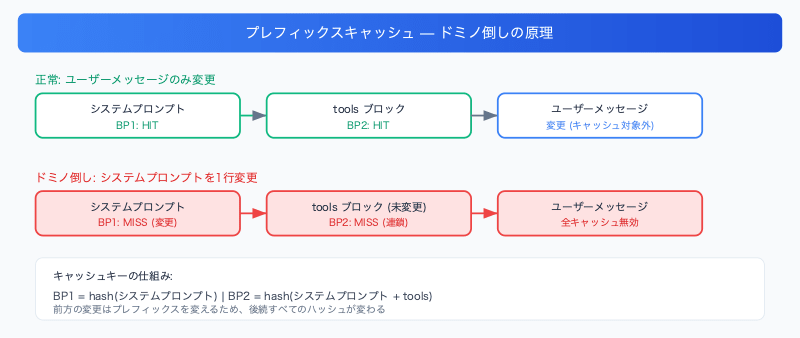
The Domino Effect
Due to this "prefix principle," when a block in the front changes, all subsequent caches are invalidated.
Cache key for breakpoint ①: hash(system prompt)
Cache key for breakpoint ②: hash(system prompt + tools block)
If even a single character in the system prompt changes, the hash for breakpoint ① changes, which in turn causes the hash for breakpoint ② to change as well. Even if the contents of the tools block are identical, it will be treated as a new cache key because the prefix is different.
Cache Behavior as Seen in Request Payloads
Request 1: Creating the Cache
{ "model": "claude-sonnet-4-20250514", "system": [ { "type": "text", "text": "You are a helpful assistant. [Long system prompt...]", "cache_control": { "type": "ephemeral" } } ], "tools": [ { "name": "get_weather", "description": "Retrieves weather information for a specified city", "input_schema": { "type": "object", "properties": { "city": { "type": "string", "description": "City name" }, "unit": { "type": "string", "enum": ["celsius", "fahrenheit"] } }, "required": ["city"] }, "cache_control": { "type": "ephemeral" } } ], "messages": [ { "role": "user", "content": "Tell me the weather in Tokyo" } ]}
This request creates 2 breakpoints.
Request 2: Only the User Message Changed (Cache Hit)
{ "messages": [ { "role": "user", "content": "What's the weather in Osaka?" } ]}
System prompt and tools are identical → both are cache hits.
Request 3: One Line of System Prompt Edited (Cache Miss)
{ "system": [ { "type": "text", "text": "You are an expert assistant. [Long system prompt...]", "cache_control": { "type": "ephemeral" } } ]}
Just changing helpful → expert:
Scenario
System Prompt
Tools Block
Breakpoint ①
Breakpoint ②
Request 1
Version A
Version B
CREATE
CREATE
Request 2
Version A
Version B
HIT
HIT
Request 3
Version A.1
Version B
MISS
MISS
The tools block in breakpoint ② hasn't changed, yet it results in a cache miss because the prefix has changed.
"Tools Are Just Names" Is a Misconception — Why Caching Tool Definitions Matters
You might think, "Tools are just names, right? Is there really any point in caching them?" In reality, tool definitions are far "heavier" than you might imagine.
The Reality of Tool Definitions
Tools include not just names, but complete JSON Schema definitions.
A single tool definition consumes 200–500 tokens. If a production agent has 20 tools, that's more than 4,000 tokens per request used by tool definitions alone.
How Costs Change With and Without Caching
For a case with 10 tools totaling 2,000 tokens:
Item
Without Cache
With Cache Hit
Input cost
Billed for 2,000 tokens every time
~90% reduction (Read pricing applied)
Latency
JSON Schema parsed every time
Parsed results reused immediately
TTFT
More time needed to process tool definitions
Reduced
Reprocessing 4,000 tokens of tool definitions every time for a short user message is inefficient both in terms of cost and latency. By caching, tool definitions effectively become a "write once, read many times at low cost" operation.
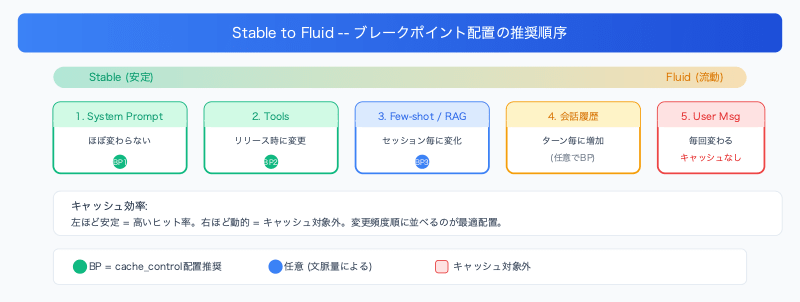
The "Stable to Fluid" Principle for Breakpoint Placement
Once you understand the prefix principle, the optimal placement strategy becomes clear. It's the "Stable to Fluid" principle: place things that don't change toward the front, and things that do change toward the back.
Recommended Placement Order
Common Anti-Patterns
Pattern
Problem
Embedding dynamic data in the system prompt
The front changes every time, causing all breakpoints to miss
Only placing breakpoints near user messages
The heaviest system prompts and tool definitions don't get cached
Frequently tweaking the system prompt
Unavoidable during development, but it's recommended to stabilize it in production
Decision Criteria for Practical Use
When the system prompt is stable: Two breakpoints ① and ② are sufficient. Since only the user message changes per request, a high hit rate can be expected
When few-shot examples or RAG context are present: Adding ③ allows the cache to be maintained without being affected by changes in conversation history or user messages
During development and debugging: Cache hit rates will be low due to frequent system prompt changes. This is expected, and the effects will appear after deploying to production
Summary
Here is a summary of key points for using Prompt Caching effectively.
Understand the prefix principle: Caches are managed using cumulative hashes from the beginning. Changes in the front invalidate all subsequent caches
Tool definitions are "heavy": The entire JSON Schema, not just names, consumes tokens. This can result in over 4,000 tokens of overhead with 20 tools
Place according to Stable to Fluid: The more static something is, the further front it goes; the more dynamic, the further back. This is the basic strategy for maximizing cache hit rates
Effects appear in production: Prompt changes during development cause cache misses, but the benefits of cost reduction and latency improvement are maximized in production environments where prompts have stabilized
Prompt Caching is similar to a "checksum for a video file." If you change the first 10 seconds, the checksum of the entire file changes and the player needs to re-read from the beginning. Keeping this analogy in mind should help you avoid confusion about cache behavior.